PaaK seems to require cellular service

SnBGC

Well-Known Member
First Name
Greg
Joined
Apr 20, 2020
Threads
46
Messages
5,962
Reaction score
9,778
Location
Phoenix
Vehicles
2021 Mach-E FE, 2021 Wrangler 4xe High Altitude
Occupation
Manager
Country flag
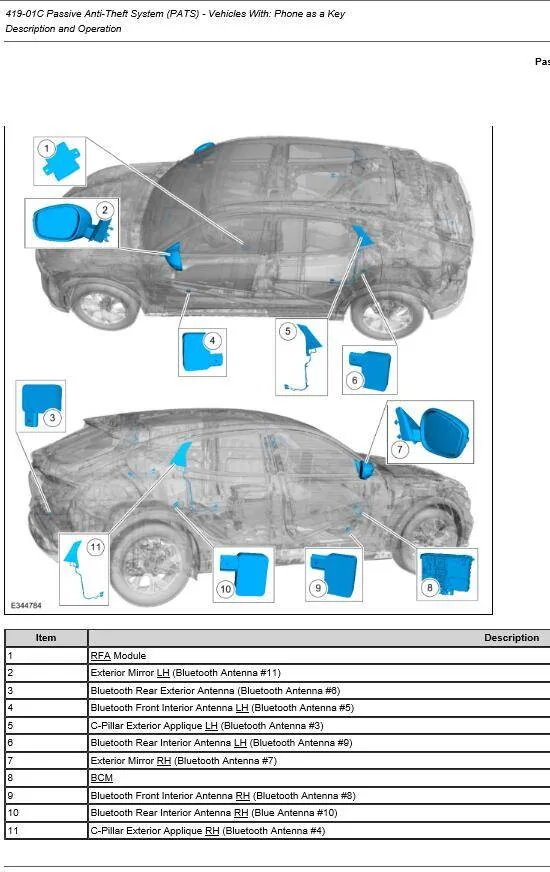
419-01C Passive Anti-Theft System (PATS) - Vehicles With: Phone as a Key
2021 Mustang Mach-E
Description and Operation
Passive Anti-Theft System (PATS) - Overview


Overview

NOTE:
This section only describes and diagnosis the Phone as a Key system. In order for the Phone as a Key system to operate, the PATS system must be functioning correctly.

NOTE: Remote start feature is only available with the Phone as a Key feature.

For more information about the PATS system
Refer to: Passive Anti-Theft System (PATS) - System Operation and Component Description (419-01C Passive Anti-Theft System (PATS) - Vehicles With: Phone as a Key, Description and Operation).

The power lock/unlock feature, locks or unlocks the doors upon a customer request from a door lock control switch, the keyless entry keypad, the passive entry system, or a RKE transmitter, and the Phone as a Key feature duplicates RKE PATS functionality with traditional RKE. Phone as a Key utilizes Bluetooth Low Energy protocol, an authorized mobile device, and RFA module and antenna to achieve this function.

The Phone as a Key option does not disable an already running vehicle.

The Phone as a Key uses an authorized mobile device and the Ford Pass mobile app to communicate to the bluetooth antenna and the RFA module via LIN to lock/unlock the vehicle and as remote start. The customer must install the Ford Pass mobile app and request a consumer access key, via the app, to initiate the system and create a key pair with the vehicle and authorized mobile device. The consumer access key may take up to 48 hours to be delivered to the vehicle. Every logged-in authorized user will be able to see the status and names of all issued keys for the corresponding VIN for the vehicle.

The user can revoke any/all keys assigned to the vehicle. The user can also create a valet code assuming backup starting passcode is setup. The maximum number of keys authorized will be 4 per vehicle.


Backup Starting

This allows the customers to enter and drive their RKE-based system vehicle without their RKE or Phone as a Key authorized mobile device. This feature utilizes the existing keyless entry keypad system as well as a new, password-based starting system. This feature is turned on when the customer completes all the steps in the initial app initialization.

The backup starting passcode allows the customer to access and operate the vehicle in case the mobile device is not present, depleted mobile device battery, or any other reason that prevents the RFA module from detecting the mobile device or recognizing the consumer access key. The user will also be able to create a valet code assuming backup starting passcode is setup.

When a user revokes Phone as a Key keys remotely via their mobile device, Ford Backend connectivity will remove all Phone as a Key backup starting passcodes associated with these Phone as a Key keys.

When a user enables Privacy Mode via the SYNC display in Customer Connectivity settings, the Phone as a Key backup starting passcode feature must be suspended.

Possible error states when attempting to access and start the vehicle:

  • User does not enter valid keypad code or inputs incorrect code by mistake
  • User does not enter valid password or inputs incorrect password by mistake
  • Too many incorrect password attempts will lead to SYNC lockout for 5 minutes
  • User is inactive for more than 30 seconds while SYNC displays password entry screen
  • User does not start vehicle within 20 seconds of successful password entry
  • User presses start button without holding brake pedal after password is accepted
 

SnBGC

Well-Known Member
First Name
Greg
Joined
Apr 20, 2020
Threads
46
Messages
5,962
Reaction score
9,778
Location
Phoenix
Vehicles
2021 Mach-E FE, 2021 Wrangler 4xe High Altitude
Occupation
Manager
Country flag
Phone as a Key System

The Phone as a Key feature is controlled by the RFA module through bluetooth and the TCU over wi-fi. Phone as a Key system functionality is the same as the RKE system.
Refer to: Handles, Locks, Latches and Entry Systems - System Operation and Component Description (501-14 Handles, Locks, Latches and Entry Systems, Description and Operation).
It enables the use of a customers registered and authorized connected mobile device to deliver the features provided by the RKE transmitter.

The customer downloads the Ford Pass Mobile app to their registered and authorized connected mobile device. The activation state is reached when the user has a valid customer access key on their registered and authorized connected mobile devices and in their vehicle. This also provides that the TCU, the GWM, and the cloud based Global Vehicle Management System to acknowledge the presence of and communicate with the RFA module.

The registered and authorized connected mobile device, sends a bluetooth signal out and is received by the bluetooth antennas. This message is then sent via LIN to the RFA module. The RFA module communicates its message via HS-CAN4 to the GWM and the TCU. The GWM communicates via HS-CAN1 to the BCM. This now initiates the functions of the RKE that allows the vehicle's doors to lock and unlock as well as starting the vehicle.

The backup starting passcode allows the customer to access and operate the vehicle in case the mobile device is not present or depleted battery or any other reason that prevents the RFA module from detecting the mobile device or recognizing the customer access key.

The Phone as a Key incorporates both the PATS and the RKE transmitter functions in a single device. During phone programming procedures, the phone and the RFA module are both programmed into the cloud based Global Vehicle Management System. The system accepts programming of up to 4 registered and authorized connected mobile devices.

The RFA module receives the bluetooth signal from the bluetooth antennas. When the RFA module is activated by one of the bluetooth signals, it sends out a signal that is received by the BCM, the GWM and the TCU.

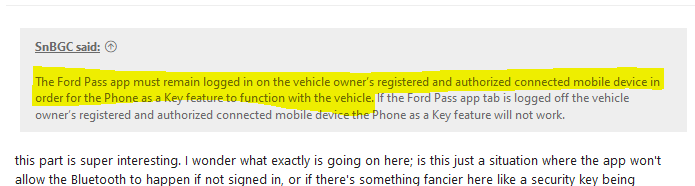
The Ford Pass app must remain logged in on the vehicle owner’s registered and authorized connected mobile device in order for the Phone as a Key feature to function with the vehicle. If the Ford Pass app tab is logged off the vehicle owner’s registered and authorized connected mobile device the Phone as a Key feature will not work.

If a vehicle owner wants to operate more vehicles from their registered and authorized connected mobile devices, the correct vehicle on the App will need to be selected from the vehicle selection menu.

The Phone as a Key function will keep and maintain all of your memory profiles that were programmed into the vehicle, if it has been associated to a profile.

The registered and authorized connected mobile device communicates with the vehicle via wireless communication using the bluetooth standard as defined in the Bluetooth Core Specification version 4.2 or later.

NOTE: The Ford Call Center Representative or using the Concierge icon on the Ford Pass app is capable of explaining the processes of requesting or revoking keys to the user so that the customer can successfully complete these processes using their Ford Pass Mobile app.


Phone as a Key Range

NOTE:
When approaching the vehicle line of sight, access to the vehicle owner's mobile device must exist to allow the vehicle to establish a bluetooth connection. Testing has indicated that bluetooth signals can be blocked by body interference. Such as placement of the mobile device in a back pocket or stored in a backpack/ briefcase.

The vehicle is able to connect to registered an authorized mobile device(s) located within 131 feet (40m) of the vehicle.

The vehicle recognizes the authorized mobile device(s) approaching the vehicle when it is within 19 1/2 feet (6 meters) from the vehicle.

For the passive entry features, the authorized connected mobile device must be within 6 1/2 feet (2 meters) for this feature to operate properly.

When the registered and authorized connected mobile device is out of bluetooth range 131 feet (40m) the Ford Pass app provides a visual indication in the display of app command icons to indicate which commands will not be sent over bluetooth. These commands are inactive until the device is within bluetooth range. At ranges beyond 131 feet (40m) selectable Ford Pass app commands are completed after a cellular signal is received from the mobile device by the TCU.
 

bellyer

Well-Known Member
Joined
Jun 25, 2020
Threads
57
Messages
450
Reaction score
629
Location
Chicago
Vehicles
'21 MME FE & '23 F-150 Lightning Lariat ER
Country flag
I have been using PaaK with my Galaxy Note 11+ on Android 11 since day 1 with the MME and it has been flawless really. Sure, I would love it to recognize a smidge faster when I am hoping to leave the phone in my pocket and open up the car, but, I can't complain too much. I think I have only brought the fob out with me on a single drive, aside from the trip home from the dealership. It is great, so far.

Also, I love seeing that a few folks are rocking Surface Duos! I am a little biased, but I am so excited about that device and its potential, but I held back and decided to wait for v2 on the Duo. Glad a couple of you are using them though!
 

JSOrange97

Well-Known Member
Joined
Jan 26, 2020
Threads
2
Messages
195
Reaction score
197
Location
New Jersey
Vehicles
Ford F-150, Chevrolet Suburban K1500
Country flag
Yes, I suspect there is some background security. I'll bet it's in the FordPass app rather than the car but that's only a guess.
Especially in the iPhone/IOS ecosystem, there is a pretty good security infrastructure.


OP
OP
ChasingCoral

ChasingCoral

Well-Known Member
First Name
Mark
Joined
Feb 3, 2020
Threads
502
Messages
14,318
Reaction score
28,677
Location
Maryland
Vehicles
2021 GB E4X FE, 2022 F-150 Lightning Lariat ER
Occupation
Retired oceanographer
Country flag
@ChasingCoral thanks as always for your detailed write-ups. Can you say what your experience with the back-up code has been, i.e. any particular reason why would you want to have the key fob with you now based on your experience instead of leaning on the back-up code when PaaK isn't working?

Did you find that the back-up code also seems to require a cell connection by the Mach-E to work?
The Back-up door and start codes do not seem to require cell connection as they worked fine every time. The door code is no big deal to use and works quickly and efficiently. The start code requires waiting for about a minute for the screen to come up. I think it is repeatedly attempting to find a key and then timing out. At that point you can enter the start code. It did work every time but was time consuming because of the delay. The car also required it to go into drive when you got out and back in (I think even passenger out and in did this). This happened even when the car had not been turn off. At a place like the Everglades I was getting out frequently to take pictures, then waiting to enter the code every time.

Two reasons I put the fob back into the car:
1. Time delay hassles
2. That start code is the last fall-back. It's no longer a back-up when it is the only way to get the car to work. Thus, there is no backup and it's a long way for Ford or AAA to travel.
 

sambastang

Well-Known Member
First Name
Bobby
Joined
Feb 24, 2021
Threads
7
Messages
145
Reaction score
290
Location
Seattle, WA
Vehicles
2013 Veloster, 2021 Mustang Mach-E FE
Occupation
IT Engineer
Country flag
Yup have a Duo here @sambastang . I don't use it much for PAAK as I always have the fob in my pocket.

It seems to reliably pull up android auto and the few times I've tried to use with with PAAK have been 50/50 or so: Sometimes it works after a few seconds, other times I have to go into the Ford Pass app and unlock the car.
@JamieGeek - Is it possible to start a club...within a club....?
 

GoGoGadgetMachE

Well-Known Member
First Name
Michael
Joined
Jan 23, 2020
Threads
153
Messages
5,612
Reaction score
12,669
Location
Ohio
Vehicles
2021 Mach-E 1st Ed., 2022 Lightning Platinum
Occupation
Professional forum cheerleader and fanboy
Country flag
The Ford Pass app must remain logged in on the vehicle owner’s registered and authorized connected mobile device in order for the Phone as a Key feature to function with the vehicle. If the Ford Pass app tab is logged off the vehicle owner’s registered and authorized connected mobile device the Phone as a Key feature will not work.
this part is super interesting. I wonder what exactly is going on here; is this just a situation where the app won't allow the Bluetooth to happen if not signed in, or if there's something fancier here like a security key being exchanged that is removed from the device when you sign out and put back on when you sign in, retrieved from the "cloud based Global Vehicle Management System"...

none of this explains why @ChasingCoral seemed to need Internet connectivity since the process as described seems to imply it's only needed for the initial "set this up and send the information to the car" process.
 

JamieGeek

Well-Known Member
Joined
Dec 29, 2019
Threads
82
Messages
3,589
Reaction score
6,823
Location
Southeastern Michigan
Website
spareelectrons.wordpress.com
Vehicles
Escape PHEV, old: Mach-E, Bolt, C-Max Energi, Focus Electric
Country flag

SnBGC

Well-Known Member
First Name
Greg
Joined
Apr 20, 2020
Threads
46
Messages
5,962
Reaction score
9,778
Location
Phoenix
Vehicles
2021 Mach-E FE, 2021 Wrangler 4xe High Altitude
Occupation
Manager
Country flag
this part is super interesting. I wonder what exactly is going on here; is this just a situation where the app won't allow the Bluetooth to happen if not signed in, or if there's something fancier here like a security key being exchanged that is removed from the device when you sign out and put back on when you sign in, retrieved from the "cloud based Global Vehicle Management System"...

none of this explains why @ChasingCoral seemed to need Internet connectivity since the process as described seems to imply it's only needed for the initial "set this up and send the information to the car" process.
To me, this part means you have to have cell or WiFi signal so FordPass to be connected and for PaaK to function.
Am I reading this incorrectly? I guess it depends on that 'connected' means in that sentence?

Ford Mustang Mach-E PaaK seems to require cellular service 1615222610024
 

kdryden99

Well-Known Member
First Name
Richard
Joined
Sep 25, 2020
Threads
34
Messages
1,644
Reaction score
1,426
Location
Montreal Canada
Vehicles
Nissan Sentra Spec-V, Infinite Blue Mach E4X Prem
Country flag
Most likely the app cannot work in offline mode which is completely stupid
 

benk016

Well-Known Member
First Name
Ben
Joined
Nov 12, 2020
Threads
39
Messages
3,269
Reaction score
5,107
Location
Tulsa, Oklahoma
Vehicles
2021 Mustang Mach-E GT
Country flag
this part is super interesting. I wonder what exactly is going on here; is this just a situation where the app won't allow the Bluetooth to happen if not signed in, or if there's something fancier here like a security key being exchanged that is removed from the device when you sign out and put back on when you sign in, retrieved from the "cloud based Global Vehicle Management System"...

none of this explains why @ChasingCoral seemed to need Internet connectivity since the process as described seems to imply it's only needed for the initial "set this up and send the information to the car" process.

The app itself actually controls the bluetooth connection. If I look in my bluetooth connections the PAAK connection is nowhere to be found. Therefore if you aren't signed into the app, it can't actually initiate the connection to the car.
 

benk016

Well-Known Member
First Name
Ben
Joined
Nov 12, 2020
Threads
39
Messages
3,269
Reaction score
5,107
Location
Tulsa, Oklahoma
Vehicles
2021 Mustang Mach-E GT
Country flag
Most likely the app cannot work in offline mode which is completely stupid
It does work in offline mode. Just might not be reliable. Or possibly even phone specific. It could also be if you have cellular signal, but an area that doesn't have data coverage, that could cause it to just keep trying to initiate the connection.

Mine took a lot longer to actually open the app when its offline. And then it did have the red warning at the top that fordpass is unavailable. But bluetooth controls still worked.
 

GoGoGadgetMachE

Well-Known Member
First Name
Michael
Joined
Jan 23, 2020
Threads
153
Messages
5,612
Reaction score
12,669
Location
Ohio
Vehicles
2021 Mach-E 1st Ed., 2022 Lightning Platinum
Occupation
Professional forum cheerleader and fanboy
Country flag
To me, this part means you have to have cell or WiFi signal so FordPass to be connected and for PaaK to function.
Am I reading this incorrectly? I guess it depends on that 'connected' means in that sentence?

1615222610024.png
I took "connected" here to mean "connected by Bluetooth" but that was completely just based on my reading and not based on "Ford Fact" (tm)(R)(C)(xyz).
The app itself actually controls the bluetooth connection. If I look in my bluetooth connections the PAAK connection is nowhere to be found. Therefore if you aren't signed into the app, it can't actually initiate the connection to the car.
interesting. Since I don't have my car yet I can't see what shows up on the phone. ;)
Sponsored


Top