Jeff-NoVA

Well-Known Member
First Name
Jeff
Joined
Oct 21, 2023
Threads
19
Messages
693
Reaction score
1,115
Location
Northern VA
Vehicles
2022 Mustang Mach-E Premium
Country flag
I'm trying this for the first time and *womp womp* cannot even login to FDRS. Network Diagnostics gives "Pass" for Internet connections but fails the FDSP and Login server connection, and I get a message telling me I need an active internet connection to login. Running on Windows 10; I opened the firewall for FDRS. Help please!

Edit: Also tried using an older version, v.37.4.5 (I think) - no luck there either.
Sponsored

 
Last edited:

Mike G

Well-Known Member
First Name
Mike
Joined
Mar 27, 2022
Threads
25
Messages
6,449
Reaction score
5,289
Location
N. AL, USA
Vehicles
'23(J1) Mach-E GT-PE, '22 F-150 Lightning, '24 Bronco HLE 2Dr
Country flag
I'm trying this for the first time and *womp womp* cannot even login to FDRS. Network Diagnostics gives "Pass" for Internet connections but fails the FDSP and Login server connection, and I get a message telling me I need an active internet connection to login. Running on Windows 10; I opened the firewall for FDRS. Help please!

Edit: Also tried using an older version, v.37.4.5 (I think) - no luck there either.
How long is your license good for?

Have you contacted the helpdesk?

Are you using your Ford account email address and associated password to log in to FDRS?
 

Jeff-NoVA

Well-Known Member
First Name
Jeff
Joined
Oct 21, 2023
Threads
19
Messages
693
Reaction score
1,115
Location
Northern VA
Vehicles
2022 Mustang Mach-E Premium
Country flag
How long is your license good for?

Have you contacted the helpdesk?

Are you using your Ford account email address and associated password to log in to FDRS?
2 days, purchased today. No, haven't ccontacted them but will write them. Yes using Ford account credentials. I also tried v34.x and got a pass on all the connections but still couldn't get logged in.
 

bshaw

Well-Known Member
Joined
May 18, 2020
Threads
14
Messages
1,562
Reaction score
2,181
Location
Boston, MA
Vehicles
2021 Mustang Mach E 4X (Job 1)
Country flag
[...]
I opened the firewall for FDRS.
[...]
What do you mean you opened the firewall for FDRS? Is this a typical home internet connection, or do you have special hardware in place for additional security?
 

Homer007

Well-Known Member
First Name
Nick
Joined
Feb 7, 2022
Threads
1
Messages
96
Reaction score
61
Location
El Cajon
Vehicles
22 MME Premium Ext AWD
Country flag
I'm trying this for the first time and *womp womp* cannot even login to FDRS. Network Diagnostics gives "Pass" for Internet connections but fails the FDSP and Login server connection, and I get a message telling me I need an active internet connection to login. Running on Windows 10; I opened the firewall for FDRS. Help please!

Edit: Also tried using an older version, v.37.4.5 (I think) - no luck there either.
I had this problem too tonight. Same exact error, switching the User Type to Independent Operator/Non-Dealer fixed it for me. I originally had Non-Dealer ETIS selected which was incorrect. I don't have the "Non-Dealer Motocraft" option on the first page in version 38.5.7.


Jeff-NoVA

Well-Known Member
First Name
Jeff
Joined
Oct 21, 2023
Threads
19
Messages
693
Reaction score
1,115
Location
Northern VA
Vehicles
2022 Mustang Mach-E Premium
Country flag
I had the same problem and wasn't selecting the right option at the top. I had to select

I had this problem too tonight. Same exact error, switching the User Type to Independent Operator/Non-Dealer fixed it for me. I originally had Non-Dealer ETIS selected which was incorrect. I don't have the "Non-Dealer Motocraft" option on the first page in version 38.5.7.
Yeah I noticed the Non-Dealer Motorcraft option was not there with. I tried the Independent Operator option too without luck, but I'll give it another go. Thanks.
 

Mike G

Well-Known Member
First Name
Mike
Joined
Mar 27, 2022
Threads
25
Messages
6,449
Reaction score
5,289
Location
N. AL, USA
Vehicles
'23(J1) Mach-E GT-PE, '22 F-150 Lightning, '24 Bronco HLE 2Dr
Country flag
Yeah I noticed the Non-Dealer Motorcraft option was not there with. I tried the Independent Operator option too without luck, but I'll give it another go. Thanks.
Well hopefully the helpdesk can work with you. I'm not having any issues and am using the latest version. In my view if it's saying that FDRS doesn't even think you're connected to the internet then it's not anything the helpdesk can fix.

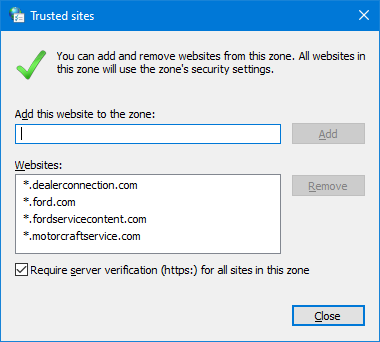
I have attached the list of the trusted sites that need to be added to the security tab of the internet options, I don't know if that will help or not.
Ford Mustang Mach-E The Complete DIY Guide to Updating Your Mach-E with FDRS Trusted_Sites
 

Mike G

Well-Known Member
First Name
Mike
Joined
Mar 27, 2022
Threads
25
Messages
6,449
Reaction score
5,289
Location
N. AL, USA
Vehicles
'23(J1) Mach-E GT-PE, '22 F-150 Lightning, '24 Bronco HLE 2Dr
Country flag
If you're DIY'ing it the only login option you want to pick is the Independent.
 

spicy_taco

Well-Known Member
First Name
Jack
Joined
Sep 23, 2022
Threads
41
Messages
582
Reaction score
414
Location
Bay Area, CA
Vehicles
2023 Mach-E Premium AWD
Country flag
I took the plunge. I got my wife's reluctant blessing, and got myself a Mongoose. I would really appreciate some input about the below APIM update.

Was able to successfully launch FDRS on Windows 11, after some initial issues with connecting to the log-in server.

A month ago I received the MME 2023 OTA equivalent to 6.2.1 (don't remember the name), but it updated my APIM to what was the latest at that time.

Yesterday I received the TCU OTA update (6.3.0). My APIM is at the version below.
Ford Mustang Mach-E The Complete DIY Guide to Updating Your Mach-E with FDRS 1705192198083


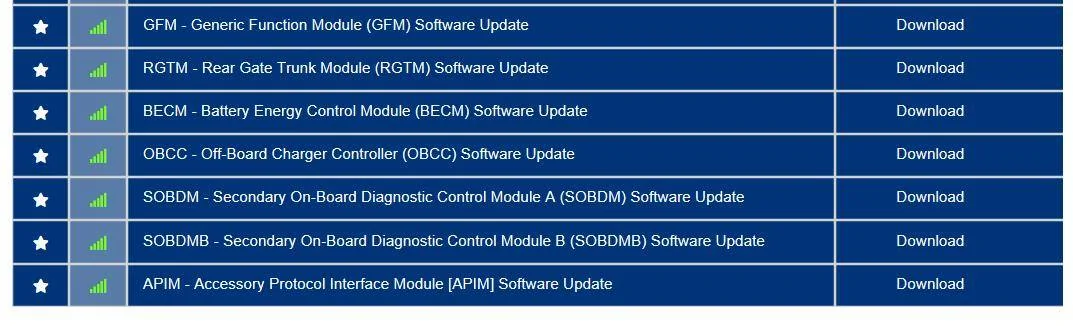
Today I noticed that I have an APIM update pending still (this was not there yesterday before the TCU update completed).
Ford Mustang Mach-E The Complete DIY Guide to Updating Your Mach-E with FDRS 1705192228469


Does anyone of you know why that would be pending? When I download the module, (I haven't executed it on my car yet) it seems to unpack version
"PU5T-14G676-CC"
in
C:\ProgramData\Ford Motor Company\FDRS\fdrs\data\vehicle_software\STRATEGY

But I already have that version on my car. So I'm a bit confused what this is about?
 

Mike G

Well-Known Member
First Name
Mike
Joined
Mar 27, 2022
Threads
25
Messages
6,449
Reaction score
5,289
Location
N. AL, USA
Vehicles
'23(J1) Mach-E GT-PE, '22 F-150 Lightning, '24 Bronco HLE 2Dr
Country flag
I took the plunge. I got my wife's reluctant blessing, and got myself a Mongoose. I would really appreciate some input about the below APIM update.

Was able to successfully launch FDRS on Windows 11, after some initial issues with connecting to the log-in server.

A month ago I received the MME 2023 OTA equivalent to 6.2.1 (don't remember the name), but it updated my APIM to what was the latest at that time.

Yesterday I received the TCU OTA update (6.3.0). My APIM is at the version below.
1705192198083.png


Today I noticed that I have an APIM update pending still (this was not there yesterday before the TCU update completed).
1705192228469.png


Does anyone of you know why that would be pending? When I download the module, (I haven't executed it on my car yet) it seems to unpack version
"PU5T-14G676-CC"
in
C:\ProgramData\Ford Motor Company\FDRS\fdrs\data\vehicle_software\STRATEGY

But I already have that version on my car. So I'm a bit confused what this is about?
The “-CC” rev you refer to keeps the F188 DID from the previous revision but does update other files/strategy. So if you have Sync 1049 now this would take you to Sync 1058 but the DID F188 in FDRS would still say “-CC”.
 

Mike G

Well-Known Member
First Name
Mike
Joined
Mar 27, 2022
Threads
25
Messages
6,449
Reaction score
5,289
Location
N. AL, USA
Vehicles
'23(J1) Mach-E GT-PE, '22 F-150 Lightning, '24 Bronco HLE 2Dr
Country flag
@spicy_taco I thought I'd add to the above comments.

Like many of us who use FDRS I learned a couple of years ago that FDRS normally uses the F188 DID reference to identify software revisions. That's all well and good and is useful to use as a reference, but as you can see if the software folks make changes to one or more of the update packages for a module, but leave the F188 DID alone then it can be less than helpful in determining what you've got.

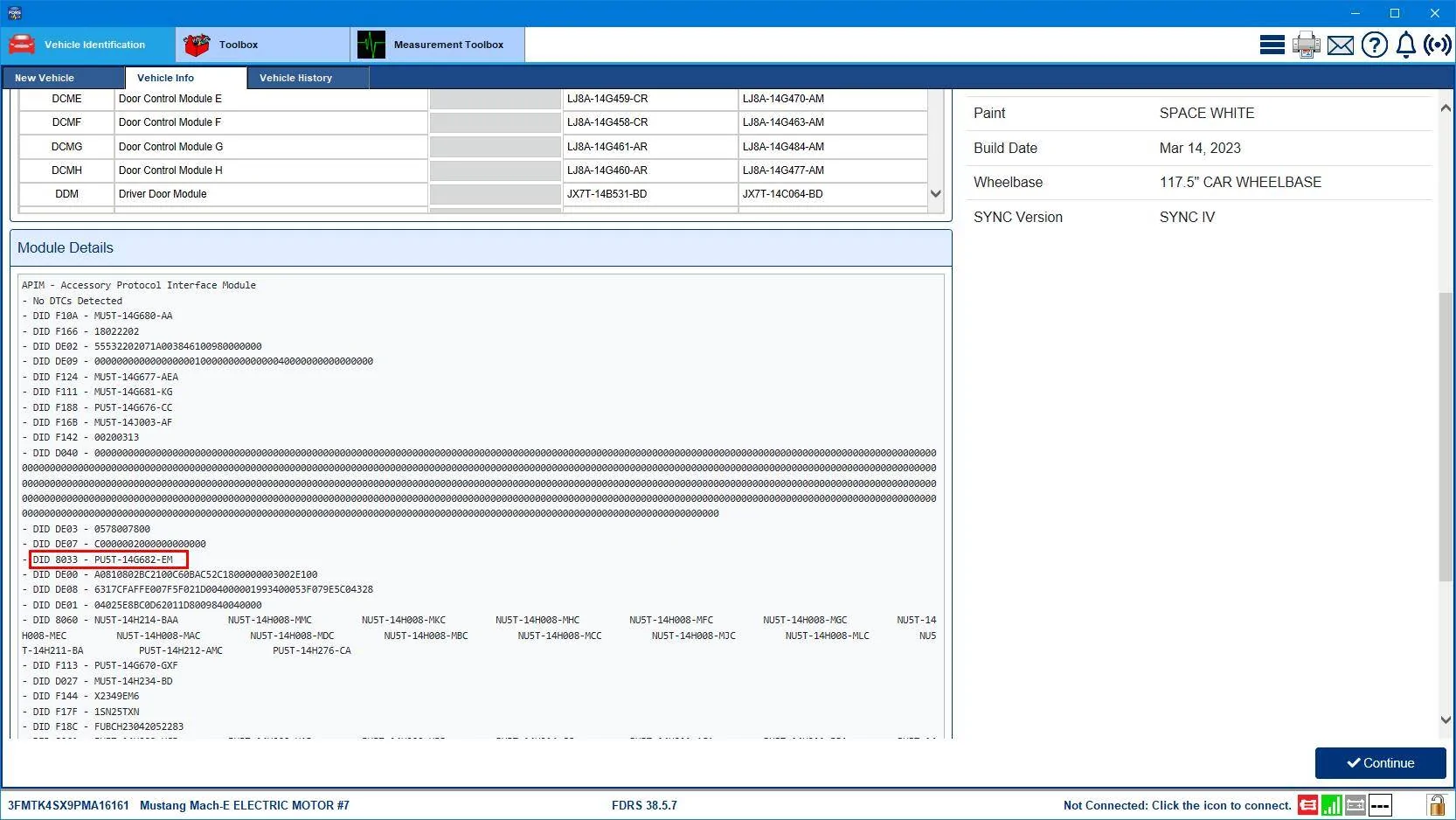
To assist techs in determining what software version of Sync 4 was the most current they started posting a spreadsheet that's updated roughly monthly. But here's the kicker. They aren't referencing the F188 DID in identifying what revision the car has in FDRS. Instead they are referencing the 8033 DID as the identifier.
Ford Mustang Mach-E The Complete DIY Guide to Updating Your Mach-E with FDRS APIM DID 8033

So in this example the DID 8033 is PU5T-14G682-EM which is the latest for this car, and if I go to the About Sync page in the car itself I'd find that it shows 4.0.23297_PRODUCT Sync 1058. If you check the DID 8033 you have now in your car it's probably PU5T-14G682-EL and that should be 4.0.23291_PRODUCT Sync 1049 on the About Sync page. But they both have a F188 PU5T-14G676-CC as the identifier in FDRS.

So although you can usually rely on the F188 DID reference to identify what software revision a module has the APIM seems to be an exception.
 

Eric_C_Boston

Well-Known Member
First Name
Eric
Joined
Apr 16, 2021
Threads
63
Messages
615
Reaction score
811
Location
North Shore, MA, USA
Vehicles
2021 Ford Mustang Mach-E RWD ER
Occupation
Retired Software Engineer
Country flag
@spicy_taco I thought I'd add to the above comments.

Like many of us who use FDRS I learned a couple of years ago that FDRS normally uses the F188 DID reference to identify software revisions. That's all well and good and is useful to use as a reference, but as you can see if the software folks make changes to one or more of the update packages for a module, but leave the F188 DID alone then it can be less than helpful in determining what you've got.

To assist techs in determining what software version of Sync 4 was the most current they started posting a spreadsheet that's updated roughly monthly. But here's the kicker. They aren't referencing the F188 DID in identifying what revision the car has in FDRS. Instead they are referencing the 8033 DID as the identifier.
APIM DID 8033.png

So in this example the DID 8033 is PU5T-14G682-EM which is the latest for this car, and if I go to the About Sync page in the car itself I'd find that it shows 4.0.23297_PRODUCT Sync 1058. If you check the DID 8033 you have now in your car it's probably PU5T-14G682-EL and that should be 4.0.23291_PRODUCT Sync 1049 on the About Sync page. But they both have a F188 PU5T-14G676-CC as the identifier in FDRS.

So although you can usually rely on the F188 DID reference to identify what software revision a module has the APIM seems to be an exception.
It is obvious to me, based on bits of information, that the APIM, and GWM have an application processor and a Vehicle Mounted Control Unit (VMCU) processor. The VMCU interfaces between the application and the rest of the car. The F188 Strategy is the VMCU software part number in these cases.

Several DIDs are used for the application software part numbers. 8068 is the boot loader part number, 8033 is the operating system (OS) image part number, and 8060/8061 are both applications and data part numbers.

For example, when I updated from PU5T-14G682-EE to PU5T-14G682-EL using FDRS, I could tell the owner's manual got updated as one of the 8060/8061 entries went from MU5T-14H213-XJD to MU5T-14H213-XJE.
 

spicy_taco

Well-Known Member
First Name
Jack
Joined
Sep 23, 2022
Threads
41
Messages
582
Reaction score
414
Location
Bay Area, CA
Vehicles
2023 Mach-E Premium AWD
Country flag
@spicy_taco
So although you can usually rely on the F188 DID reference to identify what software revision a module has the APIM seems to be an exception.
Thank you so much for the detailed information. This is really helpful.
In general if seems like APIM updates are preceded by GWM abd followed by TCU. This one doesn't seem to be. I assume since it's advertised in FDRS in this case it should be ok to install abd shouldn't break some sequence?

Besides looking at the file path I referenced in my original post , is there a way to see what revision an update to a module will be ?

Are there any references that decode and identify what the different DID sections mean?
Sponsored


Top