Troubleshooting "Electrical System Drain Service Required" Message

Mach-Lee

Well-Known Member
First Name
Lee
Joined
Jul 16, 2021
Threads
262
Messages
11,344
Reaction score
24,963
Location
Wisconsin
Vehicles
2022 Mach-E Premium AWD
Occupation
Sci/Eng
Country flag
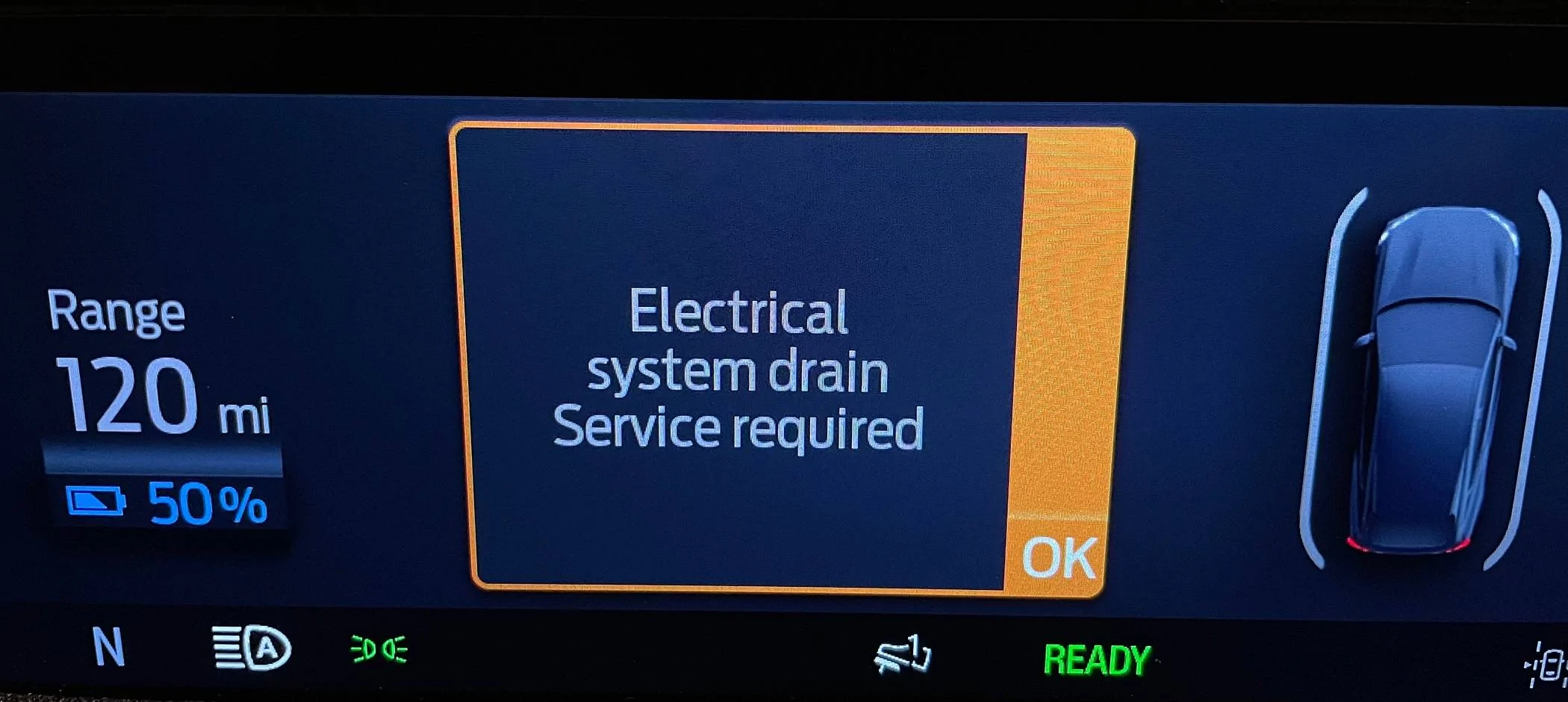
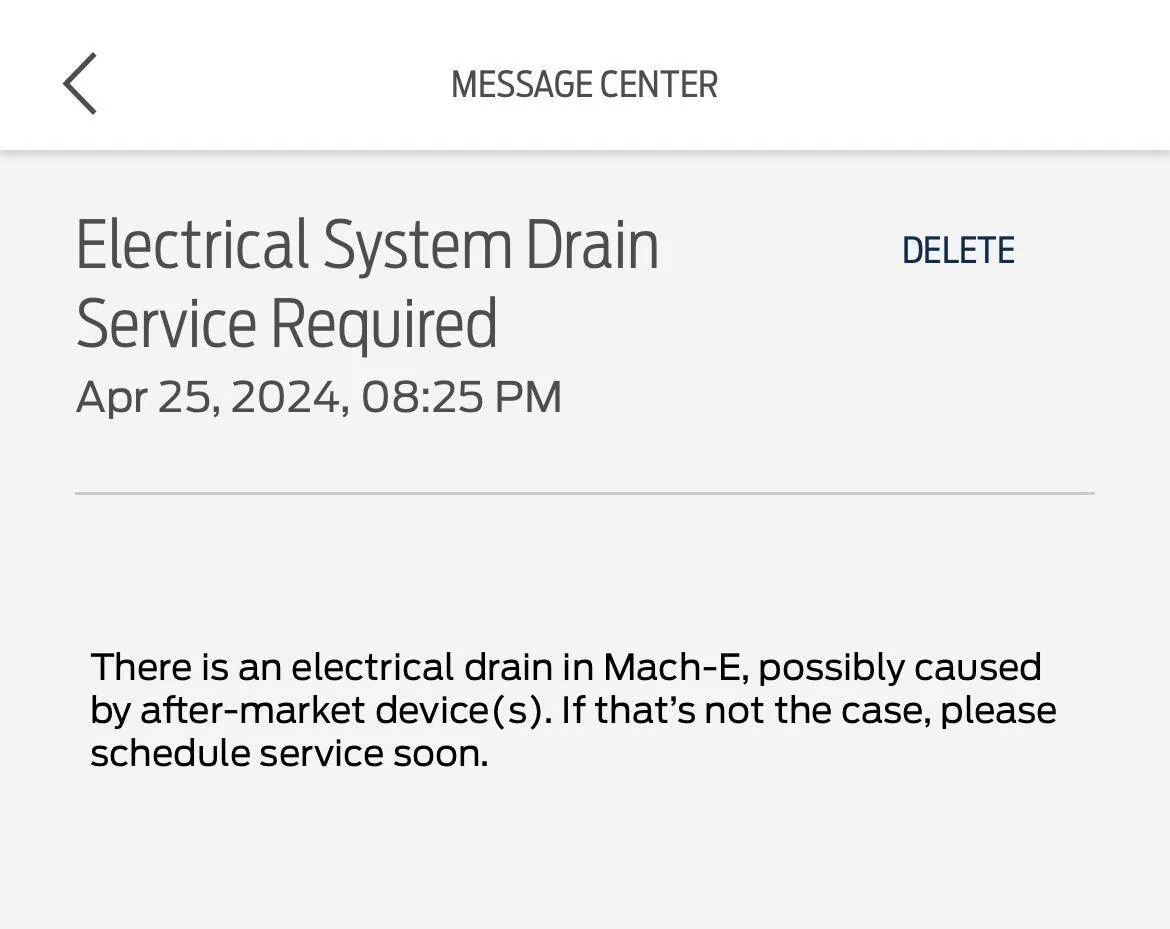
If you receive the 12V drain alert (either through a FordPass notification, or on the instrument cluster when starting the vehicle), it means the vehicle has detected an excessive 12V drain and the 12V battery had to be recharged to prevent it from going completely dead. Normally you shouldn’t ever receive this message because there should not be any significant 12V drains while the vehicle is off. A “healthy” Mach-E will not ever receive this message.

Ford Mustang Mach-E Troubleshooting "Electrical System Drain Service Required" Message IMG_2910


Ford Mustang Mach-E Troubleshooting "Electrical System Drain Service Required" Message IMG_2907


The first time you get this message, consider it a warning. It could be a fluke or rare situation. But the second time you get the drain message in a short timeframe, you should really consider addressing the cause.

If you choose to ignore multiple 12V drain messages, the health of your 12V battery will suffer, leading to early failure and potentially being stranded with a dead 12V battery. An ongoing 12V drain will also impact your ability to install OTAs. My personal recommendation is to address any 12V drains preemptively before they cause larger issues.

12V Drain Checklist

If you get a 12V drain message, please check that:

✔ No dashcams, radar detectors, or accessories are wired into the electrical system
✔ No devices are plugged into the OBD port under the dash
✔ No hidden dealer-installed tracking devices are installed (see below)
✔ Welcome lighting is disabled
✔ Headlights not staying on (faulty headlamp switches on '21-'22 models)
✔Completely quit the FordPass app on your phone(s) and disable it from running in the background (iOS: disable "Always" location permission), or disable Bluetooth
✔ Perform a 12V reset (remove negative battery cable for 10 min) to reset any stuck modules
✔You have never ever given your FordPass password to a 3rd party app
◦ Change your FordPass password anyway to be safe
✔ No rodent damage to wire harnesses has occurred
✔ No faulty EVSE that causes charge faults

Causes

There can be many causes of 12V drains. I will try to provide a comprehensive list here of all known 12V drain causes. Please note that software changes does make this a moving target.

Dashcams & Radar Detectors

One of the most common cause of 12V drain messages is the improper installation of dashcams and radar detectors so they run continuously when the vehicle is off (called parking mode). Despite a strong desire for owners to replicate Sentry Mode from Tesla, the Mach-E electrical system is not designed for this type of use and the 12V battery will drain too far. Dashcams should be wired to switched power circuits only (turns on/off with the car), not always-on circuits.

If you absolutely must have a dashcam running in parking mode, set a time limit, or set the voltage cutoff to 12.3 volts or higher. The default setting of 12.0V on many cameras is too low. To solve the problem completely, install a dashcam battery, which is a dedicated battery for the dashcam to run off without draining the electrical system. For more information about dashcams and the 12V system, see my 12V FAQ topic.

Any other third party accessories that have been spliced into the vehicle wiring (e.g LED lights or trailer wiring) should also be considered as a potential cause.

NOTE: Things plugged into the factory USB ports or 12V power ports will not cause a drain since they are automatically switched off when the vehicle is off.

OBD-II Port Devices


The OBD-II port is located above the driver’s footwell. If experiencing a 12V drain, verify there are no devices plugged into the port. Common devices that plug in here include Bluetooth OBD devices (to run apps like Car Scanner), dashcams, tracking devices, and insurance data collection devices. When using a scan tool app (like Car Scanner) it’s very important to disconnect your data session when you are finished. If you forget, the data collection will continue while the car is off, the vehicle will not go to sleep, and your 12V battery will be drained. In addition, many OBD port devices draw too much power while idle, and some present a security risk while plugged in, which is why it’s best to unplug them when they aren’t being used.

Hidden Tracking Devices

GPS tracking devices are installed before sale on an increasing percentage of new vehicles.

Dealer-installed GPS tracking devices are very common nowadays and are usually installed when the vehicle arrives on the dealer’s lot and enters inventory. But they are often forgotten or not removed completely after the vehicle is sold. Common brands include LoJack, Starguard, Spireon, and MasTrack. It is very routine for dealers to install these devices on all new vehicles entering dealer stock for asset protection, and as an additional revenue generating add-on. If you bought your vehicle from dealer stock or was told it has “LoJack” there is a good chance one of these devices had been installed. However because time is money, the big dirty secret is most dealers do not actually uninstall these devices when you buy the vehicle, even if they tell you it was removed (don’t trust what they say). In many cases they just cut a wire or disable the device remotely without physically removing it, and in some cases they actually do nothing and the tracking device is still active for years without the owner’s knowledge. They often fail to physically remove the device from your vehicle, so it may continue to draw power and drain your 12V battery over time.

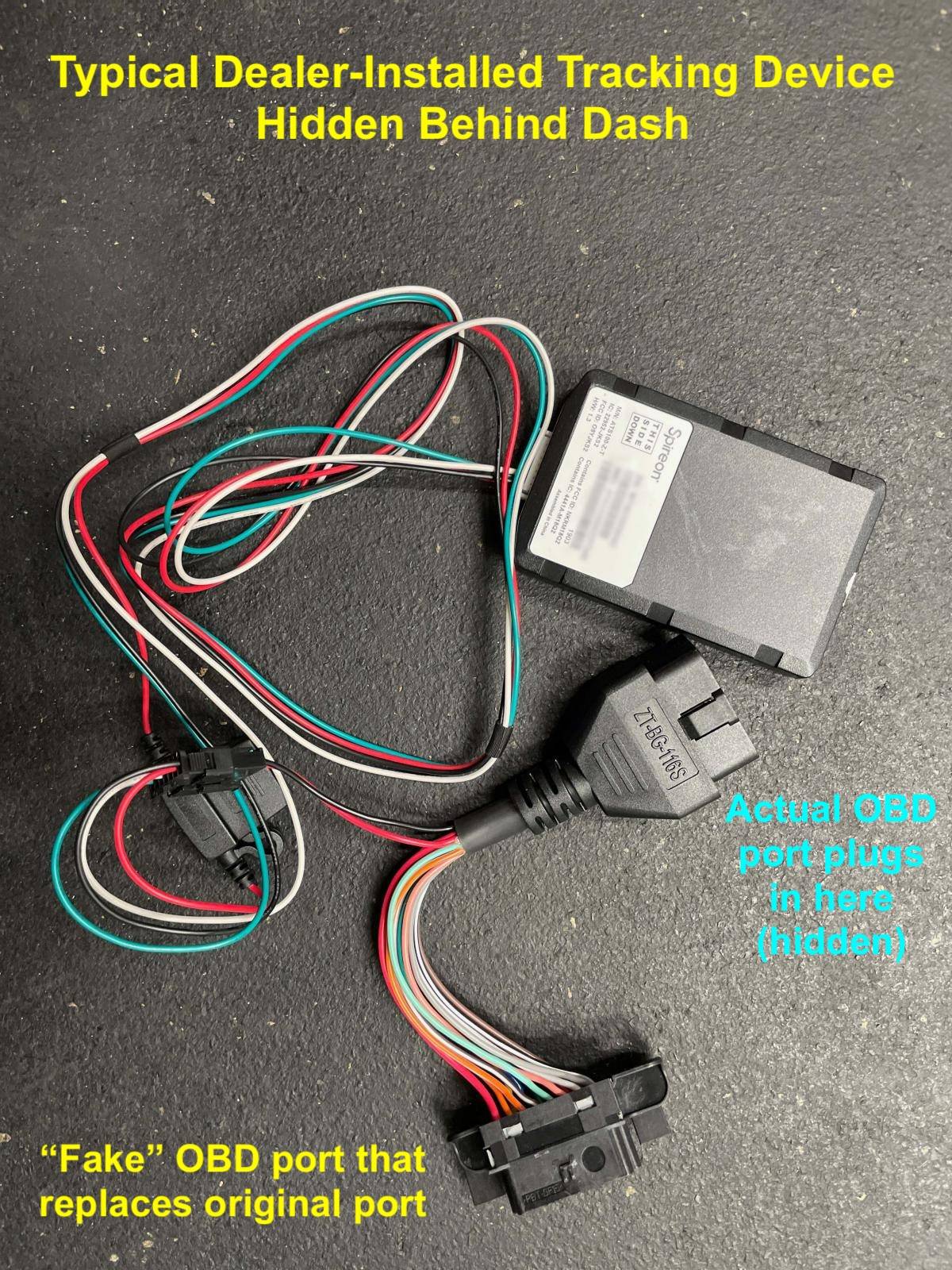
These tracking devices are most commonly hidden under the dash above the driver’s footwell. Many tie into the OBD port, in fact they sell harnesses that plug in and replace the OBD port completely while providing power and data to the device. These harnesses can be difficult to spot (they function like a credit card skimmer) unless you get under the dash and look carefully. The other place tracking devices are commonly installed is under the hood near the 12V battery. Look for wires that don’t look factory (zip ties are a good hint).

Ford Mustang Mach-E Troubleshooting "Electrical System Drain Service Required" Message Dealer Tracking Device


So in summary, if you get a 12V drain message, you should look under the dash above the OBD port for any aftermarket wires or devices, and also pop the frunk covers and verify there’s nothing attached to the 12V battery. Remember the device might still be present even if the dealer said they removed it. Or they never told you they installed one. They are frequently forgotten about. Don’t assume there isn’t one unless you’ve checked.

NOTE: In very rare cases, these tracking devices may be installed in connection with a subprime finance deal (if you have bad credit). The requirement to have a vehicle tracking device will be spelled out in your contract. In that case, you should NOT remove the tracking device since it could trigger a repossession.

Welcome Lighting / Key Proximity

If you store your keys or phone within 25’ of the vehicle, the approach (or welcome) lighting may activate on the vehicle repeatedly (which wakes up the vehicle). Welcoming lighting is known to cause 12V battery drains. To rule this out, you should disable welcome lighting in vehicle settings if you are experiencing an unknown 12V drain (this has worked for a number of people I’ve helped). Another tip is to store your key fobs at least 25’ from the vehicle if possible, same thing with phone as a key. You can also try disabling Bluetooth on your phone at night to stop the connection with the vehicle.

NOTE: Repeated welcome lighting activation has been fixed in the latest BCM software found in the 12V optimization update OTA. It will now only activate a couple times instead of dozens of times before being locked out until the next ignition cycle.

Headlight Bug

2021 and 2022 vehicles built before Aug 19 2022 may have a faulty headlamp switch that randomly causes the headlights to stay on after the vehicle is off. When the headlights stay on, the 12V battery will be drained and the message triggered. This occurs randomly due to a logic bug in the headlamp switch. The only fix is to replace the headlamp switch, Ford has released SSM 51696 for this issue. A proper functioning switch will never allow the headlights to stay on and drain the battery.

If you notice the headlights are stuck on, turn the knob to the off position and schedule service to replace the headlight switch. This bug can also prevent you from installing OTAs.

Stuck Modules

In some cases, a software or hardware glitch with certain modules can cause them to stay awake when the car is parked and drain the 12V battery. Sometimes the stuck modules can only be reset by disconnecting the 12V battery to force a complete reboot. For example CSP 24P16 was recently released for some 2023 Mach-Es that had 12V drains from a stuck HVAC module. To fix any stuck modules, you need to disconnect the negative battery cable for ~10 minutes. You will have to remove the frunk panels to access the 12V battery, and use a 10 mm hex socket to loosen the negative terminal clamp bolt (loosen, but do not remove the nut). Set the negative terminal aside so it doesn't touch (place a thick glove over it if necessary), wait 10 minutes, then drop the terminal back on and tighten.

FordPass 5

I’ve seen a few 12V drains recently related to using the new FordPass 5 app (beta version). If you get a 12V drain message and are using the new app version, I suggest reverting to non-beta as a test to see if the drain disappears. If that doesn’t work, then completely quit FordPass, disable it from running in the background, and/or disable Bluetooth on your phone. On iOS, set location permission to "While Using" instead of "Always" and swipe up/quit the app from the App Switcher. In some cases the phone app will keep pinging the car preventing it from going to sleep.

3rd Party Apps

Use of 3rd party apps that poll the vehicle for data has been a significant cause of 12V drains in the past. These apps can ask for your FordPass login credentials in order to collect vehicle or charging data. You should never give your FordPass login or password to a 3rd party app, that is a violation of the FordPass terms of service and may result in your Ford account being locked out. Unfortunately when installing these apps, many people will give their FordPass username and password during setup without a second thought, and will often forget they entered their password months later when 12V drains eventually show up.

It's important to realize that an app asking for your FordPass username and password could be considered a phishing attack. In some cases, the prompt for your password looks just like the real FordPass login screen, but is a ploy to collect your data. Smartcar was the company used by many of these apps to collect your data, however Smartcar has malicious intent and uses your credentials to log into your Ford account and steal as much of your data as possible. This is an overreach because they are accessing all of your data (such as your name, address, credit card info, vehicle location, etc), not just specific parameters. Do not give out your password to any apps.

Here is a partial list of 3rd party apps that have been associated with vehicle polling:

Tronity, Recurrent, Home Assistant, HomeBridge, OptiWatt, Duke Energy app, Eevee, A Better Route Planner (ABRP), Autel, Emporia Energy, National Grid, EV JuiceNet, Charge Smart MA, Smart EV Charging App, ev.energy, Shell Recharge, Octopus

In general, any app besides FordPass that can display the current % of the battery or force the vehicle to charge is likely an offender. Note, vehicle integration has since been removed from or is an optional feature in a lot of these apps. However, if you entered your FordPass password into any of these apps at any point in the past, that can later come back to haunt you with 12V drains. The companies will keep your login credentials on file and continue to use them without your knowledge or permission unless you ask for them to be removed. Because there are multiple companies involved (both the app author and Smartcar) you will need to make sure your info is completely removed by all parties.

Again, people often forget they’ve entered their login credentials to one of these apps potentially months or years ago. There is also the possibility that a hacker has somehow obtained your Ford password and is using it to spy on your vehicle. In many cases, it’s best to just change your FordPass password to rule out any polling access, which is what I suggest you do when troubleshooting an unknown 12V drain. You can also perform a Master Reset on the SYNC screen, that will break all access. After performing the master reset, do not set up any apps again until you’ve ruled out polling as a cause.

Rodent damage

This one is rare, but has caused a handful of 12V drain situations that were difficult to find. A rodent can get into your car and chew on wires. This can cause short circuits or network disruptions that cause the vehicle to stay awake. Look for signs of rodents in or around the vehicle. Chewed wires can be difficult to find, someone will have to remove covers and search for chewed wires if this is suspected.

Faulty EVSE

In rare cases, a faulty EVSE or J1772 plug can trigger a charge fault on your vehicle, and the fault condition can cause a 12V drain. I’ve seen other strange behavior from some EVSEs such a charging that keeps starting and stopping. If you get charge faults, use a different EVSE or address the charging issues first.


Troubleshooting this message can take a little patience and persistence. Consider all causes carefully. But hopefully following all the steps in this guide will allow you to resolve your 12V drain.
Sponsored

 
Last edited:

zvez

Banned
Banned
First Name
chris
Joined
Dec 31, 2020
Threads
13
Messages
2,441
Reaction score
2,344
Location
ga
Vehicles
2023 GT PE Carbonized Grey with Nite Pony package
Occupation
retired
Country flag
If you receive the 12V drain alert (either through a FordPass notification, or on the instrument cluster when starting the vehicle), it means the vehicle has detected an excessive 12V drain and the 12V battery had to be recharged to prevent it from going completely dead. Normally you shouldn’t ever receive this message because there should not be any significant 12V drains while the vehicle is off. A “healthy” Mach-E will not ever receive this message.

IMG_2910.jpeg


IMG_2907.PNG


The first time you get this message, consider it a warning. It could be a fluke or rare situation. But the second time you get the drain message in a short timeframe, you should really consider addressing the cause.

If you choose to ignore multiple 12V drain messages, the health of your 12V battery will suffer, leading to early failure and potentially being stranded with a dead 12V battery. An ongoing 12V drain will also impact your ability to install OTAs. My personal recommendation is to address any 12V drains preemptively before they cause larger issues.

12V Drain Checklist

If you get a 12V drain message, please check that:
  • ✔ No dashcams, radar detectors, or accessories are wired into the electrical system
  • ✔ No devices are plugged into the OBD port under the dash
  • ✔ No hidden dealer-installed tracking devices are installed (see below)
  • ✔ Welcome lighting is disabled
  • ✔ Headlights not staying on (bug)
  • ✔Completely quit the FordPass app on your phone(s) and disable it from running in the background, or disable Bluetooth
    • Suggest downgrading to old FordPass if you are using FordPass 5 beta version
  • ✔You have never ever given your FordPass password to a 3rd party app
    • Change your FordPass password anyway to be safe
  • ✔ No rodent damage to wire harnesses has occurred
  • ✔ No faulty EVSE that causes charge faults

Causes

There can be many causes of 12V drains. I will try to provide a comprehensive list here of all known 12V drain causes. Please note that software changes does make this a moving target.

Dashcams & Radar Detectors

One of the most common cause of 12V drain messages is the improper installation of dashcams and radar detectors so they run continuously when the vehicle is off (called parking mode). Despite a strong desire for owners to replicate Sentry Mode from Tesla, the Mach-E electrical system is not designed for this type of use and the 12V battery will drain too far. Dashcams should be wired to switched power circuits only (turns on/off with the car), not always-on circuits.

If you absolutely must have a dashcam running in parking mode, set a time limit, or set the voltage cutoff to 12.3 volts or higher. The default setting of 12.0V on many cameras is too low. To solve the problem completely, install a dashcam battery, which is a dedicated battery for the dashcam to run off without draining the electrical system. For more information about dashcams and the 12V system, see my 12V FAQ topic.

Any other third party accessories that have been spliced into the vehicle wiring (e.g LED lights or trailer wiring) should also be considered as a potential cause.

NOTE: Things plugged into the factory USB ports or 12V power ports will not cause a drain since they are automatically switched off when the vehicle is off.

OBD-II Port Devices


The OBD-II port is located above the driver’s footwell. If experiencing a 12V drain, verify there are no devices plugged into the port. Common devices that plug in here include Bluetooth OBD devices (to run apps like Car Scanner), dashcams, tracking devices, and insurance data collection devices. When using a scan tool app (like Car Scanner) it’s very important to disconnect your data session when you are finished. If you forget, the data collection will continue while the car is off, the vehicle will not go to sleep, and your 12V battery will be drained. In addition, many OBD port devices draw too much power while idle, and some present a security risk while plugged in, which is why it’s best to unplug them when they aren’t being used.

Hidden Tracking Devices

GPS tracking devices are installed before sale on a large percentage of new vehicles.

Dealer-installed GPS tracking devices are very common nowadays and are usually installed when the vehicle arrives on the dealer’s lot. But they are often forgotten or not removed completely after the vehicle is sold. Common brands include LoJack, Starguard, Spireon, and MasTrack. It is very routine for dealers to install these devices on all new vehicles entering dealer stock for asset protection, and as an additional revenue generating add-on. If you bought your vehicle from dealer stock or was told it has “LoJack” there is a good chance one of these devices had been installed. However because time is money, the big dirty secret is most dealers do not actually uninstall these devices when you buy the vehicle, even if they tell you it was removed (don’t trust what they say). In many cases they just cut a wire or disable the device remotely without physically removing it, and in some cases they actually do nothing and the tracking device is still active for years without the owner’s knowledge. They often fail to physically remove the device from your vehicle, so it may continue to draw power and drain your 12V battery over time.

These tracking devices are most commonly hidden under the dash above the driver’s footwell. Many tie into the OBD port, in fact they sell harnesses that plug in and replace the OBD port completely while providing power and data to the device. These harnesses can be difficult to spot (they function like a credit card skimmer) unless you get under the dash and look carefully. The other place tracking devices are commonly installed is under the hood near the 12V battery. Look for wires that don’t look factory (zip ties are a good hint).

Dealer Tracking Device.jpg


So in summary, if you get a 12V drain message, you should look under the dash above the OBD port for any aftermarket wires or devices, and also pop the frunk covers and verify there’s nothing attached to the 12V battery. Remember the device might still be present even if the dealer said they removed it. Or they never told you they installed one. They are frequently forgotten about. Don’t assume there isn’t one unless you’ve checked.

NOTE: In very rare cases, these tracking devices may be installed in connection with a subprime finance deal (if you have bad credit). The requirement to have a vehicle tracking device will be spelled out in your contract. In that case, you should NOT remove the tracking device since it could trigger a repossession.

Welcome Lighting / Key Proximity

If you store your keys or phone within 25’ of the vehicle, the approach (or welcome) lighting may activate on the vehicle repeatedly (which wakes up the vehicle). Welcoming lighting is known to cause 12V battery drains. To rule this out, you should disable welcome lighting in vehicle settings if you are experiencing an unknown 12V drain (this has worked for a number of people I’ve helped). Another tip is to store your key fobs at least 25’ from the vehicle if possible, same thing with phone as a key. You can also try disabling Bluetooth on your phone at night to stop the connection with the vehicle.

NOTE: Repeated welcome lighting activation has been fixed in the latest BCM software found in the 12V optimization update OTA. It will now only activate a couple times instead of dozens of times before being locked out until the next ignition cycle.

Headlight Bug

2021 and 2022 vehicles built before Aug 19 2022 may have a faulty headlamp switch that randomly causes the headlights to stay on after the vehicle is off. When the headlights stay on, the 12V battery will be drained and the message triggered. This occurs randomly due to a logic bug in the headlamp switch. The only fix is to replace the headlamp switch, Ford has released SSM 51696 for this issue. A proper functioning switch will never allow the headlights to stay on and drain the battery.

If you notice the headlights are stuck on, turn the knob to the off position and schedule service to replace the headlight switch. This bug can also prevent you from installing OTAs.

FordPass 5

I’ve seen a few 12V drains recently related to using the new FordPass 5 app (beta version). If you get a 12V drain message and are using the new app version, I suggest downgrading to FordPass 4 as a test to see if the drain disappears. If that doesn’t work, then completely quit FordPass, disable it from running in the background, and/or disable Bluetooth on your phone. In some cases the phone app will keep pinging the car preventing it from going to sleep.

3rd Party Apps

Use of 3rd party apps that poll the vehicle for data has been a significant cause of 12V drains in the past. These apps can ask for your FordPass login credentials in order to collect vehicle or charging data. You should never give your FordPass login or password to a 3rd party app, that is a violation of the FordPass terms of service and may result in your Ford account being locked out. Unfortunately when installing these apps, many people will give their FordPass username and password during setup without a second thought, and will often forget they entered their password months later when 12V drains eventually show up.

It's important to realize that an app asking for your FordPass username and password could be considered a phishing attack. In some cases, the prompt for your password looks just like the real FordPass login screen, but is a ploy to collect your data. Smartcar was the company used by many of these apps to collect your data, however Smartcar has malicious intent and uses your credentials to log into your Ford account and steal as much of your data as possible. This is an overreach because they are accessing all of your data (such as your name, address, credit card info, vehicle location, etc), not just specific parameters. Do not give out your password to any apps.

Here is a partial list of 3rd party apps that have been associated with vehicle polling:

Tronity, Recurrent, Home Assistant, HomeBridge, OptiWatt, Duke Energy app, Eevee, A Better Route Planner (ABRP), Autel, Emporia Energy, National Grid, EV JuiceNet, Charge Smart MA, Smart EV Charging App, ev.energy, Shell Recharge, Octopus

In general, any app besides FordPass that can display the current % of the battery or force the vehicle to charge is likely an offender. Note, vehicle integration has since been removed from or is an optional feature in a lot of these apps. However, if you entered your FordPass password into any of these apps at any point in the past, that can later come back to haunt you with 12V drains. The companies will keep your login credentials on file and continue to use them without your knowledge or permission unless you ask for them to be removed. Because there are multiple companies involved (both the app author and Smartcar) you will need to make sure your info is completely removed by all parties.

Again, people often forget they’ve entered their login credentials to one of these apps potentially months or years ago. There is also the possibility that a hacker has somehow obtained your Ford password and is using it to spy on your vehicle. In many cases, it’s best to just change your FordPass password to rule out any polling access, which is what I suggest you do when troubleshooting an unknown 12V drain. You can also perform a Master Reset on the SYNC screen, that will break all access. After performing the master reset, do not set up any apps again until you’ve ruled out polling as a cause.

Rodent damage

This one is rare, but has caused a handful of 12V drain situations that were difficult to find. A rodent can get into your car and chew on wires. This can cause short circuits or network disruptions that cause the vehicle to stay awake. Look for signs of rodents in or around the vehicle. Chewed wires can be difficult to find, someone will have to remove covers and search for chewed wires if this is suspected.

Faulty EVSE

In rare cases, a faulty EVSE or J1772 plug can trigger a charge fault on your vehicle, and the fault condition can cause a 12V drain. I’ve seen other strange behavior from some EVSEs such a charging that keeps starting and stopping. If you get charge faults, use a different EVSE or address the charging issues first.


Troubleshooting this message can take a little patience and persistence. Consider all causes carefully. But hopefully following all the steps in this guide will allow you to resolve your 12V drain.
great information!!
 

phil

Well-Known Member
Joined
Jun 6, 2021
Threads
13
Messages
3,160
Reaction score
4,211
Location
USA
Vehicles
LS400
Country flag
I got this message 3 times in about 4 days last month, and then the error stopped recurring. I'm now thinking it was likely the headlight switch. I found the lights stuck on somewhere around that time, but failed to connect the two issues. It's been a while, so the timing may have been different, but if the error message does not recur, I'm gonna assume that's what it was. I have since had the headlight switch replaced under warranty.

I will leave the welcome lighting on for now, cuz I like the welcome lighting. I always have few keys within 25' of the car at home, so that one may be tougher to deal with if it ever becomes necessary.

Thanks, Mach-Lee, very helpful.
 

alangant

Well-Known Member
First Name
Alan
Joined
Oct 20, 2021
Threads
6
Messages
410
Reaction score
486
Location
Plano, TX
Vehicles
MME GTPE Rapid Red (ordered 10/22/21)
Occupation
Retired
Country flag
If you receive the 12V drain alert (either through a FordPass notification, or on the instrument cluster when starting the vehicle), it means the vehicle has detected an excessive 12V drain and the 12V battery had to be recharged to prevent it from going completely dead. Normally you shouldn’t ever receive this message because there should not be any significant 12V drains while the vehicle is off. A “healthy” Mach-E will not ever receive this message.

IMG_2910.jpeg


IMG_2907.PNG


The first time you get this message, consider it a warning. It could be a fluke or rare situation. But the second time you get the drain message in a short timeframe, you should really consider addressing the cause.

If you choose to ignore multiple 12V drain messages, the health of your 12V battery will suffer, leading to early failure and potentially being stranded with a dead 12V battery. An ongoing 12V drain will also impact your ability to install OTAs. My personal recommendation is to address any 12V drains preemptively before they cause larger issues.

12V Drain Checklist

If you get a 12V drain message, please check that:

✔ No dashcams, radar detectors, or accessories are wired into the electrical system
✔ No devices are plugged into the OBD port under the dash
✔ No hidden dealer-installed tracking devices are installed (see below)
✔ Welcome lighting is disabled
✔ Headlights not staying on (bug)
✔Completely quit the FordPass app on your phone(s) and disable it from running in the background, or disable Bluetooth
◦ Suggest downgrading to old FordPass if you are using FordPass 5 beta version
✔You have never ever given your FordPass password to a 3rd party app
◦ Change your FordPass password anyway to be safe
✔ No rodent damage to wire harnesses has occurred
✔ No faulty EVSE that causes charge faults

Causes

There can be many causes of 12V drains. I will try to provide a comprehensive list here of all known 12V drain causes. Please note that software changes does make this a moving target.

Dashcams & Radar Detectors

One of the most common cause of 12V drain messages is the improper installation of dashcams and radar detectors so they run continuously when the vehicle is off (called parking mode). Despite a strong desire for owners to replicate Sentry Mode from Tesla, the Mach-E electrical system is not designed for this type of use and the 12V battery will drain too far. Dashcams should be wired to switched power circuits only (turns on/off with the car), not always-on circuits.

If you absolutely must have a dashcam running in parking mode, set a time limit, or set the voltage cutoff to 12.3 volts or higher. The default setting of 12.0V on many cameras is too low. To solve the problem completely, install a dashcam battery, which is a dedicated battery for the dashcam to run off without draining the electrical system. For more information about dashcams and the 12V system, see my 12V FAQ topic.

Any other third party accessories that have been spliced into the vehicle wiring (e.g LED lights or trailer wiring) should also be considered as a potential cause.

NOTE: Things plugged into the factory USB ports or 12V power ports will not cause a drain since they are automatically switched off when the vehicle is off.

OBD-II Port Devices


The OBD-II port is located above the driver’s footwell. If experiencing a 12V drain, verify there are no devices plugged into the port. Common devices that plug in here include Bluetooth OBD devices (to run apps like Car Scanner), dashcams, tracking devices, and insurance data collection devices. When using a scan tool app (like Car Scanner) it’s very important to disconnect your data session when you are finished. If you forget, the data collection will continue while the car is off, the vehicle will not go to sleep, and your 12V battery will be drained. In addition, many OBD port devices draw too much power while idle, and some present a security risk while plugged in, which is why it’s best to unplug them when they aren’t being used.

Hidden Tracking Devices

GPS tracking devices are installed before sale on a large percentage of new vehicles.

Dealer-installed GPS tracking devices are very common nowadays and are usually installed when the vehicle arrives on the dealer’s lot. But they are often forgotten or not removed completely after the vehicle is sold. Common brands include LoJack, Starguard, Spireon, and MasTrack. It is very routine for dealers to install these devices on all new vehicles entering dealer stock for asset protection, and as an additional revenue generating add-on. If you bought your vehicle from dealer stock or was told it has “LoJack” there is a good chance one of these devices had been installed. However because time is money, the big dirty secret is most dealers do not actually uninstall these devices when you buy the vehicle, even if they tell you it was removed (don’t trust what they say). In many cases they just cut a wire or disable the device remotely without physically removing it, and in some cases they actually do nothing and the tracking device is still active for years without the owner’s knowledge. They often fail to physically remove the device from your vehicle, so it may continue to draw power and drain your 12V battery over time.

These tracking devices are most commonly hidden under the dash above the driver’s footwell. Many tie into the OBD port, in fact they sell harnesses that plug in and replace the OBD port completely while providing power and data to the device. These harnesses can be difficult to spot (they function like a credit card skimmer) unless you get under the dash and look carefully. The other place tracking devices are commonly installed is under the hood near the 12V battery. Look for wires that don’t look factory (zip ties are a good hint).
Dealer Tracking Device.jpg


So in summary, if you get a 12V drain message, you should look under the dash above the OBD port for any aftermarket wires or devices, and also pop the frunk covers and verify there’s nothing attached to the 12V battery. Remember the device might still be present even if the dealer said they removed it. Or they never told you they installed one. They are frequently forgotten about. Don’t assume there isn’t one unless you’ve checked.

NOTE: In very rare cases, these tracking devices may be installed in connection with a subprime finance deal (if you have bad credit). The requirement to have a vehicle tracking device will be spelled out in your contract. In that case, you should NOT remove the tracking device since it could trigger a repossession.

Welcome Lighting / Key Proximity

If you store your keys or phone within 25’ of the vehicle, the approach (or welcome) lighting may activate on the vehicle repeatedly (which wakes up the vehicle). Welcoming lighting is known to cause 12V battery drains. To rule this out, you should disable welcome lighting in vehicle settings if you are experiencing an unknown 12V drain (this has worked for a number of people I’ve helped). Another tip is to store your key fobs at least 25’ from the vehicle if possible, same thing with phone as a key. You can also try disabling Bluetooth on your phone at night to stop the connection with the vehicle.

NOTE: Repeated welcome lighting activation has been fixed in the latest BCM software found in the 12V optimization update OTA. It will now only activate a couple times instead of dozens of times before being locked out until the next ignition cycle.

Headlight Bug

2021 and 2022 vehicles built before Aug 19 2022 may have a faulty headlamp switch that randomly causes the headlights to stay on after the vehicle is off. When the headlights stay on, the 12V battery will be drained and the message triggered. This occurs randomly due to a logic bug in the headlamp switch. The only fix is to replace the headlamp switch, Ford has released SSM 51696 for this issue. A proper functioning switch will never allow the headlights to stay on and drain the battery.

If you notice the headlights are stuck on, turn the knob to the off position and schedule service to replace the headlight switch. This bug can also prevent you from installing OTAs.

FordPass 5

I’ve seen a few 12V drains recently related to using the new FordPass 5 app (beta version). If you get a 12V drain message and are using the new app version, I suggest downgrading to FordPass 4 as a test to see if the drain disappears. If that doesn’t work, then completely quit FordPass, disable it from running in the background, and/or disable Bluetooth on your phone. In some cases the phone app will keep pinging the car preventing it from going to sleep.

3rd Party Apps

Use of 3rd party apps that poll the vehicle for data has been a significant cause of 12V drains in the past. These apps can ask for your FordPass login credentials in order to collect vehicle or charging data. You should never give your FordPass login or password to a 3rd party app, that is a violation of the FordPass terms of service and may result in your Ford account being locked out. Unfortunately when installing these apps, many people will give their FordPass username and password during setup without a second thought, and will often forget they entered their password months later when 12V drains eventually show up.

It's important to realize that an app asking for your FordPass username and password could be considered a phishing attack. In some cases, the prompt for your password looks just like the real FordPass login screen, but is a ploy to collect your data. Smartcar was the company used by many of these apps to collect your data, however Smartcar has malicious intent and uses your credentials to log into your Ford account and steal as much of your data as possible. This is an overreach because they are accessing all of your data (such as your name, address, credit card info, vehicle location, etc), not just specific parameters. Do not give out your password to any apps.

Here is a partial list of 3rd party apps that have been associated with vehicle polling:

Tronity, Recurrent, Home Assistant, HomeBridge, OptiWatt, Duke Energy app, Eevee, A Better Route Planner (ABRP), Autel, Emporia Energy, National Grid, EV JuiceNet, Charge Smart MA, Smart EV Charging App, ev.energy, Shell Recharge, Octopus

In general, any app besides FordPass that can display the current % of the battery or force the vehicle to charge is likely an offender. Note, vehicle integration has since been removed from or is an optional feature in a lot of these apps. However, if you entered your FordPass password into any of these apps at any point in the past, that can later come back to haunt you with 12V drains. The companies will keep your login credentials on file and continue to use them without your knowledge or permission unless you ask for them to be removed. Because there are multiple companies involved (both the app author and Smartcar) you will need to make sure your info is completely removed by all parties.

Again, people often forget they’ve entered their login credentials to one of these apps potentially months or years ago. There is also the possibility that a hacker has somehow obtained your Ford password and is using it to spy on your vehicle. In many cases, it’s best to just change your FordPass password to rule out any polling access, which is what I suggest you do when troubleshooting an unknown 12V drain. You can also perform a Master Reset on the SYNC screen, that will break all access. After performing the master reset, do not set up any apps again until you’ve ruled out polling as a cause.

Rodent damage

This one is rare, but has caused a handful of 12V drain situations that were difficult to find. A rodent can get into your car and chew on wires. This can cause short circuits or network disruptions that cause the vehicle to stay awake. Look for signs of rodents in or around the vehicle. Chewed wires can be difficult to find, someone will have to remove covers and search for chewed wires if this is suspected.

Faulty EVSE

In rare cases, a faulty EVSE or J1772 plug can trigger a charge fault on your vehicle, and the fault condition can cause a 12V drain. I’ve seen other strange behavior from some EVSEs such a charging that keeps starting and stopping. If you get charge faults, use a different EVSE or address the charging issues first.


Troubleshooting this message can take a little patience and persistence. Consider all causes carefully. But hopefully following all the steps in this guide will allow you to resolve your 12V drain.
Mach Lee, you are a treasured resource! It seems like every time I might have a battery issue, you make a post specifically answering my needs! From a need to de-sulfate after my MME was in transit for 3 months, to your 12v FAQ, to this 12v drain explained. I moved my Ford Pass app back to v4, and haven't had a warning for 5 days. For about a month I was getting the warning any day I didn't drive. Now I have a list of what to check next if it isn't cured. (I just inspected my OBD port, which looks completely stock.)

Thanks again for all you do to make this forum so valuable!
 
OP
OP
Mach-Lee

Mach-Lee

Well-Known Member
First Name
Lee
Joined
Jul 16, 2021
Threads
262
Messages
11,344
Reaction score
24,963
Location
Wisconsin
Vehicles
2022 Mach-E Premium AWD
Occupation
Sci/Eng
Country flag
And just as a real-world example, this person was having 12V battery drain issues on their brand new car, and discovered a GPS tracking device hidden under the dash the dealer never told him about:


The fake OBDII port from the tracker can also interfere with programming and cause it to fail.


OP
OP
Mach-Lee

Mach-Lee

Well-Known Member
First Name
Lee
Joined
Jul 16, 2021
Threads
262
Messages
11,344
Reaction score
24,963
Location
Wisconsin
Vehicles
2022 Mach-E Premium AWD
Occupation
Sci/Eng
Country flag
Checklist has been updated to include a 12V reset procedure to fix stuck modules causing 12V drains. This has long been a suspicion of mine, but the release of CSP 24P16 has confirmed the possibility and the effectiveness of the 12V reset as a solution.
 

rreddy3

Well-Known Member
First Name
Richard
Joined
Mar 25, 2024
Threads
5
Messages
984
Reaction score
1,058
Location
Virginia
Vehicles
2023 Mach e Premium AWD X
Country flag
If you receive the 12V drain alert (either through a FordPass notification, or on the instrument cluster when starting the vehicle), it means the vehicle has detected an excessive 12V drain and the 12V battery had to be recharged to prevent it from going completely dead. Normally you shouldn’t ever receive this message because there should not be any significant 12V drains while the vehicle is off. A “healthy” Mach-E will not ever receive this message.

IMG_2910.jpeg


IMG_2907.PNG


The first time you get this message, consider it a warning. It could be a fluke or rare situation. But the second time you get the drain message in a short timeframe, you should really consider addressing the cause.

If you choose to ignore multiple 12V drain messages, the health of your 12V battery will suffer, leading to early failure and potentially being stranded with a dead 12V battery. An ongoing 12V drain will also impact your ability to install OTAs. My personal recommendation is to address any 12V drains preemptively before they cause larger issues.

12V Drain Checklist

If you get a 12V drain message, please check that:

✔ No dashcams, radar detectors, or accessories are wired into the electrical system
✔ No devices are plugged into the OBD port under the dash
✔ No hidden dealer-installed tracking devices are installed (see below)
✔ Welcome lighting is disabled
✔ Headlights not staying on (bug)
✔Completely quit the FordPass app on your phone(s) and disable it from running in the background (iOS: disable "Always" location permission), or disable Bluetooth
✔ Perform a 12V reset (remove negative battery cable for 10 min) to reset any stuck modules
✔You have never ever given your FordPass password to a 3rd party app
◦ Change your FordPass password anyway to be safe
✔ No rodent damage to wire harnesses has occurred
✔ No faulty EVSE that causes charge faults

Causes

There can be many causes of 12V drains. I will try to provide a comprehensive list here of all known 12V drain causes. Please note that software changes does make this a moving target.

Dashcams & Radar Detectors

One of the most common cause of 12V drain messages is the improper installation of dashcams and radar detectors so they run continuously when the vehicle is off (called parking mode). Despite a strong desire for owners to replicate Sentry Mode from Tesla, the Mach-E electrical system is not designed for this type of use and the 12V battery will drain too far. Dashcams should be wired to switched power circuits only (turns on/off with the car), not always-on circuits.

If you absolutely must have a dashcam running in parking mode, set a time limit, or set the voltage cutoff to 12.3 volts or higher. The default setting of 12.0V on many cameras is too low. To solve the problem completely, install a dashcam battery, which is a dedicated battery for the dashcam to run off without draining the electrical system. For more information about dashcams and the 12V system, see my 12V FAQ topic.

Any other third party accessories that have been spliced into the vehicle wiring (e.g LED lights or trailer wiring) should also be considered as a potential cause.

NOTE: Things plugged into the factory USB ports or 12V power ports will not cause a drain since they are automatically switched off when the vehicle is off.

OBD-II Port Devices


The OBD-II port is located above the driver’s footwell. If experiencing a 12V drain, verify there are no devices plugged into the port. Common devices that plug in here include Bluetooth OBD devices (to run apps like Car Scanner), dashcams, tracking devices, and insurance data collection devices. When using a scan tool app (like Car Scanner) it’s very important to disconnect your data session when you are finished. If you forget, the data collection will continue while the car is off, the vehicle will not go to sleep, and your 12V battery will be drained. In addition, many OBD port devices draw too much power while idle, and some present a security risk while plugged in, which is why it’s best to unplug them when they aren’t being used.

Hidden Tracking Devices

GPS tracking devices are installed before sale on a large percentage of new vehicles.

Dealer-installed GPS tracking devices are very common nowadays and are usually installed when the vehicle arrives on the dealer’s lot. But they are often forgotten or not removed completely after the vehicle is sold. Common brands include LoJack, Starguard, Spireon, and MasTrack. It is very routine for dealers to install these devices on all new vehicles entering dealer stock for asset protection, and as an additional revenue generating add-on. If you bought your vehicle from dealer stock or was told it has “LoJack” there is a good chance one of these devices had been installed. However because time is money, the big dirty secret is most dealers do not actually uninstall these devices when you buy the vehicle, even if they tell you it was removed (don’t trust what they say). In many cases they just cut a wire or disable the device remotely without physically removing it, and in some cases they actually do nothing and the tracking device is still active for years without the owner’s knowledge. They often fail to physically remove the device from your vehicle, so it may continue to draw power and drain your 12V battery over time.

These tracking devices are most commonly hidden under the dash above the driver’s footwell. Many tie into the OBD port, in fact they sell harnesses that plug in and replace the OBD port completely while providing power and data to the device. These harnesses can be difficult to spot (they function like a credit card skimmer) unless you get under the dash and look carefully. The other place tracking devices are commonly installed is under the hood near the 12V battery. Look for wires that don’t look factory (zip ties are a good hint).

Dealer Tracking Device.jpg


So in summary, if you get a 12V drain message, you should look under the dash above the OBD port for any aftermarket wires or devices, and also pop the frunk covers and verify there’s nothing attached to the 12V battery. Remember the device might still be present even if the dealer said they removed it. Or they never told you they installed one. They are frequently forgotten about. Don’t assume there isn’t one unless you’ve checked.

NOTE: In very rare cases, these tracking devices may be installed in connection with a subprime finance deal (if you have bad credit). The requirement to have a vehicle tracking device will be spelled out in your contract. In that case, you should NOT remove the tracking device since it could trigger a repossession.

Welcome Lighting / Key Proximity

If you store your keys or phone within 25’ of the vehicle, the approach (or welcome) lighting may activate on the vehicle repeatedly (which wakes up the vehicle). Welcoming lighting is known to cause 12V battery drains. To rule this out, you should disable welcome lighting in vehicle settings if you are experiencing an unknown 12V drain (this has worked for a number of people I’ve helped). Another tip is to store your key fobs at least 25’ from the vehicle if possible, same thing with phone as a key. You can also try disabling Bluetooth on your phone at night to stop the connection with the vehicle.

NOTE: Repeated welcome lighting activation has been fixed in the latest BCM software found in the 12V optimization update OTA. It will now only activate a couple times instead of dozens of times before being locked out until the next ignition cycle.

Headlight Bug

2021 and 2022 vehicles built before Aug 19 2022 may have a faulty headlamp switch that randomly causes the headlights to stay on after the vehicle is off. When the headlights stay on, the 12V battery will be drained and the message triggered. This occurs randomly due to a logic bug in the headlamp switch. The only fix is to replace the headlamp switch, Ford has released SSM 51696 for this issue. A proper functioning switch will never allow the headlights to stay on and drain the battery.

If you notice the headlights are stuck on, turn the knob to the off position and schedule service to replace the headlight switch. This bug can also prevent you from installing OTAs.

Stuck Modules

In some cases, a software or hardware glitch with certain modules can cause them to stay awake when the car is parked and drain the 12V battery. Sometimes the stuck modules can only be reset by disconnecting the 12V battery to force a complete reboot. For example CSP 24P16 was recently released for some 2023 Mach-Es that had 12V drains from a stuck HVAC module. To fix any stuck modules, you need to disconnect the negative battery cable for ~10 minutes. You will have to remove the frunk panels to access the 12V battery, and use a 10 mm hex socket to loosen the negative terminal clamp bolt (loosen, but do not remove the nut). Set the negative terminal aside so it doesn't touch (place a thick glove over it if necessary), wait 10 minutes, then drop the terminal back on and tighten.

FordPass 5

I’ve seen a few 12V drains recently related to using the new FordPass 5 app (beta version). If you get a 12V drain message and are using the new app version, I suggest reverting to non-beta as a test to see if the drain disappears. If that doesn’t work, then completely quit FordPass, disable it from running in the background, and/or disable Bluetooth on your phone. On iOS, set location permission to "While Using" instead of "Always" and swipe up/quit the app from the App Switcher. In some cases the phone app will keep pinging the car preventing it from going to sleep.

3rd Party Apps

Use of 3rd party apps that poll the vehicle for data has been a significant cause of 12V drains in the past. These apps can ask for your FordPass login credentials in order to collect vehicle or charging data. You should never give your FordPass login or password to a 3rd party app, that is a violation of the FordPass terms of service and may result in your Ford account being locked out. Unfortunately when installing these apps, many people will give their FordPass username and password during setup without a second thought, and will often forget they entered their password months later when 12V drains eventually show up.

It's important to realize that an app asking for your FordPass username and password could be considered a phishing attack. In some cases, the prompt for your password looks just like the real FordPass login screen, but is a ploy to collect your data. Smartcar was the company used by many of these apps to collect your data, however Smartcar has malicious intent and uses your credentials to log into your Ford account and steal as much of your data as possible. This is an overreach because they are accessing all of your data (such as your name, address, credit card info, vehicle location, etc), not just specific parameters. Do not give out your password to any apps.

Here is a partial list of 3rd party apps that have been associated with vehicle polling:

Tronity, Recurrent, Home Assistant, HomeBridge, OptiWatt, Duke Energy app, Eevee, A Better Route Planner (ABRP), Autel, Emporia Energy, National Grid, EV JuiceNet, Charge Smart MA, Smart EV Charging App, ev.energy, Shell Recharge, Octopus

In general, any app besides FordPass that can display the current % of the battery or force the vehicle to charge is likely an offender. Note, vehicle integration has since been removed from or is an optional feature in a lot of these apps. However, if you entered your FordPass password into any of these apps at any point in the past, that can later come back to haunt you with 12V drains. The companies will keep your login credentials on file and continue to use them without your knowledge or permission unless you ask for them to be removed. Because there are multiple companies involved (both the app author and Smartcar) you will need to make sure your info is completely removed by all parties.

Again, people often forget they’ve entered their login credentials to one of these apps potentially months or years ago. There is also the possibility that a hacker has somehow obtained your Ford password and is using it to spy on your vehicle. In many cases, it’s best to just change your FordPass password to rule out any polling access, which is what I suggest you do when troubleshooting an unknown 12V drain. You can also perform a Master Reset on the SYNC screen, that will break all access. After performing the master reset, do not set up any apps again until you’ve ruled out polling as a cause.

Rodent damage

This one is rare, but has caused a handful of 12V drain situations that were difficult to find. A rodent can get into your car and chew on wires. This can cause short circuits or network disruptions that cause the vehicle to stay awake. Look for signs of rodents in or around the vehicle. Chewed wires can be difficult to find, someone will have to remove covers and search for chewed wires if this is suspected.

Faulty EVSE

In rare cases, a faulty EVSE or J1772 plug can trigger a charge fault on your vehicle, and the fault condition can cause a 12V drain. I’ve seen other strange behavior from some EVSEs such a charging that keeps starting and stopping. If you get charge faults, use a different EVSE or address the charging issues first.


Troubleshooting this message can take a little patience and persistence. Consider all causes carefully. But hopefully following all the steps in this guide will allow you to resolve your 12V drain.
I received the 'electrical system drain service required' message on FordPass at 1:07 this afternoon! I also received the 'plug in to maintain 12v battery' message at the same time. The good news is the car was, and remains, safely tucked away in the garage at home next to the Morgan. My HVB was indicating a 76% SoC, LVB unknown but low based on messages. I plugged the ChargePoint EVSE in and charged to 90%. Not sure if it has any effect, but I derated the EVSE from 48 to 30 A guessing that perhaps stringing the charge time out might add a bit more charge to the LVB. And in keeping with the old adage "just because I'm paranoid doesn't mean they aren't after me', I decided to lower the driver's side front window ... just in case the LVB decides to head south or the lock out gremlin strikes ... Meanwhile I've reviewed your check list, the principle unknow is whether there is a hidden selling dealer installed tracking device. Fob is kept in a farady pouch, BT on phone is off, FP only gets to use location when using app, no electrical accessories, electrics are box stock.

I'm scheduling a service appointment with Ted Britt Ford in Fairfax. They are supposed to be top shelf in this area. I need a VA state inspection this month on the car, so the electrical drain issue provides a reason to get both done in one visit.

Thank you for your comprehensive write up on this issue and other issues Lee.
 

ack154

Well-Known Member
Joined
Jan 24, 2024
Threads
37
Messages
851
Reaction score
1,446
Location
NY
Vehicles
2023 Mach-E GT PE
Checklist has been updated to include a 12V reset procedure to fix stuck modules causing 12V drains. This has long been a suspicion of mine, but the release of CSP 24P16 has confirmed the possibility and the effectiveness of the 12V reset as a solution.
I just went through this after these messages (the system drain and the plug in to maintain message) started appearing a couple times in the past few weeks after a bunch of updates.

More detail here: https://www.macheforum.com/site/threads/completely-locked-out-😭.37460/post-834237

But basically did a 12V reset the other day and will be waiting to see if the messages reappear.
 

zvez

Banned
Banned
First Name
chris
Joined
Dec 31, 2020
Threads
13
Messages
2,441
Reaction score
2,344
Location
ga
Vehicles
2023 GT PE Carbonized Grey with Nite Pony package
Occupation
retired
Country flag
Checklist has been updated to include a 12V reset procedure to fix stuck modules causing 12V drains. This has long been a suspicion of mine, but the release of CSP 24P16 has confirmed the possibility and the effectiveness of the 12V reset as a solution.
I have a question about the battery disconnect. I saw the document for doing battery disconnect for lightning so it may be different. In that it says first you have to "de energize the high voltage battery", and when the disconnect process is complete you have to do the "door window initialization procedure". .\
The other question, I've read a few posts where they say the bsm can cause problems after a reset in that it doesn't have the accurate soc of the battery?
 
OP
OP
Mach-Lee

Mach-Lee

Well-Known Member
First Name
Lee
Joined
Jul 16, 2021
Threads
262
Messages
11,344
Reaction score
24,963
Location
Wisconsin
Vehicles
2022 Mach-E Premium AWD
Occupation
Sci/Eng
Country flag
I have a question about the battery disconnect. I saw the document for doing battery disconnect for lightning so it may be different. In that it says first you have to "de energize the high voltage battery", and when the disconnect process is complete you have to do the "door window initialization procedure". .\
The other question, I've read a few posts where they say the bsm can cause problems after a reset in that it doesn't have the accurate soc of the battery?
You don’t have to do the high voltage de-energize thing. It shouldn’t cause problems with the BMS either.
 

rreddy3

Well-Known Member
First Name
Richard
Joined
Mar 25, 2024
Threads
5
Messages
984
Reaction score
1,058
Location
Virginia
Vehicles
2023 Mach e Premium AWD X
Country flag
Checklist has been updated to include a 12V reset procedure to fix stuck modules causing 12V drains. This has long been a suspicion of mine, but the release of CSP 24P16 has confirmed the possibility and the effectiveness of the 12V reset as a solution.
Lee, my service advisor told me today that CSP 24P16 was paused as of July 31. Have you heard that? (I took my car in since I received the 12v electrical drain and charge now warnings simultaneously last Thursday. I also needed the annual state inspection this month so the car needed to be taken in, in any event. I also asked that they look into the gateway module fix for the lockout problem, a story making the rounds today.). If they disconnect the battery for any length of time for any reason they will have performed CSP 24P16 regardless of a pause, if I understand your comments on the CSP in another thread.
 

mburtsvt

Well-Known Member
First Name
Michael
Joined
Dec 27, 2020
Threads
26
Messages
566
Reaction score
812
Location
California
Vehicles
Good by to the 21 FE - Hello to the 24 GT.
Occupation
Retired
Country flag
I got this message 3 times in about 4 days last month, and then the error stopped recurring. I'm now thinking it was likely the headlight switch. I found the lights stuck on somewhere around that time, but failed to connect the two issues. It's been a while, so the timing may have been different, but if the error message does not recur, I'm gonna assume that's what it was. I have since had the headlight switch replaced under warranty.

I will leave the welcome lighting on for now, cuz I like the welcome lighting. I always have few keys within 25' of the car at home, so that one may be tougher to deal with if it ever becomes necessary.

Thanks, Mach-Lee, very helpful.
I see you have a 2021. Have you replaced the 12 volt yet? You may be getting close.
 
OP
OP
Mach-Lee

Mach-Lee

Well-Known Member
First Name
Lee
Joined
Jul 16, 2021
Threads
262
Messages
11,344
Reaction score
24,963
Location
Wisconsin
Vehicles
2022 Mach-E Premium AWD
Occupation
Sci/Eng
Country flag
Lee, my service advisor told me today that CSP 24P16 was paused as of July 31. Have you heard that? (I took my car in since I received the 12v electrical drain and charge now warnings simultaneously last Thursday. I also needed the annual state inspection this month so the car needed to be taken in, in any event. I also asked that they look into the gateway module fix for the lockout problem, a story making the rounds today.). If they disconnect the battery for any length of time for any reason they will have performed CSP 24P16 regardless of a pause, if I understand your comments on the CSP in another thread.
Yes it’s on pause because of the lockout issues. You can disconnect the battery yourself though.
 

rreddy3

Well-Known Member
First Name
Richard
Joined
Mar 25, 2024
Threads
5
Messages
984
Reaction score
1,058
Location
Virginia
Vehicles
2023 Mach e Premium AWD X
Country flag
Thanks. Even if the dealer does a disconnect in conjunction with checking the 12v drain, or other issue, I plan to pull the - terminal … I have to pull covers anyway to make my 12v jump point and HVB disconnect access ports and to … install the Steeda strut tower brace that’s on the way?. While I’m at it, I think I’ll pull the frunk tub so I can say to myself, ‘been there, done that’. Thanks again.
 

phil

Well-Known Member
Joined
Jun 6, 2021
Threads
13
Messages
3,160
Reaction score
4,211
Location
USA
Vehicles
LS400
Country flag
I see you have a 2021. Have you replaced the 12 volt yet? You may be getting close.
Good question. No, I have not seen the error message in months now so have not gotten a replacement. But I as I am approaching three years, I intend to replace it soon to try to avoid some hassles.
Sponsored


Top