Voice Prompts Stopped Working

RMoore

Well-Known Member
First Name
Rob
Joined
Jul 25, 2021
Threads
75
Messages
1,139
Reaction score
801
Location
New Jersey
Vehicles
Audi Q5, Toyota Sienna, 2022 Mach e
Country flag
Try this:

https://www.ford.com/support/how-to...ess-entry-code-for-my-intelligent-access-key/

If it doesn't work, your dealer can lookup the number for you.
Thanks! Turns out I had written the code down. I did try doing the procedure detailed in the link you sent but couldn’t get it to work. The instructions are confusing since they don’t show you the required orientation of the key. They say the key should be in the slot with the buttons facing upward but they would either be facing towards the front or back. And they don’t really say which part of the key should be down.
Sponsored


macchiaz-o

Well-Known Member
First Name
Jonathan
Joined
Nov 25, 2019
Threads
171
Messages
8,579
Reaction score
15,987
Location
}not/A/gr8'Place.2.store-mEyePassword{
Vehicles
MY21 J1 Premium RWD SR
Country flag
Thanks! Turns out I had written the code down. I did try doing the procedure detailed in the link you sent but couldn’t get it to work. The instructions are confusing since they don’t show you the required orientation of the key. They say the key should be in the slot with the buttons facing upward but they would either be facing towards the front or back. And they don’t really say which part of the key should be down.
Glad you found your code!

I had to try a few extra times, but I got it to work if I placed the fat end of the fob down, and the buttons side facing towards the front of the vehicle, such that I couldn't see the buttons.

However, the five digit code that displayed on the dash is *totally different* than the code printed on the key card that came with the vehicle. Weird.

This thread points out other options for getting your code. For instance, @markboris points out that the code is printed on a white sticker on the outside of the body control module, which is below the glovebox near the firewall:

https://www.macheforum.com/site/threads/factory-door-unlock-code.3646/post-625472
 

RMoore

Well-Known Member
First Name
Rob
Joined
Jul 25, 2021
Threads
75
Messages
1,139
Reaction score
801
Location
New Jersey
Vehicles
Audi Q5, Toyota Sienna, 2022 Mach e
Country flag
Glad you found your code!

I had to try a few extra times, but I got it to work if I placed the fat end of the fob down, and the buttons side facing towards the front of the vehicle, such that I couldn't see the buttons.

However, the five digit code that displayed on the dash is *totally different* than the code printed on the key card that came with the vehicle. Weird.

This thread points out other options for getting your code. For instance, @markboris points out that the code is printed on a white sticker on the outside of the body control module, which is below the glovebox near the firewall:

https://www.macheforum.com/site/threads/factory-door-unlock-code.3646/post-625472
Thanks. I should have tried buttons towards the front, I tried the two orientations with them facing the rear. Oops. I’ll try again tomorrow just to see what code shows up. I feel like there is some hiding place in the car that I put it in but just can’t recall. I’ll try to find a thread where people mention hiding it in the car somewhere. Not critical since I have the code it just drives me nuts that I can’t remember where I put the card!
 

1CalifCowboy

Member
First Name
Michael
Joined
Dec 23, 2023
Threads
0
Messages
13
Reaction score
18
Location
Selma Calif
Vehicles
2023 Calif route 1
Occupation
Construction
Country flag
Any other way to fix this beside hard reset? Tried Sync reset no luck. Have contacted Ford support
3 times no luck. Have no nav talking or Ford assist. All it tells me is no voice recognition. Any one
have any luck getting this fixed at all?


b1ptsv24

Well-Known Member
First Name
Shirl
Joined
Jul 18, 2022
Threads
1
Messages
59
Reaction score
141
Location
Ontario, Canada
Vehicles
Mustang Mach-e
Country flag
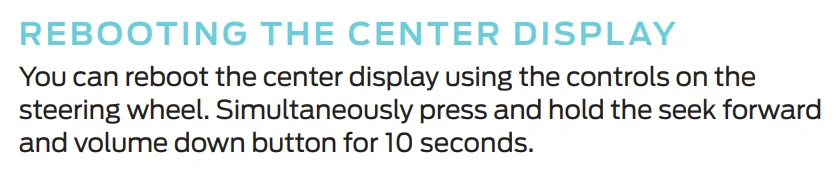
Have you done the Sync reboot? i.e. hold volume down and next track on your steering wheel at the same time until the center screen goes dark
OMG! Thanks so much! I’ve been scouring the Internet for a solution for this for my brother’s Mustang and this reset worked! Neither the button or the wake word worked! Thanks again!!!
 

macchiaz-o

Well-Known Member
First Name
Jonathan
Joined
Nov 25, 2019
Threads
171
Messages
8,579
Reaction score
15,987
Location
}not/A/gr8'Place.2.store-mEyePassword{
Vehicles
MY21 J1 Premium RWD SR
Country flag
OMG! Thanks so much! I’ve been scouring the Internet for a solution for this for my brother’s Mustang and this reset worked! Neither the button or the wake word worked! Thanks again!!!
Ford published the "reboot center display" instructions starting with Quick Start Reference v3, published 1/26/2021. They may have moved this into the full owners manual for later model years, though. This is from the thinner, full color pamphlet that's packed with my vehicle's supplemental owners manual in the glove box:

Ford Mustang Mach-E Voice Prompts Stopped Working 1722142527680-vc


Check out the owner's manual for lots of cool details about the car! I've organized a bunch of that sort of info on this page:

https://www.macheforum.com/site/thr...manuals-and-web-sites-for-mach-e-owners.1660/


Top