skiingj
Well-Known Member
- First Name
- John
- Joined
- Jun 19, 2021
- Threads
- 21
- Messages
- 567
- Reaction score
- 371
- Location
- Roseville, California
- Vehicles
- Mach-E Premium

TT deluxe has always imported my 1099 and other investment forms.
Sponsored

That is incorrect. It's because it's NOT READY.My 8911 in TT shows 'do not file'. I believe its because I've surpassed my allowable tax credit with both my MME and Solar credits. Line 14 and 15b have the same number.

Ok. Suit yourself. I suggest that you don't file a return with DO NOT FILE on the top of one of the forms, but what do I know?
I just finished my taxes on Turbo Tax and was able to enter the amount it costs me to install my outlet in the garage. It does say that my forms are not ready yet, and gives a date of March 17th for the IRS to complete them. Once that is done, I can mail my return. For the $950 I spent installing, I get $268 credit on my taxes.Ok. Suit yourself. I suggest that you don't file a return with DO NOT FILE on the top of one of the forms, but what do I know?
Form 8911I just finished my taxes on Turbo Tax and was able to enter the amount it costs me to install my outlet in the garage. It does say that my forms are not ready yet, and gives a date of March 17th for the IRS to complete them. Once that is done, I can mail my return. For the $950 I spent installing, I get $268 credit on my taxes.
Ok. Suit yourself. I suggest that you don't file a return with DO NOT FILE on the top of one of the forms, but what do I know?
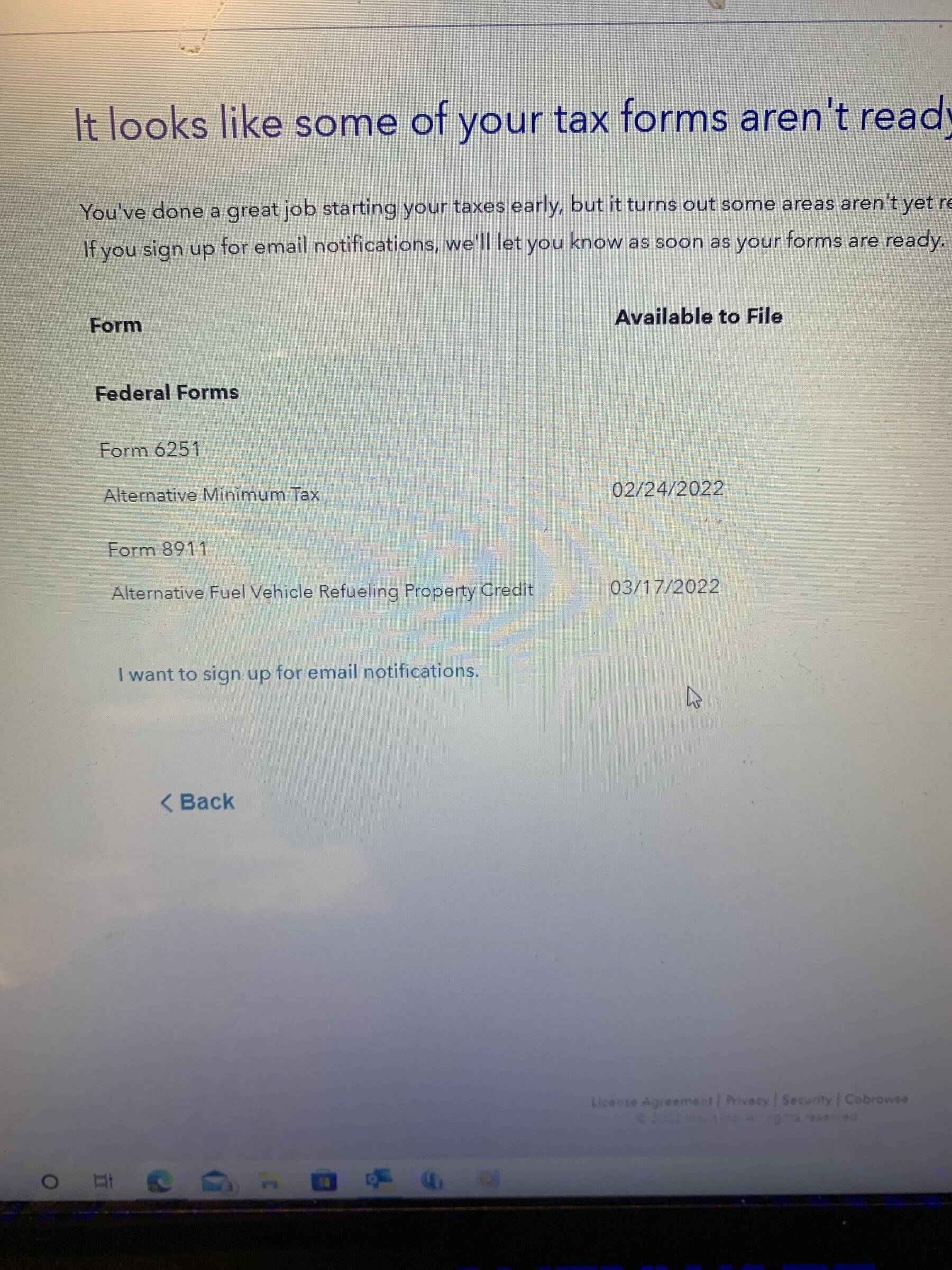

I think this is why we've conflated the warning. (Or at least this is why I did)That is incorrect. It's because it's NOT READY.
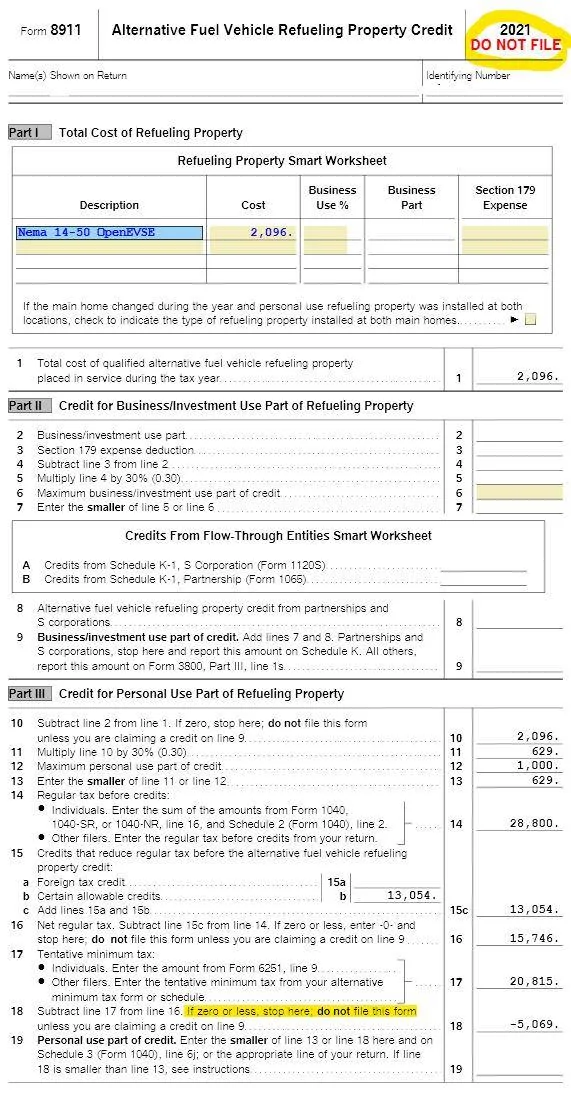

Come March 17 (or whenever the form actually gets released) the red “Do not file” will disappear regardles of your tax situation.I think this is why we've conflated the warning. (Or at least this is why I did)

TurboTax didn't warn me against filing because in my case, zero credit and no form to file.

Reversing the math from the bottom of that form, it seems like you'd get this EVSE credit if you carried forward almost $5,000 of your line 15b credits (solar panels?) to next year.I think this is why we've conflated the warning. (Or at least this is why I did)
TurboTax didn't warn me against filing because in my case, zero credit and no form to file.
Since you did the math, and you say you did it right, then you should file.I think this is why we've conflated the warning. (Or at least this is why I did)
TurboTax didn't warn me against filing because in my case, zero credit and no form to file.
Doesn't it look like TurboTax isn't going to make the best choice for @Scooby24, even when they do finalize his forms, due to his tax difference from AMT/TMT shown as -$5k? You know, that line he highlighted for us on his 8911.Since you did the math, and you say you did it right, then you should file.
However, since the software isn't able to properly calculate your tax because the form isn't finalized in the software, and as such the calculations aren't finalized in the software, then you can't verify that (unless you used the IRS form and instructions, and did the calculations).
Of course anyone can file whenever they want, and then if the software is updated AND that results in a different end result, file an amended return.
TurboTax, when it's finalized, is supposed to minimize the amount of taxes paid by the consumer. If there is a carryforward, the software stores that, tells the consumer, and applies it to next years taxes.Doesn't it look like TurboTax isn't going to make the best choice for @Scooby24, even when they do finalize his forms, due to his tax difference from AMT/TMT shown as -$5k? You know, that line he highlighted for us on his 8911.
I mean, if it were me I think I'd carry forward a big chunk of my solar credit since it allows carry forward. Then I can take all my credits that don't allow carry forward in my 2021 return.
But TurboTax wouldn't want to tell the customer "you owe 4.75k more this year than you might have expected and we want you to file a W-4 to get that back in your pocket asap, instead of waiting another year from now." So it goes with the simple, happy, but less perfect result "you are getting so many credits this year you rockstar, thanks to TurboTax®."

I'd have to carry forward literally the whole solar credit to next year to get back less than 500 for the EVSE. I'll return more than that in investment earnings by doing the solar now.Doesn't it look like TurboTax isn't going to make the best choice for @Scooby24, even when they do finalize his forms, due to his tax difference from AMT/TMT shown as -$5k? You know, that line he highlighted for us on his 8911.
I mean, if it were me I think I'd carry forward a big chunk of my solar credit since it allows carry forward. Then I can take all my credits that don't allow carry forward in my 2021 return.
But TurboTax wouldn't want to tell the customer "you owe 4.75k more this year than you might have expected and we want you to file a W-4 to get that back in your pocket asap, instead of waiting another year from now." So it goes with the simple, happy, but less perfect result "you are getting so many credits this year you rockstar, thanks to TurboTax®."
Have you seen the 2022 form? It's literally identical in every way. It tells you exactly what to enter and from where and what percentage to use for calculations.TurboTax, when it's finalized, is supposed to minimize the amount of taxes paid by the consumer. If there is a carryforward, the software stores that, tells the consumer, and applies it to next years taxes.
I haven't run @Scooby24's numbers. And I'm not an accountant. But I wouldn't waste my time looking at a form that isn't finalized in software, and how those results impact my return, until such time as the form is finalized.
I can tell you that each year when my return is complete, I print it out and run through the entire return making sure I understand each and every number and why it is what it is. That gives me a better understand of my tax situation, and also allows me to know things like whether I should group donations into every other year to be able to itemize, or the impact on my taxes of moving to a new house during retirement and getting a huge mortgage.
As to adjusting your W4, my understanding (haven't received one since 2008) is that you can't play anymore with the withholding allowances (I once had over 30) to lower your withholding (not saying my understanding is perfect). If you don't want a penalty for underpayment, you need to meet IRS requirements for how much you have withheld / pay in estimated taxes. That's why this year I'm getting money back (I hate that), because it was easier to just pay 100% of last year's tax versus guessing and then having to pay a penalty. My preliminary run through TurboTax, before my forms are finalized, has me paying under $800 in tax, so I will happily pay $200 per quarter this year via estimated taxes and comply with the requirements.
Have you seen the 2022 form? It's literally identical in every way. It tells you exactly what to enter and from where and what percentage to use for calculations.