
benk016
Well-Known Member
- First Name
- Ben
- Joined
- Nov 12, 2020
- Threads
- 39
- Messages
- 3,281
- Reaction score
- 5,129
- Location
- Tulsa, Oklahoma
- Vehicles
- 2021 Mustang Mach-E GT

That OBCC update is new for every car I checked yesterday.
Sponsored
I still use the VCX Nano, and the only issue I've had with it still is the CCM not updating with FDRS correctly. Everything else has worked as expected. I still would only recommend it for advanced users though in case something does break.VCX Nano will cause corrupted data and has been removed from the approved list of adapters (at least on the F-150 site, I haven't checked here). Link here.

Is your gearshifter one of the ones they talk about in the TSB? One that was made during a certain time period and needs to be replaced? There has been more than one TSB on those and I can't remember which one it is that says it needs to be replaced...or what the indications are.Since it got up to freezing I decided to update my 2021 Job 1 RWD Premium today. The APIM update took over an hour to download from the servers and a good chunk of time to copy the 5GB of files to the USB. When it was done have have the new UI and another GWM update showed up. I did that update, then went on to do the PCM (and SOBDM as part of it), OBCC, and the door modules.
The only problem is there is a DTC about the the Gearshift module having illegal data (or something similar). A retest did not clear it.


Sometimes if you log off the vehicle in FDRS and back on again it will help with things like that since it does a re-read of the modules from the server. I don't know if closing out the program entirely or not is the preferred way.Brought my 21 Job 1.5 up to the new Sync and updated a couple of other modules—all good. Other than the hideous home button row iconography, I really do like the new layout. Fonts are a little smaller which is harder for older eyes, to be sure.
I had one hitch that I don’t think I care about, but I thought I’d ask. I updated the PCM, and that went fine and it automatically updated the secondary module as expected. Afterward, the PCM didn’t clear from my available upgrade list. I ran it again, and it ran through the update quickly (as it didn’t need to change anything), but it still didn’t clear. I did that dance about four times and gave up. I had the same loop problem with the OBCC, but it cleared after the second time.
I’m assuming there’s no issue, but I thought I’d double-check with the gang. Thanks!
I've had to spam the rerun network scan button, all the way to shutting down FDRS and restarting to get things cleared in the past. It hasn't happened in a while though and I tend to think it's internet connectivity or backend server related.Sometimes if you log off the vehicle in FDRS and back on again it will help with things like that since it does a re-read of the modules from the server. I don't know if closing out the program entirely or not is the preferred way.

It should not. But weird things do happenI wonder if having the diagnostic security tokens enabled can prevent new updates from appearing for the GWM, TCU, and APIM.
Ain't that the truth. Do you have any insight as to why the availability of the latest updates in FDRS vary so widely by VIN? I don't think we've ever seen this before with FDRS updates for cars built around the same time.It should not. But weird things do happen
Might have something to do with why 21G01 was paused, there are some ongoing backend database issuesAin't that the truth. Do you have any insight as to why the availability of the latest updates in FDRS vary so widely by VIN? I don't think we've ever seen this before with FDRS updates for cars built around the same time.
That's never good.Might have something to do with why 21G01 was paused, there are some ongoing backend database issues

So are the Advanced Analytics stuff still happening? I used to be part of it but was sent an email a while back that they were disabling them (around the time we had to agree to new EA terms) and would have more info on the program in the future, but never heard anything more.I wonder if having the diagnostic security tokens enabled can prevent new updates from appearing for the GWM, TCU, and APIM. I know it generates DTCs for software version incompatibility for those modules, so it seems plausible. I think I'll disable the tokens for a while and see if it makes a difference.


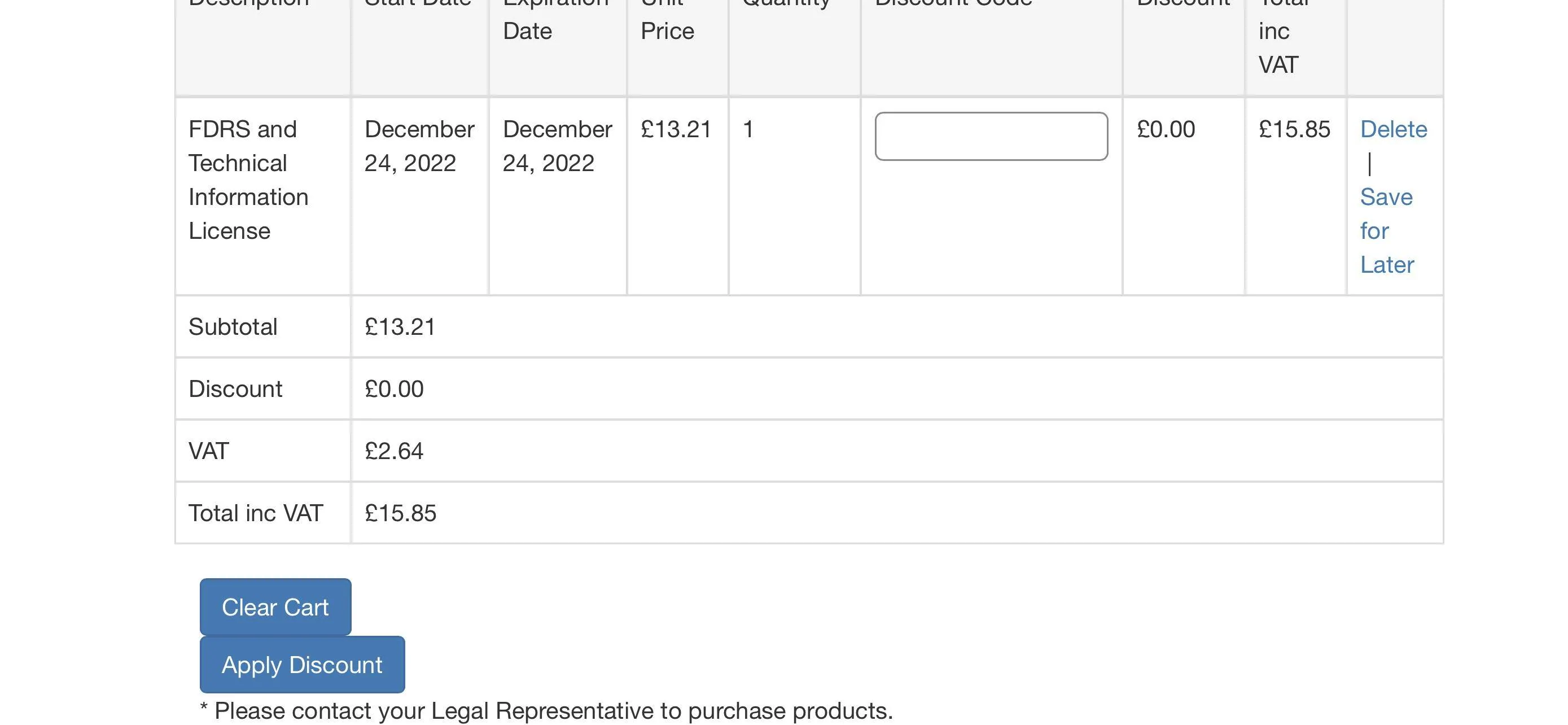
Just bumping this in case someone can help. Are FDRS licenses only available to companies? The Motorcraft site seems to require an account to be set up by a company (as legal representative) and then employees added to that account which have access to FDRS. Is it possible for an individual to buy a license and do I need to go through Motorcraft?Newbie here; can anyone help? I created a Motorcraft account and added a 1 hour FDRS subscription license to my basket. Unfortunately no button to allow purchase is displayed and there is a little footnote that says “* Please contact your Legal Representative to purchase products”. Any idea what I’m doing wrong?

I wonder if having the diagnostic security tokens enabled can prevent new updates from appearing for the GWM, TCU, and APIM. I know it generates DTCs for software version incompatibility for those modules, so it seems plausible. I think I'll disable the tokens for a while and see if it makes a difference.