Mike G

Well-Known Member
First Name
Mike
Joined
Mar 27, 2022
Threads
25
Messages
6,458
Reaction score
5,298
Location
N. AL, USA
Vehicles
'23(J1) Mach-E GT-PE, '22 F-150 Lightning, '24 Bronco HLE 2Dr
Country flag
Yeah I did the lump of coal as well....just to see what a network scan might turn up. Nada.

But on a darker note...my YouTube and other streaming stuff has completely disappeared from the Entertainment section...as if I had never gotten that update at all.

Now...I never use it, but the point is...it was there and now it's not. I don't know if there's a connection between that and the GWM/APIM dependency issue that's keeping us from getting the new UI or not. But it's like....the sprinkles on top of the issue..

It's the little things, ya know?
Sponsored

 

737flyer

Well-Known Member
First Name
Richard
Joined
Jul 12, 2021
Threads
2
Messages
872
Reaction score
373
Location
Redington Beach, Fl
Vehicles
2025 Mache Premium, 2024 BMW IX50
Occupation
Retired Airline Pilot
Country flag
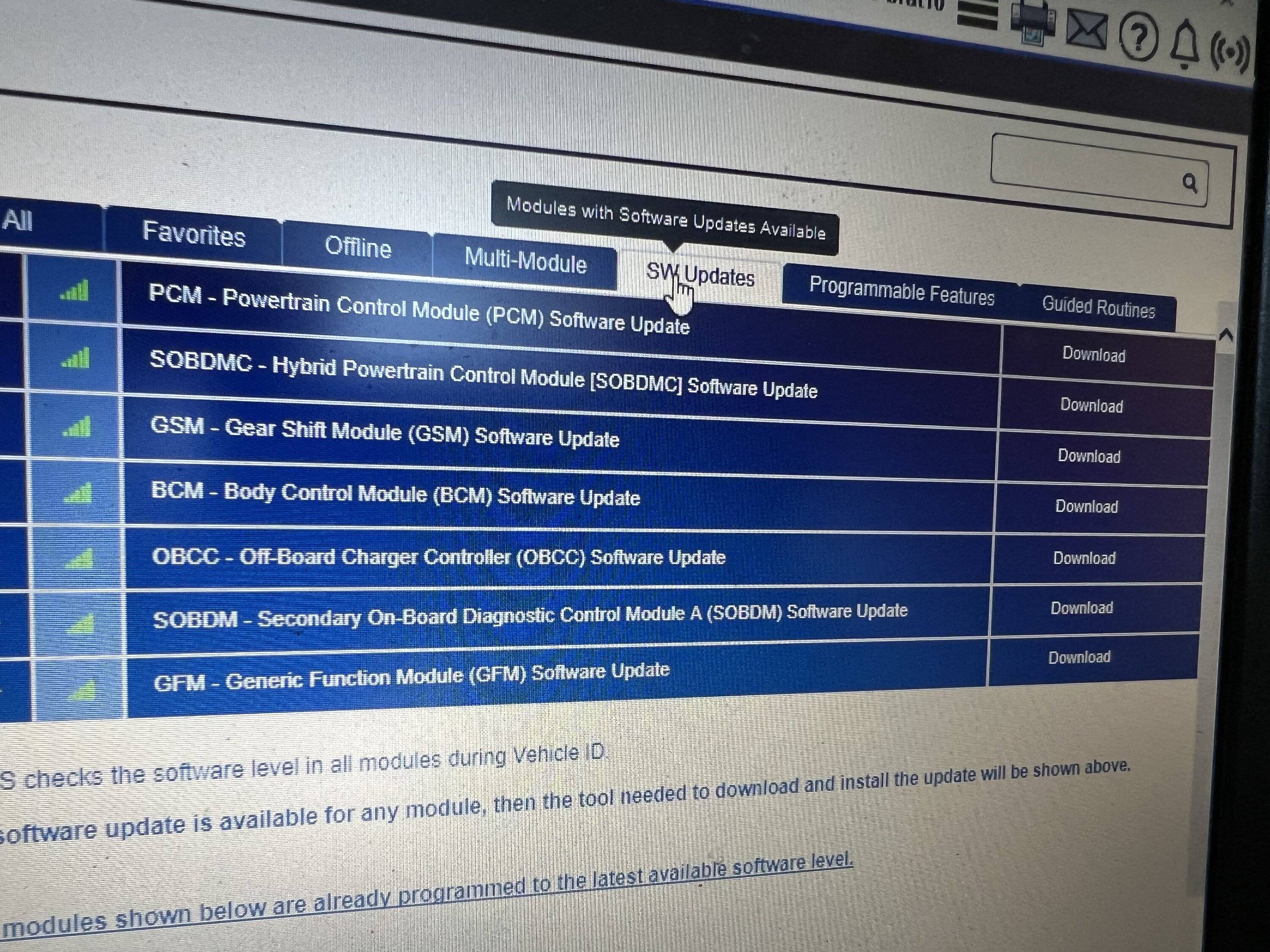
Modules updating this week. Should I do any special order?
Ford Mustang Mach-E The Complete DIY Guide to Updating Your Mach-E with FDRS 018DF422-3B99-4B4E-A8FD-92452CDFED7F
 

RyZt

Well-Known Member
Joined
Nov 17, 2019
Threads
24
Messages
747
Reaction score
880
Location
San Jose
Vehicles
Mach E4X
Country flag
I've seen complaints about USB writing speed in this thread and elsewhere in this forum from time to time. For example, https://www.macheforum.com/site/threads/fdrs-synch-module-apim-6-gb-usb-drive-taking-forever.24978/

I have no knowledge of FDRS implementation. But the only plausible explanation is that FDRS is doing many small writes when it should do a few big writes.

Depending on the quality of the USB drive one is using, the difference can be a minute or ten hours. When I did my first FDRS updates for my Job 1 Mach E in Dec 2022, I had many USB updated modules. It was very fast.

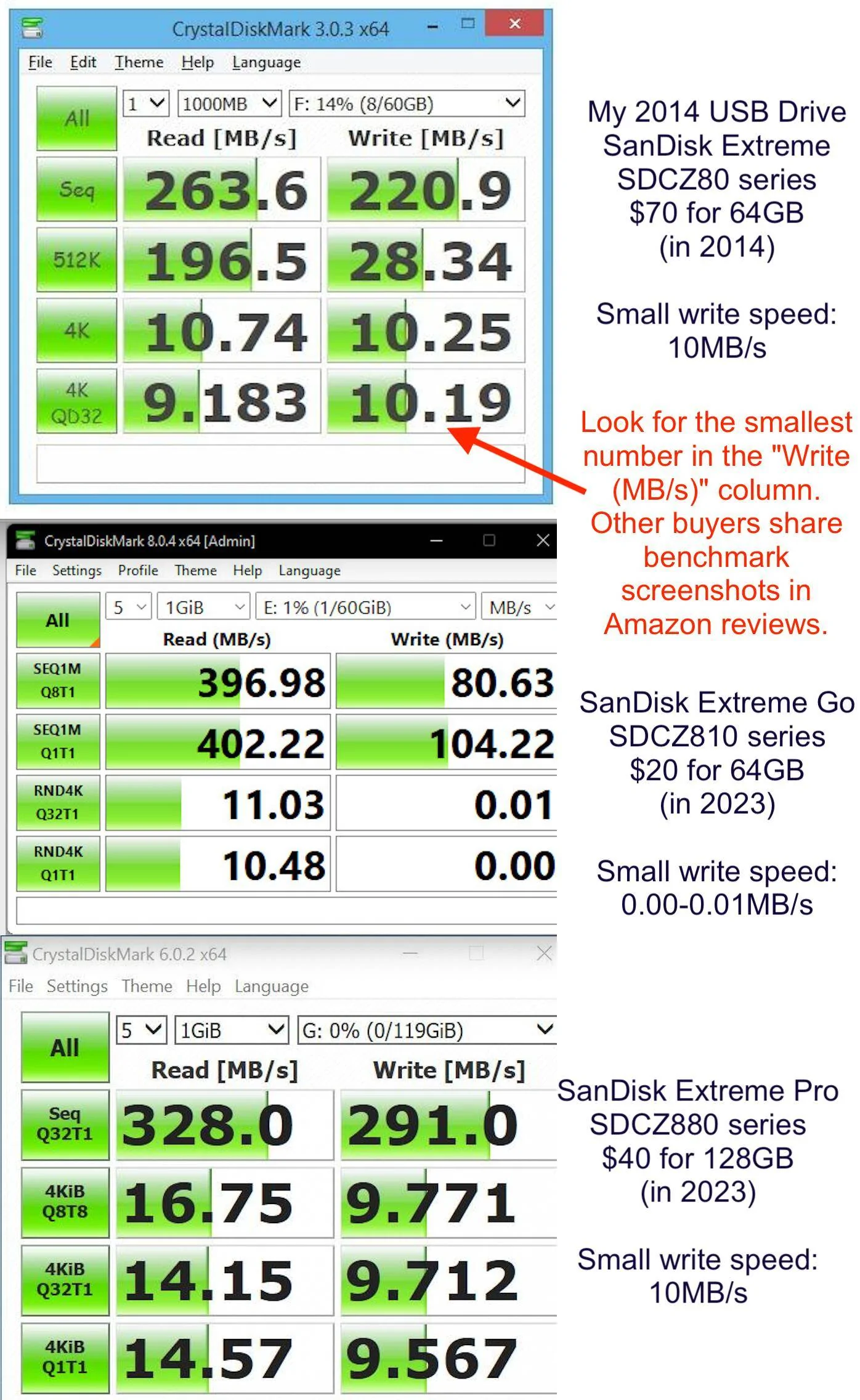
I think it is worthwhile to update the top post in this thread to call out the importance of having a proper USB drive so that people don't spend 10 extra hours doing APIM update. They may not know that saving $20 could cost them 12 hours of anxiety. Or they may had bad luck and paid good money for a cheap product.

The picture below says it all.

Ford Mustang Mach-E The Complete DIY Guide to Updating Your Mach-E with FDRS Screen Shot 2023-01-08 at 11.08.07 AM
 
Last edited:

bshaw

Well-Known Member
Joined
May 18, 2020
Threads
14
Messages
1,562
Reaction score
2,181
Location
Boston, MA
Vehicles
2021 Mustang Mach E 4X (Job 1)
Country flag
I assumed part of the reason the usb transfer took so long was because FDRS was digitally signing each file component so the car would accept it? Anyone know how that works?

But yeah, if the usb drive is not quality, then I could see the minutes and hours adding up.


Woeo

Well-Known Member
First Name
Woeo
Joined
Feb 2, 2020
Threads
31
Messages
1,019
Reaction score
1,008
Location
Maryland
Vehicles
Fusion Energi
Country flag
I assumed part of the reason the usb transfer took so long was because FDRS was digitally signing each file component so the car would accept it? Anyone know how that works?

But yeah, if the usb drive is not quality, then I could see the minutes and hours adding up.
When I had issues with a multi-gigabyte APIM update I found temporarily moving the router to avoid the signal traveling through a wall (while also reducing the distance involved) boosted the WiFi signal in the garage which improved my transfer time tremendously.

Now using 100’ Cat5 cable for a wired connection.
 

Neil4Real

Well-Known Member
Joined
Jul 8, 2021
Threads
17
Messages
3,385
Reaction score
3,073
Location
Southern California
Vehicles
Mach-E GT Performance Edition - Shadow Black
Country flag
When I had issues with a multi-gigabyte APIM update I found temporarily moving the router to avoid the signal traveling through a wall (while also reducing the distance involved) boosted the WiFi signal in the garage which improved my transfer time tremendously.

Now using 100’ Cat5 cable for a wired connection.
Once it starts downloading, you can disconnect your laptop from the car and take it inside.
 

Arjan

Well-Known Member
First Name
Arjan
Joined
Feb 14, 2020
Threads
6
Messages
360
Reaction score
241
Location
NL
Vehicles
Ford Mustang Mach-E GT Performance
Country flag
Once it starts downloading, you can disconnect your laptop from the car and take it inside.
Yes this will work, but the sequence to continue will fail. But after you reconnect to the car and restart the sequence it will continue.
 

Mike G

Well-Known Member
First Name
Mike
Joined
Mar 27, 2022
Threads
25
Messages
6,458
Reaction score
5,298
Location
N. AL, USA
Vehicles
'23(J1) Mach-E GT-PE, '22 F-150 Lightning, '24 Bronco HLE 2Dr
Country flag
I've seen complaints about USB writing speed in this thread and elsewhere in this forum from time to time. For example, https://www.macheforum.com/site/threads/fdrs-synch-module-apim-6-gb-usb-drive-taking-forever.24978/

I have no knowledge of FDRS implementation. But the only plausible explanation is that FDRS is doing many small writes when it should do a few big writes.

Depending on the quality of the USB drive one is using, the difference can be a minute or ten hours. When I did my first FDRS updates for my Job 1 Mach E in Dec 2022, I had many USB updated modules. It was very fast.

I think it is worthwhile to update the top post in this thread to call out the importance of having a proper USB drive so that people don't spend 10 extra hours doing APIM update. They may not know that saving $20 could cost them 12 hours of anxiety. Or they may had bad luck and paid good money for a cheap product.

The picture below says it all.

Screen Shot 2023-01-08 at 11.08.07 AM.webp
I know that FDRS does copy a digital certificate to the USB drive where it copies the files. I don't know that the file is anything more than a verification of what packages that vehicle is supposed to get. Meaning I don't think there's any encryption/decryption going on, it's just a file that has the car's VIN to ensure that somebody isn't loading software into a module that is not supposed to be there by design.

I have been asked why sometimes USB-based updates didn't work properly or took forever. I have always used Sandisk Extreme USB 3.0 drives (expensive when I bought them years ago). I bought a handful of these years ago to put movies on to watch on my TV. I got tired of waiting like 20 minutes or more with older USB drives just to copy a few movies. So that's how it started for me.

I have one drive set aside to do FDRS updates with. It's a Sandisk Extreme 3.0 and is 64GB. For some reason when I format it to exFat with the default allocation it is formatting to 32GB. That's fine because that's all it needs to be anyway and again, that drive is only used (and reused, over and over) for FDRS updates.

My FDRS laptop is a Dell Latitude running Win10 and it does have USB 3.0 ports. I believe that point should not be overlooked. It's fine to have a fast USB thumb drive, but if you're using it with a laptop that only has USB 2.0 ports....you get the idea.

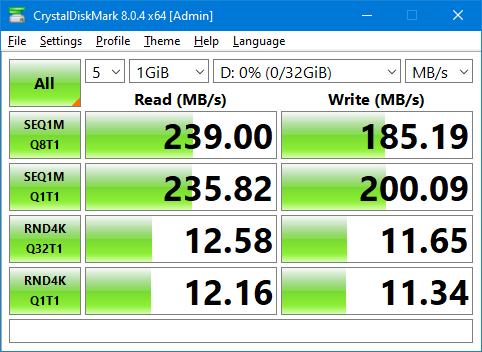
Here's the actual bench of my FDRS Sandisk drive:
Ford Mustang Mach-E The Complete DIY Guide to Updating Your Mach-E with FDRS Sandisk_Extreme_3


I have no problem with USB updates copying to this drive..but I have never seen a giant APIM update take "an hour" as some people have. I think the longest I ever spent waiting for a 6GB APIM update to copy was like 4-5 minutes. I have Starlink internet by the way, if anybody thinks that matters (I live in the sticks).

There are folks on this forum and both of the F-150 forums (ICE and Lightning) who do their own programming and post about having issues when they are first getting started...and too many times it comes back to things like not skimping on the basics. They later post, after initially having a problem, that when they went and got a proper USB drive instead of one they found in a desk drawer from years ago....things improved dramatically.

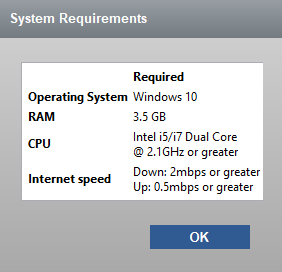
To sum up:
Ford Mustang Mach-E The Complete DIY Guide to Updating Your Mach-E with FDRS FDRS_Req


Should have USB 3.0 port(s) to go with the USB 3.0 thumb drive you are using. The USB thumb drive optimally should be of the "Extreme" performance variety to ensure success.
 

bshaw

Well-Known Member
Joined
May 18, 2020
Threads
14
Messages
1,562
Reaction score
2,181
Location
Boston, MA
Vehicles
2021 Mustang Mach E 4X (Job 1)
Country flag
There are folks on this forum and both of the F-150 forums (ICE and Lightning) who do their own programming and post about having issues when they are first getting started...and too many times it comes back to things like not skimping on the basics. They later post, after initially having a problem, that when they went and got a proper USB drive instead of one they found in a desk drawer from years ago....things improved dramatically.
This was my initial experience exactly. Started with a USB drive from a desk drawer and although it appeared to work for other purposes, failed miserably on FDRS.
However, I did not buy the "Extreme" version and now mine functionally works in FDRS, but at a much slower speed.


Should have USB 3.0 port(s) to go with the USB 3.0 thumb drive you are using. The USB thumb drive optimally should be of the "Extreme" performance variety to ensure success.
Agreed. The car's USB-C port works fine to accept the FDRS updates. I think all USB-C interfaces are at least 3.0?

Maybe someone should amend the initial post for this thread to say investing in the performance USB model will save significant time.
 

Mike G

Well-Known Member
First Name
Mike
Joined
Mar 27, 2022
Threads
25
Messages
6,458
Reaction score
5,298
Location
N. AL, USA
Vehicles
'23(J1) Mach-E GT-PE, '22 F-150 Lightning, '24 Bronco HLE 2Dr
Country flag
This was my initial experience exactly. Started with a USB drive from a desk drawer and although it appeared to work for other purposes, failed miserably on FDRS.
However, I did not buy the "Extreme" version and now mine functionally works in FDRS, but at a much slower speed.


Agreed. The car's USB-C port works fine to accept the FDRS updates. I think all USB-C interfaces are at least 3.0?

Maybe someone should amend the initial post for this thread to say investing in the performance USB model will save significant time.
A very good point. I haven't explored a USB 3.0 drive that connects via USB C. I know Sandisk makes at least one I saw in passing on Amazon recently but I haven't tried it.

As to whether all USB C drives are at least 3.0 I'm not sure about that. Link From this graph it appears that USB C can be backwards compatible to earlier specs, but going forward all USB 3.2 do use the USB C connection.

As a follow-up I investigated why my FDRS USB 3.0 drive was only formatting to 32Gb. Following the guidance provided here I successfully deleted the partition and "cleaned" the drive using diskpart and reformatted to exFat with the default allocation, and now it's showing the proper size again. Don't know how it got limited to 32Gb in the first place, but it's sorted now. ?
 
Last edited:

RyZt

Well-Known Member
Joined
Nov 17, 2019
Threads
24
Messages
747
Reaction score
880
Location
San Jose
Vehicles
Mach E4X
Country flag
The USB thumb drive optimally should be of the "Extreme" performance variety to ensure success.
All 3 models in my screenshot are “Extreme”. The 1st (old-generation Extreme, probably what you and me are using) and the 3rd (Extreme Pro) is 1000X faster than the 2nd (Extreme Go) at small write performance.
 

Mike G

Well-Known Member
First Name
Mike
Joined
Mar 27, 2022
Threads
25
Messages
6,458
Reaction score
5,298
Location
N. AL, USA
Vehicles
'23(J1) Mach-E GT-PE, '22 F-150 Lightning, '24 Bronco HLE 2Dr
Country flag
Modules updating this week. Should I do any special order?
018DF422-3B99-4B4E-A8FD-92452CDFED7F.jpeg
I didn't see anybody else jump in here....so...it's not your first rodeo...you know what's going to happen if you select that PCM first.....all the powertrain related updates will get done in sequence. In your case that will be the PCM, SOBDM, SOBDMC. I don't know if the OBCC is chained in there or not. But if not you can do that one next (takes a couple of minutes), and then I'd move on to the BCM *before* the GFM to keep from getting the "Frunk Service Required" message (really either can be done in any sequence as long as both are done in one session). And then to round up the session that GSM update.

That would be how I'd do it.
 

Arjan

Well-Known Member
First Name
Arjan
Joined
Feb 14, 2020
Threads
6
Messages
360
Reaction score
241
Location
NL
Vehicles
Ford Mustang Mach-E GT Performance
Country flag
The speed of USB-C and USB-A in the MME is exactly thesame, but it does make a big difference to use a USB3 or USB-C port and stick in the laptop. Although the limiting factor (at least here in the Netherlands) is often the speed when downloading from the Ford servers. It is just not quick in downloading.
 

Mike G

Well-Known Member
First Name
Mike
Joined
Mar 27, 2022
Threads
25
Messages
6,458
Reaction score
5,298
Location
N. AL, USA
Vehicles
'23(J1) Mach-E GT-PE, '22 F-150 Lightning, '24 Bronco HLE 2Dr
Country flag
The speed of USB-C and USB-A in the MME is exactly thesame, but it does make a big difference to use a USB3 or USB-C port and stick. Although the limiting factor (at least here in the Netherlands) is often the speed when downloading from the Ford servers. It is just not quick in downloading.
It's not quick in downloading regardless of what country you're in ;)
Sponsored


Top