
geftsnowball
Well-Known Member
- Joined
- Mar 26, 2022
- Threads
- 8
- Messages
- 184
- Reaction score
- 189
- Location
- Washington
- Vehicles
- '22 Mach-E, Grabber Blue, Premium AWD ER

Yep, but be warned, it can incorrectly detect a speed sign, e.g., a side road, or a few other scenarios. This can cause you to rapidly speed up or slow down without warning. At least, that's what it sounds like from reading others' experience with it. I've set mine to off just because I like to explicitly control my speed.


geftsnowball
Well-Known Member
- Joined
- Mar 26, 2022
- Threads
- 8
- Messages
- 184
- Reaction score
- 189
- Location
- Washington
- Vehicles
- '22 Mach-E, Grabber Blue, Premium AWD ER
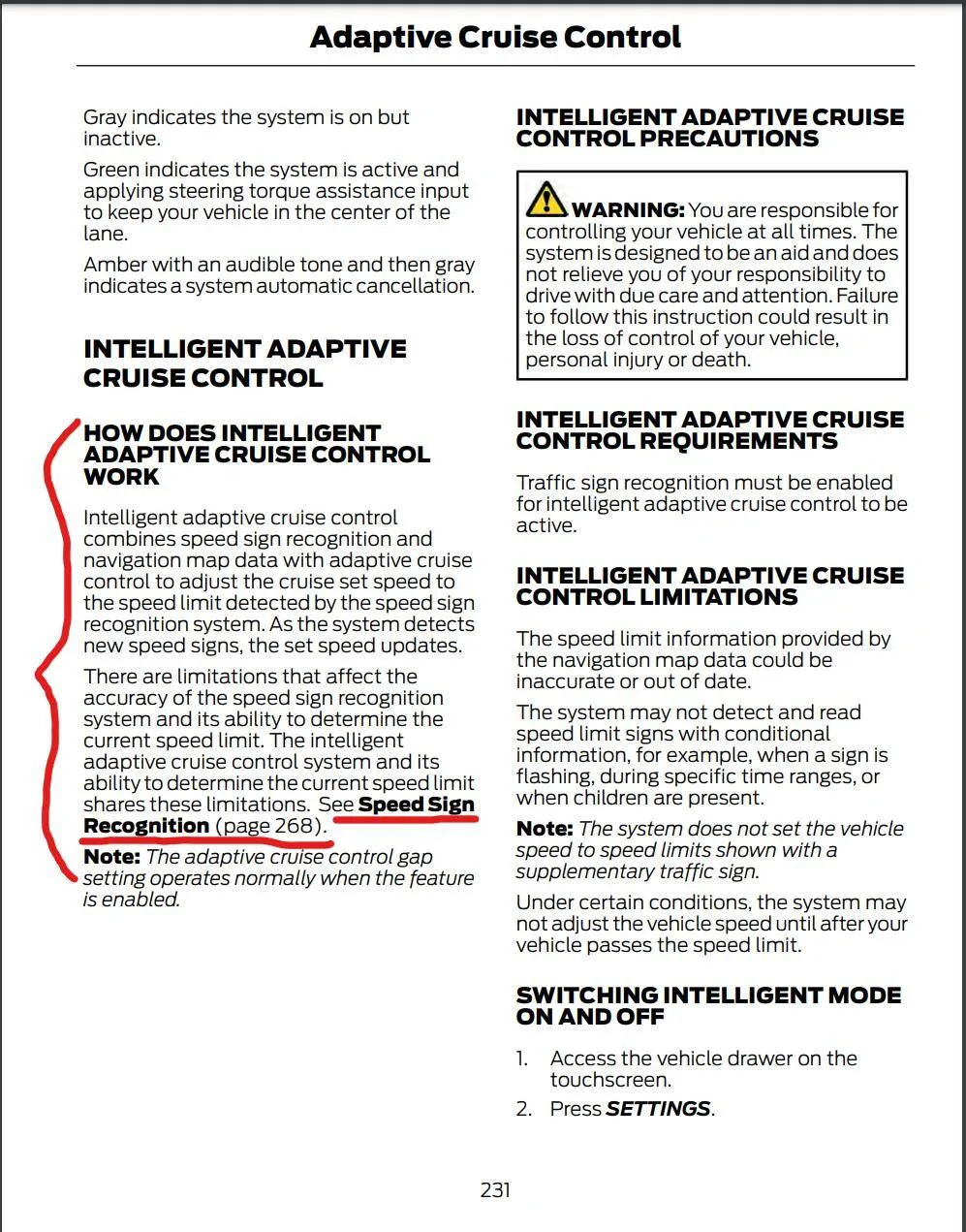
Sure, here: https://www.fordservicecontent.com/...-Owners-Manual_version-1_om_EN-US_10_2021.pdf
I searched for "mach e manual" and clicked the first link just to get the description because I knew it was there but didn't remember the specifics. Depending on your Sync version it may or may not be accurate. You might be able to find the latest updated digital manual via one of the options in the car (read comments about it... and it missing after the 4.1.2 update... but have never personally looked myself).
I searched for "mach e manual" and clicked the first link just to get the description because I knew it was there but didn't remember the specifics. Depending on your Sync version it may or may not be accurate. You might be able to find the latest updated digital manual via one of the options in the car (read comments about it... and it missing after the 4.1.2 update... but have never personally looked myself).

Jimrpa
Well-Known Member
- First Name
- Jim
- Joined
- Sep 10, 2020
- Threads
- 297
- Messages
- 9,546
- Reaction score
- 12,872
- Location
- Wayne, PA
- Vehicles
- 2021 Infinite Blue Premium Mustang Mach E ER AWD
- Occupation
- Retied (formerly tried to herd highly technical, independent cats)
The manual is also available in FordPass.
elmedico27
Well-Known Member
- First Name
- Drew
- Joined
- May 19, 2022
- Threads
- 3
- Messages
- 274
- Reaction score
- 363
- Location
- Missouri
- Vehicles
- 2022 Mach-E Premium AWD ER
Exact reason I turned it off, soon after it “saw” a 5 mph sign while I was on the highway. I still see discrepancies between what the car “sees” and what Apple Maps has programmed in all the time.Yep, but be warned, it can incorrectly detect a speed sign, e.g., a side road, or a few other scenarios. This can cause you to rapidly speed up or slow down without warning.
byoungblood
Well-Known Member
- First Name
- Bart
- Joined
- Feb 17, 2022
- Threads
- 1
- Messages
- 158
- Reaction score
- 117
- Location
- Berryville, VA
- Vehicles
- 2012 F150, 2007 Mazda 3, 1999 Jeep Wrangler
I had it on for the first 2-3 weeks that I owned the car, and then turned it off.
On some roads where it has no speed limit info, it defaults to 25 mph. You will pass a speed limit sign, which it will recognize, and it will set the cruise to that speed plus/minus your tolerance. Then, without any warning, it decides the limit on the road is 25 mph again and slams on the brakes to slow the car.
Tooling around at 60, it picks up a speed sign on an adjacent ramp, quite a distance from the travel lane you're in. It again rapidly decelerates down to the "new" speed limit. I encountered this 2-3 times on my drive home from work. Took looking at Google street view to spot the errant sign.
An improvement would be to require the driver to press OK or provide some other feedback if the limit (either detected by the camera, or whatever is in the internal database) varies more than 10 mph from the previously detected limit.
On some roads where it has no speed limit info, it defaults to 25 mph. You will pass a speed limit sign, which it will recognize, and it will set the cruise to that speed plus/minus your tolerance. Then, without any warning, it decides the limit on the road is 25 mph again and slams on the brakes to slow the car.
Tooling around at 60, it picks up a speed sign on an adjacent ramp, quite a distance from the travel lane you're in. It again rapidly decelerates down to the "new" speed limit. I encountered this 2-3 times on my drive home from work. Took looking at Google street view to spot the errant sign.
An improvement would be to require the driver to press OK or provide some other feedback if the limit (either detected by the camera, or whatever is in the internal database) varies more than 10 mph from the previously detected limit.
Kabish
Well-Known Member
- First Name
- Bill
- Joined
- Jul 24, 2021
- Threads
- 40
- Messages
- 927
- Reaction score
- 977
- Location
- San Diego
- Vehicles
- 2021 Mach-E Mustang
- Occupation
- IT
100% would not recommend turning on.
I used it when I first got my car and it worked "okay" for a bit. Then it started to get real squirrely and I shut it off. I turned it back on months later and had it drop me from a 70mph highway to 20mph multiple times. I've also played around, expecting it not to work right, on a local freeway. I had it change my speed from 65 to 5 or 15mph multiple times for no real good reason. Think I might had posted a video of it somewhere here.
Don't use it unless you like getting rear ended, Ford should remove it from the car. Its a HUGE safety concern that they cover themselves by saying "The driver must always be ready to take control" BS...
I used it when I first got my car and it worked "okay" for a bit. Then it started to get real squirrely and I shut it off. I turned it back on months later and had it drop me from a 70mph highway to 20mph multiple times. I've also played around, expecting it not to work right, on a local freeway. I had it change my speed from 65 to 5 or 15mph multiple times for no real good reason. Think I might had posted a video of it somewhere here.
Don't use it unless you like getting rear ended, Ford should remove it from the car. Its a HUGE safety concern that they cover themselves by saying "The driver must always be ready to take control" BS...
Rory
Well-Known Member
- First Name
- Rory
- Joined
- Dec 7, 2022
- Threads
- 13
- Messages
- 245
- Reaction score
- 413
- Location
- Davis, California
- Vehicles
- Mustang Mach-E 2022 Premium ER AWD
I've had speed limit following cruise control on other cars I've rented. There are so many ways the car can be fooled that it's not practical. This is not just a Ford issue.
For example, speed signs on a road coming off your road, speed limit signs partly covered causing a misread, construction zones that have reduced speed limit signs but then just a resume usual speed sign instead of a numerical sign at the end of construction, etc.
For example, speed signs on a road coming off your road, speed limit signs partly covered causing a misread, construction zones that have reduced speed limit signs but then just a resume usual speed sign instead of a numerical sign at the end of construction, etc.

azerik
Well-Known Member
- First Name
- Erik
- Joined
- Jan 8, 2023
- Threads
- 79
- Messages
- 4,545
- Reaction score
- 4,557
- Location
- Chandler/Flagstaff, AZ
- Vehicles
- '21 Spacey Prem4x, '21 RX450H, 13 Focus EV
- Occupation
- DevSecNetOps, General PITA
If the sign rec. is turned off does the speed limit sign still show up on the small display? That's all I need.
geftsnowball
Well-Known Member
- Joined
- Mar 26, 2022
- Threads
- 8
- Messages
- 184
- Reaction score
- 189
- Location
- Washington
- Vehicles
- '22 Mach-E, Grabber Blue, Premium AWD ER
Yes, you can turn everything on -except- the "intelligent" speed sign recognition speed adjustments if you want, e.g., I have everything on except that and I can see the detected speed on the dash and even have the speed limit threshold warning (speed sign image just blinks if you exceed what it thinks the limit is).If the sign rec. is turned off does the speed limit sign still show up on the small display? That's all I need.
Skip Towne
Well-Known Member
- Joined
- Nov 11, 2021
- Threads
- 18
- Messages
- 160
- Reaction score
- 245
- Location
- New Hampshire
- Vehicles
- Mach-E 4x Premium
Wait, what????
You are supposed to pay attention to speed limit signs on the highway? Are you sure about that?
That seems like inviting a rear-end crash where I come from.
You are supposed to pay attention to speed limit signs on the highway? Are you sure about that?
That seems like inviting a rear-end crash where I come from.
- First Name
- Doug
- Joined
- May 5, 2021
- Threads
- 4
- Messages
- 664
- Reaction score
- 329
- Location
- Valencia Pa
- Vehicles
- 2021 mustang mach e GT performance
- Occupation
- Retired
- Banned
- #14
I find it is a great tool and use it all the time. Gives my arthritic foot and ankle a rest. Only time it slowed down was reading the 25 mph road parallel to the road we were on at 45 mph. Great on the turnpike using 5 car length ad captive cruise at 70 mph, slows down and speeds up every time.Yep, but be warned, it can incorrectly detect a speed sign, e.g., a side road, or a few other scenarios. This can cause you to rapidly speed up or slow down without warning. At least, that's what it sounds like from reading others' experience with it. I've set mine to off just because I like to explicitly control my speed.
azerik
Well-Known Member
- First Name
- Erik
- Joined
- Jan 8, 2023
- Threads
- 79
- Messages
- 4,545
- Reaction score
- 4,557
- Location
- Chandler/Flagstaff, AZ
- Vehicles
- '21 Spacey Prem4x, '21 RX450H, 13 Focus EV
- Occupation
- DevSecNetOps, General PITA
Forum needs a "That part" emoji.Wait, what????
You are supposed to pay attention to speed limit signs on the highway? Are you sure about that?
That seems like inviting a rear-end crash where I come from.
Sponsored
Similar threads


- Replies
- 8
- Views
- 6,455
