SashaLondon

Well-Known Member
First Name
Sasha
Joined
Sep 11, 2020
Threads
32
Messages
1,393
Reaction score
1,500
Location
London
Vehicles
MME AWD SR
Country flag
Do you have the template sensor for percentage charge? Mine is no longer working after the update to the Fordpass app and I have forgotten how to do it.
Anyone care to share their car template sensors?
Sponsored
 

methorian

Well-Known Member
Joined
Nov 18, 2019
Threads
17
Messages
1,557
Reaction score
2,437
Location
Roanoke, VA
Vehicles
2021 Mach-E First Edition, 2025 Kia EV6 GT-Line
Occupation
IT Admin
Country flag
Do you have the template sensor for percentage charge? Mine is no longer working after the update to the Fordpass app and I have forgotten how to do it.
Anyone care to share their car template sensors?
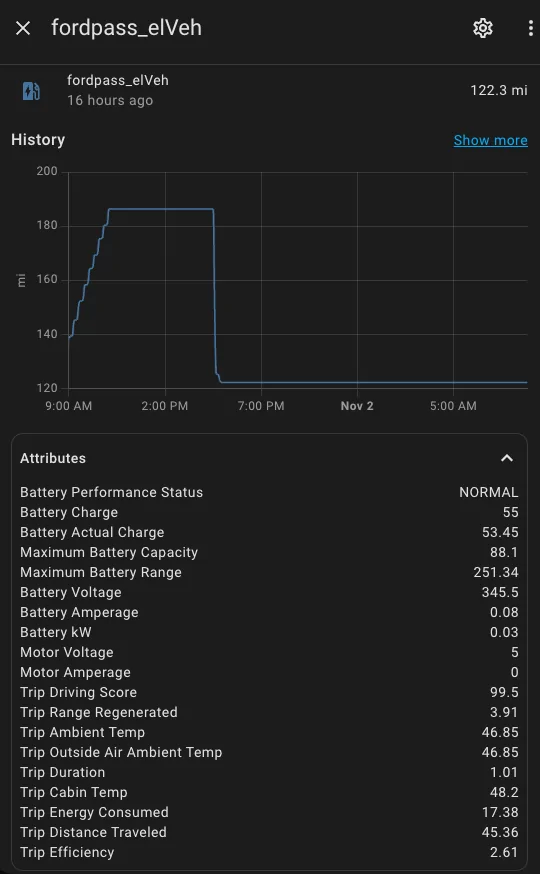
This is what I have for HV Battery SoC - using state stemplate sensor helper:

Code:
{{ state_attr('sensor.fordpass_elveh', 'Battery Charge') | float }}
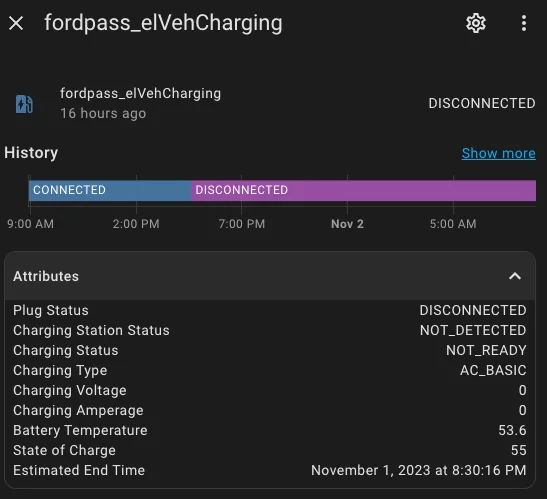
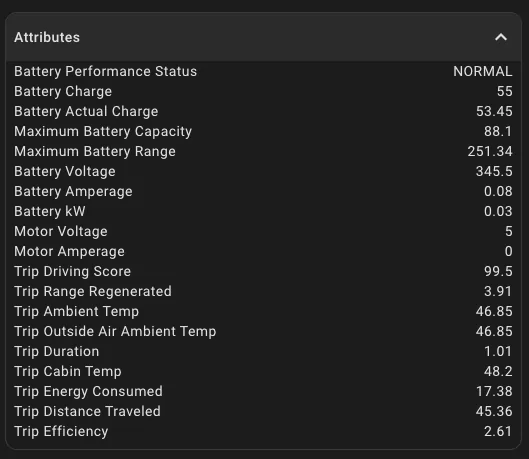
There's a lot of new data in HA now from FordPass integration, which is pretty cool (at least I don't remember these attributes being there in the past)...

Ford Mustang Mach-E Home Assistant Automations - Show them off!!! 1698929736963


Ford Mustang Mach-E Home Assistant Automations - Show them off!!! 1698929714674


Ford Mustang Mach-E Home Assistant Automations - Show them off!!! 1698929697544
 

mdpmdp

Well-Known Member
Joined
Oct 2, 2021
Threads
1
Messages
521
Reaction score
525
Location
Arizona
Vehicles
'22 Premium RWD SR Grabber Blue
Country flag
I thought the HA integration was broken? At least it has been for me since October, and others (based on what I read), due to API lockdowns on Ford's end.
 
OP
OP
DevSecOps

DevSecOps

Well-Known Member
First Name
Todd
Joined
Sep 22, 2021
Threads
69
Messages
4,764
Reaction score
11,624
Location
Sacramento, CA
Vehicles
'21 Audi SQ5 / '23 Rivian R1T / '23 M3P
Occupation
CISO
Country flag
I thought the HA integration was broken? At least it has been for me since October, and others (based on what I read), due to API lockdowns on Ford's end.
It works. Some people are just scared to use it.

I don't think the HA integration has ever caused lockouts. It's been other services.
 

mdpmdp

Well-Known Member
Joined
Oct 2, 2021
Threads
1
Messages
521
Reaction score
525
Location
Arizona
Vehicles
'22 Premium RWD SR Grabber Blue
Country flag
Mine stopped pulling info/updates back in October and I haven't been able to get it linked again. I'll have to look at it again later today.


OP
OP
DevSecOps

DevSecOps

Well-Known Member
First Name
Todd
Joined
Sep 22, 2021
Threads
69
Messages
4,764
Reaction score
11,624
Location
Sacramento, CA
Vehicles
'21 Audi SQ5 / '23 Rivian R1T / '23 M3P
Occupation
CISO
Country flag
Mine stopped pulling info/updates back in October and I haven't been able to get it linked again. I'll have to look at it again later today.
Have you kept it updated using HACS? If you haven't then yes, it has stopped working a number of times but is always resolved with an update. The maintainers do a good job of resolving issues quickly.
 

methorian

Well-Known Member
Joined
Nov 18, 2019
Threads
17
Messages
1,557
Reaction score
2,437
Location
Roanoke, VA
Vehicles
2021 Mach-E First Edition, 2025 Kia EV6 GT-Line
Occupation
IT Admin
Country flag
I thought the HA integration was broken? At least it has been for me since October, and others (based on what I read), due to API lockdowns on Ford's end.
I created a secondary Ford account and linked my Mach-E to that, which is what I use to auth in HA.

Just in case Ford decides to go bananas again.
 

mdpmdp

Well-Known Member
Joined
Oct 2, 2021
Threads
1
Messages
521
Reaction score
525
Location
Arizona
Vehicles
'22 Premium RWD SR Grabber Blue
Country flag
I was basing it around this update on the Android widget which stated that some API changes had disabled certain features, and then the next update stating the old API was shutdown and pending the release of a public API. My HA integration died at the same time (I incorrectly attributed both failures to an update that had come down to the car the night before) and I thought I updated via HACS at the time but perhaps I didn't.
 

bigredx86

Well-Known Member
Joined
Aug 25, 2022
Threads
4
Messages
192
Reaction score
153
Location
Pittsburgh, PA
Vehicles
2023 Ford Mach-E Premium STD AWD
Country flag
I created a secondary Ford account and linked my Mach-E to that, which is what I use to auth in HA.

Just in case Ford decides to go bananas again.
This is a really good idea, may do this and loose my life again to HA again. I walked away as I'd spend to many hours playing with it.
 

aporzio1

Well-Known Member
Joined
Dec 29, 2022
Threads
14
Messages
70
Reaction score
90
Location
Florida
Vehicles
2022 Mach-e GT
Country flag
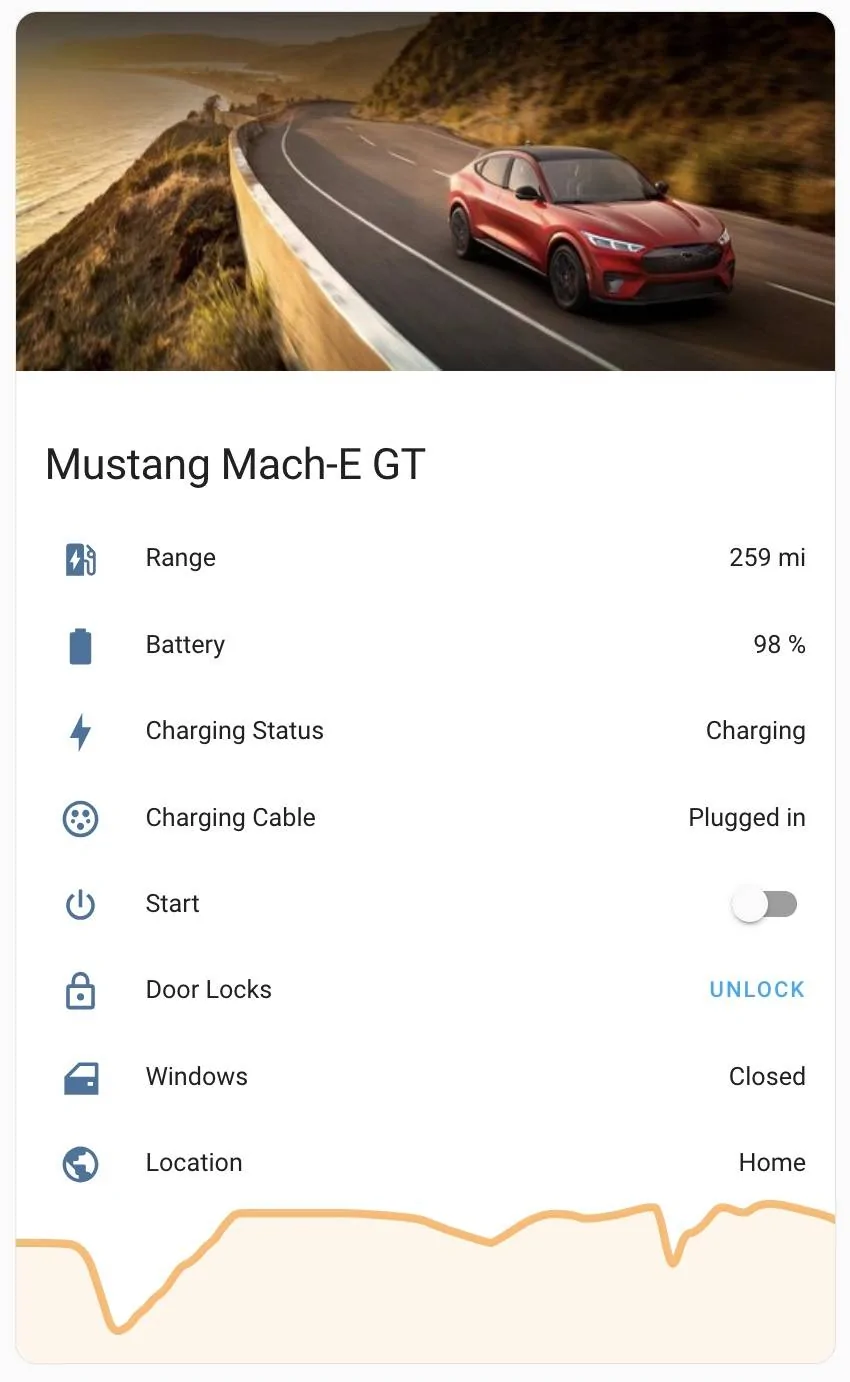
I've been using the Fordpass integration from HACS. And this is the card I was able to make for my front end. It gives me the ability to lock/unlock doors and start the vehicle.

But I really wish I could start and stop charging sessions with it.

My setup:
2023 Mustang Mach-E GT Performance
Tesla Powerwall
Tesla Wall Connector J-1772

Fordpass Integration:
https://github.com/itchannel/fordpass-ha


mache charging v2.webp


YAML:
type: entities
entities:
  - entity: sensor.fordpass_elveh
    name: Range
    secondary_info: none
  - type: attribute
    entity: sensor.fordpass_elveh
    attribute: Battery Fill Level
    name: Battery
    icon: mdi:battery
    suffix: '%'
  - entity: sensor.fordpass_elveh_plug_charging_status
    icon: mdi:lightning-bolt
  - entity: sensor.fordpass_elveh_plug_state
    icon: mdi:ev-plug-type1
  - entity: switch.fordpass_ignition_switch
    name: Start
  - entity: lock.fordpass_doorlock
    name: Door Locks
    icon: mdi:lock-outline
  - entity: sensor.fordpass_windowposition
    name: Windows
    icon: mdi:car-door
  - entity: device_tracker.fordpass_tracker
    name: Location
header:
  type: picture
  image: >-
    https://pictures.dealer.com/l/levittownfordfd/1545/ecf2d68c9eac42e902cfdc51fb31b11ex.jpg?impolicy=downsize_bkpt&w=412
footer:
  type: graph
  graph: line
  entity: sensor.fordpass_elveh
  hours_to_show: 24
  unit: '%'
  detail: 2
title: Mustang Mach-E GT

I made two template sensors to format the data in the attributes of sensor.fordpass_elveh


YAML:
fordpass_elveh_plug_state:
      friendly_name: 'Charging Cable'
      value_template: >
        {% if state_attr('sensor.fordpass_elveh', 'Plug Status') == 1 %}
        Plugged in
        {% elif state_attr('sensor.fordpass_elveh', 'Plug Status') == 0 %}
        NOT Plugged in
        {% else %}
        error
        {% endif %}

    fordpass_elveh_plug_charging_status:
      friendly_name: 'Charging Status'
      value_template: >
        {% if state_attr('sensor.fordpass_elveh', 'Charging Status') == 'ChargingAC' %}
        Charging
        {% elif state_attr('sensor.fordpass_elveh', 'Charging Status') == 'ChargeTargetReached' %}
        Charging Complete
        {% else %}
        NOT Charging
        {% endif %}
How do I add the two sensors?
FYI - for those running latest HA, which changed how template sensors are defined, alohaflyer's code should be changed to this:

YAML:
template:
  - sensor:
    - name: "Charging Cable"
      unique_id: "mache_plug_state"
      state: >
        {% if state_attr('sensor.fordpass_elveh', 'Plug Status') == 1 %}
        Plugged in
        {% elif state_attr('sensor.fordpass_elveh', 'Plug Status') == 0 %}
        NOT Plugged in
        {% else %}
        error
        {% endif %}

  - sensor:
    - name: "Charging Status"
      unique_id: "mache_charging_status"
      state: >
        {% if state_attr('sensor.fordpass_elveh', 'Charging Status') == 'ChargingAC' %}
        Charging
        {% elif state_attr('sensor.fordpass_elveh', 'Charging Status') == 'ChargeTargetReached' %}
        Charging Complete
        {% else %}
        NOT Charging
        {% endif %}
Where do I create the template sensors in HA? I made the dashboard but am not sure how to add sensors
 

hartmms

Well-Known Member
First Name
Michael
Joined
Mar 20, 2023
Threads
18
Messages
413
Reaction score
344
Location
Phoenix, AZ
Vehicles
Mach-e GT-PE, Ram 2500
Occupation
engineer
Country flag
If you have a HA configuration that lets you modify the configuration.yaml, take that YAML I posted and put it into your file and restart HA.

HA has alternative ways to configure this now where you edit the YAML code directly in your entities card on the given dashboard. Click 3 dots in upper right and select "edit dashboard". Find the entity card and click "edit", then "show code editor".

YAML:
type: entities
entities:
  - entity: sensor.fordpass_elveh
    name: Range
    secondary_info: none
  - entity: sensor.fordpass_elvehcharging
    name: Plug
  - type: attribute
    entity: sensor.fordpass_elvehcharging
    name: Charge Status
    attribute: Charging Status
  - type: attribute
    entity: sensor.fordpass_elvehcharging
    attribute: State of Charge
    name: Battery
    icon: mdi:battery
    suffix: '%'
  - type: attribute
    entity: sensor.fordpass_elvehcharging
    attribute: Estimated End Time
    name: ETA for full charge
    icon: mdi:clock
  - type: attribute
    entity: sensor.fordpass_elvehcharging
    attribute: Charging Voltage
    name: Charging Volts
    icon: mdi:sine-wave
    suffix: V
  - type: attribute
    entity: sensor.fordpass_elvehcharging
    attribute: Charging Amperage
    name: Charging Amps
    icon: mdi:current-ac
    suffix: A
  - type: attribute
    entity: sensor.fordpass_elvehcharging
    attribute: Battery Temperature
    name: Battery Temp
    icon: mdi:thermometer
 

music_cities

Well-Known Member
Joined
Nov 7, 2023
Threads
53
Messages
671
Reaction score
679
Location
Calgary, Canada
Vehicles
Mach E 2022 GT
Country flag
Hey, I use Hubitat and I'm going to use a Shelly Wifi Relay (indirectly, triggering a bigger 20Amp relay) to share a 20Amp 240V circuit between an existing garage heater and my brand new Grizzl-E charger. Can I have the MME tell Hubitat its SOC, so I can have tell Hubitat to switch the relay back to the garage heater when the SOC reaches 90%?

This way I could plug in the car in the evening, switching the relay over to the EV charger, and still have a toasty garage in the morning when I depart for skiing.
 
OP
OP
DevSecOps

DevSecOps

Well-Known Member
First Name
Todd
Joined
Sep 22, 2021
Threads
69
Messages
4,764
Reaction score
11,624
Location
Sacramento, CA
Vehicles
'21 Audi SQ5 / '23 Rivian R1T / '23 M3P
Occupation
CISO
Country flag
Hey, I use Hubitat and I'm going to use a Shelly Wifi Relay (indirectly, triggering a bigger 20Amp relay) to share a 20Amp 240V circuit between an existing garage heater and my brand new Grizzl-E charger. Can I have the MME tell Hubitat its SOC, so I can have tell Hubitat to switch the relay back to the garage heater when the SOC reaches 90%?

This way I could plug in the car in the evening, switching the relay over to the EV charger, and still have a toasty garage in the morning when I depart for skiing.
There's nothing developed for HE that I'm aware of that will interface with the FP API, so the answer would be no. You could do this with Home Assistant, but not with HE.


Top