

dtbaker61
Well-Known Member
- First Name
- Dan
- Joined
- May 11, 2020
- Threads
- 126
- Messages
- 4,822
- Reaction score
- 4,525
- Location
- santa fe,nm
- Website
- www.envirokarma.org
- Vehicles
- MME (delivered 2/26/21), DIY eMiata BEV
- Occupation
- Solar Sales/install

- Thread starter
- #1
One of the first things I asked @Ford Motor Company for to enhance the dashboard/instrument information is real-time display of Power Output/Regen/Charging in kW, and Battery Energy remaining in kWhr.
No response of course.... so I went in search of the easiest and most cost effective way to display 'custom' information. Turns out that it is pretty easy, and not very expensive. All you need is:
- a free phone App
- a OBD-II reader
- (optional) phone holder to position phone somewhere near your line of sight
1. get the phone app to display scan data
from Android PlayStore or iOS, download/install 'Car Scanner ELM OBD2'
some addl documentation is available online at
https://www.carscanner.info/
There are other choices available now, but CarScanner does what I wanted. Basic App is free, but I paid $6 to upgrade to 'pro' version to support the developer.
2. buy an OBD2 adapter with full ELM protocol support
CarScanner developer recommends 'quality' ODB2 with full ELM protocol support
such as: Viecar Bluetooth 4
$25 https://www.amazon.com/gp/product/B01MTKSCEJ/ref=ppx_yo_dt_b_asin_title_o00_s00?
3. first-time config of CarScanner
download app, install app
plug OBD2 into port, turn car 'on'
pair phone to OBD2 device
open CarScan app, select paired device, 'connect'
configure app
- create a 'vehicle', etc
- create a Dashboard to display desired sensors
4. Then, to use
plug OBD2 into Port, turn car 'on'
open CarScan app, 'connect', which can take 30 seconds...
Settings-> pick what you want to do
- Dashboard to show selected sensor datastreams
- display/export DTC for error codes recorded
- record Accelleration for accurate performance testing
etc, some of which are for ICE cars only
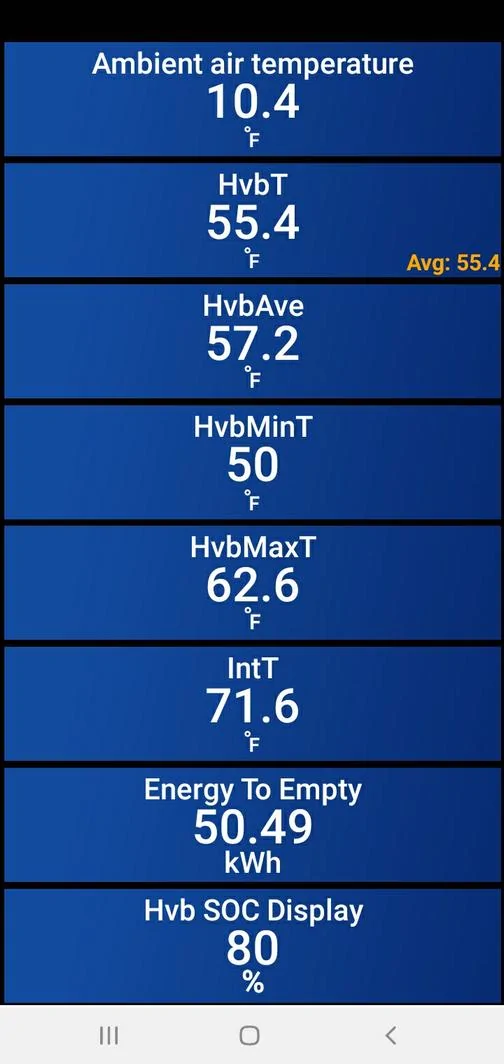
It is pretty simple to create your own dashboard to display whatever sensor data you want. This is a sample layout that I find useful:

and I found a very affordable phone holder from @AOSK that I modified a little to hold the phone where I wanted AND block the sun from cooking the back of my center display. https://www.macheforum.com/site/thr...display-all-phone-apps-like-carscanner.20913/

I find this combination very useful to display actual Output/Regen/Charging power, and actual battery capacity remaining as well as battery temp
[update 1/20/24 to add some step-by-step info on setup, and my current config file.cbz] --------------------------------------
- open CanScanner app on phone
- click 'settings' ,
- set up connection profile for Ford Mustang Mach-e
- 'backup' config file once you have it set up, or import .cbz
- ....back
- click lower-right 'demo' button to enable setting up y dashboard
- click 'dashboard' to display 1/16 possible layouts. each layout allows you to put whatever sensor you want in the box. I like layout 4/16. you can scroll thru possible layouts by touching upper left of screen, and << or >> to different layouts.
- dble-touch any gauge area to edit what data goes in the area.
...attaching my .cbz with .txt extension, you'll have to rename to remove the .txt if you want to import it to CarScanner
No response of course.... so I went in search of the easiest and most cost effective way to display 'custom' information. Turns out that it is pretty easy, and not very expensive. All you need is:
- a free phone App
- a OBD-II reader
- (optional) phone holder to position phone somewhere near your line of sight
1. get the phone app to display scan data
from Android PlayStore or iOS, download/install 'Car Scanner ELM OBD2'
some addl documentation is available online at
https://www.carscanner.info/
There are other choices available now, but CarScanner does what I wanted. Basic App is free, but I paid $6 to upgrade to 'pro' version to support the developer.
2. buy an OBD2 adapter with full ELM protocol support
CarScanner developer recommends 'quality' ODB2 with full ELM protocol support
such as: Viecar Bluetooth 4
$25 https://www.amazon.com/gp/product/B01MTKSCEJ/ref=ppx_yo_dt_b_asin_title_o00_s00?
3. first-time config of CarScanner
download app, install app
plug OBD2 into port, turn car 'on'
pair phone to OBD2 device
open CarScan app, select paired device, 'connect'
configure app
- create a 'vehicle', etc
- create a Dashboard to display desired sensors
4. Then, to use
plug OBD2 into Port, turn car 'on'
open CarScan app, 'connect', which can take 30 seconds...
Settings-> pick what you want to do
- Dashboard to show selected sensor datastreams
- display/export DTC for error codes recorded
- record Accelleration for accurate performance testing
etc, some of which are for ICE cars only
It is pretty simple to create your own dashboard to display whatever sensor data you want. This is a sample layout that I find useful:
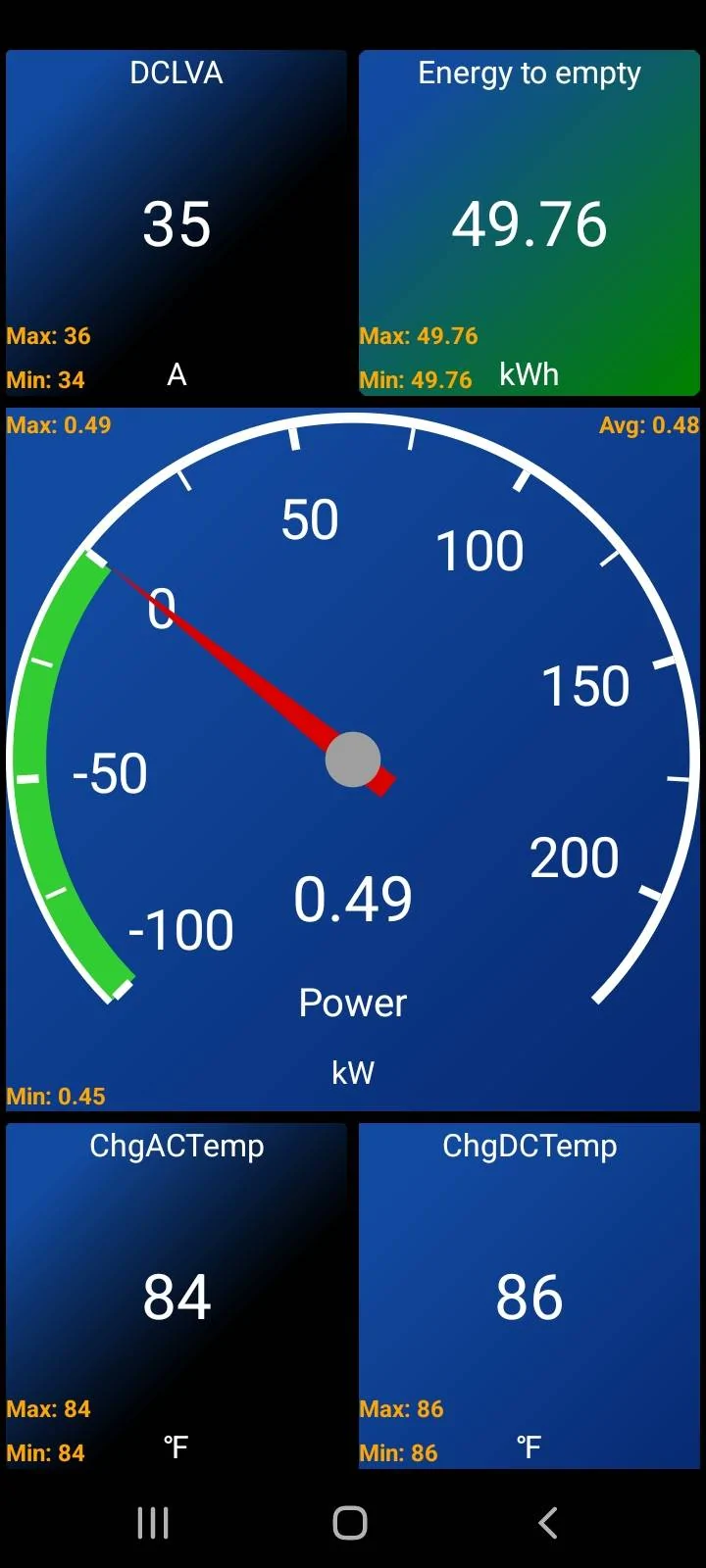
and I found a very affordable phone holder from @AOSK that I modified a little to hold the phone where I wanted AND block the sun from cooking the back of my center display. https://www.macheforum.com/site/thr...display-all-phone-apps-like-carscanner.20913/
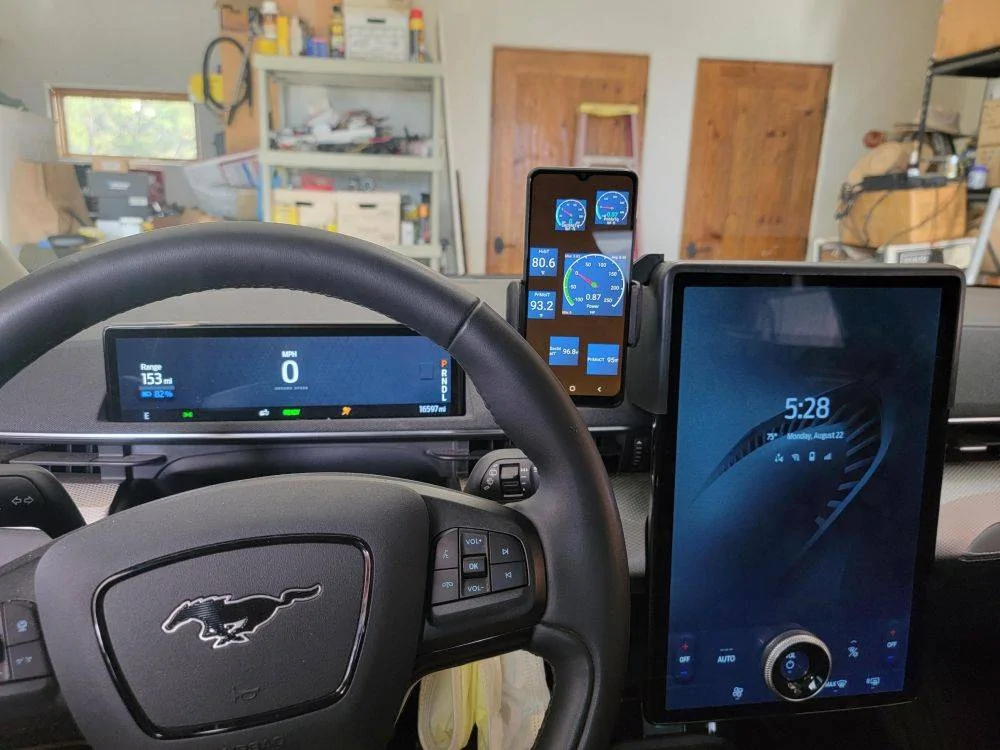
I find this combination very useful to display actual Output/Regen/Charging power, and actual battery capacity remaining as well as battery temp
[update 1/20/24 to add some step-by-step info on setup, and my current config file.cbz] --------------------------------------
- open CanScanner app on phone
- click 'settings' ,
- set up connection profile for Ford Mustang Mach-e
- 'backup' config file once you have it set up, or import .cbz
- ....back
- click lower-right 'demo' button to enable setting up y dashboard
- click 'dashboard' to display 1/16 possible layouts. each layout allows you to put whatever sensor you want in the box. I like layout 4/16. you can scroll thru possible layouts by touching upper left of screen, and << or >> to different layouts.
- dble-touch any gauge area to edit what data goes in the area.
...attaching my .cbz with .txt extension, you'll have to rename to remove the .txt if you want to import it to CarScanner
Sponsored
Attachments
-
372.2 KB Views: 466
Last edited:


 ,) but if the key combinations/access method is steep enough, only the geeks would use it.


