
HowTo: use OBD-II and CarScanner to see Power Output/Regen/Charging and other data
OP
OP

dtbaker61
Well-Known Member
- First Name
- Dan
- Joined
- May 11, 2020
- Threads
- 126
- Messages
- 4,822
- Reaction score
- 4,525
- Location
- santa fe,nm
- Website
- www.envirokarma.org
- Vehicles
- MME (delivered 2/26/21), DIY eMiata BEV
- Occupation
- Solar Sales/install

- Thread starter
- #17
It takes a little messing around..... Here's the way I have mine set up currently:Thank you for the article and instructions. Got it working. Now on to figure out how to customize the screen.
- open CanScanner app on phone
- click 'settings' ,
- set up connection profile for Ford Mustang Mach-e
- 'backup' config file once you have it set up, or import
- ....back
- click lower-right 'demo' button to enable setting up y dashboard
- click 'dashboard' to display 1/16 possible layouts. each layout allows you to put whatever sensor you want in the box. I like layout 4/16. you can scroll thru possible layouts by touching upper left of screen, and << or >> to different layouts.
- dble-touch any gauge area to edit what data goes in the area.
- I just saved my current config, and exported to a .cbz file.... not sure I can upload it to this thread, but will try to put this info up in the top post of the thread.
JimmyMachE
Well-Known Member
Actually, there are over 20 screens preloaded in the Mach-E profile:Thank you for the article and instructions. Got it working. Now on to figure out how to customize the screen.
settings >> Dashboard >> reset dashboard to default
(Mach-E should be selected as Connection profile)
OP
OP
dtbaker61
Well-Known Member
- First Name
- Dan
- Joined
- May 11, 2020
- Threads
- 126
- Messages
- 4,822
- Reaction score
- 4,525
- Location
- santa fe,nm
- Website
- www.envirokarma.org
- Vehicles
- MME (delivered 2/26/21), DIY eMiata BEV
- Occupation
- Solar Sales/install
- Thread starter
- #19
I haven't updated my version of CarScanner in a while.... only 16 preconfigured in my version.Actually, there are over 20 screens preloaded in the Mach-E profile:
settings >> Dashboard >> reset dashboard to default
(Mach-E should be selected as Connection profile)

I did attach my .cbz backup config file to the top post if anybody wants it. For me, the primary display I wanted to see while driving is the power output/regen (in kW), so I made that as big as possible and a 'dial' I could glance at without needing my reading glasses.
I sure wish I could cast the display to the center screen without any additional hardware and expense.
JimmyMachE
Well-Known Member
This looks like a free solution without any additional hardware (haven't tested it yet) - AAMirror allows mirroring of the phone screen, but without touch functions on AA:I sure wish I could cast the display to the center screen without any additional hardware and expense.
https://github.com/shmykelsa/AAAD
https://github.com/croccio/Android-Auto-Store
Last edited:
OP
OP
dtbaker61
Well-Known Member
- First Name
- Dan
- Joined
- May 11, 2020
- Threads
- 126
- Messages
- 4,822
- Reaction score
- 4,525
- Location
- santa fe,nm
- Website
- www.envirokarma.org
- Vehicles
- MME (delivered 2/26/21), DIY eMiata BEV
- Occupation
- Solar Sales/install
- Thread starter
- #21
I tried this, but could not get it to work. If you do please post detailed step by stepThis looks like a free solution without any additional hardware (haven't tested it yet) - AAMirror allows mirroring of the phone screen, but without touch functions on AA:
https://github.com/shmykelsa/AAAD
https://github.com/croccio/Android-Auto-Store

Beewize2
Active Member
- First Name
- Bee
- Joined
- Oct 27, 2023
- Threads
- 7
- Messages
- 29
- Reaction score
- 8
- Location
- Washington, District of Columbia
- Vehicles
- Mach-E
This helped me a lot

metalpro2021
Well-Known Member
- First Name
- Chris
- Joined
- Apr 5, 2021
- Threads
- 11
- Messages
- 139
- Reaction score
- 114
- Location
- Amsterdam
- Vehicles
- Mach-e 1st edition
- Occupation
- Software architect

Why not start an open source project on creating a Android Auto/ Apple Carplay app using the OBD2 adapter displaying the data in Porsche (Macan) style on a tablet/phone? (Great video by Kyle showing it: (16) Full Tour Of The Porsche Macan EV! Impressive Range, Charging & Performance Leads To A Great Package - YouTube 1:07:05 timestamp) It is doable. I am capable (technical skills) to build it, but do not have the time. But I am able to help occasionally.
Last edited:
Nikos
Well-Known Member
- Joined
- Dec 29, 2019
- Threads
- 2
- Messages
- 594
- Reaction score
- 547
- Location
- Taylors SC
- Vehicles
- 17 Must GT, 21MME AWD, 22 F-150 Lightning
- Occupation
- Aircraft Mechanic
I got it working. Not without some head scratching. The weirdest thing was that the displayed windows showing the data upside down.It takes a little messing around..... Here's the way I have mine set up currently:
- open CanScanner app on phone
- click 'settings' ,
- set up connection profile for Ford Mustang Mach-e
- 'backup' config file once you have it set up, or import
- ....back
- click lower-right 'demo' button to enable setting up y dashboard
- click 'dashboard' to display 1/16 possible layouts. each layout allows you to put whatever sensor you want in the box. I like layout 4/16. you can scroll thru possible layouts by touching upper left of screen, and << or >> to different layouts.
- dble-touch any gauge area to edit what data goes in the area.
- I just saved my current config, and exported to a .cbz file.... not sure I can upload it to this thread, but will try to put this info up in the top post of the thread.
Android also was interfering with the Bluetooth connection.
Now, I have to work with the tray and the phone holder.
I picked a screen with 8 displayed values. I will stick with it for now.
Also, I upgraded to the pro version.
I got inundated with the options.
Trying to keep it simple.
Thanks for showing and sharing your work in the forum.
Lightning is next.
GarageWarrior2023
Well-Known Member
- Joined
- Aug 18, 2023
- Threads
- 13
- Messages
- 238
- Reaction score
- 179
- Location
- Manitoba, Canada
- Vehicles
- 2023 Mustang Mach-E Premium x2

Not sure why Ford won't allow for this data to be shown or for customization in the instrument panel.....One of the first things I asked @Ford Motor Company for to enhance the dashboard/instrument information is real-time display of Power Output/Regen/Charging in kW, and Battery Energy remaining in kWhr.
No response of course....
I came from a 22 Bolt EUV, it had the KW in/out in live view on the instrument cluster. I WANT THIS FOR THE MACH-E SO BADLY!!!!
Honestly, put it on the left-most side of the instrument display as a thin band in that UNUSED space. There's room for it and why not have it if the information is there to be used via an OBDII reader.
Having this information is critical to EV efficiency and adjusting your habits to match an EV's efficiency sweet spots. I know that my habits changed dramatically when driving the BOLT and I have lost a lot of efficiency now driving the Mach-E "blind".
In my opinion, Ford should do a couple of things with the instrument cluster:
1. add the KW in/out live meter
2. add the ability to do slight customizations to this screen
2A. Show or hide the KW in/out live display
2B. Show the battery remaining as either a percentage off to the side or as a bar graph (not my cup of tea, I prefer the percentage readout as it's more precise, but since the UI change there are those upset with not seeing the bar graph)
2C. Ability to switch the locations of the vehicle/speedo so that drivers can opt to center or not center the speed readout (again, I'm fine with how ford has redone things, and don't care if the speed is not centered, but for those it does bother, at least they have a choice)
Most owners appreciate the ability to make slight adjustments to the instrument view to suit their needs and Instead of trying to please everyone with one fixed style....why not just add basic customization to allow for a small amount of choice. Then everyone can be happy....

SteveJo
Well-Known Member
- First Name
- Steve
- Joined
- Apr 17, 2020
- Threads
- 12
- Messages
- 234
- Reaction score
- 360
- Location
- Chadds Ford, PA, USA
- Vehicles
- 2010 Ford Fusion Hybrid, Job 1 Mach-e/X
You are correct, sir.CarScanner is NOT supported directly by CarPlay or AndroidAuto unfortunately. There are a couple members that have added third party stuff to display unsupported apps, but it requires some extra equipment costing several hundred dollars.....

Jiji
Well-Known Member
- First Name
- Rick
- Joined
- Jul 26, 2021
- Threads
- 24
- Messages
- 496
- Reaction score
- 646
- Location
- Finger Lakes
- Vehicles
- 2022 Mustang Mach-E GT 2024 F-150 Lightning
TL;DR: Scan tool data greatly enhances trip/charge logs but don't get your hopes up it still is extra work - I might not bother if it wasn't my baby.
Been a long while since I last posted on my Mach-E iPhone app but I do have some experience in integrating the scan tool live data while recording trips and charges. This is just a hobby and now that I have an R1S I ported, and greatly enhanced the code to work with the Rivian..
There are differences, Rivian encrypts the diagnostic data so I am limited by what I can pull from the Rivian API, basically the odometer, SoC, and gear position for trips. The Mach-E is much better since I now only have full access to the OBDII data without any lag I can detect state changes much more quickly.
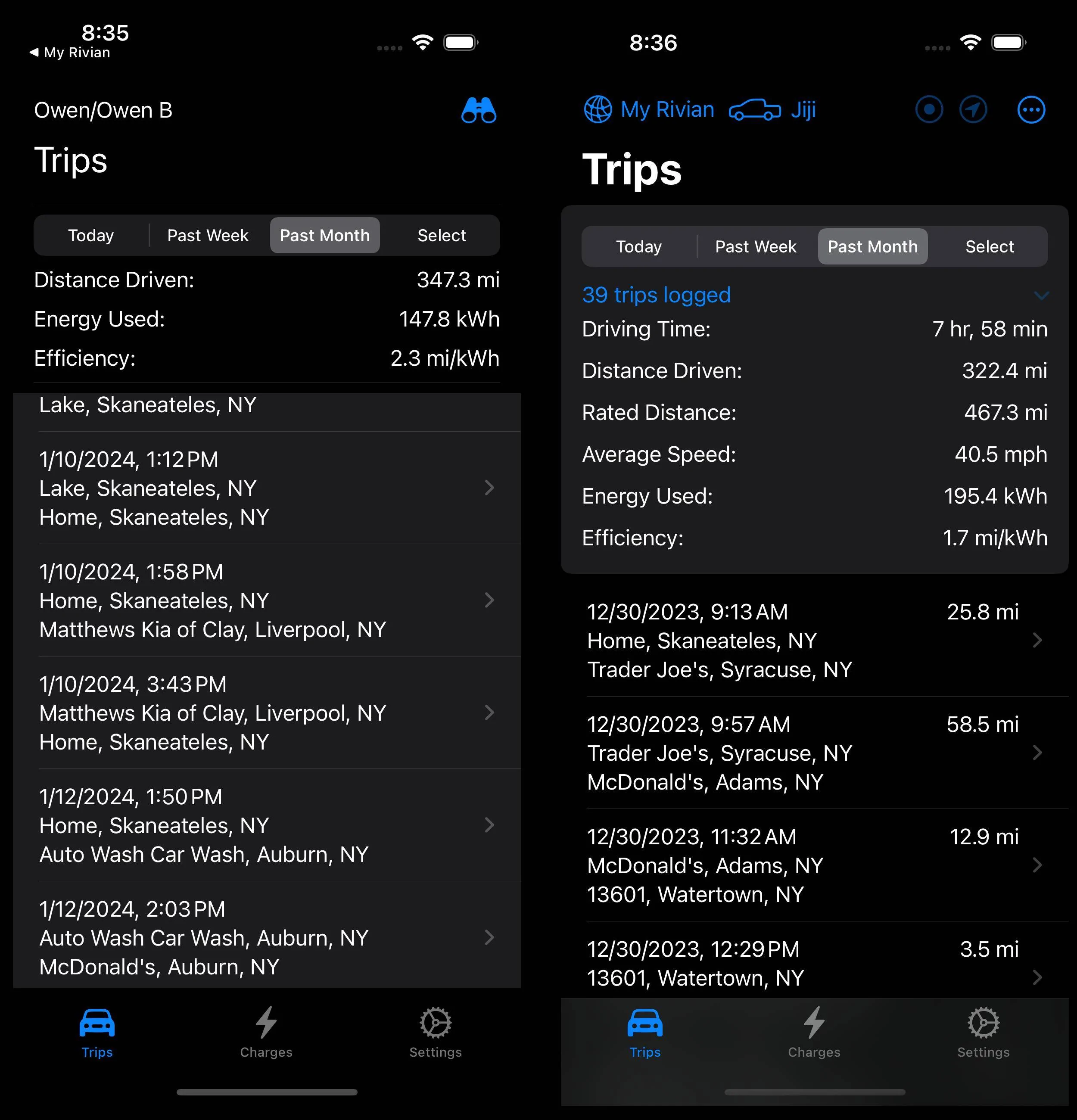
So here is a side-by-side comparison of Trips tab, nothing too nice to see but the summaries and lists of trips (Mach-E on the left). In general the Rivian version is more refined and has many more features since I stopped working on the Mach-E app to create the Rivian app and I have learned many new iOS tricks since then:

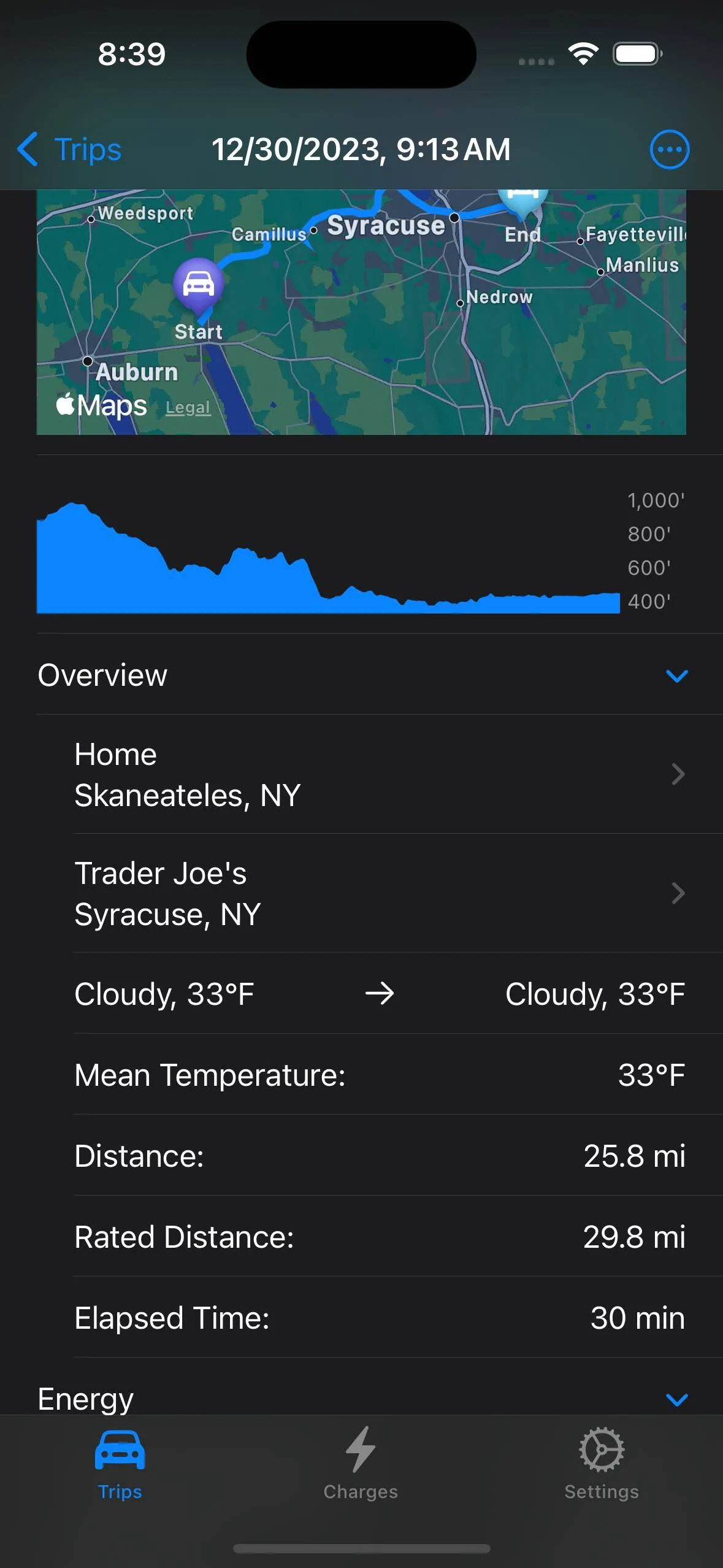
If we drill into the details of a Rivian trip we can see the improvements and but you won't find any battery data since there isn't any. But the basics of the route, elevation profile, and trip details are all here (in case you are wondering, rated distance is the range consumed by the trip):

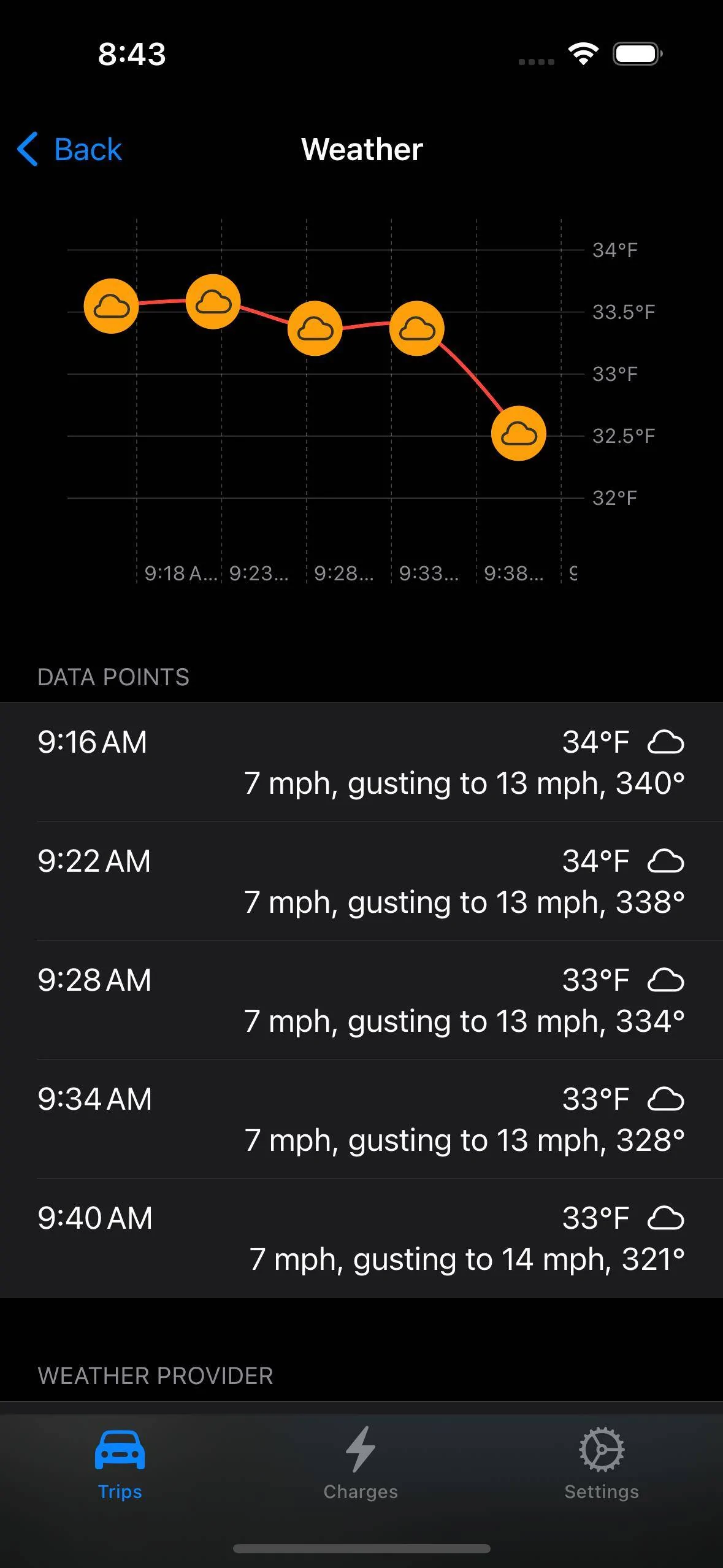
What is new is that I can tap into Apple Weather so I can record the weather along the route, the Rivian only has the cabin temperature and there are so many variables that affect the efficiency:
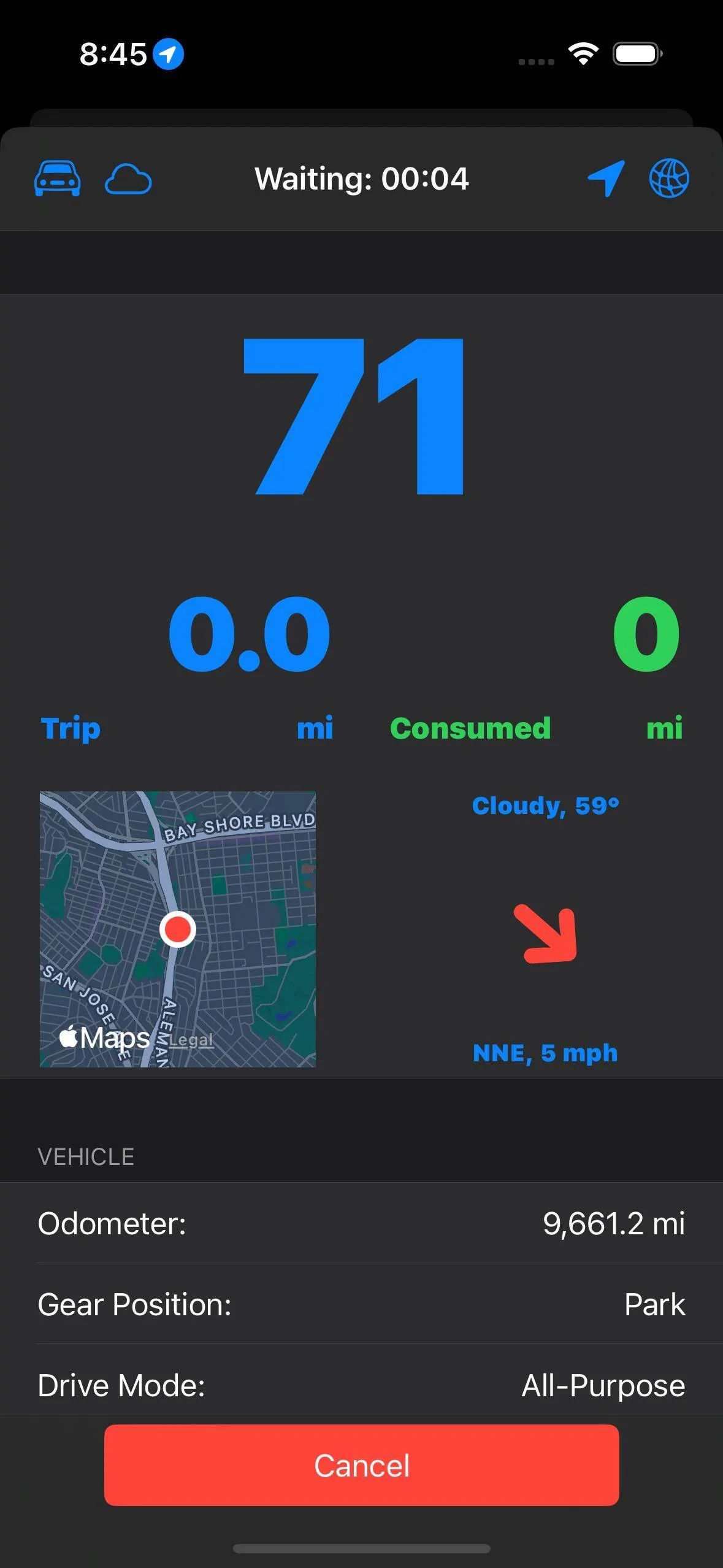
And during the trip the Rivian app displays a dashboard with vehicle and weather information. In this display (taken from the simulator) you have the GPS speed (to compare the 'air speed'), a trip odometer and the range consumed (green if you are consuming range slower than trip odometer), and then a little bit of weather but here the red arrow indicates I have a quartering headwind with the size proportional to the headwind magnitude). Just a lot of useless data to geek out on.
As I learn new programming skills there is more, like support for the Dynamic Island and Lock Screen widgets since most things can run in the background:
Each solution has its merits, the Rivian requires no scan tool but lacks any sort of good data, it even lacks any energy data so energy is estimated from the change in the SoC. I also start trips and changes manually since I would otherwise be polling the API for a gear position change and draining you phone's battery.
The Mach-E has the issue of making sure you are connected to the Bluetooth scan tool, but once you connect it is pretty solid. It also has the benefit not requiring a cell signal s I have now figured out how to cache failed writes and retry them at a. later time.
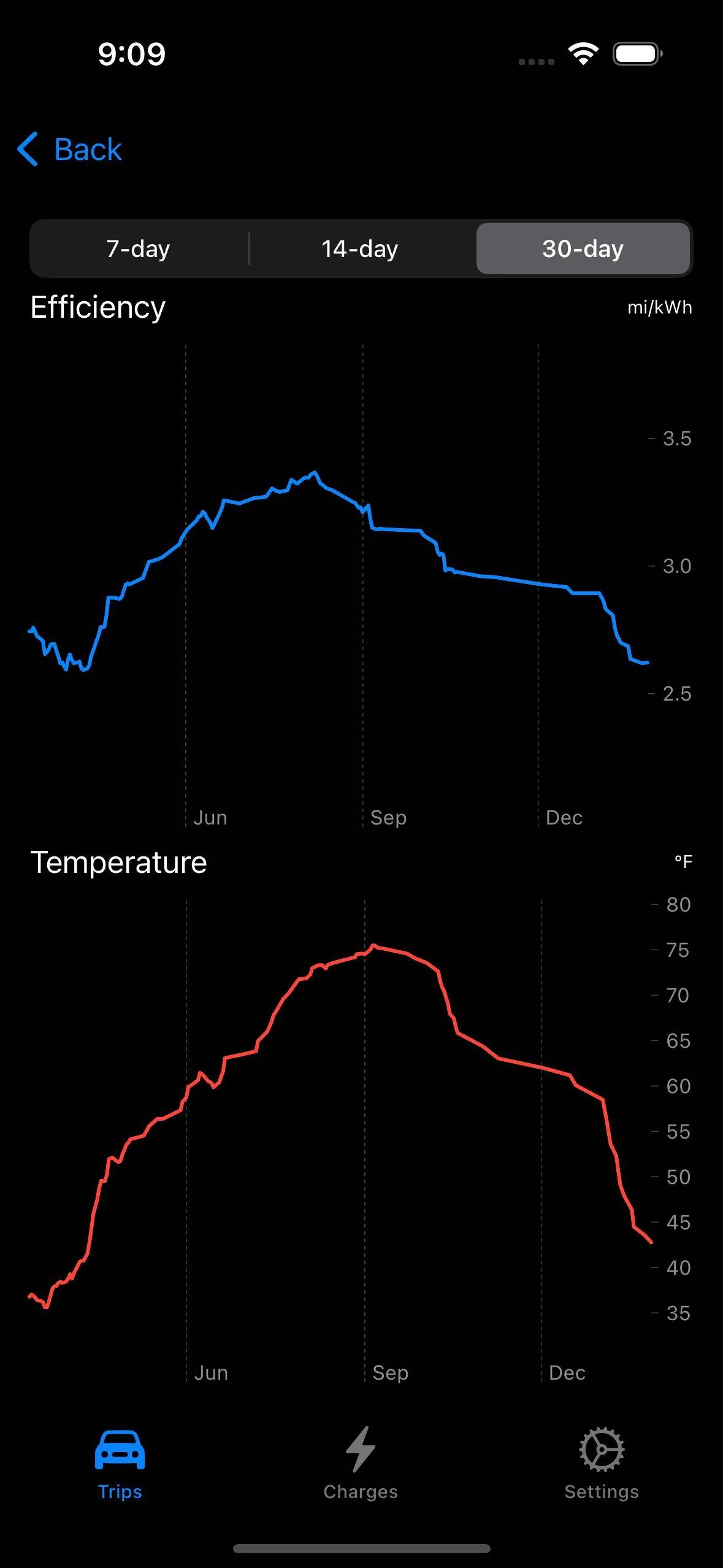
My favorite graph is just watching the efficiency ebb and flow with the seasons now that I have more than a year of data. Recording can be a chore and the results are solely for your entertainment, "Hey, wanna see my last DCFC charge curve?", but it is great see how much more efficient the Mach-E is and it doesn't lose kWh/day just sitting.
Been a long while since I last posted on my Mach-E iPhone app but I do have some experience in integrating the scan tool live data while recording trips and charges. This is just a hobby and now that I have an R1S I ported, and greatly enhanced the code to work with the Rivian..
There are differences, Rivian encrypts the diagnostic data so I am limited by what I can pull from the Rivian API, basically the odometer, SoC, and gear position for trips. The Mach-E is much better since I now only have full access to the OBDII data without any lag I can detect state changes much more quickly.
So here is a side-by-side comparison of Trips tab, nothing too nice to see but the summaries and lists of trips (Mach-E on the left). In general the Rivian version is more refined and has many more features since I stopped working on the Mach-E app to create the Rivian app and I have learned many new iOS tricks since then:
If we drill into the details of a Rivian trip we can see the improvements and but you won't find any battery data since there isn't any. But the basics of the route, elevation profile, and trip details are all here (in case you are wondering, rated distance is the range consumed by the trip):
What is new is that I can tap into Apple Weather so I can record the weather along the route, the Rivian only has the cabin temperature and there are so many variables that affect the efficiency:
And during the trip the Rivian app displays a dashboard with vehicle and weather information. In this display (taken from the simulator) you have the GPS speed (to compare the 'air speed'), a trip odometer and the range consumed (green if you are consuming range slower than trip odometer), and then a little bit of weather but here the red arrow indicates I have a quartering headwind with the size proportional to the headwind magnitude). Just a lot of useless data to geek out on.
As I learn new programming skills there is more, like support for the Dynamic Island and Lock Screen widgets since most things can run in the background:
Each solution has its merits, the Rivian requires no scan tool but lacks any sort of good data, it even lacks any energy data so energy is estimated from the change in the SoC. I also start trips and changes manually since I would otherwise be polling the API for a gear position change and draining you phone's battery.
The Mach-E has the issue of making sure you are connected to the Bluetooth scan tool, but once you connect it is pretty solid. It also has the benefit not requiring a cell signal s I have now figured out how to cache failed writes and retry them at a. later time.
My favorite graph is just watching the efficiency ebb and flow with the seasons now that I have more than a year of data. Recording can be a chore and the results are solely for your entertainment, "Hey, wanna see my last DCFC charge curve?", but it is great see how much more efficient the Mach-E is and it doesn't lose kWh/day just sitting.
OP
OP
dtbaker61
Well-Known Member
- First Name
- Dan
- Joined
- May 11, 2020
- Threads
- 126
- Messages
- 4,822
- Reaction score
- 4,525
- Location
- santa fe,nm
- Website
- www.envirokarma.org
- Vehicles
- MME (delivered 2/26/21), DIY eMiata BEV
- Occupation
- Solar Sales/install
- Thread starter
- #28
yes... it would be pretty darn easy for @Ford Motor Company to add some small level of customization in 'areas' of the instrument display. My top priorities would be :Not sure why Ford won't allow for this data to be shown or for customization in the instrument panel.....
I came from a 22 Bolt EUV, it had the KW in/out in live view on the instrument cluster. I WANT THIS FOR THE MACH-E SO BADLY!!!!
Honestly, put it on the left-most side of the instrument display as a thin band in that UNUSED space. There's room for it and why not have it if the information is there to be used via an OBDII reader.
Having this information is critical to EV efficiency and adjusting your habits to match an EV's efficiency sweet spots. I know that my habits changed dramatically when driving the BOLT and I have lost a lot of efficiency now driving the Mach-E "blind".
In my opinion, Ford should do a couple of things with the instrument cluster:
1. add the KW in/out live meter
2. add the ability to do slight customizations to this screen
2A. Show or hide the KW in/out live display
2B. Show the battery remaining as either a percentage off to the side or as a bar graph (not my cup of tea, I prefer the percentage readout as it's more precise, but since the UI change there are those upset with not seeing the bar graph)
2C. Ability to switch the locations of the vehicle/speedo so that drivers can opt to center or not center the speed readout (again, I'm fine with how ford has redone things, and don't care if the speed is not centered, but for those it does bother, at least they have a choice)
Most owners appreciate the ability to make slight adjustments to the instrument view to suit their needs and Instead of trying to please everyone with one fixed style....why not just add basic customization to allow for a small amount of choice. Then everyone can be happy....
1. a bar or dial showing real-time power (in kW) for output/regen power. -120kw to +250kw output
2. the ability to toggle battery SOC display from % to kWhr remaining
3. the ability to select different methods of calculating/displaying the estimated range remaining on GOM. My preferred method would be based on 'rolling average miles/kwhr over last 50 miles'..... this would automatically adjust for terrain, temps, and type of driving done over the last 50 miles to predict estimated range remaining
but, since we do not have that capability..... OBD2+Carscanner displayed on your phone is a very effective solution costing less than $50 to implement yourself.

Dr Obnxs
Well-Known Member
- First Name
- Matt
- Joined
- Dec 30, 2020
- Threads
- 3
- Messages
- 181
- Reaction score
- 215
- Location
- Woodside, CA
- Website
- www.drobnxs.com
- Vehicles
- 21 MME, 65 Mustang Too Many to List!
- Occupation
- Physicist
Thank you for this. I know Ford wanted this to seem like a car, but hell, my Pacific PHEV has more info and dash configurability than the Mach-E. I mean, c'mon.
This is a great add.
This is a great add.
GarageWarrior2023
Well-Known Member
- Joined
- Aug 18, 2023
- Threads
- 13
- Messages
- 238
- Reaction score
- 179
- Location
- Manitoba, Canada
- Vehicles
- 2023 Mustang Mach-E Premium x2
You have some great ideas for different selectable options. They make a lot of sense.yes... it would be pretty darn easy for @Ford Motor Company to add some small level of customization in 'areas' of the instrument display. My top priorities would be :
1. a bar or dial showing real-time power (in kW) for output/regen power. -120kw to +250kw output
2. the ability to toggle battery SOC display from % to kWhr remaining
3. the ability to select different methods of calculating/displaying the estimated range remaining on GOM. My preferred method would be based on 'rolling average miles/kwhr over last 50 miles'..... this would automatically adjust for terrain, temps, and type of driving done over the last 50 miles to predict estimated range remaining
but, since we do not have that capability..... OBD2+Carscanner displayed on your phone is a very effective solution costing less than $50 to implement yourself.
It seems like for many of us there's similar crossover in what we are looking for. And the over arching issue is that we just simply aren't being given enough data to drive these EV's like they are EV's.
Yes the OBDII option is data-heaven, I even have a hand full of bluetooth OBDII adapters sitting in my garage I can use for this. I will most likely setup Car Scanner and try this out. It's just a shame that this data can't be granted from within the built in UI of the vehicle yet.
Sponsored
Similar threads

- Replies
- 21
- Views
- 7,225

- Replies
- 66
- Views
- 13,759


- Replies
- 13
- Views
- 5,611