fleeps

Well-Known Member
First Name
Ray
Joined
Jun 19, 2023
Threads
6
Messages
66
Reaction score
93
Location
Maryland, USA
Vehicles
Mach-E Premium, AWD, Extended Battery, Rapid Red
Country flag
You might want to reset CarScanner settings to 'default', and go back through your settings.... particularly the units.
I don't know how to change the units. It's not like I had to define what EV Battery Power means, what units it uses, etc. I just picked a sensor from a list. It is what it is, and I don't see any way to change it.

And I've tried installing CarScanner on a different phone with the same result.
Sponsored

 
OP
OP
dtbaker61

dtbaker61

Well-Known Member
First Name
Dan
Joined
May 11, 2020
Threads
126
Messages
4,822
Reaction score
4,525
Location
santa fe,nm
Website
www.envirokarma.org
Vehicles
MME (delivered 2/26/21), DIY eMiata BEV
Occupation
Solar Sales/install
Country flag
I don't know how to change the units. It's not like I had to define what EV Battery Power means, what units it uses, etc. I just picked a sensor from a list. It is what it is, and I don't see any way to change it.

And I've tried installing CarScanner on a different phone with the same result.
have you tried using a different odb2 ? a viecar like the one I provided a link for in the top post for instance ?
 

fleeps

Well-Known Member
First Name
Ray
Joined
Jun 19, 2023
Threads
6
Messages
66
Reaction score
93
Location
Maryland, USA
Vehicles
Mach-E Premium, AWD, Extended Battery, Rapid Red
Country flag
have you tried using a different odb2 ? a viecar like the one I provided a link for in the top post for instance ?
I finally received a Viecar, and the behavior is identical. I still get near zero power, as though the power scale were measured in MWh instead of kWh.
 
OP
OP
dtbaker61

dtbaker61

Well-Known Member
First Name
Dan
Joined
May 11, 2020
Threads
126
Messages
4,822
Reaction score
4,525
Location
santa fe,nm
Website
www.envirokarma.org
Vehicles
MME (delivered 2/26/21), DIY eMiata BEV
Occupation
Solar Sales/install
Country flag
I finally received a Viecar, and the behavior is identical. I still get near zero power, as though the power scale were measured in MWh instead of kWh.
I was hoping it was the odb2. Last thing I can think of is to uninstall, reinstall car scanner, and reset to defaults. There may be something along the way that you changed when putting the car in your garage that you did not realize. Default settings seem to work
 

fleeps

Well-Known Member
First Name
Ray
Joined
Jun 19, 2023
Threads
6
Messages
66
Reaction score
93
Location
Maryland, USA
Vehicles
Mach-E Premium, AWD, Extended Battery, Rapid Red
Country flag
Last thing I can think of is to uninstall, reinstall car scanner, and reset to defaults.
Nope. I saw that the app had an update on Mar 4, but still was no good. The one variable I have not been able to vary is the car. I think I'll visit the dealer and try other cars, especially if they have any used cars.
 
Last edited:


TheGM

New Member
First Name
Gary
Joined
Sep 24, 2023
Threads
0
Messages
4
Reaction score
1
Location
US
Vehicles
Mustang Mach E Premium
Occupation
Engineer
Country flag
Nope. I saw that the app had an update on Mar 4, but still was no good. The one variable I have not been able to vary is the car. I think I'll visit the dealer and try other cars, especially if they have any used cars.
I have exactly the same issue, '23 Mach E Premium ER. This was one of my main reasons for setting this up, to see this value. I've tried 3 different OBD dongles. I reinstalled multiple times, even changed phones. Nothing. All other sensors work fine. Puzzling, I must say.
 
OP
OP
dtbaker61

dtbaker61

Well-Known Member
First Name
Dan
Joined
May 11, 2020
Threads
126
Messages
4,822
Reaction score
4,525
Location
santa fe,nm
Website
www.envirokarma.org
Vehicles
MME (delivered 2/26/21), DIY eMiata BEV
Occupation
Solar Sales/install
Country flag
I have exactly the same issue, '23 Mach E Premium ER. This was one of my main reasons for setting this up, to see this value. I've tried 3 different OBD dongles. I reinstalled multiple times, even changed phones. Nothing. All other sensors work fine. Puzzling, I must say.
there is a 'contact developer' in the App.... you might be able to contact and tell him exactly what is going on. maybe there has been a change in the PID for that calculation.
 

fleeps

Well-Known Member
First Name
Ray
Joined
Jun 19, 2023
Threads
6
Messages
66
Reaction score
93
Location
Maryland, USA
Vehicles
Mach-E Premium, AWD, Extended Battery, Rapid Red
Country flag
This is how I solved the problem. I created a new sensor (Setting > Sensors, +). I named it "HV Power" and set it to Formula "{Hybrid/EV Battery System Voltage}*{HVB Current}/1000.0" with units of "kW". I set the role override to "EV_BatteryPower" although I don't know whether that has any effect. I set the minimum and maximum to -200 and 200, although I'm not sure what the actual limiting values are.

I'm not saying this is the best solution, but it works for me in my 2023 Premium with a build date of 7/7/2023.
 
OP
OP
dtbaker61

dtbaker61

Well-Known Member
First Name
Dan
Joined
May 11, 2020
Threads
126
Messages
4,822
Reaction score
4,525
Location
santa fe,nm
Website
www.envirokarma.org
Vehicles
MME (delivered 2/26/21), DIY eMiata BEV
Occupation
Solar Sales/install
Country flag
This is how I solved the problem. I created a new sensor (Setting > Sensors, +). I named it "HV Power" and set it to Formula "{Hybrid/EV Battery System Voltage}*{HVB Current}/1000.0" with units of "kW". I set the role override to "EV_BatteryPower" although I don't know whether that has any effect. I set the minimum and maximum to -200 and 200, although I'm not sure what the actual limiting values are.

I'm not saying this is the best solution, but it works for me in my 2023 Premium with a build date of 7/7/2023.
that's very cool, I didn't know you COULD create a 'sensor' with a formula based on other available data ?!

I wonder if it would be possible to create an 'Estimated Range' based on rolling average from the last 50 miles mi/kWhr * remaining kWhr, and update every mile ? This is what I wish the GOM would display.....
 

Nikos

Well-Known Member
Joined
Dec 29, 2019
Threads
2
Messages
594
Reaction score
547
Location
Taylors SC
Vehicles
17 Must GT, 21MME AWD, 22 F-150 Lightning
Occupation
Aircraft Mechanic
Country flag
I have all the parts at hand.
Time to put them into use.
Thanks for the detailed info.
Looking forward to use it in my next long trip. Driving in the spring on the Blue Ridge Parkway, up and down the mountains, will be a cool way to see what exactly is going on with my beloved vehicles, MME and Lightning.
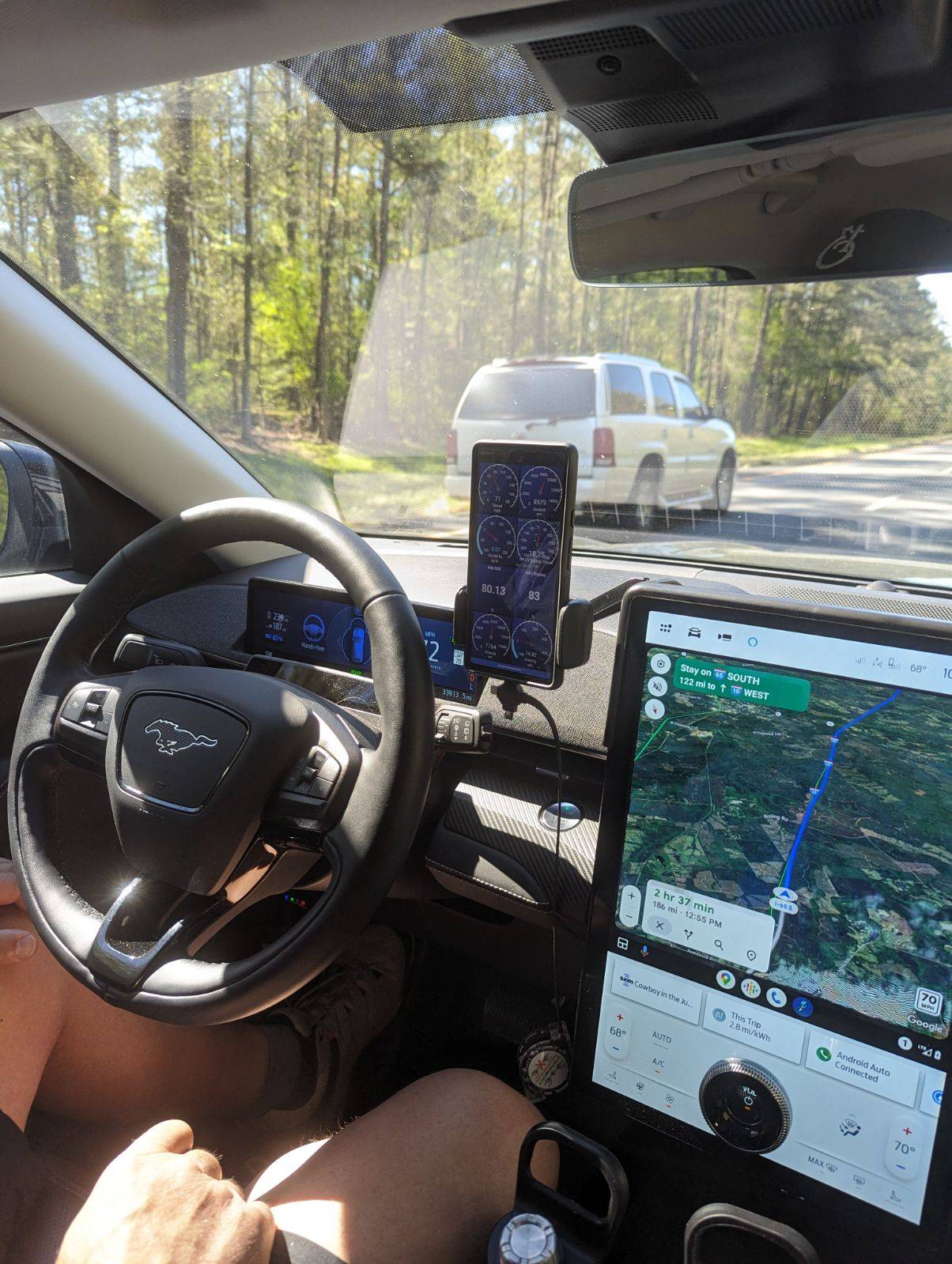
My trip back to Louisiana was the best way to try my OBDII and Car Scanner app. Follow the instructions of the Car Scanner developer. Get the recommended OBDII reader, set it up for Android or Apple phones....it makes a big difference....and chose your dashboard. Take a long trip.
The two Boykins Spaniels were our companions in this long trip.
Perfect company.!!!!!
Ford Mustang Mach-E HowTo: use OBD-II and CarScanner to see Power Output/Regen/Charging and other data IMG_20240329_161936
Ford Mustang Mach-E HowTo: use OBD-II and CarScanner to see Power Output/Regen/Charging and other data IMG_20240329_161947
Ford Mustang Mach-E HowTo: use OBD-II and CarScanner to see Power Output/Regen/Charging and other data IMG_20240329_162011
 

Nikos

Well-Known Member
Joined
Dec 29, 2019
Threads
2
Messages
594
Reaction score
547
Location
Taylors SC
Vehicles
17 Must GT, 21MME AWD, 22 F-150 Lightning
Occupation
Aircraft Mechanic
Country flag
My trip back to Louisiana was the best way to try my OBDII and Car Scanner app. Follow the instructions of the Car Scanner developer. Get the recommended OBDII reader, set it up for Android or Apple phones....it makes a big difference....and chose your dashboard. Take a long trip.
The two Boykins Spaniels were our companions in this long trip.
Perfect company.!!!!!
IMG_20240329_161936.jpg
IMG_20240329_161947.jpg
IMG_20240329_162011.jpg
Here are the numbers of this trip.
Started from Greenville SC with 100% and the cabin preconditioned to warm.
Departure temp at 46°, at 4am.
Having replaced the HVBJB on the recall, with the new software update for the HV module
Drove to Atlanta....with minimum traffic delays.....no lie....to my first stop in East Point GA. First observation, rates have gone up in GA. Per min charge for non members of EA is at $.58/min and $.42/min for Pass+ members.
Took 56KW at 121KW max charge rate to 91%, and a charge of $25.58. Enough to my next stop to Greenville AL, +60 miles of cushion.
My speed goal was speed limits+5 for the entire length of the trip.
The stop at Greenville AL, costing $15.99, $.33/min, charged the battery to 86%, max charge at 160KW, uptake of 69KW.
Outside temp at 55°.
Again, a comfortable 60 miles cushion to my next stop at Gulfport Mississippi.
Gulfport Mississippi stop costing $16.38, $.33/min, charged the battery to 86%, max charge at 161KW, uptake of 66KW.
Arrived in Slidell LA at 3pm local.
Exactly 12 hours of road tripping in good spirits, well behaved occupants but ready to get out of the vehicle, sit on comfortable chairs and enjoy a beer.
Total cost to LA was $57.95 with an uptake of 191KW.
On this trip I was testing my new OBDII reader, car scanner app and the new accessory to hold the cellphone and additional storage in front of the display.
DTBAKER started this mess with the OBDII reader and scanner app and followed his setup plan, including his modification for the cellphone holder arm. I monitored the temp of the display every 30 min since I did not provide any cooling vents for the display. The display doesn't get hot other than when direct sunlight shines on it, especially on the screen itself.
I noticed some pixilation and color washing when direct sunlight shining on the screen, but nothing abnormal.
On the return trip home, I utilized the same stops in reverse.
Gulfport MS costing $12.26 to 91%, max charge of 132KW, uptake of 39KW.
Same scenario, build a comfortable cushion to my next stop, which came handy on my way to Greenville AL. Had to divert off the interstate because of an accident.
A 5min wait for the charger, and got into position for my charge. Costing $16.04 to 90%, max charge of 161KW, uptake of 67KW. Next stop, East Point GA. Arrived around 4:30pm. My wife was not thrilled of the arrival time. Needless to say, all 8 stalls were taken.
Upon arrival we were #4 in line.
Time to use the restrooms and wait for our turn. As soon as I returned to my vehicle the stalls were opening up for the waiting vehicles. 5 min later was our turn to charge.
Costing $0.00, thank you EA, to 81%, max charge of 93KW. I was in a Balanced Hyper 350KW stall. I noticed from 10% to 80%, the charge stayed at 90-93KWH rate. At 81% it had dropped down to 45KWH. Uptake of 57KW. All the times I have visited EA at East Point GA, most, if all of them are busy at 4-6pm. The stop is a mere 2 miles away from Hartsfield ATL airport, which I suspect half of the traffic is contributed by EV rentals.
Next stop was back home.
12-1/2 hours of travel time, including the wait for our turns to charge.
We got out of Atlanta rather quickly.
Tried the HOV lane for as far as I could.
No issues with the MME.
Few sudden acceleration events to get away from impatient drivers riding our tail and also to get around slower, privileged drivers holding the left lane to themselves.
The return trip home costing is $28.30 with an uptake of 163KW.
Total cost for the entire trip was $86.25 and a total uptake of 354KW.
This trip was done with EA stations and a Pass+ membership.
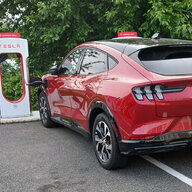
Hopefully, the next time, I will be using Tesla's superchargers also.
I have ordered an A2Z adaptor to use until my Ford provided one arrives sometime in June. A2Z promised me one in two weeks. I need one soon.
EA gets 3.8* still from my personal experience. This time only 2 chargers were down for maintenance on my way to Louisiana. The same stations were up and running on my return trip but they were problematic with some EVs, Rivian in particular.
I had to be a good EV citizen. Offered advice and patience to some of the waiting and confused travelers.
3.8* for EA, still, because they are not expanding, they trying to maintain the existing network from falling apart.
I cannot wait for my A2Z adaptor and the Tesla/Ford adaptor.
Overall, this trip was not stressful as to waiting for a charger or broken down network on Easter Holiday weekend.
The OBDII reader performed nicely and according to what you choose for your dashboard, it is info to help or confuse you. Keep it simple. Pick 8 readings that will help to understand what the vehicle is doing, uses/regenerates energy, charges at DCFC chargers.
A note of interest to everyone traveling with your spouses or significant others or partners. My wife wanted to charge our MME herself. Zip it.....she said....let me do it myself. Honey.....the MME.....is all YOURS.!!!!
 

AngryMan

Well-Known Member
First Name
Jim
Joined
Aug 19, 2023
Threads
11
Messages
737
Reaction score
966
Location
Ohio
Vehicles
OLD 2021 Select , NEW 2023 GT...RED !
Occupation
Living the good life
Country flag
I just got my scanner and the most important info that I want is the efficiency . Is there a premade sensor/value to add to my screen or even one I could set the perimeters up myself ?
Im not sure what factors would tell me that . Is there one that shows just a simple realtime m/kWh ?
 
OP
OP
dtbaker61

dtbaker61

Well-Known Member
First Name
Dan
Joined
May 11, 2020
Threads
126
Messages
4,822
Reaction score
4,525
Location
santa fe,nm
Website
www.envirokarma.org
Vehicles
MME (delivered 2/26/21), DIY eMiata BEV
Occupation
Solar Sales/install
Country flag
I just got my scanner and the most important info that I want is the efficiency . Is there a premade sensor/value to add to my screen or even one I could set the perimeters up myself ?
Im not sure what factors would tell me that . Is there one that shows just a simple realtime m/kWh ?
There is one if you scroll thru the list of available sensors, 'EV Instant Energy Consumption'.

The problem is that it does not average over any set or variable number of miles, so it's not very useful. It would be GREAT if it displayed a 'rolling average' over last X miles to reflect changing conditions. But it doesn't.

I've heard there is a way to 'build your own formula' within CarScanner, but I haven't spent any time looking into it.

What I would love to see is the Trip efficiency screen that currently shows Trip 1, Trip 2, and This Trip changed to :

Trip 1 average - since last manual reset
Trip rolling average - over last XX (settable) miles, default to 50
This Trip - since last reset, and resets automatically every start
 

hack-e

Well-Known Member
First Name
Mark
Joined
Mar 5, 2022
Threads
14
Messages
892
Reaction score
782
Location
Austin, TX
Vehicles
2022 Prem AWD ER MME
Occupation
Robotics Engineer
Country flag
What I've been wanting displayed is the difference between estimated range left in the batteries and the distance to my destination. If that number stays the same or increases then I pretty much know I can trust the estimated range left in the batteries. If it decreases, then I should be cautious and maybe slow down to conserve energy.

I think I'll play around with customizing Car Scanner today and see if I can get it to do this miles/kWh averaging as well as my delta.
 
OP
OP
dtbaker61

dtbaker61

Well-Known Member
First Name
Dan
Joined
May 11, 2020
Threads
126
Messages
4,822
Reaction score
4,525
Location
santa fe,nm
Website
www.envirokarma.org
Vehicles
MME (delivered 2/26/21), DIY eMiata BEV
Occupation
Solar Sales/install
Country flag
What I've been wanting displayed is the difference between estimated range left in the batteries and the distance to my destination. If that number stays the same or increases then I pretty much know I can trust the estimated range left in the batteries. If it decreases, then I should be cautious and maybe slow down to conserve energy.

I think I'll play around with customizing Car Scanner today and see if I can get it to do this miles/kWh averaging as well as my delta.

what I found useful was to use the 'this trip' average shown in the 'regular' console screen, and display actual kWhr remaining in CarScanner... and 'do the math' periodically while driving to see how it compared to GOM estimated range.

This won't catch rapidly changing conditions on a roadtrip like sudden temp, speed, wind, or elevation gain/loss.... but you can reset the 'this trip' odo and it recalcs new average after a couple miles that reflects current conditions.
Sponsored


Top