
The Complete DIY Guide to Updating Your Mach-E with FDRS
LeanneL
Well-Known Member
- First Name
- Leanne
- Joined
- Jun 5, 2022
- Threads
- 6
- Messages
- 382
- Reaction score
- 322
- Location
- Surrey, BC Canada
- Vehicles
- 2023 GTP
- Occupation
- Nurse

Nope! Mine is good now!

Robob
Well-Known Member
- First Name
- Rob
- Joined
- May 29, 2023
- Threads
- 3
- Messages
- 241
- Reaction score
- 164
- Location
- Vermont
- Vehicles
- 23’ GT Cyber Orange
- Occupation
- Auto Parts, Paint & Tech

Weird I did them and it worked going into work this morn and then it just won’t connect to Bluetooth in the app. Maybe it’s a FordPass thing not sure

Snakebitten
Well-Known Member
- Joined
- Mar 1, 2024
- Threads
- 0
- Messages
- 2,263
- Reaction score
- 3,779
- Location
- Coastal Texas
- Vehicles
- 2023.5 Mach-E
My PAAK was flawless, but then got stuck in the "trying to connect" phase after some updates I did.did the new powertrain updates and all is well. The next day PAAK stops working like the last round of updates. Did anyone else have this happen again? @LeanneL perhaps?
Instead of fussing with it, I just used FordPass to remove it. Then uninstalled FordPass / reinstalled.
Then repeated the setup for PAAK again.
I will never know what nixed it, nor exactly what might have fixed it short of just starting over. But the procedure is so easy and quick, I took that route.
All is normal again.
By the way, those same updates zeroed out my charging locations and so I had to charge one time at home before I could set my target again. Interestingly I did not lose my charging history though.
It's definitely a software platform on wheels. I'm starting to get the hang of it's quirks and all. Fascinating machine
Robob
Well-Known Member
- First Name
- Rob
- Joined
- May 29, 2023
- Threads
- 3
- Messages
- 241
- Reaction score
- 164
- Location
- Vermont
- Vehicles
- 23’ GT Cyber Orange
- Occupation
- Auto Parts, Paint & Tech
This is the 2nd time after a round of updates the car will work fine with PAAK for a day or so and then just be stuck on "Disconnected" under BT status it wont go to "connecting" or anything while you try to refresh so it feels like the car loses the authentication of the BT connection or something.
Remote start and everything that goes over cell network works fine but the BT side of the key does not. Also hard reset the iphone14 pro a few times to see if made a diff.
I did the same as you, removed from ford pass, deleted from phone. made sure the TestFlight version wasn't on the phone and then re-installed and signed in and it works. Also no random DTCs either like the car usually has it was all green so nothing to show for it in FDRS either.
lots of ghosts in the machine it seems.
Remote start and everything that goes over cell network works fine but the BT side of the key does not. Also hard reset the iphone14 pro a few times to see if made a diff.
I did the same as you, removed from ford pass, deleted from phone. made sure the TestFlight version wasn't on the phone and then re-installed and signed in and it works. Also no random DTCs either like the car usually has it was all green so nothing to show for it in FDRS either.
lots of ghosts in the machine it seems.
spicy_taco
Well-Known Member
- First Name
- Jack
- Joined
- Sep 23, 2022
- Threads
- 41
- Messages
- 582
- Reaction score
- 414
- Location
- Bay Area, CA
- Vehicles
- 2023 Mach-E Premium AWD
Have you seen any improvement to the drive mode switching with the new updates?I don't use 1PD. But my drive mode was switching unexpectedly. I'll check it out on the way into town for a wash.

su-ch+mache
Well-Known Member
- First Name
- carl
- Joined
- Aug 16, 2022
- Threads
- 5
- Messages
- 183
- Reaction score
- 143
- Location
- Germany
- Website
- www.ford-suv-freunde.com
- Vehicles
- Escape MY17, Puma MY20, Mach E MY22 AWD ER TP2
- Occupation
- retired buyer

using FDRS version 40.4.1 we updated our MMEs yesterday, a short test drive 3 km and everythin was looking good. Today we 'll have a longer drive to test everything.
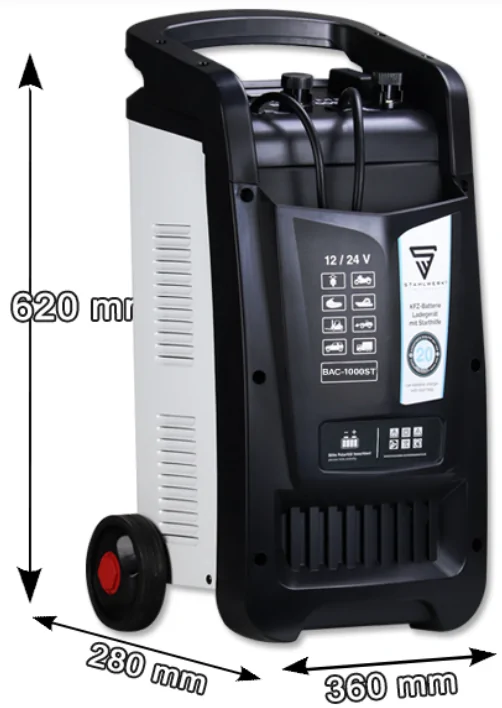
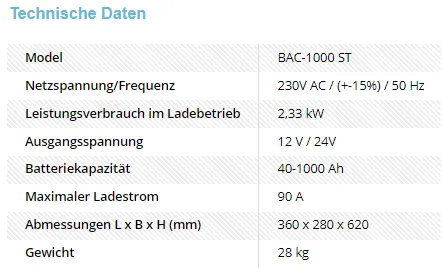
After running into issues with the power on the image update (we were using a 20A power unit) we bought us this little baby:


After running into issues with the power on the image update (we were using a 20A power unit) we bought us this little baby:
Last edited:

Mike G
Well-Known Member
- First Name
- Mike
- Joined
- Mar 27, 2022
- Threads
- 25
- Messages
- 6,451
- Reaction score
- 5,289
- Location
- N. AL, USA
- Vehicles
- '23(J1) Mach-E GT-PE, '22 F-150 Lightning, '24 Bronco HLE 2Dr
Drive mode switching has not occurred since I did the update.Have you seen any improvement to the drive mode switching with the new updates?
MrLoganRoss
Well-Known Member
- First Name
- Chris
- Joined
- Dec 11, 2023
- Threads
- 47
- Messages
- 506
- Reaction score
- 452
- Location
- Seattle
- Vehicles
- Mach E
Hi. I am wondering if there are exact physical steps for connecting the PL6100 to the wall, to the car, and then turning it on, and setting it for the supply job and correct voltage. I have this huge fear that I will get the order wrong and short something out.
Robob
Well-Known Member
- First Name
- Rob
- Joined
- May 29, 2023
- Threads
- 3
- Messages
- 241
- Reaction score
- 164
- Location
- Vermont
- Vehicles
- 23’ GT Cyber Orange
- Occupation
- Auto Parts, Paint & Tech
I don’t do anything special I plug it in to the wall, turn it on. Hook up pos and neg to supply then car (no power goes through until you hit start), then I make Sure it’s in power supply mode and at 13.4 or 13.5v and then double check connections are tight before hitting start on the supply.
Mike G
Well-Known Member
- First Name
- Mike
- Joined
- Mar 27, 2022
- Threads
- 25
- Messages
- 6,451
- Reaction score
- 5,289
- Location
- N. AL, USA
- Vehicles
- '23(J1) Mach-E GT-PE, '22 F-150 Lightning, '24 Bronco HLE 2Dr
On the PL6100 I first connect the leads to the jump terminal posts on the vehicle, then plug the unit in and then turn on the master switch in the back.
When it comes up I believe the default is to battery charging...but it doesn't actually do anything until you've hit the start button (in case you wanted to adjust the charge rate etc.).
I usually will set it to charge the 12V battery and leave it to do that while I'm getting laptop and extension cord, and adapter setup. The 12V battery is generally not at least 80% when I first start the car and move it over to my shop, so I make sure to at least get it above that so FDRS doesn't complain that my SOC is too low when I'm trying to update something.
I then will stop the charge, press the button to change it over to powersupply and bump the voltage up with the arrow button to 13.6 and then hit the start button. And that's the way it stays until I'm finished updating. Then stop the powersupply mode, shut off the main switch in the back and disconnect.
When it comes up I believe the default is to battery charging...but it doesn't actually do anything until you've hit the start button (in case you wanted to adjust the charge rate etc.).
I usually will set it to charge the 12V battery and leave it to do that while I'm getting laptop and extension cord, and adapter setup. The 12V battery is generally not at least 80% when I first start the car and move it over to my shop, so I make sure to at least get it above that so FDRS doesn't complain that my SOC is too low when I'm trying to update something.
I then will stop the charge, press the button to change it over to powersupply and bump the voltage up with the arrow button to 13.6 and then hit the start button. And that's the way it stays until I'm finished updating. Then stop the powersupply mode, shut off the main switch in the back and disconnect.
MrLoganRoss
Well-Known Member
- First Name
- Chris
- Joined
- Dec 11, 2023
- Threads
- 47
- Messages
- 506
- Reaction score
- 452
- Location
- Seattle
- Vehicles
- Mach E
Thank you for both responses. One more thing I am not 100% clear on. When do I turn the car on, and do I just turn on full accessory, or actually press break and turn on fully (leaving it in park)?
Mike G
Well-Known Member
- First Name
- Mike
- Joined
- Mar 27, 2022
- Threads
- 25
- Messages
- 6,451
- Reaction score
- 5,289
- Location
- N. AL, USA
- Vehicles
- '23(J1) Mach-E GT-PE, '22 F-150 Lightning, '24 Bronco HLE 2Dr
According to the notes I've found, when starting FDRS, the car is supposed to be in "Key On, Engine Off" to make sure that the "inhale" process is not affected.Thank you for both responses. One more thing I am not 100% clear on. When do I turn the car on, and do I just turn on full accessory, or actually press break and turn on fully (leaving it in park)?
This verbiage is found in many TSBs, SSMs, etc.:
Important Information for Module Programming
NOTE: When programming or reprogramming a module, use the following basic checks to ensure
programming completes without errors.
• Make sure the 12V battery is fully charged before carrying out the programming steps and
connect IDS/scan tool to a power source.
• Inspect Vehicle Communication Module (VCM) and cables for any damage. Make sure scan tool
connections are not interrupted during programming.
• A hardwired connection is strongly recommended.
• Turn off all unnecessary accessories (radio, heated/cooled seats, headlamps, interior lamps, HVAC
system, etc.) and close doors.
• Disconnect/depower any aftermarket accessories (remote start, alarm, power inverter, CB radio,
etc.).
• Follow all scan tool on-screen instructions carefully.
• Disable IDS/scan tool sleep mode, screensaver, hibernation modes.
• Create all sessions key on engine off (KOEO). Starting the vehicle before creating a session will
cause errors within the programming inhale process. (my emphasis)
Last edited:
grein002
Well-Known Member
- First Name
- Scott
- Joined
- Mar 5, 2024
- Threads
- 9
- Messages
- 266
- Reaction score
- 409
- Location
- Durham, NC
- Vehicles
- 2023 Mach-E GTPE, Red w/Gray interior
My concern (and I could be wrong about this...) is that FDRS is for many models, mostly ICE-based. ICE vehicles have three distinct key "modes" - accessory, on (engine not running) and on (engine running). Our Mach E's only have two modes - accessory, and on. The only way to get to "on" is to press the brake when pressing the start button. I've performed all my updates in the "on" mode.According to the notes I've found, when starting FDRS, the car is supposed to be in "Key On, Engine Off" to make sure that the "inhale" process is not affected.
This verbiage is found in may TSBs, SSMs, etc.:
Important Information for Module Programming
NOTE: When programming or reprogramming a module, use the following basic checks to ensure
programming completes without errors.
• Make sure the 12V battery is fully charged before carrying out the programming steps and
connect IDS/scan tool to a power source.
• Inspect Vehicle Communication Module (VCM) and cables for any damage. Make sure scan tool
connections are not interrupted during programming.
• A hardwired connection is strongly recommended.
• Turn off all unnecessary accessories (radio, heated/cooled seats, headlamps, interior lamps, HVAC
system, etc.) and close doors.
• Disconnect/depower any aftermarket accessories (remote start, alarm, power inverter, CB radio,
etc.).
• Follow all scan tool on-screen instructions carefully.
• Disable IDS/scan tool sleep mode, screensaver, hibernation modes.
• Create all sessions key on engine off (KOEO). Starting the vehicle before creating a session will
cause errors within the programming inhale process. (my emphasis)
MrLoganRoss
Well-Known Member
- First Name
- Chris
- Joined
- Dec 11, 2023
- Threads
- 47
- Messages
- 506
- Reaction score
- 452
- Location
- Seattle
- Vehicles
- Mach E
Ok, given the different approaches, maybe it does not matter? It would be good to get a consensus from everyone here about what mode the perform repairs in.
Sponsored
Similar threads
- Replies
- 46
- Views
- 17,342


- Replies
- 29
- Views
- 15,965
