rugedraw

Well-Known Member
First Name
Javier
Joined
Nov 13, 2023
Threads
0
Messages
2,684
Reaction score
2,441
Location
Miami, FL
Vehicles
2021 Ford F150 Platinum FX4 EB/2023 Bronco Sport Badlands/1991 Mustang 5.0 coupe
Occupation
Auto Sales
Country flag
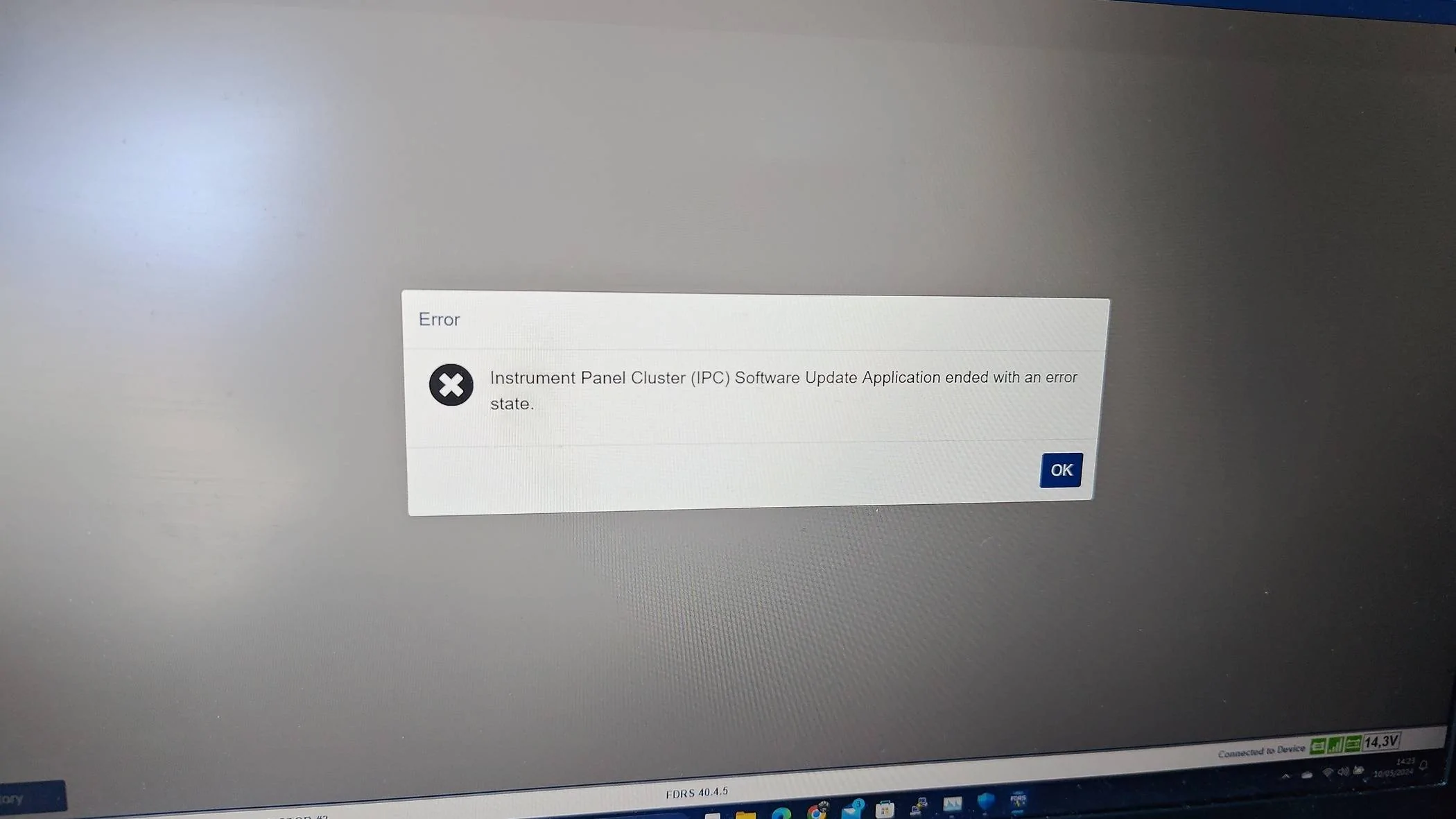
When i launch the execution of tcu update or ipc update it start "downloading vehicle data" and few second (may be 1 min) it stop at same step with this error


Nothing else and i came back on the screen of a software update chose...

It make that also on a pmi on apim tcu and ipc or on any configuration of apim or tcu. The configuration of ipc work it change language of the screen from french to english...
Have you been able to successfully do any updates at all, or these are the only ones you have tried?
Sponsored


Helly

Well-Known Member
Joined
Jan 18, 2024
Threads
0
Messages
48
Reaction score
13
Location
france
Vehicles
MME
Country flag
Have you been able to successfully do any updates at all, or these are the only ones you have tried?
I have done more than 20 updates with fdrs since i receive my cars and ever pass a package with an usb for gwm apim tcu ipc. I only don t do the ipma ans pscm since today because i hadn t a power supply. Today i launch fdrs for doing ipma and pscm but i see the ipc too

After doing ipma and pscm i see tcu too i try tcu --> don t work and ipc-> don t work too.

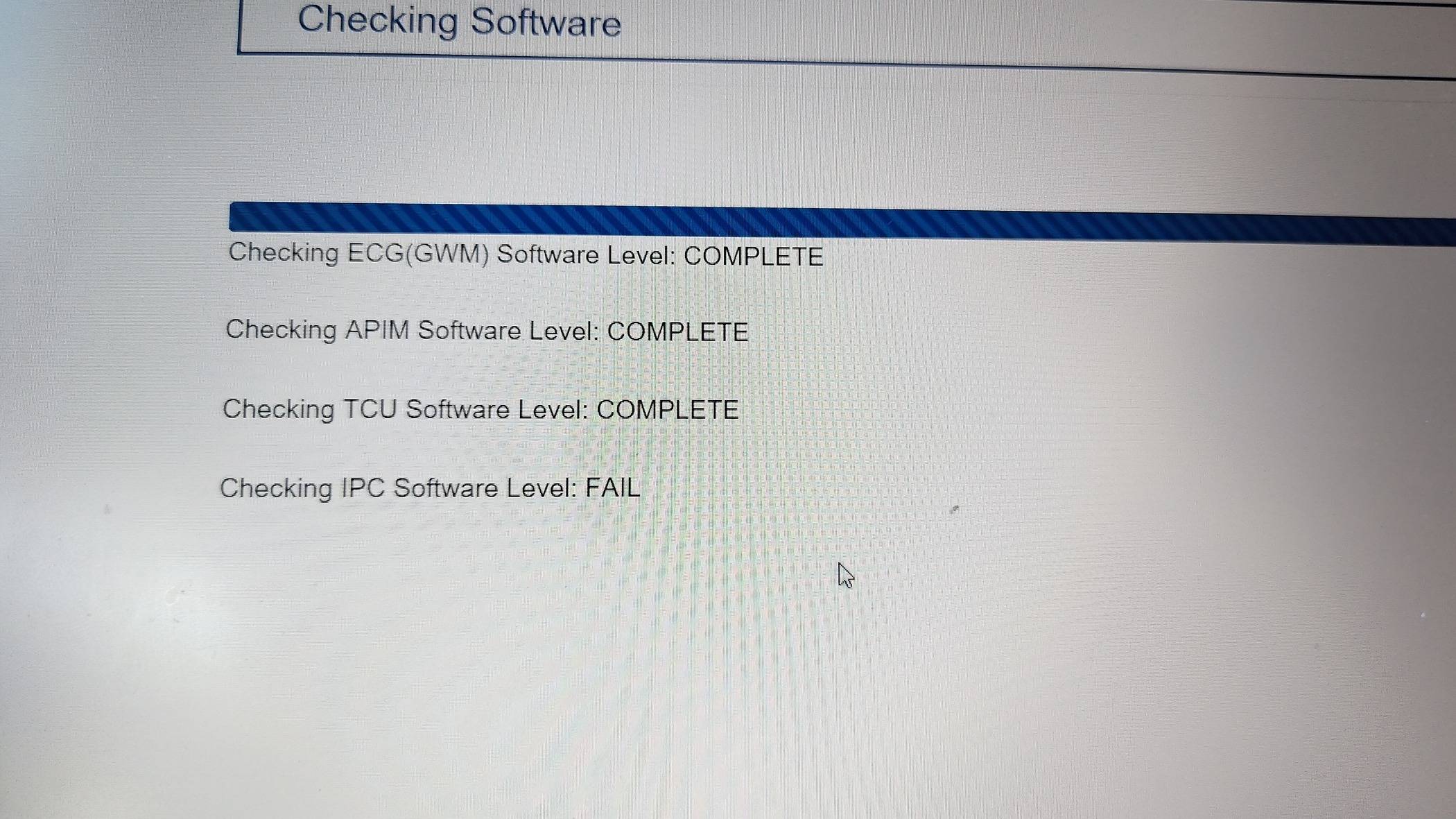
When i try to launch apim touch screen config it test some module version gwm apim tcu and ipc the first three are ok but it failed on ipc version which not the same
Ford Mustang Mach-E The Complete DIY Guide to Updating Your Mach-E with FDRS P_20240510_151754
 

rugedraw

Well-Known Member
First Name
Javier
Joined
Nov 13, 2023
Threads
0
Messages
2,684
Reaction score
2,441
Location
Miami, FL
Vehicles
2021 Ford F150 Platinum FX4 EB/2023 Bronco Sport Badlands/1991 Mustang 5.0 coupe
Occupation
Auto Sales
Country flag
I have done more than 20 updates with fdrs since i receive my cars and ever pass a package with an usb for gwm apim tcu ipc. I only don t do the ipma ans pscm since today because i hadn t a power supply. Today i launch fdrs for doing ipma and pscm but i see the ipc too

After doing ipma and pscm i see tcu too i try tcu --> don t work and ipc-> don t work too.

When i try to launch apim touch screen config it test some module version gwm apim tcu and ipc the first three are ok but it failed on ipc version which not the same
I'm going to message you now.
 

benk016

Well-Known Member
First Name
Ben
Joined
Nov 12, 2020
Threads
39
Messages
3,274
Reaction score
5,120
Location
Tulsa, Oklahoma
Vehicles
2021 Mustang Mach-E GT
Country flag
When i launch the execution of tcu update or ipc update it start "downloading vehicle data" and few second (may be 1 min) it stop at same step with this error
P_20240510_142335.jpg


Nothing else and i came back on the screen of a software update chose...

It make that also on a pmi on apim tcu and ipc or on any configuration of apim or tcu. The configuration of ipc work it change language of the screen from french to english...
Have you done basic troubleshooting, like making sure your C Drive isn't too full to download more content?

Next step I'd try is clearing all the FDRS cached files.


MrLoganRoss

Well-Known Member
First Name
Chris
Joined
Dec 11, 2023
Threads
47
Messages
506
Reaction score
452
Location
Seattle
Vehicles
Mach E
Country flag
A big step! I completed my first Update: GWM. Unfortunately my 20amp extension cord needed for the PL6100 won’t be here till tomorrow.

Next up: CMR, ABS, and maybe the power train stuff.

One question. I no longer have the B&O DSP, and I see a few orange rectangles, which I know I can ignore. But would the inability to update the DSP gate other stuff? I don’t see an APIM update and I don’t have the new icons.

Thanks!!
 

Mike G

Well-Known Member
First Name
Mike
Joined
Mar 27, 2022
Threads
25
Messages
6,458
Reaction score
5,298
Location
N. AL, USA
Vehicles
'23(J1) Mach-E GT-PE, '22 F-150 Lightning, '24 Bronco HLE 2Dr
Country flag
I ever done that ?
@Helly we had a forum member who could not get his programming to work until he switched FDRS to the language the car was supposed to support.

Also, before you started to program the updates did you make sure your IPC had no DTCs (orange module status)?
 

Mike G

Well-Known Member
First Name
Mike
Joined
Mar 27, 2022
Threads
25
Messages
6,458
Reaction score
5,298
Location
N. AL, USA
Vehicles
'23(J1) Mach-E GT-PE, '22 F-150 Lightning, '24 Bronco HLE 2Dr
Country flag
A big step! I completed my first Update: GWM. Unfortunately my 20amp extension cord needed for the PL6100 won’t be here till tomorrow.

Next up: CMR, ABS, and maybe the power train stuff.

One question. I no longer have the B&O DSP, and I see a few orange rectangles, which I know I can ignore. But would the inability to update the DSP gate other stuff? I don’t see an APIM update and I don’t have the new icons.

Thanks!!
I don't believe there are any other modules dependent on the DSP.
 

Helly

Well-Known Member
Joined
Jan 18, 2024
Threads
0
Messages
48
Reaction score
13
Location
france
Vehicles
MME
Country flag
@Helly we had a forum member who could not get his programming to work until he switched FDRS to the language the car was supposed to support.

Also, before you started to program the updates did you make sure your IPC had no DTCs (orange module status)?
Yes i m sure . My car is in french and fdrs too. I had try in english too...

In fact with @rugedraw we saw yesterday that when i launch ipc or tcu fdrs try to download files in the vehicle_software directory but it can t . The file are create at 0 Ko...

I have no problem of disk space so i don t understand it s like fdrs cannot find the url where it has to download file...
 

MrLoganRoss

Well-Known Member
First Name
Chris
Joined
Dec 11, 2023
Threads
47
Messages
506
Reaction score
452
Location
Seattle
Vehicles
Mach E
Country flag
[Post Install Activity]

I have seen a number of people reference “configuring” modules.

For step 1, I always think of “update” or “ install” modules.

Is there sometimes a step 2 that requires some sort of configuration? If so, I assume it is not on the SW Update tab, but another tab. If true, is there guidance on what needs to be configured, and how?
 

Snakebitten

Well-Known Member
Joined
Mar 1, 2024
Threads
0
Messages
2,264
Reaction score
3,782
Location
Coastal Texas
Vehicles
2023.5 Mach-E
Country flag
Yes i m sure . My car is in french and fdrs too. I had try in english too...

In fact with @rugedraw we saw yesterday that when i launch ipc or tcu fdrs try to download files in the vehicle_software directory but it can t . The file are create at 0 Ko...

I have no problem of disk space so i don t understand it s like fdrs cannot find the url where it has to download file...
I hesitate to post this because I wouldn't want to send anyone down this rabbit hole unnecessarily. I don't believe this affects very many folks, but I am pretty sure you are describing exactly what I encountered.

Check your FDRS log file, and if you find entries that resemble the ones I would get (below), FDRS will abort the file download because it thinks the file size "expected" doesn't match the file size "received".

Sample of the log:

com.ford.otx.resource.exception.InvalidDownloadException: File has been downloaded, but the size is not valid, uid: PU5T-14H481-BAD, uri: https://xxxxxxxxxx.ford.com/7dfebcef-0147-4073-afc3-040cf7da595b_PU5T-14H481-BAD.vbf, expected file size: 18884882, size of received file: 18631435

Obviously your filename and size would be the first file that the particular update you are attempting to perform tries to download.

And if you tried various updates, you will have similar failures early in the download process, and find similar entries in the log file at the matching timestamp for the FDRS error.

If you verify what I described, I will be happy to post further what I found necessary to do to get these recent updates to succeed on my Mach-E.

By the way, the log file is:

C:\programdata\Ford Motor Company\FDRS\fdrs-runtime.log

I know the first time you open that file it can be a bit intimidating. But it really is just a very granular recording of what your most recent FDRS session experienced.
And in this case we are simply looking for any record of "InvalidDownloadException"
 

rugedraw

Well-Known Member
First Name
Javier
Joined
Nov 13, 2023
Threads
0
Messages
2,684
Reaction score
2,441
Location
Miami, FL
Vehicles
2021 Ford F150 Platinum FX4 EB/2023 Bronco Sport Badlands/1991 Mustang 5.0 coupe
Occupation
Auto Sales
Country flag
@Helly

Make sure you have this folder in your pc's directory:

C:\ProgramData\Ford Motor Company\FDRS\fdrs\data\vehicle_software

If it is not in there, create it.
I hesitate to post this because I wouldn't want to send anyone down this rabbit hole unnecessarily. I don't believe this affects very many folks, but I am pretty sure you are describing exactly what I encountered.

Check your FDRS log file, and if you find entries that resemble the ones I would get (below), FDRS will abort the file download because it thinks the file size "expected" doesn't match the file size "received".

Sample of the log:

com.ford.otx.resource.exception.InvalidDownloadException: File has been downloaded, but the size is not valid, uid: PU5T-14H481-BAD, uri: https://xxxxxxxxxx.ford.com/7dfebcef-0147-4073-afc3-040cf7da595b_PU5T-14H481-BAD.vbf, expected file size: 18884882, size of received file: 18631435

Obviously your filename and size would be the first file that the particular update you are attempting to perform tries to download.

And if you tried various updates, you will have similar failures early in the download process, and find similar entries in the log file at the matching timestamp for the FDRS error.

If you verify what I described, I will be happy to post further what I found necessary to do to get these recent updates to succeed on my Mach-E.

By the way, the log file is:

C:\programdata\Ford Motor Company\FDRS\fdrs-runtime.log

I know the first time you open that file it can be a bit intimidating. But it really is just a very granular recording of what your most recent FDRS session experienced.
And in this case we are simply looking for any record of "InvalidDownloadException"
Good idea. He's actually an IT systems engineer and knows more than a thing or two. I'm really stumped. I had you-know-who look into his issue, too, and we can't figure it out. He made a custom USB update to get his TCU updated and even though his car never confirmed it went through, it went through (or was already installed) and his TCU is updated (I checked the strategy myself) but FDRS still shows an update pending. We don't want to make a USB update for the IPC, because that will only install part of the update and if FDRS does not pick up on the rest, then he'll be in no-man's land and the only way to fix it would be with him remoting in to do it. Any time I am trying to help someone here that requires remote access, people get scared and back off so I don't even bother anymore and just let people figure it out on their own.
 
Last edited:

HuntingPudel

Well-Known Member
First Name
Steve
Joined
Mar 23, 2021
Threads
89
Messages
12,952
Reaction score
17,407
Location
Bay Area, CA
Vehicles
2024 MME GT with Performance Upgrade, 1979 Fire-Am, 1972 K/5 Blazer
Occupation
Engineering
Country flag
.
A big step! I completed my first Update: GWM. Unfortunately my 20amp extension cord needed for the PL6100 won’t be here till tomorrow.
<SNIP>
For FDRS updates you won’t need a 20A cord. The car will draw something short of 600W, plus a small overhead for the power supply. Let’s call it 650W for grins. That’s half of a hair dryer. Add a few watts for your laptop’s needs. The total is still way less than the 15A cord can handle. Since I already had a 20A circuit in my garage, I got a 20A cord, but it’s totally unnecessary for an FDRS update. ??
Sponsored


Top