Post here if you have an active FDRS account and are willing to look up info for others

Mike G

Well-Known Member
First Name
Mike
Joined
Mar 27, 2022
Threads
25
Messages
6,462
Reaction score
5,306
Location
N. AL, USA
Vehicles
'23(J1) Mach-E GT-PE, '22 F-150 Lightning, '24 Bronco HLE 2Dr
Country flag
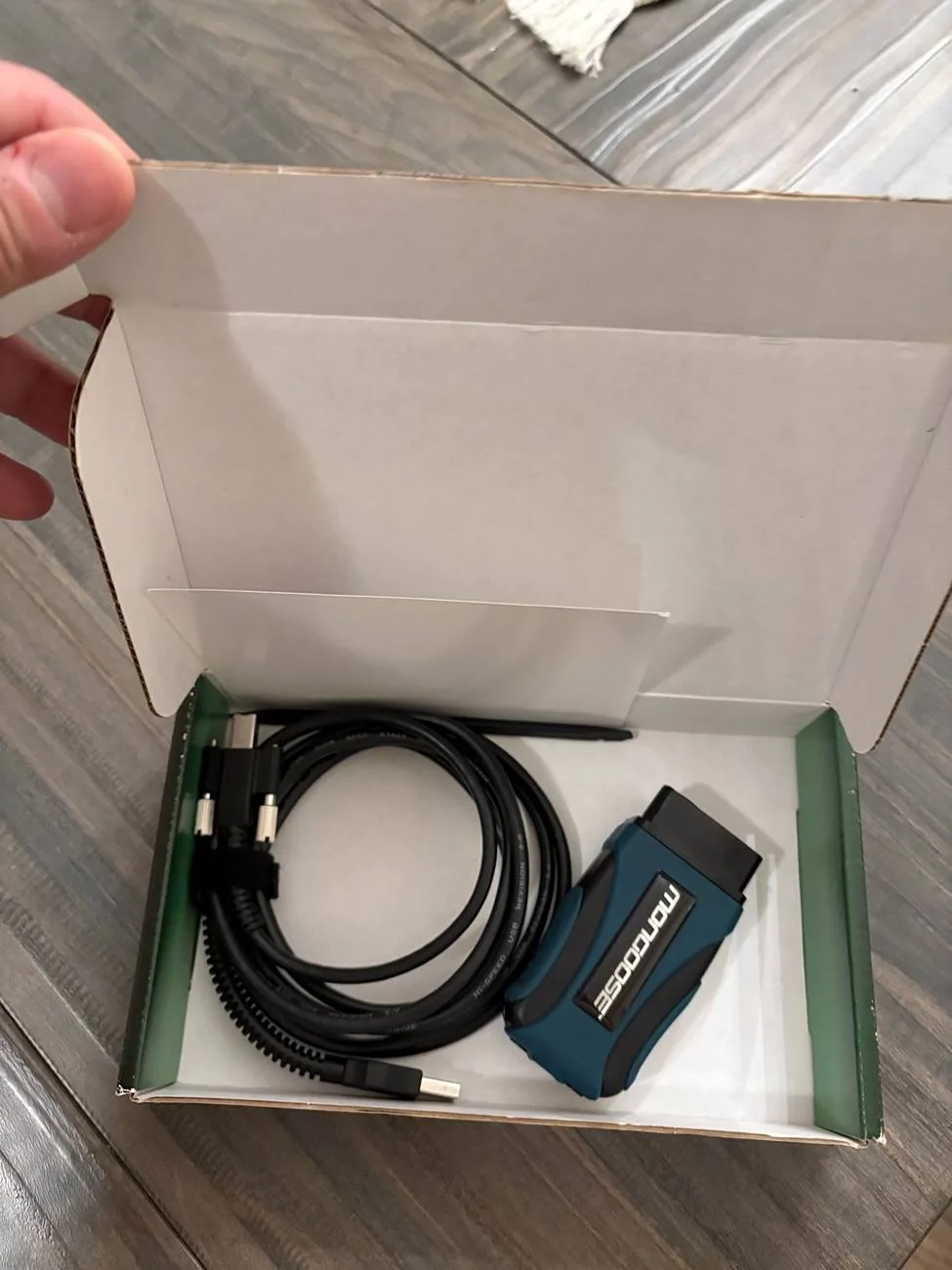
Hey all, I bought a thing!!

Let me know if you have any tips for order in which I should run my updates. Will the 2 day be enough? Thanks so much!

Vin 3FMTK4SX0NMA64516

IMG_4069.webp
Ford Mustang Mach-E Post here if you have an active FDRS account and are willing to look up info for others 3FMTK4SX0NMA64516-24-Dec-24


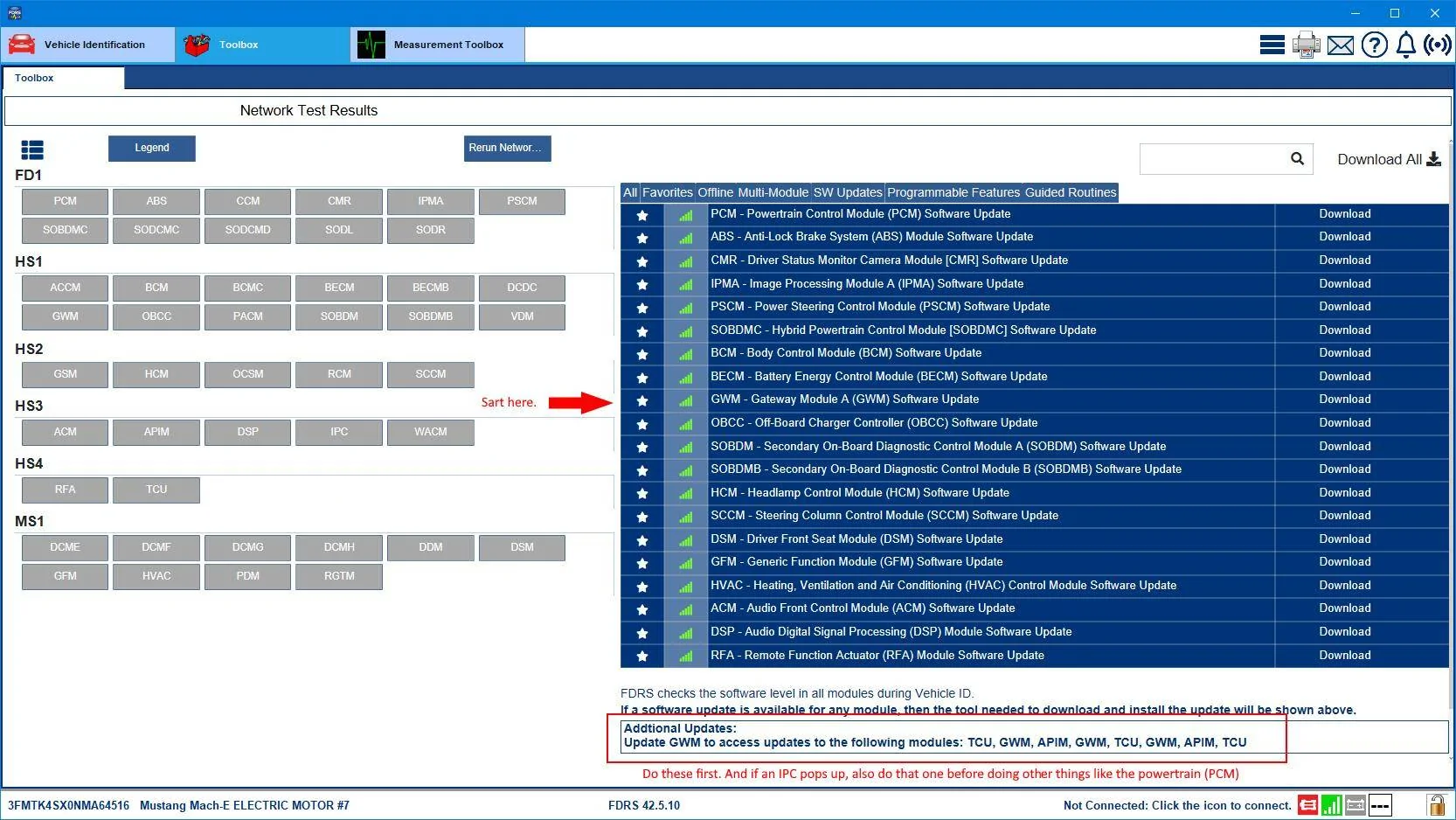
A two-day could be enough if you start early. The USB ones are deceptive because of the amount of time the downloads actually take (varies on your internet and time of day, etc.) and then each one has to get copied to a USB drive and then the car has to inhale that and it then tells you to shutdown and leave the door open for 10 minutes. So even one of those APIM updates that's 6GB could take an hour. Not all APIM updates are that big but quite a few are.

So follow whatever the sequence is in your available software list. Normally it would always be the GWM first, then APIM, then TCU, then IPC if one of those shows up. But there are times when there are back-to-back GWM updates, so just be aware of that.
Sponsored

 

Mike G

Well-Known Member
First Name
Mike
Joined
Mar 27, 2022
Threads
25
Messages
6,462
Reaction score
5,306
Location
N. AL, USA
Vehicles
'23(J1) Mach-E GT-PE, '22 F-150 Lightning, '24 Bronco HLE 2Dr
Country flag
Sounds good, so I just click on each one and it should update? Iirc some need a usb key correct?

What can I expect time wise for each update? Probably going to run Remote Desktop so I can keep an eye on it.
You'll need a 64 GB USB drive (3.1 or 3.2). Can be whatever USB (A or C) that your laptop uses (the car takes either one).

All the GWM, APIM, TCU and IPC updates are all USB based... a powersupply isn't actually necessary when doing USB updates as long as you've started the car and let it run a bit while the software is downloading to your laptop (before copying over to the USB). The reason for this is that after the software has been copied over to the USB drive you're instructed to start the car (POS II) and then insert the USB drive into the console slot while the car is running. So the car is maintaining the 12V battery while it's running.

Remember to completely reformat the USB drive prior to copying over the next updates files to it. Takes only seconds to do this. And name your USB drive something short and simple like Sync or FDRS, no long names with spaces or other characters.

Oh and make sure you do the CMR before trying to do the IPMA/PSCM combo.

So to recap a bit...do all the ones listed in the Additional Updates note, then do the powertrain (start with the PCM the rest will follow), then do the CMR (I know that one takes around 52 minutes), and then do the IPMA and PSCM. Other standalone things like the HVAC, DSP, ACM, RFA, BCM, GFM can be done after the big stuff is done, or beforehand if you just want to get your feet wet and get the hang of it.
 

Attachments

Last edited:

DK_Min

Well-Known Member
First Name
Matt
Joined
Sep 28, 2024
Threads
3
Messages
93
Reaction score
73
Location
Canada
Vehicles
2022 GTPE, 2013 GT Vert 5.0
Country flag
Amazing! Thanks so much for all the tips!

I have an IT background so I plan for everything to go well, but I have also bricked and unbricked a lot of devices in the past so I hope that won’t be the case here! ?


You'll need a 64 GB USB drive (3.1 or 3.2). Can be whatever USB (A or C) that your laptop uses (the car takes either one).

All the GWM, APIM, TCU and IPC updates are all USB based... a powersupply isn't actually necessary when doing USB updates as long as you've started the car and let it run a bit while the software is downloading to your laptop (before copying over to the USB). The reason for this is that after the software has been copied over to the USB drive you're instructed to start the car (POS II) and then insert the USB drive into the console slot while the car is running. So the car is maintaining the 12V battery while it's running.

Remember to completely reformat the USB drive prior to copying over the next updates files to it. Takes only seconds to do this. And name your USB drive something short and simple like Syn or FDRS, no long names with spaces or other characters.

Oh and make sure you do the CMR before trying to do the IPMA/PSCM combo.

So to recap a bit...do all the ones listed in the Additional Updates note, then do the powertrain (start with the PCM the rest will follow), then do the CMR (I know that one takes around 52 minutes), and then do the IPMA and PSCM. Other standalone things like the HVAC, DSP, ACM, RFA, BCM, GFM can be done after the big stuff is done, or beforehand if you just want to get your feet wet and get the hang of it.
 

Mike G

Well-Known Member
First Name
Mike
Joined
Mar 27, 2022
Threads
25
Messages
6,462
Reaction score
5,306
Location
N. AL, USA
Vehicles
'23(J1) Mach-E GT-PE, '22 F-150 Lightning, '24 Bronco HLE 2Dr
Country flag
On all the updates that are NOT USB based......make sure you go back to the "Selftest" tab and select "Clear and Retest" before proceeding to the next update. Even if all the module status blocks are shown as "Green" do it anyway.
 

EVTRAVEL

Well-Known Member
First Name
JIM
Joined
May 29, 2021
Threads
4
Messages
81
Reaction score
95
Location
WASHINGTON
Vehicles
FORD F150, MACH E
Occupation
RETIRED
Country flag
Some awesome members here have signed up for an FDRS account and have offered to run VINs and show what module updates are available for their Mach-E. Those offers can get buried in a thread, and I thought a stand-alone post might get more attention and be easier to spot the offer.

Two forum members have been exceptionally helpful to me, and I want to give a shout-out and pay it forward. @kltye and @breeves002 answered a bunch of my silly questions as I purchased a Bosch MasterTech II and a PL6100 battery maintainer... and my 11 module update went flawless last night because of them.

For those that don't know, a Ford FDRS license can be purchased for as few as 2 days for $50, all the way up to a year for quite a bit more. I have a 2-day license expiring Sunday (10-10-21) evening. If you would like me to run your VIN, I'm happy to run as many as I can. In off-line mode, it will show what modules have a software update available. No codes or anything like that show since you need to be hooked up to the vehicle to pull them.

My thought is that since there seems to be a handful of us willing to purchase the 2-day FDRS license, it would be great to share the resource before spending the money to check for an available update.

If you are interested, you can post here or send me a private message with your VIN, and I'll send you a screenshot of your FDRS screen. Again, my license expires Sunday (10-10-21) in the evening.

If you have FDRS access and are willing to look up another forum member's Mach-E details, post in this thread with the time period that your license is active.
Your thread was recommended to check if all modules had been updated for Blue Cruise 1.3 on my 2021 Mach E. I can send you or someone you recommend my vin number.

Thanks, Jim K

Initial question:

I got the same message about my 2021 Mach E’s Blue Cruise being extended, so I called customer support and was told to take to dealership since I had not received any OTA updates in last 90 days. The dealership installed a number of updates including BC 1.3 but lane change and ability to reposition car in lane does not work. However, when I called support again I was told the Sync should have a toggle option to turn these functions on and I should receive an OTA to enable. Since customer support cannot see what updates the dealership has installed, how do I know if BC 1.3 is installed?

Initial response.

Go on this thread and ask them to run your VIN in FDRS. Someone there should be able to see if the service tech updated all the right modules. If so, then I'd recommend investing in an OBD II adapter and turning on the setting to enable BC 1.3 yourself with FORScan.


rugedraw

Well-Known Member
First Name
Javier
Joined
Nov 13, 2023
Threads
0
Messages
2,718
Reaction score
2,476
Location
Miami, FL
Vehicles
2021 Ford F150 Platinum FX4 EB/2023 Bronco Sport Badlands/1991 Mustang 5.0 coupe
Occupation
Auto Sales
Country flag
Your thread was recommended to check if all modules had been updated for Blue Cruise 1.3 on my 2021 Mach E. I can send you or someone you recommend my vin number.

Thanks, Jim K

Initial question:

I got the same message about my 2021 Mach E’s Blue Cruise being extended, so I called customer support and was told to take to dealership since I had not received any OTA updates in last 90 days. The dealership installed a number of updates including BC 1.3 but lane change and ability to reposition car in lane does not work. However, when I called support again I was told the Sync should have a toggle option to turn these functions on and I should receive an OTA to enable. Since customer support cannot see what updates the dealership has installed, how do I know if BC 1.3 is installed?

Initial response.

Go on this thread and ask them to run your VIN in FDRS. Someone there should be able to see if the service tech updated all the right modules. If so, then I'd recommend investing in an OBD II adapter and turning on the setting to enable BC 1.3 yourself with FORScan.
Need the VIN to check. As I mentioned in the other thread: If the dealer did apply the correct updates, you will need FORScan to enable the new BC features.
 

rsas8991

Member
First Name
David
Joined
Aug 20, 2023
Threads
3
Messages
21
Reaction score
3
Location
Goshen CT
Vehicles
Ford Mach E Standard AWD
Occupation
Sales
Country flag
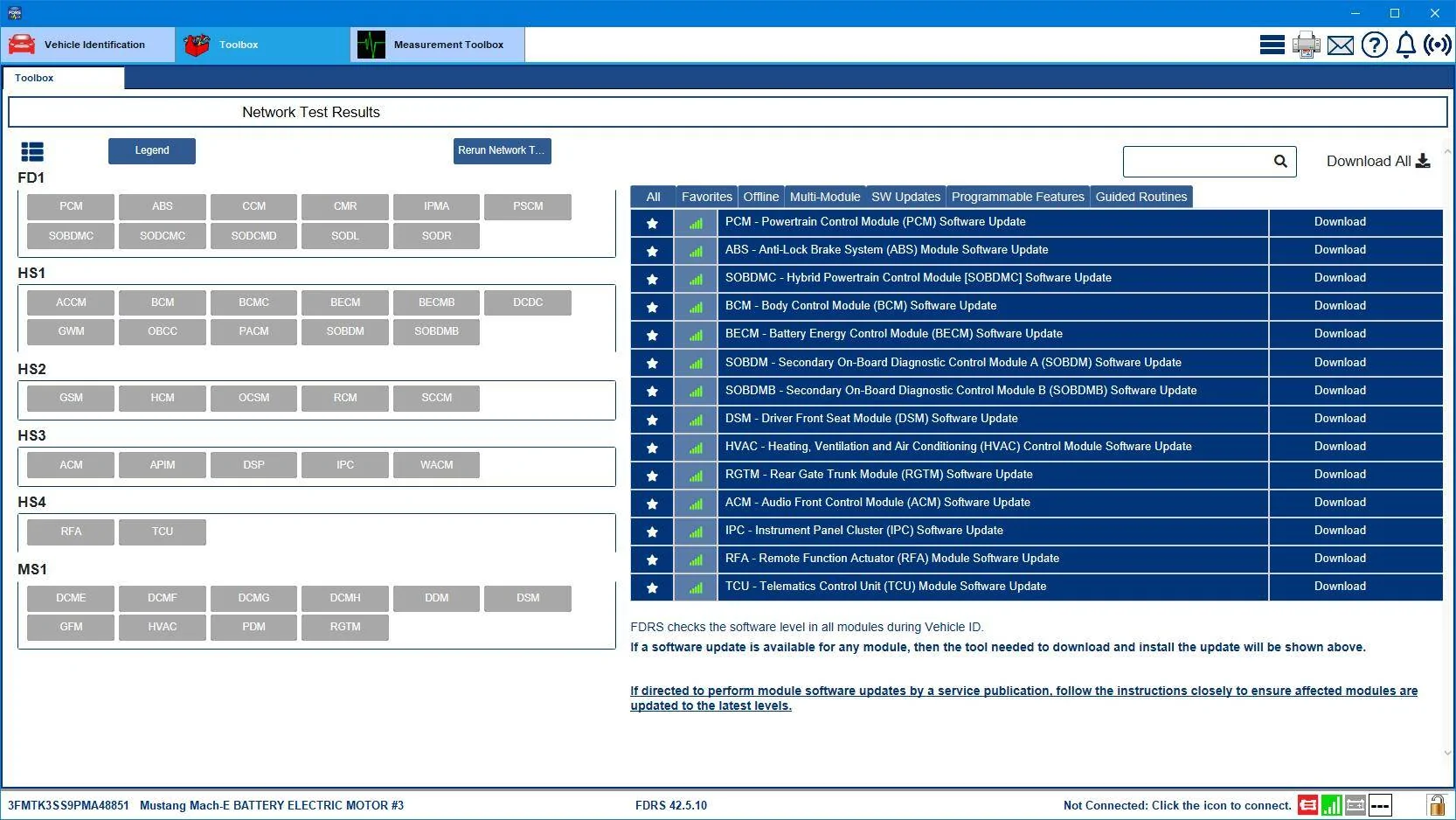
Would someone be so kind as to run this Vin # 3FMTK3SS9PMA48851. Happy holiday and thanks in advance.
 

yong

Member
Joined
Jul 27, 2023
Threads
0
Messages
17
Reaction score
8
Location
PNW
Vehicles
'21 Mach E Premium FE, '15 Audi Q5
Country flag
I have returned, once again, now that my 21 is back at the dealer. Nominally for a tire rotation, but really to get them to fix a pesky Pre-Collision Assist issue that keeps popping up on highways.

They've had it for almost a week now. Supposedly, they realized I wasn't getting any updates, and are in the process of updating a bunch of modules for me to enable BC 1.3. Should I see anything in FordPass from this? Can someone see what they've actually completed? From the app, I can see my car's now in the parking lot as of a few hours ago, whereas it'd been inside the service building over the weekend.

VIN: 3FMTK3SU6MMA10703

Thanks!
 

rugedraw

Well-Known Member
First Name
Javier
Joined
Nov 13, 2023
Threads
0
Messages
2,718
Reaction score
2,476
Location
Miami, FL
Vehicles
2021 Ford F150 Platinum FX4 EB/2023 Bronco Sport Badlands/1991 Mustang 5.0 coupe
Occupation
Auto Sales
Country flag
I have returned, once again, now that my 21 is back at the dealer. Nominally for a tire rotation, but really to get them to fix a pesky Pre-Collision Assist issue that keeps popping up on highways.

They've had it for almost a week now. Supposedly, they realized I wasn't getting any updates, and are in the process of updating a bunch of modules for me to enable BC 1.3. Should I see anything in FordPass from this? Can someone see what they've actually completed? From the app, I can see my car's now in the parking lot as of a few hours ago, whereas it'd been inside the service building over the weekend.

VIN: 3FMTK3SU6MMA10703

Thanks!
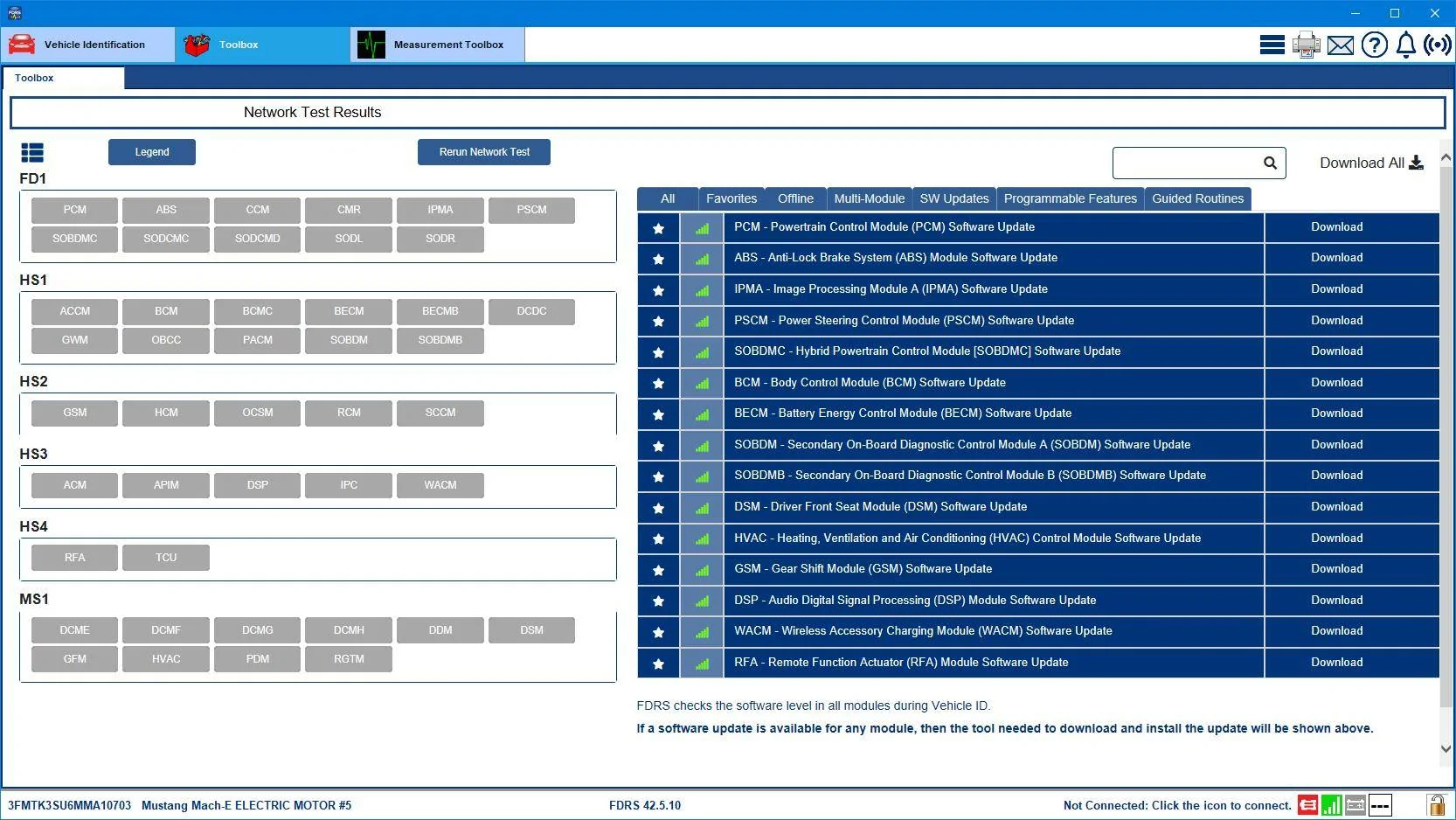
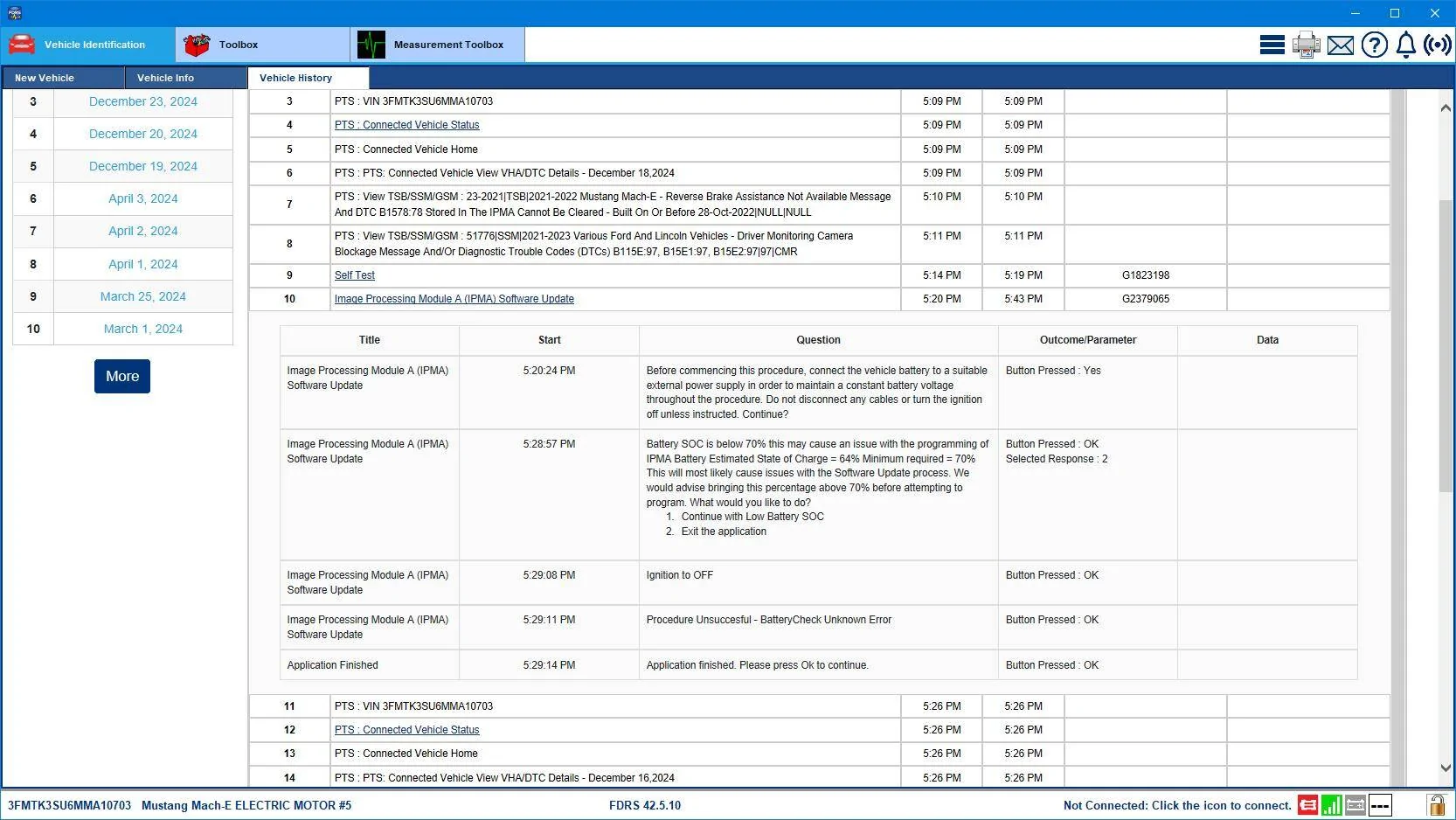
They seem to have replaced the CMR. The tech ran the PMI twice and both times, it was done incorrectly. When asked if the module was the original module, they selected "yes" both times, so you still show a CMR update pending. I'm sure the car is fine, but they still didn't follow the correct process. They went to update the IPMA, but backed out of it due to the 12v battery being low. They then ran the PSCM update and it did not seem to to trigger the IPMA after, so maybe it didn't actually update. Hard to tell from what I can see.

Either way, your IPMA is of the beta BC 1.4 version, so your car already had the software for the new BC features in it. Not sure if the CMR needs to be updated or not for it to work, but like I said in the post above you: If the dealer applied the updates to the ADAS module, you will need to enable the new BC features yourself. The dealer cannot do it.
 

ThunderClap

Well-Known Member
First Name
Revanth
Joined
May 1, 2024
Threads
8
Messages
247
Reaction score
170
Location
Tennessee
Vehicles
MachE GT
Country flag
Hey guys, happy holidays.

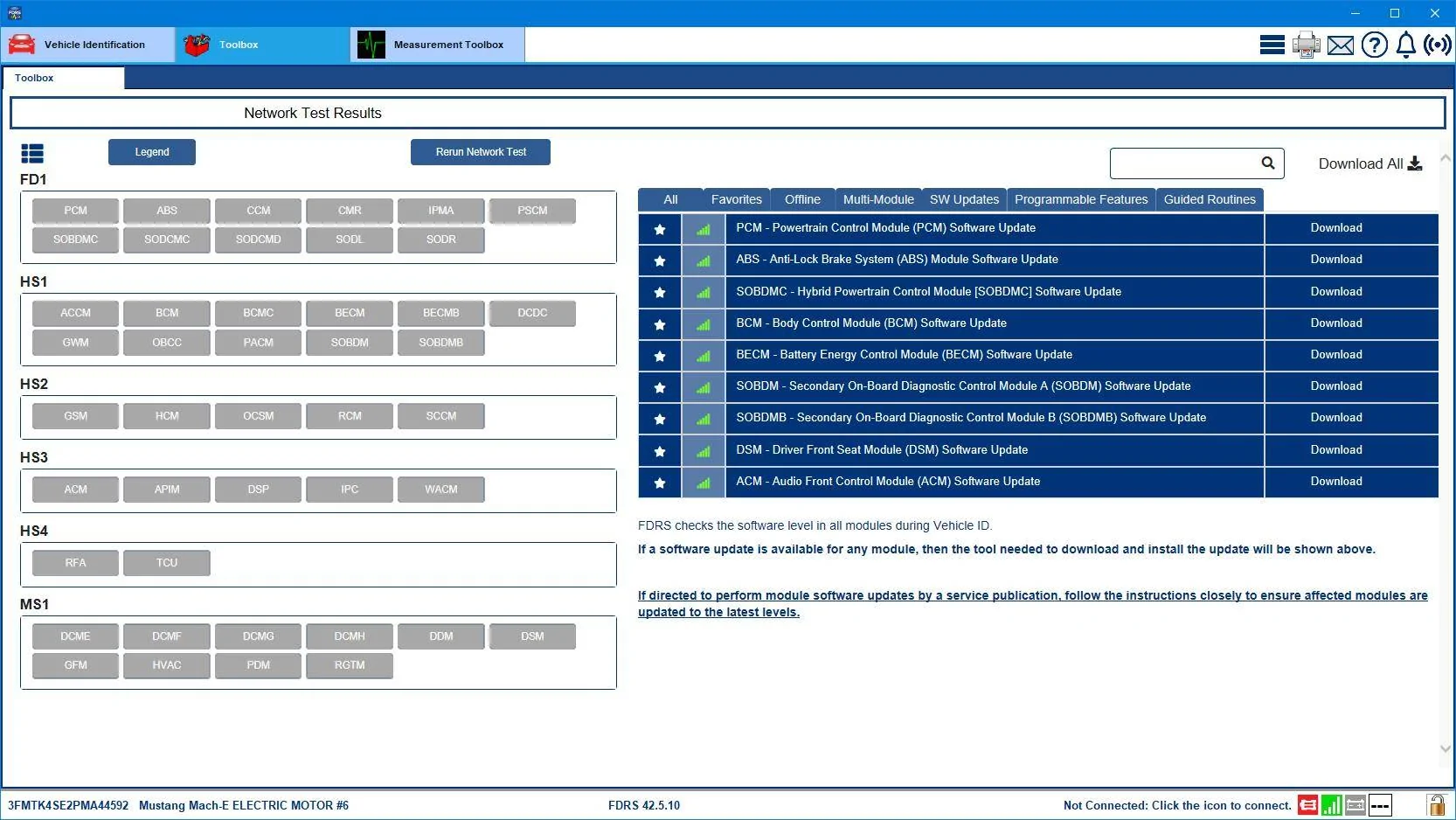
Can I please get a monthly check!
VIN: 3FMTK4SE2PMA44592

Thanks for your support.
 

maggieli

Member
First Name
maggie
Joined
Dec 19, 2024
Threads
3
Messages
22
Reaction score
7
Location
ca
Vehicles
2021 mach e premium
Hi first of all. thank you for your help.
Here is my vin 3FMTK3SU4MMA01031. Please help to check my software.
which I purchased a month ago from a used car dealership. never get any update but sitting in dealership for 2 weeks for 2 recalls.
 

Mike G

Well-Known Member
First Name
Mike
Joined
Mar 27, 2022
Threads
25
Messages
6,462
Reaction score
5,306
Location
N. AL, USA
Vehicles
'23(J1) Mach-E GT-PE, '22 F-150 Lightning, '24 Bronco HLE 2Dr
Country flag
Would someone be so kind as to run this Vin # 3FMTK3SS9PMA48851. Happy holiday and thanks in advance.
Your car has received a notification of a pending update to the TCU (Software Update 10.1.1). The next time you go for a drive you should hit the "Check Updates" button and look for that, and if it's downloaded by then you should select "Update Now". This TCU update has tried to install a couple of times now since Thanksgiving and for some reason it's not happening.

Here's the list of available updates in FDRS:
Ford Mustang Mach-E Post here if you have an active FDRS account and are willing to look up info for others 3FMTK3SS9PMA48851-25-Dec-24
 

Mike G

Well-Known Member
First Name
Mike
Joined
Mar 27, 2022
Threads
25
Messages
6,462
Reaction score
5,306
Location
N. AL, USA
Vehicles
'23(J1) Mach-E GT-PE, '22 F-150 Lightning, '24 Bronco HLE 2Dr
Country flag
I have returned, once again, now that my 21 is back at the dealer. Nominally for a tire rotation, but really to get them to fix a pesky Pre-Collision Assist issue that keeps popping up on highways.

They've had it for almost a week now. Supposedly, they realized I wasn't getting any updates, and are in the process of updating a bunch of modules for me to enable BC 1.3. Should I see anything in FordPass from this? Can someone see what they've actually completed? From the app, I can see my car's now in the parking lot as of a few hours ago, whereas it'd been inside the service building over the weekend.

VIN: 3FMTK3SU6MMA10703

Thanks!
Ford Mustang Mach-E Post here if you have an active FDRS account and are willing to look up info for others 3FMTK3SU6MMA10703-25-Dec-24

The IPMA update failed due to a low 12V battery. The tech backed out. And then proceeded to fool around with the CMR for some reason.
Ford Mustang Mach-E Post here if you have an active FDRS account and are willing to look up info for others 3FMTK3SU6MMA10703-25-Dec-24Work

Maybe next time they should get the powersupply out of the cabinet and use that.
 

Mike G

Well-Known Member
First Name
Mike
Joined
Mar 27, 2022
Threads
25
Messages
6,462
Reaction score
5,306
Location
N. AL, USA
Vehicles
'23(J1) Mach-E GT-PE, '22 F-150 Lightning, '24 Bronco HLE 2Dr
Country flag
Hey guys, happy holidays.

Can I please get a monthly check!
VIN: 3FMTK4SE2PMA44592

Thanks for your support.
Ford Mustang Mach-E Post here if you have an active FDRS account and are willing to look up info for others 3FMTK4SE2PMA44592-25-Dec-24
Sponsored


Top