3.5.3.3 UI Question

djjerv91

Well-Known Member
First Name
Jonathon
Joined
Aug 6, 2021
Threads
21
Messages
109
Reaction score
74
Location
Illinois
Vehicles
2021 Mustang Mach-E Premium RWD ER Infinite Blue
Country flag
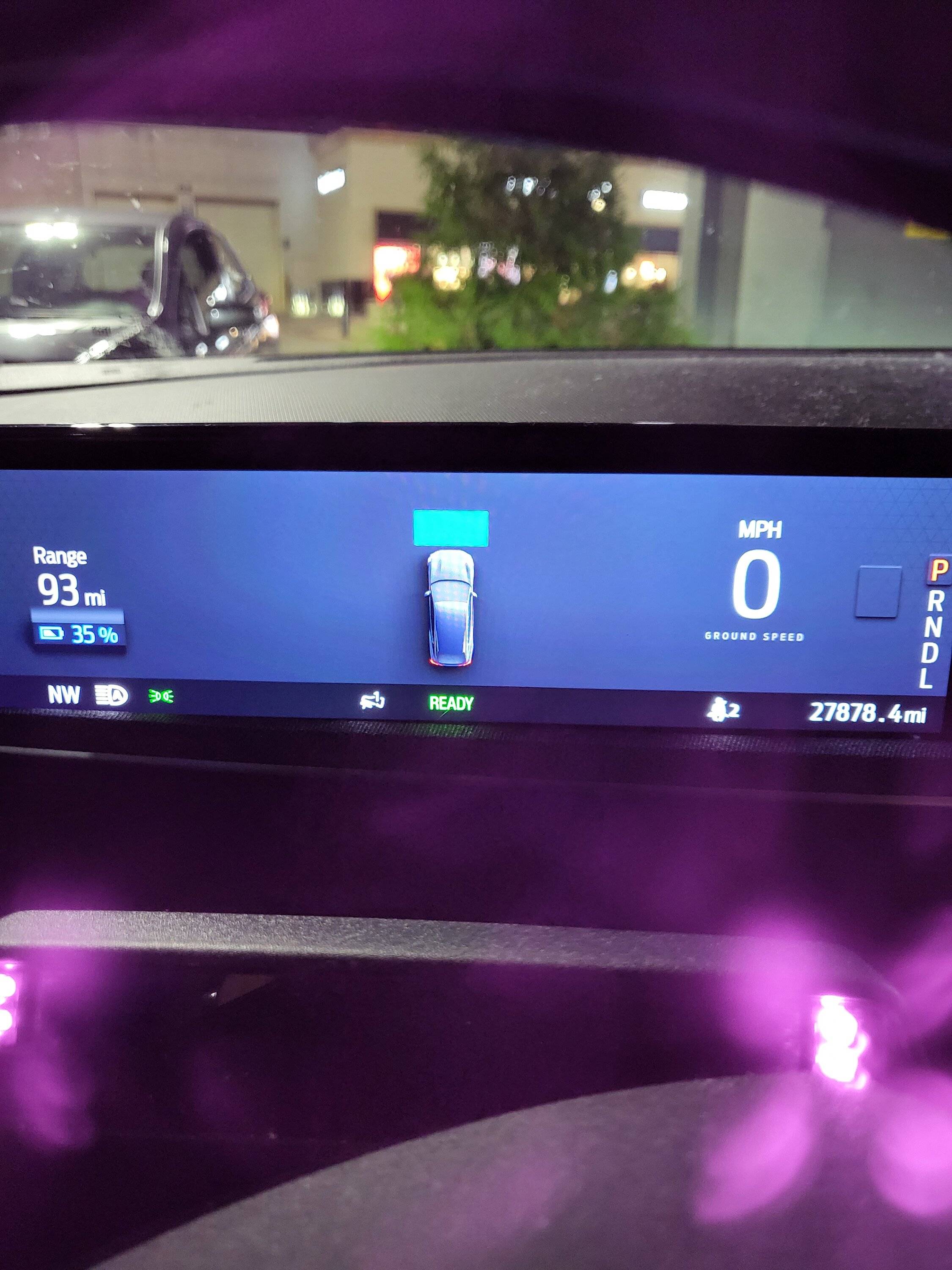
I'll preface this with I'm a 2021 Job 1 car (Not EA). I recently took my vehicle in for 21G01 to get Bluecruise. Everything looked fine but ended up having to take it back in today to get it to fully work. When they did the update today it pushed 3.5.3.3 to my vehicle. After the update, my UI screen behind the steering wheel keeps the vehicle icon as if I'm in cruise when I'm not. Normally it would have my speed in the middle of the screen. Is anyone else having this problem after 3.5.3.3? A pic of what is happening will be below. TIA

Ford Mustang Mach-E 3.5.3.3 UI Question 20221007_193803
Sponsored


heisnuts

Well-Known Member
First Name
Darrel
Joined
Dec 5, 2021
Threads
21
Messages
978
Reaction score
2,038
Location
Oregon
Vehicles
Model 3 Performance
Country flag
That’s the icon when you have the power on to Blue Cruise. Pressing the power button on the left side of the steering wheel should take that away.
 
OP
OP
djjerv91

djjerv91

Well-Known Member
First Name
Jonathon
Joined
Aug 6, 2021
Threads
21
Messages
109
Reaction score
74
Location
Illinois
Vehicles
2021 Mustang Mach-E Premium RWD ER Infinite Blue
Country flag
Go into Settings > Driver Assistance > Pre-Collision Assist and disable Distance Indication.
Thanks, never had that turned on but when I received the car back this afternoon my profile was acting weird.
 

macchiaz-o

Well-Known Member
First Name
Jonathan
Joined
Nov 25, 2019
Threads
171
Messages
8,577
Reaction score
15,986
Location
}not/A/gr8'Place.2.store-mEyePassword{
Vehicles
MY21 J1 Premium RWD SR
Country flag
Thanks, never had that turned on but when I received the car back this afternoon my profile was acting weird.
From what I gather on the forum, that's one of the ways to know your vehicle has 3.5.3 or later. ;)


alexgorod

Well-Known Member
First Name
Alex
Joined
Jul 27, 2021
Threads
21
Messages
1,304
Reaction score
1,400
Location
Michigan
Vehicles
21 Job 2 MME Premium SR AWD (21 CR-V - wife's)
Occupation
DBA
Country flag
Another question on 3.5.3.3 usability - is there a way to use Alexa without it listening to the word "Alexa"?
 

macchiaz-o

Well-Known Member
First Name
Jonathan
Joined
Nov 25, 2019
Threads
171
Messages
8,577
Reaction score
15,986
Location
}not/A/gr8'Place.2.store-mEyePassword{
Vehicles
MY21 J1 Premium RWD SR
Country flag
Another question on 3.5.3.3 usability - is there a way to use Alexa without it listening to the word "Alexa"?
Press the speech button on the steering wheel, then say Alexa then what you want.

This works even if you've disabled the listen wake word.
 

alexgorod

Well-Known Member
First Name
Alex
Joined
Jul 27, 2021
Threads
21
Messages
1,304
Reaction score
1,400
Location
Michigan
Vehicles
21 Job 2 MME Premium SR AWD (21 CR-V - wife's)
Occupation
DBA
Country flag
Press the speech button on the steering wheel, then say Alexa then what you want.

This works even if you've disabled the listen wake word.
Perfect, thank you.
 

alexgorod

Well-Known Member
First Name
Alex
Joined
Jul 27, 2021
Threads
21
Messages
1,304
Reaction score
1,400
Location
Michigan
Vehicles
21 Job 2 MME Premium SR AWD (21 CR-V - wife's)
Occupation
DBA
Country flag
More questions - what can Alexa do with the car? It turned the A/C on per my command, but anything else?


Top