- First Name
- Brian
- Joined
- May 10, 2021
- Threads
- 72
- Messages
- 3,478
- Reaction score
- 6,709
- Location
- Michigan
- Vehicles
- Mustang Mach-E
- Occupation
- Real Human & Community Manager

- Thread starter
- #1
Hi Mustang Mach-E owners,
We’re excited to announce that compatible Tesla Superchargers are coming to Connected Navigation! This feature will be available from the factory for the 2025 Mustang Mach-E.
Here’s how it will work:
Adapter Needed
To charge at Tesla Superchargers, you’ll need a Fast Charging Adapter.
Now when you start a route in Connected Navigation, you will see a new toggle: Fast Charging Adapter needed.

If you don’t have an adapter, or don’t have it with you, turning this toggle off will remove stations that require an adapter from route plans and the charger search view. To restore Tesla Superchargers to route plans and charger searches, toggle it back on.
To learn more about charging with adapters, please visit ford.com/fastchargingadapter
To purchase a Fast Charging Adapter when available, please visit go.ford/fordadapter
Routing With Tesla Superchargers
When starting a route to a destination, Connected Navigation will automatically calculate if charging is required. If the Fast Charging Adapter needed toggle is enabled, Connected Navigation will choose from all DC Fast Chargers, including compatible Tesla Superchargers and other fast chargers which require an adapter.
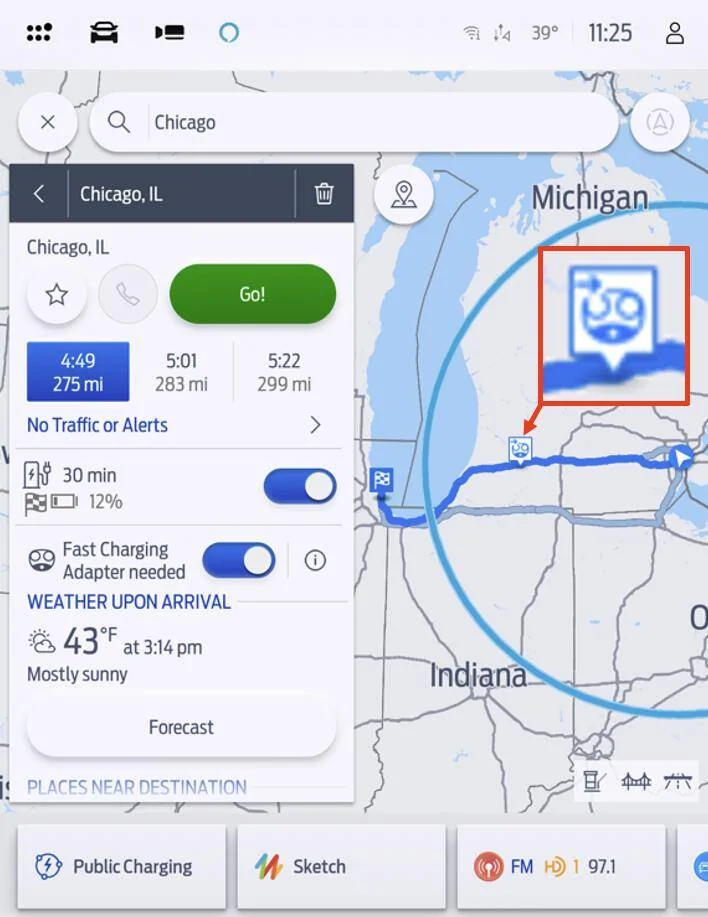
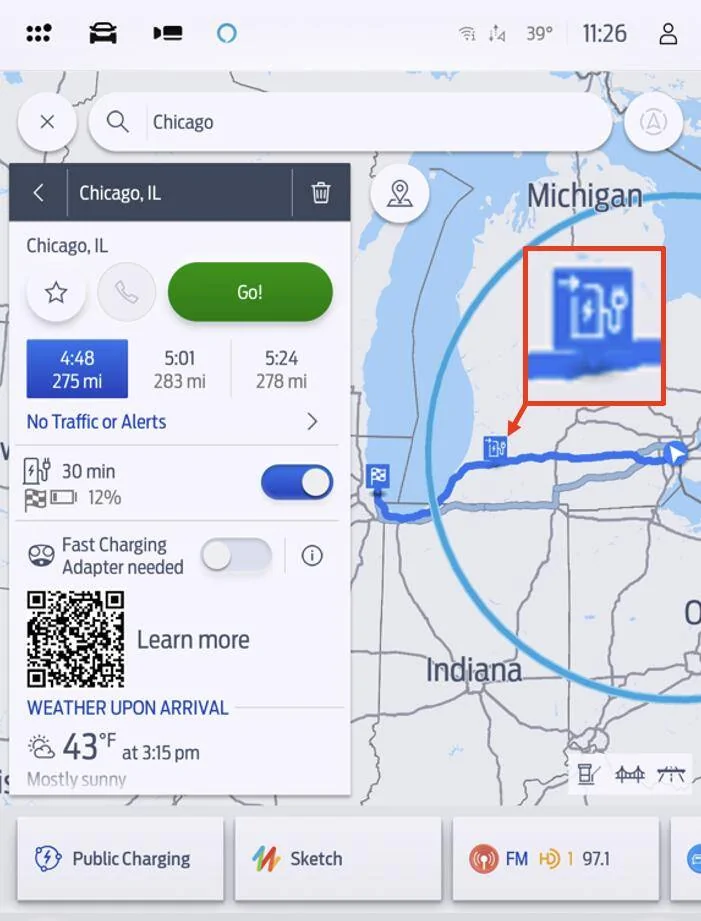
When a station is added to your route plan, charge stops will have a unique icon to indicate which stops require an adapter:
Stations which require an adapter will be noted with an image of the NACS plug:

Stations which do not require an adapter will be noted with a blue charging station:

Finding Superchargers Manually
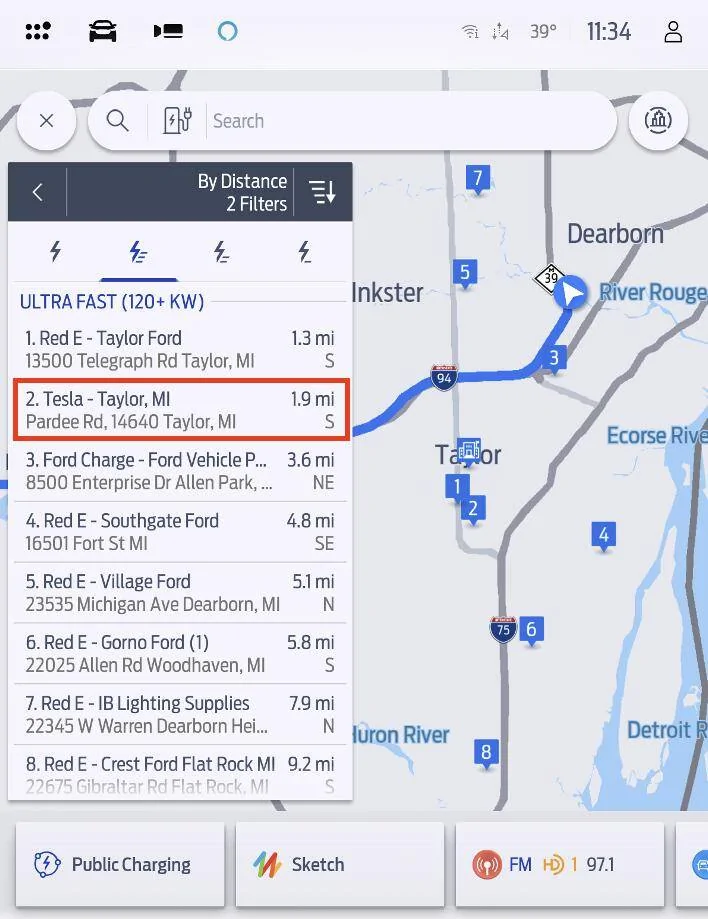
To locate chargers manually, tap Where to? and then tap Chargers.
Compatible Tesla Superchargers are all Ultra Fast (120+ kW), so to find them easier, tap the Ultra Fast filter. They will appear in the list display:

If Tesla Superchargers don’t appear, make sure the Fast Charging Adapter needed toggle is on by searching for a destination and confirming the status of the toggle.
Note that you can also use Connected Navigation to find chargers in another location, or only ahead of you along your active route. To change where you’re looking at chargers, tap the Search Near menu at the top of the screen and choose from the available options:

Not all Tesla Superchargers are open to non-Tesla vehicles. When you enter a destination Connected Navigation will only include stations that are open to Ford vehicles in your route plan. However, to provide a complete listing of all charging stations, stations that are incompatible are listed when manually viewing chargers unless the Available and Open filter is selected. These stations will appear accompanied by a symbol.

If you manually select these chargers, you may see a warning message appear notifying you that you have selected an incompatible station. If you aren’t expecting to see this message, select Cancel Route and choose another charger.

Frequently Asked Questions:
Do I need to use Connected Navigation? Can I use Apple CarPlay or Android Auto to find Tesla Superchargers?
Connected Navigation is one option to find Tesla Superchargers. Android users can also use Google Maps EV Routing for Android Auto to find Superchargers. For Apple CarPlay users, Apple Maps will soon add Tesla Supercharger support.
Does Connected Navigation precondition my battery for fast charging?
Yes, Connected Navigation will precondition your vehicle’s battery when heading to a known fast charger. For more on preconditioning visit go.ford/evroadtrip
How do I pay for charging at Tesla Superchargers?
Compatible Tesla Superchargers are part of the BlueOval Charge Network feature Plug & Charge, so simply plugging in your vehicle is all it takes – your BlueOval Charge Network account will be automatically used for payment. And like all networks within the BlueOval Charge Network, you can also use the FordPass® app to pay for charging.
Is there a cost to use Connected Navigation?
Connected Navigation is a connected service with a complimentary 3-year trial included for electric vehicles.
Robert and Brian
We’re excited to announce that compatible Tesla Superchargers are coming to Connected Navigation! This feature will be available from the factory for the 2025 Mustang Mach-E.
Here’s how it will work:
Adapter Needed
To charge at Tesla Superchargers, you’ll need a Fast Charging Adapter.
Now when you start a route in Connected Navigation, you will see a new toggle: Fast Charging Adapter needed.
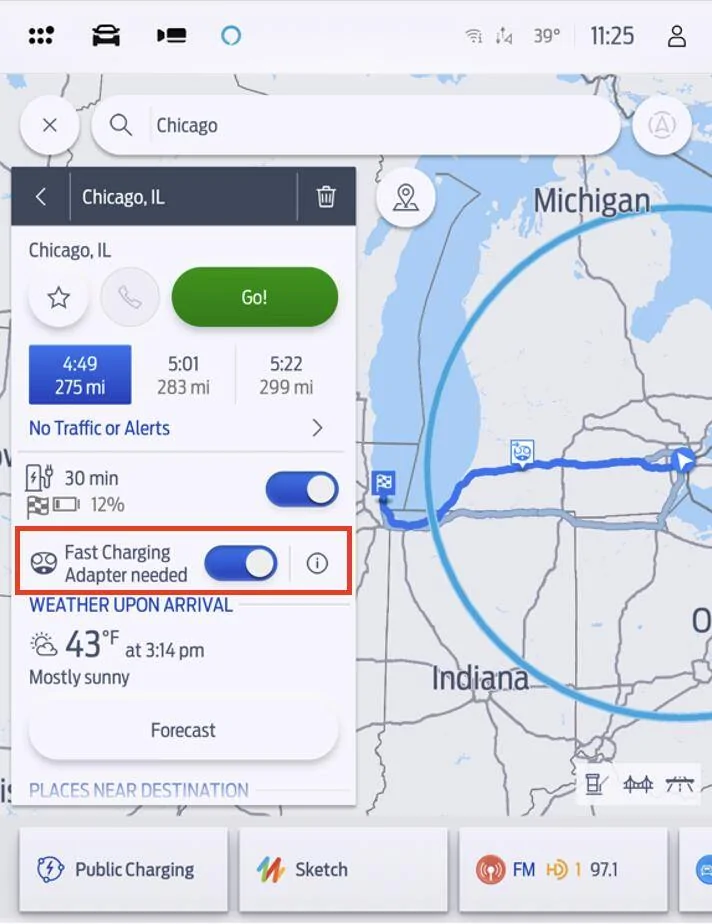
If you don’t have an adapter, or don’t have it with you, turning this toggle off will remove stations that require an adapter from route plans and the charger search view. To restore Tesla Superchargers to route plans and charger searches, toggle it back on.
To learn more about charging with adapters, please visit ford.com/fastchargingadapter
To purchase a Fast Charging Adapter when available, please visit go.ford/fordadapter
Routing With Tesla Superchargers
When starting a route to a destination, Connected Navigation will automatically calculate if charging is required. If the Fast Charging Adapter needed toggle is enabled, Connected Navigation will choose from all DC Fast Chargers, including compatible Tesla Superchargers and other fast chargers which require an adapter.
When a station is added to your route plan, charge stops will have a unique icon to indicate which stops require an adapter:
Stations which require an adapter will be noted with an image of the NACS plug:
Stations which do not require an adapter will be noted with a blue charging station:
Finding Superchargers Manually
To locate chargers manually, tap Where to? and then tap Chargers.
Compatible Tesla Superchargers are all Ultra Fast (120+ kW), so to find them easier, tap the Ultra Fast filter. They will appear in the list display:
If Tesla Superchargers don’t appear, make sure the Fast Charging Adapter needed toggle is on by searching for a destination and confirming the status of the toggle.
Note that you can also use Connected Navigation to find chargers in another location, or only ahead of you along your active route. To change where you’re looking at chargers, tap the Search Near menu at the top of the screen and choose from the available options:
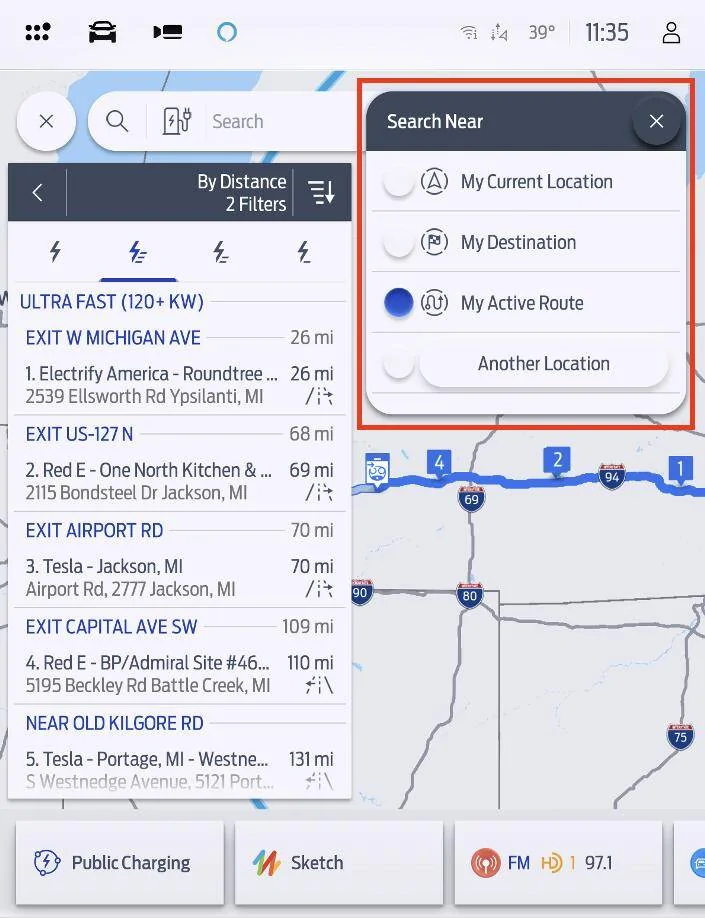
- My Current Location – Find the chargers closest to your location, in any direction
- My Destination – Find chargers near the destination of your active route
- My Active Route – Find chargers that are ahead of you along your active route
- Another Location – Search for chargers anywhere.
Not all Tesla Superchargers are open to non-Tesla vehicles. When you enter a destination Connected Navigation will only include stations that are open to Ford vehicles in your route plan. However, to provide a complete listing of all charging stations, stations that are incompatible are listed when manually viewing chargers unless the Available and Open filter is selected. These stations will appear accompanied by a
symbol.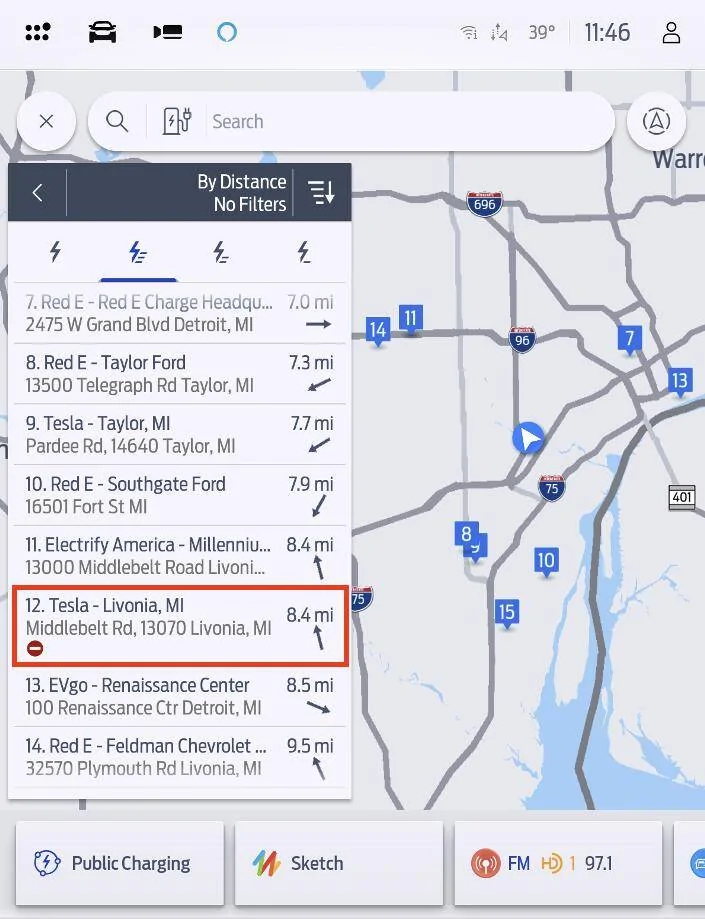
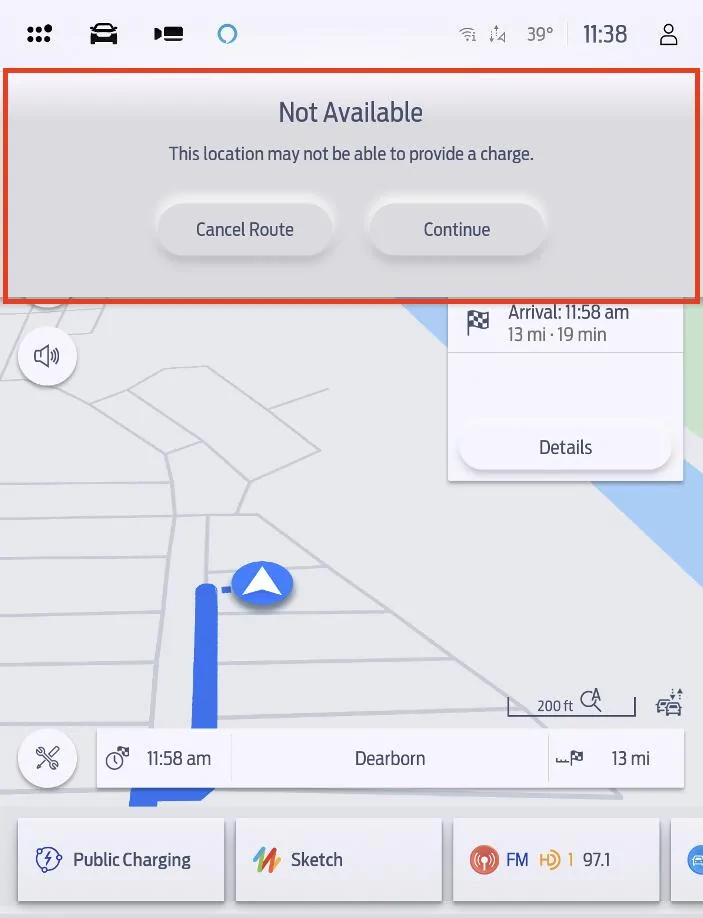
If you manually select these chargers, you may see a warning message appear notifying you that you have selected an incompatible station. If you aren’t expecting to see this message, select Cancel Route and choose another charger.
Frequently Asked Questions:
Do I need to use Connected Navigation? Can I use Apple CarPlay or Android Auto to find Tesla Superchargers?
Connected Navigation is one option to find Tesla Superchargers. Android users can also use Google Maps EV Routing for Android Auto to find Superchargers. For Apple CarPlay users, Apple Maps will soon add Tesla Supercharger support.
Does Connected Navigation precondition my battery for fast charging?
Yes, Connected Navigation will precondition your vehicle’s battery when heading to a known fast charger. For more on preconditioning visit go.ford/evroadtrip
How do I pay for charging at Tesla Superchargers?
Compatible Tesla Superchargers are part of the BlueOval Charge Network feature Plug & Charge, so simply plugging in your vehicle is all it takes – your BlueOval Charge Network account will be automatically used for payment. And like all networks within the BlueOval Charge Network, you can also use the FordPass® app to pay for charging.
Is there a cost to use Connected Navigation?
Connected Navigation is a connected service with a complimentary 3-year trial included for electric vehicles.
- For 2025 MY Mustang Mach-E, Connected Navigation will be available via the paid Connectivity Package after the expiration of the 3-year trial.
- For prior model year Mustang Mach-E, Connected Navigation/Connected Built-In Navigation (as equipped) is available as a standalone paid subscription after the expiration of the 3-year trial
Robert and Brian
Sponsored
Last edited: