"App Projection" is what Carplay and Android auto use. That's the name for the tech in the background. Nothing else is supported at this time.
You'll see the same "App Projection" referenced on other vehicles as well. My brothers Bolt for instance doesn't have a dedicated android auto button, but just an app projection button that then switches the display to android auto.
Android Auto and CarPlay also limit what apps can be displayed through app projection. No video apps are allowed. (I'm sure there are ways around this if you jailbreak/root your device)
Interestingly, my MME has a greyed out "mobile apps" toggle that is currently not available under the Projected Apps submenu in the settings. The info that pops up says you can project any app from your phone using Bluetooth (but you can die from distracted driving blah blah) and that you need to disconnect Android Auto/Car Play in order to use projected apps....
But again, the toggle was greyed out. And I did not have Android Auto connected at the time. So, perhaps this is a "maybe coming soon" feature?
Interestingly, my MME has a greyed out "mobile apps" toggle that is currently not available under the Projected Apps submenu in the settings. The info that pops up says you can project any app from your phone using Bluetooth (but you can die from distracted driving blah blah) and that you need to disconnect Android Auto/Car Play in order to use projected apps....
But again, the toggle was greyed out. And I did not have Android Auto connected at the time. So, perhaps this is a "maybe coming soon" feature?
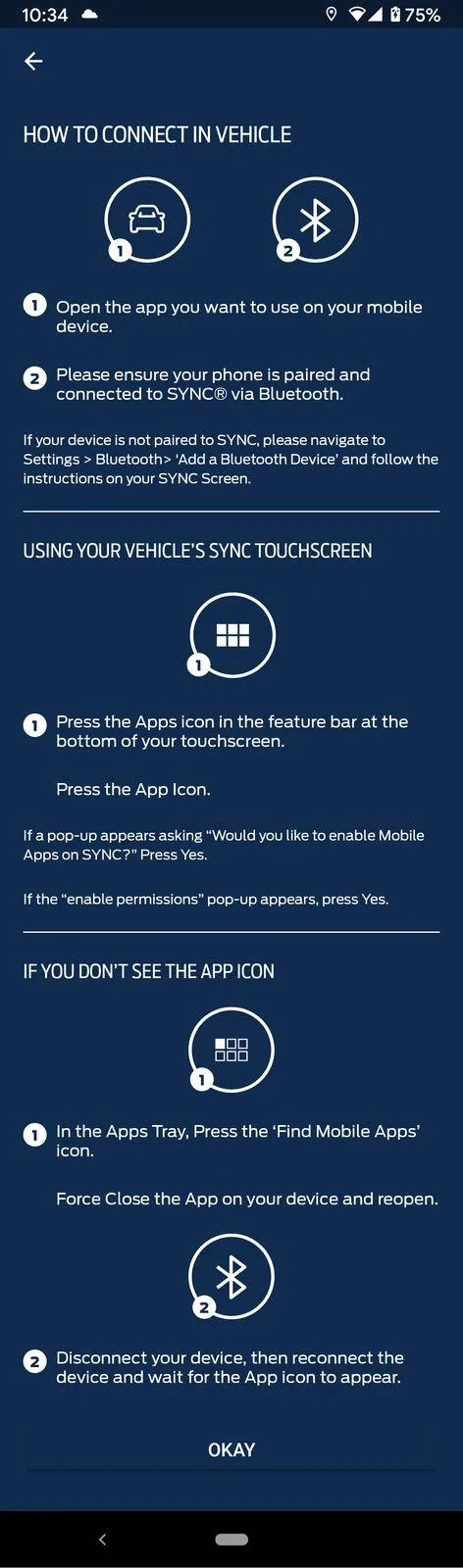
There are a small number of apps that support SYNC AppLink, which can project limited content to SYNC via Bluetooth and possibly other protocols (USB, WiFi) but I'm not sure.
Launch FordPass on your phone, tap the hamburger menu ("More") and then tap App Catalog. This might not be the complete list, but it's probably close.
I tried tested this with iHeartRadio. I installed the app on my phone, and after the next time the car synced up its app catalog from my phone, it showed up on the SYNC display. Then if I launch it in the car, I get a special SYNC version of the iHeartRadio user interface, with steering wheel controls, some voice controls, etc.
You'll probably prefer Android Auto or CarPlay though.