1st_EV_2011
Well-Known Member
- First Name
- James
- Joined
- Jul 16, 2024
- Threads
- 14
- Messages
- 71
- Reaction score
- 128
- Location
- Michigan
- Website
- www.macheforum.com
- Vehicles
- 2023 Mustang Mach-E GT
- Occupation
- Threat Intelligence Analyst

- Thread starter
- #1
I installed IOS 18.1 on the iPhone 16 Pro Max today, requested to be added to the Apple Intelligence waitlist, and was very shortly thereafter provided with Apple Intelligence.
Heretofore, the Apple Photos library has been a deep dark ocean where nothing could be found. This has changed with the arrival of Apple Intelligence.
Now one can:
"Find and name people and pets in Photos on iPhone
The Photos app sorts photos and videos of people, dogs, and cats in the People & Pets collection (or the People collection if no pets appear). You can name a person, dog, or cat directly from a photo or video in your photo library, or in People & Pets."
https://support.apple.com/guide/iphone/find-and-name-people-and-pets-iph9c7ee918c/18.0/ios/18.0
Search for specific photos and videos with Apple Intelligence:
https://support.apple.com/guide/iphone/use-apple-intelligence-in-photos-iphf7de217f0/ios
This is the game changer. It works.
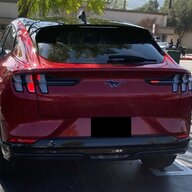
The shortcoming I have found is that Apple Intelligence will not allow me to add my Mustang Mach-E as a "Pet". I did try. The documentation indicates that only cats and dogs are allowed.
For the inevitable cry baby post whiners on this forum, please note that this post is under "Automotive Discussions & Off Topic Lounge". Thanks in advance.
Heretofore, the Apple Photos library has been a deep dark ocean where nothing could be found. This has changed with the arrival of Apple Intelligence.
Now one can:
"Find and name people and pets in Photos on iPhone
The Photos app sorts photos and videos of people, dogs, and cats in the People & Pets collection (or the People collection if no pets appear). You can name a person, dog, or cat directly from a photo or video in your photo library, or in People & Pets."
https://support.apple.com/guide/iphone/find-and-name-people-and-pets-iph9c7ee918c/18.0/ios/18.0
Search for specific photos and videos with Apple Intelligence:
https://support.apple.com/guide/iphone/use-apple-intelligence-in-photos-iphf7de217f0/ios
This is the game changer. It works.
The shortcoming I have found is that Apple Intelligence will not allow me to add my Mustang Mach-E as a "Pet". I did try. The documentation indicates that only cats and dogs are allowed.
For the inevitable cry baby post whiners on this forum, please note that this post is under "Automotive Discussions & Off Topic Lounge". Thanks in advance.
Sponsored