Apple Maps not showing Tesla

Knuckles39

Well-Known Member
First Name
Jeff
Joined
Oct 30, 2021
Threads
6
Messages
90
Reaction score
26
Location
IL
Vehicles
Mach-E
Country flag
I use Apple Maps generally for navigation. I have Apple Maps setup and connected with the Mach-e. It lets me add the preferred chargers in but under plug types doesn’t list NACS. Anyone know of this is a planned update or not to add that?
Sponsored
 

Dysan911

Well-Known Member
First Name
Brian
Joined
Mar 11, 2024
Threads
13
Messages
318
Reaction score
235
Location
USA
Vehicles
2023 Mustang Mach E GT
Occupation
Technical Software Analyst
Country flag
Where in Apple maps do you set the preferred chargers?
 
OP
OP

Knuckles39

Well-Known Member
First Name
Jeff
Joined
Oct 30, 2021
Threads
6
Messages
90
Reaction score
26
Location
IL
Vehicles
Mach-E
Country flag
It’s underneath vehicles-Mustang Mach-e and then in the next screen that pops up to add network. You can add Tesla there but regardless if you have those selected it seems to be navigating to the same networks each time, just not mostly Tesla in my case
 

Dysan911

Well-Known Member
First Name
Brian
Joined
Mar 11, 2024
Threads
13
Messages
318
Reaction score
235
Location
USA
Vehicles
2023 Mustang Mach E GT
Occupation
Technical Software Analyst
Country flag
Edit: I actually found it and mine is showing Tesla Supercharger as one of the Networks It can use. You're right about the Plug type though. Only J1772 or CCS1. Would that matter though since we can use an adapter with Tesla Superchargers so it doesn't need to list NACS?
 
OP
OP

Knuckles39

Well-Known Member
First Name
Jeff
Joined
Oct 30, 2021
Threads
6
Messages
90
Reaction score
26
Location
IL
Vehicles
Mach-E
Country flag
I’m not sure. I would think it would need to know that as not all superchargers are available for us to use


kdonnel

Well-Known Member
Joined
Oct 31, 2021
Threads
35
Messages
1,147
Reaction score
1,665
Location
Metro Atlanta
Vehicles
2022 CA Route 1, 2020 Bolt EV
Country flag
Edit: I actually found it and mine is showing Tesla Supercharger as one of the Networks It can use. You're right about the Plug type though. Only J1772 or CCS1. Would that matter though since we can use an adapter with Tesla Superchargers so it doesn't need to list NACS?
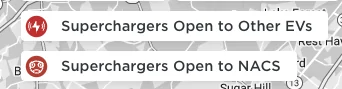
Apple will need to update to include NACS as a choice to cover just sites with the magic dock and also NACS with Adapter, to cover the sites open to non Tesla with an adapter.

Similar to how Tesla handles their Find Us map

Ford Mustang Mach-E Apple Maps not showing Tesla Screenshot 2024-04-11 at 8.26.27 AM


Until then, in the US, the routing will not route a non Tesla to a SuperCharger.
 
Last edited:

zvez

Banned
Banned
First Name
chris
Joined
Dec 31, 2020
Threads
13
Messages
2,441
Reaction score
2,344
Location
ga
Vehicles
2023 GT PE Carbonized Grey with Nite Pony package
Occupation
retired
Country flag
Edit: I actually found it and mine is showing Tesla Supercharger as one of the Networks It can use. You're right about the Plug type though. Only J1772 or CCS1. Would that matter though since we can use an adapter with Tesla Superchargers so it doesn't need to list NACS?
but as I think others have mentioned, not all of the tesla superchargers (I'm speaking of not all gen 3 superchargers) are available to nacs. The other question I had was, if you used the tesla app with your mach e, would it enable those excluded superchargers to be used bya nacs adaptor car.
 

markboris

Well-Known Member
First Name
Mark
Joined
Nov 13, 2019
Threads
43
Messages
5,731
Reaction score
16,371
Location
Sonora, CA
Vehicles
Currently: '20 Shelby GT500 FPB '24 Mach-E GTP GGM
Occupation
Retired
Country flag
but as I think others have mentioned, not all of the tesla superchargers (I'm speaking of not all gen 3 superchargers) are available to nacs. The other question I had was, if you used the tesla app with your mach e, would it enable those excluded superchargers to be used bya nacs adaptor car.
In the Tesla App, when I choose Charge Your Other EV, it only shows SuperChargers that require the NACS adapter in Apple Maps. Maybe all the SuperChargers around me are newer V3's that allow charging with the NACS adapter? I have not traveled more than 50 miles from my home but I will be later today (driving to Sacramento) and I will check this out further.
 

kdonnel

Well-Known Member
Joined
Oct 31, 2021
Threads
35
Messages
1,147
Reaction score
1,665
Location
Metro Atlanta
Vehicles
2022 CA Route 1, 2020 Bolt EV
Country flag
but as I think others have mentioned, not all of the tesla superchargers (I'm speaking of not all gen 3 superchargers) are available to nacs. The other question I had was, if you used the tesla app with your mach e, would it enable those excluded superchargers to be used bya nacs adaptor car.
When you add your non Tesla vehicle to the Tesla app you get to set whether you have a NACS DC Adapter or not.

If you say no then the app will only show you magic dock Supercharger stations.

If you say yes then the app will show you magic dock stations and those stations open and compatible to non Tesla.
 

markboris

Well-Known Member
First Name
Mark
Joined
Nov 13, 2019
Threads
43
Messages
5,731
Reaction score
16,371
Location
Sonora, CA
Vehicles
Currently: '20 Shelby GT500 FPB '24 Mach-E GTP GGM
Occupation
Retired
Country flag
When you add your non Tesla vehicle to the Tesla app you get to set whether you have a NACS DC Adapter or not.

If you say no then the app will only show you magic dock Supercharger stations.

If you say yes then the app will show you magic dock stations and those stations open and compatible to non Tesla.
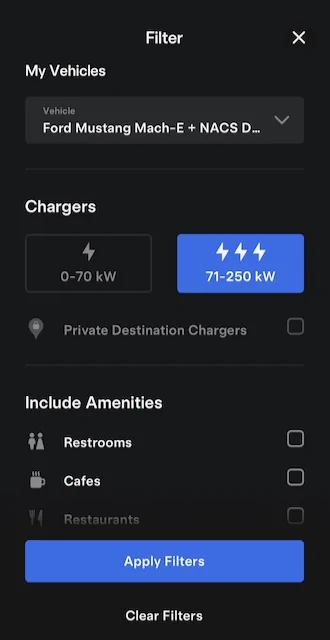
Also, in the Tesla App under Filters you want to make sure you have selected fast chargers.


Ford Mustang Mach-E Apple Maps not showing Tesla IMG_9754
 

kdonnel

Well-Known Member
Joined
Oct 31, 2021
Threads
35
Messages
1,147
Reaction score
1,665
Location
Metro Atlanta
Vehicles
2022 CA Route 1, 2020 Bolt EV
Country flag
Also, in the Tesla App under Filters you want to make sure you have selected fast chargers.


IMG_9754.jpeg
Oddly, you do not have to select 71-250 to see the superchargers. But if you specifically select 0-70 and do not select 71-250 you will only see destination chargers.

If you select neither, it is as though you selected both.

When neither are selected or both are selected Superchargers are displayed with a red icon and destination chargers displayed with gray.

But I don't see a way to show only destination chargers open to non Tesla. I think the majority are but I believe there is a setting that can be applied in the destination charger that limits their use to only Tesla.
 

4sallypat

Well-Known Member
First Name
Pat
Joined
Mar 30, 2022
Threads
103
Messages
2,806
Reaction score
2,463
Location
Southern California
Website
www.kudo-ume-farms.com
Vehicles
'23 MME delivered May '23 + '22 Lightning July '22
Occupation
Network Tech
Country flag
Tried Apple Maps from the Tesla app link but it was terrible - would not show live real time turn by turn nav on our phones.

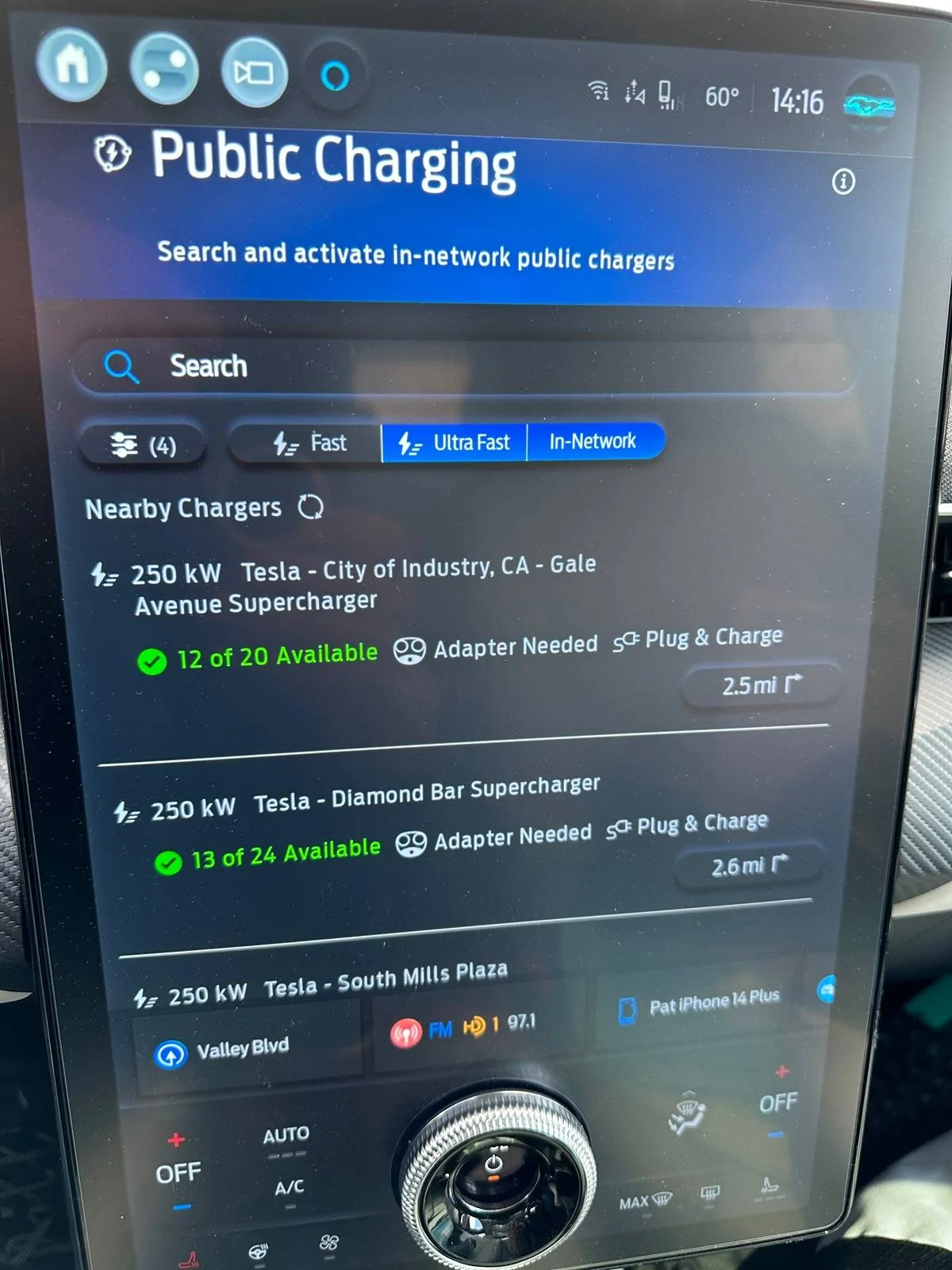
I use Public Charging (aka Charge Assist) to locate Tesla SC that will work with the Mach E.

The only bad feature is that I can't have the app run while the vehicle is in motion.

Ford has to fix this or else integrate into their Ford nav.

Ford Mustang Mach-E Apple Maps not showing Tesla IMG_0474
 

markboris

Well-Known Member
First Name
Mark
Joined
Nov 13, 2019
Threads
43
Messages
5,731
Reaction score
16,371
Location
Sonora, CA
Vehicles
Currently: '20 Shelby GT500 FPB '24 Mach-E GTP GGM
Occupation
Retired
Country flag
Oddly, you do not have to select 71-250 to see the superchargers. But if you specifically select 0-70 and do not select 71-250 you will only see destination chargers.

If you select neither, it is as though you selected both.

When neither are selected or both are selected Superchargers are displayed with a red icon and destination chargers displayed with gray.

But I don't see a way to show only destination chargers open to non Tesla. I think the majority are but I believe there is a setting that can be applied in the destination charger that limits their use to only Tesla.
Correct. I just meant to select 71-250 so that the 0-70 would not be shown.
 

markboris

Well-Known Member
First Name
Mark
Joined
Nov 13, 2019
Threads
43
Messages
5,731
Reaction score
16,371
Location
Sonora, CA
Vehicles
Currently: '20 Shelby GT500 FPB '24 Mach-E GTP GGM
Occupation
Retired
Country flag
Tried Apple Maps from the Tesla app link but it was terrible - would not show live real time turn by turn nav on our phones.

I use Public Charging (aka Charge Assist) to locate Tesla SC that will work with the Mach E.

The only bad feature is that I can't have the app run while the vehicle is in motion.

Ford has to fix this or else integrate into their Ford nav.

IMG_0474.JPG
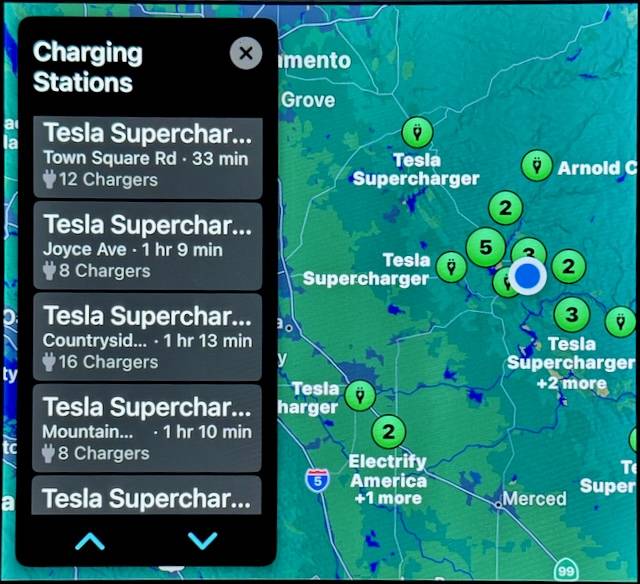
I ask Siri to show Tesla SuperCharges close to me. Unfortunately it shows all of them but I happen to know the ones it does show close to me are all NACS compatible. Like the OP said, hopefully someday we will have the option to choose NACS as a plug type in Apple Maps.


Ford Mustang Mach-E Apple Maps not showing Tesla IMG_9593 (1)
 

david_quick

Well-Known Member
First Name
David
Joined
Sep 10, 2023
Threads
54
Messages
642
Reaction score
487
Location
Bremerton WA
Vehicles
2023 Mach E GT
Occupation
Retired
Country flag
I was going to ask this question as well.

I did a little experiment. My destination was set to Spokane,Wa. I deleted all but the Tesla network and maps still had me stopping in at the EVgo in Ellensburg. There is a SC there and couple of Magic Docks up the road.

Everyone says to avoid the EVGo here if you can.
Sponsored


Top