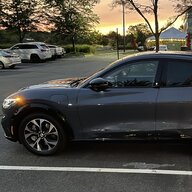
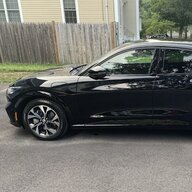
Locking door with touch lock button

RickMachE

Well-Known Member
Joined
Jul 1, 2021
Threads
267
Messages
17,903
Reaction score
27,866
Location
SE MI
Vehicles
2022 Mach-E Premium 4X, 2022 Lightning Lariat ER
Country flag
Holding finger on the icon does not help, tried that.

Have not tried 7-8 / 9-0 option (will give it a try tomorrow), but all these other ways work fine including walking away. I am just hoping I can find a way to use this touch lock button as it seems most convenient to me. Again, it works too, just after some weird delay or a few tries.
If the driver's door is open, the internal button will lock the doors after you close then. Pretty silent. If you have the fob in your pocket, you can't then check by pulling on the outside handle as that unlocks them.
Sponsored


SpaceEVDriver

Well-Known Member
Joined
Aug 26, 2021
Threads
71
Messages
2,651
Reaction score
4,774
Location
Arizona
Vehicles
2022 CA Route 1 AWD, ER; 2023 Lightning Lariat ER
Occupation
Planetary Science
Country flag
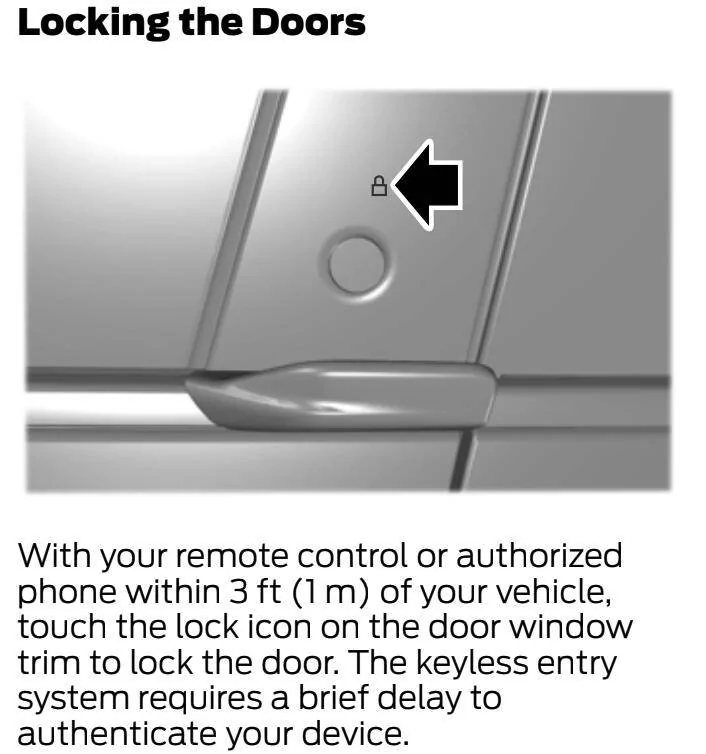
Page 81 of the 2022 manual:
My experience is that I need to hold my finger on the lock button for a moment or two.

The next several pages discuss the keypad and its uses.

Ford Mustang Mach-E Locking door with touch lock button Screen Shot 2022-05-08 at 21.25.15
 

Kabish

Well-Known Member
First Name
Bill
Joined
Jul 24, 2021
Threads
40
Messages
927
Reaction score
977
Location
San Diego
Vehicles
2021 Mach-E Mustang
Occupation
IT
Country flag
I think its the typical PAAK issue and updates.

My car for the first 6 months would NEVER lock with that button. Then all the sudden one day I accidently hit it somehow and it locked. Now I would say it locks without much issue as long as I do it very promptly after getting out of the car. I would say 1 out of 10 times I'll have it not work, been using it pretty regularly the last two weeks. One oddity for me, I find it works better if I slide my finger down. That said, its going to scratch the hell out of the panel doing it that way unless you keep your car spotless.

Not too sure why Ford had to put authentication to lock a door..... I feel like that is what causes the majority of my issues. PAAK is still not in its prime time, its WAY better than what it was, but its still a buggy mess.
 

SpaceEVDriver

Well-Known Member
Joined
Aug 26, 2021
Threads
71
Messages
2,651
Reaction score
4,774
Location
Arizona
Vehicles
2022 CA Route 1 AWD, ER; 2023 Lightning Lariat ER
Occupation
Planetary Science
Country flag
I don't use PAAK. After reading about needing to keep my finger on the button for a moment, I've had 100% success rate with the fob.
 

Murse-In-Airy

Well-Known Member
First Name
Rod
Joined
Mar 5, 2021
Threads
82
Messages
3,678
Reaction score
8,297
Location
Chaumont, NY
Vehicles
Mach-E ER AWD
Occupation
Nurse
Country flag
I’m on my 3rd Mach-E. Wife has one. I had one. Sold it and bought a GT. Across all three, that lock icon on the door pillar has NEVER ONCE worked for me. But the 7-8, 9-0 button combination, conveniently located just above the faux lock icon has been flawless.


TruWrecks

Well-Known Member
Joined
Jun 3, 2021
Threads
25
Messages
948
Reaction score
1,030
Location
Oregon
Vehicles
Mach-E Star White Premium AWD Ext (Ghost Stallion)
Occupation
Retired
Country flag
I use the touch lock all the time. Sometimes I need to press it twice.
 

Chuck

Well-Known Member
First Name
Chuck
Joined
May 13, 2021
Threads
96
Messages
1,258
Reaction score
1,775
Location
SoCal
Vehicles
Mustang Mach E 2021
Country flag
Sorry, can't help you. I've never used the lock button, I only use the walk away lock feature.
 

buzznwood

Well-Known Member
Joined
Nov 14, 2019
Threads
3
Messages
1,162
Reaction score
1,379
Location
california
Vehicles
focus st & GTPE
Country flag
+1 to the lock button being flaky to the point I gave up trying to use it and just rely on the walk away feature and the horn honking. I tried to give it the benefit of the doubt for the first month of ownership but found I was spending more time resorting to using the keypad double button method.

Gave the the passenger side a go just to make sure something wasn't up with the drivers side button, but same success rate or rather lack of. I will give ford for the implementation on my Focus a 10/10 while I will give the one on the mach-e a 1/10 as it is that bad in comparison.
 
OP
OP

circle11

Active Member
Joined
May 8, 2022
Threads
8
Messages
40
Reaction score
15
Location
USA
Vehicles
'22 Mach-e Premium
Country flag
Something else I realized today after looking into this: when I get out of the car and close the door, the keypad is lit. It stays lit for maybe 10 seconds. During these 10 seconds the lock icon never works (but 7-8/9-10 combination does - thanks for that advise). Once the keypad goes off and is not lit anymore, the touch icon starts working. At least this is how it seems to behave on mine. Is this by design? If so, this design is not very well thought thru (understatement!).
 

TGIF

Well-Known Member
Joined
Oct 12, 2021
Threads
31
Messages
584
Reaction score
602
Location
IA
Vehicles
‘18 Pacifica PHEV, ‘22 RR Premium 4X
Country flag
When I first got my Pacifica I was convinced the lock buttons didn’t work. Turns out they just needed to be pressed for a second to work. I was punching them too quickly. You might see if that works.
 

Thunderbuck

Well-Known Member
First Name
Brett
Joined
Feb 7, 2020
Threads
9
Messages
447
Reaction score
665
Location
Whitehorse, Yukon
Vehicles
2023 Mustang Mach-E Premium
Occupation
IT Tech
Country flag
I’m on my 3rd Mach-E. Wife has one. I had one. Sold it and bought a GT. Across all three, that lock icon on the door pillar has NEVER ONCE worked for me. But the 7-8, 9-0 button combination, conveniently located just above the faux lock icon has been flawless.
I usually like the walk-away feature, but if I'm parking at night I don't want to disturb my neighbors with the horn blast. I've found the lock icon to be hit or miss (likely Paak issue) but I'll try the 7-8 and 9-0 button trick. Thanks ?
 

JohnnyForensic

Well-Known Member
First Name
John
Joined
Apr 14, 2021
Threads
44
Messages
1,208
Reaction score
2,191
Location
VA, US
Vehicles
'21 Infinite Blue MME 4X Premium
Occupation
Digital Forensics
Country flag
If you’re using PaaK, make sure your phone is reasonably close to the door when you press it (or the open button, for that matter). If my phone is in my front left pocket as it always is and I have my body turned away from the car, neither button works reliably. If I have it in my hand that’s pushing the button, it works almost every time without fail.
 
Last edited:

Ford Motor Company

Well-Known Member
Official Ford Account
First Name
Brian
Joined
May 10, 2021
Threads
68
Messages
3,455
Reaction score
6,529
Location
Michigan
Vehicles
Mustang Mach-E
Occupation
Real Human & Community Manager
Country flag
Sorry if this has been asked before. I just got my Mach-e about 10 days ago and brand new to this forum. Love it overall but still trying to work through some little hiccups.

When I arrive to my destination, turn off the car and get out, I like to lock the car using the little lock button on the door located right above the door release button. The problem is that lock button never works from the first touch. It works eventually, but I have to push it like 5-10 times for it to work for several seconds. Maybe there is some kind of time delay feature? I don't think the button itself is defective because all the lock buttons on all four doors behave the same. Very annoying! Would love to get it to work with a single push.

BTW, I was shocked to see the numeric touchpad on this car. I should be able to lock the car with that lock button, and it unlocks automatically with door release button given I have the key in my pocket. What exactly is the purpose of the numeric keypad?

Thanks in advance for your help!
Hi there! Can you send us a DM with more information? I’ll see how I can assist on my end. Thanks!
 

JmanMachE

Active Member
First Name
Jerry
Joined
Oct 16, 2021
Threads
0
Messages
35
Reaction score
22
Location
Needham, MA
Vehicles
2021 Mach E Premium AWD ext. range
Country flag
Please try this and let us know if it works - it seems to make a difference (after going crazy trying to figure out what I was doing wrong) though it may sound crazy. When you stand near the lock button, align the key fob vertically with it first and then press lock. Only a light press is needed for a short (under a second) duration. Same for unlock issues.

Update: I saw the post about being within 3 feet - that correlates with my advice as I almost always have the fob in my pocket and probably would be just out of range…
 
Last edited:

Chuck

Well-Known Member
First Name
Chuck
Joined
May 13, 2021
Threads
96
Messages
1,258
Reaction score
1,775
Location
SoCal
Vehicles
Mustang Mach E 2021
Country flag
If you’re using PaaK, make sure your phone is reasonably close to the door when you press it (or the open button, for that matter). If my phone is in my front left pocket as it always is and I have my body turned away from the car, neither button works reliably. If I have it in my hand that’s pushing the button, it works almost every time without fail.
I think it need only say "Bluetooth connected" on the Ford Pass app for the PAAK to work. In my case the phone can be in my pocket and when I get within about 10 feet of the car the tail lights light up when bluetooth is connected and I'm good to go. My phone doesn't need to be held by me for this to work. I suspect each phone model will be different.
Sponsored


Top