Mach E Select - disable departure times

brian1974

New Member
First Name
Brian
Joined
Dec 13, 2021
Threads
2
Messages
3
Reaction score
0
Location
NYC
Vehicles
Mach E Standard
Country flag
Hi,

may wife has had her Mach e for just over 1 month with no issues until now.
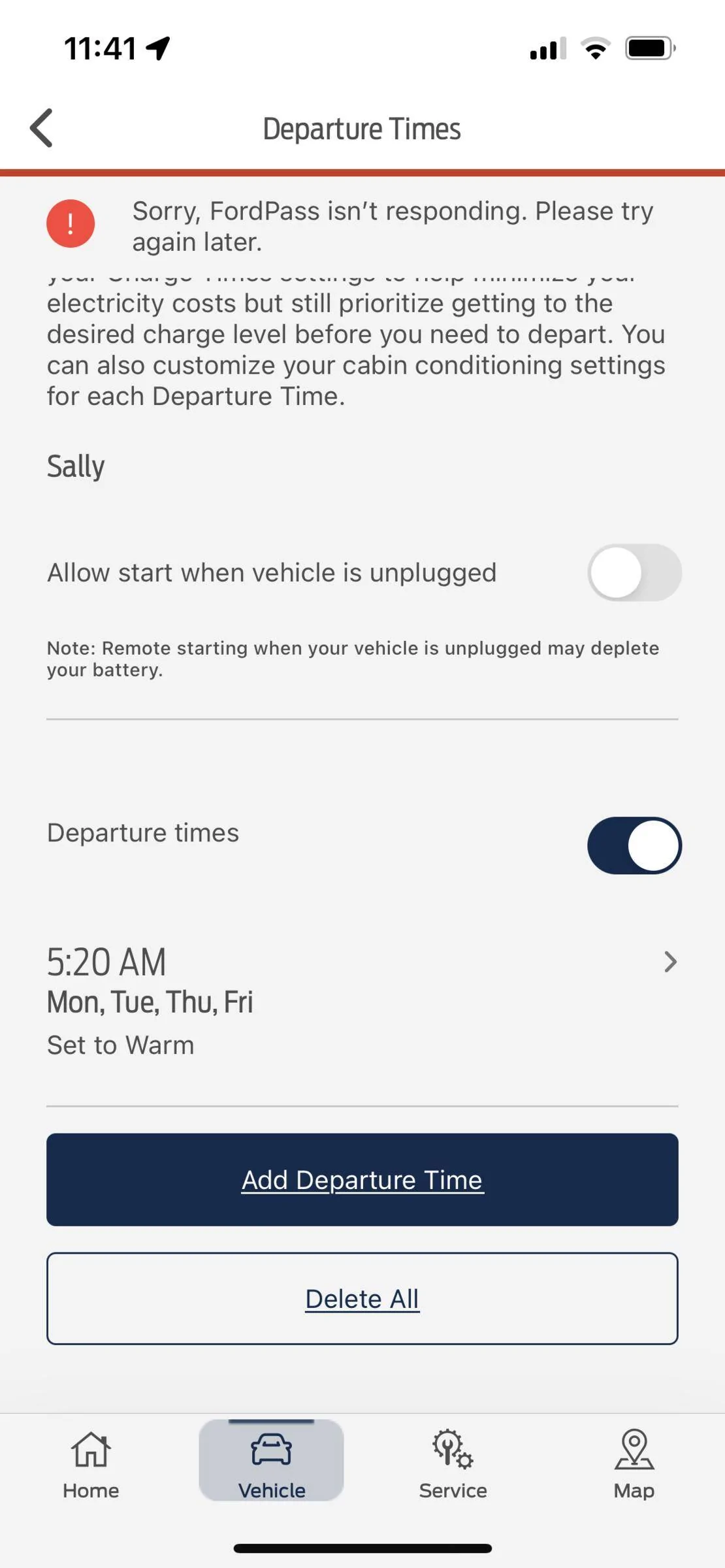
She has departure times setup in the week to get the car ready at 5.20am Monday to Friday setting the cabin temp to warm.

today we logged into the app and tried to turn this off temporarily,
However it will not go through.
Just gives the error “ sorry ford pass isn’t responding please try again later”
We also tried deleting the set departure time and changing the time and get the same error.
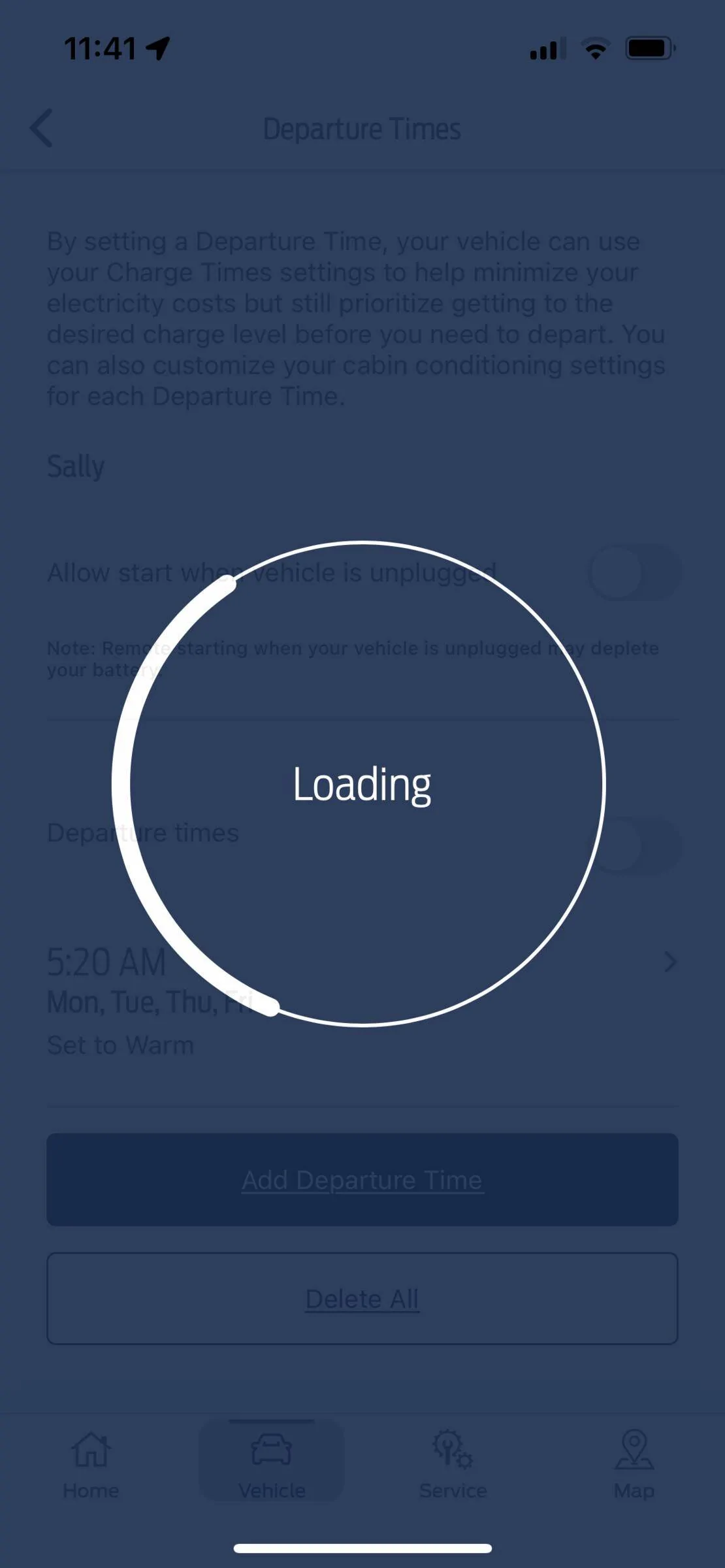
It spins on the loading screen for anywhere up to 2 mins and then gives the error.

I tried downloading and logging in my own phone and get the same error.
We tried deleting the app from the phones and rebooting the phones to no avail.
I went into the car through the menu and saw no way of turning this off.

Any advice on how to proceed ?

Will it try to preheat/prep the car for departure time if it is left unplugged and the start while unplugged button is disabled?

how does the car get this departure time does it come directly from the phone or go through a ford server that stores the information and pushes to the car?

is there a way to disable this departure time without using the app?

what’s odd is that all other functionality in the app seems to work, remote start , unlocking downloading of trips and charging info, update on charging when it’s plugged in.

thanks for the help

Ford Mustang Mach-E Mach E Select - disable departure times D75D7542-CD80-4BEE-8F56-6BD949D94D10


Ford Mustang Mach-E Mach E Select - disable departure times D94793C2-A26A-4903-9259-2ACD7AE7127A
Sponsored


Maquis

Well-Known Member
First Name
Dave
Joined
Dec 21, 2020
Threads
34
Messages
5,688
Reaction score
8,068
Location
Illinois
Vehicles
2021 Mach E4X, 2023 Lightning Lariat ER
Country flag
I can offer no help, but if it’s any consolation, mine is behaving the same way. iOS FordPass 4.11.

4.11 seems like it messed up a lot of stuff!
 

AKgrampy

Well-Known Member
First Name
Mike
Joined
Jan 29, 2022
Threads
7
Messages
3,519
Reaction score
3,590
Location
Fairbanks, Alaska
Vehicles
Ford Expedition, Ford F-150, Mach E GT
Occupation
Retired
Country flag
You can set and delete departure time with the in-car screen. Hopefully you can get it cleared that way. I do not know if changing departure time with the Sync system will also make changes to the departure times in Ford Pass. I would think so but it appears there is some form of communication glitch. I do not know if your car will condition your cabin unplugged but it is my understanding will not pre-condition the batteries.
 

RickMachE

Well-Known Member
Joined
Jul 1, 2021
Threads
267
Messages
17,898
Reaction score
27,850
Location
SE MI
Vehicles
2022 Mach-E Premium 4X, 2022 Lightning Lariat ER
Country flag
FordPass issues, yet again.
 

KevinS

Well-Known Member
Joined
Oct 11, 2021
Threads
34
Messages
1,515
Reaction score
2,831
Location
Maryland
Vehicles
2021 Mach-E (sold), 2023 Ioniq 6 SEL
Country flag
Oh FordPass, you little scamp.

I have taken to using the Scriptable app as much as possible. It's so much more responsive for basic functions like unlock and remote start.


Ford Motor Company

Well-Known Member
Official Ford Account
First Name
Brian
Joined
May 10, 2021
Threads
68
Messages
3,455
Reaction score
6,529
Location
Michigan
Vehicles
Mustang Mach-E
Occupation
Real Human & Community Manager
Country flag
Hi,

may wife has had her Mach e for just over 1 month with no issues until now.
She has departure times setup in the week to get the car ready at 5.20am Monday to Friday setting the cabin temp to warm.

today we logged into the app and tried to turn this off temporarily,
However it will not go through.
Just gives the error “ sorry ford pass isn’t responding please try again later”
We also tried deleting the set departure time and changing the time and get the same error.
It spins on the loading screen for anywhere up to 2 mins and then gives the error.

I tried downloading and logging in my own phone and get the same error.
We tried deleting the app from the phones and rebooting the phones to no avail.
I went into the car through the menu and saw no way of turning this off.

Any advice on how to proceed ?

Will it try to preheat/prep the car for departure time if it is left unplugged and the start while unplugged button is disabled?

how does the car get this departure time does it come directly from the phone or go through a ford server that stores the information and pushes to the car?

is there a way to disable this departure time without using the app?

what’s odd is that all other functionality in the app seems to work, remote start , unlocking downloading of trips and charging info, update on charging when it’s plugged in.

thanks for the help
D75D7542-CD80-4BEE-8F56-6BD949D94D10.png


D94793C2-A26A-4903-9259-2ACD7AE7127A.png
Hi there! Can you send us a PM with your VIN and Ford dealership information? I’d be happy to look into this Mach-E concern on my end.
 

Motomax

Well-Known Member
First Name
Max
Joined
Jul 19, 2021
Threads
5
Messages
1,017
Reaction score
1,027
Location
California
Vehicles
VW GLI, 4Runner
Country flag
Departure time kinda just does it’s own thing. Sometimes it works, sometimes it doesn’t.
Everything in the manual seems to indicate that preconditioning only works when plugged in.
So what does The remote start when not plugged in option mean? well it doesn’t disable remote start from the app. my untested assumption is that when not plugged in it may only remote start the vehicle vs preconditioning the vehicle.

try force quitting the app and reloading it. Maybe wake the vehicle with an unlock command. You can also set the departure settings in the vehicle itself.
 

SnBGC

Well-Known Member
First Name
Greg
Joined
Apr 20, 2020
Threads
46
Messages
5,962
Reaction score
9,778
Location
Phoenix
Vehicles
2021 Mach-E FE, 2021 Wrangler 4xe High Altitude
Occupation
Manager
Country flag
Departure time kinda just does it’s own thing. Sometimes it works, sometimes it doesn’t.
Everything in the manual seems to indicate that preconditioning only works when plugged in.
So what does The remote start when not plugged in option mean? well it doesn’t disable remote start from the app. my untested assumption is that when not plugged in it may only remote start the vehicle vs preconditioning the vehicle.

try force quitting the app and reloading it. Maybe wake the vehicle with an unlock command. You can also set the departure settings in the vehicle itself.
This is similar to what I have to do to get it to work.
I set the times in the car since that is much faster than the app most times.
In order to get it to actually work, I usually have to wake up my car. When I am getting ready for work, I open FordPass on my phone and refresh the home screen. That will usually wake up the car and start the cabin preconditioning routine. Sometimes I forget to do that though and it's 50/50 if the cabin is ready or not.

Last week it worked 2 out of the 5 days.
This morning is n/a since I didn't plug in last night. :)
 

Motomax

Well-Known Member
First Name
Max
Joined
Jul 19, 2021
Threads
5
Messages
1,017
Reaction score
1,027
Location
California
Vehicles
VW GLI, 4Runner
Country flag
In order to get it to actually work, I usually have to wake up my car. When I am getting ready for work, I open FordPass on my phone and refresh the home screen. That will usually wake up the car and start the cabin preconditioning routine. Sometimes I forget to do that though and it's 50/50 if the cabin is ready or not.
Yes, it does seem like the most reliable way to get departure time to work is to open the app and refresh it like 30-40 min before you leave. Today I forgot and it didn’t work lol. Sometimes even that doesn’t work and I give up.
it’s kind of annoying because the first month of owning the car it worked flawlessly. Then i disabled it for a holiday and it’s never worked right since.
 

SnBGC

Well-Known Member
First Name
Greg
Joined
Apr 20, 2020
Threads
46
Messages
5,962
Reaction score
9,778
Location
Phoenix
Vehicles
2021 Mach-E FE, 2021 Wrangler 4xe High Altitude
Occupation
Manager
Country flag
Yes, it does seem like the most reliable way to get departure time to work is to open the app and refresh it like 30-40 min before you leave. Today I forgot and it didn’t work lol. Sometimes even that doesn’t work and I give up.
it’s kind of annoying because the first month of owning the car it worked flawlessly. Then i disabled it for a holiday and it’s never worked right since.
My wife's Wrangler 4xe doesn't even have the option to set departure times. :(
So I guess we are lucky that we have something....even if it doesn't always work every time. :)
 

Paul H

Member
First Name
Paul
Joined
Feb 18, 2021
Threads
8
Messages
23
Reaction score
9
Location
Pittsboro, NC
Vehicles
Fusion Hybrid, Mini Cooper S
Country flag
Setting departure times with the app has always worked for me until the last two days. Now I can't set or delete DTs anymore, just get the "Ford Pass not responding" message after it tries for a while.
 

Gullwingdmc

Well-Known Member
First Name
Chip
Joined
May 15, 2021
Threads
85
Messages
2,943
Reaction score
4,110
Location
Boston, MA
Vehicles
2022 Mustang Mach E GT AWD ER - Grabber Blue
Country flag
My departure times haven’t been working for the last few days. I confirmed in my car today that they are set correctly, and I can see the settings in the app. It just doesn’t start and I don’t get the notification. In the app it shows the next departure time as my first one of the week (Sunday 1:15pm) that one didn’t go and none of the ones since then.
 

OON7

Well-Known Member
First Name
Evan
Joined
Jul 29, 2021
Threads
12
Messages
461
Reaction score
586
Location
Ohio
Vehicles
New: 24 GT w/ perf. upgrade Vapor Blue // Old: 22 GTPE DMG // 21 Select CG
Country flag
Mine also not working, plus my car has decided to ignore charge to 90% suddenly and going to 100%. Trying to delete and re-add my charging locations but just get the same spinnnnnnnnnnn all day in FordPass.
 

Maquis

Well-Known Member
First Name
Dave
Joined
Dec 21, 2020
Threads
34
Messages
5,688
Reaction score
8,068
Location
Illinois
Vehicles
2021 Mach E4X, 2023 Lightning Lariat ER
Country flag
Setting departure times with the app has always worked for me until the last two days. Now I can't set or delete DTs anymore, just get the "Ford Pass not responding" message after it tries for a while.
Welcome to FP 4.11!
 

SnBGC

Well-Known Member
First Name
Greg
Joined
Apr 20, 2020
Threads
46
Messages
5,962
Reaction score
9,778
Location
Phoenix
Vehicles
2021 Mach-E FE, 2021 Wrangler 4xe High Altitude
Occupation
Manager
Country flag
Setting departure times with the app has always worked for me until the last two days. Now I can't set or delete DTs anymore, just get the "Ford Pass not responding" message after it tries for a while.
Sounds like a new version of FordPass might have been released recently. Stuff like this occurs when the software is updated. Not the intended goal....usually updates are intended as an improvement but it doesn't work out that way every time. :(
Sponsored


Top