
TheSteelRider
Well-Known Member
- Joined
- Dec 31, 2019
- Threads
- 57
- Messages
- 1,296
- Reaction score
- 2,309
- Location
- United States
- Vehicles
- '21 Premium RWD

That was my situationTried it at 81% SoC and it still failed. I guess I'll try to get it to like 95% and do it.
Try a 30 - 45 minute "Blower Charge" and retry.After a couple of failed installs of 6.6.0, I found this thread. I checked the LVB SOC and it was at 41%. No clue why / how as the car is driven daily.
Yesterday I followed @Mach-Lee 's OTA failed hints. Specifically, I followed the "Stay On" method. I verified that the LVB SOC was at 81% from my account dashboard. The car stayed on for literally HOURS. I tried updating late in the night, and it failed.
I went to bed and in the morning, I used the "Blower Charge" method for about 45 minutes. I did not check/record the LVB SOC (my apologies, this was before coffee time), but I hit the update now and this time it worked.
I just checked after the completed update the LVB SOC from the account dashboard is at 74%. I guess / assume this means that the SOC needs to be > 81%? At any rate, here is another data point, and finally after several failed attempts we are at 6.6.0.
This is a real fail for Ford. The update fails with a precondition that an average, or even savvy, user cannot realistically solve without knowing deep "inside information".
Thanks @ChasingCoral and @Mach-Lee , without you both I'm not convinced we'd have ever gotten the update to succeed!
https://www.macheforum.com/site/threads/how-to-get-failed-otas-to-install.29749/
"Blower Charge" Method
12V system voltage is increased when blower speed is set to 5 or higher with a key present inside the vehicle. Only perform this method if the vehicle can be parked in a safe location (e.g. a closed garage) to avoid theft. Battery will charge to a high SoC faster with this method due to a higher voltage set point (14.3V vs 13.4V).
- Unplug the car
- Turn ON the car
- Disable "Vehicle Power Down Timer" in vehicle settings
- Set the parking brake
- Turn OFF the headlights fully (rotate knob counterclockwise)
- Set blower speed to 5 (you may turn off A/C if you like)
- Place key fob inside vehicle
- Leave the car ON in Park for 2 hours
- Manually start the update on the screen with the "Update Now" button
- Turn OFF the vehicle, exit, and close all doors
- Wait for the update to complete (up to 30 mins)
kevC
Well-Known Member
- Joined
- Jul 8, 2021
- Threads
- 18
- Messages
- 321
- Reaction score
- 666
- Location
- Houston
- Vehicles
- 2021 Mustang Mach-E AWD Preimum Carbon Gray
Yeah that's how I got it to 81% haha. It was originally at 53%.That was my situation
Try a 30 - 45 minute "Blower Charge" and retry.
https://www.macheforum.com/site/threads/how-to-get-failed-otas-to-install.29749/

HuntingPudel
Well-Known Member
- First Name
- Steve
- Joined
- Mar 23, 2021
- Threads
- 88
- Messages
- 12,942
- Reaction score
- 17,391
- Location
- Bay Area, CA
- Vehicles
- 2024 MME GT with Performance Upgrade, 1979 Fire-Am, 1972 K/5 Blazer
- Occupation
- Engineering
The charge update installed yesterday. 6.6.0 downloaded while I was at work so I installed it when I parked in my driveway. I got my first ever red ring while on L2 due to the update installing, so I disconnected the L2 cable from the car. Once the update finished, I ran a key cycle and plugged back in. All so far seems normal. ??
shark
Well-Known Member
- First Name
- David
- Joined
- Jul 18, 2021
- Threads
- 22
- Messages
- 326
- Reaction score
- 515
- Location
- Texas
- Vehicles
- Mach E GT
I have a 21 GT that is stuck on 6.1, but 6.6 has been showing as available and ready to install for at least a week or two, but I just cannot get it to install. I even hooked up my constant power supply to the 12V battery and tried "Update Now". I can see through the screen that is it "preparing update" or something to that extent, but I come back 30 mins later and it failed and I see no indication at all of why it has failed.
I see some mention reading the SOC of the LVB on the Ford website, I can't seem to find this information anywhere in the vehicle dashboard. Since I hooked up my battery to the constant voltage power supply, I don't think my issue would be the LVB. Any ideas how to force this one to install?
I see some mention reading the SOC of the LVB on the Ford website, I can't seem to find this information anywhere in the vehicle dashboard. Since I hooked up my battery to the constant voltage power supply, I don't think my issue would be the LVB. Any ideas how to force this one to install?

Arsenic17
Well-Known Member
- First Name
- Arsenic
- Joined
- Sep 23, 2022
- Threads
- 10
- Messages
- 314
- Reaction score
- 257
- Location
- Denver, CO
- Vehicles
- MME GT 2023 Vapor Blue
Same here. Mine failed like 5 nights in a row saying "update interrupted by another process". I checked my LvB SoC and it was 64%. I did a normal Level 2 home charge from 60% to 90% and my LvB charge increased to 93%. After that I went in and manually installed the update and it worked. After the update, I checked and the LvB was down to 84%. Crazy it used nearly 10% 12v charge to install the update....The charge update installed yesterday. 6.6.0 downloaded while I was at work so I installed it when I parked in my driveway. I got my first ever red ring while on L2 due to the update installing, so I disconnected the L2 cable from the car. Once the update finished, I ran a key cycle and plugged back in. All so far seems normal. ??
Arsenic17
Well-Known Member
- First Name
- Arsenic
- Joined
- Sep 23, 2022
- Threads
- 10
- Messages
- 314
- Reaction score
- 257
- Location
- Denver, CO
- Vehicles
- MME GT 2023 Vapor Blue
I dont think LvB SoC can be seen anywhere in the car. You must go to website or use an OBD scanner. I got my LvB to 93% charge and the update worked right away after failing 5 times. I also turned the headlight dial to off as recommended by other users. Not sure if that impacted the success though or not.I see some mention reading the SOC of the LVB on the Ford website, I can't seem to find this information anywhere in the vehicle dashboard. Since I hooked up my battery to the constant voltage power supply, I don't think my issue would be the LVB. Any ideas how to force this one to install?
HuntingPudel
Well-Known Member
- First Name
- Steve
- Joined
- Mar 23, 2021
- Threads
- 88
- Messages
- 12,942
- Reaction score
- 17,391
- Location
- Bay Area, CA
- Vehicles
- 2024 MME GT with Performance Upgrade, 1979 Fire-Am, 1972 K/5 Blazer
- Occupation
- Engineering
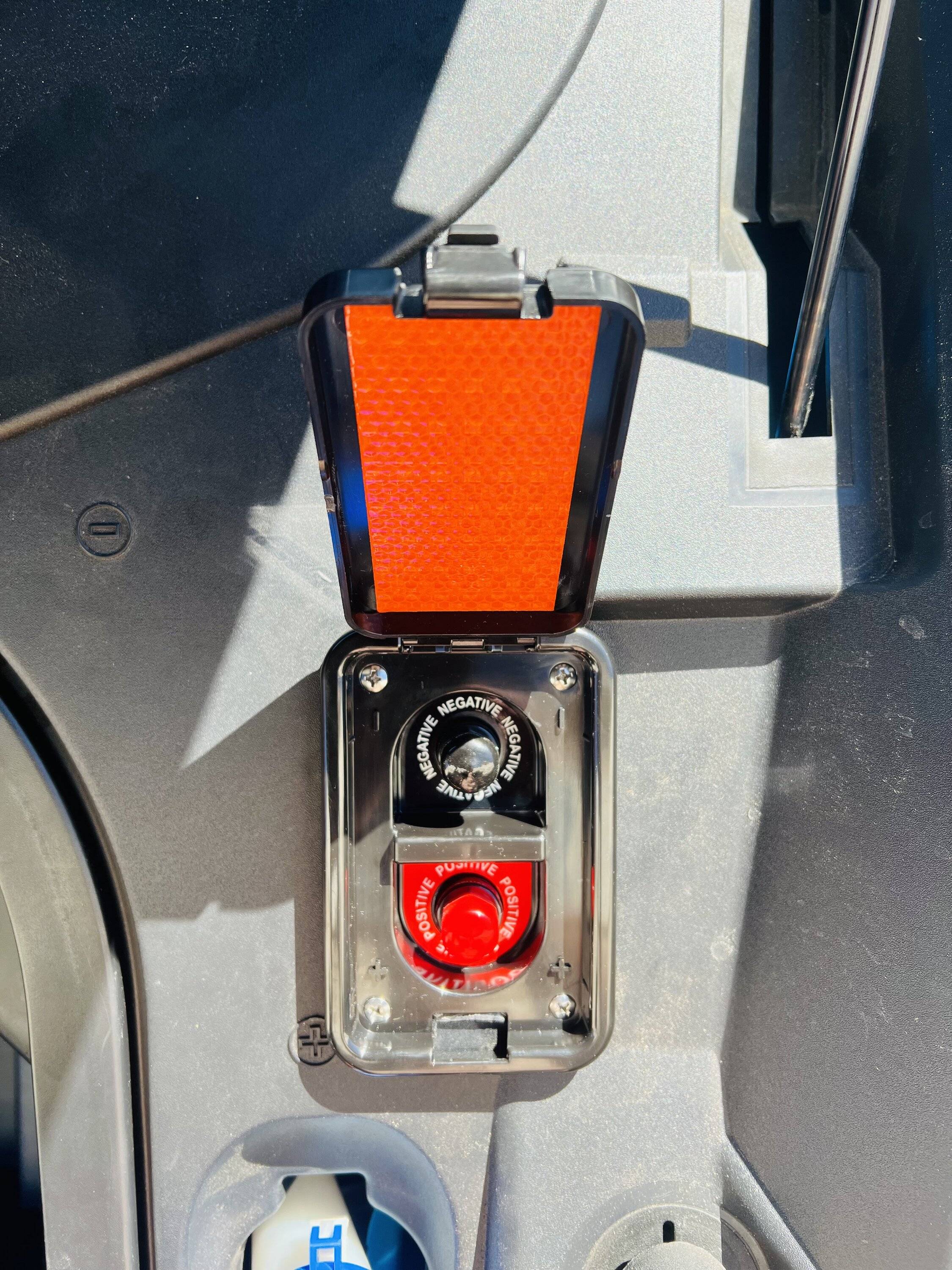
Yeah, our cars’ 12V batteries are pitifully small. The same amount of juice from a traditional Group 34 battery would be in the 5-7% range. I guess I should note that my LVB SoC is almost >95% when I park in my driveway, so I didn’t even think about it. I do occasionally make use of my 12V jump point to charge the 12V, but it really doesn’t need that most of the time I connect to the 12V charger. ?Same here. Mine failed like 5 nights in a row saying "update interrupted by another process". I checked my LvB SoC and it was 64%. I did a normal Level 2 home charge from 60% to 90% and my LvB charge increased to 93%. After that I went in and manually installed the update and it worked. After the update, I checked and the LvB was down to 84%. Crazy it used nearly 10% 12v charge to install the update....
 ?
?
shark
Well-Known Member
- First Name
- David
- Joined
- Jul 18, 2021
- Threads
- 22
- Messages
- 326
- Reaction score
- 515
- Location
- Texas
- Vehicles
- Mach E GT
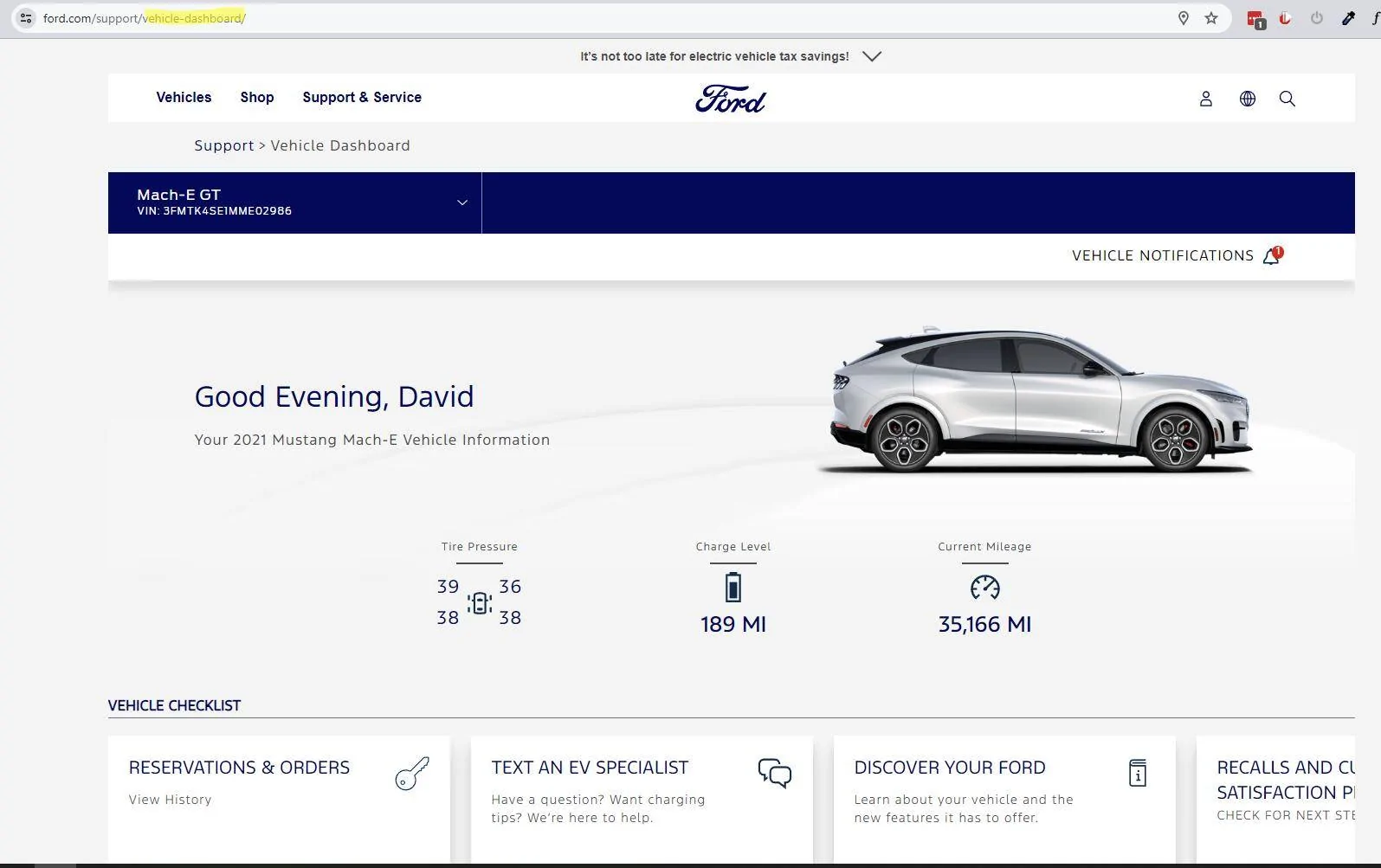
The "Vehicle Dashboard"' is a page on the Ford website. I see the information for my car, but nowhere do I see the 12V SOC. Where on that page would I see any information on the 12V battery? I've looked all over and cant find it. ThanksI dont think LvB SoC can be seen anywhere in the car. You must go to website or use an OBD scanner. I got my LvB to 93% charge and the update worked right away after failing 5 times. I also turned the headlight dial to off as recommended by other users. Not sure if that impacted the success though or not.

Mach-Lee
Well-Known Member
- First Name
- Lee
- Joined
- Jul 16, 2021
- Threads
- 262
- Messages
- 11,366
- Reaction score
- 25,033
- Location
- Wisconsin
- Vehicles
- 2022 Mach-E Premium AWD
- Occupation
- Sci/Eng
No, just click on the link everyone keeps giving rather than finding it yourself.The "Vehicle Dashboard"' is a page on the Ford website. I see the information for my car, but nowhere do I see the 12V SOC. Where on that page would I see any information on the 12V battery? I've looked all over and cant find it. Thanks

shark
Well-Known Member
- First Name
- David
- Joined
- Jul 18, 2021
- Threads
- 22
- Messages
- 326
- Reaction score
- 515
- Location
- Texas
- Vehicles
- Mach E GT
What link? I have clicked a couple links posted in this thread but none of them take me to a screen that shows the 12V state of charge. Can someone post the link or screenshot of the URL that has this info? Thanks.No, just click on the link everyone keeps giving rather than finding it yourself.
Arsenic17
Well-Known Member
- First Name
- Arsenic
- Joined
- Sep 23, 2022
- Threads
- 10
- Messages
- 314
- Reaction score
- 257
- Location
- Denver, CO
- Vehicles
- MME GT 2023 Vapor Blue
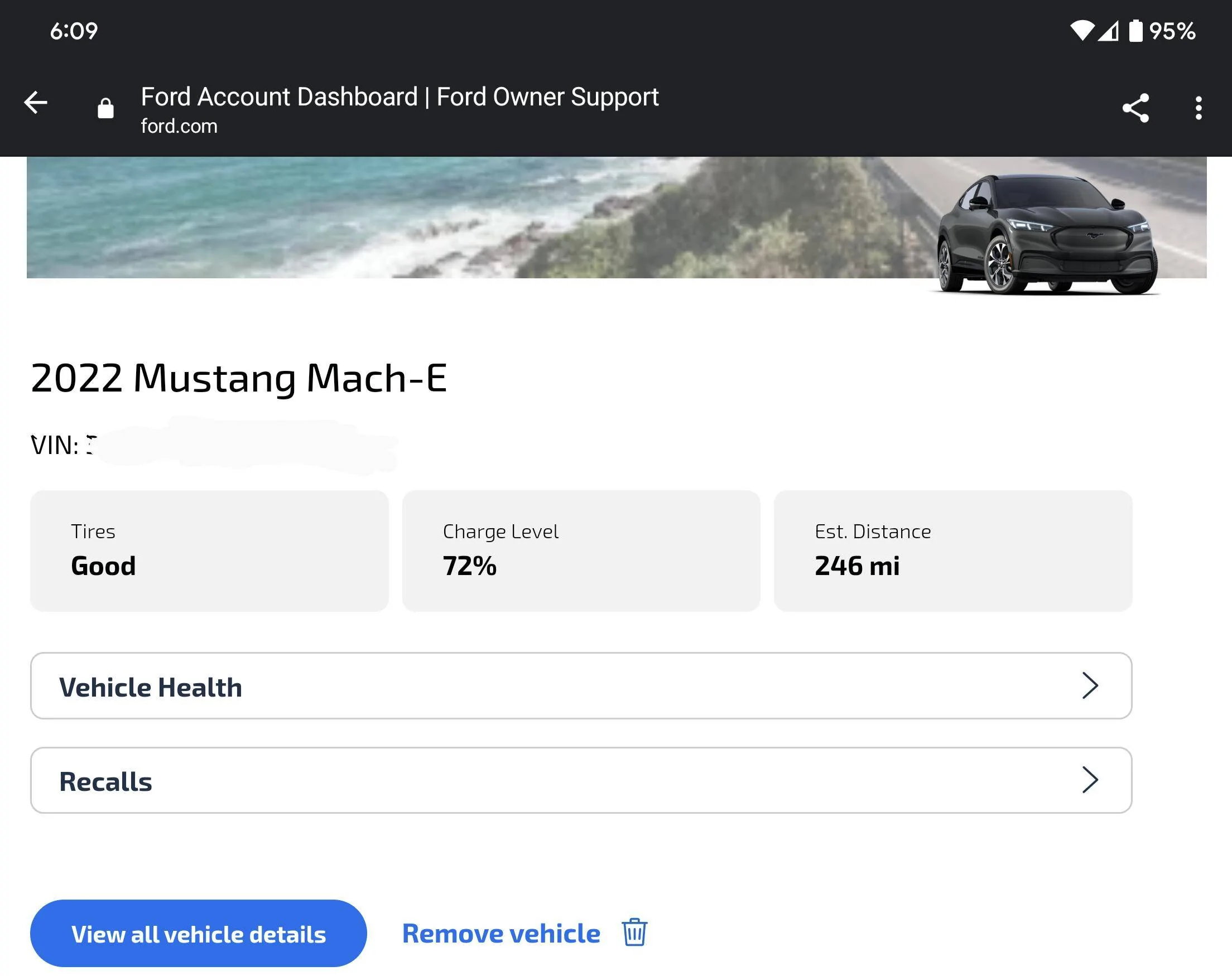
https://www.ford.com/myaccount/account-dashboardWhat link? I have clicked a couple links posted in this thread but none of them take me to a screen that shows the 12V state of charge. Can someone post the link or screenshot of the URL that has this info? Thanks.
shark
Well-Known Member
- First Name
- David
- Joined
- Jul 18, 2021
- Threads
- 22
- Messages
- 326
- Reaction score
- 515
- Location
- Texas
- Vehicles
- Mach E GT
For me that just takes me to the first vehicle in my account which is my Raptor. I can navigate to the Mach-E, but still cannot find the 12V battery SOC. Certainly it's not the 72% shown here is it? isn't that the HVB state of charge?
hybrid2bev
Well-Known Member
You would think so, but it’s actually the 12v SOC.For me that just takes me to the first vehicle in my account which is my Raptor. I can navigate to the Mach-E, but still cannot find the 12V battery SOC. Certainly it's not the 72% shown here is it? isn't that the HVB state of charge?

Kamuelaflyer
Well-Known Member
- First Name
- Bill
- Joined
- Feb 18, 2020
- Threads
- 11
- Messages
- 11,359
- Reaction score
- 22,944
- Location
- Hawaii
- Vehicles
- 2021 Premium Infinite Blue. ER AWD. 2020 Raptor, 2021 Ranger.
That is the LVB soc. Undoubtedly it was intended to be the hvb charge but currently it’s the 12v state of charge.Certainly it's not the 72% shown here is it? isn't that the HVB state of charge?
Sponsored
Similar threads
- Replies
- 4
- Views
- 2,194


