Purchasing and Programming another FOB

crl

Well-Known Member
Joined
Jun 15, 2023
Threads
1
Messages
49
Reaction score
57
Location
VT
Vehicles
2023 Mustang Mach-E Premium AWD
Occupation
IT
Country flag
What two other procedures worked?
Could you give us their references?
i just went through this last night. Failure after failure AND it was even throwing Service Vehicle Soon errors after repeated tries so watch out for that...all I could do was let the vehicle sit there for a while before it would power on to drive (accessory mode would power on but it would continue throwing the error).

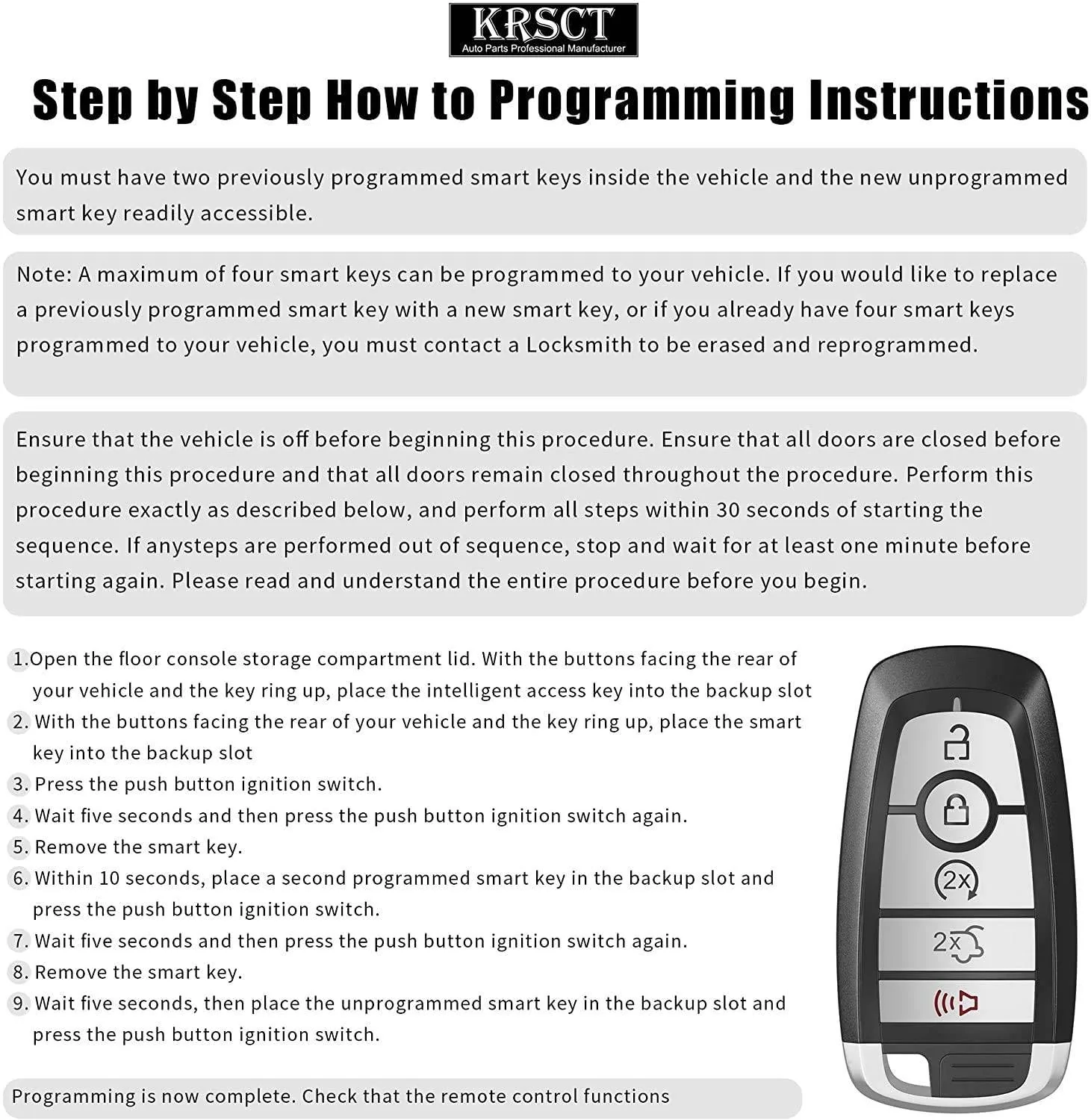
Finally, I decided to just try doing it as quickly as possible rather than counting out the 5 seconds each step. THAT WORKED. Load the first key in, power on vehicle. Wait a second, turn it off. Load second key, power on vehicle, wait a second, turn it off. Load new key, turn on vehicle, wait a second...and it confirms key programming success. Simple as that.
 

TheVirtualTim

Well-Known Member
First Name
Tim
Joined
Oct 11, 2020
Threads
26
Messages
1,366
Reaction score
2,469
Location
Dearborn, MI
Vehicles
‘21 Mach-E First Edition, ‘23 Mach-E GT Performance
Country flag
What two other procedures worked?
Could you give us their references?
Sorry for the confusion ... the other two procedures I found did _not_ work. Only this procedure worked (after repeated attempts).

In fairness, I was doing a long 5 second count (1-Mississippi, 2-Mississippi, etc.) and it seems like a "long" count is not what you should go for. If I had it to do over, I'd probably be quicker because that's likely why it finally worked on my last attempt.

The key fob I was trying to program was already programmed to another car ... I did not need to clear it to program it to the new car.
 

raiderchop

Member
First Name
Bill
Joined
Jan 20, 2024
Threads
1
Messages
12
Reaction score
14
Location
Keller, TX
Vehicles
2023 MME GT PP
Country flag
Just did this tonight and wanted to mention that you are not starting the car. Kept pushing the brake pedal in and pushing the ignition switch like you would to turn it on. Read the instructions again and noticed it said "press the push ignition switch". Started the process over again but did not touch the brake pedal and it completed the first time. Just goes to show you to RTFM...carefully.
 

dcheng

Well-Known Member
Joined
Mar 24, 2022
Threads
2
Messages
108
Reaction score
69
Location
California
Vehicles
Star White CA Route 1
Country flag
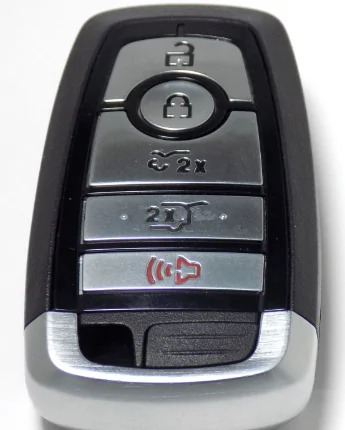
I ordered an F150 Lightning fob, and I went through the programming steps. At the end, it gave me a message about the key programming being successful; however, the fob does not work. I've gone through the programming a couple more times, including once when I went quickly (e.g., not waiting 5 seconds). Each time, I've received a message that the key programming was successful. I have verified that the batteries are all good. I haven't gone through all the messages in this thread yet, but has anyone else seen this?

I have a 2022 CR1, and both original fobs work fine. I was just hoping to get a frunk button. As far as I know, everything is reasonably up-to-date in software. I think I'm missing a couple of the more recent updates, but I have the updates that get me close to BC 1.4.


4sallypat

Well-Known Member
First Name
Pat
Joined
Mar 30, 2022
Threads
103
Messages
2,806
Reaction score
2,463
Location
Southern California
Website
www.kudo-ume-farms.com
Vehicles
'23 MME delivered May '23 + '22 Lightning July '22
Occupation
Network Tech
Country flag
I ordered an F150 Lightning fob, and I went through the programming steps. At the end, it gave me a message about the key programming being successful; however, the fob does not work. I've gone through the programming a couple more times, including once when I went quickly (e.g., not waiting 5 seconds). Each time, I've received a message that the key programming was successful. I have verified that the batteries are all good. I haven't gone through all the messages in this thread yet, but has anyone else seen this?

I have a 2022 CR1, and both original fobs work fine. I was just hoping to get a frunk button. As far as I know, everything is reasonably up-to-date in software. I think I'm missing a couple of the more recent updates, but I have the updates that get me close to BC 1.4.
My '23 Job 1 was programmed using the Lightning keyfob I paid $125 on eBay.
Easy - followed instructions provided.
I now use the Lightning fob for frunk release all the time.

Ford Mustang Mach-E Purchasing and Programming another FOB IMG_0859.JPG
 

dcheng

Well-Known Member
Joined
Mar 24, 2022
Threads
2
Messages
108
Reaction score
69
Location
California
Vehicles
Star White CA Route 1
Country flag
My '23 Job 1 was programmed using the Lightning keyfob I paid $125 on eBay.
Easy - followed instructions provided.
I now use the Lightning fob for frunk release all the time.
I think I found the problem. I saw one of your other threads indicated that Ford may have changed the frequencies on the fobs. I received a 2023 Lightning fob which appears to be using 434MHz instead of 315MHz. I think I need to find an earlier version of the fob.

Thanks for putting that other information up!

EDIT: After more research, maybe I just received some mixed inventory, and the Lightning fob did not change. I went back to the original eBay listing, and the images clearly show 315MHz. The FCC ID that was listed also indicates that it should have been 315MHz.
 
Last edited:

Shepherd

Well-Known Member
First Name
Shepherd
Joined
Mar 19, 2024
Threads
6
Messages
293
Reaction score
335
Location
Undisclosed
Vehicles
2023 GT
Occupation
Retired by doge
I found I couldn’t program my Lightning fob with the car in the garage, which I liken to a bunker. When I tried on the driveway it worked first time. Maybe it needs to send data to the mothership for it to work ?
 

Babbit

Well-Known Member
Joined
Mar 10, 2024
Threads
6
Messages
159
Reaction score
126
Location
West Michigan
Vehicles
2023 Prem 4X
Country flag
I think I found the problem. I saw one of your other threads indicated that Ford may have changed the frequencies on the fobs. I received a 2023 Lightning fob which appears to be using 434MHz instead of 315MHz. I think I need to find an earlier version of the fob.

Thanks for putting that other information up!

EDIT: After more research, maybe I just received some mixed inventory, and the Lightning fob did not change. I went back to the original eBay listing, and the images clearly show 315MHz. The FCC ID that was listed also indicates that it should have been 315MHz.
I just bought a Lightning remote and was able to program it with reading this whole thing:

Ford Mustang Mach-E Purchasing and Programming another FOB KeyFob-Programming


I had to do the sequence multiple times with all three fobs. Once I got the key fob successful message on the dash the external lights flashed. Then I was able to program my profile and verify that the frunk worked. Also, I don't have PAAK setup.
 

dcheng

Well-Known Member
Joined
Mar 24, 2022
Threads
2
Messages
108
Reaction score
69
Location
California
Vehicles
Star White CA Route 1
Country flag
I think I found the problem. I saw one of your other threads indicated that Ford may have changed the frequencies on the fobs. I received a 2023 Lightning fob which appears to be using 434MHz instead of 315MHz. I think I need to find an earlier version of the fob.

Thanks for putting that other information up!

EDIT: After more research, maybe I just received some mixed inventory, and the Lightning fob did not change. I went back to the original eBay listing, and the images clearly show 315MHz. The FCC ID that was listed also indicates that it should have been 315MHz.
The eBay vendor is sending me a new key fob after they verified that they should have sent out a normal one using the 315MHz band. I have a few follow-up questions:

1) My understanding is that only 4 key fobs can be programmed, and if you need to replace one of those, it has to go to the dealer. Is that correct?
2) Since it seems that I was able to successfully program the incorrect Lightning fob, I'm assuming that I now have 3 programmed. I did go through programming the fob multiple times, and they were successful. Do I potentially have all of the slots used up, or is it safe to assume that re-programming the same fob does not use up additional slots?
3) Is there a way to use Forscan to remove a programmed fob? Or is that really something that needs a dealer or locksmith?
 

Thesnowback

Well-Known Member
First Name
Andy
Joined
May 9, 2024
Threads
2
Messages
46
Reaction score
53
Location
Ada, Michigan
Vehicles
2023 Mach-E GT | 2021 Shelby GT500
Occupation
Business Owner IT Consultant
Country flag
This worked for me on the fob I bought on Amazon. It’ll be nice having a button for the frunk without having to get my phone out, unlocked, app launched, etc.

Thanks Mach-E forum.
 

DeusEx

Well-Known Member
Joined
Apr 17, 2024
Threads
9
Messages
608
Reaction score
745
Location
New York
Vehicles
2023.5 Mach-E Premium ER AWD
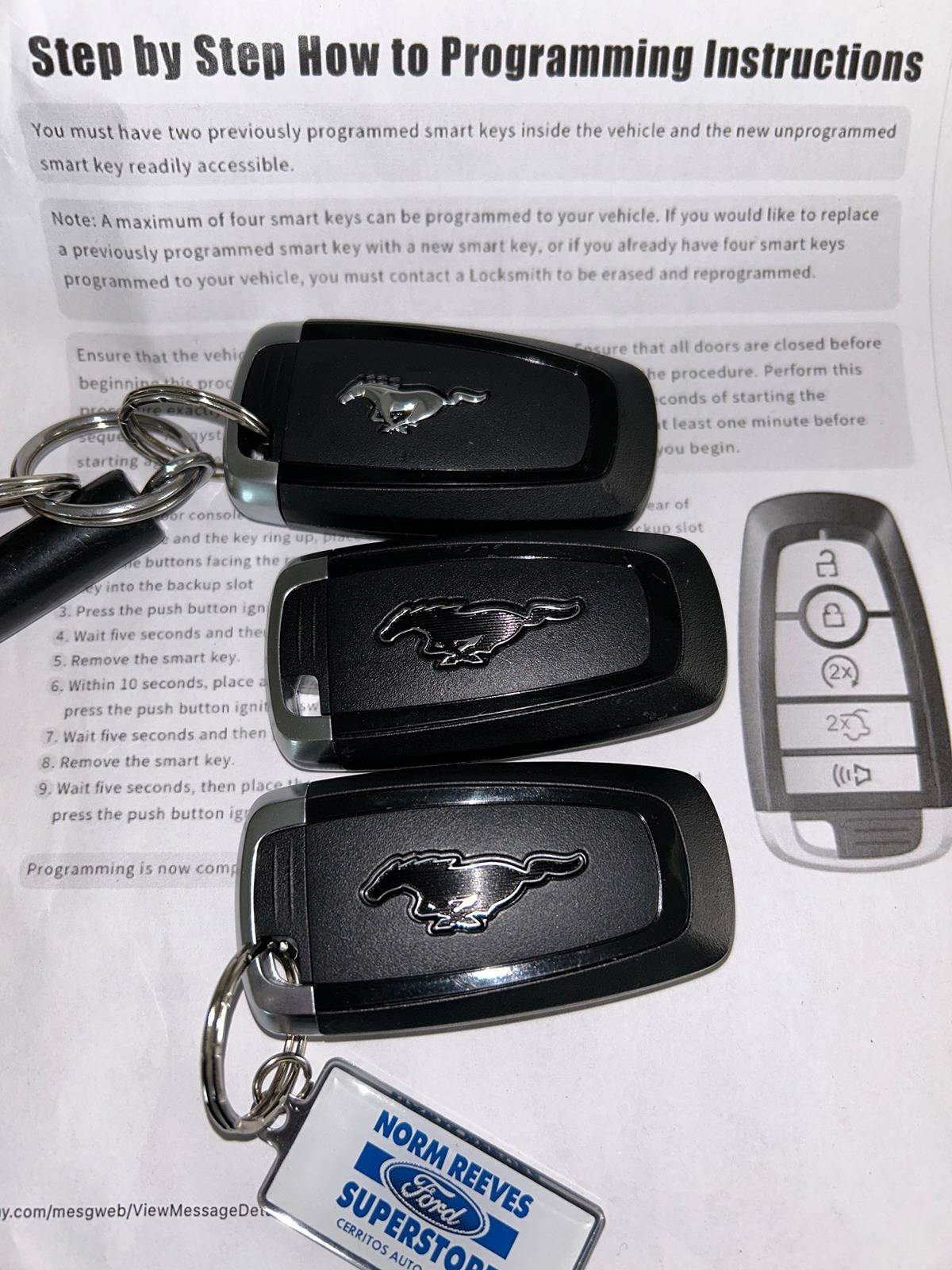
Just a heads up, I just recently purchased a 3rd keyfob with frunk access and the Mach-E mustang logo on my current fob. Everything worked as expected and I'm super happy. If anyone is interested, the link is here:

https://www.ebay.com/itm/3545439839...oiClmFvTRa&var=&widget_ver=artemis&media=COPY

I followed the video instructions from here which only took me one try:

Also if you like maximizing rewards, there is a cash back site offering 1% on your eBay purchase so you can save an extra buck.
 

SteveMach-ee

Well-Known Member
First Name
Steve
Joined
Nov 6, 2024
Threads
1
Messages
126
Reaction score
169
Location
Mass
Vehicles
2021 MME Select AWD, 2023 Ariya Venture+
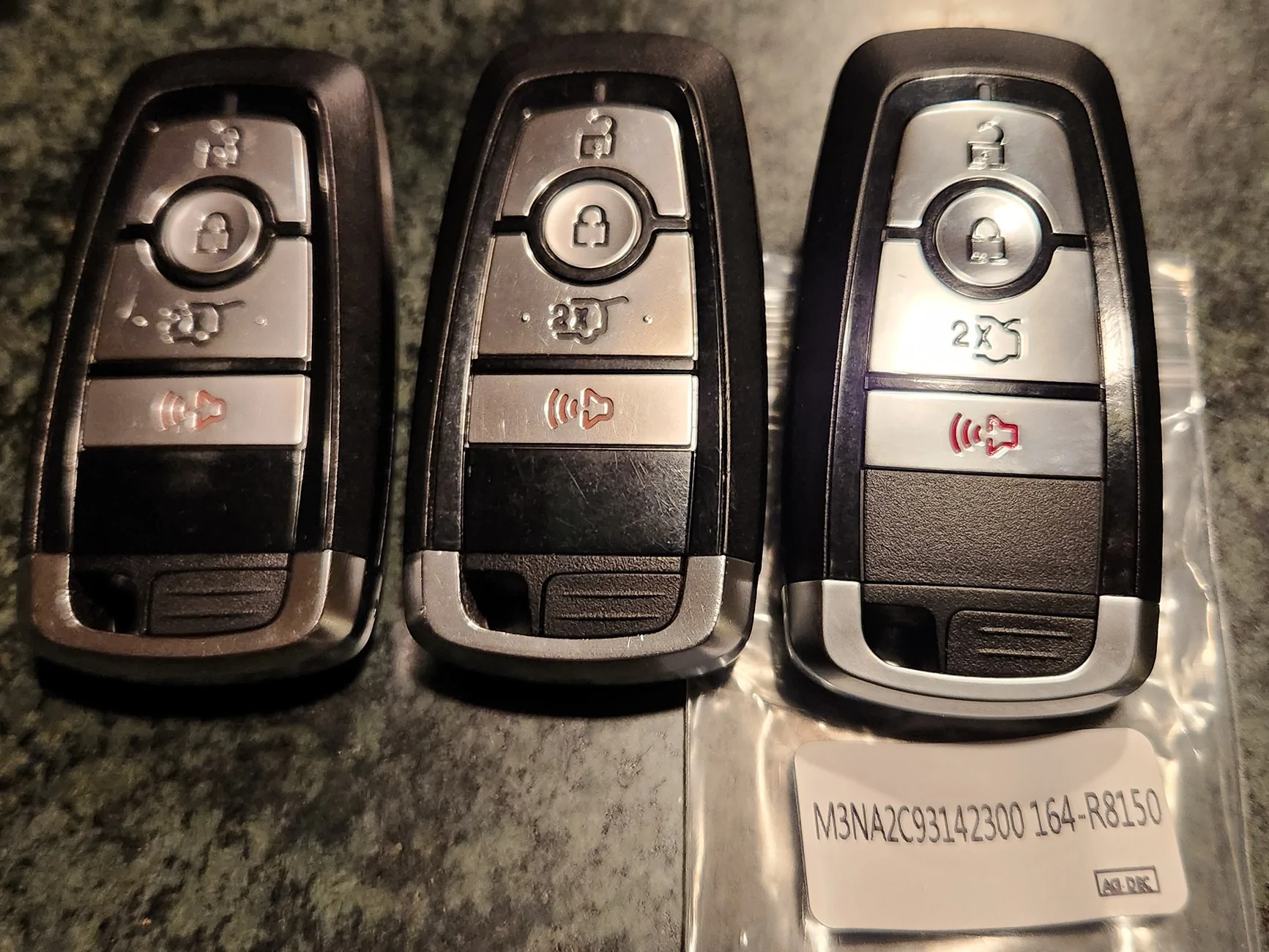
I've pretty much given up on PAAK with my S22+ phone. Too many random "no key detected" messages. So for a backup FOB I got this $39.95 one on Amazon (on the right). It works great on my 2021. Same construction as the OEM FOBs but It has a blank back, so no mustang logo. Programmed it as a 3rd FOB with the above procedure. Note as others suggested I did a fast 5-count not a slow one-one thousand count. Programmed successfully on the first try.

https://www.amazon.com/dp/B0BT215FFP

Edit: This FOB is 315MHz for the '21 & '22 Mach-E. The 2023 (and later?) have a different FCC number and is 434MHz.

Ford Mustang Mach-E Purchasing and Programming another FOB Key FOBs
Sponsored

 
Last edited:


Top