benk016

Well-Known Member
First Name
Ben
Joined
Nov 12, 2020
Threads
38
Messages
3,265
Reaction score
5,093
Location
Tulsa, Oklahoma
Vehicles
2021 Mustang Mach-E GT
Country flag
Hi,
Just bought a one day licence but I've got the following issue :
1740679286591-8u.jpg

FDRS 43.6.7
try to uninstall and reinstall, reboot etc.

Do you know why I'm doing wrong ?
Same user than where I've bought my licence
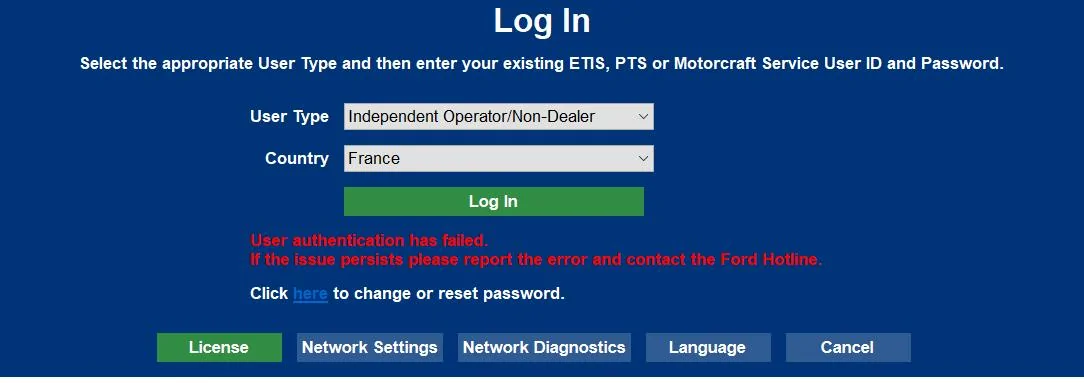
FWIW I had this happen on 2 machines this week. Both were new machines with a fresh FDRS install.

I never could figure out what exactly was being blocked, but turning on my wifi hot spot and bypassing my home network got me logged in normally.
Sponsored


 

Mike G

Well-Known Member
First Name
Mike
Joined
Mar 27, 2022
Threads
25
Messages
6,449
Reaction score
5,289
Location
N. AL, USA
Vehicles
'23(J1) Mach-E GT-PE, '22 F-150 Lightning, '24 Bronco HLE 2Dr
Country flag
FWIW I had this happen on 2 machines this week. Both were new machines with a fresh FDRS install.

I never could figure out what exactly was being blocked, but turning on my wifi hot spot and bypassing my home network got me logged in normally.
I didn't know this until reading some posts today that there had been a widespread FDRS/PTS outage last Monday. Don't know if that impacted you or not. In my case there may have been more than one thing going on (blocked account and broken FDRS login).
 

benk016

Well-Known Member
First Name
Ben
Joined
Nov 12, 2020
Threads
38
Messages
3,265
Reaction score
5,093
Location
Tulsa, Oklahoma
Vehicles
2021 Mustang Mach-E GT
Country flag
I didn't know this until reading some posts today that there had been a widespread FDRS/PTS outage last Monday. Don't know if that impacted you or not. In my case there may have been more than one thing going on (blocked account and broken FDRS login).
I kept trying all week thinking maybe it was an outage but finally tried on my hotspot yesterday and got right in.

When you do the network test it was even showing fail for the login servers.

the only thing I can think is maybe unifi has started tagging something as suspicious and blocking it through intrusion prevention.
 

Mike G

Well-Known Member
First Name
Mike
Joined
Mar 27, 2022
Threads
25
Messages
6,449
Reaction score
5,289
Location
N. AL, USA
Vehicles
'23(J1) Mach-E GT-PE, '22 F-150 Lightning, '24 Bronco HLE 2Dr
Country flag
I kept trying all week thinking maybe it was an outage but finally tried on my hotspot yesterday and got right in.

When you do the network test it was even showing fail for the login servers.

the only thing I can think is maybe unifi has started tagging something as suspicious and blocking it through intrusion prevention.
That was exactly my experience except that Monday morning I also got this:
Ford Mustang Mach-E The Complete DIY Guide to Updating Your Mach-E with FDRS Reactivate_your_account
 

UN1075

Active Member
Joined
Jan 7, 2025
Threads
3
Messages
37
Reaction score
29
Location
Florida
Vehicles
2021 Mach E Premium Extended
Successful updated IPMA, BECM and SOBDM. Then a GWM update popped up, which I successfully did. Then an APIM update popped up. Going to take a lunch break, it's been three hours and I was able to go pick up and build a Harbor Freight carport in the meantime lol.

Is the APIM update a long one?


rugedraw

Well-Known Member
First Name
Javier
Joined
Nov 13, 2023
Threads
0
Messages
2,633
Reaction score
2,390
Location
Miami, FL
Vehicles
2021 Ford F150 Platinum FX4 EB/2023 Bronco Sport Badlands/1991 Mustang 5.0 coupe
Occupation
Auto Sales
Country flag
Successful updated IPMA, BECM and SOBDM. Then a GWM update popped up, which I successfully did. Then an APIM update popped up. Going to take a lunch break, it's been three hours and I was able to go pick up and build a Harbor Freight carport in the meantime lol.

Is the APIM update a long one?
The download may take a while, but it will be updated with a USB like the GWM you just did, so the install itself will not be too long.
 

UN1075

Active Member
Joined
Jan 7, 2025
Threads
3
Messages
37
Reaction score
29
Location
Florida
Vehicles
2021 Mach E Premium Extended
The download may take a while, but it will be updated with a USB like the GWM you just did, so the install itself will not be too long.
Yeah it took about an hour.

Question though. I just came back out and it asked me if I wanted to update or remove voice. Obviously I'm updating but when I came out here, the car is off...

Is that normal? Everything is still hooked up and showing 13v but it's not in Key on, engine off state anymore. I don't know if it did that itself or not and I don't want to turn it back on if I'm not supposed to.

Edit - that part finished and the USB has been in the car slot updating for ~10 minutes so far. That scared the, everything was black lol
 
Last edited:

rugedraw

Well-Known Member
First Name
Javier
Joined
Nov 13, 2023
Threads
0
Messages
2,633
Reaction score
2,390
Location
Miami, FL
Vehicles
2021 Ford F150 Platinum FX4 EB/2023 Bronco Sport Badlands/1991 Mustang 5.0 coupe
Occupation
Auto Sales
Country flag
Yeah it took about an hour.

Question though. I just came back out and it asked me if I wanted to update or remove voice. Obviously I'm updating but when I came out here, the car is off...

Is that normal? Everything is still hooked up and showing 13v but it's not in Key on, engine off state anymore. I don't know if it did that itself or not and I don't want to turn it back on if I'm not supposed to.

Edit - that part finished and the USB has been in the car slot updating for ~10 minutes so far. That scared the, everything was black lol
The only time you want to remove the voice files is if the USB method fails with a (if I remember correctly) "USB Error 0" message. This means there is not enough space for the installation process to do what it does, so by deleting the voice files for the nav, enough space is created for the USB update to go through.
 

UN1075

Active Member
Joined
Jan 7, 2025
Threads
3
Messages
37
Reaction score
29
Location
Florida
Vehicles
2021 Mach E Premium Extended
The only time you want to remove the voice files is if the USB method fails with a (if I remember correctly) "USB Error 0" message. This means there is not enough space for the installation process to do what it does, so by deleting the voice files for the nav, enough space is created for the USB update to go through.
Well, that was an adventure. 6 1/2 hours later, everything is updated!

I didn't see anything pertaining to the latest BC update on my settings but I'm not sure if it actually shows that. Happy to have gotten it done. Thank you and everyone who offered me advice, I really appreciate it. Made the process much less stressful.

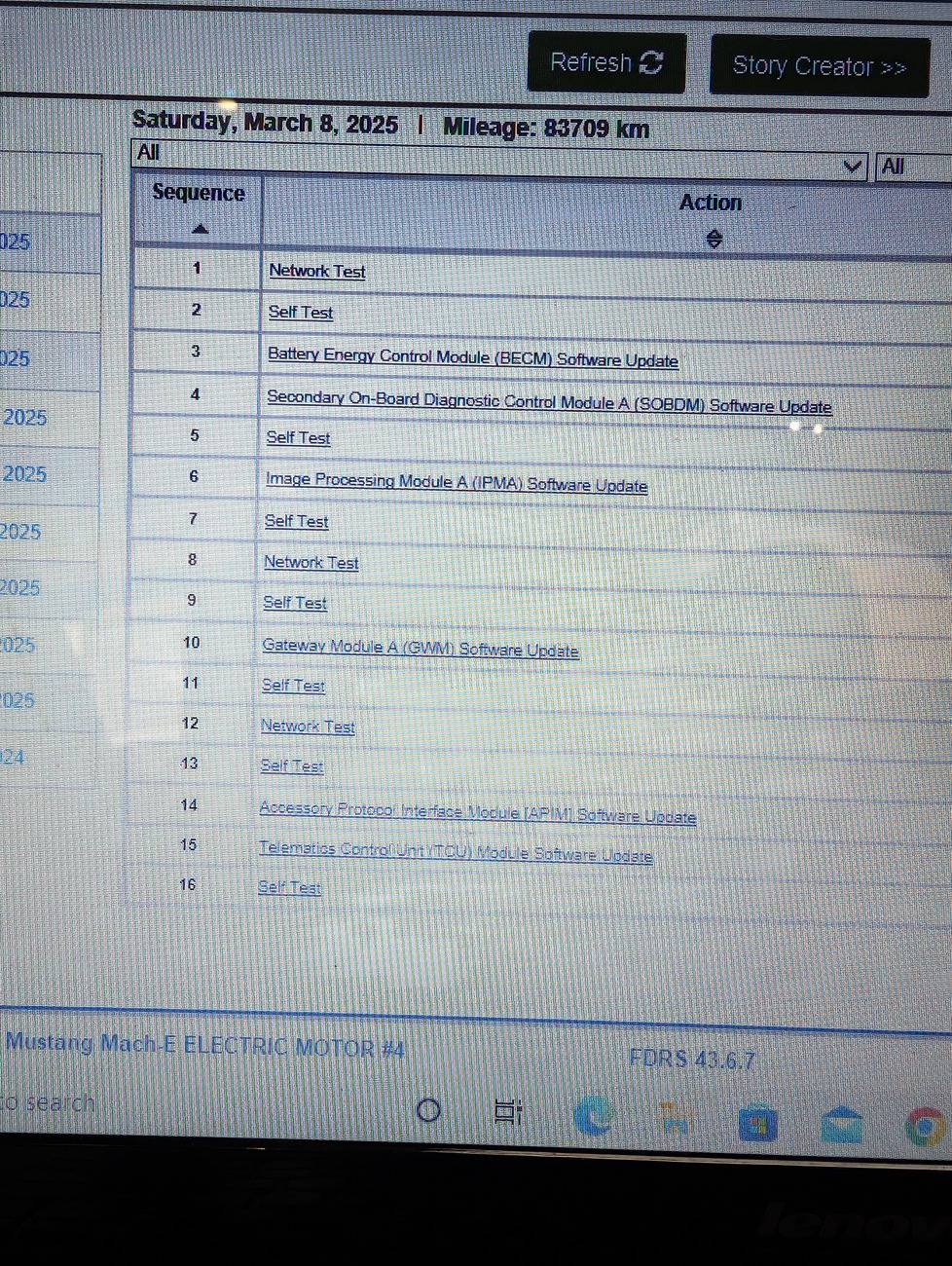
If you have a second, would your mind checking to make sure I didn't miss anything? I don't know all the ins and outs of FDRS so I just stuck to the CDTC tab and SW update tabs ?

Ford Mustang Mach-E The Complete DIY Guide to Updating Your Mach-E with FDRS PXL_20250308_214633280
 

rugedraw

Well-Known Member
First Name
Javier
Joined
Nov 13, 2023
Threads
0
Messages
2,633
Reaction score
2,390
Location
Miami, FL
Vehicles
2021 Ford F150 Platinum FX4 EB/2023 Bronco Sport Badlands/1991 Mustang 5.0 coupe
Occupation
Auto Sales
Country flag
Well, that was an adventure. 6 1/2 hours later, everything is updated!

I didn't see anything pertaining to the latest BC update on my settings but I'm not sure if it actually shows that. Happy to have gotten it done. Thank you and everyone who offered me advice, I really appreciate it. Made the process much less stressful.

If you have a second, would your mind checking to make sure I didn't miss anything? I don't know all the ins and outs of FDRS so I just stuck to the CDTC tab and SW update tabs ?
Nothing we can see remotely is as accurate as what you will see plugged in directly to the vehicle. If the SW updates tab is empty, then you are done until Ford releases more updates for your VIN.

To enable lane change and the other BC 1.3 features, you will need to do that with FORScan. Message me when you're ready.
 

Mike G

Well-Known Member
First Name
Mike
Joined
Mar 27, 2022
Threads
25
Messages
6,449
Reaction score
5,289
Location
N. AL, USA
Vehicles
'23(J1) Mach-E GT-PE, '22 F-150 Lightning, '24 Bronco HLE 2Dr
Country flag
I get this question a lot. Many people are faced with a long list of available software updates in FDRS when they first decide they are going to do their own updates.

So I thought I'd post recommendations for the order in which updates should be performed. This is based on Ford's own guidance found in several different TSBs going back as far as the 21P22 and 21G01 days of pre-BlueCruise prep, and then the actual activation of BlueCruise, for all those vehicles for the first time, in the Feb-Mar timeframe of 2022. As well as more recent examples like 25-2049 and 25-2058 which touch on the subject as well.

If you're just getting started with FDRS and want to get the hang of how the process works on short updates, you can start out by knocking out any of the "Everything Else" updates at the bottom of this post. These are updates that are standalone and won't affect any other modules if they are updated (or not), have no dependency requirements, and can be done in any order you like.

But for the updates that do have dependency requirements, here are the recommendations on how to proceed:

USB-based updates are the GWM, APIM, TCU and IPC. USB based updates should always be performed first, and anytime any of them appear in your list after updating something else (like the powertrain for example). The reason for this is that there are sometimes software dependencies that require some updates to be performed, so they don't block other updates from becoming available.

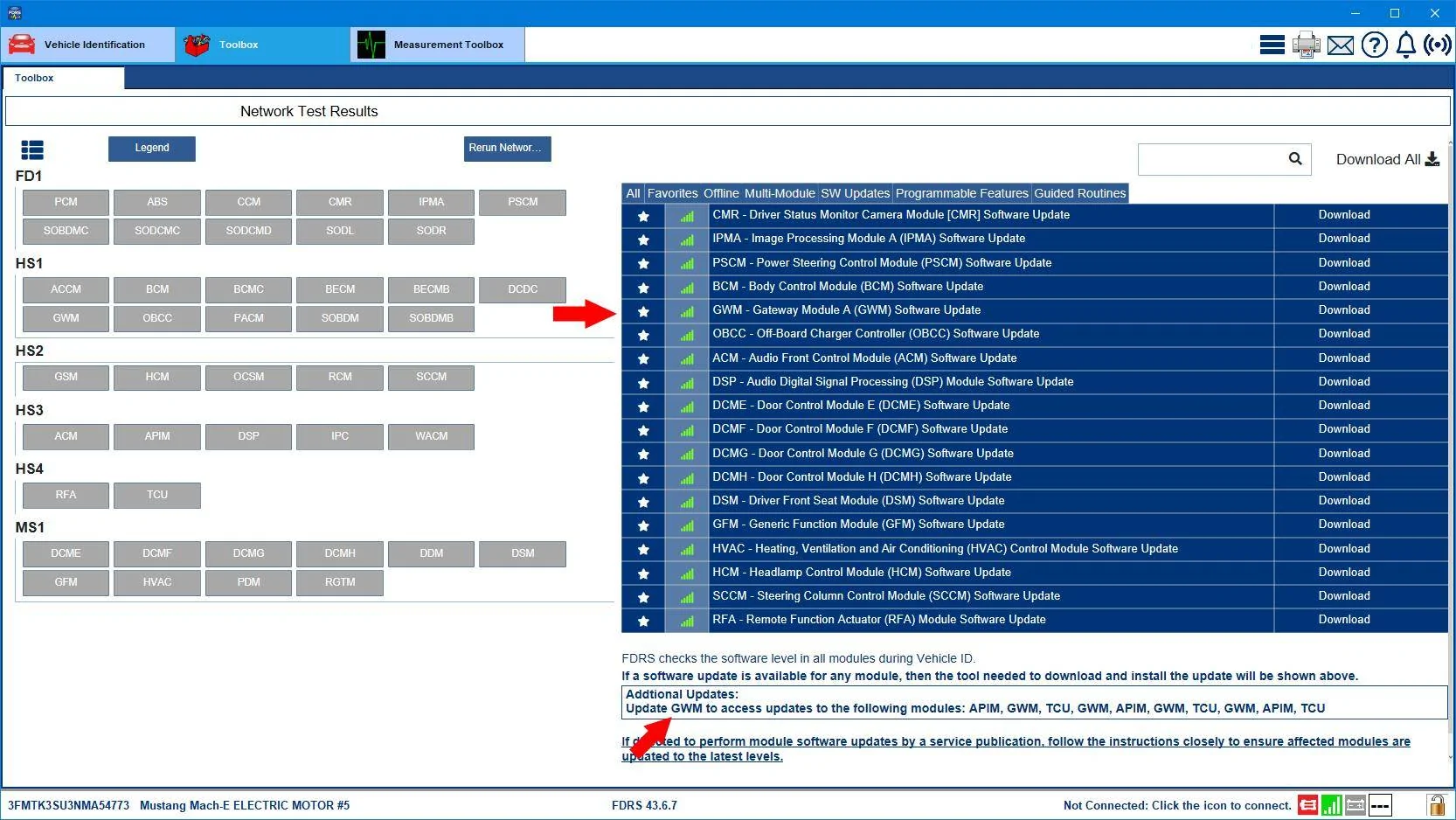
USB-based updates are always incremental (not cumulative) and need to be done in certain sequence. They are also done with the vehicle fully On so if your 12V battery is fully charged you don't even need to use a powersupply to program those. Thankfully, FDRS now lists in the Additional Updates section at the bottom of the SW Updates page the actual sequence you should perform the updates, and what to expect the next one will be to appear in the list when you've done the one you're working on now. (See the pic below).
Ford Mustang Mach-E The Complete DIY Guide to Updating Your Mach-E with FDRS USB_Updates_Overdu

So updating the GWM in the list would then cause the next USB based update to appear as a result (the APIM in this case). Admitedly, the list above is a bit out of the ordinary, as it's for a car that sat on a dealer's lot for two and a half years before it was sold. I used this only to provide an example.

After you've worked your way through whatever USB-based updates you have, the powertrain items in your list would be the recommended next step.

Powertrain items are scripted to update as a 'coordinated' group. They are the PCM, ABS, BECM, SOBDM, SOBDMC, and in the case of AWD cars also the SOBDMB. Selecting any of those items in your list kicks off a script, where FDRS will then perform all of the powertrain module updates in the sequence decided by the script itself. You could pick the PCM as an example, and the script might decide to update the ABS first. It's all good, just let the script do it's thing.

If no new USB-based updates have appeared in your list after doing the powertrain items, then it's time to move on to the cruise-control system modules. The SCCM, CCM, CMR, IPMA, and PSCM. If any of those are in your list, then do them in the sequence shown. The IPC is also involved in cruise control functions, but obviously since it's USB-based you would have already done that one by this point. The IPMA is 'coordinated' to update along with the PSCM. So those two will be scripted to update together.

Then there's Everything Else.....these are the standalone items that have no dependencies, are usually very short in programming duration, and can be done in any sequence. BCM, GFM, OBCC, HVAC, RFA, GSM, DSM, Door modules, DSP, ACM, WACM, HCM.

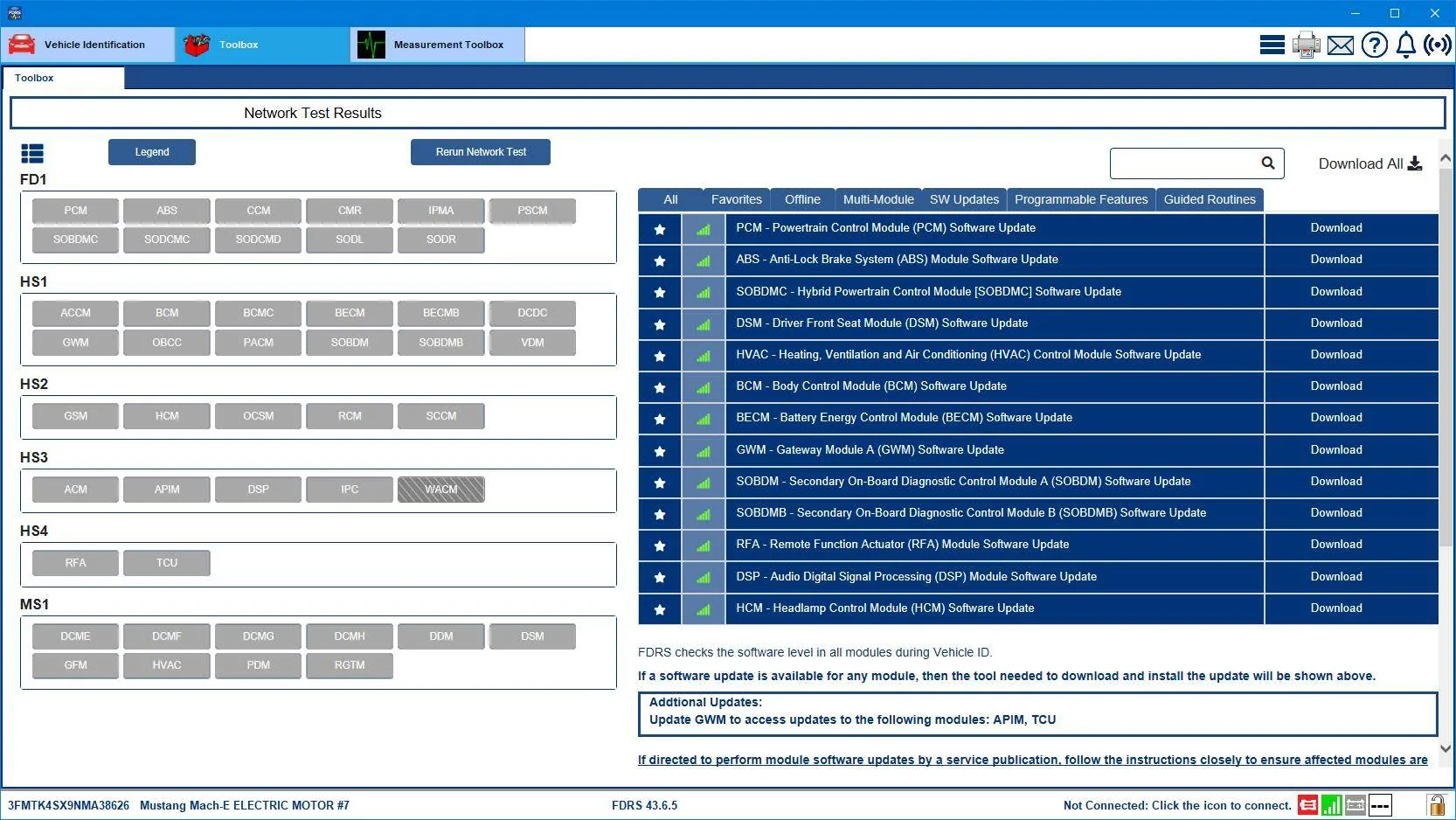
So for this example list below, I'll list the sequence I'd recommend doing these updates in:
Ford Mustang Mach-E The Complete DIY Guide to Updating Your Mach-E with FDRS 3FMTK4SX9NMA38626-21-Feb-25

So for a first-timer using FDRS you could go with non-dependency items like the HVAC, BCM, DSP, DSM, HCM, and RFA to get started.

Or if you want to let your 12V battery charge up a bit while you're doing USB-based updates (car is fully On when doing USB based updates), then you could go with the GWM, followed by the APIM, followed by the TCU, before doing anything else.

After any USB-based updates in this list are done, then it's time to move on to the powertrain by selecting the PCM and then just turning on and off the start button and hitting "Ok" in FDRS when told to do so.

If any new USB-based updates showed up at this point, we would do those next.

And finally, since there are no cruise-control items in this list above, we'd be finished at this point. Time to go back the CMDTCS selftest screen and do one final "clear and retest" before disconnecting the Mongoose and shutting FDRS down.
 
Last edited:

rugedraw

Well-Known Member
First Name
Javier
Joined
Nov 13, 2023
Threads
0
Messages
2,633
Reaction score
2,390
Location
Miami, FL
Vehicles
2021 Ford F150 Platinum FX4 EB/2023 Bronco Sport Badlands/1991 Mustang 5.0 coupe
Occupation
Auto Sales
Country flag
If no new USB-based updates have appeared in your list after doing the powertrain items, then it's time to move on to the cruise-control system modules. The SCCM, CMR, IPMA, and PSCM. If any of those are in your list, then do them in the sequence shown. The IPC is also involved in cruise control functions, but obviously since it's USB-based you would have already done that one by this point. The IPMA is 'coordinated' to update along with the PSCM. So those two will be scripted to update together.
As per usual, you go above-and-beyond to put good, well organized info out there for DIY crew.

If I may make a suggestion, I would also add the CCM to the list of ADAS modules in your post. If I remember correctly, that one will also trigger FDRS to update all the ADAS modules. I think the CCM update would probably only apply to 2021 job 1 vehicles (for now), but worth a mention.
 

Mike G

Well-Known Member
First Name
Mike
Joined
Mar 27, 2022
Threads
25
Messages
6,449
Reaction score
5,289
Location
N. AL, USA
Vehicles
'23(J1) Mach-E GT-PE, '22 F-150 Lightning, '24 Bronco HLE 2Dr
Country flag
As per usual, you go above-and-beyond to put good, well organized info out there for DIY crew.

If I may make a suggestion, I would also add the CCM to the list of ADAS modules in your post. If I remember correctly, that one will also trigger FDRS to update all the ADAS modules. I think the CCM update would probably only apply to 2021 job 1 vehicles (for now), but worth a mention.
Thanks Javier, I knew I'd forgotten something. I've edited the original post to add the CCM.
 

Mike G

Well-Known Member
First Name
Mike
Joined
Mar 27, 2022
Threads
25
Messages
6,449
Reaction score
5,289
Location
N. AL, USA
Vehicles
'23(J1) Mach-E GT-PE, '22 F-150 Lightning, '24 Bronco HLE 2Dr
Country flag
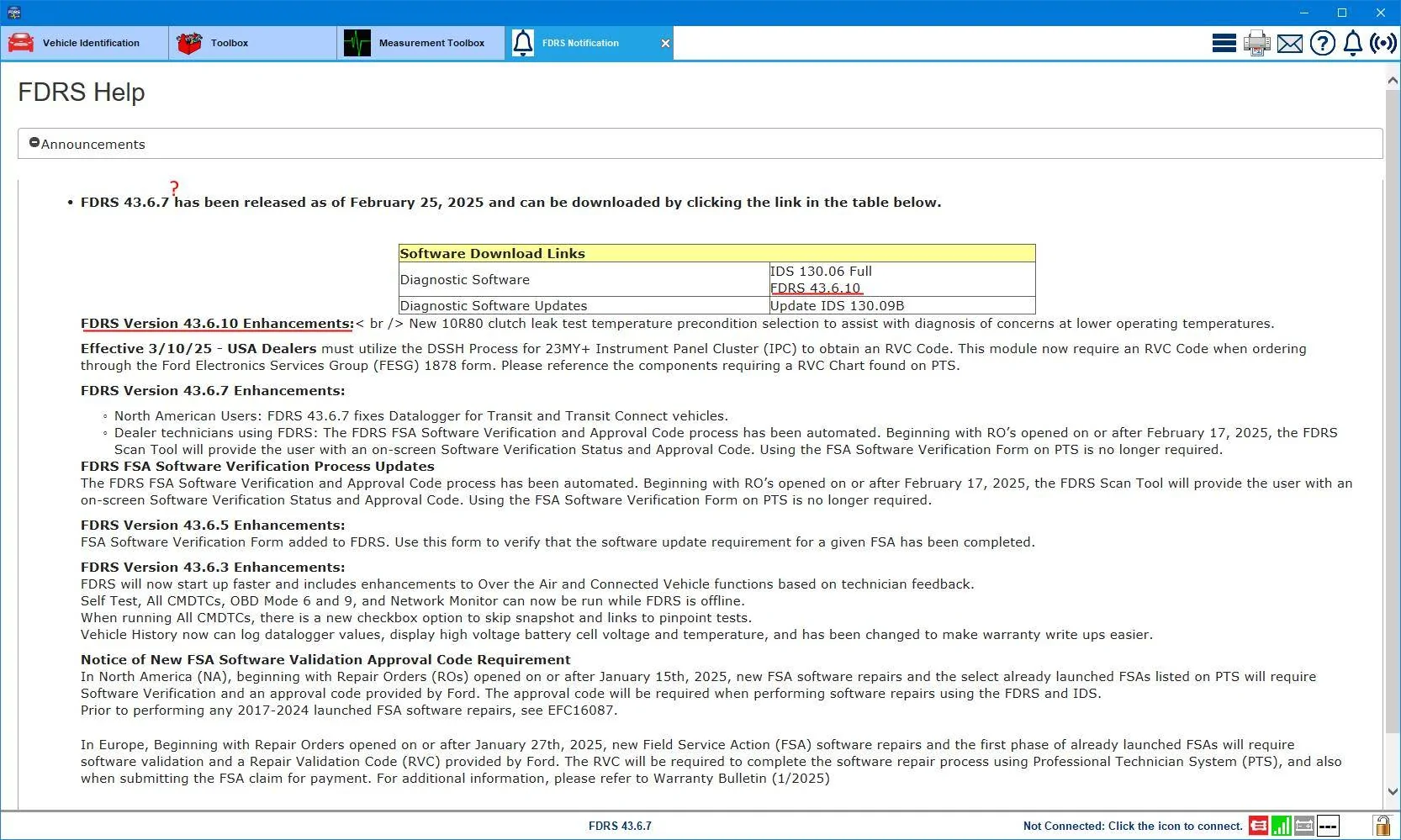
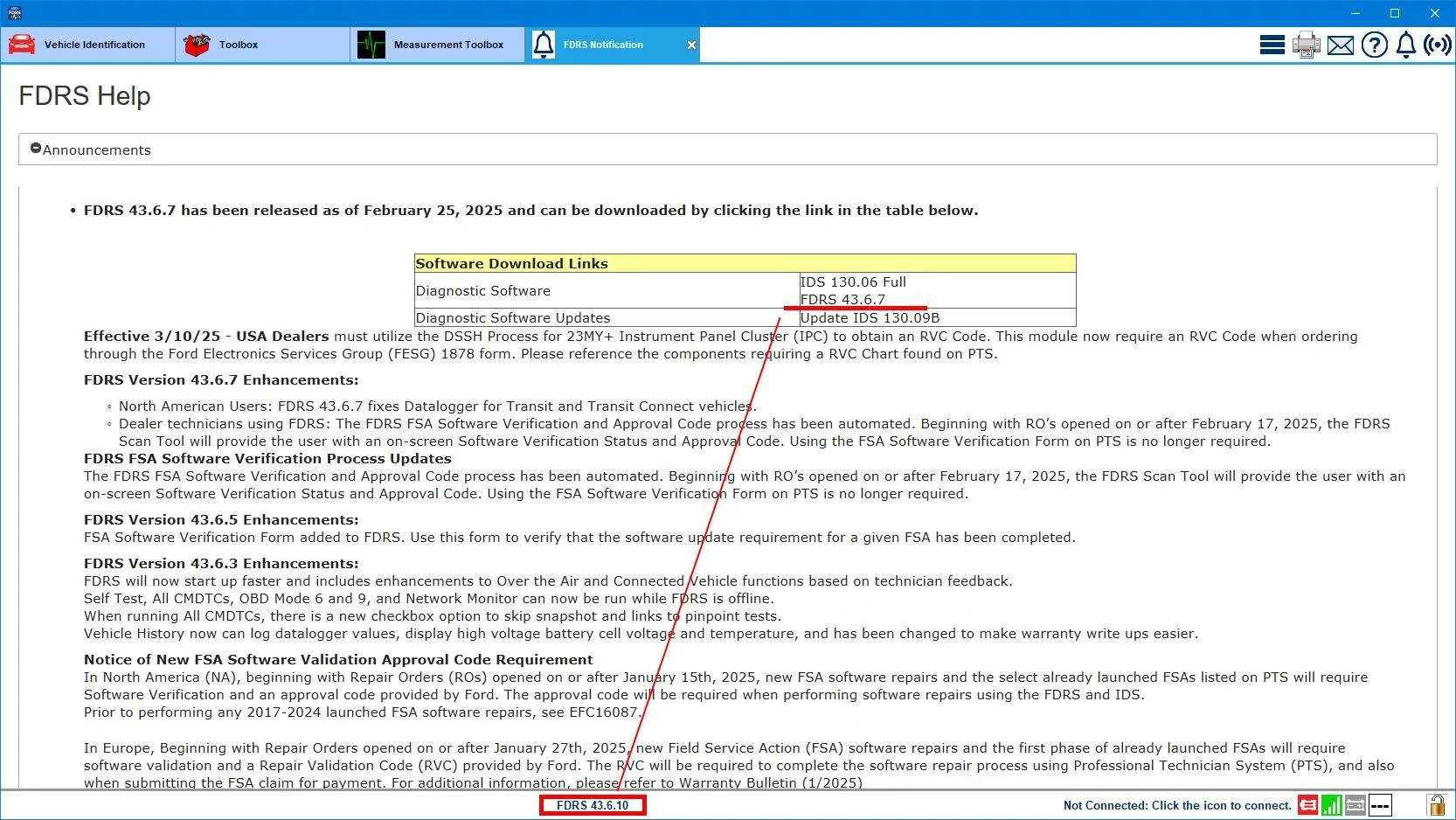
FDRS 43.6.10 is 'sort of' announced today...the info page is apparently still a work in progress though ?‍♂

Ford Mustang Mach-E The Complete DIY Guide to Updating Your Mach-E with FDRS FDRS_43-6-10_Announc

So I just downloaded and installed 43.6.10 and when I run it the help screen is now back to showing 43.6.7 as the latest version.....?‍♂ but I'm gonna still run with 43.6.10 to see what happens.
Ford Mustang Mach-E The Complete DIY Guide to Updating Your Mach-E with FDRS FDRS_43-6-10_Announce_or_maybe_not
 
Last edited:

chesteroberto

Well-Known Member
First Name
Rob
Joined
Feb 12, 2023
Threads
9
Messages
129
Reaction score
94
Location
Bluffton, SC
Vehicles
2021 Ford Mustang Mach-E Premium
Country flag
I just opened FDRS to update it, but it's no longer showing 43.6.10 as an available update. It's still showing 43.6.7 as the latest version. They must have rolled back the update for some reason.
Sponsored


Top