Mike G

Well-Known Member
First Name
Mike
Joined
Mar 27, 2022
Threads
25
Messages
6,449
Reaction score
5,289
Location
N. AL, USA
Vehicles
'23(J1) Mach-E GT-PE, '22 F-150 Lightning, '24 Bronco HLE 2Dr
Country flag
IMG_0783.jpg


I'm running dual PL2320's here in power supply mode, peak draw was about 34A for one second, but most of the time the draw was less than 25A. You could probably get away with a single PL2320 for most updates shorter than an hour. During some of the updates the DC/DC continues to run which also reduces demand. Posting this to spread the word that you don't have to spend $500+ on a PL6100 power supply to do FDRS updates.
I have to say it never occurred to me to buy a second PL2320 and double up......I bought the PL6100 and am giving the 2320 to my son.....

Well played my friend...well played...

Mike
Sponsored

 
Last edited:

Mike G

Well-Known Member
First Name
Mike
Joined
Mar 27, 2022
Threads
25
Messages
6,449
Reaction score
5,289
Location
N. AL, USA
Vehicles
'23(J1) Mach-E GT-PE, '22 F-150 Lightning, '24 Bronco HLE 2Dr
Country flag
Did anyone here install the “bad modules” listed in this recall??

https://www.autoevolution.com/news/...software-issue-464-units-affected-189201.html

“
The shoddy powertrain control module software may lead to unintended acceleration, unintended deceleration, unintended vehicle movement, or reduced motive power, increasing the risk of a crash.

A grand total of three versions are listed in the attached report: MJ98-12A650-AXH, MJ98-12A650-BBH, and MJ98-12A650-BEH. Ford says the affected software rolled out exclusively as a service release, never introduced into series production. The remedy versions are MJ98-12A650-AXJ, MJ98-12A650-BBJ, and MJ98-12A650-BEJ, which are designed to report the secondary axle torque value properly to the vehicle’s PCU.”
Well you got my attention with that one...

I'm totally up-to-date with no updates pending and have a AWD Prem (for purposes of discussion).

Of the identifiers you reference above, my car is using the PCM module with engineering part number (not software version) MJ98-12A650-BBJ. The software version running currently on that module is MJ98-14C204-BBJ.

So I've just read that story...there is no mention specifically about software versions that I can see. (I don't know what R44 SR4 relate to as software versions go) The only identifiable references are for the hardware version of the PCM. (RWD, AWD, GT ?)

I'm in my FDRS now and have no updates of any kind showing for my car so I'm pretty sure I'm G2G with the version I have. But we'll see. The good news is if I do have to get an update....I'll do it myself. ?

Edit: After a re-read of the attached....I am running a BBJ version of the module which supposedly is the update or 'remedy' of the referenced BBH version....now I'm really sure I don't have anything to worry about.

Mike
 

Attachments

Last edited:

MustThee?

Well-Known Member
First Name
Sam
Joined
Aug 31, 2021
Threads
6
Messages
192
Reaction score
109
Location
North Carolina
Vehicles
2021 Mach Premium E
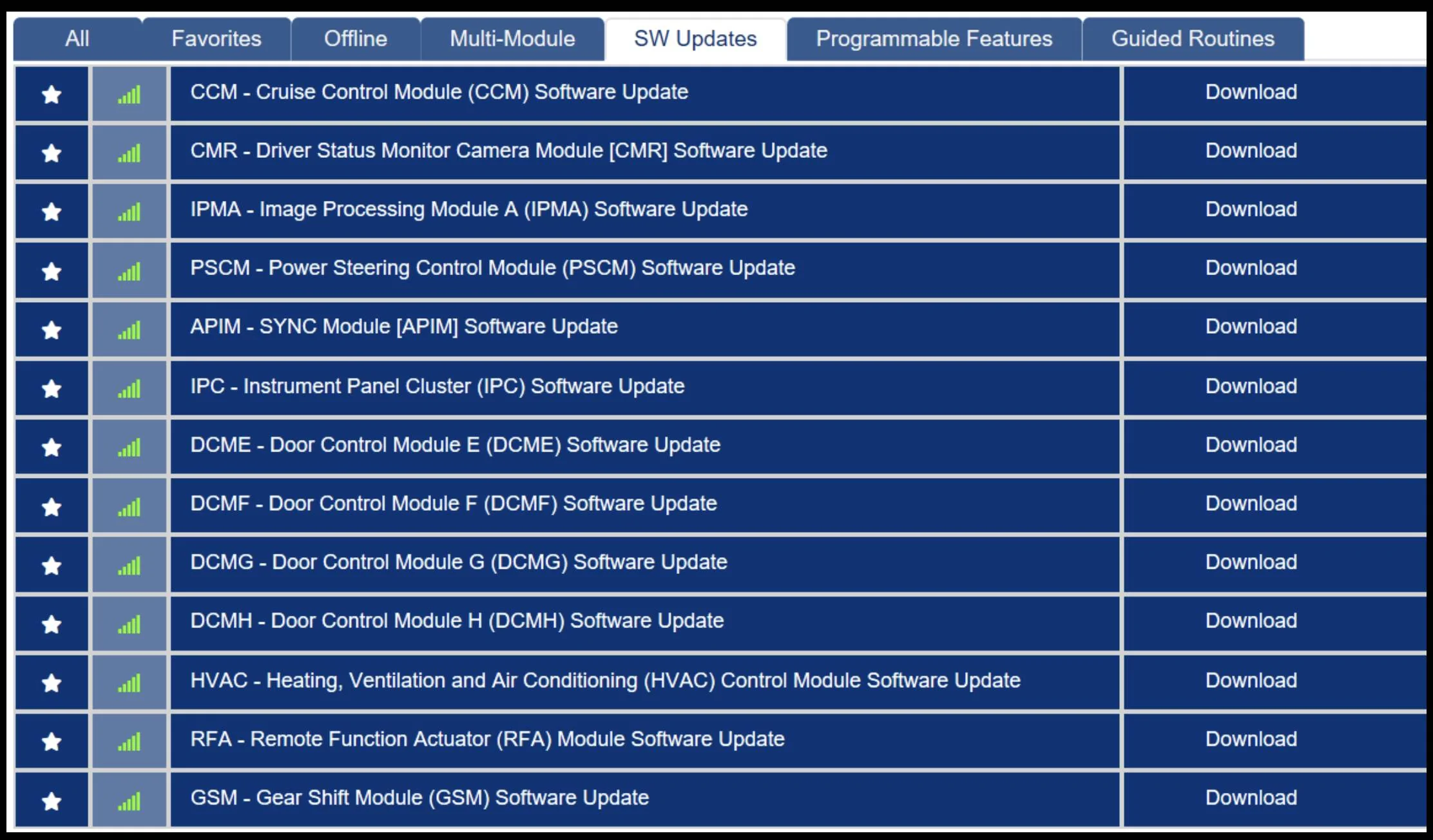
I have given up on finding a dealer to unstuck me for OTA’s and ordered the hardware required to update on my own. I have not gotten my FDRS license yet and attached picture shows the pending modules as of last month. I know there is a lot of info already discussed on this forum but I am not clear whether these modules need to be updated in a particular sequence. Please help clarify, thanks!

Ford Mustang Mach-E The Complete DIY Guide to Updating Your Mach-E with FDRS CC51CB94-2498-4EB0-A446-AACA71C55AA3
 

Mike G

Well-Known Member
First Name
Mike
Joined
Mar 27, 2022
Threads
25
Messages
6,449
Reaction score
5,289
Location
N. AL, USA
Vehicles
'23(J1) Mach-E GT-PE, '22 F-150 Lightning, '24 Bronco HLE 2Dr
Country flag
I have given up on finding a dealer to unstuck me for OTA’s and ordered the hardware required to update on my own. I have not gotten my FDRS license yet and attached picture shows the pending modules as of last month. I know there is a lot of info already discussed on this forum but I am not clear whether these modules need to be updated in a particular sequence. Please help clarify, thanks!

CC51CB94-2498-4EB0-A446-AACA71C55AA3.jpeg
Okay so to be clear you're saying you have no version of Sync showing and your updates function is greyed out correct?

So you would be performing the TSB 22-2150 procedure if you want to go forward with getting OTAs to function.

Low hanging fruit that you would be able to update right away with FDRS without doing anything else would be all of the door modules, the HVAC, the RFA, and the GSM although that last one is likely to show back up after you do it due to an issue on Ford's end.

I would not do any of the updates involved in BlueCruise until that APIM gets updated (unstuck). Those would be the CCM, CMR, IPMA, PSCM, or IPC.

If you want to attempt to get that APIM updated without all the extra cables and procedures called for in TSB 22-2150 you can first try to do the update using the exFat formatted, but completely blank, USB 3.0 thumb drive (min 32GB).

To do that you would simply download the APIM software using FDRS and following the prompts create the USB drive files and then safely eject the drive from your computer and insert it into the USB port in the console with the car fully on (not just in accessory mode).

And here's the part that takes patience... you have to wait for the message that it's updating and select "close" when prompted so that the update can start. This may not happen right away..in fact it could take days before that pops up. But some have done this to get their car past the stuck APIM issue without doing all that's required in TSB 22-2150.

Or if you'd rather not wait...just follow the steps in the TSB 22-2150 which is likely faster but involves a bit more work to achieve success.

Once your APIM is unstuck you can just follow the BlueCruise procedures 21G01 to get that done.

Mike
 

Attachments

ZuleMME

Well-Known Member
First Name
Zule
Joined
Apr 23, 2021
Threads
10
Messages
1,018
Reaction score
1,487
Location
Denver, CO
Vehicles
21' Job1 P4X MME, 22' MYP
Occupation
Implementation Engineer
Country flag
...
And here's the part that takes patience... you have to wait for the message that it's updating and select "close" when prompted so that the update can start. This may not happen right away..in fact it could take days before that pops up. But some have done this to get their car past the stuck APIM issue without doing all that's required in TSB 22-2150.
...
Mike
Interesting that you mention this; have you seen that someone else did this? This is effectively what I did and how I'm now in a pickle of a situation. This method works because "eventually" the GWM times out on it's erroring because of the corrupt internal database and during this timeout it no longer "blocks" the USB updates from happening. But, here's the kicker in my mind, the internal database is STILL corrupt. So if you do this, now you have an APIM version that's no longer compatible with the 22-2150 tool to "fix" it and you're REALLY REALLY stuck. My car failed to take 2.6.0 as a result and I believe will fail again and again for the same reason until Ford figured out how to fix the database on other releases or allow detection of the issue regardless of the version of SYNC that's running.


Mike G

Well-Known Member
First Name
Mike
Joined
Mar 27, 2022
Threads
25
Messages
6,449
Reaction score
5,289
Location
N. AL, USA
Vehicles
'23(J1) Mach-E GT-PE, '22 F-150 Lightning, '24 Bronco HLE 2Dr
Country flag
Interesting that you mention this; have you seen that someone else did this? This is effectively what I did and how I'm now in a pickle of a situation. This method works because "eventually" the GWM times out on it's erroring because of the corrupt internal database and during this timeout it no longer "blocks" the USB updates from happening. But, here's the kicker in my mind, the internal database is STILL corrupt. So if you do this, now you have an APIM version that's no longer compatible with the 22-2150 tool to "fix" it and you're REALLY REALLY stuck. My car failed to take 2.6.0 as a result and I believe will fail again and again for the same reason until Ford figured out how to fix the database on other releases or allow detection of the issue regardless of the version of SYNC that's running.
This is what several people on the F-150 forum have been doing and recommending.

And it does eventually update. But I’ve never heard that the APIM data may still be corrupted as a result. Nobody is complaining about that happening as a result of updating with the USB. And their OTAs have started working again.
Mike
 

MustThee?

Well-Known Member
First Name
Sam
Joined
Aug 31, 2021
Threads
6
Messages
192
Reaction score
109
Location
North Carolina
Vehicles
2021 Mach Premium E
Okay so to be clear you're saying you have no version of Sync showing and your updates function is greyed out correct?

So you would be performing the TSB 22-2150 procedure if you want to go forward with getting OTAs to function.

Low hanging fruit that you would be able to update right away with FDRS without doing anything else would be all of the door modules, the HVAC, the RFA, and the GSM although that last one is likely to show back up after you do it due to an issue on Ford's end.

I would not do any of the updates involved in BlueCruise until that APIM gets updated (unstuck). Those would be the CCM, CMR, IPMA, PSCM, or IPC.

If you want to attempt to get that APIM updated without all the extra cables and procedures called for in TSB 22-2150 you can first try to do the update using the exFat formatted, but completely blank, USB 3.0 thumb drive (min 32GB).

To do that you would simply download the APIM software using FDRS and following the prompts create the USB drive files and then safely eject the drive from your computer and insert it into the USB port in the console with the car fully on (not just in accessory mode).

And here's the part that takes patience... you have to wait for the message that it's updating and select "close" when prompted so that the update can start. This may not happen right away..in fact it could take days before that pops up. But some have done this to get their car past the stuck APIM issue without doing all that's required in TSB 22-2150.

Or if you'd rather not wait...just follow the steps in the TSB 22-2150 which is likely faster but involves a bit more work to achieve success.

Once your APIM is unstuck you can just follow the BlueCruise procedures 21G01 to get that done.

Mike
Mike, thanks for taking the time for a detailed response. I will review and make a plan using these notes. Yes, I have no version of Sync showing. The scheduled updates function is NOT greyed out but anything I put in the schedule is not saved. I did get a message on the center console that 1.7.1 was updated but none of the associated changes like Notes showed up. Using the scriptable widget, I could see that the OTA was scheduled but months later it expired.
 

ZuleMME

Well-Known Member
First Name
Zule
Joined
Apr 23, 2021
Threads
10
Messages
1,018
Reaction score
1,487
Location
Denver, CO
Vehicles
21' Job1 P4X MME, 22' MYP
Occupation
Implementation Engineer
Country flag
Mike, thanks for taking the time for a detailed response. I will review and make a plan using these notes. Yes, I have no version of Sync showing. The scheduled updates function is NOT greyed out but anything I put in the schedule is not saved. I did get a message on the center console that 1.7.1 was updated but none of the associated changes like Notes showed up. Using the scriptable widget, I could see that the OTA was scheduled but months later it expired.
This is the exact indication of the failed 1.7.1. You need to perform TSB 22-2150 to fix it properly.
 

generaltso

Well-Known Member
Joined
Jun 24, 2020
Threads
76
Messages
15,389
Reaction score
28,694
Location
Vermont
Vehicles
2024 Kia EV9 GT-Line
Country flag
Now that I've been spoiled by doing my own updates on the MME, I really couldn't stomach the thought of sitting around at a Toyota dealer to get my wife's RAV4 Prime updated. The last time I did that, I was there for about 3 hours for what was likely a 10 minute software flash.

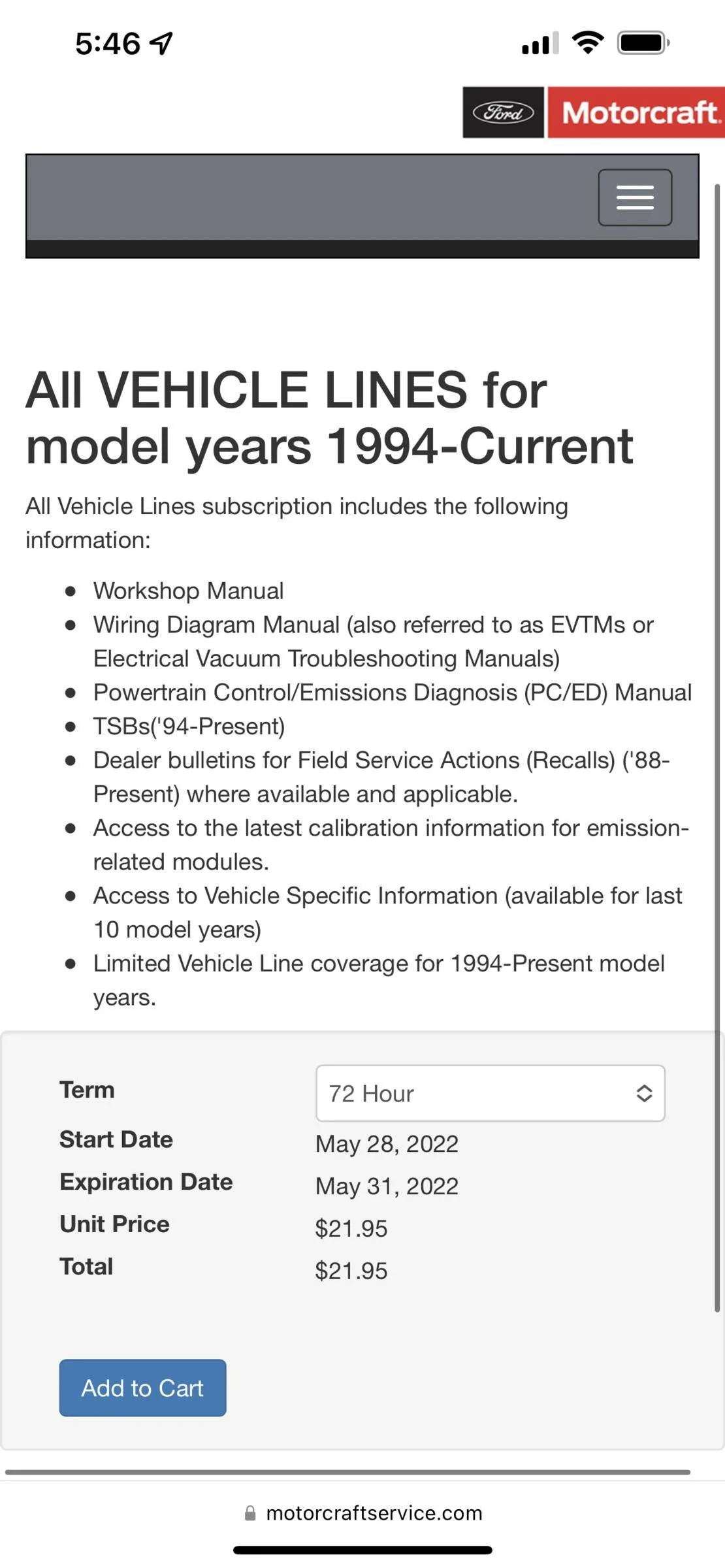
So I did some research and found that Toyota offers the same kind of subscription model for DIYers. Their software is called Techstream, and is similar to FDRS. I paid $65 for a 2-day license, so the cost is a little higher than Ford. But that license also includes full access to TIS, which is Toyota's equivalent to Ford's PTS (and Oasis). The process was a little different, but still pretty easy to get a recall and several TSBs taken care of on the RAV4 Prime without having to leave home. But now after looking through the treasure trove of information available for Toyotas in TIS, it really makes me want to be able to use PTS. Does anyone know if Ford offers any kind of PTS subscription option for DIY or do you have to be a dealer or industry insider?
 

ProximusAl

Well-Known Member
Joined
May 27, 2021
Threads
7
Messages
674
Reaction score
707
Location
UK
Vehicles
Mach-E - SR-AWD - Star White
Country flag
Now that I've been spoiled by doing my own updates on the MME, I really couldn't stomach the thought of sitting around at a Toyota dealer to get my wife's RAV4 Prime updated. The last time I did that, I was there for about 3 hours for what was likely a 10 minute software flash.

So I did some research and found that Toyota offers the same kind of subscription model for DIYers. Their software is called Techstream, and is similar to FDRS. I paid $65 for a 2-day license, so the cost is a little higher than Ford. But that license also includes full access to TIS, which is Toyota's equivalent to Ford's PTS (and Oasis). The process was a little different, but still pretty easy to get a recall and several TSBs taken care of on the RAV4 Prime without having to leave home. But now after looking through the treasure trove of information available for Toyotas in TIS, it really makes me want to be able to use PTS. Does anyone know if Ford offers any kind of PTS subscription option for DIY or do you have to be a dealer or industry insider?
Here in the UK you can access PTS as part of the FDRS subscription from motor craft.
 

ProximusAl

Well-Known Member
Joined
May 27, 2021
Threads
7
Messages
674
Reaction score
707
Location
UK
Vehicles
Mach-E - SR-AWD - Star White
Country flag
When you buy a subscription, say 1 day or 1 hour, you get a link direct to PTS
 

walla2

Well-Known Member
First Name
David
Joined
May 1, 2021
Threads
7
Messages
149
Reaction score
273
Location
Walla Walla, WA
Vehicles
21 MME Prem ER AWD, 2017 Toyota Highlander
Occupation
Clergy
Country flag

walla2

Well-Known Member
First Name
David
Joined
May 1, 2021
Threads
7
Messages
149
Reaction score
273
Location
Walla Walla, WA
Vehicles
21 MME Prem ER AWD, 2017 Toyota Highlander
Occupation
Clergy
Country flag


Top