Wonky_Donkey

Well-Known Member
First Name
Tony R
Joined
Feb 13, 2020
Threads
29
Messages
1,835
Reaction score
3,048
Location
Norwich UK
Vehicles
2022 Mach-E RWD ER
Country flag
New version of FDRS released - updated to 37.4.3

Nothing immediately and obviously different.
Sponsored

 

Mike G

Well-Known Member
First Name
Mike
Joined
Mar 27, 2022
Threads
25
Messages
6,449
Reaction score
5,289
Location
N. AL, USA
Vehicles
'23(J1) Mach-E GT-PE, '22 F-150 Lightning, '24 Bronco HLE 2Dr
Country flag
Recommend not updating your FDRS to 37.4.3, or attempted fix (fail) released yesterday 37.4.4.

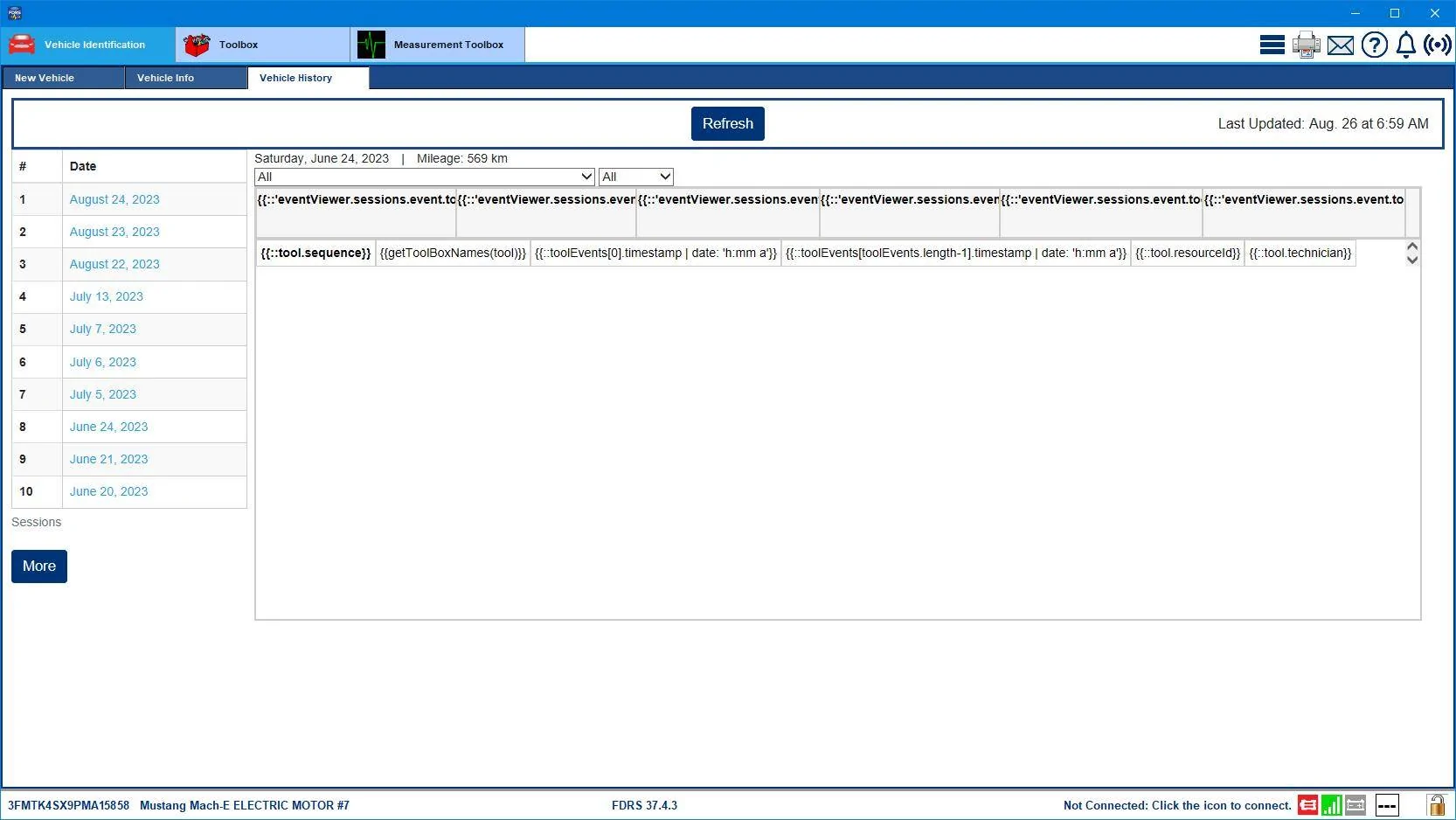
Both of these revisions will make your session logs look like this:
Ford Mustang Mach-E The Complete DIY Guide to Updating Your Mach-E with FDRS FDRS_37-4-3_Session_Log_Fail


Stay on 36.4.8 for the time being until the all clear is sounded. Remain calm.
 

Wonky_Donkey

Well-Known Member
First Name
Tony R
Joined
Feb 13, 2020
Threads
29
Messages
1,835
Reaction score
3,048
Location
Norwich UK
Vehicles
2022 Mach-E RWD ER
Country flag
Recommend not updating your FDRS to 37.4.3, or attempted fix (fail) released yesterday 37.4.4.

Both of these revisions will make your session logs look like this:
FDRS_37-4-3_Session_Log_Fail.png


Stay on 36.4.8 for the time being until the all clear is sounded. Remain calm.
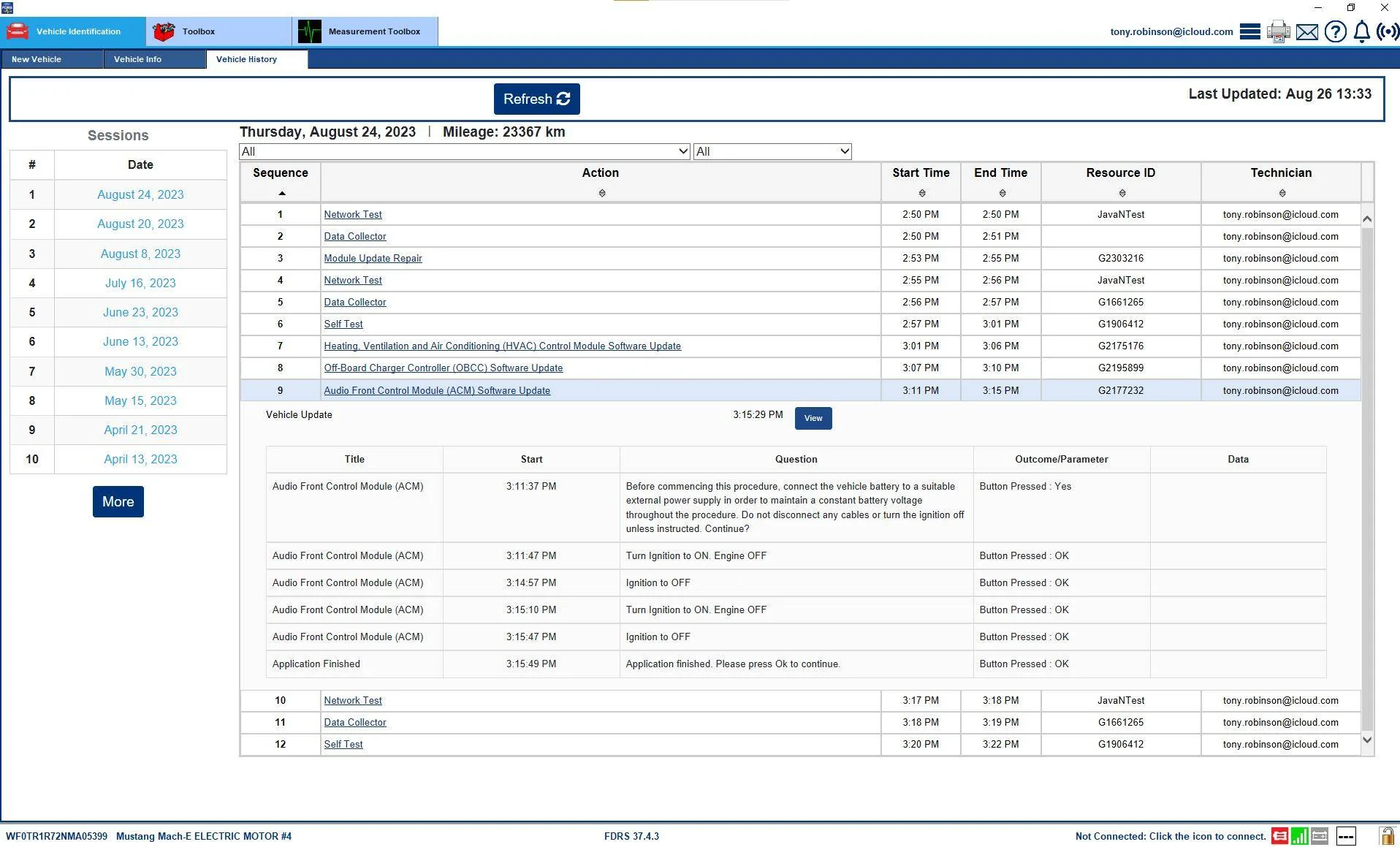
Oooh - that's a bit weird. Is this just session logs created with the new versions then?

I ran some updates before the version change and mine look ok on the new version.....

Ford Mustang Mach-E The Complete DIY Guide to Updating Your Mach-E with FDRS 1693053374407
 

Mike G

Well-Known Member
First Name
Mike
Joined
Mar 27, 2022
Threads
25
Messages
6,449
Reaction score
5,289
Location
N. AL, USA
Vehicles
'23(J1) Mach-E GT-PE, '22 F-150 Lightning, '24 Bronco HLE 2Dr
Country flag
Oooh - that's a bit weird. Is this just session logs created with the new versions then?

I ran some updates before the version change and mine look ok on the new version.....

1693053374407.png
Well I tried pulling up session logs on several VINs, and on both 37.4.3 and the 37.4.4 version that was hastily released the next day they are messed up. When I roll back to 36.4.8 everything's fine again.


Mike G

Well-Known Member
First Name
Mike
Joined
Mar 27, 2022
Threads
25
Messages
6,449
Reaction score
5,289
Location
N. AL, USA
Vehicles
'23(J1) Mach-E GT-PE, '22 F-150 Lightning, '24 Bronco HLE 2Dr
Country flag
It is possible that if you do programming with the newer versions that those session logs will come out looking right. Try another VIN and go back and look at previous session logs to see what they look like. If they come out right I'd be surprised. I think others are seeing this too, and that's why they tried to release a fixed version the next day. But on my computer at least the result is the same with the 37.4.4 as it was with 37.4.3.
 

redditn00b92

Well-Known Member
Joined
Jun 15, 2022
Threads
17
Messages
121
Reaction score
20
Location
Austin, TX
Vehicles
2021 Mustang Mach-E CR1
Country flag
After nearly a year and months of waiting for a new APIM to come in, I came home excited to install some APIM Updates. I booted up FDRS, connected to a power source, all the things you need to do to get ready for updates, etc. I had not GWM or TCU updates so I went straight to the APIM Update.

It walked me through the steps. Reads the data, module, prompts me turn the vehicle in key on engine off. It then completes the whole cycle not too long after that. All of about 4 steps. It doesn't throw error codes or anything but when I go back to the SW Updates page and rerun the Network Scan, it still shows up. I am so frustrated that I still can't update my damn APIM.

Any advice folks? :(
 

bshaw

Well-Known Member
Joined
May 18, 2020
Threads
14
Messages
1,562
Reaction score
2,181
Location
Boston, MA
Vehicles
2021 Mustang Mach E 4X (Job 1)
Country flag
Two possibilities:
You just received a new piece of APIM hardware, it may already be reasonably up to date.

Sometimes a successful update doesn’t clear immediately from FDRS, it will eventually if you are all set.
 

Neil4Real

Well-Known Member
Joined
Jul 8, 2021
Threads
17
Messages
3,385
Reaction score
3,073
Location
Southern California
Vehicles
Mach-E GT Performance Edition - Shadow Black
Country flag
After nearly a year and months of waiting for a new APIM to come in, I came home excited to install some APIM Updates. I booted up FDRS, connected to a power source, all the things you need to do to get ready for updates, etc. I had not GWM or TCU updates so I went straight to the APIM Update.

It walked me through the steps. Reads the data, module, prompts me turn the vehicle in key on engine off. It then completes the whole cycle not too long after that. All of about 4 steps. It doesn't throw error codes or anything but when I go back to the SW Updates page and rerun the Network Scan, it still shows up. I am so frustrated that I still can't update my damn APIM.

Any advice folks? :(
I thought part of the install of an APIM is doing the config install which will get it fully up to date?
 

redditn00b92

Well-Known Member
Joined
Jun 15, 2022
Threads
17
Messages
121
Reaction score
20
Location
Austin, TX
Vehicles
2021 Mustang Mach-E CR1
Country flag
I thought part of the install of an APIM is doing the config install which will get it fully up to date?
If only. These austin dealers do the bare minimum it seems. Finally got a GWM and TCU update to appear. Cycling through those and then I’m expecting an APIM update. Should be in the clear.
 

Mike G

Well-Known Member
First Name
Mike
Joined
Mar 27, 2022
Threads
25
Messages
6,449
Reaction score
5,289
Location
N. AL, USA
Vehicles
'23(J1) Mach-E GT-PE, '22 F-150 Lightning, '24 Bronco HLE 2Dr
Country flag
If only. These austin dealers do the bare minimum it seems. Finally got a GWM and TCU update to appear. Cycling through those and then I’m expecting an APIM update. Should be in the clear.
Fingers crossed.

Are you using a Mongoose?
 

Mike G

Well-Known Member
First Name
Mike
Joined
Mar 27, 2022
Threads
25
Messages
6,449
Reaction score
5,289
Location
N. AL, USA
Vehicles
'23(J1) Mach-E GT-PE, '22 F-150 Lightning, '24 Bronco HLE 2Dr
Country flag
It is possible that if you do programming with the newer versions that those session logs will come out looking right. Try another VIN and go back and look at previous session logs to see what they look like. If they come out right I'd be surprised. I think others are seeing this too, and that's why they tried to release a fixed version the next day. But on my computer at least the result is the same with the 37.4.4 as it was with 37.4.3.
As a followup to my previous email;

I submitted a ticket through the "Report a Problem" function of FDRS and got this back:

"The issue stated in your case was not reproducible on The tool with version 37.4.4. To optimize performance, ensure The PC is not running in a Power Saving mode, a strong WiFi connection is available and The VCI/FDRS software is at The latest level. Before reinstalling FDRS, we recommend running The Refresh FDRS files under The Fix a problem tool under The Report a problem envelope button. We strongly recommend selecting The Remove User Data option to Remove all cache Data when updating FDRS to ensure a clean download and installation of applications.

Thank you again for taking the time to submit this concern. If you have any questions or further information related to your concern, please contact me directly at the email address below.

Regards,
Coordinator, Report a Problem
[email protected]"

So I guess I'll try that and see what happens. Could well have been cached data I suppose.

I'm not sure what caused every instance of the word "the" to be capitalized in that response email, but that's the way it came in. A bit strange.

EDIT: I removed all user data during the uninstall of 36.4.8 and then installed 37.4.4 and it is working fine. So the newer version must be formatting the session log data differently than the previous version(s) and clearing out the old cached data now makes the system pull fresh stuff down and it displays properly. Seems good to go now.
 
Last edited:

Arjan

Well-Known Member
First Name
Arjan
Joined
Feb 14, 2020
Threads
6
Messages
360
Reaction score
241
Location
NL
Vehicles
Ford Mustang Mach-E GT Performance
Country flag
So today was the day i connected FDRS to my MME again. I stayed at 36.4.8 just to be safe regarding the issues described above.

Updates done:
- OBCC
- ACM
- IPC
and the previous troubleupdate CMR.

Again the CMR gave me issues, this time i had a failed flash after 45 minutes, but after trying to flash it again it worked fine.
 

Mike G

Well-Known Member
First Name
Mike
Joined
Mar 27, 2022
Threads
25
Messages
6,449
Reaction score
5,289
Location
N. AL, USA
Vehicles
'23(J1) Mach-E GT-PE, '22 F-150 Lightning, '24 Bronco HLE 2Dr
Country flag
So today was the day i connected FDRS to my MME again. I stayed at 36.4.8 just to be safe regarding the issues described above.

Updates done:
- OBCC
- ACM
- IPC
and the previous troubleupdate CMR.

Again the CMR gave me issues, this time i had a failed flash after 45 minutes, but after trying to flash it again it worked fine.
I remember doing that CMR and it took 52 minutes...but there were weird long "pauses" where it looked like nothing was happening and it was stuck. I just waited it out and eventually it finished.

I did the ACM and OBCC on my '23 yesterday and was surprised that the ACM took 20 minutes. The OBCC took like 4 minutes or something. I did have to clear all DTCs after each module update and ran the selftest and on-demand to reset the SOBDMC afterward. It did once again cause a SSN alert to show up (including in FP). But it's all good and "green" now and everything works fine.

I don't know why it causes that SOBDMC issue after programming seemingly every module I update. I know how to reset and clear the DTCs afterward, but I wish I knew why it was happening in the first place.
 
Last edited:

Arjan

Well-Known Member
First Name
Arjan
Joined
Feb 14, 2020
Threads
6
Messages
360
Reaction score
241
Location
NL
Vehicles
Ford Mustang Mach-E GT Performance
Country flag
I did see a SSN message once but after running clear errors all was fine again. I am still left with a door error (module f) that cannot be cleared. I am guessing a sensor issue. Guess i will have to visit the dealer sometime soon.
Sponsored


Top