
The Complete DIY Guide to Updating Your Mach-E with FDRS


xofox25
Well-Known Member
- Joined
- Feb 12, 2023
- Threads
- 2
- Messages
- 52
- Reaction score
- 19
- Location
- France
- Vehicles
- Mach E Premium ER Red Job2
- Occupation
- IT system admin

Just try with an employee but same issue (licence assigned to the employee)The license key must be same of employee mail. In motorcraft account you can assign more employees. You can create a new email in motorcraft as employee and link with the main account (It works for me in Spain)
Try 3 times to uninstall by coching all (clear cache etc.) will try with another laptop.Had the same issue some weeks ago. Had to reinstall FDRS - keep in mind to tick the box for clearing the cache.
Thank you guys for these idea


rugedraw
Well-Known Member
- First Name
- Javier
- Joined
- Nov 13, 2023
- Threads
- 0
- Messages
- 2,633
- Reaction score
- 2,390
- Location
- Miami, FL
- Vehicles
- 2021 Ford F150 Platinum FX4 EB/2023 Bronco Sport Badlands/1991 Mustang 5.0 coupe
- Occupation
- Auto Sales

I've seen many cases where the log in will just work after you let some time pass without doing anything differently. I understand it is a one-day license and that is not the best scenario for you, but logging in to FDRS for the first time has proven to be a PITA for many people.Just try with an employee but same issue (licence assigned to the employee)
Try 3 times to uninstall by coching all (clear cache etc.) will try with another laptop.
Thank you guys for these idea
xofox25
Well-Known Member
- Joined
- Feb 12, 2023
- Threads
- 2
- Messages
- 52
- Reaction score
- 19
- Location
- France
- Vehicles
- Mach E Premium ER Red Job2
- Occupation
- IT system admin
Same issue on another computer. So wait and see if patience is the solution.I've seen many cases where the log in will just work after you let some time pass without doing anything differently. I understand it is a one-day license and that is not the best scenario for you, but logging in to FDRS for the first time has proven to be a PITA for many people.
Thank you
eponey
Well-Known Member
Some notes on the attempt.
What was not explicitly clear is you have to log into https://www.motorcraftservice.com/ and accept their EULA before you can log into FDRS, you can just use your fordpass creds both places.
The USB updates are a little bit of a shitshow, I would recommend that maybe make sure your USB has an activity light (maybe?) otherwise there is some waiting with very little feedback.
When I did the IPC it had me wait 10 minutes two separate times, once with that big screen of text, then again after that to let all the modules sleep? What's up with that?
For those with low fortitude, the car will beep, talk to you, pop, whir, throw all sorts of crazy errors just at baseline during this process. Then some of the hung modules require a bit of troubleshooting including some power cycles allowing the car to go to light sleep and resetting the sync screen, so give yourself plenty of time.
I also had some updates fail for unclear reasons but FDRS always recovered, FDRS hung once, crashed once.
The process is very time consuming and there are occasionally extra steps, so just make sure to budget plenty of time (hours), especially for your first go.
The RFA update was a pretty bizarre process compared to the other modules, really curious why it runs like that.
Do I need to get access to PTS obtain more information on the modules and their architecture?
What was not explicitly clear is you have to log into https://www.motorcraftservice.com/ and accept their EULA before you can log into FDRS, you can just use your fordpass creds both places.
The USB updates are a little bit of a shitshow, I would recommend that maybe make sure your USB has an activity light (maybe?) otherwise there is some waiting with very little feedback.
When I did the IPC it had me wait 10 minutes two separate times, once with that big screen of text, then again after that to let all the modules sleep? What's up with that?
For those with low fortitude, the car will beep, talk to you, pop, whir, throw all sorts of crazy errors just at baseline during this process. Then some of the hung modules require a bit of troubleshooting including some power cycles allowing the car to go to light sleep and resetting the sync screen, so give yourself plenty of time.
I also had some updates fail for unclear reasons but FDRS always recovered, FDRS hung once, crashed once.
The process is very time consuming and there are occasionally extra steps, so just make sure to budget plenty of time (hours), especially for your first go.
The RFA update was a pretty bizarre process compared to the other modules, really curious why it runs like that.
Do I need to get access to PTS obtain more information on the modules and their architecture?
Last edited:
UN1075
Active Member
I ordered a Mongoose cable and Pyramid battery supply yesterday so I can start doing these myself.
Any first timer tips or warnings I should know? I'm going to watch the video linked in the OP again before I try. Just trying to avoid any first timer mistakes or hangups.
Any first timer tips or warnings I should know? I'm going to watch the video linked in the OP again before I try. Just trying to avoid any first timer mistakes or hangups.
rugedraw
Well-Known Member
- First Name
- Javier
- Joined
- Nov 13, 2023
- Threads
- 0
- Messages
- 2,633
- Reaction score
- 2,390
- Location
- Miami, FL
- Vehicles
- 2021 Ford F150 Platinum FX4 EB/2023 Bronco Sport Badlands/1991 Mustang 5.0 coupe
- Occupation
- Auto Sales
GWM, APIM, TCU and IPC updates first as they appear. Doing one of these will release another one of these until there are no more left. After that, the order in which you do them is not important.I ordered a Mongoose cable and Pyramid battery supply yesterday so I can start doing these myself.
Any first timer tips or warnings I should know? I'm going to watch the video linked in the OP again before I try. Just trying to avoid any first timer mistakes or hangups.
The IPMA will take 3 hours and it is tied to the other ADAS modules like the PSCM, CCM and CMR (CMR will take 45-60 minutes to do). So do not start updating any of these unless you have the time to seem them though.
If you come across any issues, post here and someone will chime in and lend a hand.
UN1075
Active Member
I really appreciate the info, thank you.GWM, APIM, TCU and IPC updates first as they appear. Doing one of these will release another one of these until there are no more left. After that, the order in which you do them is not important.
The IPMA will take 3 hours and it is tied to the other ADAS modules like the PSCM, CCM and CMR (CMR will take 45-60 minutes to do). So do not start updating any of these unless you have the time to seem them though.
If you come across any issues, post here and someone will chime in and lend a hand.
With the IPMA update, can you "set it and forget it" or do you need to monitor it? I'll probably tackle that first thing Saturday morning.
rugedraw
Well-Known Member
- First Name
- Javier
- Joined
- Nov 13, 2023
- Threads
- 0
- Messages
- 2,633
- Reaction score
- 2,390
- Location
- Miami, FL
- Vehicles
- 2021 Ford F150 Platinum FX4 EB/2023 Bronco Sport Badlands/1991 Mustang 5.0 coupe
- Occupation
- Auto Sales
Yea, you can go about your business and come check on it every now and then to make sure it didn't stall out for some reason. Just remember to turn off your laptop's screensaver and power saver off completely.I really appreciate the info, thank you.
With the IPMA update, can you "set it and forget it" or do you need to monitor it? I'll probably tackle that first thing Saturday morning.
Elektronik
Well-Known Member
- First Name
- Olegs
- Joined
- Aug 15, 2022
- Threads
- 1
- Messages
- 180
- Reaction score
- 136
- Location
- Latvia
- Vehicles
- Mach E RWD standard battery

Is anyone here from Latvia, Lithuania, Estonia with Mongoose cable and does FDRS updates themselves?
Orb7
Well-Known Member
Same issue here.Hi,
Just bought a one day licence but I've got the following issue :

FDRS 43.6.7
try to uninstall and reinstall, reboot etc.
Do you know why I'm doing wrong ?
Same user than where I've bought my licence
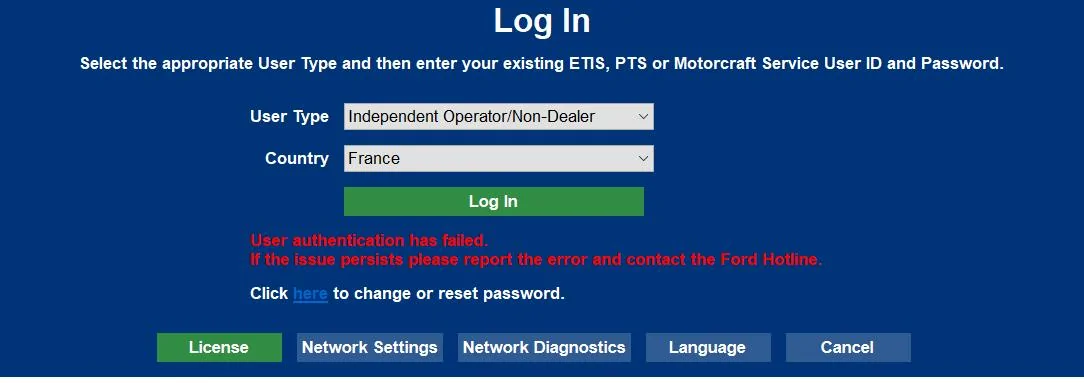
I tried logging in with the same username and password as on Motorcraft Service and accepted their EULA. I also tried reinstalling FDRS and restarting my laptop.
Babbit
Well-Known Member
- Joined
- Mar 10, 2024
- Threads
- 6
- Messages
- 159
- Reaction score
- 125
- Location
- West Michigan
- Vehicles
- 2023 Prem 4X
I had the same thing last weekend but just had to wait about 30 minutes or so and it started working. How long have you waited since purchasing the license?Same issue here.
I tried logging in with the same username and password as on Motorcraft Service and accepted their EULA. I also tried reinstalling FDRS and restarting my laptop.
Orb7
Well-Known Member
I purchased the license about 4 hours ago. I managed to add the license to FDRS but failed to log in.I had the same thing last weekend but just had to wait about 30 minutes or so and it started working. How long have you waited since purchasing the license?
I have already tried installing different FDRS versions, creating another Motorcraft Service user, and changing computers, but the issue persists.
Babbit
Well-Known Member
- Joined
- Mar 10, 2024
- Threads
- 6
- Messages
- 159
- Reaction score
- 125
- Location
- West Michigan
- Vehicles
- 2023 Prem 4X
Have you ever successfully signed into FDRS before? If not, maybe it's because you are in Israel and Ford might Geo-Block certain countries. Have you tried connecting to a US-based VPN?I purchased the license about 4 hours ago. I managed to add the license to FDRS but failed to log in.
I have already tried installing different FDRS versions, creating another Motorcraft Service user, and changing computers, but the issue persists.
Orb7
Well-Known Member
Yes, I have successfully logged in before. Last time, I had issues because my account was blocked. This time, I tried using ExpressVPN, but I still get the same message with and without the VPN.Have you ever successfully signed into FDRS before? If not, maybe it's because you are in Israel and Ford might Geo-Block certain countries. Have you tried connecting to a US-based VPN?
Sponsored
Similar threads
- Replies
- 46
- Views
- 17,098


- Replies
- 29
- Views
- 15,774
