WAZE—-Ford, Let Us Crowdsource!!! Solved

alexgorod

Well-Known Member
First Name
Alex
Joined
Jul 27, 2021
Threads
21
Messages
1,304
Reaction score
1,400
Location
Michigan
Vehicles
21 Job 2 MME Premium SR AWD (21 CR-V - wife's)
Occupation
DBA
Country flag
I'm in the camp that no new features should be added without the ability for a user to be able to disable them, but Waze currently feels that you should always use a route regardless if it's a common route because it works best in route guidance.
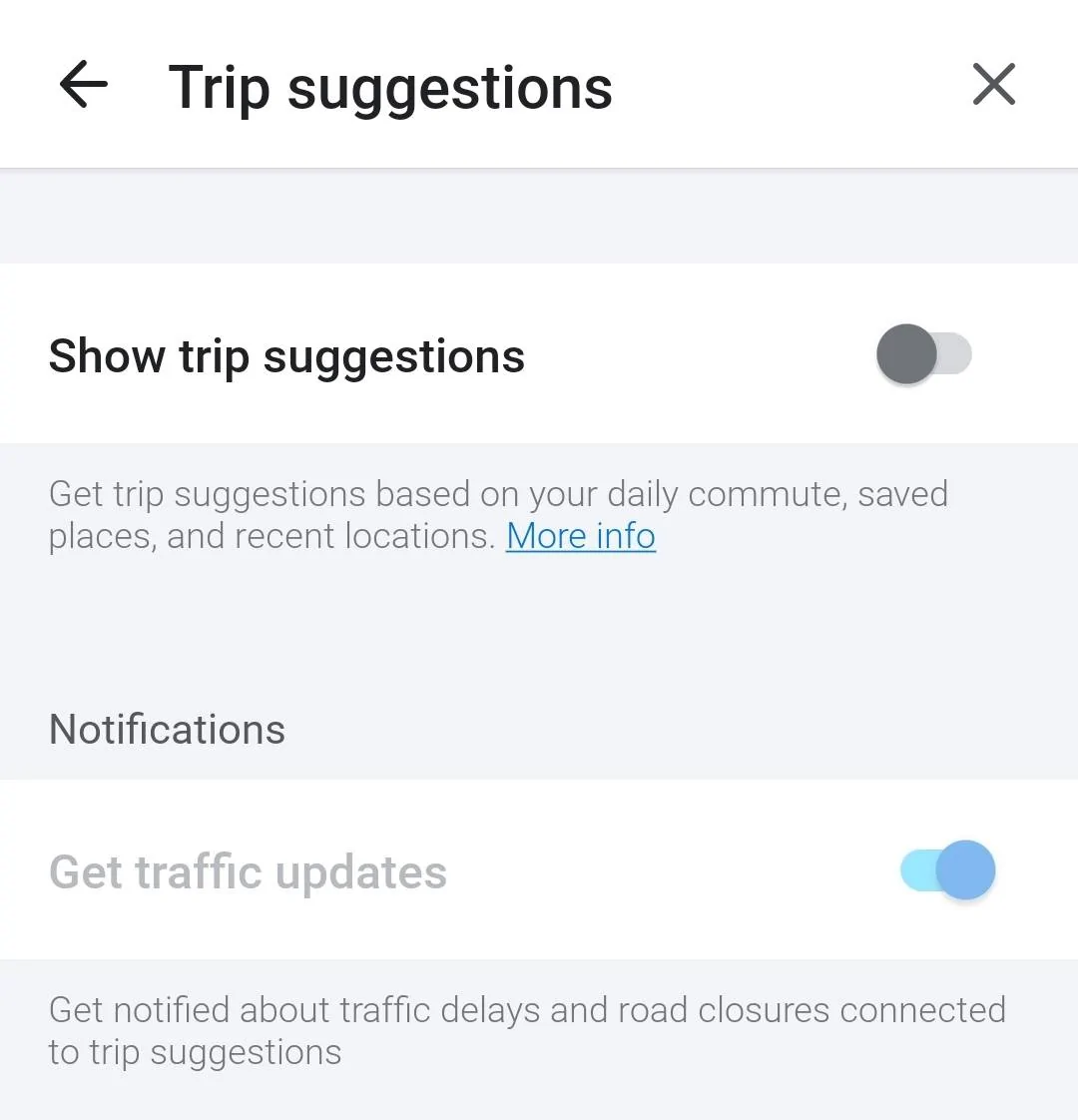
I expect that this setting will work correctly in AA at some point soon

Ford Mustang Mach-E WAZE—-Ford, Let Us Crowdsource!!! Solved Screenshot_20230530_112435_Waz
Sponsored

 
Last edited:

Guss-E 2021

Well-Known Member
First Name
Pierre
Joined
Aug 12, 2021
Threads
67
Messages
1,896
Reaction score
2,327
Location
New Hampshire
Vehicles
2022 Mach-E Prem AWD ER
Occupation
Compliance Specialist
Country flag
Non-related question about Waze on Android Auto - every session starts (after a recent Waze or AA update) by displaying the list of recent destinations. Is there a way to turn it off? Yes, it's only one touch on the screen, but still a little annoying.
I was just in the car. I went through the meager number of settings available in the car's Waze app and their was no option to disable the "Drive Now" pop up.
 

Panzer948

Well-Known Member
Joined
Aug 14, 2022
Threads
15
Messages
297
Reaction score
166
Location
Charlotte, N.C.
Vehicles
2023 MME GT PE, 2021 Ford Bronco, 2015 BMW M4, CJ5
Occupation
Geologist
Country flag
I don't understand your issue. I reported a couple of vehicles on shoulder today right on the Sync4A screen. I've entered all three of these repeatedly.

I'm using an iPhone. Does it not work on Android?
Yes, this works with Android Auto just fine. I think the OP doesn't know he can do what he is asking through Android Auto or Apple Car Play so not sure what the issue is; other than maybe just wanting to use the in car system for everything. Sadly, I don't think that will happen any time soon with any make. Ford is no different. I tend to only use the in car system when on longer trips to check charging locations and when pulling up my trip planner I did through the FordPass App. In that sense, it works pretty well.
 

BigMach-E

Well-Known Member
Joined
Jul 15, 2021
Threads
58
Messages
1,436
Reaction score
1,645
Location
Bay Area
Vehicles
Mach-E GTPE Shadow Black 2021
Occupation
IT
Country flag
I have never used Waze. Long trips are a combo of Google Maps, Apple Maps and Ford Nav. Since my SoC is linked to Apple Maps, and it tends to be either inaccurate and/or more conservative even than Ford built in Nav, I use it as a guide, but finalize in Google Maps. I use Ford Nav to find chargers closer to me when I doubt I’ll have enough buffer to be comfortable.

Local I use Apple Maps exclusively.
 

bp99

Well-Known Member
Joined
Jul 28, 2021
Threads
1
Messages
290
Reaction score
453
Location
Oregon
Vehicles
22 MME eAWD, 21 MME CA Route 1 (sold)
Country flag
They changed this as expected behavior in a recent update. There's a lot of back and forth as to weather or not there should be the ability to disable "drive now".

I'm in the camp that no new features should be added without the ability for a user to be able to disable them, but Waze currently feels that you should always use a route regardless if it's a common route because it works best in route guidance.
I hope they come to their sensibilities and make it an option. It's been annoying the heck out of me needing to X it out every time I drive somewhere.. If I know where I'm going, I don't need navigation. I understand they're trying to promote giving the best route based on traffic, etc. For me, I know where I'm going and typical traffic patterns for routes to avoid. I also don't want my music interrupted for route guidance when I know where I'm going (which is frequent when navigating out of my neighborhood). It's also none of my passenger's business to always see the last several places I navigated to.


OP
OP

e-pony

Well-Known Member
Joined
Apr 19, 2021
Threads
22
Messages
176
Reaction score
116
Location
SoCal
Vehicles
Premium AWD Extended Star White
Country flag
I don't understand your issue. I reported a couple of vehicles on shoulder today right on the Sync4A screen. I've entered all three of these repeatedly.

I'm using an iPhone. Does it not work on Android?
As noted, i cannot enter any new road conditions. The Orange button does not bring up a menu. I can only confirm whether something is Still There or not. But you pushed me to investigate. Turns out, when i got my mach e, i had put myself in Invisible Mode in WAZE, which hides my personal info but also prevents me from posting road hazards. Forgot all about that. I thought it was a Ford safety issue to keep my eyes off the screen. Thx
 

LF-X

Well-Known Member
First Name
Lutz
Joined
Oct 28, 2022
Threads
1
Messages
63
Reaction score
57
Location
Germany
Vehicles
Mach-E RWD SR TP2
Occupation
IT project manager
Country flag
yeah... the last iteration isn't really that good. the Waze button is too far away now. And the destination prompt at startup sucks.
 

A-A-Ron

Well-Known Member
First Name
Aaron
Joined
Mar 23, 2022
Threads
16
Messages
1,021
Reaction score
2,809
Location
DFW, TX
Vehicles
'21 MME Premium 4X
Country flag
Stopped using Waze and Google a while ago once Apple Maps became good
I used Apple Maps for the past year but have recently been giving Google Maps another shot. Honestly, they both have their strengths and weaknesses. The biggest weakness Apple Maps has for me is that it's not very clear about alternatives while Google is almost always presenting an alternative along with the time and toll costs. I like that Google's constantly telling me what the next best route is and what the time and toll difference is.

But it's the opposite of that that I'm struggling with in Apple Maps. We have a lot of "express (toll) lanes" around here and Apple's somewhat random when telling me to take them or avoid them. Sometimes it routes me into them and I end up paying an extra $8 in tolls and not even avoiding any slowdowns on the free lanes while other times the tolls are completely worth it to avoid an accident. I really wish they'd tell me why I should take the toll lanes and what it saves me in time and what it costs me in tolls - and I'm pretty impressed with that feature in Google Maps. I also like that Google shows me traffic around my route while Apple suppresses all traffic except what's on the route it's plotted for you. It's cleaner and prettier, but less useful.

Biggest complaint about Google Maps is the lack of SoC and dash integration. Apple also has a cleaner view (and the 3D maps in Apple are amazing though low on my actual needs in a map). Also can't seem to report accidents in Google Maps on Car Play though I can from the app on my phone.
 

ChasingCoral

Well-Known Member
First Name
Mark
Joined
Feb 3, 2020
Threads
502
Messages
14,318
Reaction score
28,680
Location
Maryland
Vehicles
2021 GB E4X FE, 2022 F-150 Lightning Lariat ER
Occupation
Retired oceanographer
Country flag
As noted, i cannot enter any new road conditions. The Orange button does not bring up a menu. I can only confirm whether something is Still There or not. But you pushed me to investigate. Turns out, when i got my mach e, i had put myself in Invisible Mode in WAZE, which hides my personal info but also prevents me from posting road hazards. Forgot all about that. I thought it was a Ford safety issue to keep my eyes off the screen. Thx
Operator error. Got it. You're far from the first to have something like this sneak up on them!

You might want to edit the title to add the word Solved at the end. You can even edit the first post to add the solution.

Glad to hear it's not the car.
 
OP
OP

e-pony

Well-Known Member
Joined
Apr 19, 2021
Threads
22
Messages
176
Reaction score
116
Location
SoCal
Vehicles
Premium AWD Extended Star White
Country flag
Ford, If you are listening, met us Mach E owners Crowdsource on WAZE app!!! Please. At least allow us to enter three simple items like Police, on-road hazard, side-of-road hazard. Move the selections to top left of screen. There. Done. Else i’ll need to mount my phone!!
Solved—Make sure you are not in Invisible Mode in Waze. !!!
Sponsored


Top