X Button MISSING after Sync UI Update with Camera Button While Reversing?

ziptbm

Well-Known Member
Joined
Jan 12, 2022
Threads
12
Messages
143
Reaction score
63
Location
Michigan
Vehicles
'22 MME GT & '22 F150 Lightning Lariat ER
Country flag
After the Sync update that added the Camera Button to the UI at the top, the camera view while reversing is now missing an X in the top right corner to get out of this view. What I'm finding is that I have to wait a period of time (which feels like WAY too long) for it to time out after I've switched from Reverse to Drive, OR I have to put the car in park first and then Drive.

Are others with MMEs post Sync UI Update missing the X button in top right corner while Reversing in their MMEs?

And what's interesting, is that my F150 Lightning, which also has the UI update with the Camera Button DOES still show the X in the top right corner in this scenario. It's surprising to see the difference between them because I want to say the MME used to allow me to X out of that screen after I was done reversing.
Sponsored
 

A-A-Ron

Well-Known Member
First Name
Aaron
Joined
Mar 23, 2022
Threads
16
Messages
1,021
Reaction score
2,808
Location
DFW, TX
Vehicles
'21 MME Premium 4X
Country flag
You are correct. You can turn off the setting to keep the camera on after shifting into drive, but I like that feature 99% of the time. Then there’s that one time you back out and want to check your nav app to see which way you should leave and you can’t get the camera view to go away
 

FordMachEGo

Well-Known Member
Joined
Jun 17, 2021
Threads
17
Messages
179
Reaction score
164
Location
SoCal
Vehicles
2021 Premium AWDx April 2021 build.
Country flag
After the Sync update that added the Camera Button to the UI at the top, the camera view while reversing is now missing an X in the top right corner to get out of this view. What I'm finding is that I have to wait a period of time (which feels like WAY too long) for it to time out after I've switched from Reverse to Drive, OR I have to put the car in park first and then Drive.

Are others with MMEs post Sync UI Update missing the X button in top right corner while Reversing in their MMEs?

And what's interesting, is that my F150 Lightning, which also has the UI update with the Camera Button DOES still show the X in the top right corner in this scenario. It's surprising to see the difference between them because I want to say the MME used to allow me to X out of that screen after I was done reversing.
The reverse camera automatically turns off when you change the shift dial to anything but reverse. If it’s not immediate, there is a setting in Sync that sets a delay for this but I am not at my car and can not tell you where it is. It’s labeled something link reverse camera delay.
 

Mirak

Banned
Banned
Joined
Oct 8, 2020
Threads
111
Messages
3,754
Reaction score
6,166
Location
Kansas
Vehicles
"Sonic" 2021 MME Grabber Blue First Edition
Country flag
Remind me again why anyone wants the backup cam to stay on after driving forward? I guess maybe if you do a ton of parallel parking?


OP
OP
ziptbm

ziptbm

Well-Known Member
Joined
Jan 12, 2022
Threads
12
Messages
143
Reaction score
63
Location
Michigan
Vehicles
'22 MME GT & '22 F150 Lightning Lariat ER
Country flag
The reverse camera automatically turns off when you change the shift dial to anything but reverse. If it’s not immediate, there is a setting in Sync that sets a delay for this but I am not at my car and can not tell you where it is. It’s labeled something link reverse camera delay.
I just checked my vehicles and BOTH (MME & F150) have the delay enabled. However, this doesn't explain the missing X button that's visible on the F150 and NOT on the MME. I'm going to test in a bit with both vehicles to see what the delay off experience is like, but ultimately, I don't understand why @Ford Motor Company would remove the X from MME and not the F150 Lightning.
 

Mach-Lee

Well-Known Member
First Name
Lee
Joined
Jul 16, 2021
Threads
262
Messages
11,344
Reaction score
24,964
Location
Wisconsin
Vehicles
2022 Mach-E Premium AWD
Occupation
Sci/Eng
Country flag
After the Sync update that added the Camera Button to the UI at the top, the camera view while reversing is now missing an X in the top right corner to get out of this view. What I'm finding is that I have to wait a period of time (which feels like WAY too long) for it to time out after I've switched from Reverse to Drive, OR I have to put the car in park first and then Drive.

Are others with MMEs post Sync UI Update missing the X button in top right corner while Reversing in their MMEs?

And what's interesting, is that my F150 Lightning, which also has the UI update with the Camera Button DOES still show the X in the top right corner in this scenario. It's surprising to see the difference between them because I want to say the MME used to allow me to X out of that screen after I was done reversing.
Yes, that has been a bug since 4.2.2 that I’ve been dealing with for months. You have to shift to park or go faster than 5 mph to exit the camera view because the X button is missing. It’s annoying if you are using the camera in a slow drive through line or parking garage exit line. It hijacks the whole screen and you can’t do anything.

As a workaround, you can press the parking button on the console and then exit.

The second time you use the camera the X button is there and works, so clearly a bug.
 

Maquis

Well-Known Member
First Name
Dave
Joined
Dec 21, 2020
Threads
34
Messages
5,688
Reaction score
8,068
Location
Illinois
Vehicles
2021 Mach E4X, 2023 Lightning Lariat ER
Country flag
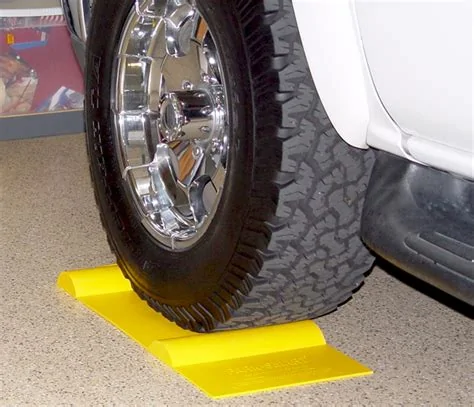
Just briefly shift to “P” to cancel the reverse camera.

I have the delay on because the reverse camera is the best way to tell how far the back of the car is inside the garage door when I’m pulling in forward.
 

cjljr41

Well-Known Member
First Name
Chuck
Joined
Jan 5, 2020
Threads
13
Messages
278
Reaction score
260
Location
Windsor, CT
Vehicles
'24 GTPE, '21 Premium 4X (traded)
Country flag
Just briefly shift to “P” to cancel the reverse camera.

I have the delay on because the reverse camera is the best way to tell how far the back of the car is inside the garage door when I’m pulling in forward.
These are pretty helpful for knowing if you're clear of the garage door. I also have a larger one that runs the entire width of the car.
Ford Mustang Mach-E X Button MISSING after Sync UI Update with Camera Button While Reversing? th-3711005828
 

Maquis

Well-Known Member
First Name
Dave
Joined
Dec 21, 2020
Threads
34
Messages
5,688
Reaction score
8,068
Location
Illinois
Vehicles
2021 Mach E4X, 2023 Lightning Lariat ER
Country flag
These are pretty helpful for knowing if you're clear of the garage door. I also have a larger one that runs the entire width of the car.
th-3711005828.jpeg
I pull in different distances depending in what I need to load/unload (if anything from the hatch.
 

Maquis

Well-Known Member
First Name
Dave
Joined
Dec 21, 2020
Threads
34
Messages
5,688
Reaction score
8,068
Location
Illinois
Vehicles
2021 Mach E4X, 2023 Lightning Lariat ER
Country flag
Interesting observation - the camera cancel button exists on my Lightning, but not the Mach-E. Both have the new interface, but it impossible for me to tell which one has newer updates. I suspect the Lightning is newer??
 

Awmustang

Well-Known Member
First Name
Andy
Joined
Dec 12, 2020
Threads
0
Messages
199
Reaction score
208
Location
Wisconsin
Vehicles
17 Ecoboost Performance Pack, Ordered 24 i4 xDrive
Country flag
Remind me again why anyone wants the backup cam to stay on after driving forward? I guess maybe if you do a ton of parallel parking?
I use this feature nearly daily because I want to make sure I'm fully in my parking spot at work but not over the line in front. I know what the side lines look like in the rear view camera when I'm in the spot where I want so after pulling in to the spot I shift to reverse and check and then can adjust either forward or backward while still having the view up on the screen. (To be clear I'm in a Mustang coupe that only has a rear camera). I'm hoping this becomes less necessary once I have a 360 camera.
Sponsored


Top