OTA 1.7.1 Stuck, anyone else have issue updating?

theganyo

Well-Known Member
Joined
Sep 14, 2021
Threads
2
Messages
84
Reaction score
62
Location
Oregon
Vehicles
2021 Mustang Mach-E Premium AWD
Country flag
Looks like I made it! Our Dealer finally (third time’s the charm!) got me unstuck and OTAs working. Very exciting! (Thank you, @Gimme_my_MME for added support.)

But it seems there’s always something… now neither my wife nor I can get Phone As A Key working again. Even tried a master reset a couple of times, the app just “downloads the key” and fails to connect to the car every time. ?
Sponsored

 

Jim_I

Well-Known Member
First Name
Jim
Joined
Feb 6, 2020
Threads
3
Messages
279
Reaction score
393
Location
FL
Vehicles
2021 Mach-E Premium X-R Batt RWD Carbonized Gray
Country flag
One of the key factors that's overlooked for OTAs to actually kick off is the state of charge for your LVB (12V battery). You can plug your car in to the EVSE overnight to charge and start it up the next morning and your 12V battery's SOC can be down to 50-60% initially. Then as the car is run for a few minutes it slowly recharges the 12V battery back up. So this is why people see OTA updates appear as they're driving around town in an area with at least three bars of AT&T coverage and why it may not be happening for people when the car is safely tucked up for the night on the EVSE.

Here's a list of the things that might keep your car from starting an OTA (from official docs):

The official wording is "preconditions can include but are not limited to":
Electronic Steering Column Lock (ESCL) is engaged
Steering tension torque, no torque is applied to the steering wheel
A diagnostic self-test is not active
No Charging faults are reported
Ignition status, Ignition Off
Ignition status, Accessory functionality Off
The battery voltage is within the required range
The vehicle is stopped
PRNDL in park
Parking brake is applied
Charging is not in Progress ( hybrid or EV high voltage battery charging/LIII)
The hazard indicators are off
The alarm is not sounding
The engine is not running
All doors and liftgate are closed
The parking lights are off
Limp home mode is not active
Illuminated exit is not active
The brake pedal is not being pressed
The battery voltage is within the required range
(repeat from above for some reason)
The windows are closed and not operating
eCall is not active
Remote start is not active
Vehicle theft (SVS) is not active
Remote park assist is not active
Neutral tow is not active
4x4 high/Low is not active
A DTC requiring vehicle service, is not present in the module targeted for the update.


So some things I didn't realize before I read this...OTAs, according to this, won't happen while your car is charging, or if your parking brake is not on, or if you leave your liftgate open in the garage, and again, if your 12V battery charge is not >80% (stated elsewhere in the docs).

Mike
Interesting.....

This really should be told to everyone!

I never put on the parking brake in my garage - I will from now on!!!

My nightly charging starts at 11:00 PM. Until very recently, I had the software update start at 11:30 PM.

No wonder I was not getting any OTA updates!

Thanks again!

Jim
 

RSH

Well-Known Member
First Name
RSH
Joined
Jun 18, 2021
Threads
2
Messages
282
Reaction score
253
Location
Virginia
Vehicles
2021 MME Rapid Red Premium ER
Country flag
If I understand you correctly your PowerUp screen says you're at 2.8.2.... However I should point out that if you have BlueCruise working and are showing at least a version of Sync on your Job 1 car of 364 (or higher like maybe 421), then you are past OTA 2.8.3 equivalency. Even though your PowerUp says otherwise. Updates done by a tech using FDRS can take you past what the OTA PowerUp level is shown in your Sync screen. And if you never got another OTA ever again, and a tech using FDRS always applied your updates from now on...your PowerUp version would stay at 2.8.2 or whatever the last OTA was that you got. Like forever. But you would still be up-to-date (assuming the tech did all updates, etc.). Hope that makes sense.

Mike
[/QUOTE]
Good explanation. Explains why I'm still showing a failure on 1.7.1 in the widgett since I was unstuck at the dealership. Since I'm still showing this failure, will I be able to get new OTA's such as 22S41, or will I have to go to the dealership for OTA's?

Nevermind - just got the notice for 22S41 OTA.
 
Last edited:

Randy

Member
First Name
Rande
Joined
May 19, 2021
Threads
0
Messages
24
Reaction score
21
Location
Encinitas CA
Vehicles
MME Premium Iconic Silver
Occupation
Retired
Country flag
Glad to hear it. Here's the list of available updates as of this morning, and none of them are major things to be concerned about, simply for situational awareness:
3FMTK3RM8MMA39349-30-July-22.png


If I understand you correctly your PowerUp screen says you're at 2.8.2.... However I should point out that if you have BlueCruise working and are showing at least a version of Sync on your Job 1 car of 364 (or higher like maybe 421), then you are past OTA 2.8.3 equivalency. Even though your PowerUp says otherwise. Updates done by a tech using FDRS can take you past what the OTA PowerUp level is shown in your Sync screen. And if you never got another OTA ever again, and a tech using FDRS always applied your updates from now on...your PowerUp version would stay at 2.8.2 or whatever the last OTA was that you got. Like forever. But you would still be up-to-date (assuming the tech did all updates, etc.). Hope that makes sense.

Mike
Got it, thanks. Yes, screen says 2.8.2 and sync version is 421. Was able to put a few miles on the car, some of it on the interstate with BlueCruise on - interesting. I must say going 9 months with out updates I feel like I'm driving a different car. Maybe it's me, but everything seems more refined. One pedal is smoother, going in and out of park, or reverse to drive is much less harsh or clunky. It all adds up to make it feel like the sport luxury vehicle it is - nice! Oh, and I'm now putting the parking brake on when garaged!
 

Mach-Lee

Well-Known Member
First Name
Lee
Joined
Jul 16, 2021
Threads
262
Messages
11,382
Reaction score
25,072
Location
Wisconsin
Vehicles
2022 Mach-E Premium AWD
Occupation
Sci/Eng
Country flag
One of the key factors that's overlooked for OTAs to actually kick off is the state of charge for your LVB (12V battery). You can plug your car in to the EVSE overnight to charge and start it up the next morning and your 12V battery's SOC can be down to 50-60% initially. Then as the car is run for a few minutes it slowly recharges the 12V battery back up. So this is why people see OTA updates appear as they're driving around town in an area with at least three bars of AT&T coverage and why it may not be happening for people when the car is safely tucked up for the night on the EVSE.

Here's a list of the things that might keep your car from starting an OTA (from official docs):

The official wording is "preconditions can include but are not limited to":
Electronic Steering Column Lock (ESCL) is engaged
Steering tension torque, no torque is applied to the steering wheel
A diagnostic self-test is not active
No Charging faults are reported
Ignition status, Ignition Off
Ignition status, Accessory functionality Off
The battery voltage is within the required range
The vehicle is stopped
PRNDL in park
Parking brake is applied
Charging is not in Progress ( hybrid or EV high voltage battery charging/LIII)
The hazard indicators are off
The alarm is not sounding
The engine is not running
All doors and liftgate are closed
The parking lights are off
Limp home mode is not active
Illuminated exit is not active
The brake pedal is not being pressed
The battery voltage is within the required range
(repeat from above for some reason)
The windows are closed and not operating
eCall is not active
Remote start is not active
Vehicle theft (SVS) is not active
Remote park assist is not active
Neutral tow is not active
4x4 high/Low is not active
A DTC requiring vehicle service, is not present in the module targeted for the update.


So some things I didn't realize before I read this...OTAs, according to this, won't happen while your car is charging, or if your parking brake is not on, or if you leave your liftgate open in the garage, and again, if your 12V battery charge is not >80% (stated elsewhere in the docs).
Interesting.....

This really should be told to everyone!

I never put on the parking brake in my garage - I will from now on!!!

My nightly charging starts at 11:00 PM. Until very recently, I had the software update start at 11:30 PM.

No wonder I was not getting any OTA updates!
I've gotten two OTAs now parking in my garage WITHOUT applying the parking brake. So I don't think that requirement is true.


e-pony

Well-Known Member
Joined
Apr 19, 2021
Threads
22
Messages
176
Reaction score
116
Location
SoCal
Vehicles
Premium AWD Extended Star White
Country flag
One of the key factors that's overlooked for OTAs to actually kick off is the state of charge for your LVB (12V battery). You can plug your car in to the EVSE overnight to charge and start it up the next morning and your 12V battery's SOC can be down to 50-60% initially. Then as the car is run for a few minutes it slowly recharges the 12V battery back up. So this is why people see OTA updates appear as they're driving around town in an area with at least three bars of AT&T coverage and why it may not be happening for people when the car is safely tucked up for the night on the EVSE.

Here's a list of the things that might keep your car from starting an OTA (from official docs):

The official wording is "preconditions can include but are not limited to":
Electronic Steering Column Lock (ESCL) is engaged
Steering tension torque, no torque is applied to the steering wheel
A diagnostic self-test is not active
No Charging faults are reported
Ignition status, Ignition Off
Ignition status, Accessory functionality Off
The battery voltage is within the required range
The vehicle is stopped
PRNDL in park
Parking brake is applied
Charging is not in Progress ( hybrid or EV high voltage battery charging/LIII)
The hazard indicators are off
The alarm is not sounding
The engine is not running
All doors and liftgate are closed
The parking lights are off
Limp home mode is not active
Illuminated exit is not active
The brake pedal is not being pressed
The battery voltage is within the required range
(repeat from above for some reason)
The windows are closed and not operating
eCall is not active
Remote start is not active
Vehicle theft (SVS) is not active
Remote park assist is not active
Neutral tow is not active
4x4 high/Low is not active
A DTC requiring vehicle service, is not present in the module targeted for the update.


So some things I didn't realize before I read this...OTAs, according to this, won't happen while your car is charging, or if your parking brake is not on, or if you leave your liftgate open in the garage, and again, if your 12V battery charge is not >80% (stated elsewhere in the docs).

Mike
WTF?!?!?! Tesla can roll out 100K otas a day, and ford does WTF?!?!?!
 

Mike H

Member
First Name
Mike
Joined
Jan 23, 2021
Threads
0
Messages
6
Reaction score
3
Location
Michigan
Vehicles
2012 Focus
Country flag
29 Jan '21, Job 1 car.

This car is eligible for CSP 21P22 and FSA 21G01 which would clean up a lot of these updates and maybe solve some of the issues you're experiencing. It also looks like the 22S41 recall modules could be updated as well.

The tech at the dealer where you got service on the 11th of May attempted the Module Repair (22B08) and then tried to update the APIM, which failed twice.

I believe the issue is that, in accordance with the BlueCruise procedures (21G01), at step 19, if CSP 21P22 has not been performed, that has to be done first before trying to do all the BlueCruise related updates. The tech is then directed to go back, do all of the CSP 21P22 module updates, and then resume the BlueCruise programming.

Your tech has not done that, and as evidenced by the logs, may be trying to "cherry-pick" modules for updating to solve a specific problem, when following the sequence in the two attached FSAs would accomplish a better result.

Schedule service with your dealer and specifically tell them that you want CSP 21P22 and FSA 21G01 applied to your car as well as the 22S41 recall.

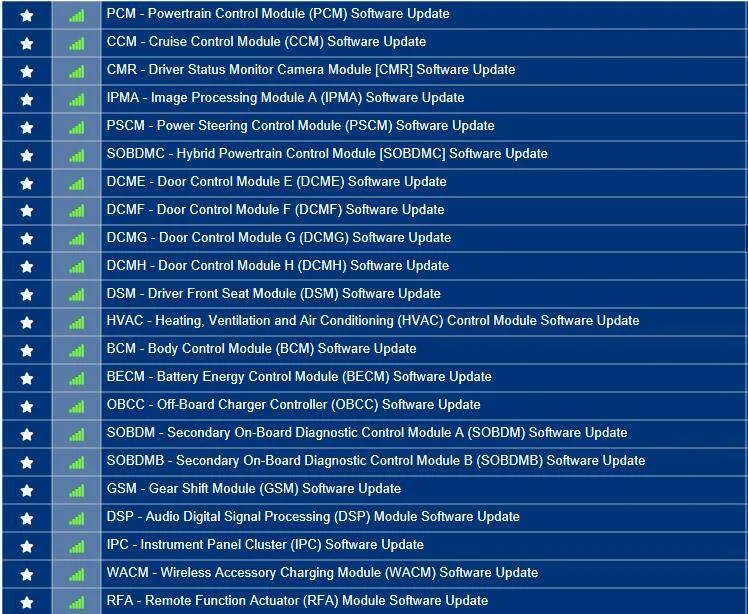
Here is the rather large list of outstanding updates that your car has available, and which would be pared down considerably if those programs were executed successfully:
3FMTK3SU8MMA09830-19-July-22.png


I would expect them to tell you that it could take two full days to update your car.

That's if the tech stayed with it and focused.

Mike
Mike I just received the car back from the dealer after 5 days installing updates and Blue cruise. They had to contact Ford because of various problems. They told me all modules were done and that Blue Cruise now works although I have not had an opportunity to test it yet. I would appreciate it if you could run VIN 3FMTK3SU8MMA09830 again to verify this. You have been a great help to me and many others. Thanks Mike H
 

Mike G

Well-Known Member
First Name
Mike
Joined
Mar 27, 2022
Threads
25
Messages
6,458
Reaction score
5,298
Location
N. AL, USA
Vehicles
'23(J1) Mach-E GT-PE, '22 F-150 Lightning, '24 Bronco HLE 2Dr
Country flag
Mike I just received the car back from the dealer after 5 days installing updates and Blue cruise. They had to contact Ford because of various problems. They told me all modules were done and that Blue Cruise now works although I have not had an opportunity to test it yet. I would appreciate it if you could run VIN 3FMTK3SU8MMA09830 again to verify this. You have been a great help to me and many others. Thanks Mike H
I don't think these appeared in the last 24hrs...

Ford Mustang Mach-E OTA 1.7.1 Stuck, anyone else have issue updating? 3FMTK3SU8MMA09830-7-Oct-22


This is the second car this morning where the techs had to get Ford involved to get BC working and a lot of programming, and re-programming, went on and yet they left a TCU not programmed.

I hope everything works for you. That TCU will likely be an OTA.

EDIT...my bad, the reason I'm seeing TCUs show up is they literally sent that out last night (6/7 Oct).

So it's new.

Mike
 
Last edited:

Twig

Member
Joined
Jan 13, 2022
Threads
2
Messages
20
Reaction score
9
Location
Orlando
Vehicles
Mache e
Country flag
Is there anyone still having this issues besides me? Been to the dealer multiple times and called Ford multiple times and nothing. They are now saying my APIM needs to be replaced but that was months ago and apparently they have no "good" APIMs to ship because the software on all of them is bad.
 

Mach-Lee

Well-Known Member
First Name
Lee
Joined
Jul 16, 2021
Threads
262
Messages
11,382
Reaction score
25,072
Location
Wisconsin
Vehicles
2022 Mach-E Premium AWD
Occupation
Sci/Eng
Country flag
Is there anyone still having this issues besides me? Been to the dealer multiple times and called Ford multiple times and nothing. They are now saying my APIM needs to be replaced but that was months ago and apparently they have no "good" APIMs to ship because the software on all of them is bad.
Ugh, I don't know if that's true or they're seeing the warning about Bronco APIM updates failing and interpreting it to mean it applies to all APIMs are messed up. You might need to try a different dealer.
 

eldecarlo

Active Member
First Name
Ernie
Joined
Mar 7, 2022
Threads
1
Messages
42
Reaction score
20
Location
Delaware
Vehicles
California Rte 1 Extended Range
Country flag
Is there anyone still having this issues besides me? Been to the dealer multiple times and called Ford multiple times and nothing. They are now saying my APIM needs to be replaced but that was months ago and apparently they have no "good" APIMs to ship because the software on all of them is bad.
I had it replaced last year when mine wouldn’t take the recall for updates. Has worked well since then. Took a couple of weeks for it to come in and a lot of begging from dealer.
 

Twig

Member
Joined
Jan 13, 2022
Threads
2
Messages
20
Reaction score
9
Location
Orlando
Vehicles
Mache e
Country flag
Ugh, I don't know if that's true or they're seeing the warning about Bronco APIM updates failing and interpreting it to mean it applies to all APIMs are messed up. You might need to try a different dealer.

This what the dealer said so I spent hours on the phone with Ford and basically Ford told me the same thing.
 

Bobpies

Active Member
Joined
Jan 3, 2024
Threads
0
Messages
28
Reaction score
7
Location
Uk
Vehicles
Mach e
Country flag
Hi mike

sorry to dig up an old post but is there any chance you can check my VIN

WF0TR3SU5MMA15788

I’ve been stuck on the same software since purchase 2 years ago

dealer told me today they updated all modules so should work but I’m not convinced


29 Jan '21, Job 1 car.

This car is eligible for CSP 21P22 and FSA 21G01 which would clean up a lot of these updates and maybe solve some of the issues you're experiencing. It also looks like the 22S41 recall modules could be updated as well.

The tech at the dealer where you got service on the 11th of May attempted the Module Repair (22B08) and then tried to update the APIM, which failed twice.

I believe the issue is that, in accordance with the BlueCruise procedures (21G01), at step 19, if CSP 21P22 has not been performed, that has to be done first before trying to do all the BlueCruise related updates. The tech is then directed to go back, do all of the CSP 21P22 module updates, and then resume the BlueCruise programming.

Your tech has not done that, and as evidenced by the logs, may be trying to "cherry-pick" modules for updating to solve a specific problem, when following the sequence in the two attached FSAs would accomplish a better result.

Schedule service with your dealer and specifically tell them that you want CSP 21P22 and FSA 21G01 applied to your car as well as the 22S41 recall.

Here is the rather large list of outstanding updates that your car has available, and which would be pared down considerably if those programs were executed successfully:
3FMTK3SU8MMA09830-19-July-22.png


I would expect them to tell you that it could take two full days to update your car.

That's if the tech stayed with it and focused.

Mike
 

Mike G

Well-Known Member
First Name
Mike
Joined
Mar 27, 2022
Threads
25
Messages
6,458
Reaction score
5,298
Location
N. AL, USA
Vehicles
'23(J1) Mach-E GT-PE, '22 F-150 Lightning, '24 Bronco HLE 2Dr
Country flag
Hi mike

sorry to dig up an old post but is there any chance you can check my VIN

WF0TR3SU5MMA15788

I’ve been stuck on the same software since purchase 2 years ago

dealer told me today they updated all modules so should work but I’m not convinced
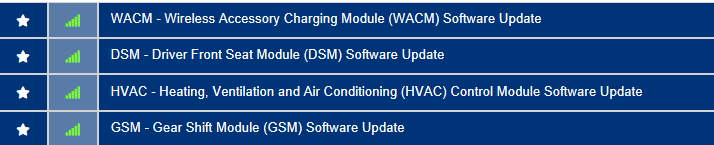
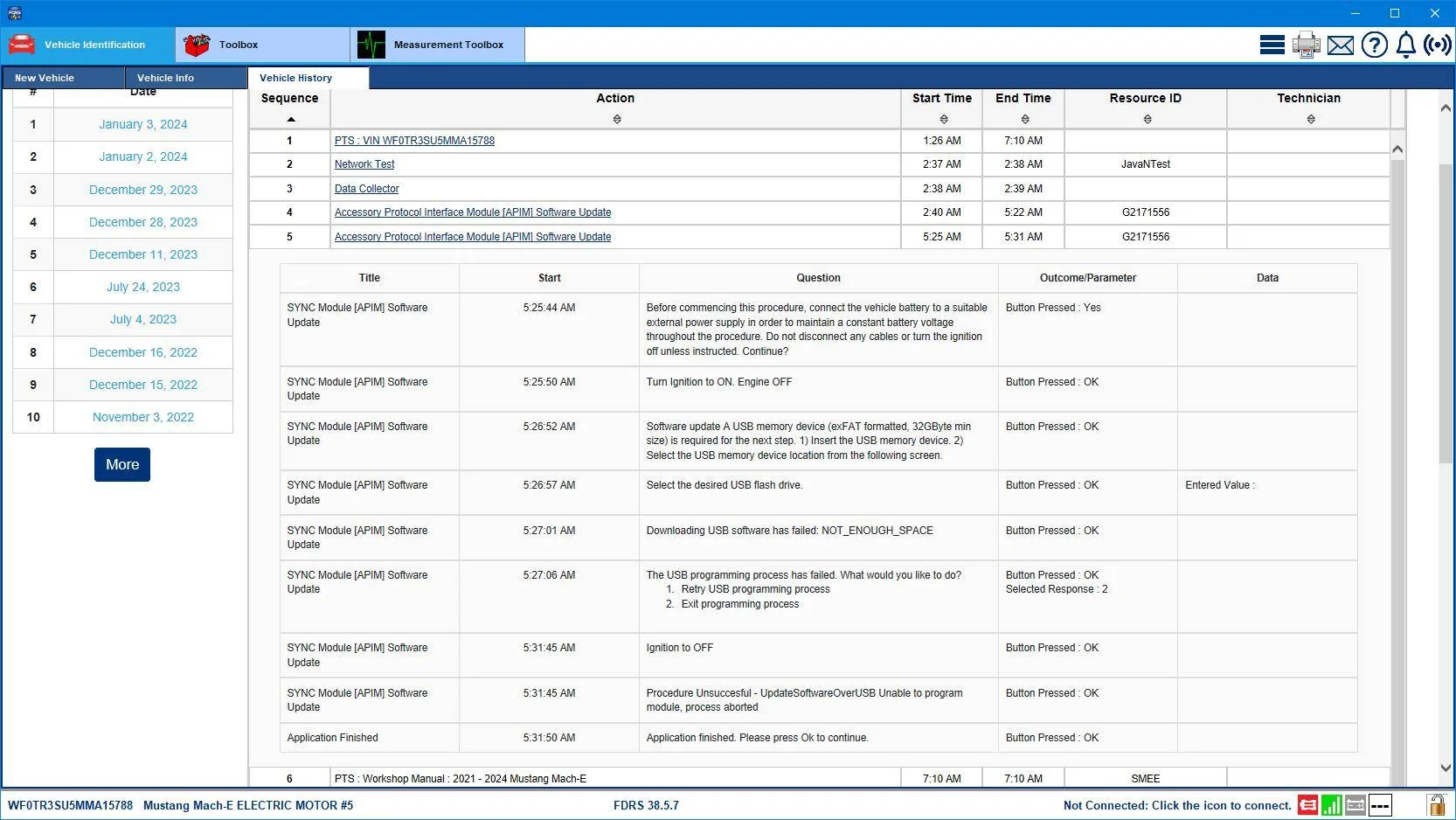
Well they have been busy...but just so you know the tech was told that he/she was using a USB thumb drive that was too small to do the update.
Ford Mustang Mach-E OTA 1.7.1 Stuck, anyone else have issue updating? WF0TR3SU5MMA15788-3-Jan-24Work


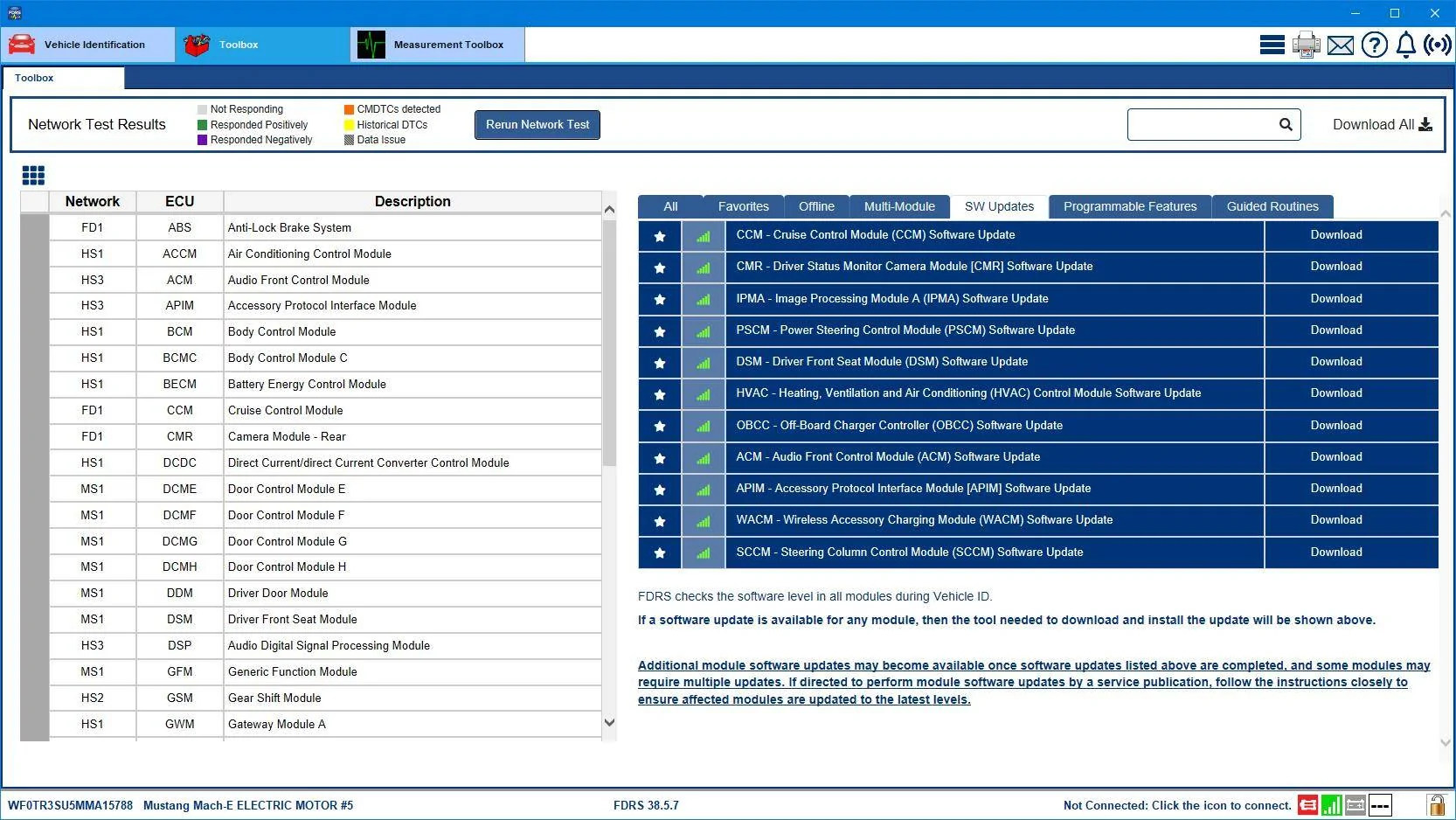
Hopefully they'll get a bigger USB drive and push on to do the rest of these updates before handing you the car back:
Ford Mustang Mach-E OTA 1.7.1 Stuck, anyone else have issue updating? WF0TR3SU5MMA15788-3-Jan-24
 

Bobpies

Active Member
Joined
Jan 3, 2024
Threads
0
Messages
28
Reaction score
7
Location
Uk
Vehicles
Mach e
Country flag
Are you saying they didn’t finish the updates ?
They told me 2 wouldn’t apply and they seeked advice. But they said today they successfully did it this morning and I got the car back this afternoon ..

Well they have been busy...but just so you know the tech was told that he/she was using a USB thumb drive that was too small to do the update.
WF0TR3SU5MMA15788-3-Jan-24Work.png


Hopefully they'll get a bigger USB drive and push on to do the rest of these updates before handing you the car back:
WF0TR3SU5MMA15788-3-Jan-24.png
Sponsored


Top