How to more prominently display Battery SoC

GreaseMonkey

Well-Known Member
First Name
Steve
Joined
Oct 3, 2021
Threads
21
Messages
3,238
Reaction score
5,179
Location
Chicago, IL
Vehicles
24 Mach-E GT
Country flag
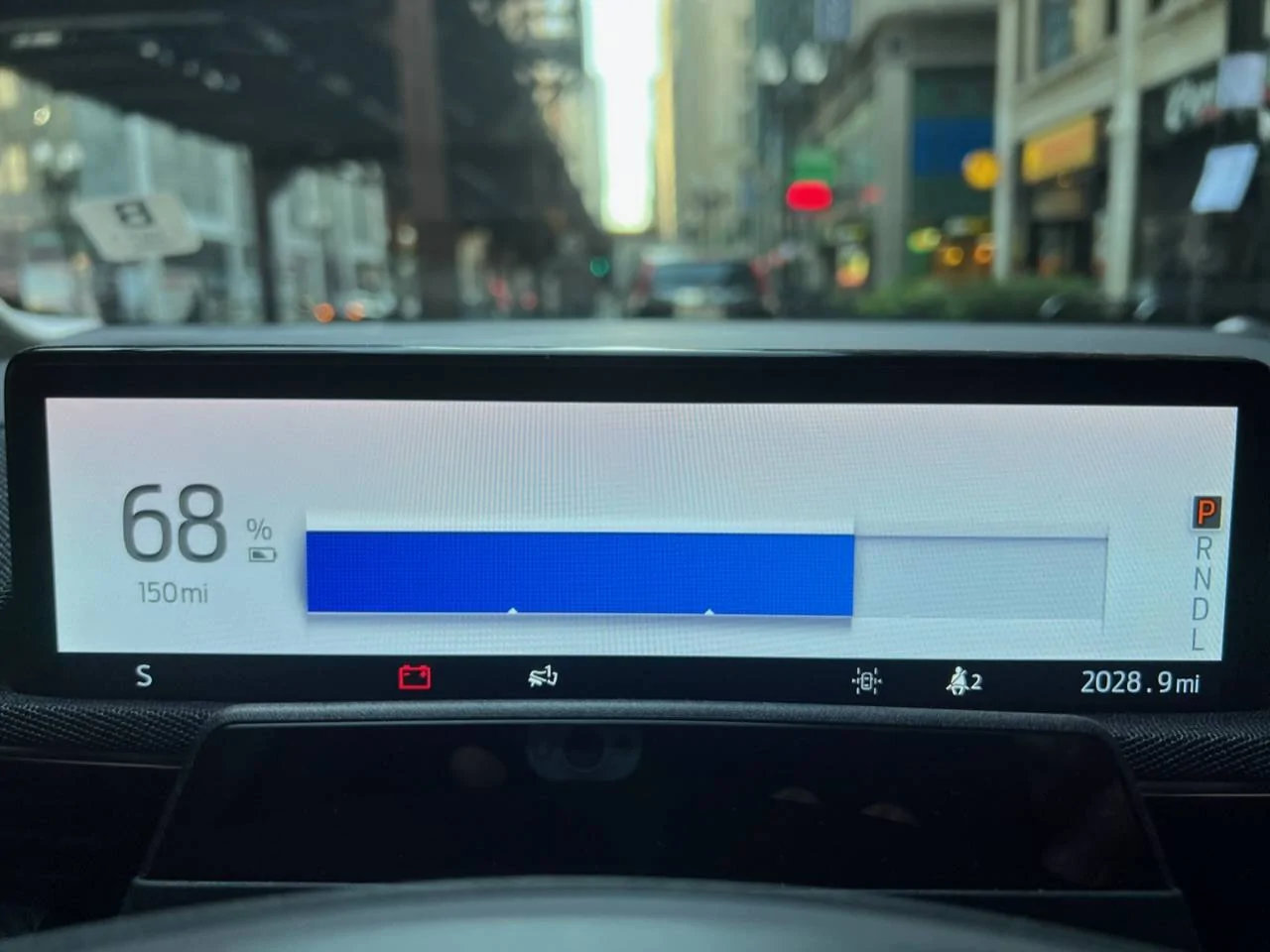
I noticed for the first time that when in accessory mode, the vehicle displays the battery SoC more prominently than the range estimate (see pic). Is there a way to have that as the default display setting when the vehicle is on?

Given the inherent inaccuracy of the range estimate, I find it more useful to monitor SoC. Any thoughts?

Ford Mustang Mach-E How to more prominently display Battery SoC 0DE5BE56-50CF-4FCC-9C79-26390C8A9B16
Sponsored


CompilerBreak

Well-Known Member
Joined
May 11, 2021
Threads
9
Messages
295
Reaction score
439
Location
Seattle
Vehicles
2021 MME GT
Country flag
Drive in Engage mode ;)

But for real, seems like an odd time to throw that up, I think it also does it when charging, so you can better keep an eye on the state from outside the car perhaps?
 

SnBGC

Well-Known Member
First Name
Greg
Joined
Apr 20, 2020
Threads
46
Messages
5,962
Reaction score
9,778
Location
Phoenix
Vehicles
2021 Mach-E FE, 2021 Wrangler 4xe High Altitude
Occupation
Manager
Country flag
Engage mode without the pre-collision indicator active shows a similar view while driving.
 
OP
OP
GreaseMonkey

GreaseMonkey

Well-Known Member
First Name
Steve
Joined
Oct 3, 2021
Threads
21
Messages
3,238
Reaction score
5,179
Location
Chicago, IL
Vehicles
24 Mach-E GT
Country flag
I have never driven in Engage mode in the 3 months I've owned the vehicle. Will certainly give it a shot.
 

SnBGC

Well-Known Member
First Name
Greg
Joined
Apr 20, 2020
Threads
46
Messages
5,962
Reaction score
9,778
Location
Phoenix
Vehicles
2021 Mach-E FE, 2021 Wrangler 4xe High Altitude
Occupation
Manager
Country flag
I have never driven in Engage mode in the 3 months I've owned the vehicle. Will certainly give it a shot.
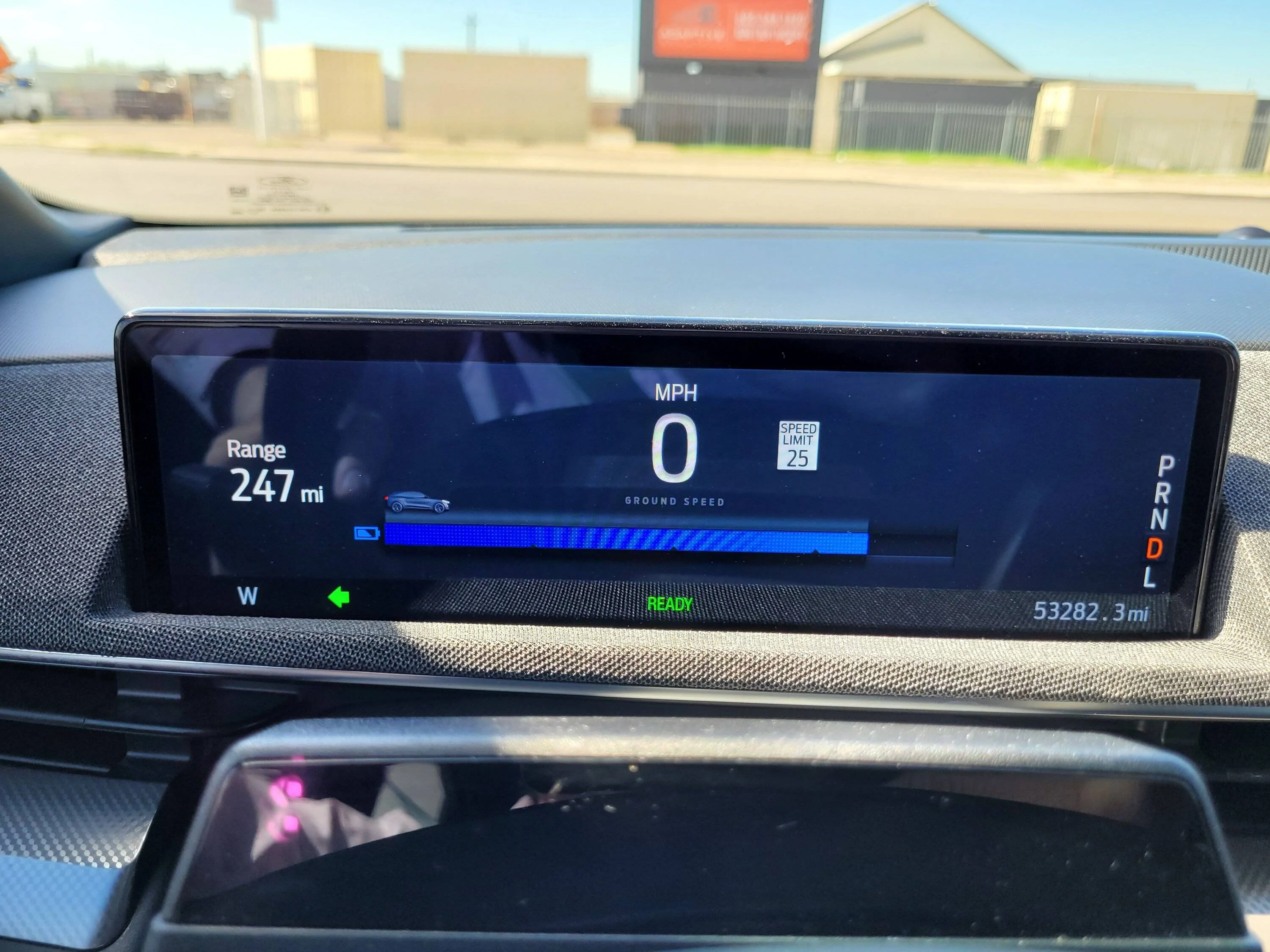
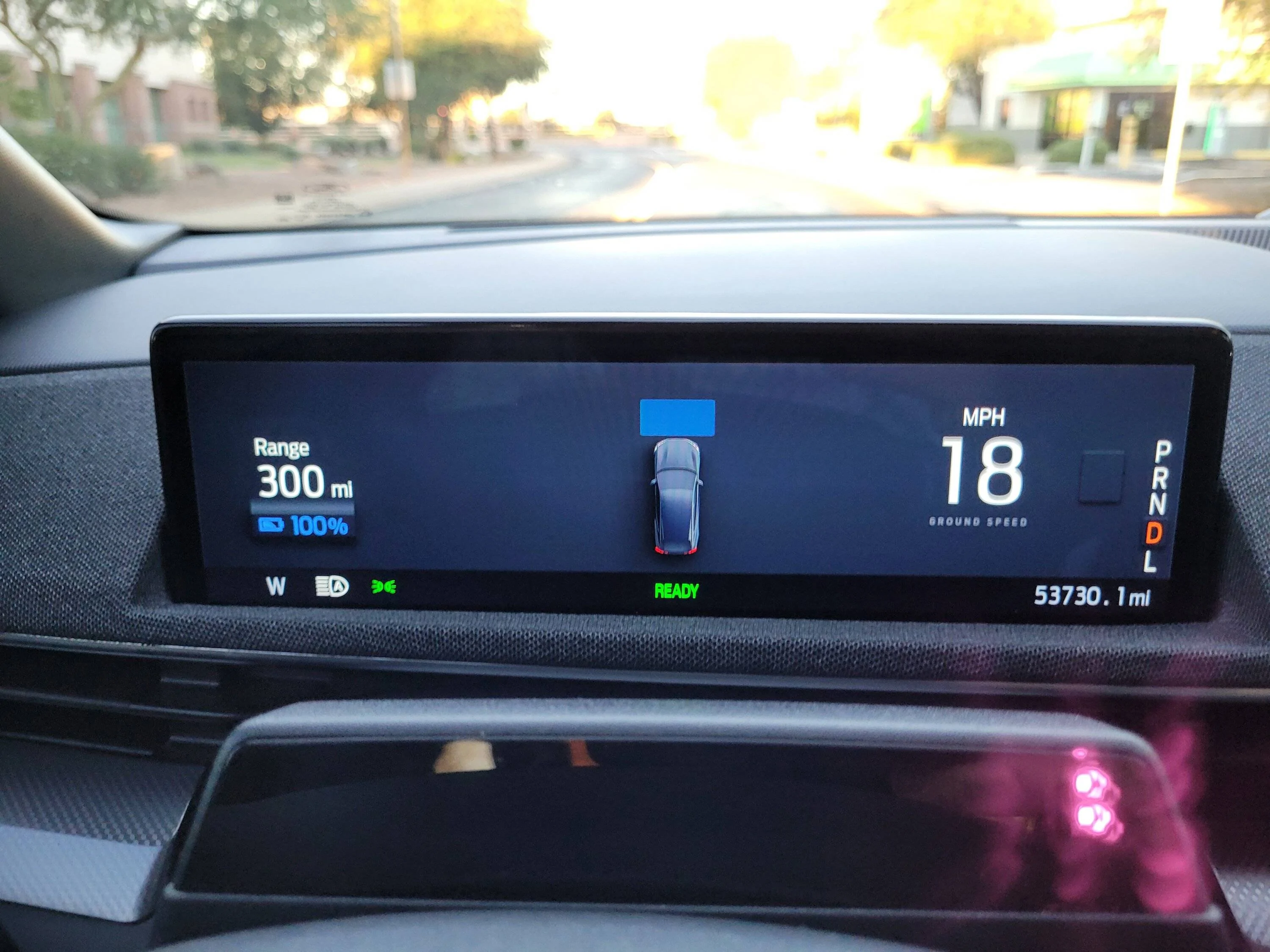
I prefer the view with the distance indicator showing. For two reasons,
First is so when others drive the car it will let them know if they are following too close.
Second is that I prefer to see the state of charge as a numerical value vs a gauge. That is because I know I can get 3 miles per percent (or 30 miles per 10% etc). Seems to work better for me.

Here are the two different views in Engage.

Ford Mustang Mach-E How to more prominently display Battery SoC 20221014_123608


Ford Mustang Mach-E How to more prominently display Battery SoC 20221019_065713


dtbaker61

Well-Known Member
First Name
Dan
Joined
May 11, 2020
Threads
126
Messages
4,822
Reaction score
4,525
Location
santa fe,nm
Website
www.envirokarma.org
Vehicles
MME (delivered 2/26/21), DIY eMiata BEV
Occupation
Solar Sales/install
Country flag
I noticed for the first time that when in accessory mode, the vehicle displays the battery SoC more prominently than the range estimate (see pic). Is there a way to have that as the default display setting when the vehicle is on?

Given the inherent inaccuracy of the range estimate, I find it more useful to monitor SoC. Any thoughts?
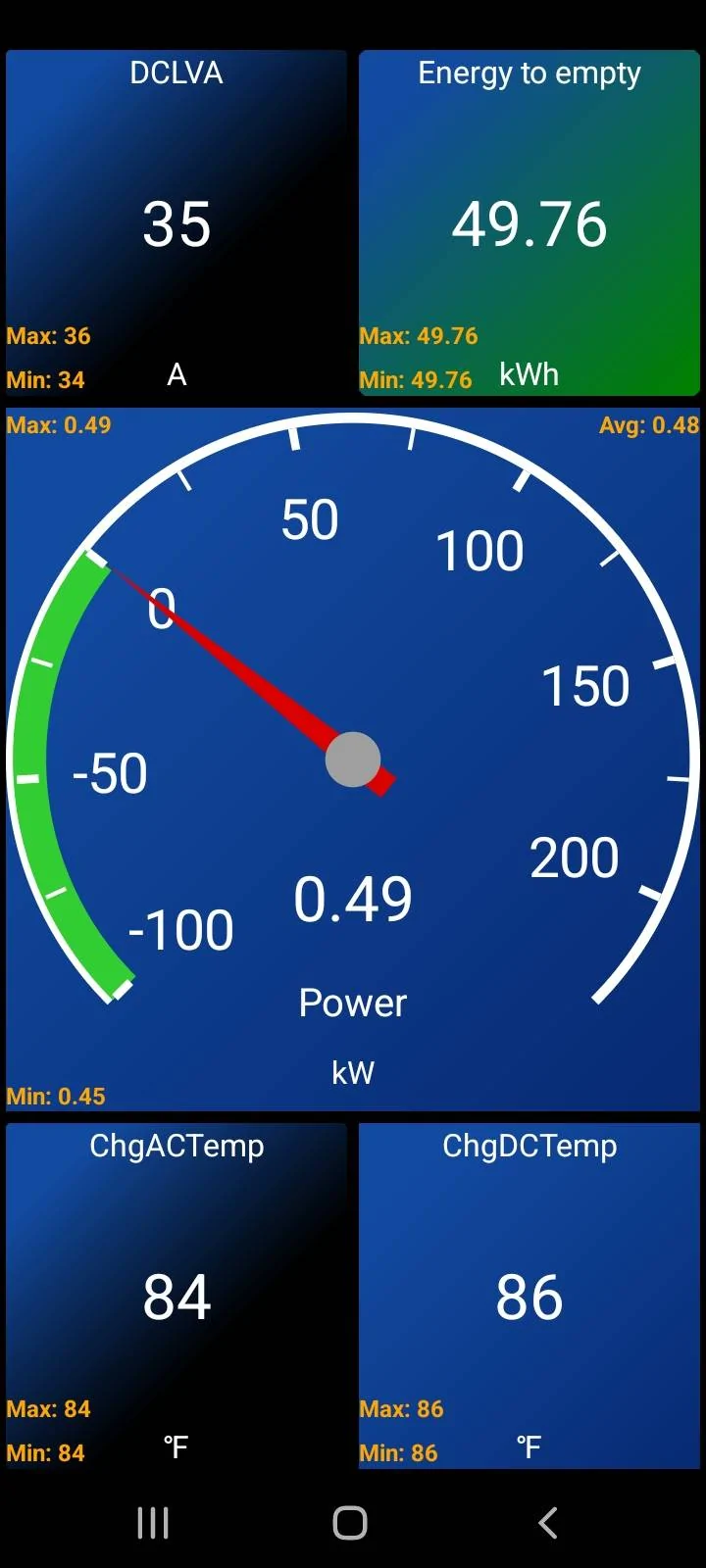
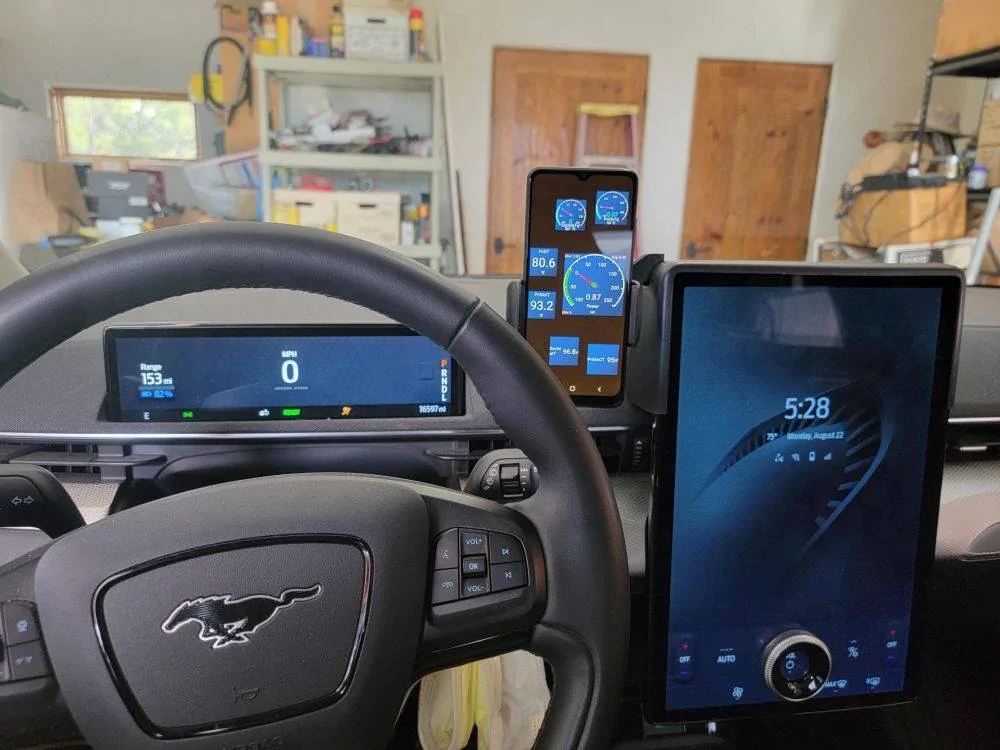
You can see whatever sensor data you want (including actual kWhr remaining IF you get
- a ODB2 reader w BT
- phone app like CarScanner
- phone holder so you can see phone while driving

Ford Mustang Mach-E How to more prominently display Battery SoC dashboard_4 power-chg temps-lv DC curr-kwhr


Ford Mustang Mach-E How to more prominently display Battery SoC 12 displaying CarScanner dashboard
 
OP
OP
GreaseMonkey

GreaseMonkey

Well-Known Member
First Name
Steve
Joined
Oct 3, 2021
Threads
21
Messages
3,238
Reaction score
5,179
Location
Chicago, IL
Vehicles
24 Mach-E GT
Country flag
You can see whatever sensor data you want (including actual kWhr remaining IF you get
- a ODB2 reader w BT
- phone app like CarScanner
- phone holder so you can see phone while driving

dashboard_4 power-chg temps-lv DC curr-kwhr.jpg


12 displaying CarScanner dashboard.jpg
I’m afraid this solution far exceeds my competence level :) !
 

dtbaker61

Well-Known Member
First Name
Dan
Joined
May 11, 2020
Threads
126
Messages
4,822
Reaction score
4,525
Location
santa fe,nm
Website
www.envirokarma.org
Vehicles
MME (delivered 2/26/21), DIY eMiata BEV
Occupation
Solar Sales/install
Country flag
I’m afraid this solution far exceeds my competence level :) !
really?
it's not hard..... ODB2 reader cost $25 and just plugs in the port by your left knee
phone holder of your choice....
free phone App.... like carScanner lets you pick what sensor data you want to see, and how you want to see it (dials, bars, numbers)
 

Obie

Well-Known Member
Joined
Sep 9, 2022
Threads
2
Messages
57
Reaction score
57
Location
SoCal
Vehicles
Mach-E Premium 4X
Country flag
I prefer the view with the distance indicator showing. For two reasons,
First is so when others drive the car it will let them know if they are following too close.
Second is that I prefer to see the state of charge as a numerical value vs a gauge. That is because I know I can get 3 miles per percent (or 30 miles per 10% etc). Seems to work better for me.

Here are the two different views in Engage.

20221014_123608.webp


20221019_065713.webp
How do you swap the views in Engaged? I only seem to have the bottom one even after disabling the distance indicator.
 

macchiaz-o

Well-Known Member
First Name
Jonathan
Joined
Nov 25, 2019
Threads
171
Messages
8,579
Reaction score
15,987
Location
}not/A/gr8'Place.2.store-mEyePassword{
Vehicles
MY21 J1 Premium RWD SR
Country flag
How do you swap the views in Engaged? I only seem to have the bottom one even after disabling the distance indicator.
You'd need to turn off other driver aids, such as lane departure warnings and lane keeping (steering wheel button is used for those two). You'd also need to cancel navigation if you currently have a destination set. Also turn off cruise control.
 

Obie

Well-Known Member
Joined
Sep 9, 2022
Threads
2
Messages
57
Reaction score
57
Location
SoCal
Vehicles
Mach-E Premium 4X
Country flag
You'd need to turn off other driver aids, such as lane departure warnings and lane keeping (steering wheel button is used for those two). You'd also need to cancel navigation if you currently have a destination set. Also turn off cruise control.
thanks. I’ll give it a try next timeI’m out there.
 

Zoheb318

Active Member
First Name
Zoheb
Joined
Sep 29, 2022
Threads
0
Messages
30
Reaction score
57
Location
Illinois
Vehicles
2022 Premium AWD ER - (10.3.22 Build Week)
Country flag
You can see whatever sensor data you want (including actual kWhr remaining IF you get
- a ODB2 reader w BT
- phone app like CarScanner
- phone holder so you can see phone while driving

dashboard_4 power-chg temps-lv DC curr-kwhr.jpg


12 displaying CarScanner dashboard.jpg
Which phone holder/mount is that?
 

dtbaker61

Well-Known Member
First Name
Dan
Joined
May 11, 2020
Threads
126
Messages
4,822
Reaction score
4,525
Location
santa fe,nm
Website
www.envirokarma.org
Vehicles
MME (delivered 2/26/21), DIY eMiata BEV
Occupation
Solar Sales/install
Country flag
OP
OP
GreaseMonkey

GreaseMonkey

Well-Known Member
First Name
Steve
Joined
Oct 3, 2021
Threads
21
Messages
3,238
Reaction score
5,179
Location
Chicago, IL
Vehicles
24 Mach-E GT
Country flag
You'd need to turn off other driver aids, such as lane departure warnings and lane keeping (steering wheel button is used for those two). You'd also need to cancel navigation if you currently have a destination set. Also turn off cruise control.
Holy crap! That’s a lot of useful stuff to turn off.
 
OP
OP
GreaseMonkey

GreaseMonkey

Well-Known Member
First Name
Steve
Joined
Oct 3, 2021
Threads
21
Messages
3,238
Reaction score
5,179
Location
Chicago, IL
Vehicles
24 Mach-E GT
Country flag
I prefer the view with the distance indicator showing. For two reasons,
First is so when others drive the car it will let them know if they are following too close.
Second is that I prefer to see the state of charge as a numerical value vs a gauge. That is because I know I can get 3 miles per percent (or 30 miles per 10% etc). Seems to work better for me.

Here are the two different views in Engage.

20221014_123608.jpg


20221019_065713.jpg
To be clear, the SoC info you can get displayed is the bar only and not an actual percentage, correct? I was hoping to have the digits displayed (like I had in my picture).
Sponsored


Top