Mike G

Well-Known Member
First Name
Mike
Joined
Mar 27, 2022
Threads
25
Messages
6,449
Reaction score
5,289
Location
N. AL, USA
Vehicles
'23(J1) Mach-E GT-PE, '22 F-150 Lightning, '24 Bronco HLE 2Dr
Country flag
It’s quite probable that the update hasn’t been issued to EU VIN’s yet which is why we’re not seeing it.
That actually is a probability.
Sponsored


Mike G

Well-Known Member
First Name
Mike
Joined
Mar 27, 2022
Threads
25
Messages
6,449
Reaction score
5,289
Location
N. AL, USA
Vehicles
'23(J1) Mach-E GT-PE, '22 F-150 Lightning, '24 Bronco HLE 2Dr
Country flag
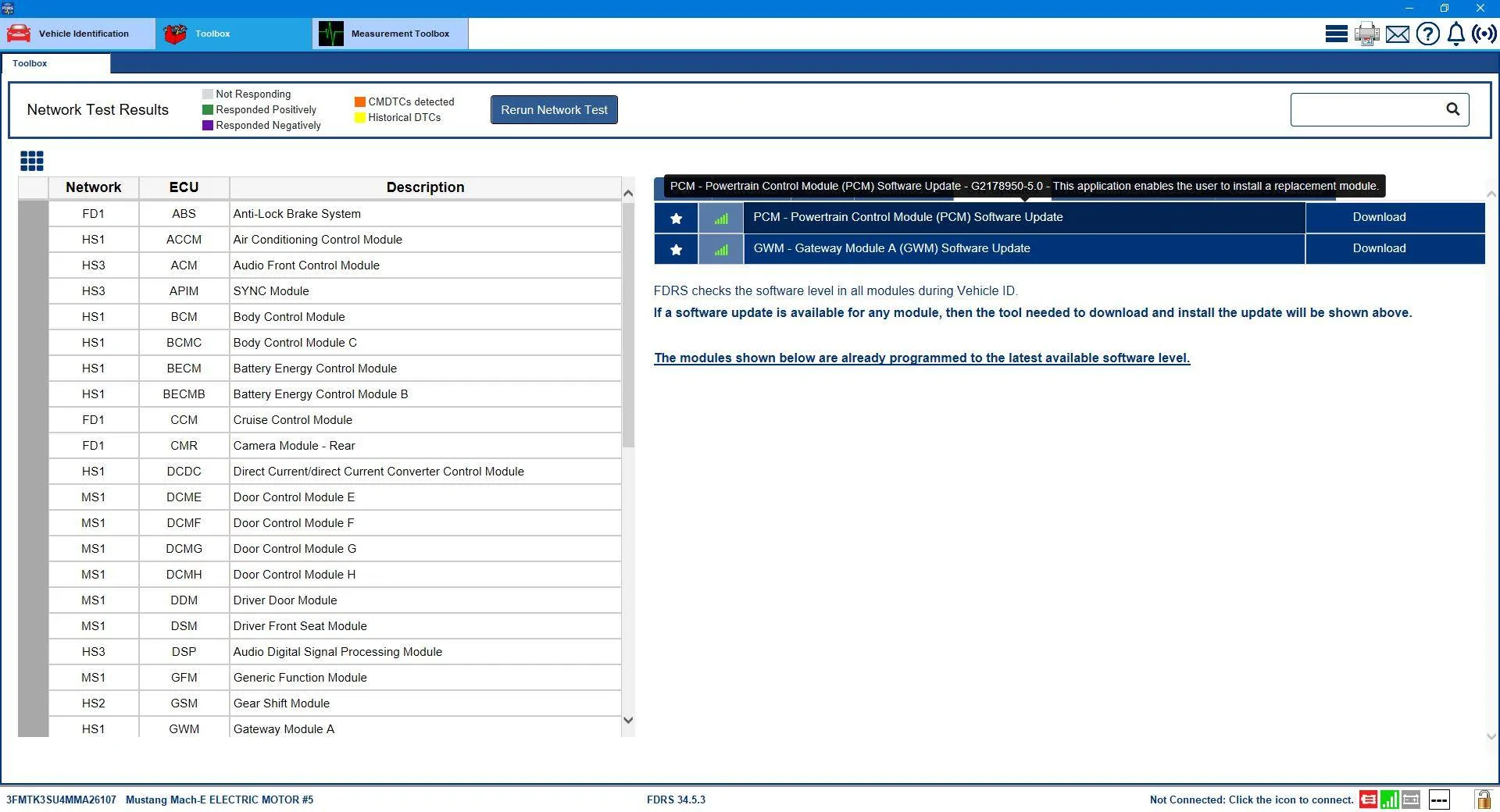
So now that we're all getting the ball rolling....It was a naughty PCM update that was keeping the GWM from showing up. I'm told that in addition to whatever dependency issue was created by doing the PCM update (at the time I did it there was no GWM in my list) the PCM was not completely 'reporting' as well, which could have compounded the problem.

I asked somebody on another forum to check something out for me and the result was a 'reset' of my PCM reported version to a previous iteration.

Which made the GWM....and the PCM (again) show up as updates in my list.
Ford Mustang Mach-E The Complete DIY Guide to Updating Your Mach-E with FDRS Naughty_PCM


I was advised to do an offline download of the GWM software (no network scan), and then only plug it in afterward...and to do a PMI (and answer "No" to the question about if the original module is installed).

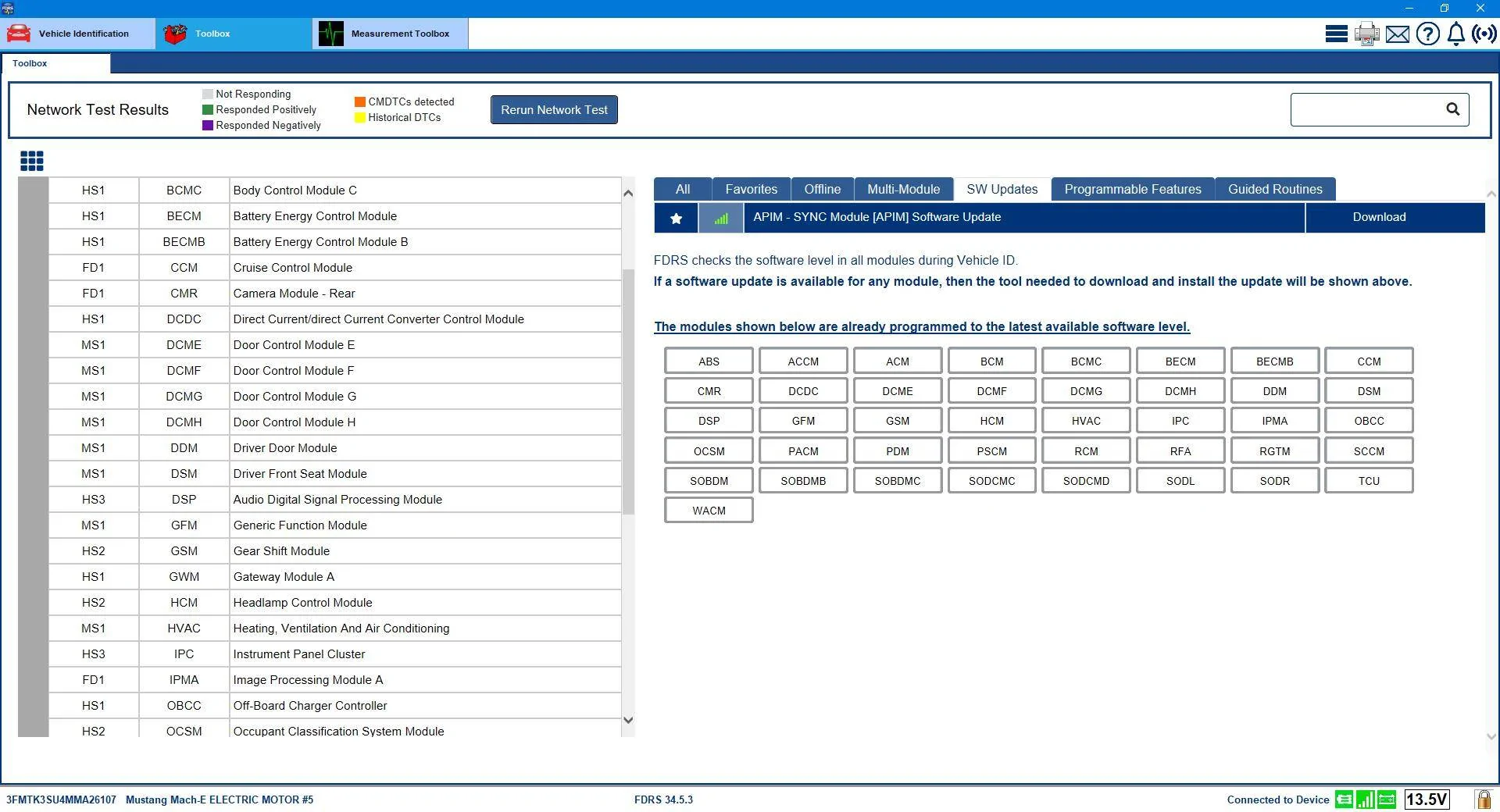
That worked like a charm and after the completion of the GWM update (GWM "-LAD" revision) and the network scan I was bestowed with the precious Sync 640 APIM update, and the naughty PCM update had disappeared from the list (because it was actually already installed).
Ford Mustang Mach-E The Complete DIY Guide to Updating Your Mach-E with FDRS It_Worked_APIM_is_Next


Afterward, another GWM showed up and all the packages in that update still showed as "-LAD" except the F188 which flipped over to "-LAE".

All good...another Sync crisis put to rest.
 

Arjan

Well-Known Member
First Name
Arjan
Joined
Feb 14, 2020
Threads
6
Messages
360
Reaction score
241
Location
NL
Vehicles
Ford Mustang Mach-E GT Performance
Country flag
Could you make a more detailed step by step of this ? I would like to get busy with this ?
 

Mike G

Well-Known Member
First Name
Mike
Joined
Mar 27, 2022
Threads
25
Messages
6,449
Reaction score
5,289
Location
N. AL, USA
Vehicles
'23(J1) Mach-E GT-PE, '22 F-150 Lightning, '24 Bronco HLE 2Dr
Country flag
Could you make a more detailed step by step of this ? I would like to get busy with this ?
So it's similar to a process you do to spoof IDS when you are adding a module to a vehicle with a different VIN than the one you are working on.

You start FDRS and without connecting to the car you put the VIN in, go to the updates, select the update to download and run, and at the point where FDRS asks you if you want to continue you plug the Mongoose in (and make sure it shows connected) and then say okay. Everything should proceed as normal at that point. It's kindof what I imagine you'd have to do if you were using a VCXNano and were trying to avoid FDRS doing network scans while doing updates.
 

benk016

Well-Known Member
First Name
Ben
Joined
Nov 12, 2020
Threads
38
Messages
3,265
Reaction score
5,093
Location
Tulsa, Oklahoma
Vehicles
2021 Mustang Mach-E GT
Country flag
Could you make a more detailed step by step of this ? I would like to get busy with this ?
This still probably isn't going to give you the new updates if you are outside of North America.


AjzRide

Well-Known Member
First Name
Alan
Joined
May 1, 2021
Threads
8
Messages
365
Reaction score
541
Location
Houston
Vehicles
RR 2021 MME Premium RWD
Occupation
Eng
Country flag
By time I got home to try this, the OBCC and PCM were gone, and replaced with the GWM. Doing the GWM released the APIM. So it looks like Ford finally fixed the back end server to recognize the state we were in. I do agree it might take a few days for Europe and other regions to get the same fix applied, I doubt they use the same lookup matrix US and Canada do.
 

Mike G

Well-Known Member
First Name
Mike
Joined
Mar 27, 2022
Threads
25
Messages
6,449
Reaction score
5,289
Location
N. AL, USA
Vehicles
'23(J1) Mach-E GT-PE, '22 F-150 Lightning, '24 Bronco HLE 2Dr
Country flag
By time I got home to try this, the OBCC and PCM were gone, and replaced with the GWM. Doing the GWM released the APIM. So it looks like Ford finally fixed the back end server to recognize the state we were in. I do agree it might take a few days for Europe and other regions to get the same fix applied, I doubt they use the same lookup matrix US and Canada do.
Dunno about that, @ProximusAl has the GWM in his list when I checked a few minutes ago.... but it's a secret so don't tell him.
 

Arjan

Well-Known Member
First Name
Arjan
Joined
Feb 14, 2020
Threads
6
Messages
360
Reaction score
241
Location
NL
Vehicles
Ford Mustang Mach-E GT Performance
Country flag
By time I got home to try this, the OBCC and PCM were gone, and replaced with the GWM. Doing the GWM released the APIM. So it looks like Ford finally fixed the back end server to recognize the state we were in. I do agree it might take a few days for Europe and other regions to get the same fix applied, I doubt they use the same lookup matrix US and Canada do.
Well see, but i think you guys are right. Maybe the update needs some fixes/adjustment for europe
 

Arjan

Well-Known Member
First Name
Arjan
Joined
Feb 14, 2020
Threads
6
Messages
360
Reaction score
241
Location
NL
Vehicles
Ford Mustang Mach-E GT Performance
Country flag
So it's similar to a process you do to spoof IDS when you are adding a module to a vehicle with a different VIN than the one you are working on.

You start FDRS and without connecting to the car you put the VIN in, go to the updates, select the update to download and run, and at the point where FDRS asks you if you want to continue you plug the Mongoose in (and make sure it shows connected) and then say okay. Everything should proceed as normal at that point. It's kindof what I imagine you'd have to do if you were using a VCXNano and were trying to avoid FDRS doing network scans while doing updates.
Ok so now the only thing i need is a different vin from a european gt model ?
 

AjzRide

Well-Known Member
First Name
Alan
Joined
May 1, 2021
Threads
8
Messages
365
Reaction score
541
Location
Houston
Vehicles
RR 2021 MME Premium RWD
Occupation
Eng
Country flag

scoopman

Well-Known Member
Joined
Jan 30, 2021
Threads
60
Messages
2,771
Reaction score
5,816
Location
Bay Area
Vehicles
2023 KIA EV6 GT, 20214 Hyundai Ioniq 5 Ltd AWD
Occupation
former electric pony jockey, flatbed towing expert
Country flag
So I've tried 3 times to update my GWM to this new version. USB stick gets made, I plug in, progress bar completes, and it tells me to turn off and leave my car for 10 minutes. I've done this, tried without locking and also with leaving unlocked. No matter what I do, I'm not getting a completed popup message, and FDRS says the module failed updating. I've also done a network scan and it shows GWM still needs updating. I've made the USB twice now and also reformatted it.

Any suggestions here? Or am Ijust doomed to be stuck on the old UX?
 

Mike G

Well-Known Member
First Name
Mike
Joined
Mar 27, 2022
Threads
25
Messages
6,449
Reaction score
5,289
Location
N. AL, USA
Vehicles
'23(J1) Mach-E GT-PE, '22 F-150 Lightning, '24 Bronco HLE 2Dr
Country flag
So I've tried 3 times to update my GWM to this new version. USB stick gets made, I plug in, progress bar completes, and it tells me to turn off and leave my car for 10 minutes. I've done this, tried without locking and also with leaving unlocked. No matter what I do, I'm not getting a completed popup message, and FDRS says the module failed updating. I've also done a network scan and it shows GWM still needs updating. I've made the USB twice now and also reformatted it.

Any suggestions here? Or am Ijust doomed to be stuck on the old UX?
Mine said door left open. So I propped it open with the shoulder belt buckle and came back in ten minutes. Honestly, I know you know what you're doing so it must be something simple....
 

AjzRide

Well-Known Member
First Name
Alan
Joined
May 1, 2021
Threads
8
Messages
365
Reaction score
541
Location
Houston
Vehicles
RR 2021 MME Premium RWD
Occupation
Eng
Country flag
A) Make sure your 12v battery is showing at least 80% SOC and 12.3v

B) Turn the car off, leave the drivers door open, take the key inside to the farthest corner of the house, set a 20 minute timer, don’t go anywhere near the car until the 20 minutes is up.
 

Mike G

Well-Known Member
First Name
Mike
Joined
Mar 27, 2022
Threads
25
Messages
6,449
Reaction score
5,289
Location
N. AL, USA
Vehicles
'23(J1) Mach-E GT-PE, '22 F-150 Lightning, '24 Bronco HLE 2Dr
Country flag
A) Make sure your 12v battery is showing at least 80% SOC and 12.3v

B) Turn the car off, leave the drivers door open, take the key inside to the farthest corner of the house, set a 20 minute timer, don’t go anywhere near the car until the 20 minutes is up.
I left my key in the cupholder. As long as that door is left open....you're good.
 

Neil4Real

Well-Known Member
Joined
Jul 8, 2021
Threads
17
Messages
3,385
Reaction score
3,073
Location
Southern California
Vehicles
Mach-E GT Performance Edition - Shadow Black
Country flag
So I've tried 3 times to update my GWM to this new version. USB stick gets made, I plug in, progress bar completes, and it tells me to turn off and leave my car for 10 minutes. I've done this, tried without locking and also with leaving unlocked. No matter what I do, I'm not getting a completed popup message, and FDRS says the module failed updating. I've also done a network scan and it shows GWM still needs updating. I've made the USB twice now and also reformatted it.

Any suggestions here? Or am Ijust doomed to be stuck on the old UX?
Wow, I just opened my door to turn the car fully off. Waited my usual minute, watching when the headlight switch turns to off, and then turned the car fully back on, "engine" too. About 3 minutes later, pop up that update has completed.
Sponsored


Top