Mike G

Well-Known Member
First Name
Mike
Joined
Mar 27, 2022
Threads
25
Messages
6,451
Reaction score
5,289
Location
N. AL, USA
Vehicles
'23(J1) Mach-E GT-PE, '22 F-150 Lightning, '24 Bronco HLE 2Dr
Country flag
Somewhat surprised this morning to find in addition to the HVAC I haven't done yet on my 21J1...another GWM!

What is that..three in a month? Or just two?
Sponsored

 

kdonnel

Well-Known Member
Joined
Oct 31, 2021
Threads
35
Messages
1,147
Reaction score
1,665
Location
Metro Atlanta
Vehicles
2022 CA Route 1, 2020 Bolt EV
Country flag
Somewhat surprised this morning to find in addition to the HVAC I haven't done yet on my 21J1...another GWM!

What is that..three in a month? Or just two?
I posted in another thread, but if Ford is re-releasing 4.1.1(GWM), 4.1.2(APIM), 4.1.3(GWM) it makes sense that 4.2.1(GWM), 4.2.2(APIM) would be followed up with 4.2.3(GWM).
 

benk016

Well-Known Member
First Name
Ben
Joined
Nov 12, 2020
Threads
39
Messages
3,270
Reaction score
5,112
Location
Tulsa, Oklahoma
Vehicles
2021 Mustang Mach-E GT
Country flag
I updated the HVAC and GWM last night. The GWM is 1 file only changed. So a small config change. The HVAC took longer than the USB GWM update did.

GWM brings us up to LJ8T-14H021-LKB
 

Raptip1

Member
Joined
Jul 16, 2021
Threads
0
Messages
8
Reaction score
0
Location
Italy
Vehicles
Mustang Mach-e RWD Extended Teck Pack+ AB
Occupation
Energy Manager for industries
Country flag
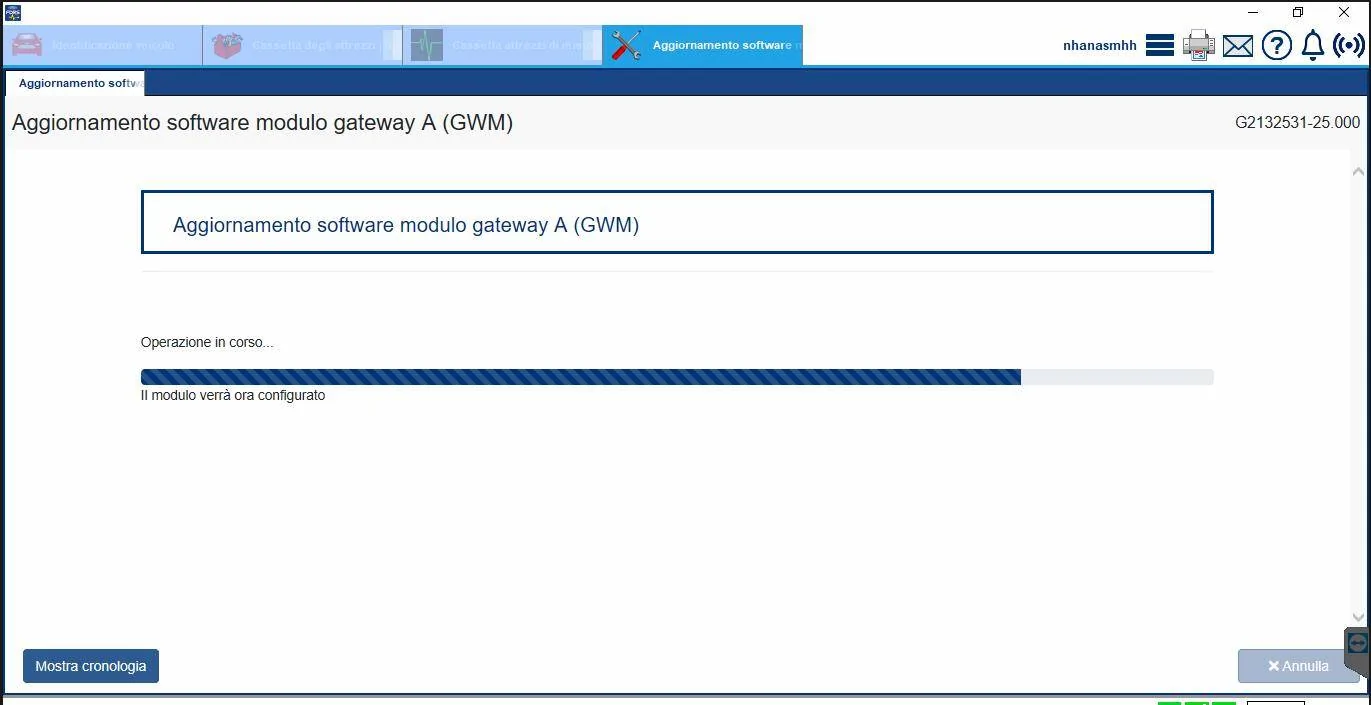
Does anyone know how long the update takes
of the GVM gateway module "A".
It's been at least over 3 hours now,
thanks
 
Last edited:

Mach-Lee

Well-Known Member
First Name
Lee
Joined
Jul 16, 2021
Threads
262
Messages
11,373
Reaction score
25,044
Location
Wisconsin
Vehicles
2022 Mach-E Premium AWD
Occupation
Sci/Eng
Country flag
I updated the HVAC and GWM last night. The GWM is 1 file only changed. So a small config change. The HVAC took longer than the USB GWM update did.

GWM brings us up to LJ8T-14H021-LKB
Makes you wonder why they couldn’t have included the small config change in 4.2.2 since they had some time to fix it.


kdonnel

Well-Known Member
Joined
Oct 31, 2021
Threads
35
Messages
1,147
Reaction score
1,665
Location
Metro Atlanta
Vehicles
2022 CA Route 1, 2020 Bolt EV
Country flag
Just applied the GWM and HVAC update.

Didn't go exactly to plan.

GWM applied seemingly without issue.

HVAC as well but it remained in my list.

So I exited FDRS and launched it again and it still saw the update. So I rebooted the laptop, no difference, it still sees the HVAC update. So I applied it again. Still remains.

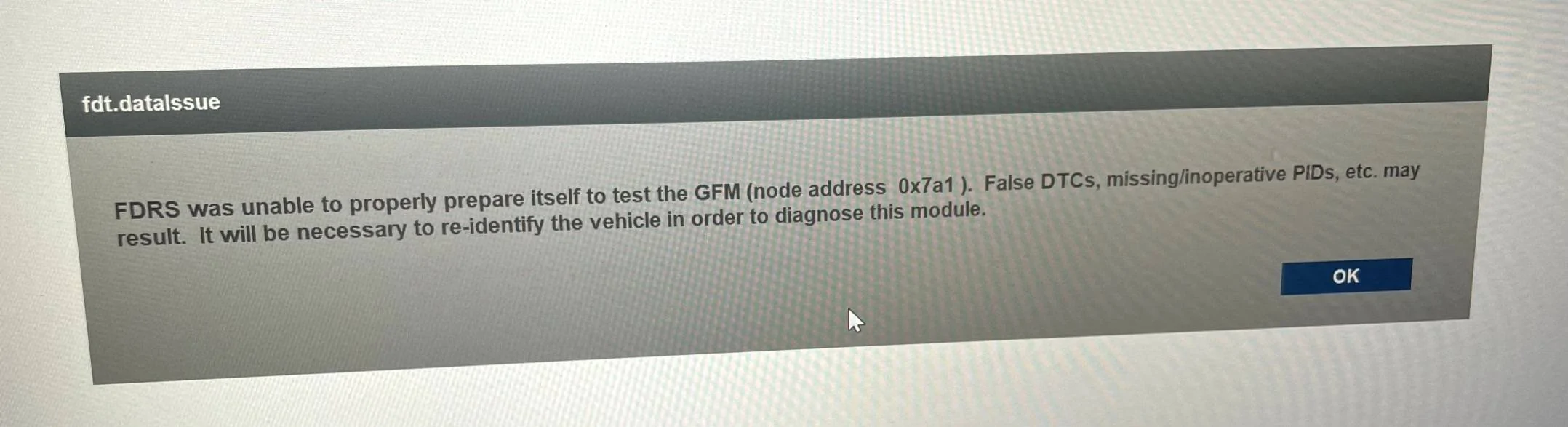
I then ran a network test to clear any DTC and was greeted with:
Ford Mustang Mach-E The Complete DIY Guide to Updating Your Mach-E with FDRS IMG_4055


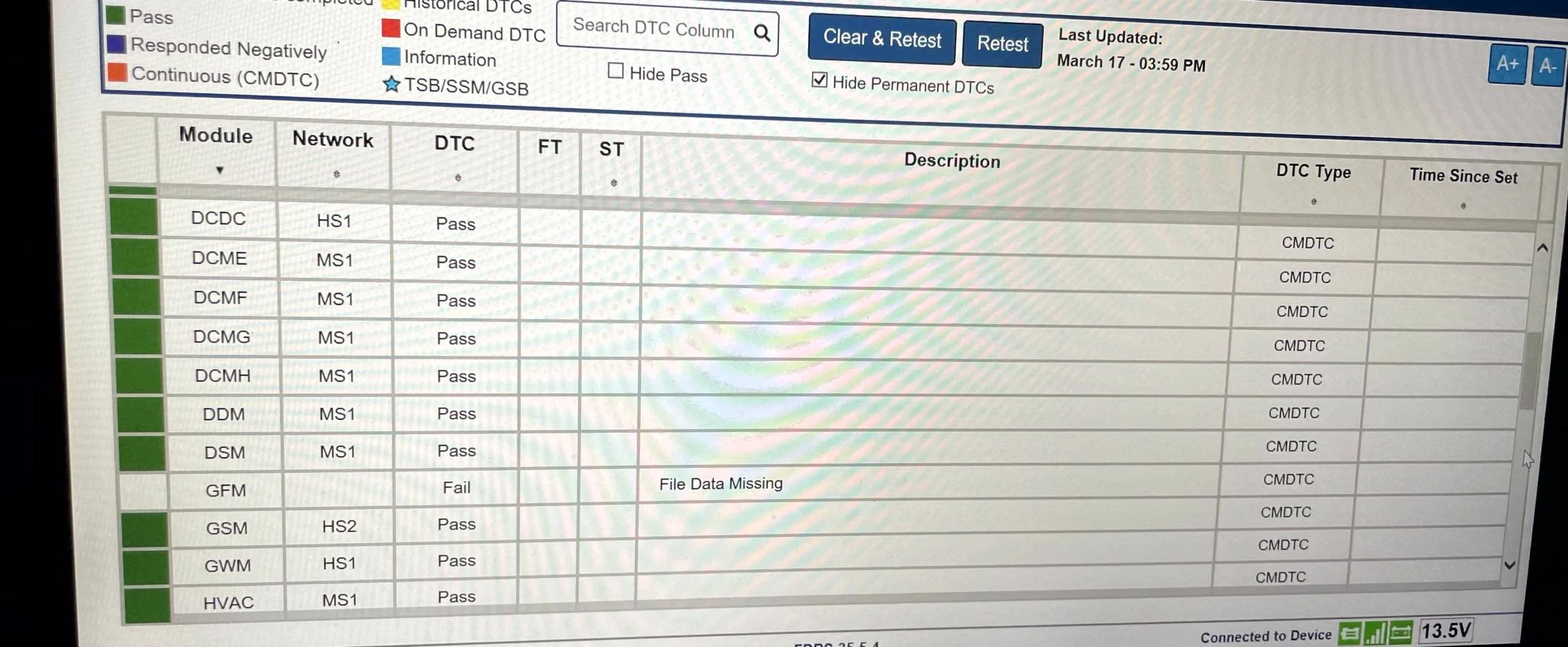
After pressing OK it did it's thing but for GFM I get:
Ford Mustang Mach-E The Complete DIY Guide to Updating Your Mach-E with FDRS IMG_4057


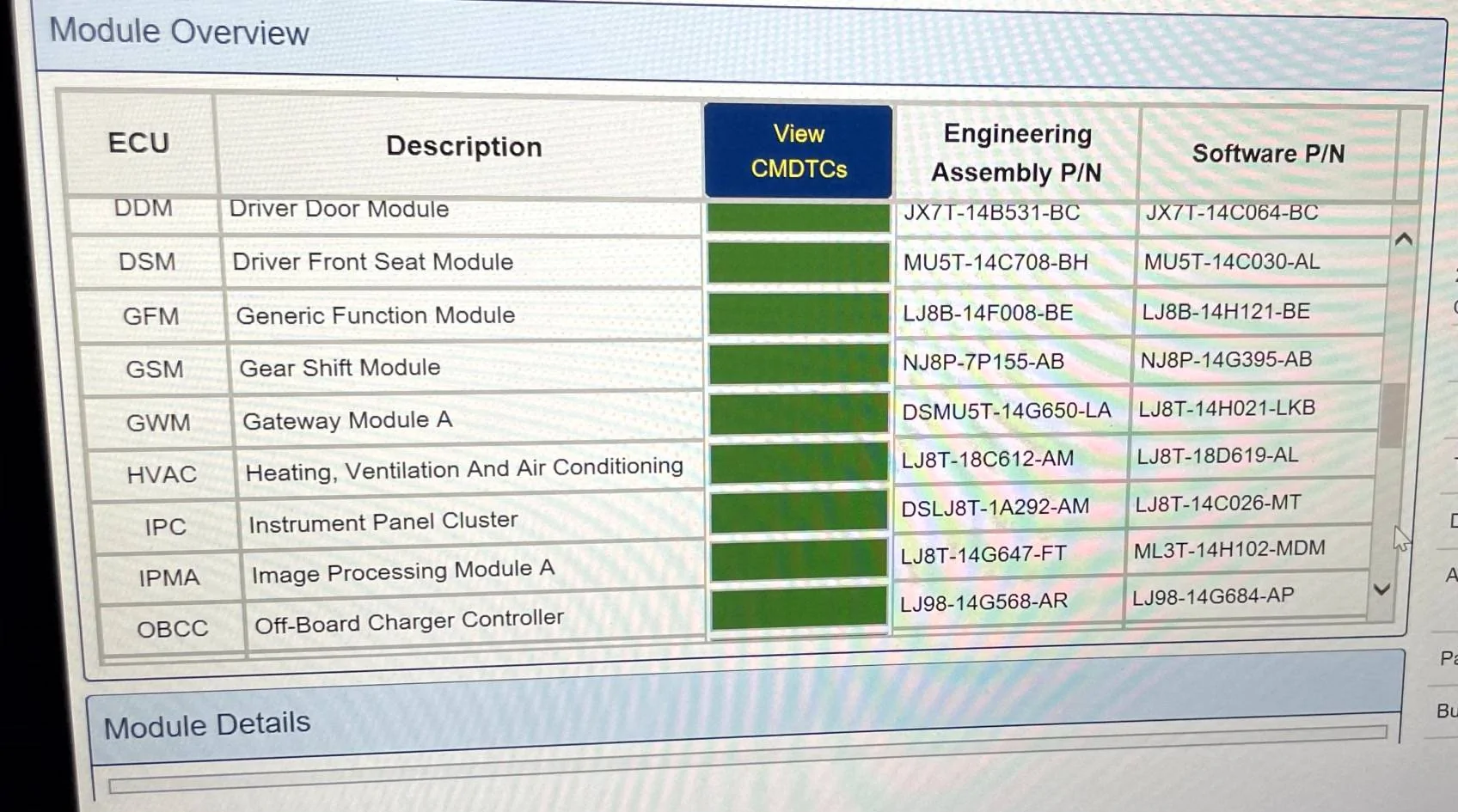
If I relaunch FDRS I get green for the GFM.
Ford Mustang Mach-E The Complete DIY Guide to Updating Your Mach-E with FDRS IMG_4058


The HVAC module remains in my list.

Any ideas? I am using FDRS 35.5.4.
 

Mike G

Well-Known Member
First Name
Mike
Joined
Mar 27, 2022
Threads
25
Messages
6,451
Reaction score
5,289
Location
N. AL, USA
Vehicles
'23(J1) Mach-E GT-PE, '22 F-150 Lightning, '24 Bronco HLE 2Dr
Country flag
Does anyone know how long the update takes
of the GVM gateway module "A".
It's been at least over 3 hours now,
thanks
5 minutes to recognize the drive, another 5-10 minutes to update the software and then shutdown for 10 minutes with the driver's door open. Come back, turn the car on and wait for the message that says it was successful.
 

Attachments

Mike G

Well-Known Member
First Name
Mike
Joined
Mar 27, 2022
Threads
25
Messages
6,451
Reaction score
5,289
Location
N. AL, USA
Vehicles
'23(J1) Mach-E GT-PE, '22 F-150 Lightning, '24 Bronco HLE 2Dr
Country flag
Just applied the GWM and HVAC update.

Didn't go exactly to plan.

GWM applied seemingly without issue.

HVAC as well but it remained in my list.

So I exited FDRS and launched it again and it still saw the update. So I rebooted the laptop, no difference, it still sees the HVAC update. So I applied it again. Still remains.

I then ran a network test to clear any DTC and was greeted with:
IMG_4055.jpg


After pressing OK it did it's thing but for GFM I get:
IMG_4057.jpg


If I relaunch FDRS I get green for the GFM.
IMG_4058.jpg


The HVAC module remains in my list.

Any ideas? I am using FDRS 35.5.4.
Your Frunk module went AWOL?

Did you check and clear DTCs before you did any programming?
 

Mike G

Well-Known Member
First Name
Mike
Joined
Mar 27, 2022
Threads
25
Messages
6,451
Reaction score
5,289
Location
N. AL, USA
Vehicles
'23(J1) Mach-E GT-PE, '22 F-150 Lightning, '24 Bronco HLE 2Dr
Country flag
Makes you wonder why they couldn’t have included the small config change in 4.2.2 since they had some time to fix it.
Yeah this is a real "configuration control" head scratcher. This file was literally 1Kb big.

Is this some sort of "job security" to create baby step updates like this or are they really on the 'struggle bus' when it comes to software configuration control. Nevermind, I think I know the answer.
 

Raptip1

Member
Joined
Jul 16, 2021
Threads
0
Messages
8
Reaction score
0
Location
Italy
Vehicles
Mustang Mach-e RWD Extended Teck Pack+ AB
Occupation
Energy Manager for industries
Country flag
5 minuti per riconoscere l'unità, altri 5-10 minuti per aggiornare il software e poi spegnere per 10 minuti con la portiera del conducente aperta. Torna indietro, accendi la macchina e attendi il messaggio che dice che è andata a buon fine.
[/CITAZIONE]

So I abort the operation? he's been in this state for over 5 hours now
Ford Mustang Mach-E The Complete DIY Guide to Updating Your Mach-E with FDRS Immagine 2023-03-17 221227
 

kdonnel

Well-Known Member
Joined
Oct 31, 2021
Threads
35
Messages
1,147
Reaction score
1,665
Location
Metro Atlanta
Vehicles
2022 CA Route 1, 2020 Bolt EV
Country flag
Your Frunk module went AWOL?

Did you check and clear DTCs before you did any programming?
I never do before, I always do after.

I did take note that I had a RFA, OBCC, and one other module with a DTC but not the GFM.

I did get a frunk error message as the HVAC programming finished together with an assortment of other errors, not unlike normal programming sessions.

edited to add:
Just was able to use FordPass to open the trunk so it is still there.
 
Last edited:

Mike G

Well-Known Member
First Name
Mike
Joined
Mar 27, 2022
Threads
25
Messages
6,451
Reaction score
5,289
Location
N. AL, USA
Vehicles
'23(J1) Mach-E GT-PE, '22 F-150 Lightning, '24 Bronco HLE 2Dr
Country flag
Yes. This looks like the same update I just did and there's no way it takes this long. Reboot the laptop and start over.
 

Mike G

Well-Known Member
First Name
Mike
Joined
Mar 27, 2022
Threads
25
Messages
6,451
Reaction score
5,289
Location
N. AL, USA
Vehicles
'23(J1) Mach-E GT-PE, '22 F-150 Lightning, '24 Bronco HLE 2Dr
Country flag
I never do before, I always do after.

I did take note that I had a RFA, OBCC, and one other module with a DTC but not the GFM.

I did get a frunk error message as the HVAC programming finished together with an assortment of other errors, not unlike normal programming sessions.

edited to add:
Just was able to use FordPass to open the trunk so it is still there.
Well I would shut the car down and recheck in a half hour to see if it's still doing it. Do a DTC check and clear with the car fully running, not just on the accessory position. I think it's an anomaly.
 

Mike G

Well-Known Member
First Name
Mike
Joined
Mar 27, 2022
Threads
25
Messages
6,451
Reaction score
5,289
Location
N. AL, USA
Vehicles
'23(J1) Mach-E GT-PE, '22 F-150 Lightning, '24 Bronco HLE 2Dr
Country flag
I updated the HVAC and GWM last night. The GWM is 1 file only changed. So a small config change. The HVAC took longer than the USB GWM update did.

GWM brings us up to LJ8T-14H021-LKB
If you haven't re-formatted your thumb drive yet take a look at the .JSON file the car wrote to it after the update was successful.

I did my update this afternoon and I'm left scratching my head over why the timestamp on the .JSON file is 10:23 AM this morning, when the timestamps for the files that were downloaded were 3:07 PM this afternoon.

Is the car not getting synced to a time reference? Is that a possible reason that updates aren't happening when they should?

This JSON file gets written to the thumb drive by the car after the update is successful...so why on earth would the timestamp be that far off unless the car isn't correctly syncing up with a time reference?
Ford Mustang Mach-E The Complete DIY Guide to Updating Your Mach-E with FDRS Time_issue


It's Paddy's Day so shenanigans can't be ruled out! ???
 

benk016

Well-Known Member
First Name
Ben
Joined
Nov 12, 2020
Threads
39
Messages
3,270
Reaction score
5,112
Location
Tulsa, Oklahoma
Vehicles
2021 Mustang Mach-E GT
Country flag
If you haven't re-formatted your thumb drive yet take a look at the .JSON file the car wrote to it after the update was successful.

I did my update this afternoon and I'm left scratching my head over why the timestamp on the .JSON file is 10:23 AM this morning, when the timestamps for the files that were downloaded were 3:07 PM this afternoon.

Is the car not getting synced to a time reference? Is that a possible reason that updates aren't happening when they should?

This JSON file gets written to the thumb drive by the car after the update is successful...so why on earth would the timestamp be that far off unless the car isn't correctly syncing up with a time reference?
Time_issue.png


It's Paddy's Day so shenanigans can't be ruled out! ???
Just looked and mine didn't write the JSON file at all on this update. Just the Certificate file and the folder with the update files.
Sponsored


Top