4.2.6 has failed for 2 weeks after trying every scenario

iam-s-Hon

Well-Known Member
First Name
Richard
Joined
May 20, 2021
Threads
3
Messages
409
Reaction score
366
Location
Maryland
Vehicles
2021 Job 1 MME Premium AWD ER Iconic Silver, 24 Lightning Lariat AMB
Country flag
Mine keeps failing too for over a week and then yesterday while I was working, the Ford pass app says it completed. I did nothing different than before. It just installed this time.
Same.. it failed multiple times over the weekend, tho, I was away from home and I know park mode on my dashcam impacts the LVB. FWIW I use park mode b/c of parked hit & run requiring 2 new doors.

However, the night before it updated I had a 2 hour drive and car was parked, plugged in and with dashcam unplugged (in garage). I assume the LVB was full and the update could run.
Sponsored
 

HorseWithNoName

Active Member
Joined
Nov 12, 2021
Threads
18
Messages
42
Reaction score
15
Location
Los Angeles
Vehicles
2021 Select RWD + Confort Techology package
Country flag
Charged to 100%, unplugged the vehicle, clicked on "Update Now", got the dreaded "Update Rescheduled" Car was not able to update as scheduled because certain precondition(s) were not met...
Going on 3 weeks of failed updates after trying all suggestions from this forum and having visited the dealership twice in 2 weeks.
Update, I took a 1H30 road trip to my daughter’s graduation. Arrived with a SOC of 70%, parked the car, initiated the update which completed successfully after 30 minutes, a little bit later, another update popped up about DC fast charging, that 2nd update was supposed to take 11 minutes. That one completed successfully as well.
 
Last edited:

U2bambam

Member
First Name
Jonathan
Joined
Jun 15, 2023
Threads
1
Messages
7
Reaction score
9
Location
Los Angeles, CA
Vehicles
2023 Mustang Mach-E GT
Occupation
Business Owner
Country flag
Can anyone with access lookup why 4.2.6 is failing over 2 weeks now. I have tried everything posted in the forum, from leaving the car running for 6 hours, charging to 100%, driving for 2 hours then charging to 100%, Etc. I check my battery charge using a plug I put in my cigarette lighter. While driving it shows 14.X volts, and when I power car off before updating it shows 13.x volts. I have tried to update manually and let it update on schedule with no luck for either. It always fails with some other service has interrupted the update. I have never had a failure on any other update. Any thoughts or help would be appreciated.

Thanks in advance
Can anyone with access lookup why 4.2.6 is failing over 2 weeks now. I have tried everything posted in the forum, from leaving the car running for 6 hours, charging to 100%, driving for 2 hours then charging to 100%, Etc. I check my battery charge using a plug I put in my cigarette lighter. While driving it shows 14.X volts, and when I power car off before updating it shows 13.x volts. I have tried to update manually and let it update on schedule with no luck for either. It always fails with some other service has interrupted the update. I have never had a failure on any other update. Any thoughts or help would be appreciated.

Thanks in advance
Try
Can anyone with access lookup why 4.2.6 is failing over 2 weeks now. I have tried everything posted in the forum, from leaving the car running for 6 hours, charging to 100%, driving for 2 hours then charging to 100%, Etc. I check my battery charge using a plug I put in my cigarette lighter. While driving it shows 14.X volts, and when I power car off before updating it shows 13.x volts. I have tried to update manually and let it update on schedule with no luck for either. It always fails with some other service has interrupted the update. I have never had a failure on any other update. Any thoughts or help would be appreciated.

Thanks in advance
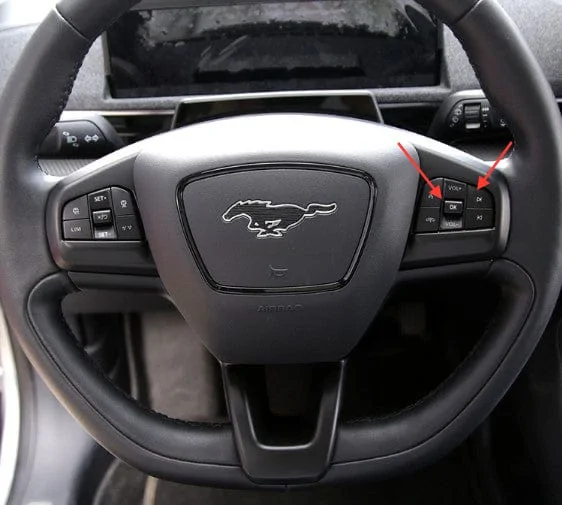
Try doing a soft restart of your software on your Mach-E. Turn your car on, give it time to load and connect to your phone, on the steering wheel hold down the volume button and the next track button at the same time until your screen turns off and restarts again, when you see the ford loading screen again you can release both buttons. Should help with software issues/glitches.

Has worked for me, hope it helps.

Ford Mustang Mach-E 4.2.6 has failed for 2 weeks after trying every scenario IMG_0647
 

Mike G

Well-Known Member
First Name
Mike
Joined
Mar 27, 2022
Threads
25
Messages
6,458
Reaction score
5,298
Location
N. AL, USA
Vehicles
'23(J1) Mach-E GT-PE, '22 F-150 Lightning, '24 Bronco HLE 2Dr
Country flag
Try


Try doing a soft restart of your software on your Mach-E. Turn your car on, give it time to load and connect to your phone, on the steering wheel hold down the volume button and the next track button at the same time until your screen turns off and restarts again, when you see the ford loading screen again you can release both buttons. Should help with software issues/glitches.

Has worked for me, hope it helps.

IMG_0647.jpeg
You do realize that's just a reboot of the Sync system right? It has nothing to do with anything else and will not affect any updates or downloads.


Mach-Lee

Well-Known Member
First Name
Lee
Joined
Jul 16, 2021
Threads
262
Messages
11,382
Reaction score
25,069
Location
Wisconsin
Vehicles
2022 Mach-E Premium AWD
Occupation
Sci/Eng
Country flag
So to summarize, try this if you have trouble:
  • Unplug your dashcam and/or OBD reader
  • Drain HV battery down to 75% or less (drive it)
  • Charge from <75% to 100% in one session
  • As soon as car hits 100%, go out and do the following:
    • Unplug car
    • Manually turn off headlights
    • Set parking brake
    • Manually start update
FYI, charging from 90% to 100% is not enough time, start lower as suggested. The point is so the car spends enough time actively charging to top up the 12V battery.

Alternate way is to leave a 10A or larger 12V battery charger connected for at least 12 hours continuously before attempting the update.
 

CottonHill

Well-Known Member
First Name
Jason
Joined
Jan 20, 2022
Threads
2
Messages
60
Reaction score
44
Location
Pittsburgh, Pennsylvania, United States
Vehicles
2021 MME GTPE
Country flag
So to summarize, try this if you have trouble:
  • Unplug your dashcam and/or OBD reader
  • Drain HV battery down to 75% or less (drive it)
  • Charge from <75% to 100% in one session
  • As soon as car hits 100%, go out and do the following:
    • Unplug car
    • Manually turn off headlights
    • Set parking brake
    • Manually start update
FYI, charging from 90% to 100% is not enough time, start lower as suggested. The point is so the car spends enough time actively charging to top up the 12V battery.

Alternate way is to leave a 10A or larger 12V battery charger connected for at least 12 hours continuously before attempting the update.
I drove mine down a little below 80%, started the update, and set it to charge to 100% at the same time and it finally went through. This was about 2 days of failures though.
 

ChuckA

Well-Known Member
First Name
Chuck
Joined
Jul 3, 2021
Threads
30
Messages
1,615
Reaction score
1,147
Location
North Branford, CT
Vehicles
‘21 MME Premium AWD ER in Infinite Blue
Occupation
Accountant-Retired
Country flag
I had a week of failures until I returned from a trip.

I made sure I had good cell reception.

I made sure the Wi-Fi was connected

I unplugged the car, it was at 90%

Did a manual update, update worked. Maybe just a coincidence.
 

woody

Well-Known Member
Joined
Sep 27, 2020
Threads
0
Messages
865
Reaction score
712
Location
CO
Vehicles
'19 Chevy Bolt, '25 Chevy Equinox
Country flag
No worries.
4.2.6 introduces more failures/bugs than previous OTAs
Over a week now, still dealing w/Ford collision assist not available; speed sign recognition; cruise control; main screen malfunction; etc.
But the car still works, sort of.....
 

brancky3

Well-Known Member
First Name
Brandon
Joined
Feb 7, 2022
Threads
0
Messages
62
Reaction score
71
Location
Greenville, SC
Vehicles
'21 GT
Country flag
Ours has been giving the update failed alerts for two weeks, so last night I plugged in the HVB and put a battery tender on the LVB. Magically, the update completed during our 1am schedule last night.
 

Marc S

Well-Known Member
First Name
Marc
Joined
Aug 30, 2021
Threads
20
Messages
185
Reaction score
81
Location
United States
Vehicles
2021 Select (lease ended) Now 2023 GTPE
Country flag
Tried the 3 hour run and charge to 100 percent. Didn’t work. Next day 6 hour run and 100 percent charge. That worked, update installed and was quickly followed by another update for Bluetooth connectivity. This is inconvenient to say the least.
 

Deleted member 4194

Guest
Yesterday I contacted Ford Motor after 25 attempts to update the 4.2.6 for the last week I was on the phone for about 1 1/2 hours before I was sent to the In Vehicle Technology department.
I was told to drive the car for 30 minutes and make sure the battery was charged to 80% or more. Click on update now and put on the parking brake. Exit the car. I told Ford that nowhere in the info that kept telling me the update failed did it say to put on the parking brake. They said that all updates are different.
So I just did all that and the update just finished.
So if you are still having issues try using the parking brake. Unbelievable.
 
OP
OP

tlpillow2022

Active Member
Joined
Oct 4, 2021
Threads
11
Messages
25
Reaction score
14
Location
California
Vehicles
MACH E
Country flag
If you are still in a failed state, call OTA team at 833-389-0848. Their hours are 8:00 a.m. -11:00 p.m. EST (Monday-Friday) 8:00 a.m. -8:00 p.m. EST (Saturday). In the event, the phone number(s) do not work, call the CRC at 800-392-3673 and say " Over the Air Updates for Mustang Mach-E" for example.

Thanks for suggestion above

I finally got a resoluton to this issue. I talked to Ford customer service. Even though I had been getting the update message for 2 weeks they showed I was not due the update until June 19th. So last night the update ran and completed successfuly. I did not do anything special and my car was charging and it stopped for the update. It picked back up charging after the update and finshed charging. I am not for sure why I was being prompted to install for 2 weeks before my scheduled install date but it is now installed. So if you are failing install I would suggest calling customer service and seeing when you are actually scheduled to receive the update.
 

mdolan92869

Well-Known Member
First Name
Mike
Joined
Feb 25, 2021
Threads
25
Messages
1,149
Reaction score
2,606
Location
Orange County, CA
Vehicles
'21 Mach-e (Had '83 GT, '89 GT Ragtop, '13 GT)
Occupation
Retired Software Engineer
Country flag
Thanks for suggestion above

I finally got a resoluton to this issue. I talked to Ford customer service. Even though I had been getting the update message for 2 weeks they showed I was not due the update until June 19th. So last night the update ran and completed successfuly. I did not do anything special and my car was charging and it stopped for the update. It picked back up charging after the update and finshed charging. I am not for sure why I was being prompted to install for 2 weeks before my scheduled install date but it is now installed. So if you are failing install I would suggest calling customer service and seeing when you are actually scheduled to receive the update.
They probably needed so install that OTA to not tell you too soon to install the OTA ?
 

JRSNoVa

Well-Known Member
First Name
Jim
Joined
May 23, 2022
Threads
9
Messages
135
Reaction score
129
Location
Northern VA
Vehicles
2023 GT Performance Grabber Blue
Country flag
Mine failed a few times but worked today. I started with a HVB charge in the mid 40s and a "screen off" message indicating the 12v battery was low. I tried my usual approach of driving around for a half hour top top up the 12v and that failed twice with scheduled updates. So I charged the HVB to 90%, drove for an hour, and started the update manually. That one worked.
Sponsored


Top