Mike G

Well-Known Member
First Name
Mike
Joined
Mar 27, 2022
Threads
25
Messages
6,458
Reaction score
5,298
Location
N. AL, USA
Vehicles
'23(J1) Mach-E GT-PE, '22 F-150 Lightning, '24 Bronco HLE 2Dr
Country flag
I got temped by the allure of the new APIM update and got another month of FDRS. Only thing that has popped up for my 23 regular GT is the new DSP update from above, no APIM as of today.
Are you at Sync 1058 right now?
Sponsored


Robob

Well-Known Member
First Name
Rob
Joined
May 29, 2023
Threads
3
Messages
241
Reaction score
164
Location
Vermont
Vehicles
23’ GT Cyber Orange
Occupation
Auto Parts, Paint & Tech
Country flag
Yup 1058 just waiting for it to show up
 

Neil4Real

Well-Known Member
Joined
Jul 8, 2021
Threads
17
Messages
3,385
Reaction score
3,073
Location
Southern California
Vehicles
Mach-E GT Performance Edition - Shadow Black
Country flag
Well, I knew it was going to screw me one day. I finally busted out FDRS to get the APIM update and was doing the smaller ones, while trying to do the BCM and DSP, FDRS would randomly close trying to do self-tests before, fresh network scan, etc. but after a restart, it seemed stable. BCM, DSP, and HVAC went fine. Went to do the PSCM, fine, then the IPMA BOOM. FDRS quits while it is doing it and my car is bricked. What process do I do? Do I try and re-do the IPMA or do I run the PMI or do I have to go to a dealer?
 

rugedraw

Well-Known Member
First Name
Javier
Joined
Nov 13, 2023
Threads
0
Messages
2,665
Reaction score
2,425
Location
Miami, FL
Vehicles
2021 Ford F150 Platinum FX4 EB/2023 Bronco Sport Badlands/1991 Mustang 5.0 coupe
Occupation
Auto Sales
Country flag
Well, I knew it was going to screw me one day. I finally busted out FDRS to get the APIM update and was doing the smaller ones, while trying to do the BCM and DSP, FDRS would randomly close trying to do self-tests before, fresh network scan, etc. but after a restart, it seemed stable. BCM, DSP, and HVAC went fine. Went to do the PSCM, fine, then the IPMA BOOM. FDRS quits while it is doing it and my car is bricked. What process do I do? Do I try and re-do the IPMA or do I run the PMI or do I have to go to a dealer?
Don't panic. Module is purple in FDRS?

Run a PMI on it. When FDRS asks if it is the original module, select "no". It will take 3 hours, but your car will be fine.
 

LeanneL

Well-Known Member
First Name
Leanne
Joined
Jun 5, 2022
Threads
6
Messages
382
Reaction score
322
Location
Surrey, BC Canada
Vehicles
2023 GTP
Occupation
Nurse
Country flag
Don't panic. Module is purple in FDRS?

Run a PMI on it. When FDRS asks if it is the original module, select "no". It will take 3 hours, but your car will be fine.

Oh boy, I can confirm this works. Went through it on Tuesday! Was very anxiety provoking!


Robob

Well-Known Member
First Name
Rob
Joined
May 29, 2023
Threads
3
Messages
241
Reaction score
164
Location
Vermont
Vehicles
23’ GT Cyber Orange
Occupation
Auto Parts, Paint & Tech
Country flag
Yeah I had similar issues, power cycle the car. Clear codes, PMI the module and sometimes you have to write the config to it after if it doesn’t automatically do it in the steps of the software
 

Mike G

Well-Known Member
First Name
Mike
Joined
Mar 27, 2022
Threads
25
Messages
6,458
Reaction score
5,298
Location
N. AL, USA
Vehicles
'23(J1) Mach-E GT-PE, '22 F-150 Lightning, '24 Bronco HLE 2Dr
Country flag
That particular IPMA update has been a scary PITA for MMEs and F-150's in general.

"Configuring" for 5 hours, and other nonsense. Just quit everything reboot the lappy and restart the car and go again. If the IPMA isn't in the list then first try doing a config by itself. If that works, fine, if it doesn't then do a PMI and like Javier says so "No" when asked if the original is installed.

That exact same thing has already happened to a bunch of us here. The car isn't bricked. You just need to digitally massage it a bit until it comes back....
 

Robob

Well-Known Member
First Name
Rob
Joined
May 29, 2023
Threads
3
Messages
241
Reaction score
164
Location
Vermont
Vehicles
23’ GT Cyber Orange
Occupation
Auto Parts, Paint & Tech
Country flag
Don't forget the lovely noises it makes while stuck in configuring for 9+ hours. Error message with Bong, bong, bong... I hope my garage was soundproof enough that it didn't keep the neighbors up haha.
 

Neil4Real

Well-Known Member
Joined
Jul 8, 2021
Threads
17
Messages
3,385
Reaction score
3,073
Location
Southern California
Vehicles
Mach-E GT Performance Edition - Shadow Black
Country flag
Don't panic. Module is purple in FDRS?

Run a PMI on it. When FDRS asks if it is the original module, select "no". It will take 3 hours, but your car will be fine.
Oh boy, I can confirm this works. Went through it on Tuesday! Was very anxiety provoking!
Yeah I had similar issues, power cycle the car. Clear codes, PMI the module and sometimes you have to write the config to it after if it doesn’t automatically do it in the steps of the software
That particular IPMA update has been a scary PITA for MMEs and F-150's in general.

"Configuring" for 5 hours, and other nonsense. Just quit everything reboot the lappy and restart the car and go again. If the IPMA isn't in the list then first try doing a config by itself. If that works, fine, if it doesn't then do a PMI and like Javier says so "No" when asked if the original is installed.

That exact same thing has already happened to a bunch of us here. The car isn't bricked. You just need to digitally massage it a bit until it comes back....
Thank you all very much! I spent forever but finally got it back to working!

Is anyone else having an issue with running Self-Tests? That took SOO MUCH TIME! I would try and run a self test, it would start running close FDRS. Non-stop.

The IPMA was still listed so I took @Mike G advice and did that. It cutout halfway through again, after about an hour and a half. I did it again and it successfully completed after forever. But then my IPMA was now yellow and the DTC was saying something about a really old SSM about failure to properly do the PMI run when installing a new module.

So I then did a PMI, selected no, and it did really quick work and then said it failed, but then I was able to clear DTCs. I had to keep using FORScan to clear DTCs as self-tests were just failing.

Finally got everything green and managed to run a self-test - no more errors popping up either. My drive to work had BC working, yay!

I did the APIM update after the IPMA last night, I just left it downloading to the USB all night since you don't need to stay connected to the car. I did the update from the USB to car this morning and FDRS properly verified the files, then moved on to do the "config" but kept failing. I finally just closed it out as it already rebooted Sync, the new UI was showing, too. The failure message was something like unable to authenticate. I think this was maybe because my FDRS was open all night and you have to reauthenticate daily? Though I thought people said in the past if you keep FDRS open, even past license expiration, you can keep milkin' it, so I have no idea. The APIM did clear from my list, but I hope this doesn't cause a problem if it wasn't able to phone home properly?
 

rugedraw

Well-Known Member
First Name
Javier
Joined
Nov 13, 2023
Threads
0
Messages
2,665
Reaction score
2,425
Location
Miami, FL
Vehicles
2021 Ford F150 Platinum FX4 EB/2023 Bronco Sport Badlands/1991 Mustang 5.0 coupe
Occupation
Auto Sales
Country flag
I did the APIM update after the IPMA last night, I just left it downloading to the USB all night since you don't need to stay connected to the car. I did the update from the USB to car this morning and FDRS properly verified the files, then moved on to do the "config" but kept failing. I finally just closed it out as it already rebooted Sync, the new UI was showing, too. The failure message was something like unable to authenticate. I think this was maybe because my FDRS was open all night and you have to reauthenticate daily? Though I thought people said in the past if you keep FDRS open, even past license expiration, you can keep milkin' it, so I have no idea. The APIM did clear from my list, but I hope this doesn't cause a problem if it wasn't able to phone home properly?
[/QUOTE]

If it cleared from the list, you should be fine. What sync version does your car say it's on?
 

Robob

Well-Known Member
First Name
Rob
Joined
May 29, 2023
Threads
3
Messages
241
Reaction score
164
Location
Vermont
Vehicles
23’ GT Cyber Orange
Occupation
Auto Parts, Paint & Tech
Country flag
It should say 1122 if it updated successfully.
Make sure you update FDRS to latest version, perhaps re-install if you keep getting crashes mid update like that. I do a fresh install of it each time remove all the user files.
 

Mike G

Well-Known Member
First Name
Mike
Joined
Mar 27, 2022
Threads
25
Messages
6,458
Reaction score
5,298
Location
N. AL, USA
Vehicles
'23(J1) Mach-E GT-PE, '22 F-150 Lightning, '24 Bronco HLE 2Dr
Country flag
If I leave FDRS running overnight and then without shutting it down I try to check one of my VINs in the morning it makes me log in again before showing me anything.

So you can leave the program on...but the session connection to the servers does require re-authentication after something like 6 hours (that's a guess based on what I've seen).
 
Last edited:

Snakebitten

Well-Known Member
Joined
Mar 1, 2024
Threads
0
Messages
2,263
Reaction score
3,779
Location
Coastal Texas
Vehicles
2023.5 Mach-E
Country flag
I like to consider myself an FDRS veteran. I jumped onboard when the Gen14 F150 infamous thread started January 22, 2022.
I've done more than 75 updates across my 2 different trucks. I've confronted every common issue that FDRS updating has presented.

Having said all that, the new 2023.5 GTPE has me stumped!
I fetched it home 3 weeks ago today. I had a buddy who was licensed up run the VIN and sure enough it had 17 updates in the queue. ??

Same laptop and Mongoose and FDRS version I use on the truck. But of the 17, there were 3 or 4 that would fail almost immediately after clicking "Run". Within 4 or 5 seconds of beginning to download the update.

I thought it odd, but moved on to the next update and as stated, all but a few behaved normally. Successfully.

Fast forward to today and I decided to give it another try. The car has received successful OTA updates since I brought it home. 4 of them in about 6 days? It's like a flood with this thing. Lol
Anyways, sure enough the previous troublesome updates were still in FDRS, along with a few new ones.

Ford Mustang Mach-E The Complete DIY Guide to Updating Your Mach-E with FDRS mackE03222024updates


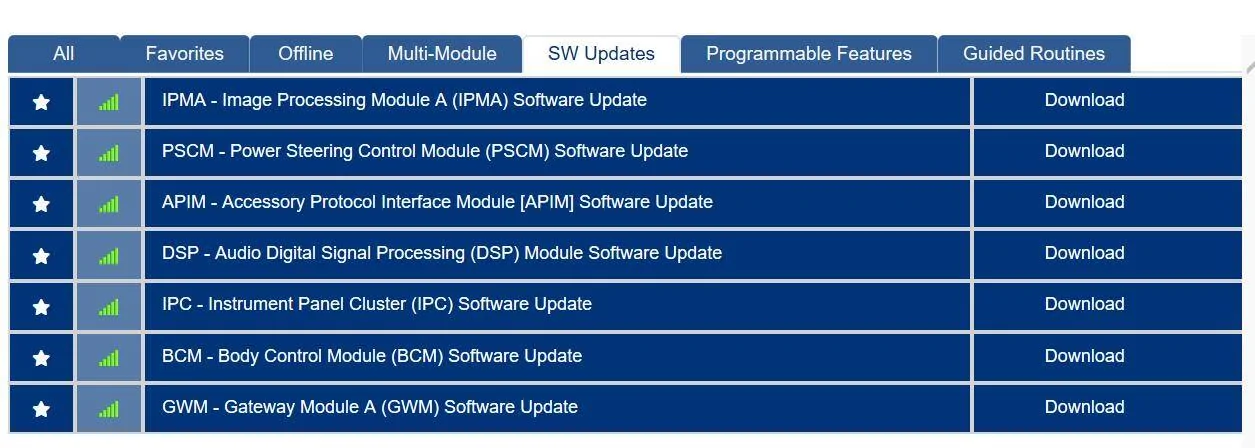
The GWM, BCM, DSP, and I think PSCM are the leftovers.
And while my habit in the past has always been to do a GWM first, if there's one available, it's a perfect example of the issue I am facing.
I click download.
I then click Run
The procedure begins normally with the "downloading files"
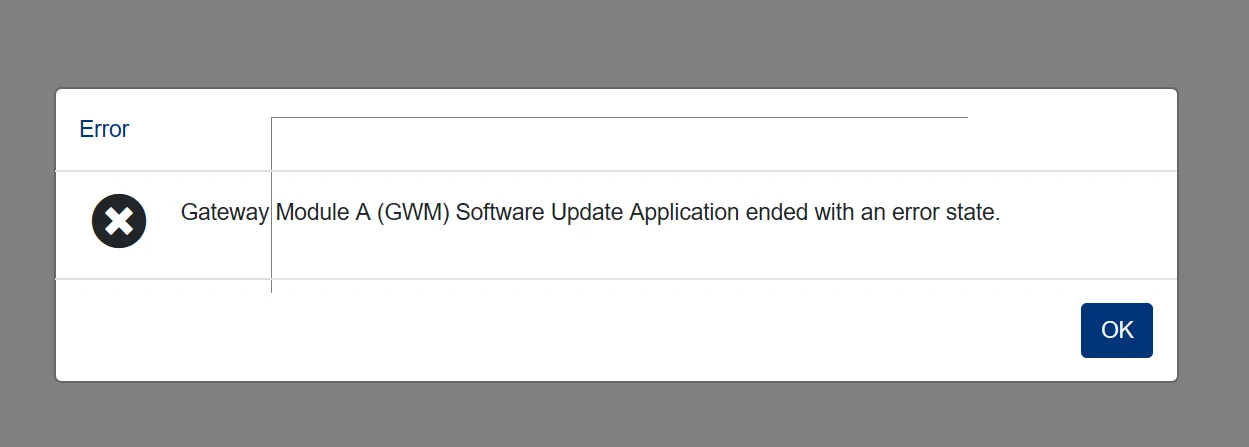
But about 4 or 5 seconds into the download the following error pops up

Ford Mustang Mach-E The Complete DIY Guide to Updating Your Mach-E with FDRS GWMerror


Same exact issue with any/all available updates.

I've tried 3 versions of FDRS
I've uninstalled/reinstalled
Upgraded
Rebooted.....

I have a 55 Amp power supply
FDRS shows voltage 14.2 (perhaps too high? The Clore 20 Amp couldn't keep that up, that's for sure)

Whatever the issue is, keep in mind I was able to do about 12 updates a couple of weeks ago. So I don't see any obvious logic for these updates that error out almost immediately.

Sorry for the long post, but wanted to answer all the typical questions that are asked when someone is new to FDRS.
 

azerik

Well-Known Member
First Name
Erik
Joined
Jan 8, 2023
Threads
79
Messages
4,545
Reaction score
4,558
Location
Chandler/Flagstaff, AZ
Vehicles
'21 Spacey Prem4x, '21 RX450H, 13 Focus EV
Occupation
DevSecNetOps, General PITA
Country flag
And just like that, the last 3 pages (1 days posts) talked me out of doing it. ✨
 

benk016

Well-Known Member
First Name
Ben
Joined
Nov 12, 2020
Threads
39
Messages
3,274
Reaction score
5,118
Location
Tulsa, Oklahoma
Vehicles
2021 Mustang Mach-E GT
Country flag
I like to consider myself an FDRS veteran. I jumped onboard when the Gen14 F150 infamous thread started January 22, 2022.
I've done more than 75 updates across my 2 different trucks. I've confronted every common issue that FDRS updating has presented.

Having said all that, the new 2023.5 GTPE has me stumped!
I fetched it home 3 weeks ago today. I had a buddy who was licensed up run the VIN and sure enough it had 17 updates in the queue. ??

Same laptop and Mongoose and FDRS version I use on the truck. But of the 17, there were 3 or 4 that would fail almost immediately after clicking "Run". Within 4 or 5 seconds of beginning to download the update.

I thought it odd, but moved on to the next update and as stated, all but a few behaved normally. Successfully.

Fast forward to today and I decided to give it another try. The car has received successful OTA updates since I brought it home. 4 of them in about 6 days? It's like a flood with this thing. Lol
Anyways, sure enough the previous troublesome updates were still in FDRS, along with a few new ones.

mackE03222024updates.webp


The GWM, BCM, DSP, and I think PSCM are the leftovers.
And while my habit in the past has always been to do a GWM first, if there's one available, it's a perfect example of the issue I am facing.
I click download.
I then click Run
The procedure begins normally with the "downloading files"
But about 4 or 5 seconds into the download the following error pops up

GWMerror.webp


Same exact issue with any/all available updates.

I've tried 3 versions of FDRS
I've uninstalled/reinstalled
Upgraded
Rebooted.....

I have a 55 Amp power supply
FDRS shows voltage 14.2 (perhaps too high? The Clore 20 Amp couldn't keep that up, that's for sure)

Whatever the issue is, keep in mind I was able to do about 12 updates a couple of weeks ago. So I don't see any obvious logic for these updates that error out almost immediately.

Sorry for the long post, but wanted to answer all the typical questions that are asked when someone is new to FDRS.
This feels more like an FDRS/laptop issue based on your description.

What I would do next, is delete the cached update files.

C:\ProgramData\Ford Motor Company\FDRS\fdrs\data\vehicle_software

Delete everything in there. This is all the actual software files it downloads for the module flashing.

Nuclear option would be to delete everything in C:\ProgramData\Ford Motor Company\ which will wipe all FDRS cache files.
Sponsored


Top