Mooseo

Member
First Name
Mike
Joined
Mar 13, 2024
Threads
1
Messages
6
Reaction score
2
Location
California
Vehicles
2023 RWD Premium
Country flag
Is there anywhere to see trip history or even the odometer in the app? Total miles used to be right up front, which maybe was not necessary, but I did actually use it.
Sponsored

 

Glenn C

Member
First Name
Glenn
Joined
Apr 16, 2022
Threads
2
Messages
23
Reaction score
17
Location
Bryn Mawr, PA
Vehicles
2022 Mustang Mach-E Premium
Country flag
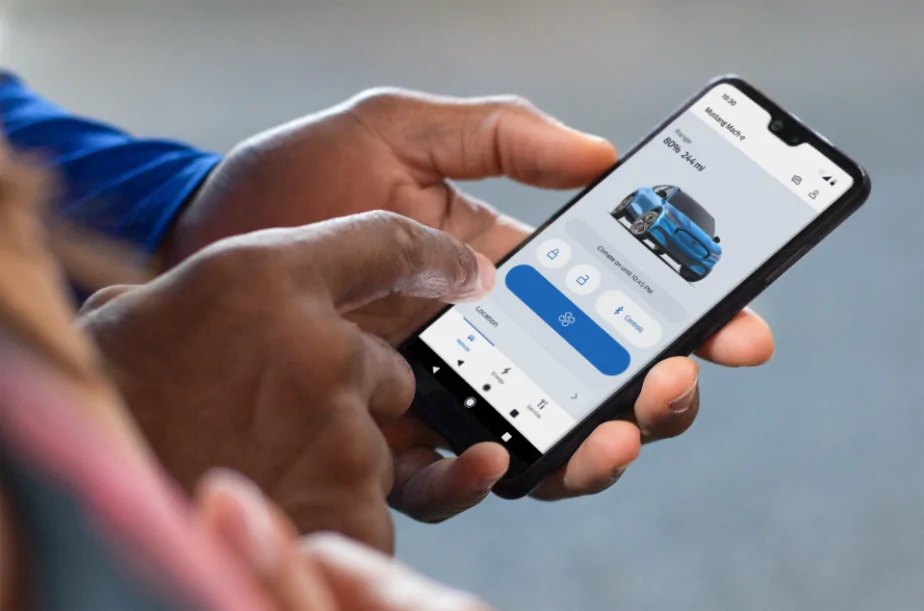
Hi Mustang Mach-E owners! If you recently updated your FordPass® app, you may have noticed it looks a little different. We are pleased to share that we have rolled out a newly designed app that is easy to use and efficient, to help you better manage your vehicle remotely. Here is what is new:
  • Simplified Experience: We have reduced the number of steps it takes to access functions and made it easier to find them. As an EV owner, you can enjoy a simplified slider for target charge. Also, instead of having to press and hold to turn the vehicle ‘on’, it is now a simple tap.
  • Apple Watch Integration: If you have an Apple Watch, in addition to lock/unlock and remote start/stop, you will also be able to use the following features from your wrist:
    • View battery level and range
    • View charging status, including: Charging speed, next departure time based on when desired charge is reached, current preferred charging window
    • View vehicle location
    • Activate horn and lights remotely
We are also continuing to improve the in-app experience with this latest version. If you notice a feature you previously used before is no longer there, don’t worry. The feature can still be accessed via your in-vehicle touchscreen.

We love to hear from our owners so let us know what you think and if you have any questions about FordPass!

Please note: FordPass® App, compatible with select smartphone platforms, is available via a download. Message and data rates may apply. 

524242.png
What happened to the trip planner function? That was the most useful function in the previous version.
 

Indy Mike

Well-Known Member
First Name
Mike
Joined
May 10, 2021
Threads
39
Messages
213
Reaction score
52
Location
Indiana
Vehicles
Mach E Prem AWD, 2019 F150, ‘94 Vet, 1948 Willys
Occupation
Retired
Country flag
Hi Mustang Mach-E owners! If you recently updated your FordPass® app, you may have noticed it looks a little different. We are pleased to share that we have rolled out a newly designed app that is easy to use and efficient, to help you better manage your vehicle remotely. Here is what is new:
  • Simplified Experience: We have reduced the number of steps it takes to access functions and made it easier to find them. As an EV owner, you can enjoy a simplified slider for target charge. Also, instead of having to press and hold to turn the vehicle ‘on’, it is now a simple tap.
  • Apple Watch Integration: If you have an Apple Watch, in addition to lock/unlock and remote start/stop, you will also be able to use the following features from your wrist:
    • View battery level and range
    • View charging status, including: Charging speed, next departure time based on when desired charge is reached, current preferred charging window
    • View vehicle location
    • Activate horn and lights remotely
We are also continuing to improve the in-app experience with this latest version. If you notice a feature you previously used before is no longer there, don’t worry. The feature can still be accessed via your in-vehicle touchscreen.

We love to hear from our owners so let us know what you think and if you have any questions about FordPass!

Please note: FordPass® App, compatible with select smartphone platforms, is available via a download. Message and data rates may apply. 

524242.png
Why does “Start” only appear after a charge? Is it to start the car, which I don’t see a button for?
 

Kamuelaflyer

Well-Known Member
First Name
Bill
Joined
Feb 18, 2020
Threads
11
Messages
11,399
Reaction score
23,071
Location
Hawaii
Vehicles
2021 Premium Infinite Blue. ER AWD. 2020 Raptor, 2021 Ranger.
Country flag
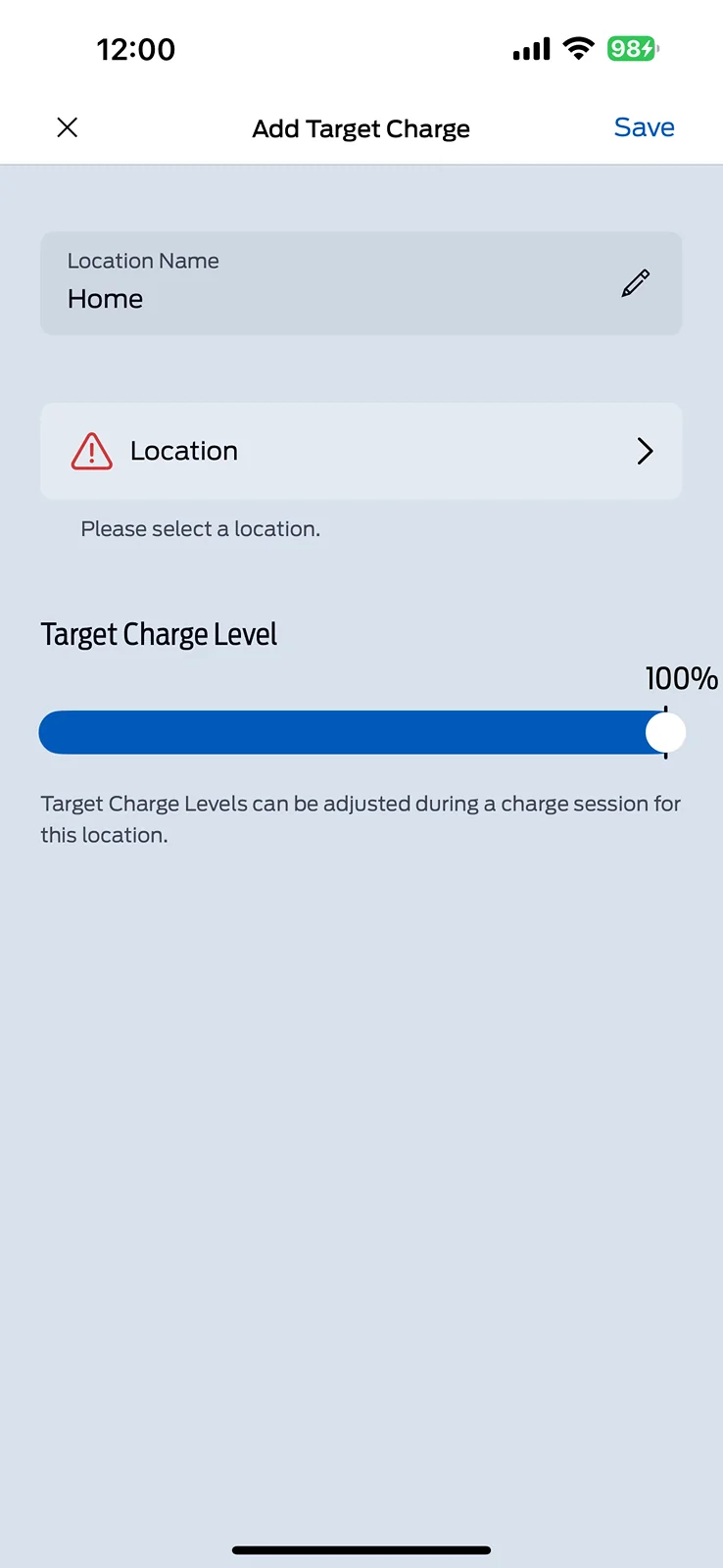
This screen right here is what I can’t figure out? I want to add a new charge location which is essentially going to be still my home. I might call at home too and I want to send it to 100% so I have the option to hit a button to charge 100 but it will not let you add a location is that the thing you’re talking about?

IMG_8118.png
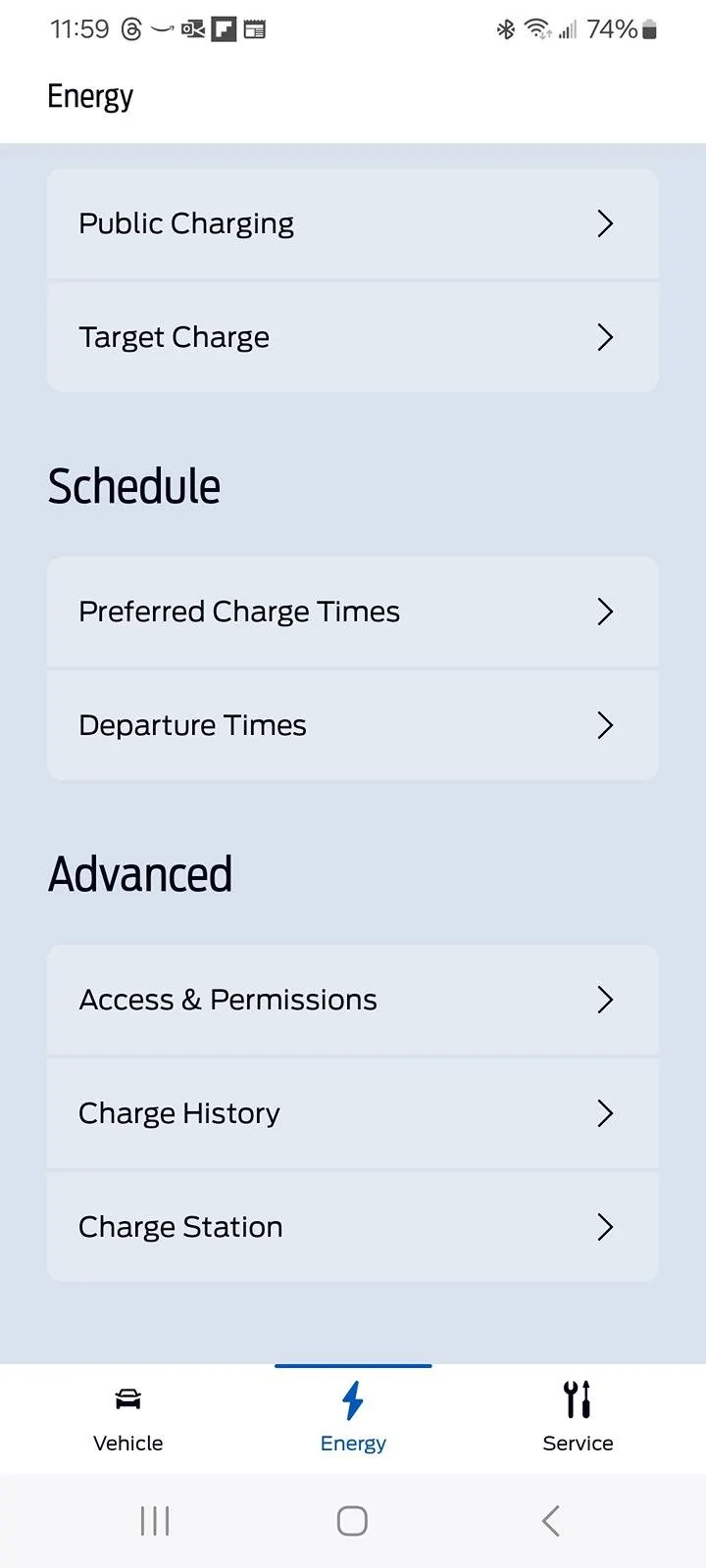
I had that last night when I updated the app but after it charged last night it popped up under energy:

Screenshot_20240524_115912_FordPass.jpg
This is the way it has always worked. It is a function of the car, not the app. You need to charge somewhere first, for at least a bit, before you can add it as a new location and edit the charge parameters, whether you’re using the app or doing it in the car.
 

Kamuelaflyer

Well-Known Member
First Name
Bill
Joined
Feb 18, 2020
Threads
11
Messages
11,399
Reaction score
23,071
Location
Hawaii
Vehicles
2021 Premium Infinite Blue. ER AWD. 2020 Raptor, 2021 Ranger.
Country flag
Maybe they didn't think it was necessary to show lock/unlock because the car defaults to locked. I've never found my mme unlocked. It always locks itself from walking away or after a time. Is there a way to keep it unlocked?
There might be a technical issue with the lock/unlock display iirc, but I no longer recall where or what thread I read that in. Beyond that there are always questions regarding UI, form? Function? Information at a glance? Etc.
 
Last edited:


circatee

Well-Known Member
Joined
Jul 21, 2021
Threads
76
Messages
532
Reaction score
355
Location
Georgia, USA
Vehicles
Mustang Mach-E GT PU, 2025
I wonder if this is one of those threads, where Ford asked a question, and now wish they hadn't. Be careful what you wish for, and all that... :cwl: No, seriously Ford, thanks for participating in the forums!
Alas, I do like the new look and such. HOWEVER, often when I first open the app, it is slow to populate any data. Even more so if I merely want to open the app and start the car. I am in Georgie, and it gets HOT here. Thus, always best to start the car before leaving the office...
 

SeattleMachE

Well-Known Member
First Name
Robert
Joined
Feb 27, 2021
Threads
1
Messages
224
Reaction score
379
Location
Seattle, WA
Vehicles
Mach-E Premium ER AWD
Country flag
Is there anywhere to see trip history or even the odometer in the app? Total miles used to be right up front, which maybe was not necessary, but I did actually use it.
Service tab, then Vehicle Health
 

BMT1071

Well-Known Member
First Name
Mike
Joined
Mar 21, 2021
Threads
65
Messages
3,197
Reaction score
4,377
Location
Glendale, AZ
Vehicles
21 MME SR RWD, 23 MME GTPE
Occupation
EV Technical Trainer
Country flag
I've not spent a ton of time with FordPass 5.0, but so far it has been a disappointment and the very opposite of an upgrade.

So far, I've not been able to find the amount of my unused EA credits.

Even though I cannot determine the amount of my EA credits, I turned on "Share Charging Access" to allow those credits to be used by my spouse, which is something we'd done a number of times with the prior version of FordPass. In order to share charging access, you need to manually activate the charger; however, FordPass 5.0 refuses to allow us to turn off Plug & Charge. Specifically when we try to turn it off, the app appears to be processing with the little circular icon spinning, but after it spins for anywhere between 2 - 5 minutes, Plug & Charge remains on. So, we have no idea what our balance is and cannot take advantage of the share charging access option because plug & charge will not turn off to allow a manual start to charging. (Not being able to turn off plug & charge also probably means we cannot take advantage of better EA and Tesla charger rates via memberships.)

Also problematic is Ford's comment about 5.0 as follows: "We are also continuing to improve the in-app experience with this latest version. If you notice a feature you previously used before is no longer there, don’t worry. The feature can still be accessed via your in-vehicle touchscreen."

I have two negative reactions to that. First, for me, using my in-vehicle touchscreen instead of my app would mean leaving my apartment, taking an elevator down a dozen floors, walking into the garage, using the touchscreen and going all the way back up. So, something I could previously have done in 2 or 3 minutes on the app now will take me 20 because I will need to visit my car. Second, I absolutely do not understand how taking features out of the app and requiring you to visit your car is in any way an upgrade. If my bank upgraded my banking app and told me: "Sorry your new banking app no longer allows you to deposit checks remotely, but don't worry, all you need to do is to go to your bank to deposit checks", I would seriously wonder how in the world that qualified as an upgrade rather than a serious step backwards in functionality.

For me FordPass 5.0 has been a significant step backwards in functionality and has cost me significantly more time and effort than what it replaced.
Interestingly enough, the opposite happened to me. I tapped on the words, specifically NOT the toggle, hoping to get the EA kWh balance. The app decided I wanted to turn off P&C. Now it won't turn it back on. The toggle moves to On, then it thinks for a few seconds and turns it back off.
I further compounded my misery by logging out of the app in the foolish hope that that might help. Now it says I need to setup PaaK, even though it shows that "This Device" is already a key. Just like some other frustrated users have posted, it is impossible to setup PaaK. It continually fails at various points in the process. ???
@Ford Motor Company
 

leehinde

Well-Known Member
Joined
Feb 12, 2023
Threads
60
Messages
820
Reaction score
1,017
Location
California
Vehicles
Mach-E California Route 1
Country flag
My most common use of the app is to open the windows as I'm walking the dogs to the car after a visit to the dog park. I prefer the tap-twice over the tap and hold, as tap and hold is a trick while guiding two dogs after an exuberant visit to the dog park.

My second most common use is to charge to 100% the night before a trip and the default behavior hasn't changed.

+1 from

YMMV
 

SteveP

Member
First Name
Steve
Joined
Apr 14, 2021
Threads
1
Messages
11
Reaction score
4
Location
38221
Vehicles
Focus Electric, Mustang Mach-E, Lincoln Corsair
Occupation
Electronics Engineer
Country flag
So far, so good! So much easier to access the charge levels. The interface is nice and clean, too.
 

phil

Well-Known Member
Joined
Jun 6, 2021
Threads
13
Messages
3,176
Reaction score
4,225
Location
USA
Vehicles
LS400
Country flag
So for people that are having trouble with the new app, I’d recommend two things:
  1. Go drive your car
  2. Quit FordPass and reboot your phone
Those should fix most of the initial sync issues people are having. If you have a poor internet connection you may see blank buttons until the status can be downloaded.
I have another option to try: Do absolutely nothing and wait a day.

When I first installed the new interface yesterday, it didn't work at all. Did not even load the UI completely, let alone give me working buttons/links. I had some blank buttons, but my internet connection was fine so that was not the cause.

I did not drive or quit or reboot, but when I opened the app today, it worked fine.
 

Mach-Lee

Well-Known Member
First Name
Lee
Joined
Jul 16, 2021
Threads
262
Messages
11,383
Reaction score
25,076
Location
Wisconsin
Vehicles
2022 Mach-E Premium AWD
Occupation
Sci/Eng
Country flag
I have another option to try: Do absolutely nothing and wait a day.
Ha, I’ll endorse that too. Sometimes these app issues do resolve themselves. Often times people get impatient and try too much too soon.
 

phil

Well-Known Member
Joined
Jun 6, 2021
Threads
13
Messages
3,176
Reaction score
4,225
Location
USA
Vehicles
LS400
Country flag
you can use the slider to set any new charge target while it's charging or done charging and plugged in. this sets the location's charge target that you are currently sitting at though. so it's an on the fly adjustment to current setting (I love the way it's designed and how it functions....others may not).
I do not love the slider design, I find it infuriating. It teases me by showing me a 75% charge limit and other 1% increments but then refuses to land anywhere between 70% and 80%. Cruel.
 

Zekester

Well-Known Member
First Name
Zeke
Joined
Jun 8, 2023
Threads
2
Messages
62
Reaction score
39
Location
Maryland
Vehicles
2023 Mach-E, 2015 F-150, 2020 Jeep Wrangler
Country flag
We love to hear from our owners so let us know what you think and if you have any questions about FordPass!
The one thing I want, either on this app, or in the car, or via the web, really anywhere, is the ability to see the current version of every piece of software in the car. Just a list of all of them and what version is currently installed. With a coherent title that indicates what that software does, in a general sense. As I don't use PAAK, and charge at home 99% off the time, this application doesn't really provide any utility to me. I'm sure you put a lot of work into it, but as I've only looked at the previous version 2 or 3 times since i bought the car a year ago, the improvements are not really apparent to me.
 

Snakebitten

Well-Known Member
Joined
Mar 1, 2024
Threads
0
Messages
2,264
Reaction score
3,782
Location
Coastal Texas
Vehicles
2023.5 Mach-E
Country flag
I do not love the slider design, I find it infuriating. It teases me by showing me a 75% charge limit and other 1% increments but then refuses to land anywhere between 70% and 80%. Cruel.
I would love to charge to 81%!

Then when I get in the car the next morning, it wouldn't be 79% ?

Although I do enjoy when FordPass says charging complete 80% 215 miles

The next morning in the car itself it's 79%, but can be 219 miles.

I lose % and gain range. Gotta love those warmer ambients after the sun comes up.
Sponsored


Top