HuntingPudel

Well-Known Member
First Name
Steve
Joined
Mar 23, 2021
Threads
88
Messages
12,950
Reaction score
17,402
Location
Bay Area, CA
Vehicles
2024 MME GT with Performance Upgrade, 1979 Fire-Am, 1972 K/5 Blazer
Occupation
Engineering
Country flag
You need a license. What most DIYers do is post on the VIN check thread once a month or so to see if anything has come out worth spending $50 for.
Or we just listen in on the conversation on the VIN check thread. ??
 

Gatorguy

Active Member
First Name
Peter
Joined
Jun 23, 2022
Threads
1
Messages
44
Reaction score
17
Location
29920
Vehicles
2021 Mustang Mach-e Premium AWD
Country flag
In this guide I'll be covering FDRS, what it is and how to use it.

What is FDRS?
It stands for "Ford Diagnosis and Repair System". Made by Ford for reading trouble codes, programming modules, updating modules, etc.

Why Would I Want to Use it?
This is really only for the die-hard DIYer. If your dealer is a **Insert nasty word of your choice here** and/or you just want to tinker this is for you.

Are there alternatives to FDRS?
Yes! Forscan is a great, free option. I won't cover it here but it has much of the same diagnostic and programming functionality. It is missing some key features though, such as updating module software as well as some service routines.... You may now snigger at how bad that name sounds in the English language.

A Few Disclaimers to Start
  1. FDRS comes with risks. It's meant to be used by dealers and shops. If something goes wrong you can brick your car. So using it is NOT for the faint of heart. It's not for the cheap of heart either, but we will get to that in a moment ?
  2. Seriously, you have been warned. FDRS and your car's hardware do have built in safety measures to prevent damage. But if something happens while following this guide, YOU are liable for any repair/replacement. If the idea that something could go wrong makes you squeamish, this is not for you.
  3. Yes yes yes.. I know this information is found elsewhere on the forum, but I wanted to make a central location with all of the information together.

What You'll Need to Run FDRS
A Laptop Running Windows 7 or 10
I used a MacBook Pro running Windows 10 on bootcamp

Windows 11 seems to work as well if you're on the bleeding edge


A J2534 Interface
This is what connects your computer to the OBD II port on the car. Quick disclaimer, cheap OBD adapters like this DO NOT work. They're fine for Forscan and Torque, but FDRS specifically requires support for the J2534 protocol.

FDRS Officially supports these devices:
  • VCM II
  • VCMM
  • VCM3
Unfortunately you'll find that those are all VERY expensive devices... I mean heaven forbid Ford make the tools needed for service reasonably priced. But I digress...
The adapter I used was This. It's a third party option that worked for what I did and the price is... less... ridiculous

A 12 Volt Power Supply
Some updates can take over an hour. During these updates the car will not be maintaining the little baby 12v battery the Mach E comes equipped with. If the battery goes kaput during the update, the update goes kaput as well. Since we're not in the business of making bricks here you need a power supply to keep this from happening. Mind you I said "power supply" not "battery charger". I didn't measure, but I hear the car can draw upwards of 30A during the updates.

I DO NOT recommend doing what I did, but I'm overly cheap sometimes. I happen to have a gigantic RV battery just sitting around for another project, so I ran jumpers to the RV battery to assist. It did the job just fine. But again, that is NOT a recommendation.

An FDRS License
There are a few websites that pop up if you Google this, but the one you want is Ford's official https://www.motorcraftservice.com/
To get the license
  1. Create a Motorcraft account
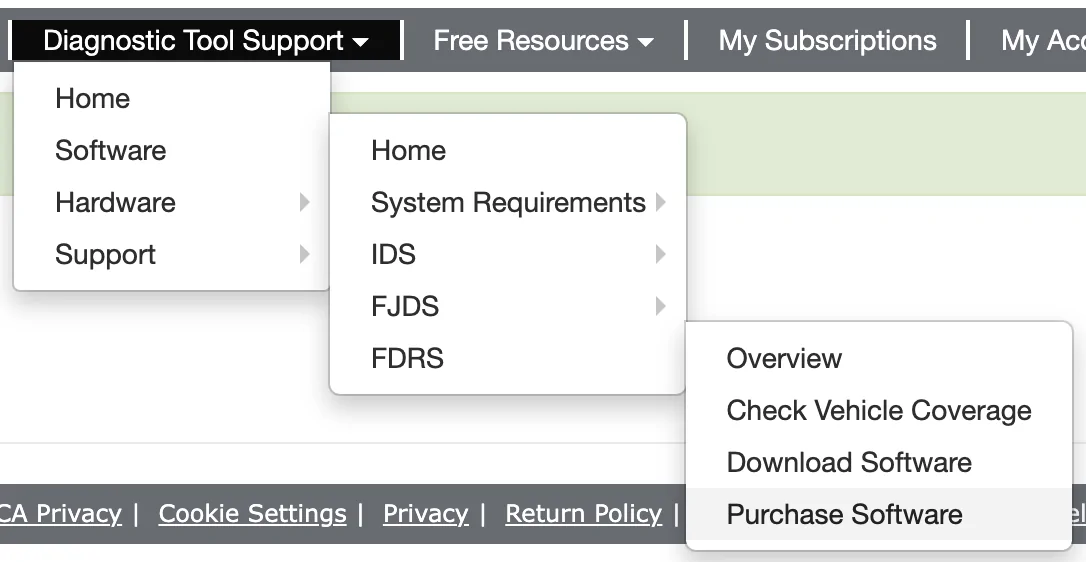
  2. Go to this menu
Screen Shot 2021-10-08 at 11.14.22 PM.png

3. Once you click through you'll be prompted to log in again on a wonderfully 90s looking website.​
4. Click Purchase Additional Licenses (It may just say Purchase Licenses for you)​
Screen Shot 2021-10-08 at 11.19.35 PM.png
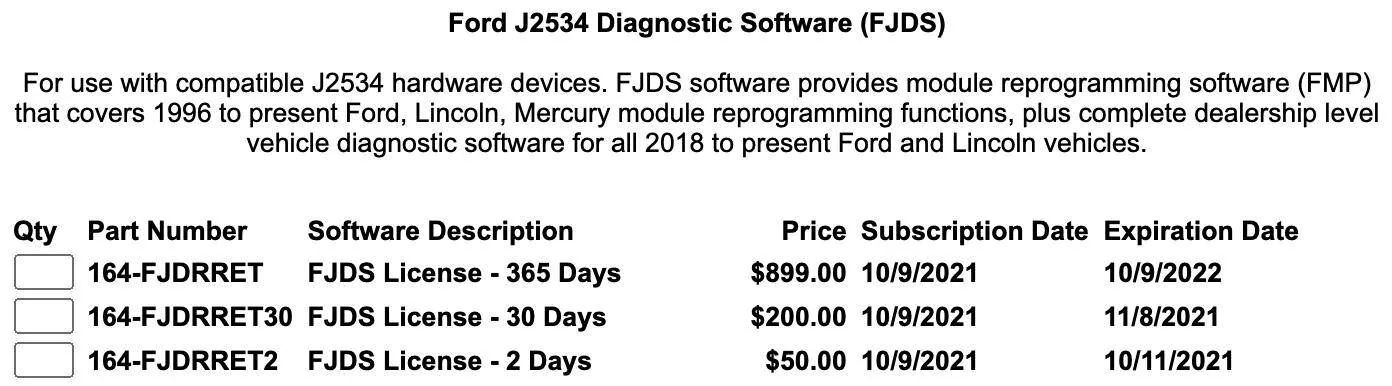
5. Choose which subscription period you want. Note it says FJDS on here, not FDRS. Don't fret, this license is still the right one​
Screen Shot 2021-10-08 at 11.19.03 PM.png
6. Once the purchase is complete it will take you to a download page with installation instructions.​
Running Updates on FDRS
If you are using the mongoose adapter like me, make sure you visit their website, download, and install the driver before running FDRS.

  1. Plug in the adapter and turn on the car
  2. Open FDRS. Choose " Non-Dealer Motorcraft" and log in.
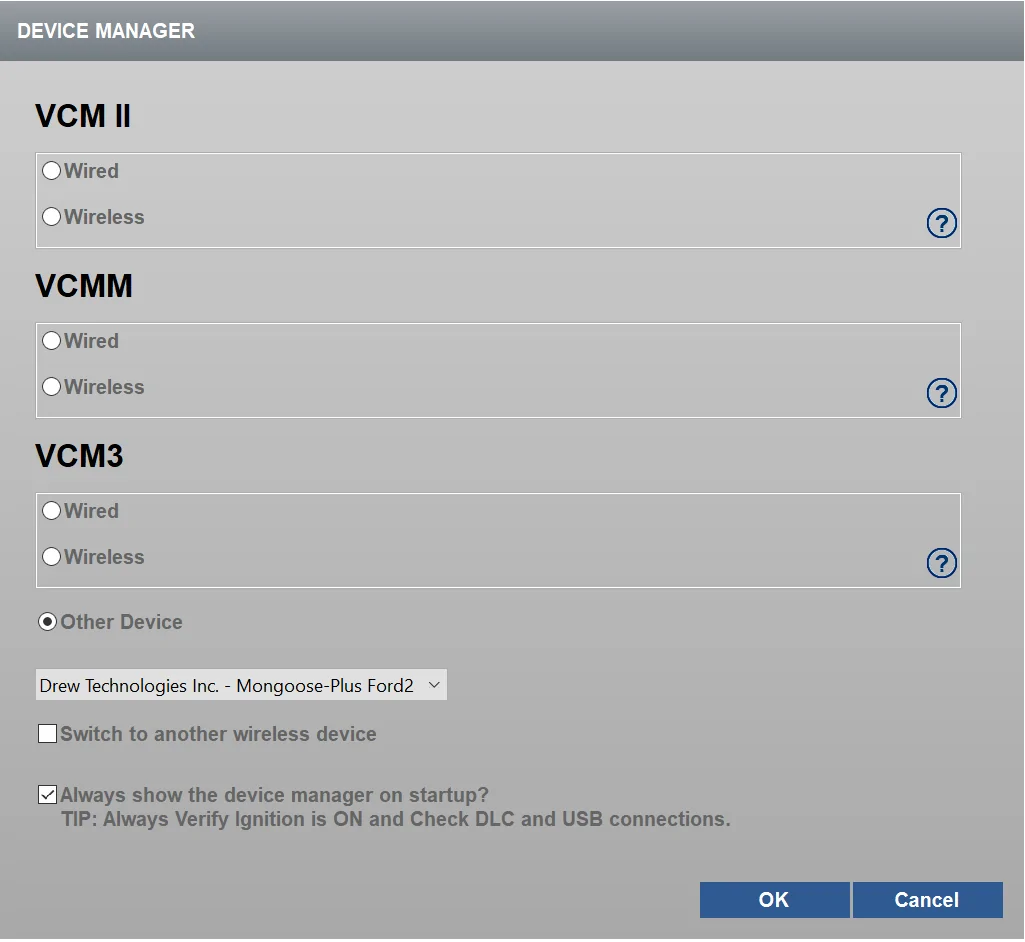
  3. It will then ask you how you are connecting to the car. If you're using the same adapter I did it should show up under "other device"
Device Manager.png
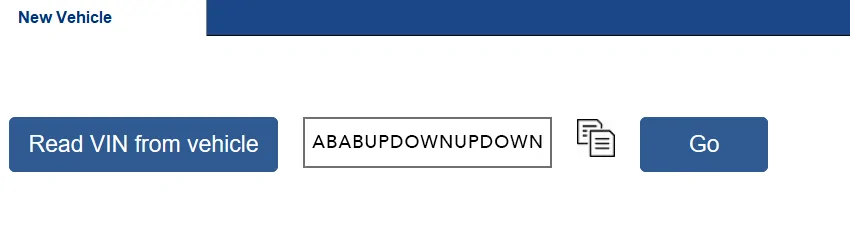
4. Hit "Read VIN from vehicle" and then "Go"​
VIN copy.png
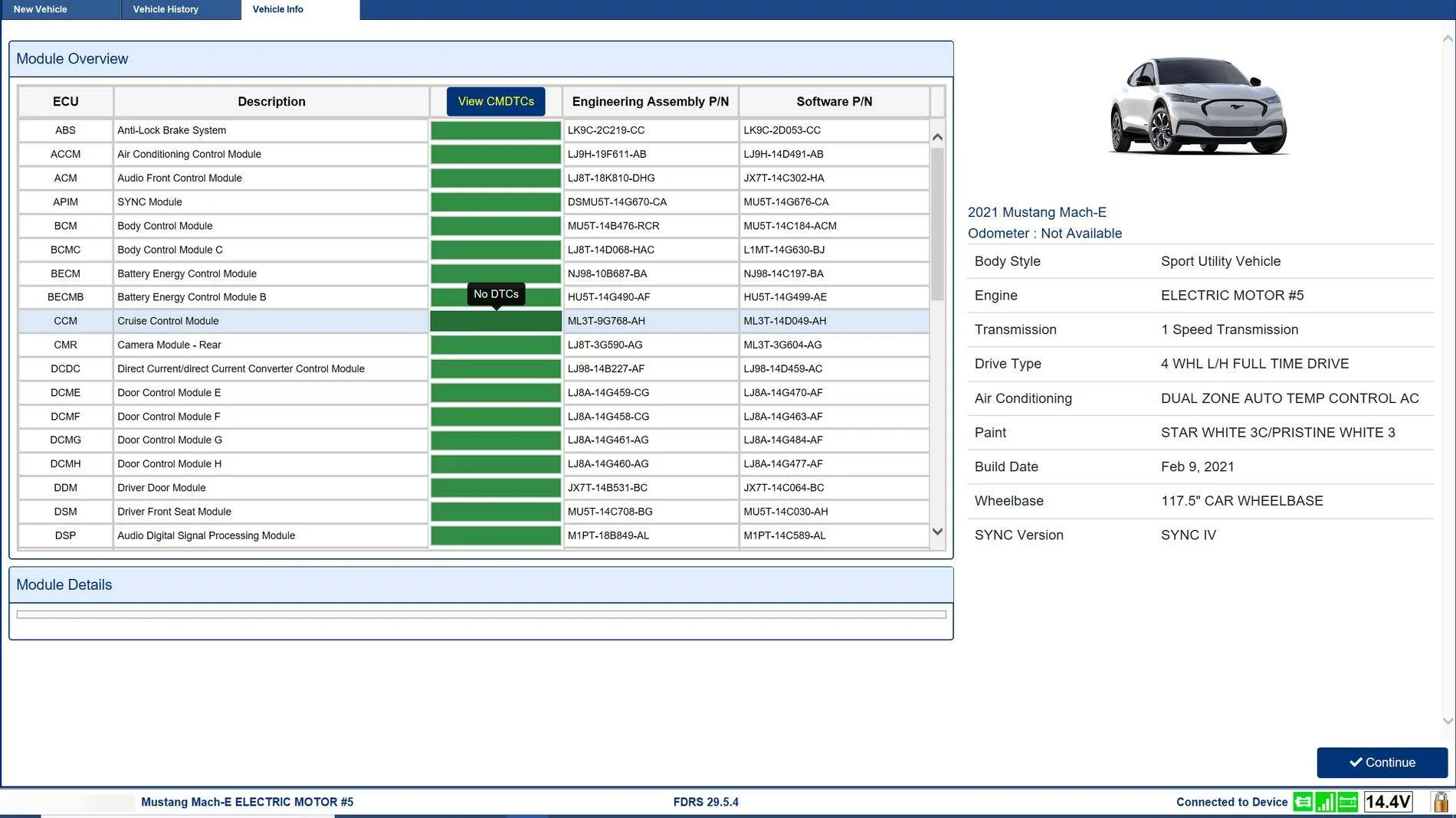
5. After a few moments it will take you to the vehicle page. Click Continue​
INFO.png
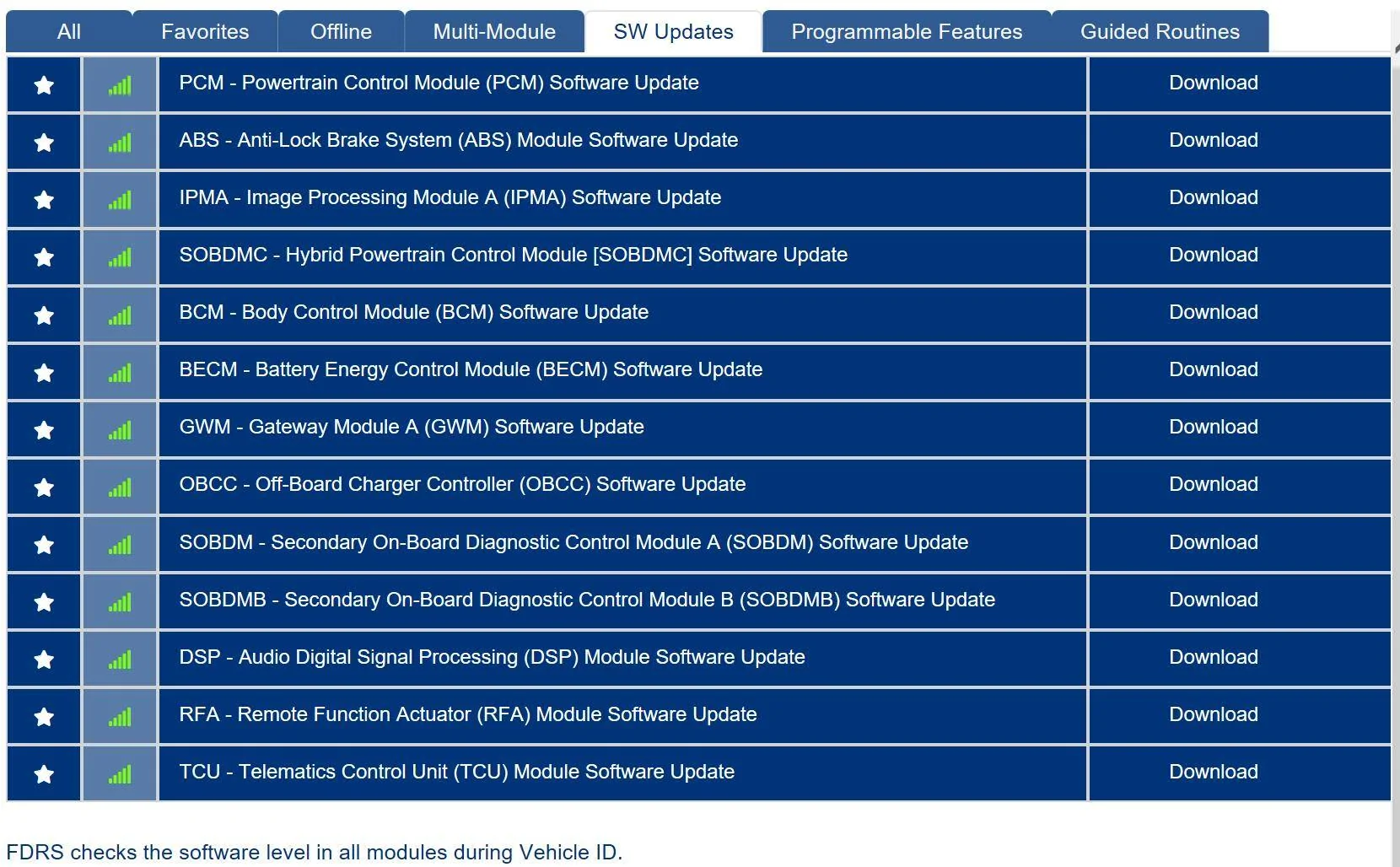
6. Go to the "SW Updates" tab and it will show you any modules that aren't up to date (mine had a lot). From here you can download and run them. The system does a great job of walking you through the process. If there are particular updates that have to happen in a specific order, FDRS will automatically take care of that and install all of them one after the other.​
1633145891868.png
How Updates Work
I unfortunately didn't take any screen shots of the update itself but there are 2 kinds of updates. One just runs straight from the laptop. The other requires the use of a USB flash drive that you plug into the SYNC system.

A couple of things on the USB drive part. It says it wants a 32 GB drive, but of the updates I installed the largest was like 150 MB. So my 16GB drive did the job just fine. The other "gotcha" is there's a restart involved. At some point the sync screen will tell you that the update is complete, and that you need to turn off and get out of the vehicle. At this point I removed the USB drive. DON'T DO THAT. After a few failed attempts I realized that once you restart, it'll think for a moment and then tell you that the update is finished (again). THEN you can remove the drive. I felt like an idiot but it fooled me.

Making this Guide Complete
I am not the most knowledgeable person on this forum about this. So if anyone has anything to add or correct, please do so!


If you'd like to see all of this in action, @scoopman made a great video of the process
I have a 2021 job 1 with BC 1.0. If I get a mongoose adapter, FDRS license, and power supply can I update the car to BC 1.4 or BC 1.3?

Thanks!
 

rugedraw

Well-Known Member
First Name
Javier
Joined
Nov 13, 2023
Threads
0
Messages
2,680
Reaction score
2,435
Location
Miami, FL
Vehicles
2021 Ford F150 Platinum FX4 EB/2023 Bronco Sport Badlands/1991 Mustang 5.0 coupe
Occupation
Auto Sales
Country flag
I have a 2021 job 1 with BC 1.0. If I get a mongoose adapter, FDRS license, and power supply can I update the car to BC 1.4 or BC 1.3?

Thanks!
Yes. You will need FDRS to get the actual software. You will then need FORScan to enable the new features. If and when you do this, message me and I can help you get it done.
 

Sikkun

Well-Known Member
Joined
May 9, 2024
Threads
3
Messages
1,777
Reaction score
3,396
Location
USA
Vehicles
2023 Mach E
Country flag
Looks like the GVMS warning for my BECM has cleared up. 2 new updated showed up for me:

SOBDCM G2186400-3.0
BECM G2283351-2.0


DeusEx

Well-Known Member
Joined
Apr 17, 2024
Threads
10
Messages
611
Reaction score
746
Location
New York
Vehicles
2023.5 Mach-E Premium ER AWD
I finally got all my equipment (Mongoose, PL6800, 2.5 in. hole covers, 2.5 hole saw, template for battery holes, nvme SSD) in and I'm ready to dive in tomorrow. Believe it or not, I read through this entire thread and took a bunch of notes.

Here is my plan of attack based off of everything I've picked up, but I have some questions.

For the standalone modules, should those be done before or after updating the GWM, APIM, TCU, and IPC or does that not matter because they're standalone ones? I think my answer is I can, but I have some final self-doubt on the subject.

Also, any final tips I didn't catch below before I dive in?

Things to do before updating:
  1. Wipers turned off (in lowest position).
  2. Turn off headlights (may need to do after every update).
  3. Turn off HVAC.
Modules to do first if you see them:
  • GWM
  • APIM
  • TCU
  • IPC
Modules to do last if you see them:
  • CCMR
  • BCM
  • IPMA/PSCM performed as set
Modules to do to get feet wet (These are standalone ones):
  • HVAC
  • DSM
  • WACM
  • RFA
  • GSM
  • BCM (do last if possible due to time?)
  • DSP
To Address Car Still Charging After Preset Charge (notes for myself as this is the main thing I wanted addressed) as per TSB:
  1. SOBDM
  2. BECM
  3. SOBDMB
  4. SOBDMC
  5. ABS
Note: After performing updates, clear DTCs.

FDRS cache files location (in case an update/download behaves weird):
  1. C:\ProgramData\Ford Motor Company\FDRS\fdrs\data\vehicle_software
  2. C:\ProgramData\Ford Motor Company\

Resolving Reverse Brake Assist Error:
  1. Drive car at greater than 18mph for 5 minutes or more.
  2. Take hands off wheel while driving straight 5 seconds at a time.
 

21st Century Pony

Well-Known Member
First Name
Martin
Joined
May 21, 2022
Threads
36
Messages
1,976
Reaction score
2,243
Location
Arlington, Virginia
Vehicles
formerly Ford Mustang Mach E 2022 Premium AWD ER, now a li'l bit of Lightning ER
Country flag
I finally got all my equipment (Mongoose, PL6800, 2.5 in. hole covers, 2.5 hole saw, template for battery holes, nvme SSD) in and I'm ready to dive in tomorrow. Believe it or not, I read through this entire thread and took a bunch of notes.

Here is my plan of attack based off of everything I've picked up, but I have some questions.

For the standalone modules, should those be done before or after updating the GWM, APIM, TCU, and IPC or does that not matter because they're standalone ones? I think my answer is I can, but I have some final self-doubt on the subject.

Also, any final tips I didn't catch below before I dive in?

Things to do before updating:
  1. Wipers turned off (in lowest position).
  2. Turn off headlights (may need to do after every update).
  3. Turn off HVAC.
Modules to do first if you see them:
  • GWM
  • APIM
  • TCU
  • IPC
Modules to do last if you see them:
  • CCMR
  • BCM
  • IPMA/PSCM performed as set
Modules to do to get feet wet (These are standalone ones):
  • HVAC
  • DSM
  • WACM
  • RFA
  • GSM
  • BCM (do last if possible due to time?)
  • DSP
To Address Car Still Charging After Preset Charge (notes for myself as this is the main thing I wanted addressed) as per TSB:
  1. SOBDM
  2. BECM
  3. SOBDMB
  4. SOBDMC
  5. ABS
Note: After performing updates, clear DTCs.

FDRS cache files location (in case an update/download behaves weird):
  1. C:\ProgramData\Ford Motor Company\FDRS\fdrs\data\vehicle_software
  2. C:\ProgramData\Ford Motor Company\

Resolving Reverse Brake Assist Error:
  1. Drive car at greater than 18mph for 5 minutes or more.
  2. Take hands off wheel while driving straight 5 seconds at a time.
Now do it do it!
 

HuntingPudel

Well-Known Member
First Name
Steve
Joined
Mar 23, 2021
Threads
88
Messages
12,950
Reaction score
17,402
Location
Bay Area, CA
Vehicles
2024 MME GT with Performance Upgrade, 1979 Fire-Am, 1972 K/5 Blazer
Occupation
Engineering
Country flag

DeusEx

Well-Known Member
Joined
Apr 17, 2024
Threads
10
Messages
611
Reaction score
746
Location
New York
Vehicles
2023.5 Mach-E Premium ER AWD
I hope you got a PL6100. ??
Nope, got the PL6800. It was cheaper than the PL6100 and in stock when sold and shipped by Amazon. There were third party only options but I'd rather not take that chance. I wonder if the higher pricing is due to the demand from this forum...
 

Mach-Lee

Well-Known Member
First Name
Lee
Joined
Jul 16, 2021
Threads
262
Messages
11,383
Reaction score
25,076
Location
Wisconsin
Vehicles
2022 Mach-E Premium AWD
Occupation
Sci/Eng
Country flag
Was doing all updates for someone's Job 1 2023 today, ran into a couple issues to watch out for.

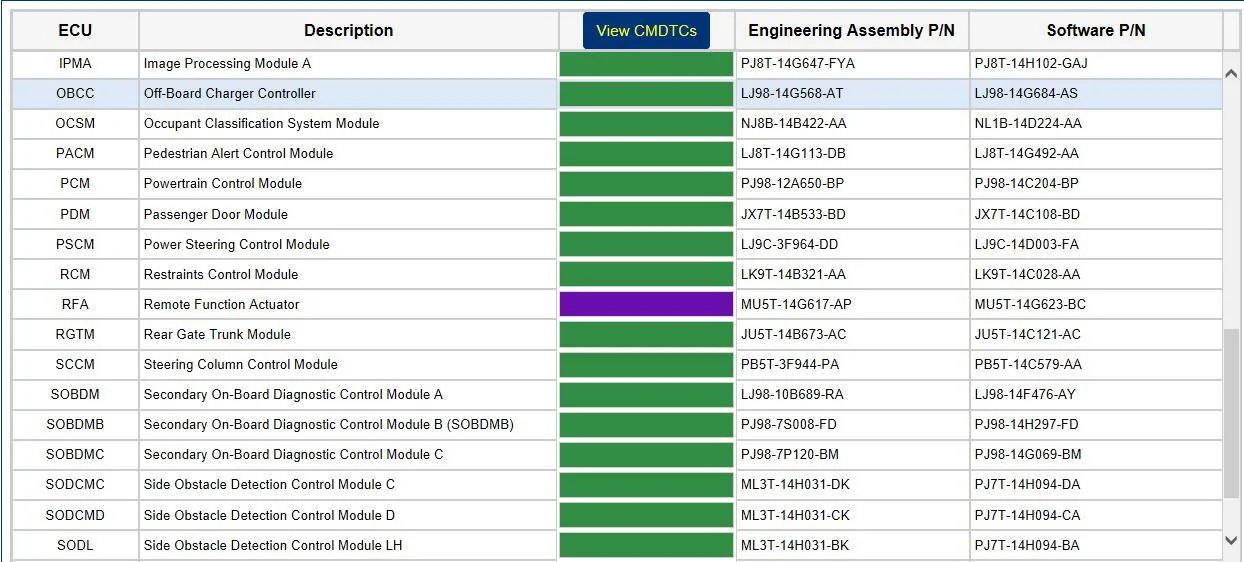
The RFA update failed and left the module in a noncommunicative state (purple status).

Ford Mustang Mach-E The Complete DIY Guide to Updating Your Mach-E with FDRS RFA failure to updat


I finished all the other updates and came back it it. For the second attempt, I closed and re-opened FDRS. During the second attempt, I also waited extra long after each of the on/off prompts before pressing the OK button. Luckily that worked and the RFA update was successful the second time.

I also had trouble with the PSCM update failing at the end despite passing all the verification steps and being configured. I did it twice and it failed both times (after having done IPMA update). However after reopening FDRS and doing a network scan the PSCM update had disappeared despite claiming to have failed. Everything worked fine afterwards, so I'm hoping that's just a glitch and the update was actually applied correctly.

If you have to fully update a 2023 from scratch, it takes about six hours including the BlueCruise modules.
 
Last edited:

Mike G

Well-Known Member
First Name
Mike
Joined
Mar 27, 2022
Threads
25
Messages
6,458
Reaction score
5,298
Location
N. AL, USA
Vehicles
'23(J1) Mach-E GT-PE, '22 F-150 Lightning, '24 Bronco HLE 2Dr
Country flag
I had a similar experience with my '23 J1 on the PSCM...but after watching the "PASS" on all the packages I knew I was good...I just disconnected and rebooted everything and then specifically ran the config tool for the PSCM and that then went fine.

I've gotten used to checking for, clearing, and retesting for DTCs after every update. When you do an update on some modules there is a step you can see fly by if you watch carefully where it's 'clearing DTCs'.....but on some updates...that's not there...and FDRS will return you to the available software list which shows all green module status tiles on the left side...and in reality due to the interruption of traffic on the network some of those modules are actually in an error state (now 'orange') but you don't know it until you go back and check and reset.

It's fun isn't it? I learn new stuff all the time doing these updates.
 

ziptbm

Well-Known Member
Joined
Jan 12, 2022
Threads
12
Messages
143
Reaction score
63
Location
Michigan
Vehicles
'22 MME GT & '22 F150 Lightning Lariat ER
Country flag
Yes. You will need FDRS to get the actual software. You will then need FORScan to enable the new features. If and when you do this, message me and I can help you get it done.
Do we know which updates specifically BC 1.4?

I haven't done any FDRS updates in a bit, but I am curious if I can get both my 22 GT and 22 Lightning updated with BC 1.4 or if I still have to wait.
 

rugedraw

Well-Known Member
First Name
Javier
Joined
Nov 13, 2023
Threads
0
Messages
2,680
Reaction score
2,435
Location
Miami, FL
Vehicles
2021 Ford F150 Platinum FX4 EB/2023 Bronco Sport Badlands/1991 Mustang 5.0 coupe
Occupation
Auto Sales
Country flag
Do we know which updates specifically BC 1.4?

I haven't done any FDRS updates in a bit, but I am curious if I can get both my 22 GT and 22 Lightning updated with BC 1.4 or if I still have to wait.
You'd need the latest SCCM, CMR, PSCM and IPMA updates for it to work. The PSCM/IPMA are only available with FDRS. They were released in December of last year.

Note that the animations for lane change assist and the new features are in an IPC update. For some reason, some vehicles are not showing that IPC update as available for them in FDRS. BC 1.4 can still be enabled without this update, but you won't see any of the BC 1.4 animations in the instrument panel.

Edit: The FORScan changes needed to enable it for the Mach E and the F150/Lightnings are different.
 

ziptbm

Well-Known Member
Joined
Jan 12, 2022
Threads
12
Messages
143
Reaction score
63
Location
Michigan
Vehicles
'22 MME GT & '22 F150 Lightning Lariat ER
Country flag
You'd need the latest SCCM, CMR, PSCM and IPMA updates for it to work. The PSCM/IPMA are only available with FDRS. They were released in December of last year.

Note that the animations for lane change assist and the new features are in an IPC update. For some reason, some vehicles are not showing that IPC update as available for them in FDRS. BC 1.4 can still be enabled without this update, but you won't see any of the BC 1.4 animations in the instrument panel.

Edit: The FORScan changes needed to enable it for the Mach E and the F150/Lightnings are different.
Thank you for posting my updates in the other thread. Continuing the conversation here since I believe it makes more sense in this thread.

For the PSCM and IPMA, you said it can take 3 hours togehter... I've got a 30 Amp DC 13.8V power supply, but I want to say I read for some updates that's not sufficient. Is that correct?

And since I don't have updates for the SCCM and CMR, does that mean updating the PSCM and IPMA will NOT get me BC 1.4 or is it that I ONLY now need those two updates to get to BC 1.4?
Sponsored


Top