Post here if you have an active FDRS account and are willing to look up info for others

deme

Member
First Name
Bogdan
Joined
Oct 17, 2024
Threads
3
Messages
22
Reaction score
5
Location
:FZiDUDH5ep4jJN
Vehicles
2022 Mach-E Extended AWD
Hi,

I got a failed frunk update. Actually, it tried to install it 4 times and two times said it failed because of another process and two times said it succeeded. Went to the dealer anyway because they promised to install all the updates when they sold me the car and they said the frunk update was successful, but another update was causing the failed message.

Long story short, they said all the available updates were applied but I still get the frunk update failed status in the Software Updates menu in SYNC.

Can you please check if they really did all the updates?

WFOTK3SUINMA00758

Thanks
Sponsored

 

Mike G

Well-Known Member
First Name
Mike
Joined
Mar 27, 2022
Threads
25
Messages
6,458
Reaction score
5,298
Location
N. AL, USA
Vehicles
'23(J1) Mach-E GT-PE, '22 F-150 Lightning, '24 Bronco HLE 2Dr
Country flag
Any chance you can check my VIN?
3FMTK4SX2PMA89842
Much appreciated in advance, have an incomplete update for weeks now which I believe is causing scheduled charging issues.
Anything is possible with OTAs.

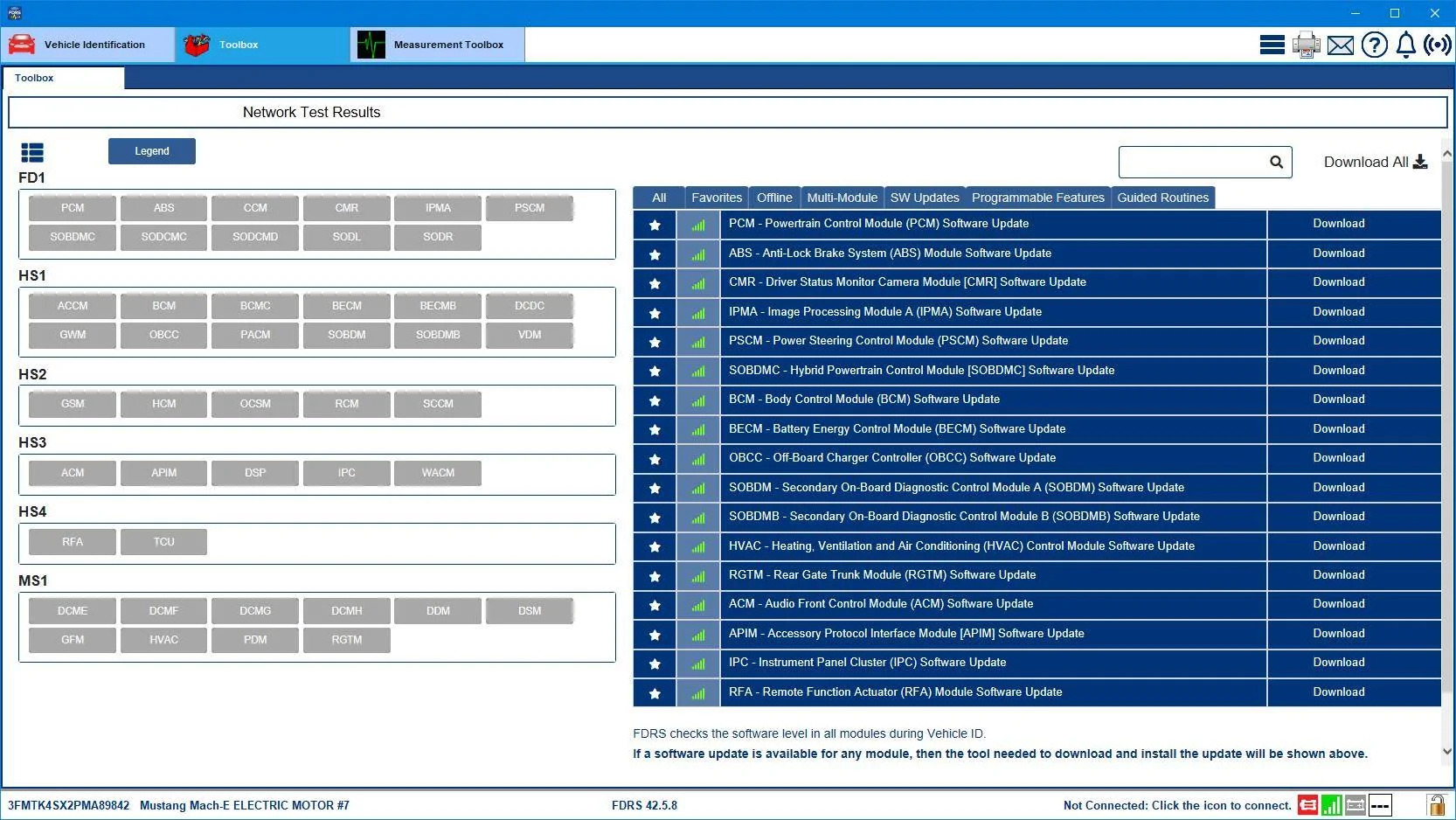
The update that didn't complete was the APIM (Sync) update "23-PU1103-NAT-VCE" and the interesting thing here is it's causing your car to tell the cloud that you don't have a schedule set to perform updates. I'm sure that's not intentional on your part. So the concern you would express to the BEV team (800-392-3673) to open a case would be that you are unable to set a schedule because an OTA that didn't completely download due to a "Release notes transfer error" is causing the issue. You can request that they get in contact with your servicing dealer to update that APIM module using FDRS using the warranty labor code for an OTA failure.

Here's the list of all the available software for your VIN showing in FDRS at present:
Ford Mustang Mach-E Post here if you have an active FDRS account and are willing to look up info for others 3FMTK4SX2PMA89842-13-Nov-24


Oh, and one final note. That same APIM OTA has failed five times, with the first failure happening on the 19th of September.
 
Last edited:

Mike G

Well-Known Member
First Name
Mike
Joined
Mar 27, 2022
Threads
25
Messages
6,458
Reaction score
5,298
Location
N. AL, USA
Vehicles
'23(J1) Mach-E GT-PE, '22 F-150 Lightning, '24 Bronco HLE 2Dr
Country flag
Hi,

I got a failed frunk update. Actually, it tried to install it 4 times and two times said it failed because of another process and two times said it succeeded. Went to the dealer anyway because they promised to install all the updates when they sold me the car and they said the frunk update was successful, but another update was causing the failed message.

Long story short, they said all the available updates were applied but I still get the frunk update failed status in the Software Updates menu in SYNC.

Can you please check if they really did all the updates?

WFOTK3SUINMA00758

Thanks
Ignore what the Sync Check Updates screen is telling you. Both the BCM and GFM did in fact update as OTAs, but at separate times instead of together as a set.

Regardless, your car is as up-to-date as Ford will allow at this moment, you have no available software updates to apply using FDRS and no OTAs in the queue.
 

deme

Member
First Name
Bogdan
Joined
Oct 17, 2024
Threads
3
Messages
22
Reaction score
5
Location
:FZiDUDH5ep4jJN
Vehicles
2022 Mach-E Extended AWD
Ignore what the Sync Check Updates screen is telling you. Both the BCM and GFM did in fact update as OTAs, but at separate times instead of together as a set.

Regardless, your car is as up-to-date as Ford will allow at this moment, you have no available software updates to apply using FDRS and no OTAs in the queue.
Thanks a lot Mike


id10tfr33

Member
First Name
bill
Joined
Nov 12, 2024
Threads
0
Messages
6
Reaction score
3
Location
jacksonville fl
Vehicles
2023 GTPE
Occupation
security analyst
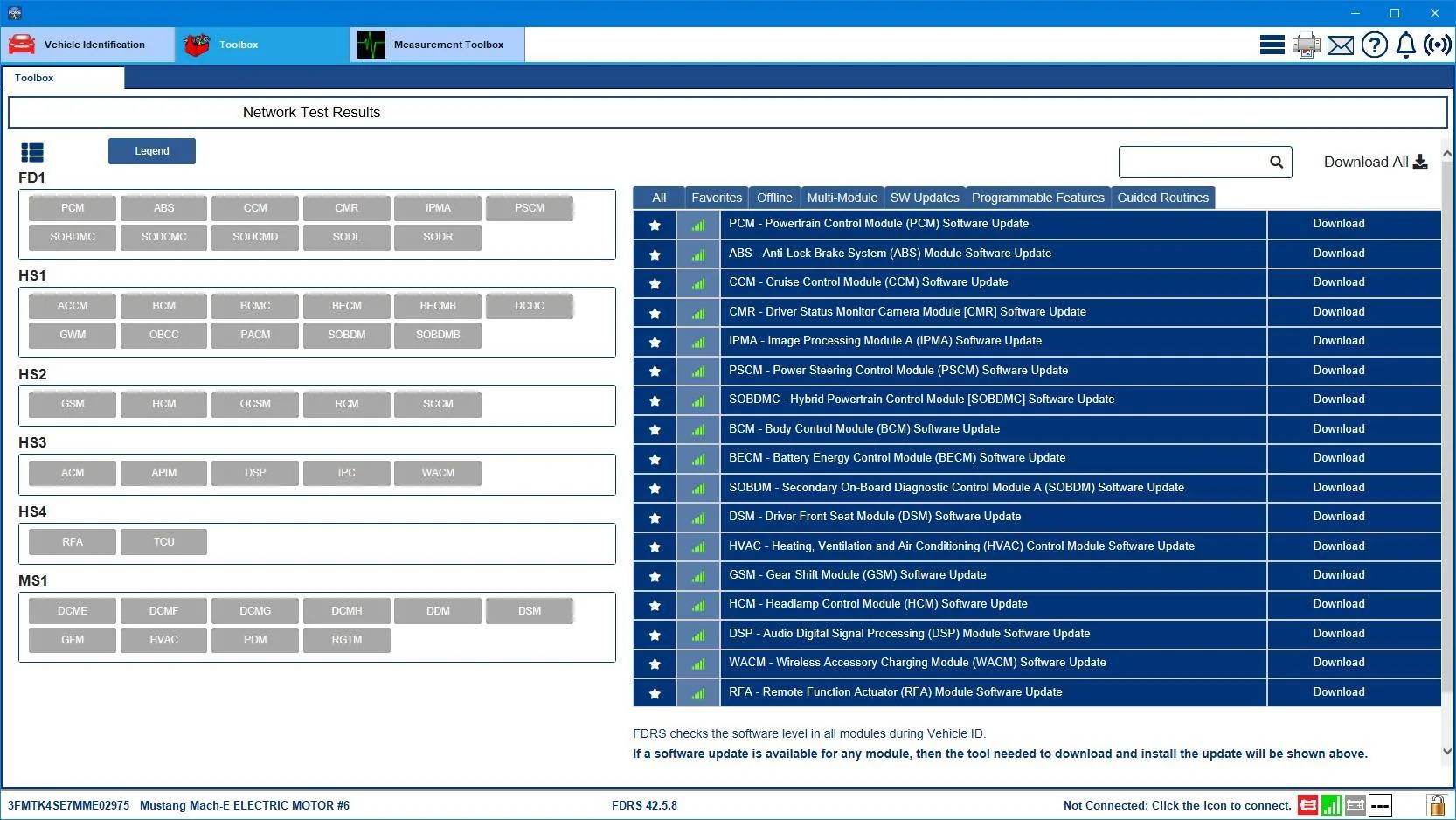
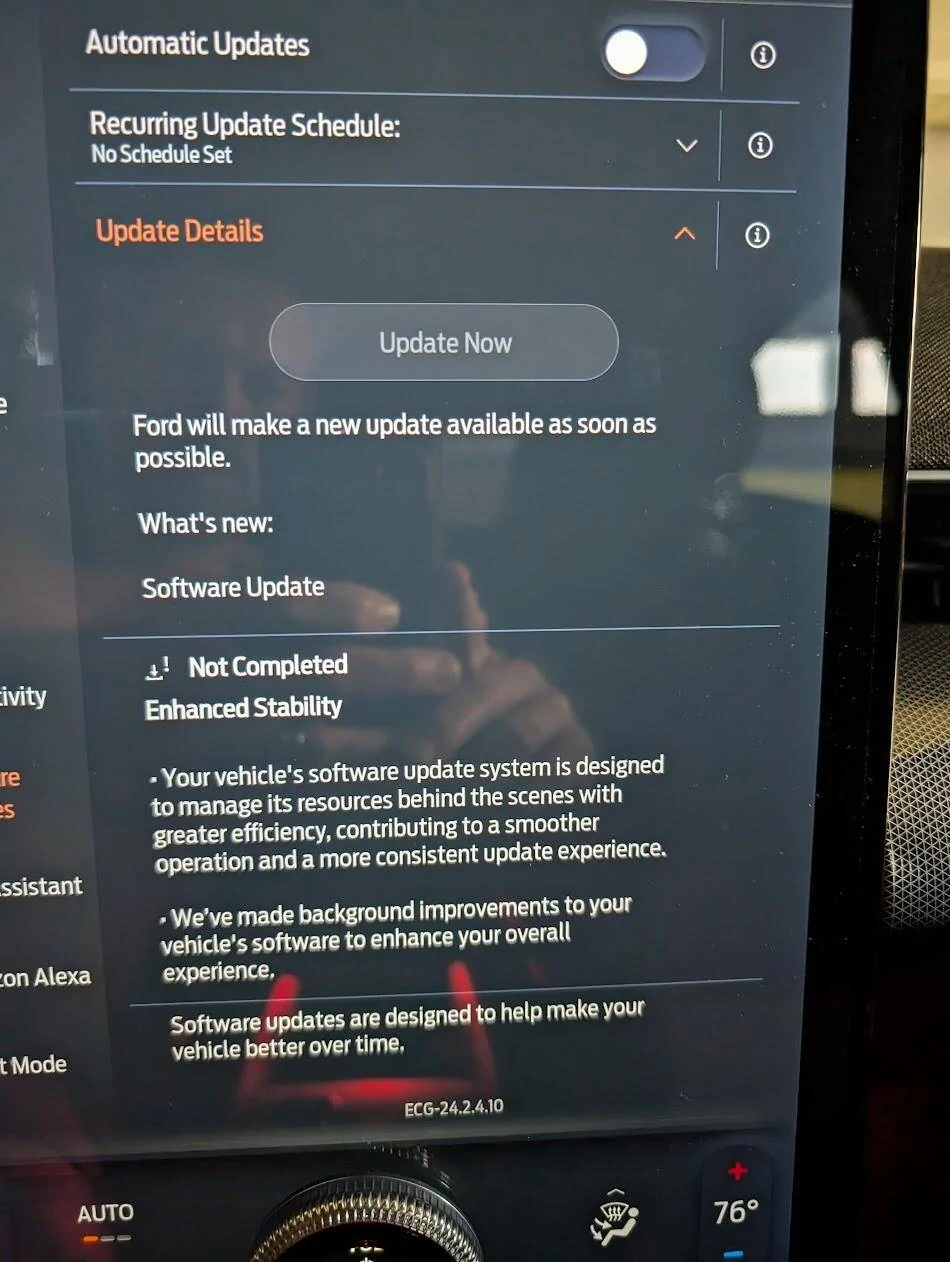
for more context
Ford Mustang Mach-E Post here if you have an active FDRS account and are willing to look up info for others 1731459809248-8h

Anything is possible with OTAs.

The update that didn't complete was the APIM (Sync) update "23-PU1103-NAT-VCE" and the interesting thing here is it's causing your car to tell the cloud that you don't have a schedule set to perform updates. I'm sure that's not intentional on your part. So the concern you would express to the BEV team (800-392-3673) to open a case would be that you are unable to set a schedule because an OTA that didn't completely download due to a "Release notes transfer error" is causing the issue. You can request that they get in contact with your servicing dealer to update that APIM module using FDRS using the warranty labor code for an OTA failure.

Here's the list of all the available software for your VIN showing in FDRS at present:
3FMTK4SX2PMA89842-13-Nov-24.jpg


Oh, and one final note. That same APIM OTA has failed five times, with the first failure happening on the 19th of September.
You sir are a gentleman and a scholar. Thank you for this!
 

Reicher89

Well-Known Member
Joined
Sep 15, 2024
Threads
6
Messages
46
Reaction score
81
Location
Alberta, Canada
Vehicles
2023 MME CR1 (Star White), 2024 F-150 XLT 2.7L SCrew 5.5 BAP 18" (Oxford White)
Occupation
Engineer
Country flag
I'm stuck on 6.3.0 being downloaded but never applied/installed. I'm wondering if I can find out what's going on. My VIN is 3FMTK2SU8PMA47346. Thank you so much if anyone is able to look my details up.
 

Mike G

Well-Known Member
First Name
Mike
Joined
Mar 27, 2022
Threads
25
Messages
6,458
Reaction score
5,298
Location
N. AL, USA
Vehicles
'23(J1) Mach-E GT-PE, '22 F-150 Lightning, '24 Bronco HLE 2Dr
Country flag
I'm stuck on 6.3.0 being downloaded but never applied/installed. I'm wondering if I can find out what's going on. My VIN is 3FMTK2SU8PMA47346. Thank you so much if anyone is able to look my details up.
According to what I'm seeing, the OTA 6.3.0 update (for the TCU module) failed because the clock ran out....and according to the connected vehicle OTA dashboard, you have automatic updates turned off, whether that was intentional or not, that's what it shows.

So the update 'trigger' was created on the 25th of Oct, and it expired on the 5th of Nov when the clock ran out.
 

Vgkfan

Well-Known Member
First Name
Keith
Joined
Jul 7, 2022
Threads
4
Messages
400
Reaction score
272
Location
Nevada
Vehicles
2022 mme premium ER AWD 2016 Kia, 2003 Honda
Country flag
for more context
1731459809248-8h.jpg


You sir are a gentleman and a scholar. Thank you for this!
I have the exact same screen showing. I turned automatic updates back on and set recurring update schedule to everyday at 1 a m. I did that 3 weeks ago or so but no change yet.
 

id10tfr33

Member
First Name
bill
Joined
Nov 12, 2024
Threads
0
Messages
6
Reaction score
3
Location
jacksonville fl
Vehicles
2023 GTPE
Occupation
security analyst
I have the exact same screen showing. I turned automatic updates back on and set recurring update schedule to everyday at 1 a m. I did that 3 weeks ago or so but no change yet.
Spoke with BEV for 48 mins and they walked me through resetting all except factory reset. Was then able to enable automatic updates and set scheduled updates. Skip to a few hours later and it has all reverted back. Looks like I will be taking the car to the dealership for something that should be able to be done remotely.
Additionally Automatic updates and Scheduled updates are not the same and all this time I thought setting scheduled to none would help to advance automatic updates. Turns out None means you get None. Not for us to understand I suppose.
Good luck with yours but suspect you are in the same boat.
 

Vgkfan

Well-Known Member
First Name
Keith
Joined
Jul 7, 2022
Threads
4
Messages
400
Reaction score
272
Location
Nevada
Vehicles
2022 mme premium ER AWD 2016 Kia, 2003 Honda
Country flag
Spoke with BEV for 48 mins and they walked me through resetting all except factory reset. Was then able to enable automatic updates and set scheduled updates. Skip to a few hours later and it has all reverted back. Looks like I will be taking the car to the dealership for something that should be able to be done remotely.
Additionally Automatic updates and Scheduled updates are not the same and all this time I thought setting scheduled to none would help to advance automatic updates. Turns out None means you get None. Not for us to understand I suppose.
Good luck with yours but suspect you are in the same boat.
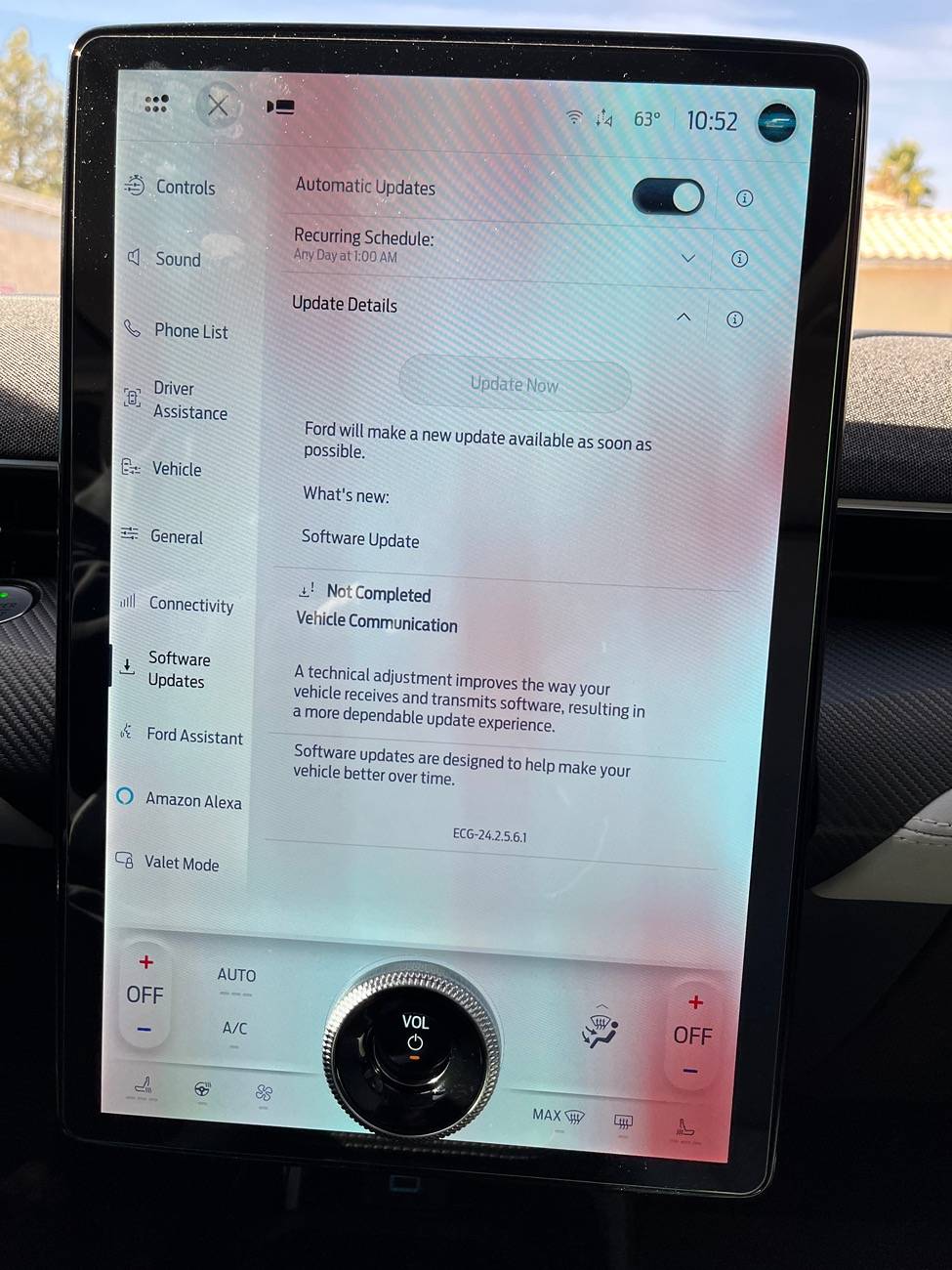
Thanks so much for updating me, and my apolologies. My update is actually a slightly different one. I discovered it when I went out to see if my auto update and recurring schedule were still on, and they were. Then noticed the difference. Ive been hoping the update would come through after getting the updates turned back on, but beginning to wonder now.

Ford Mustang Mach-E Post here if you have an active FDRS account and are willing to look up info for others IMG_2723
 

id10tfr33

Member
First Name
bill
Joined
Nov 12, 2024
Threads
0
Messages
6
Reaction score
3
Location
jacksonville fl
Vehicles
2023 GTPE
Occupation
security analyst
Apparently it won't update while charging, lights have to b set to off, not auto, and the parking brake has to b on? Sounds like BS but what do I know.
 

HuntingPudel

Well-Known Member
First Name
Steve
Joined
Mar 23, 2021
Threads
88
Messages
12,947
Reaction score
17,394
Location
Bay Area, CA
Vehicles
2024 MME GT with Performance Upgrade, 1979 Fire-Am, 1972 K/5 Blazer
Occupation
Engineering
Country flag
Apparently it won't update while charging, lights have to b set to off, not auto, and the parking brake has to b on? Sounds like BS but what do I know.
Well, headlight switch set to OFF is a fallacy. Mine only got set to off for short periods in order to clear the bug in the switch, then set back to Auto. I have also gotten OTA updates while on L2. Parking brake? Dunno since I always set it on my driveway. ?‍♂?
 

Vgkfan

Well-Known Member
First Name
Keith
Joined
Jul 7, 2022
Threads
4
Messages
400
Reaction score
272
Location
Nevada
Vehicles
2022 mme premium ER AWD 2016 Kia, 2003 Honda
Country flag
Apparently it won't update while charging, lights have to b set to off, not auto, and the parking brake has to b on? Sounds like BS but what do I know.
Ok, thanks. I almost never charge at night, I think the parking brake automatically engages when off, though will double check. Lights are definitely on auto so will change that. Thanks again for all the info, good luck with the dealership.
Just saw huntingpudels post after I posted this. I always got updates with lights on auto, but maybe this update is a little different? Guess we will find out eventually.
 

Reicher89

Well-Known Member
Joined
Sep 15, 2024
Threads
6
Messages
46
Reaction score
81
Location
Alberta, Canada
Vehicles
2023 MME CR1 (Star White), 2024 F-150 XLT 2.7L SCrew 5.5 BAP 18" (Oxford White)
Occupation
Engineer
Country flag
According to what I'm seeing, the OTA 6.3.0 update (for the TCU module) failed because the clock ran out....and according to the connected vehicle OTA dashboard, you have automatic updates turned off, whether that was intentional or not, that's what it shows.

So the update 'trigger' was created on the 25th of Oct, and it expired on the 5th of Nov when the clock ran out.
Thank you Mike! Is there any reason why the clock would run out? In the past I've had automatic updates off and just accepted them as they came in without failure. How do I get another trigger?

Very thankful for any more information you may have.
Sponsored


Top