Need help to understand and use FORScan

kamorela

Well-Known Member
First Name
Kelly
Joined
Nov 24, 2024
Threads
28
Messages
342
Reaction score
458
Location
Beaverton, Oregon
Vehicles
2024 Ford Mustang Mach-e Premium AWD ER
Occupation
Sr. Aerospace Quality Engineer, Retired
Based on the many posts I’ve read involving the use of FORScan in diagnosing vehicle operational characteristics, I did some research and purchased an OBDLinkEX adapter. I thought it would be prudent to have the means to see and understand any issues my lovely monster was undergoing. So I’ve downloaded the Windows version of FORScan (v2.3.64) to my laptop and just now plugged into my 2024 Job 1 AWD EX and played around a bit. I learned 3 things:
  • There were several codes (I think)
  • I have absolutely no idea what I’m seeing or doing (I was hoping it would be more intuitive), and
  • There are scant few tutorials to teach idiots like me (i.e. complete beginners) how to use the software, and most of those assume the user already has basic knowledge of the product
All I want is to be able to monitor and diagnose DTC’s but, my Gawd, it takes a lot of know-how to navigate and understand the information FORScan is throwing at me in FORScan-speak, which I don’t speak (yet).

Is there such a thing as a REALLY BASIC tutorial, I mean starting from scratch, on how to use the functions in FORScan and what they mean?

For fun, I’ve attached one screenshot that looks important (in my mind) as an example of what I have no idea of what it’s telling me. HELP?

Ford Mustang Mach-E Need help to understand and use FORScan DTCs
Sponsored


AliRafiee

Well-Known Member
First Name
Ali
Joined
Jan 20, 2023
Threads
103
Messages
3,267
Reaction score
4,192
Location
Seattle WA
Vehicles
2022 Mach E GT - Grabber Blue
Occupation
Software Eng.
Country flag
Forscan is good for making changes to the car’s software. Like:


To monitor things download a car scanner app on you phone.
 

AliRafiee

Well-Known Member
First Name
Ali
Joined
Jan 20, 2023
Threads
103
Messages
3,267
Reaction score
4,192
Location
Seattle WA
Vehicles
2022 Mach E GT - Grabber Blue
Occupation
Software Eng.
Country flag
I have this one. It also works on CarPlay if you’re an apple guy.
One cool thing on the CarPlay version is that it has a performance tab to measure some runs. ?

https://apps.apple.com/us/app/car-scanner-elm-obd2/id1259933623

If your car has codes, you can tap on the downloaded codes to get more info about them.
 
OP
OP
kamorela

kamorela

Well-Known Member
First Name
Kelly
Joined
Nov 24, 2024
Threads
28
Messages
342
Reaction score
458
Location
Beaverton, Oregon
Vehicles
2024 Ford Mustang Mach-e Premium AWD ER
Occupation
Sr. Aerospace Quality Engineer, Retired


GreaseMonkey

Well-Known Member
First Name
Steve
Joined
Oct 3, 2021
Threads
21
Messages
3,276
Reaction score
5,260
Location
Chicago, IL
Vehicles
24 Mach-E GT
Country flag
Yeah, Forscan is too advanced for me and I have no interest in changing settings on my vehicle. I even find carscan not user friendly. You have to filter through a lot of clutter to get to the useful bits.
 

JJR

Well-Known Member
First Name
James
Joined
May 3, 2022
Threads
29
Messages
218
Reaction score
66
Location
Colorado
Vehicles
2022 Mach-e Premium
Occupation
Artist
Country flag
Forscan is good for making changes to the car’s software. Like:


To monitor things download a car scanner app on you phone.
I have used Forscan to disable the double honk when leaving the cabin and to activate the automatic liftgate.
I also used it to diagnose a problem with my F150 that turned out to be a faulty rear wheel sensor and saved me a bunch of money.
I’m a computer technician so it wasn’t difficult.
If you are not familiar with internal computer functions or hexadecimal you should probably stay away from changing computer code.
 

Sherpadave

Member
First Name
Dave
Joined
Oct 27, 2024
Threads
2
Messages
20
Reaction score
27
Location
Winthrop, WA
Vehicles
2001 Mustang Mach E Premium
Occupation
Retired
I'm not an IT expert. I just need to take my MME to the "Geek Squad" an have them fix it.
 

Mike G

Well-Known Member
First Name
Mike
Joined
Mar 27, 2022
Threads
25
Messages
6,458
Reaction score
5,298
Location
N. AL, USA
Vehicles
'23(J1) Mach-E GT-PE, '22 F-150 Lightning, '24 Bronco HLE 2Dr
Country flag
Based on the many posts I’ve read involving the use of FORScan in diagnosing vehicle operational characteristics, I did some research and purchased an OBDLinkEX adapter. I thought it would be prudent to have the means to see and understand any issues my lovely monster was undergoing. So I’ve downloaded the Windows version of FORScan (v2.3.64) to my laptop and just now plugged into my 2024 Job 1 AWD EX and played around a bit. I learned 3 things:
  • There were several codes (I think)
  • I have absolutely no idea what I’m seeing or doing (I was hoping it would be more intuitive), and
  • There are scant few tutorials to teach idiots like me (i.e. complete beginners) how to use the software, and most of those assume the user already has basic knowledge of the product
All I want is to be able to monitor and diagnose DTC’s but, my Gawd, it takes a lot of know-how to navigate and understand the information FORScan is throwing at me in FORScan-speak, which I don’t speak (yet).

Is there such a thing as a REALLY BASIC tutorial, I mean starting from scratch, on how to use the functions in FORScan and what they mean?

For fun, I’ve attached one screenshot that looks important (in my mind) as an example of what I have no idea of what it’s telling me. HELP?
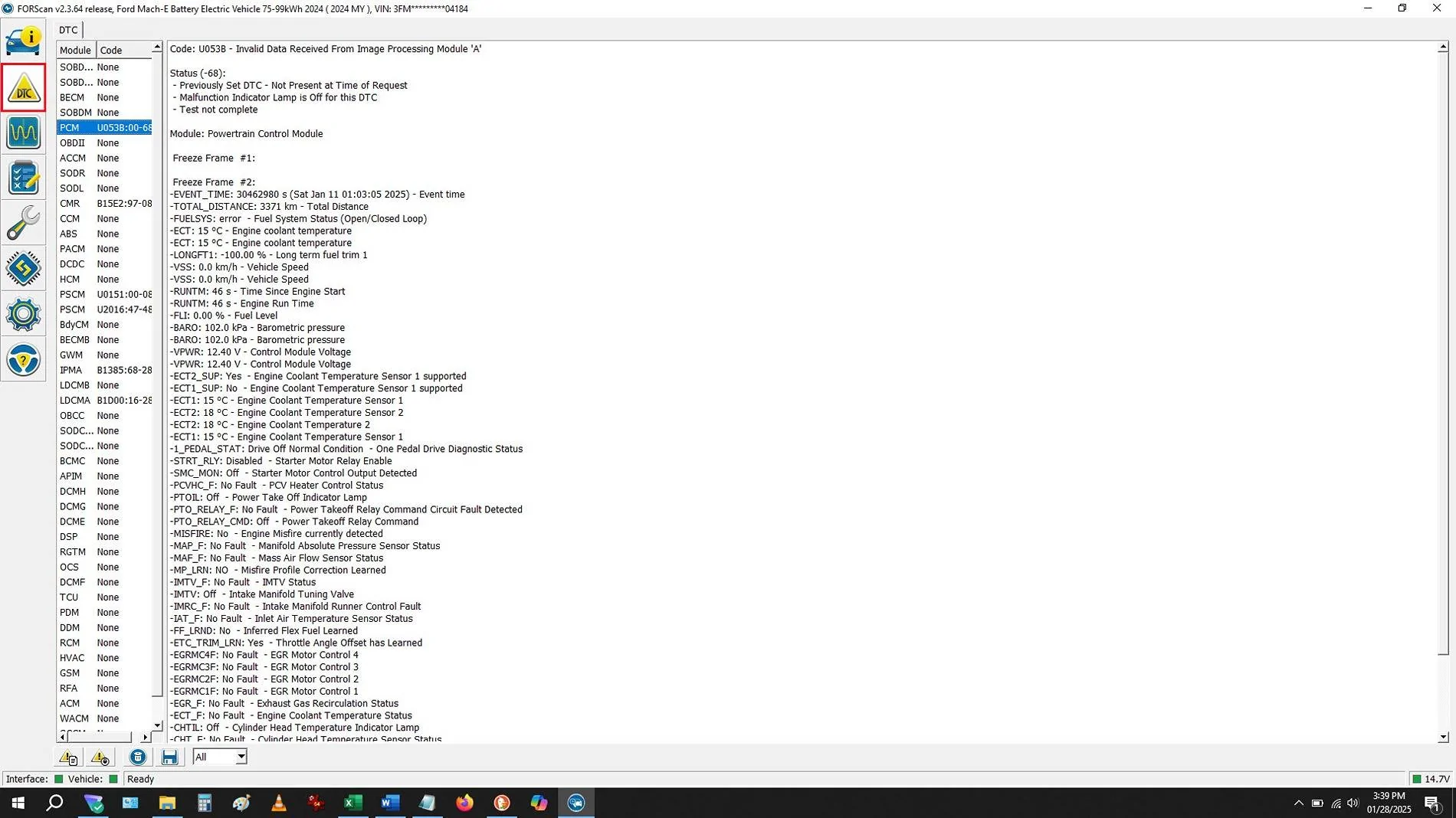
DTCs.webp
Most of us started this way...
Ford Mustang Mach-E Need help to understand and use FORScan Emmm_YouTube
 

Teslaeata

Well-Known Member
First Name
Mark
Joined
Sep 28, 2022
Threads
9
Messages
3,470
Reaction score
4,210
Location
Nottingham, England, UK
Vehicles
Red June ‘21 RWD ER Premium MME
Occupation
Forensic vehicle examiner, motor insurance assessor, expert witness
Country flag
Based on the many posts I’ve read involving the use of FORScan in diagnosing vehicle operational characteristics, I did some research and purchased an OBDLinkEX adapter. I thought it would be prudent to have the means to see and understand any issues my lovely monster was undergoing. So I’ve downloaded the Windows version of FORScan (v2.3.64) to my laptop and just now plugged into my 2024 Job 1 AWD EX and played around a bit. I learned 3 things:
  • There were several codes (I think)
  • I have absolutely no idea what I’m seeing or doing (I was hoping it would be more intuitive), and
  • There are scant few tutorials to teach idiots like me (i.e. complete beginners) how to use the software, and most of those assume the user already has basic knowledge of the product
All I want is to be able to monitor and diagnose DTC’s but, my Gawd, it takes a lot of know-how to navigate and understand the information FORScan is throwing at me in FORScan-speak, which I don’t speak (yet).

Is there such a thing as a REALLY BASIC tutorial, I mean starting from scratch, on how to use the functions in FORScan and what they mean?

For fun, I’ve attached one screenshot that looks important (in my mind) as an example of what I have no idea of what it’s telling me. HELP?

DTCs.webp
DTCs are not that simple.

You need to know why they are there, what they mean, the presence of DTCs mean nothing without guided diagnostic work to discover precisely what part actually had failed if the DTC actually relates to a fault.

Example: VW Fox goes into limp mode because of unexpected signals relating to ABS module.

Solution - replace right rear brake light bulb……..really!

ABS module gets its signal that the driver is using his brake from a complete right rear brake light circuit, when the bulb fails, and after a number of brake applications, seem to remember 150, car goes into limp mode!

So, much research needed when a DTC is set to see what it means, then an understanding of whether it’s a current DTC or one that was set due to a non fault condition but is being monitored by the car for a number of drive cycles checking if it’s a genuine fault or just a one-off hiccup.

I wouldn’t go searching for DTCs, you’ll just end up fapping over stuff that’s just not problematic.

For instance, I always have sporadic DTCs for camera, DC/DC converter and one or two other systems from time to time which I know are not faulting.

I’d only use FORSCAN which I also bought if you really know what you’re doing; you could really screw things up.

I used mine only to re program one line in the puddle lights programming when I bought my dynamic running pony puddle lights.

I would, if I were you, invest in a decent Bluetooth OBD dongle such as OBDLinx MX+ and download something like Car Scanner app in which you can monitor all sorts of conditions such as HVB SoH and look at your DTCs if that’s going to become your fetish.

If you use it on other cars, though, don’t do what I do and leave the thing plugged in and leave it there, I use it for my work and buy 4 or 5 a year because where I leave them are hostile to my work and would never just pop them in the post back to me?
 
OP
OP
kamorela

kamorela

Well-Known Member
First Name
Kelly
Joined
Nov 24, 2024
Threads
28
Messages
342
Reaction score
458
Location
Beaverton, Oregon
Vehicles
2024 Ford Mustang Mach-e Premium AWD ER
Occupation
Sr. Aerospace Quality Engineer, Retired
I have used Forscan to disable the double honk when leaving the cabin and to activate the automatic liftgate.
I also used it to diagnose a problem with my F150 that turned out to be a faulty rear wheel sensor and saved me a bunch of money.
I’m a computer technician so it wasn’t difficult.
If you are not familiar with internal computer functions or hexadecimal you should probably stay away from changing computer code.
My understanding, which is admittedly spotty, is that the ability to 'do' something through FORScan, i.e. change parameters, requires a license which I'm not going to do for the reason you've described. But thanks for the advice anyway.
 
OP
OP
kamorela

kamorela

Well-Known Member
First Name
Kelly
Joined
Nov 24, 2024
Threads
28
Messages
342
Reaction score
458
Location
Beaverton, Oregon
Vehicles
2024 Ford Mustang Mach-e Premium AWD ER
Occupation
Sr. Aerospace Quality Engineer, Retired
Most of us started this way...
Emmm_YouTube.jpg
Well, yeah, I did too. But none of the 'how-to' videos I viewed was a start-from-scratch tutorial. That's what I need. I couldn't find one that begins at the beginning and explains things step-by-step, like FORScan for idiots: "This icon here means this thing, so what it does is show you blah blah, which gives you the knowledge to etc etc. Then this other icon here does this thingy that shows you whatnot and wherefore..." I might try the Android version of CarScanner, maybe it's easier?
 

Teslaeata

Well-Known Member
First Name
Mark
Joined
Sep 28, 2022
Threads
9
Messages
3,470
Reaction score
4,210
Location
Nottingham, England, UK
Vehicles
Red June ‘21 RWD ER Premium MME
Occupation
Forensic vehicle examiner, motor insurance assessor, expert witness
Country flag
My understanding, which is admittedly spotty, is that the ability to 'do' something through FORScan, i.e. change parameters, requires a license which I'm not going to do for the reason you've described. But thanks for the advice anyway.
I bought the licence because I really wanted these, I must be a vacuously minded numpty?

Sponsored


Top