Mach-Lee

Well-Known Member
First Name
Lee
Joined
Jul 16, 2021
Threads
262
Messages
11,349
Reaction score
24,973
Location
Wisconsin
Vehicles
2022 Mach-E Premium AWD
Occupation
Sci/Eng
Country flag
Update. Called BEV team. This rep told me different things than the first one. Apparently I have 3.5.2 queued up (for who knows how long) and if it doesn’t show up “soon” I need to go to the dealer.
Explains why the procedure this morning didn’t work.
If you have an OTA queued up then you'd want to go drive the vehicle for 30 minutes in an AT&T coverage area, park, check for updates, and apply/go inside right afterwards.
Sponsored


DustyShades

Well-Known Member
Joined
Oct 11, 2022
Threads
0
Messages
201
Reaction score
400
Location
Seattle
Vehicles
2021 Premium AWD Ex Infinite Blue
Country flag
Ford support is telling people to key cycle 10 times??? Holy shit…. Just think about the UX even a little bit and build a “check for update” button on the software version screen. It makes zero sense this doesn’t exist especially given the fact that we know now the car actually can check the servers itself and request an update. Wtf are they thinking?
 

Jax_GT

Well-Known Member
Joined
Jun 10, 2022
Threads
4
Messages
467
Reaction score
337
Location
AZ
Vehicles
2022 Mach-E GT (Build in progress)
Country flag
If you have an OTA queued up then you'd want to go drive the vehicle for 30 minutes in an AT&T coverage area, park, check for updates, and apply/go inside right afterwards.
Should I park in my driveway to stay off Wi-Fi or park in garage? I’d assume either is fine.
I’ve been told 80%+ is preferred too so here’s my plan.

1. Currently charging to 95-100%.
2. Drive 30+ minutes
3. Park
4. With the car still on, navigate to software update and check for updates.
5a. If found, hit apply.
5b. If “up to date” just turn off, lock, and go inside for the night.
6. hopefully have an updated car
 

Mach-Lee

Well-Known Member
First Name
Lee
Joined
Jul 16, 2021
Threads
262
Messages
11,349
Reaction score
24,973
Location
Wisconsin
Vehicles
2022 Mach-E Premium AWD
Occupation
Sci/Eng
Country flag
Should I park in my driveway to stay off Wi-Fi or park in garage? I’d assume either is fine.
I’ve been told 80%+ is preferred too so here’s my plan.

1. Currently charging to 95-100%.
2. Drive 30+ minutes
3. Park
4. With the car still on, navigate to software update and check for updates.
5a. If found, hit apply.
5b. If “up to date” just turn off, lock, and go inside for the night.
6. hopefully have an updated car
Looks good. You don't need to charge to 100% through, driving at any % is fine.
 

MustangAmy

Well-Known Member
First Name
Amy
Joined
Oct 11, 2022
Threads
0
Messages
84
Reaction score
75
Location
Ohio
Vehicles
Grabber Blue 2022 GT
Country flag
Looks good. You don't need to charge to 100% through, driving at any % is fine.
Do you actually have to drive it for 30 min or can it sit turned on in my garage? Does it need to NOT be connected to wi-fi?

Somewhat related, exactly how do you figure out what "power-up" or update you are on and/or if you haven't gotten one. I thought i was 4.1.1, but after reading these threads, I'm not so sure.

Also, I tried the starting 10x thing last night. No dice. There was a brief moment on one restart where it looked like something might be updating, but then the screen popped up with the same version of everything .

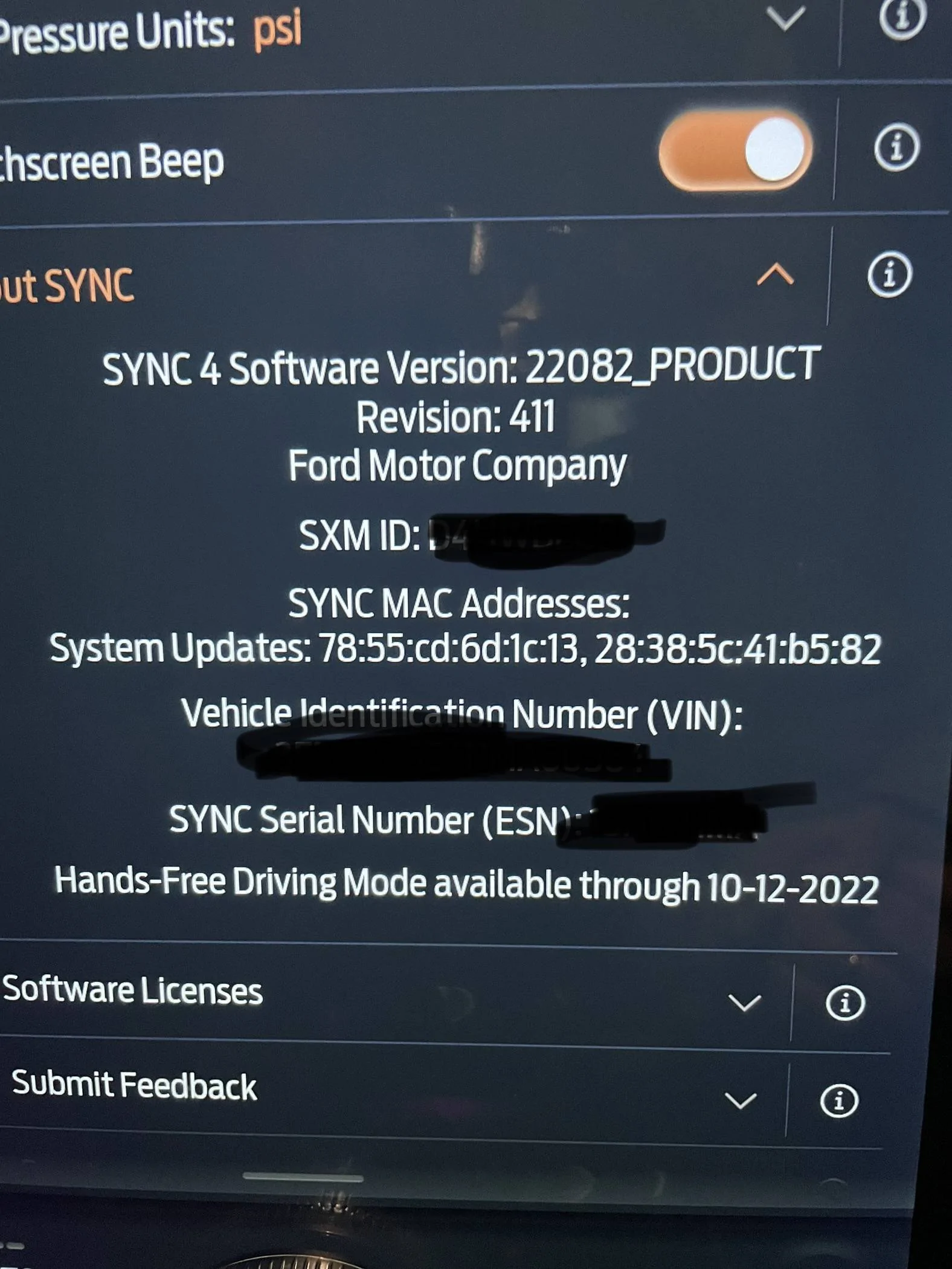
Ford Mustang Mach-E BlueCruise Map Update: Possible Solution That Worked! (Procedure Per Ford Support) IMG_9539


Mach-Lee

Well-Known Member
First Name
Lee
Joined
Jul 16, 2021
Threads
262
Messages
11,349
Reaction score
24,973
Location
Wisconsin
Vehicles
2022 Mach-E Premium AWD
Occupation
Sci/Eng
Country flag
Do you actually have to drive it for 30 min or can it sit turned on in my garage? Does it need to NOT be connected to wi-fi?

Somewhat related, exactly how do you figure out what "power-up" or update you are on and/or if you haven't gotten one. I thought i was 4.1.1, but after reading these threads, I'm not so sure.

Also, I tried the starting 10x thing last night. No dice. There was a brief moment on one restart where it looked like something might be updating, but then the screen popped up with the same version of everything .

IMG_9539.jpg
Yes you need to drive it >10 mph. It will not check for updates while parked!
 

MustangAmy

Well-Known Member
First Name
Amy
Joined
Oct 11, 2022
Threads
0
Messages
84
Reaction score
75
Location
Ohio
Vehicles
Grabber Blue 2022 GT
Country flag
Yes you need to drive it >10 mph. It will not check for updates while parked!
Ugh. I rarely drive 30 min at a time. Most of my drives are 20 min or less. I'm not sure I've actually driven it for a solid 30 minutes since I got it last week. I drove 25 minutes one day and then sat in my garage until it hit 30 min. I'm on a run of night shifts, so going out for a random 30 minute drive does not excite me.

Thanks for the answer.
 

Mach-Lee

Well-Known Member
First Name
Lee
Joined
Jul 16, 2021
Threads
262
Messages
11,349
Reaction score
24,973
Location
Wisconsin
Vehicles
2022 Mach-E Premium AWD
Occupation
Sci/Eng
Country flag
Ugh. I rarely drive 30 min at a time. Most of my drives are 20 min or less. I'm not sure I've actually driven it for a solid 30 minutes since I got it last week. I drove 25 minutes one day and then sat in my garage until it hit 30 min. I'm on a run of night shifts, so going out for a random 30 minute drive does not excite me.

Thanks for the answer.
No wonder you don't get OTAs, ha. Repeated short trips drain the 12V battery and will cause OTAs to fail. Vehicles that are never driven or charged for 1 hour or longer at a time will almost never attain a fully charged 12V battery, so a longer drive may be required to get an OTA completed.

If the OTA fails you should send me your VIN so I can see why.
 

MustangAmy

Well-Known Member
First Name
Amy
Joined
Oct 11, 2022
Threads
0
Messages
84
Reaction score
75
Location
Ohio
Vehicles
Grabber Blue 2022 GT
Country flag
Maybe I’ll try and leave early for work tonight to get at least 30 of drive time in. I have charged it for more than an hour several times. I’m charging at less than 30 amps, so it take it a while.

Thanks for the help!
 

kgautam28

Well-Known Member
Joined
Oct 22, 2020
Threads
19
Messages
219
Reaction score
433
Location
98036
Vehicles
Eco boost 2016, 2021 Mach e FE, 2022 Mach E GT PE
Occupation
Software
Country flag
Nah ya all fishing around.


Connected services, if you logged in before yesterday you'd see no expiry date there for any of the services including navigation, Alexa or blue cruise.

That has now been extended, and that's why all of our cars once again have blue Cruise
 
OP
OP
DadzBoyz

DadzBoyz

Well-Known Member
First Name
Dan
Joined
Jun 6, 2022
Threads
53
Messages
743
Reaction score
807
Location
Oldsmar, FL
Vehicles
22 Mustang Mach-E GTPE (ordered), 20 Mazda CX-5
Occupation
Software Systems Integrator
Country flag
How long did it take to show the update after you did this? I just spent some time this morning doing this with no luck (yet). After 10th (and 11th to be sure) I’m still showing Sept 10, 2022. Maybe I need to give it time. I’ll check back in a bit.
The update showed immediately.
They did say that the car had to have at least software update 3.5.2 to update the maps.
 

SuperRob

Well-Known Member
First Name
Rob
Joined
Nov 6, 2021
Threads
5
Messages
240
Reaction score
436
Location
Mill Creek, WA
Vehicles
2022 Space White Premium Ext AWD
Country flag
My car seems to have gotten 3.5.2 recently. Not sure exactly when, but I was positive I couldn't see any PowerUp version on the car when I first got it, and now I do. Might have only been a couple days ago.

I am sure we've done at least 10 ignition cycles since then and still haven't convinced the maps to download. Unfortunately, I'm going to be gone on business for a couple weeks, but maybe my wife driving it around will convince it to grab them.
 

NJDevFan30

Well-Known Member
Joined
Mar 12, 2021
Threads
3
Messages
109
Reaction score
205
Location
NJ
Vehicles
'21 MME Premium ER, '19 Highlander Hybrid
Country flag
‘21 J1 Stuck on 3.5.1 (non EA)
Job 1 MME here as well with no working HFBC but my maps do show as functional through April. (Last PU for me was 3.6.2.) Do your maps show as expired or active? HF work for you previously? Curious if my (our) issue is related to everyone else or just coincidental.
 

Steph

Well-Known Member
Joined
Dec 17, 2022
Threads
5
Messages
58
Reaction score
28
Location
Midwest
Vehicles
‘23 MME PREMIUM AWD ER
Country flag
It worked. Never gave me a notice or anything, just found the updated expiration date in the settings. Guess I’ll have to run some kind of errand tomorrow to see if that fixes the hands free issue ?
 

Formanrobs56

Member
First Name
Rob
Joined
Dec 31, 2022
Threads
0
Messages
22
Reaction score
11
Location
Lewes, DE
Vehicles
2023 Mach E GT
Occupation
Semi-retired ( PT bartender and live sound engineer)
Country flag
So, I have called Ford BEV support three times this week.
Background:
Picked up car (bought ordered car) on 12/17/2022. I had asked the dealer to run all software, firmware, module updates before I picked it up. When I sat in it at the dealer, the large main screen said "Update Complete" so I assumed they did as I asked.
Driving home, and since then, BlueCruise "works" but not in hands free mode.
January 4, 2023 I received a notice that I received a Power-Up and I'm now on 3.5.2.... What? 3.5.2 was released back in September.
I check my map expiration date and saw that my Bluecruise maps expired on December 10, 2022.... before I picked up the car.

Anyway, back to Ford BEV support.
Yesterday they told me that they could see that my car was downloading 3.5.3.
Today, no 3.5.3. I called Ford BEV support and they saw that the 3.5.3 install failed. No reason in their system. So, I do the recommended pre-requisites for successful updates (Drive or leave car on 30 minutes, make sure it has WiFi signal, Park it, Turn on Parking Brake). We'll see on that.

On to the BlueCruise map update.
First, they advised that at least version 3.5.2 is required to enable the system to properly check for map updates.
Next.... This is the silliness.
They said that they had luck doing the following:
1. Get in the car.
2. Turn on the car.
3. Turn off the car.
4. Open the door.
5. Lock the doors using the lock button on the door
6. Close the door.
7. Walk away (get keys or phone for PAAK) out of range of the car
8. Wait for the parking and interior lights to turn off
9. Repeat 10 times

Here's the crazier part.
It worked.
My BlueCruise Maps expiration is now March 14, 2023.

I have not driven it yet to try out Hands-Free BlueCruise, but will report when I do.
Sponsored


Top