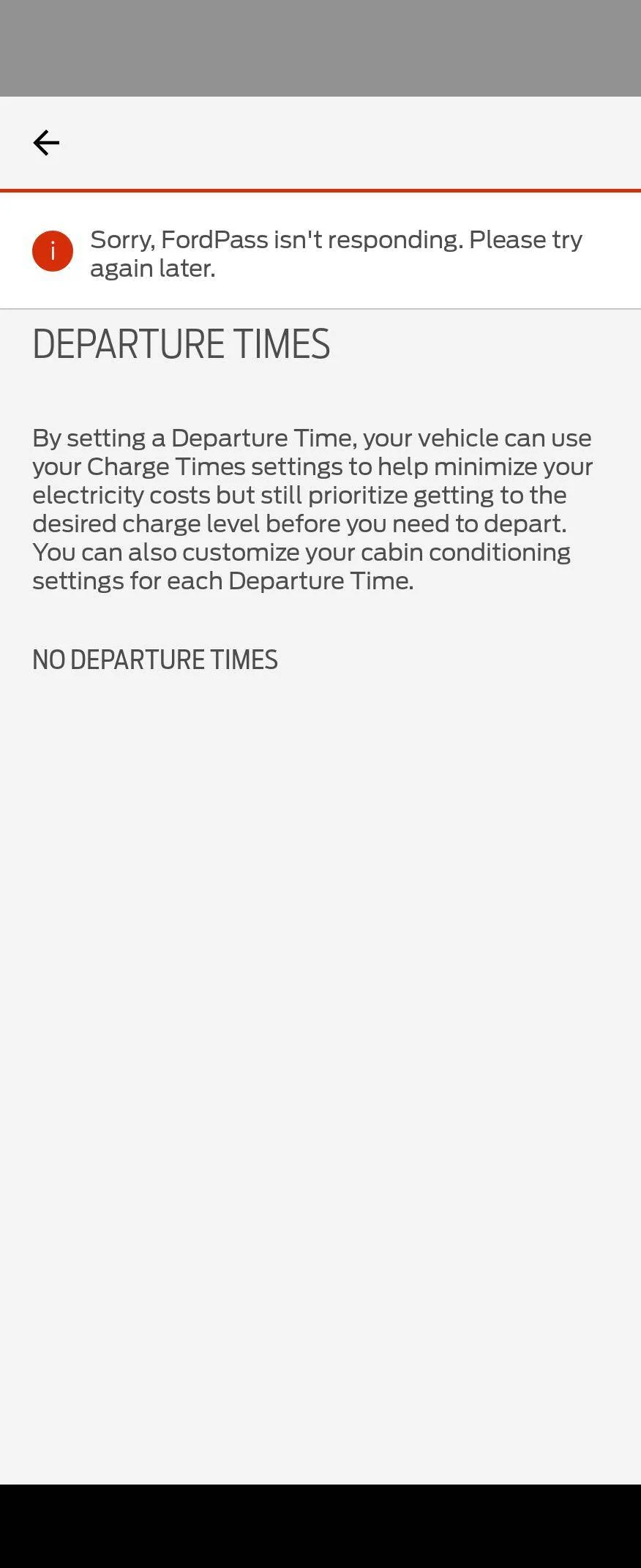
Driver ID -- log in screen only takes numbers?

YeastLyfe

Member
First Name
Lance
Joined
Dec 8, 2021
Threads
3
Messages
18
Reaction score
15
Location
Park Ridge, IL
Vehicles
Red 2021 Mach E Premium
Country flag
We have not tried logging out of the FordPass account. Looks like I can log into the web version just fine. We don't use PAAK.
Sponsored
 
OP
OP
Shayne

Shayne

Well-Known Member
Joined
Aug 9, 2020
Threads
18
Messages
3,824
Reaction score
2,738
Location
Northern Ontario Canada
Vehicles
2021 MME4x Prem
Occupation
Retired
Country flag
We have not tried logging out of the FordPass account. Looks like I can log into the web version just fine. We don't use PAAK.
You have had the driver id log in come up on the big monitor when starting it for the last 10 days?

Understand you have the top row with remote start in ford pass standard mode and have not installed paak. Maybe the the top row goes thru servers if no paak and without them if paak is installed. Different communications? Why paak remote start etc. is still working here ?‍♂ You could set a departure time in the car at the end of each use? Beats cold ;).
 

Mach-Lee

Well-Known Member
First Name
Lee
Joined
Jul 16, 2021
Threads
262
Messages
11,366
Reaction score
25,029
Location
Wisconsin
Vehicles
2022 Mach-E Premium AWD
Occupation
Sci/Eng
Country flag
Did you log out of Fordpass after it happened I have not tried that? Can you log in to your account on a browser at ford.com? I am not sure about remote start still (think I did that once and it works). Unlock lock works on the phone as of a minute ago and it still works as a key here. FP charging, vehicle info/location, departure scheduling and the cars conductivity/privacy options are a no go. You have been getting the driver login ID pop up when starting it for 10 days now and you are still driving it is good to know.
I think it's best to just wait for a fix rather than trying to do a bunch of stuff with your account which won't help. It's an issue with the gateway module configuration on the vehicle, not your account.
 

markboris

Well-Known Member
First Name
Mark
Joined
Nov 13, 2019
Threads
43
Messages
5,745
Reaction score
16,400
Location
Sonora, CA
Vehicles
Currently: '20 Shelby GT500 FPB '24 Mach-E GTP GGM
Occupation
Retired
Country flag
I think it's best to just wait for a fix rather than trying to do a bunch of stuff with your account which won't help. It's an issue with the gateway module configuration on the vehicle, not your account.
If this issue has to do with the gateway module, then maybe that's why I stopped getting the Driver ID login screen on Tuesday because that's the day I updated that module.
 
OP
OP
Shayne

Shayne

Well-Known Member
Joined
Aug 9, 2020
Threads
18
Messages
3,824
Reaction score
2,738
Location
Northern Ontario Canada
Vehicles
2021 MME4x Prem
Occupation
Retired
Country flag
I think it's best to just wait for a fix rather than trying to do a bunch of stuff with your account which won't help. It's an issue with the gateway module configuration on the vehicle, not your account.
As noted in this thread I have not logged out of FP and have not buggered with any of my settings. Just thought they may have and that is why no remote start. Pretty clear it is not a user problem here. From what I understand Ford is trying to get us fixed next week for sure, may be.


Mach-Lee

Well-Known Member
First Name
Lee
Joined
Jul 16, 2021
Threads
262
Messages
11,366
Reaction score
25,029
Location
Wisconsin
Vehicles
2022 Mach-E Premium AWD
Occupation
Sci/Eng
Country flag
If this issue has to do with the gateway module, then maybe that's why I stopped getting the Driver ID login screen on Tuesday because that's the day I updated that module.
Yes, good job Mark, that will probably end up being the fix unless they can do a config update OTA.
 
OP
OP
Shayne

Shayne

Well-Known Member
Joined
Aug 9, 2020
Threads
18
Messages
3,824
Reaction score
2,738
Location
Northern Ontario Canada
Vehicles
2021 MME4x Prem
Occupation
Retired
Country flag
It cannot be done OTA
Can you send me the file so I can load it from a usb drive? I was holding my 10000 mile check up for the first -28C to pass but appears I will have another more pressing reason. I will bug them about TSB 22-2491 also and my departure schedule problems when there.

Should we notify them early next week and let them know what is happening? Can I tell them that the new UI also needs to be also installed for a complete fix? ;)
 

VindictivePantz

Well-Known Member
Joined
Oct 7, 2022
Threads
28
Messages
434
Reaction score
426
Location
Arlen, TX
Vehicles
2021 Mustang MACH-E Premium AWD w/ Ext. Battery
Country flag
I'm not having the login issues. All good on ford.com, the app, PaaK, etc.

Not a fleet vehicle.

Issue with departure time via app (Android) started with 4.23 app update.

I deleted my charging location as well, no luck.

I know I'm not adding anything valuable other than another data point.

As someone said, it's not great timing given the cold hitting the area next week.

Ford Mustang Mach-E Driver ID -- log in screen only takes numbers? 1000000164
 

Johnny B

Well-Known Member
First Name
John
Joined
Jan 14, 2022
Threads
9
Messages
148
Reaction score
178
Location
Chandler, AZ
Vehicles
2021 Mach E Premium RWD 2017Nissan Titan XD Diesel
Occupation
Retired Software Developer
Country flag
As someone said, it's not great timing given the cold hitting the area next week.
Yes also broken for me in FP android. I can still set up Departure Times in the vehicle, and you can always a do a remote start to turn on climate controls if needed.
 
OP
OP
Shayne

Shayne

Well-Known Member
Joined
Aug 9, 2020
Threads
18
Messages
3,824
Reaction score
2,738
Location
Northern Ontario Canada
Vehicles
2021 MME4x Prem
Occupation
Retired
Country flag
I HAD non of those problems. I was able to toggle insurance on and off (mine is always set to off)
Do not remember that two line insurance data sharing in conductivity features before but maybe it was just toggled off. If you can control all the conductivity features, toggle wi-fi projection and toggle all conductivity off you have the fix. ?
Yes also broken for me in FP android. I can still set up Departure Times in the vehicle, and you can always a do a remote start to turn on climate controls if needed.
Setting it in the car has not been working consistently for me either until Fordpass went dark. I would set it in the car, it would show in Fordpass but would not come on. Last 2 time in the car I cleared the schedule then set it back up from scratch and it has worked. Not sure if it was clearing the schedule in the car first or if it was Fordpass not being in touch and not interfering anymore?

Guess we are into service again.
 

markboris

Well-Known Member
First Name
Mark
Joined
Nov 13, 2019
Threads
43
Messages
5,745
Reaction score
16,400
Location
Sonora, CA
Vehicles
Currently: '20 Shelby GT500 FPB '24 Mach-E GTP GGM
Occupation
Retired
Country flag
Do not remember that two line insurance data sharing in conductivity features before but maybe it was just toggled off. If you can control all the conductivity features, toggle wi-fi projection and toggle all conductivity off you have the fix. ?
Yes, I can toggle everything and all is as normal as of last Tuesday when I installed the GWM and have not had any issues or Driver ID login screen since then.
 

VindictivePantz

Well-Known Member
Joined
Oct 7, 2022
Threads
28
Messages
434
Reaction score
426
Location
Arlen, TX
Vehicles
2021 Mustang MACH-E Premium AWD w/ Ext. Battery
Country flag
Interesting bug I discovered today that when setting a departure time in the car since I cannot use the app...After I set a departure time, "Departure and Comfort" was turned off after I set the time. It was enabled before I did so.

Easily reproducible:
1) Ensure "Departure and Comfort" is enabled
2) Edit/add a departure time (set mine to warm)
3) Save
4) When you return to the screen, "Departure and Comfort" is disabled.

Was able to reproduce the two times today.

3.5.4.2
 
OP
OP
Shayne

Shayne

Well-Known Member
Joined
Aug 9, 2020
Threads
18
Messages
3,824
Reaction score
2,738
Location
Northern Ontario Canada
Vehicles
2021 MME4x Prem
Occupation
Retired
Country flag
Interesting bug I discovered today that when setting a departure time in the car since I cannot use the app...After I set a departure time, "Departure and Comfort" was turned off after I set the time. It was enabled before I did so.

Easily reproducible:
1) Ensure "Departure and Comfort" is enabled
2) Edit/add a departure time (set mine to warm)
3) Save
4) When you return to the screen, "Departure and Comfort" is disabled.

Was able to reproduce the two times today.

3.5.4.2
And did you finally get it to work (run)? Mine has not worked just editing/adding and I am at clearing all and setting again each time. Have even toggled it off and on again. Powered it off open the door and then back in and check it is good. I thought if it showed the departure time in Fordpass on the vehicle page at the bottom of the departure box after you set it up in the car it would work but it did not (was enable in FP too even the when not plugged in toggle but it was). I do not have a procedure to date that works consistently. Just like my charging schedule that did not work for my first 4.5 months appears it does random sh!t, is not consistent and just does not work sometimes. Does not appear to be rocket science to set up the schedules in this car but starting to think maybe I am mistaken. My wife says her romba works ;).

It obviously does not need the servers to work since I am pretty sure the cars' communication is down right now. Was wondering if that is why I have had success the last two departures. All is functional when not connected which is good to know just not as convenient. Observation is all paak appears to run Bluetooth or does not need the server (both rows). Think this is a change from the original sync4.
Sponsored


Top