phil

Well-Known Member
Joined
Jun 6, 2021
Threads
13
Messages
3,160
Reaction score
4,211
Location
USA
Vehicles
LS400
Country flag
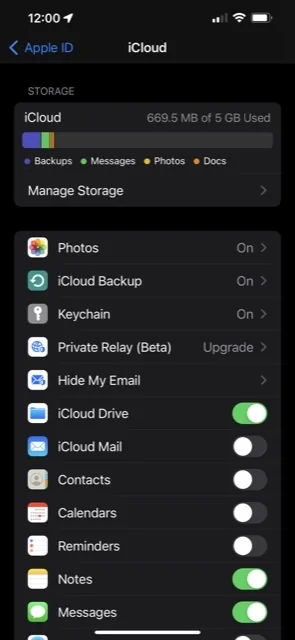
I got that at first to. What I did was go to Settongs > click on your Apple ID (Name at top) > Click on iCloud > toggle iCloud Drive on and off. Once I did that the script worked correctly.
Thanks. Where do you see "iCloud Drive"? I see photos, backup, keychain and mail to toggle off and on under iCloud. Nothing that says "Drive".
Sponsored


Kamuelaflyer

Well-Known Member
First Name
Bill
Joined
Feb 18, 2020
Threads
11
Messages
11,318
Reaction score
22,868
Location
Hawaii
Vehicles
2021 Premium Infinite Blue. ER AWD. 2020 Raptor, 2021 Ranger.
Country flag
I get an iCloud error - not supported on line 15:70.

What does it mean to do "resetting and cycling virtually everything"?
I got that at first to. What I did was go to Settongs > click on your Apple ID (Name at top) > Click on iCloud > toggle iCloud Drive on and off. Once I did that the script worked correctly.
This.

I turned everything related iCloud off and on. Honestly what @smartino suggests is what did it though.
 

Kamuelaflyer

Well-Known Member
First Name
Bill
Joined
Feb 18, 2020
Threads
11
Messages
11,318
Reaction score
22,868
Location
Hawaii
Vehicles
2021 Premium Infinite Blue. ER AWD. 2020 Raptor, 2021 Ranger.
Country flag
Thanks. Where do you see "iCloud Drive"? I see photos, backup, keychain and mail to toggle off and on under iCloud. Nothing that says "Drive".
Cluck in your photo at the top of settings. iCloud is at the top of the second block
 

phil

Well-Known Member
Joined
Jun 6, 2021
Threads
13
Messages
3,160
Reaction score
4,211
Location
USA
Vehicles
LS400
Country flag
Cluck in your photo at the top of settings. iCloud is at the top of the second block
It is. And I can click on it, and it shows how much of my 5GB storage is used (not much).

I've clicked on it a few times, but there is not on/off toggle for it, nor Drive. What am I missing?
 

smartino

Well-Known Member
First Name
Steve
Joined
Feb 11, 2021
Threads
3
Messages
229
Reaction score
283
Location
Indiana
Vehicles
2021 RR Mach E First Edition, 2017 Honda Ridgeline
Occupation
Retired
Country flag
It is. And I can click on it, and it shows how much of my 5GB storage is used (not much).

I've clicked on it a few times, but there is not on/off toggle for it, nor Drive. What am I missing?
This is what I see under the iCloud menu

Ford Mustang Mach-E FordPass - Scriptable Widget V2022.XX (iOS, iPad, MacOS) F6D9324E-34CC-465F-929C-CF89BE048A45


Kamuelaflyer

Well-Known Member
First Name
Bill
Joined
Feb 18, 2020
Threads
11
Messages
11,318
Reaction score
22,868
Location
Hawaii
Vehicles
2021 Premium Infinite Blue. ER AWD. 2020 Raptor, 2021 Ranger.
Country flag
This is what I see under the iCloud menu

F6D9324E-34CC-465F-929C-CF89BE048A45.jpg
Funny thing. I just went to check where that switch was for him ... and it was turned off again. By itself. Ghosts.
 

phil

Well-Known Member
Joined
Jun 6, 2021
Threads
13
Messages
3,160
Reaction score
4,211
Location
USA
Vehicles
LS400
Country flag
Thank you, Smartino and Kamuelaflyer.

That switch - iCloud Drive - is absent from the listing on my iPhone. Otherwise, I have all the same items except for the private relay thing.
 
Last edited:

smartino

Well-Known Member
First Name
Steve
Joined
Feb 11, 2021
Threads
3
Messages
229
Reaction score
283
Location
Indiana
Vehicles
2021 RR Mach E First Edition, 2017 Honda Ridgeline
Occupation
Retired
Country flag
Thank you, Smartino and Kamuelaflyer.

That switch - iCloud Drive - is absent from the listing on my iPhone. Otherwise, I have all the same items except for the private relay thing.
I’m on version IOS 15.3.1. Using an iPhone 13 Pro Max. Maybe that is the difference
 

phil

Well-Known Member
Joined
Jun 6, 2021
Threads
13
Messages
3,160
Reaction score
4,211
Location
USA
Vehicles
LS400
Country flag
I’m on version IOS 15.3.1. Using an iPhone 13 Pro Max. Maybe that is the difference
Thanks. I'm on the same IOS version, on an older phone (XR). I suspect the problem may be that my employer has disabled iCloud Drive as part of their idiotic security fetish, and I will be unable to use the widget. Too bad, it sounds great. My personal phone is an Android, maybe I'll be able to get something comparable on that someday.
 

smartino

Well-Known Member
First Name
Steve
Joined
Feb 11, 2021
Threads
3
Messages
229
Reaction score
283
Location
Indiana
Vehicles
2021 RR Mach E First Edition, 2017 Honda Ridgeline
Occupation
Retired
Country flag
Thanks. I'm on the same IOS version, on an older phone (XR). I suspect the problem may be that my employer has disabled iCloud Drive as part of their idiotic security fetish, and I will be unable to use the widget. Too bad, it sounds great. My personal phone is an Android, maybe I'll be able to get something comparable on that someday.
Im sure that’s it. Before I retired I used to have issues with employer security too so I understand.
 

Kamuelaflyer

Well-Known Member
First Name
Bill
Joined
Feb 18, 2020
Threads
11
Messages
11,318
Reaction score
22,868
Location
Hawaii
Vehicles
2021 Premium Infinite Blue. ER AWD. 2020 Raptor, 2021 Ranger.
Country flag
Thanks. I'm on the same IOS version, on an older phone (XR). I suspect the problem may be that my employer has disabled iCloud Drive as part of their idiotic security fetish, and I will be unable to use the widget. Too bad, it sounds great. My personal phone is an Android, maybe I'll be able to get something comparable on that someday.
There is an android widget thread for the same type of thing here. A "simple" version and a complex version.
 

Goober96

Well-Known Member
First Name
Brent
Joined
Apr 21, 2021
Threads
7
Messages
130
Reaction score
91
Location
SC
Vehicles
2021 Mach-E4X, 1996 Mustang Cobra, 2008 Corvette
Country flag
The large widget doesn’t seem to update reliably. The medium widget I’m using seems to be okay but the large one only updates when I reboot the iPad.
 

RyZt

Well-Known Member
Joined
Nov 17, 2019
Threads
24
Messages
746
Reaction score
880
Location
San Jose
Vehicles
Mach E4X
Country flag
New Release: v2022.02.27.0
Tapping the update button (in the app below the widget above “Remote Controls”) doesn’t seem to do anything.

The large widget doesn’t seem to update reliably. The medium widget I’m using seems to be okay but the large one only updates when I reboot the iPad.
Same here on my iPhone.
 
OP
OP
tonesto7

tonesto7

Well-Known Member
First Name
Anthony
Joined
Sep 20, 2021
Threads
2
Messages
243
Reaction score
610
Location
Ann Arbor, Michigan
Vehicles
2021 F150
Occupation
Software Developer/System Admin
Country flag
It's really weird how inconsistent this is for
Tapping the update button in the widget doesn’t seem to do anything.


Same here on my iPhone.
Sorry about this. I don't have any visibility into what goes wrong with updating the widgets.
If there's not an error it's running into some sort of memory limitation.
I keep leaning out the data with every release.
 

tesla2mme

Well-Known Member
First Name
Tony
Joined
Jan 2, 2022
Threads
15
Messages
323
Reaction score
384
Location
California (Bay)
Vehicles
MME GT in the best color ever made (cyber orange!)
Occupation
Engineer
Country flag
Thank you so much for your work on this. Can anyone tell me how to interpret my OTA data in the app? Would love to decode some of this, and see if I can figure out if I have the newest OTA or not. I have the sneaking suspicion that my car is missing tons of updates and the dealer is telling me that they can be done OTA, but IDK, for some reason, I don't trust them :X

Is Sync v4.0.21180 (Oct 2, 21) the most up to date version of Sync?
Sponsored

 
Last edited:


Top