SAM

Well-Known Member
First Name
SAM
Joined
Dec 29, 2020
Threads
3
Messages
335
Reaction score
362
Location
Central NJ
Vehicles
Premium MME4X Iconic Silver
Country flag
New Release: v2022.02.21.0

I just pushed out a new release which hopefully gets the large widgets working more consistently.
Please let me know the outcome!
Thanks for the update. Large widget still not working for me but color mode (light/dark) is working. Medium size widget is the only one that will display. Although the small and large widgets appear in the window when selected with "View Widget", the size is not updated on the home screen.
Sponsored


Matstar

Well-Known Member
Joined
Feb 2, 2022
Threads
11
Messages
116
Reaction score
107
Location
Canada
Vehicles
Mach E Premium
Country flag
It doesn't work for me. I uninstalled and still not able to see the Widget on the home screen. But I see it when I open Scriptable.

But no photo of the car and error message that the image is missing.

Do you have a solution?
Ford Mustang Mach-E FordPass - Scriptable Widget V2022.XX (iOS, iPad, MacOS) IMG_3421
Ford Mustang Mach-E FordPass - Scriptable Widget V2022.XX (iOS, iPad, MacOS) IMG_3422

Ford Mustang Mach-E FordPass - Scriptable Widget V2022.XX (iOS, iPad, MacOS) IMG_3423
 

Kamuelaflyer

Well-Known Member
First Name
Bill
Joined
Feb 18, 2020
Threads
11
Messages
11,307
Reaction score
22,849
Location
Hawaii
Vehicles
2021 Premium Infinite Blue. ER AWD. 2020 Raptor, 2021 Ranger.
Country flag
I’ve been unable to update from 1.x. Following the video instructions results in literally nothing happening. Deleting the old script and starting from scratch? Same thing. Nothing happens. ?‍♂
Just a FWIW update. The issue I had was an iCloud issue. After resetting and cycling virtually everything it all returned to normal. Just in time for the large widget.
 

Neil4Real

Well-Known Member
Joined
Jul 8, 2021
Threads
17
Messages
3,385
Reaction score
3,073
Location
Southern California
Vehicles
Mach-E GT Performance Edition - Shadow Black
Country flag
Thank you so much! I'm lovin' these and the smaller widget is awesome. When I click the widget, I have it set to 'Run Script' just like on the old version. But it seems to take a long time now once it opens Scriptable and runs the script for anything to open. Is this just because there is so much more data/controls?


OP
OP
tonesto7

tonesto7

Well-Known Member
First Name
Anthony
Joined
Sep 20, 2021
Threads
2
Messages
243
Reaction score
610
Location
Ann Arbor, Michigan
Vehicles
2021 F150
Occupation
Software Developer/System Admin
Country flag
Thank you so much! I'm lovin' these and the smaller widget is awesome. When I click the widget, I have it set to 'Run Script' just like on the old version. But it seems to take a long time now once it opens Scriptable and runs the script for anything to open. Is this just because there is so much more data/controls?
Yes, it's because there is more data and logic to process now.
I might allow it to load from cache on first open since it updates the dashboard every 30 seconds anyway and just have it perform a quick refresh within a second or two of displaying the dashboard so the data is current.
 

SAM

Well-Known Member
First Name
SAM
Joined
Dec 29, 2020
Threads
3
Messages
335
Reaction score
362
Location
Central NJ
Vehicles
Premium MME4X Iconic Silver
Country flag
Got the large widget working. Updated to current version (2022.02.22.0). Deleted home screen widget, deleted Fordpass widget in Scriptable, added Scriptable Fordpass widget back by running Widget tool. Added large widget to home screen and selected Fordpass script in Scriptable. Large widget remained generic. Opened Fordpass widget in Scriptable, selected menu and "View Widget". Selected Large Widget (Light), closed windows and large Fordpass widget appeared on home screen.

I really don't know what I did to make it work. A lot of steps somehow worked.
 

SAM

Well-Known Member
First Name
SAM
Joined
Dec 29, 2020
Threads
3
Messages
335
Reaction score
362
Location
Central NJ
Vehicles
Premium MME4X Iconic Silver
Country flag
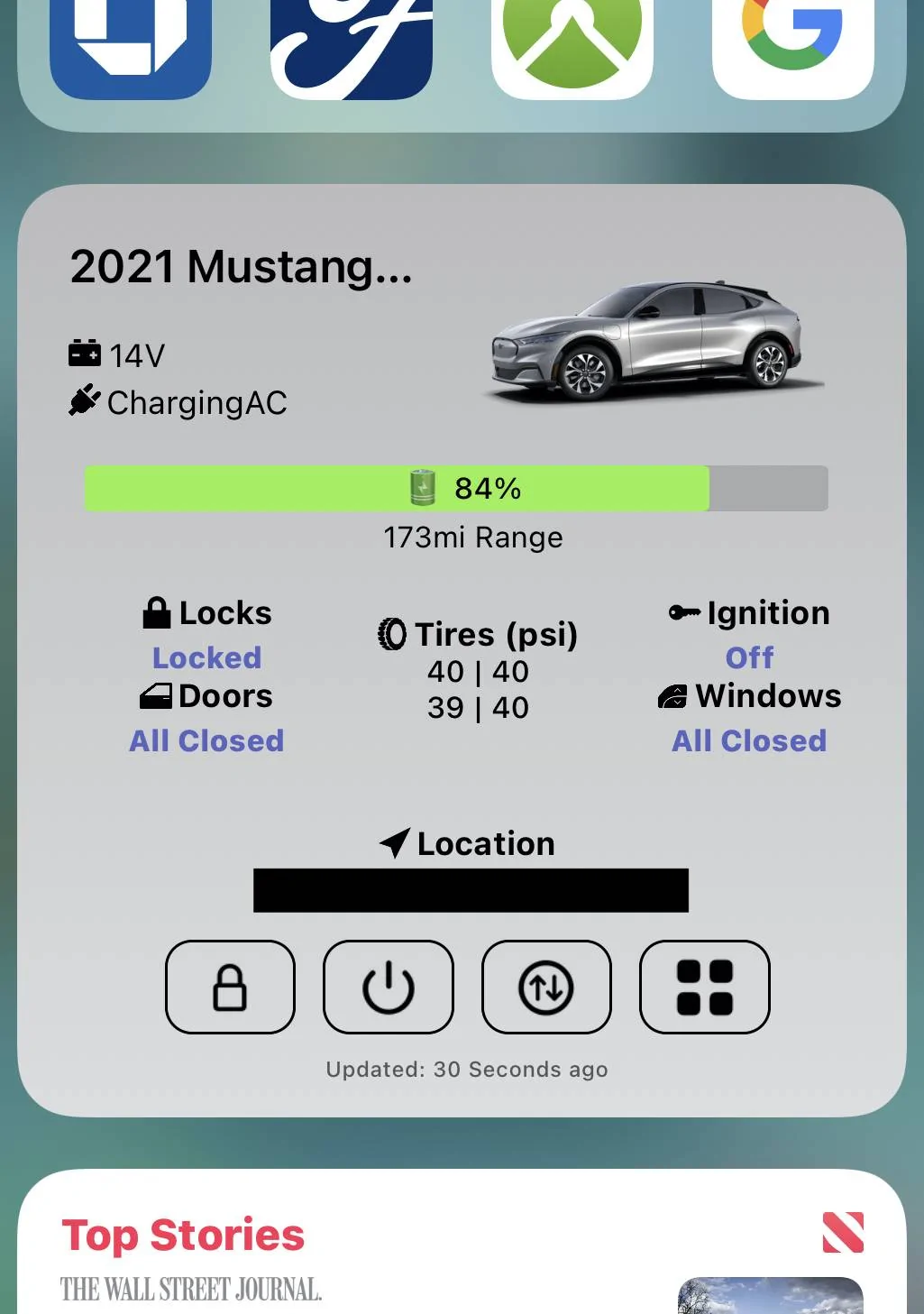
Looks fantastic!

Ford Mustang Mach-E FordPass - Scriptable Widget V2022.XX (iOS, iPad, MacOS) IMG_1205
 

Bonehead

Well-Known Member
First Name
Michael
Joined
May 28, 2021
Threads
74
Messages
273
Reaction score
545
Location
Malibu
Vehicles
'25 MME GT Performance ('21 MME Premium AWD Ex)
Country flag
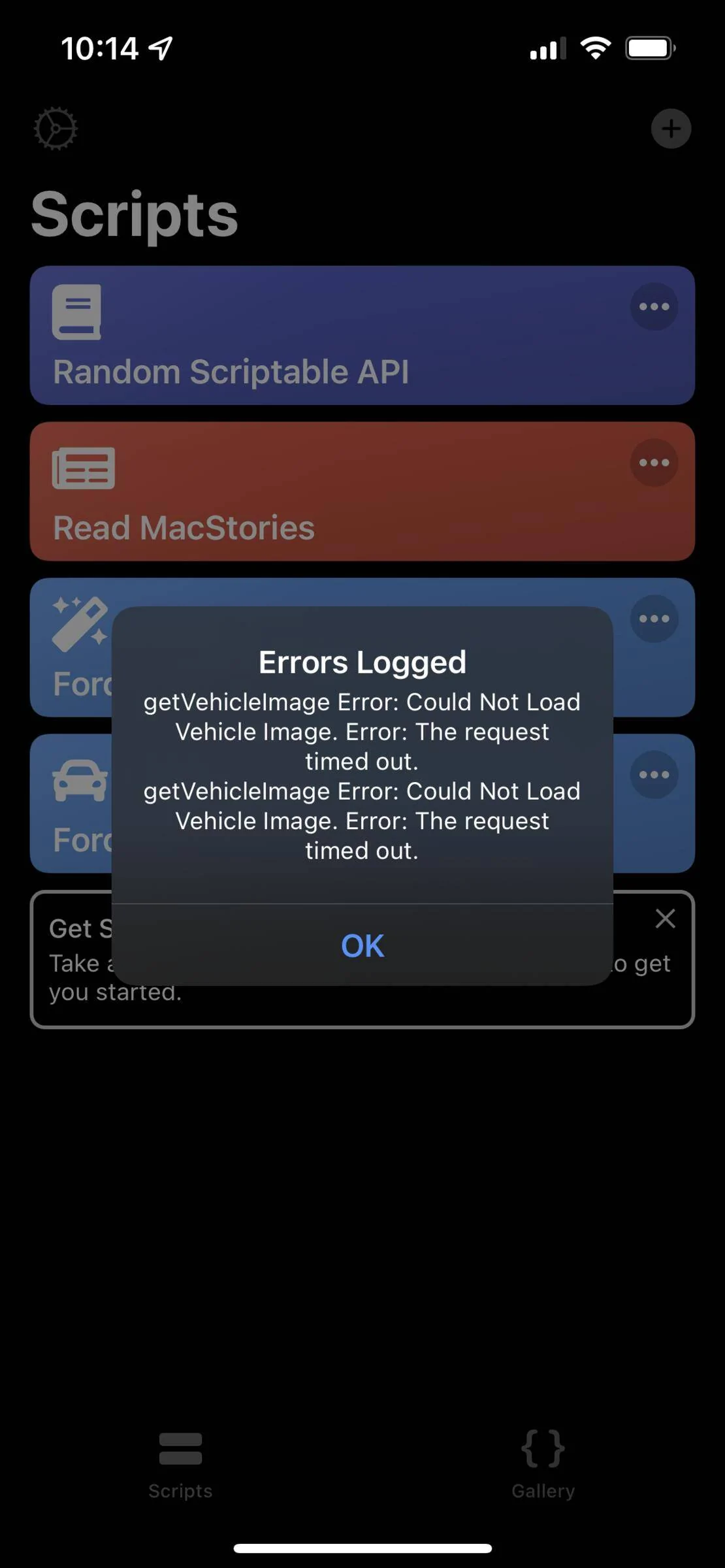
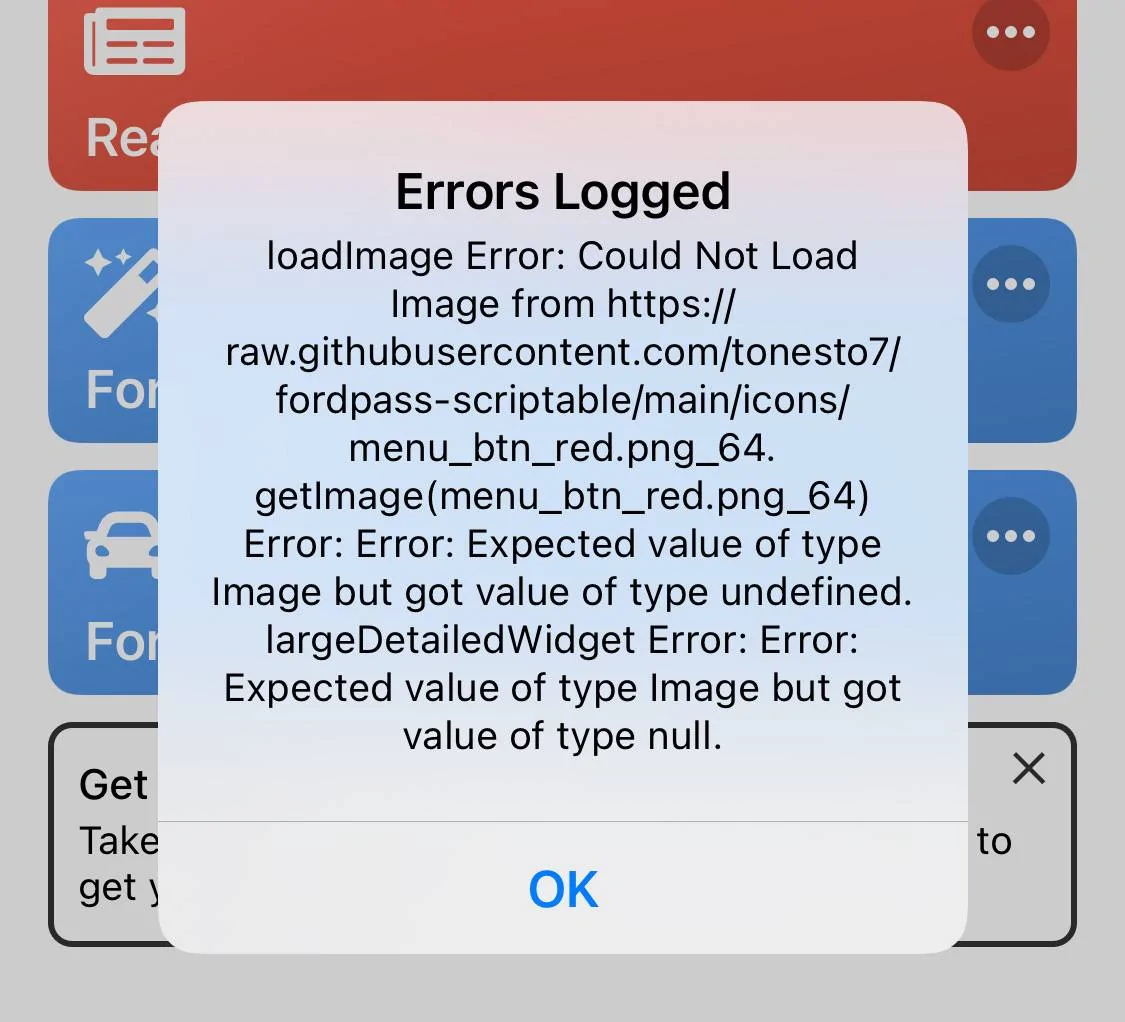
Crazy - I was about to post that I've been unable to get the large widget even with the update, and just got the error message below, but now it's finally working!

Thought I'd post it anyway since it clearly has something to do with the issue.

Ford Mustang Mach-E FordPass - Scriptable Widget V2022.XX (iOS, iPad, MacOS) My Photo Stream - 1 of 1
 
OP
OP
tonesto7

tonesto7

Well-Known Member
First Name
Anthony
Joined
Sep 20, 2021
Threads
2
Messages
243
Reaction score
610
Location
Ann Arbor, Michigan
Vehicles
2021 F150
Occupation
Software Developer/System Admin
Country flag
Crazy - I was about to post that I've been unable to get the large widget even with the update, and just got the error message below, but now it's finally working!

Thought I'd post it anyway since it clearly has something to do with the issue.

My Photo Stream - 1 of 1.jpeg
I pushed out a fix today for this and other bugs.
 

Neil4Real

Well-Known Member
Joined
Jul 8, 2021
Threads
17
Messages
3,385
Reaction score
3,073
Location
Southern California
Vehicles
Mach-E GT Performance Edition - Shadow Black
Country flag
Yes, it's because there is more data and logic to process now.
I might allow it to load from cache on first open since it updates the dashboard every 30 seconds anyway and just have it perform a quick refresh within a second or two of displaying the dashboard so the data is current.
Not sure if you ended up doing this already, but holy smokes, it’s almost instantaneous now!! Thanks
 

smartino

Well-Known Member
First Name
Steve
Joined
Feb 11, 2021
Threads
3
Messages
229
Reaction score
283
Location
Indiana
Vehicles
2021 RR Mach E First Edition, 2017 Honda Ridgeline
Occupation
Retired
Country flag
Since the last update I’m noticing the following:

1. Cannot get the large widget to work, it was working before the last update.

2. Medium widget works but seems to take forever to update. See the screen shots. The widget update was from 8am this morning and has t updated since.

Ford Mustang Mach-E FordPass - Scriptable Widget V2022.XX (iOS, iPad, MacOS) 7ED9328D-C432-4280-B775-BB15EDDE06DE

Ford Mustang Mach-E FordPass - Scriptable Widget V2022.XX (iOS, iPad, MacOS) 08FDBFCA-E7CF-4B43-B463-C6FB2A13B7E9

Could the change to using cache be causing this issue?
 
OP
OP
tonesto7

tonesto7

Well-Known Member
First Name
Anthony
Joined
Sep 20, 2021
Threads
2
Messages
243
Reaction score
610
Location
Ann Arbor, Michigan
Vehicles
2021 F150
Occupation
Software Developer/System Admin
Country flag
Since the last update I’m noticing the following:

1. Cannot get the large widget to work, it was working before the last update.

2. Medium widget works but seems to take forever to update. See the screen shots. The widget update was from 8am this morning and has t updated since.

7ED9328D-C432-4280-B775-BB15EDDE06DE.png

08FDBFCA-E7CF-4B43-B463-C6FB2A13B7E9.png

Could the change to using cache be causing this issue?
Everyone else is telling me their large widget works much better now. There seems to be no reason to have these issues. The cache change only affects the dashboard menu.
 

smartino

Well-Known Member
First Name
Steve
Joined
Feb 11, 2021
Threads
3
Messages
229
Reaction score
283
Location
Indiana
Vehicles
2021 RR Mach E First Edition, 2017 Honda Ridgeline
Occupation
Retired
Country flag
Everyone else is telling me their large widget works much better now. There seems to be no reason to have these issues. The cache change only affects the dashboard menu.
I’ll keep trying. Thanks
Sponsored


Top