Brown1000

Well-Known Member
First Name
Mikell
Joined
Nov 17, 2019
Threads
4
Messages
101
Reaction score
155
Location
Kentucky
Vehicles
F-150 MME GTPE
Country flag
Sorry if this was asked or if it’s so obvious that I am blind to it, how on earth do you get a widget onto the Home Screen??? I can view it, but then what? What dumb thing am I obviously missing..lol
you can press and hold the widget till it starts to wiggle, then drag it to the Home Screen you want to use it on.
Sponsored


Taekwonmoe

Well-Known Member
First Name
Donny
Joined
Jan 11, 2022
Threads
0
Messages
54
Reaction score
27
Location
San Diego California
Vehicles
Mustang MachE
Occupation
Animator
Country flag
you can press and hold the widget till it starts to wiggle, then drag it to the Home Screen you want to use it on.
Do you click on menu, then view widgets and then pick which one you want and hold that down? That’s what I’m doing at the moment and nothings happening.
 

Brown1000

Well-Known Member
First Name
Mikell
Joined
Nov 17, 2019
Threads
4
Messages
101
Reaction score
155
Location
Kentucky
Vehicles
F-150 MME GTPE
Country flag
Do you click on menu, then view widgets and then pick which one you want and hold that down? That’s what I’m doing at the moment and nothings happening.
from the first home page, scroll to the right to see all the widgets you have. find the scriptable widget then press and hold, when it starts to jiggle you then can drag it to the home page you want it on.
 

SashaLondon

Well-Known Member
First Name
Sasha
Joined
Sep 11, 2020
Threads
32
Messages
1,393
Reaction score
1,500
Location
London
Vehicles
MME AWD SR
Country flag
Hi Is the OTA info removed from the widget now? I cannot find any info in the widget on this.


em5quare

Well-Known Member
Joined
Oct 28, 2021
Threads
11
Messages
73
Reaction score
39
Location
NY
Vehicles
Mach E RWD Premium ER
Country flag
Noob question: I installed the FordWidgetTool, ran it to install the Fordpass Widget, then ran the Fordpass widget, but nothing happens. Does not show dialog to enter FordPass credentials. What am I missing? FordPass is installed and running fine on my iPhone. Any help appreciated!
 

RobbertPatrison

Well-Known Member
Joined
Mar 24, 2022
Threads
13
Messages
187
Reaction score
492
Location
Silicon Valley, California
Vehicles
Ice White Mustang Mach-E
Country flag
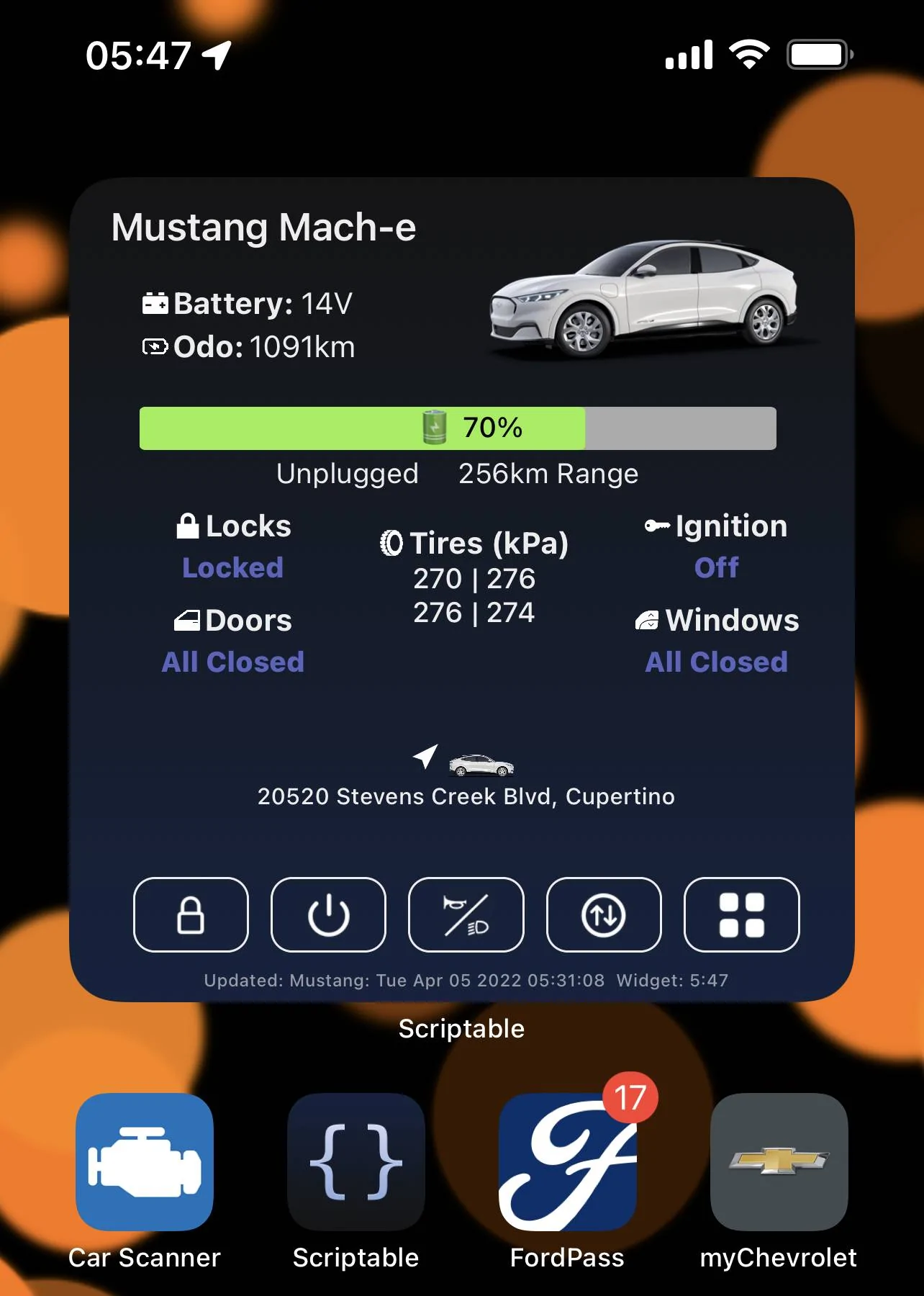
Thanks @tonesto7 for the great effort. I think this is a cool widget. I tweaked the source code to each myself JavaScript.

Ford Mustang Mach-E FordPass - Scriptable Widget V2022.XX (iOS, iPad, MacOS) 3D0295C3-E82F-4D8C-ABBD-48A6A4A21F48


The main issue I have is the unpredictable widget updates. Sometimes it doesn’t update for hours, and there seems to be no way to force iOS to update the widget. To properly know how out-of-date the widget is I modified the bottom line to contain the vehicle and data update times.

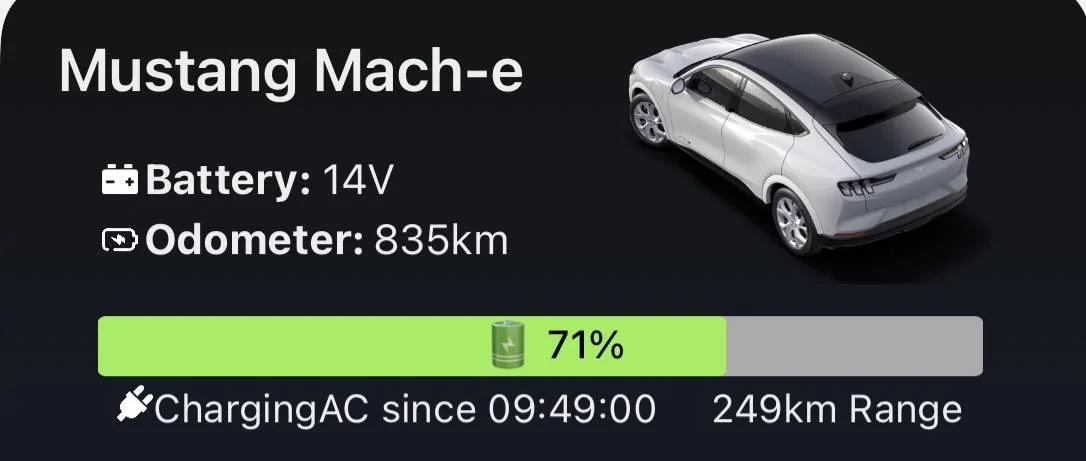
Another mod I did was to show more details on the charge status. In case the car is plugged in, it will tell the time it started charging, or the time when charging is compete:
Ford Mustang Mach-E FordPass - Scriptable Widget V2022.XX (iOS, iPad, MacOS) 6FACB924-A169-4921-B6AE-6273D1D93A99


I tried to see if I could extract more telemetry data than the stuff I see in the FordAPI JavaScript file. I was not successful as I can’t find any description of that API on the web. I also tried to guess what the command-URLs would be to open and close the trunk and frunk, with no success until now. It can be done from the Fordpass app so I presume that the url command syntax must be similar….
Anyhow, this is fun!
 

Goober96

Well-Known Member
First Name
Brent
Joined
Apr 21, 2021
Threads
7
Messages
130
Reaction score
91
Location
SC
Vehicles
2021 Mach-E4X, 1996 Mustang Cobra, 2008 Corvette
Country flag
It’s a great app. I still don’t get why the odometer is on the little tiny app but the bigger apps with all that extra space don‘t display it.
 
OP
OP
tonesto7

tonesto7

Well-Known Member
First Name
Anthony
Joined
Sep 20, 2021
Threads
2
Messages
243
Reaction score
610
Location
Ann Arbor, Michigan
Vehicles
2021 F150
Occupation
Software Developer/System Admin
Country flag
Thanks @tonesto7 for the great effort. I think this is a cool widget. I tweaked the source code to each myself JavaScript.

3D0295C3-E82F-4D8C-ABBD-48A6A4A21F48.webp


The main issue I have is the unpredictable widget updates. Sometimes it doesn’t update for hours, and there seems to be no way to force iOS to update the widget. To properly know how out-of-date the widget is I modified the bottom line to contain the vehicle and data update times.

Another mod I did was to show more details on the charge status. In case the car is plugged in, it will tell the time it started charging, or the time when charging is compete:
6FACB924-A169-4921-B6AE-6273D1D93A99.webp


I tried to see if I could extract more telemetry data than the stuff I see in the FordAPI JavaScript file. I was not successful as I can’t find any description of that API on the web. I also tried to guess what the command-URLs would be to open and close the trunk and frunk, with no success until now. It can be done from the Fordpass app so I presume that the url command syntax must be similar….
Anyhow, this is fun!
Some of those commands only work over Bluetooth and not over the ford API.
I've mapped just about every available command in the API.

If you submit changes to the github repo i will gladly accept them if they make sense for others.
 

CMRD

Well-Known Member
Joined
Oct 23, 2021
Threads
4
Messages
70
Reaction score
44
Location
Canada
Vehicles
Mach E Premium ER RWD
Country flag
The widget is great, thank you for the work. I might be doing something wrong but it doesn’t update unless I use the menu to request I refresh. Am I missing something? Thanks for the help
 

em5quare

Well-Known Member
Joined
Oct 28, 2021
Threads
11
Messages
73
Reaction score
39
Location
NY
Vehicles
Mach E RWD Premium ER
Country flag
Some of those commands only work over Bluetooth and not over the ford API.
I've mapped just about every available command in the API.

If you submit changes to the github repo i will gladly accept them if they make sense for others.
@tonesto7 I am stumped! FordPass Tool is installed, I run it it and it installs the widget, I then click on the widget and nothing happens (I don't get a dialog to input my FordPass credentials). I am logged in to FordPass app. What am I doing wrong? Thanks!
 
OP
OP
tonesto7

tonesto7

Well-Known Member
First Name
Anthony
Joined
Sep 20, 2021
Threads
2
Messages
243
Reaction score
610
Location
Ann Arbor, Michigan
Vehicles
2021 F150
Occupation
Software Developer/System Admin
Country flag
@tonesto7 I am stumped! FordPass Tool is installed, I run it it and it installs the widget, I then click on the widget and nothing happens (I don't get a dialog to input my FordPass credentials). I am logged in to FordPass app. What am I doing wrong? Thanks!
Try using the widget tool to reset the data.
Sponsored


Top