
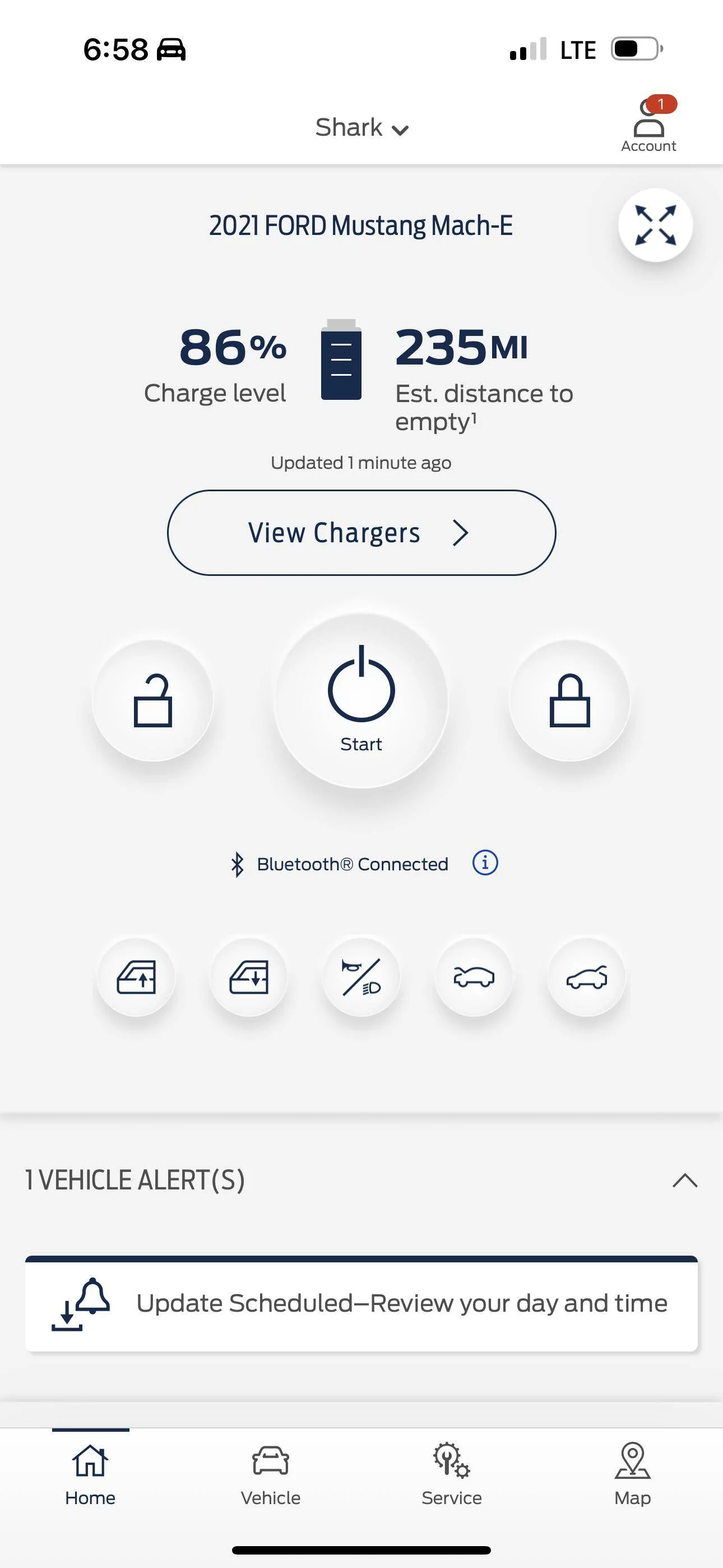
Frunk Button in FordPass YAY! My Job 1 Mach-E is Complete!!!!

Blue highway
Well-Known Member
- First Name
- Steve
- Joined
- Oct 15, 2021
- Threads
- 5
- Messages
- 2,693
- Reaction score
- 4,237
- Location
- Oregon
- Vehicles
- Mach E Premium SR RWD

It's here!... Nice
PeeKay
Well-Known Member
- First Name
- Pravin
- Joined
- Apr 2, 2021
- Threads
- 12
- Messages
- 172
- Reaction score
- 133
- Location
- Sunnyvale, CA
- Vehicles
- 2021 Job 1 MachE
- Occupation
- Retired
You Sir are a genius!!Try dragging down in the app to refresh.
I had killed the app on Android via multiple methods. But this did the trick.
???

HuntingPudel
Well-Known Member
- First Name
- Steve
- Joined
- Mar 23, 2021
- Threads
- 88
- Messages
- 12,927
- Reaction score
- 17,366
- Location
- Bay Area, CA
- Vehicles
- 2024 MME GT with Performance Upgrade, 1979 Fire-Am, 1972 K/5 Blazer
- Occupation
- Engineering
Showoff! (and to tie into the pets thread, one of my dogs' relatives was named Ch. Silverado Showoff). ??Well well well look at what we have here

ChasingCoral
Well-Known Member
- First Name
- Mark
- Joined
- Feb 3, 2020
- Threads
- 502
- Messages
- 14,306
- Reaction score
- 28,653
- Location
- Maryland
- Vehicles
- 2021 GB E4X FE, 2022 F-150 Lightning Lariat ER
- Occupation
- Retired oceanographer
Well, almost complete. Ford still hasn't implemented the frunk release on the Sync screen. They need to complete that last step (yes, I know there's a FORScan DIY -- that's not the same).Mine is working now as well. Glad this journey is complete!

generaltso
Well-Known Member
- Joined
- Jun 24, 2020
- Threads
- 76
- Messages
- 15,389
- Reaction score
- 28,694
- Location
- Vermont
- Vehicles
- 2024 Kia EV9 GT-Line
That step is just as available in FDRS as the required BCM and GFM updates. None of which have been pushed OTA.Well, almost complete. Ford still hasn't implemented the frunk release on the Sync screen. They need to complete that last step (yes, I know there's a FORScan DIY -- that's not the same).
TheVirtualTim
Well-Known Member
- First Name
- Tim
- Joined
- Oct 11, 2020
- Threads
- 26
- Messages
- 1,366
- Reaction score
- 2,469
- Location
- Dearborn, MI
- Vehicles
- ‘21 Mach-E First Edition, ‘23 Mach-E GT Performance
Just to be clear ... this is only showing up on cars where either the dealer or the owner updated to the BCM & GFM modules? I don't *think* I've seen a case where an updated car got the frunk button to appear.
My '21 Job-1 hasn't been updated ... and I'm weighing the option of updating it via FORScan vs. waiting for an update from Ford.
My '21 Job-1 hasn't been updated ... and I'm weighing the option of updating it via FORScan vs. waiting for an update from Ford.
ChasingCoral
Well-Known Member
- First Name
- Mark
- Joined
- Feb 3, 2020
- Threads
- 502
- Messages
- 14,306
- Reaction score
- 28,653
- Location
- Maryland
- Vehicles
- 2021 GB E4X FE, 2022 F-150 Lightning Lariat ER
- Occupation
- Retired oceanographer
Yes but dealers like mine only run updates for which they can cite an issue so they can be reimbursed for warranty service. Ford hasn't announced a customer service action to make Job 1 frunks fully-operational.That step is just as available in FDRS as the required BCM and GFM updates. None of which have been pushed OTA.
HuntingPudel
Well-Known Member
- First Name
- Steve
- Joined
- Mar 23, 2021
- Threads
- 88
- Messages
- 12,927
- Reaction score
- 17,366
- Location
- Bay Area, CA
- Vehicles
- 2024 MME GT with Performance Upgrade, 1979 Fire-Am, 1972 K/5 Blazer
- Occupation
- Engineering
Yes. The button will not appear in the FordPass app unless the BCM and GFM have been updated via FDRS. There is still currently no OTA package to do this. There is a third item in FDRS that enables the button on the center screen in the car. ??Just to be clear ... this is only showing up on cars where either the dealer or the owner updated to the BCM & GFM modules? I don't *think* I've seen a case where an updated car got the frunk button to appear.
My '21 Job-1 hasn't been updated ... and I'm weighing the option of updating it via FORScan vs. waiting for an update from Ford.
You will need FDRS to do the module updates. FORscan cannot perform them. You can use either FORscan or FDRS to preform the routine that enables the in-car center screen button. ??
TheVirtualTim
Well-Known Member
- First Name
- Tim
- Joined
- Oct 11, 2020
- Threads
- 26
- Messages
- 1,366
- Reaction score
- 2,469
- Location
- Dearborn, MI
- Vehicles
- ‘21 Mach-E First Edition, ‘23 Mach-E GT Performance
Interesting ... I thought I'd seen references to do the module updates in FORScan. I have FORScan and I can see that the latest "release" version (2.3.55) doesn't support module firmware updates. But the beta release (2.4.7 beta) _does_ (haven't tried it ... but from what I am reading on their forums, the ability to do update the module firmware is new to 2.4.x).Yes. The button will not appear in the FordPass app unless the BCM and GFM have been updated via FDRS. There is still currently no OTA package to do this. There is a third item in FDRS that enables the button on the center screen in the car. ??
You will need FDRS to do the module updates. FORscan cannot perform them. You can use either FORscan or FDRS to preform the routine that enables the in-car center screen button. ??
HuntingPudel
Well-Known Member
- First Name
- Steve
- Joined
- Mar 23, 2021
- Threads
- 88
- Messages
- 12,927
- Reaction score
- 17,366
- Location
- Bay Area, CA
- Vehicles
- 2024 MME GT with Performance Upgrade, 1979 Fire-Am, 1972 K/5 Blazer
- Occupation
- Engineering
Ah, beta software. But it’s not at release level. I would be interested in seeing what functionality that feature supplies and what (if any) changes are to licensing (like is it going to cost as much as FDRS to license or will it continue to stay as is). ?Interesting ... I thought I'd seen references to do the module updates in FORScan. I have FORScan and I can see that the latest "release" version (2.3.55) doesn't support module firmware updates. But the beta release (2.4.7 beta) _does_ (haven't tried it ... but from what I am reading on their forums, the ability to do update the module firmware is new to 2.4.x).
 ?
?RLW
Well-Known Member
- First Name
- Robert
- Joined
- Nov 25, 2021
- Threads
- 1
- Messages
- 71
- Reaction score
- 86
- Location
- Murfreesboro, TN
- Vehicles
- 2023 Mustang Mach E Premium AWD Extended Battery
I got the functionality this morning when I refreshed the app. I paid to have the dealership update the modules several months ago while my Mach E was in for a tire rotation. I tried to convince the guy to update free of charge but the service manager wouldn’t approve it so I paid for the updates. I used my frunk almost everyday. I play tennis and it’s nice not having tennis ball smells and fuzz being in my truck area. So my use case was worth the expense for me. So it is cool having two options for opening the frunk, the app and the door entry.

Neil4Real
Well-Known Member
- Joined
- Jul 8, 2021
- Threads
- 17
- Messages
- 3,385
- Reaction score
- 3,073
- Location
- Southern California
- Vehicles
- Mach-E GT Performance Edition - Shadow Black
For your use case, you should definitely look into getting a Lightning key fob that can open the frunk, too!I got the functionality this morning when I refreshed the app. I paid to have the dealership update the modules several months ago while my Mach E was in for a tire rotation. I tried to convince the guy to update free of charge but the service manager wouldn’t approve it so I paid for the updates. I used my frunk almost everyday. I play tennis and it’s nice not having tennis ball smells and fuzz being in my truck area. So my use case was worth the expense for me. So it is cool having two options for opening the frunk, the app and the door entry.
timbop
Well-Known Member
- First Name
- Tim
- Joined
- Jan 3, 2020
- Threads
- 65
- Messages
- 6,832
- Reaction score
- 14,036
- Location
- New Jersey
- Vehicles
- Solar powered 2021 MME ER RWD (CA RT1)
- Occupation
- Software Engineer
- I had the modules updated 8 months ago, and have been using a lightning fob or the door code to open the frunk, but the sync4a UI never showed the button.
- sunday I updated to the latest FP
- today I got and installed the 23-PU0110-RAD-PS powerup OTA
- After swiping down in fordpass to refresh it I saw the frunk button
- I went to within bluetooth range (next to car) and tried the frunk button. Got an error. retried 3 or 4 times with the same result.
- For a sanity check I tried the hatch button - which opened just fine
- Tried once more to open the frunk via FP: no dice
**** UPDATE
After force quitting FP, the button is now working. Yay!
Last edited:
HuntingPudel
Well-Known Member
- First Name
- Steve
- Joined
- Mar 23, 2021
- Threads
- 88
- Messages
- 12,927
- Reaction score
- 17,366
- Location
- Bay Area, CA
- Vehicles
- 2024 MME GT with Performance Upgrade, 1979 Fire-Am, 1972 K/5 Blazer
- Occupation
- Engineering
Huh, maybe they screwed up their inhibit code for @Jimrpa which messed up your account? ??oh well, the lightning fob is easier anyway
- I had the modules updated 8 months ago, and have been using a lightning fob or the door code to open the frunk, but the sync4a UI never showed the button.
- sunday I updated to the latest FP
- today I got and installed the 23-PU0110-RAD-PS powerup OTA
- After swiping down in fordpass to refresh it I saw the frunk button
- I went to within bluetooth range (next to car) and tried the frunk button. Got an error. retried 3 or 4 times with the same result.
- For a sanity check I tried the hatch button - which opened just fine
- Tried once more to open the frunk via FP: no dice
Sponsored
Similar threads


- Replies
- 27
- Views
- 3,340


- Replies
- 138
- Views
- 18,336


