Help! Android Auto keeps dropping wifi connection

kamorela

Well-Known Member
First Name
Kelly
Joined
Nov 24, 2024
Threads
28
Messages
336
Reaction score
452
Location
Beaverton, Oregon
Vehicles
2024 Ford Mustang Mach-e Premium AWD ER
Occupation
Sr. Aerospace Quality Engineer, Retired
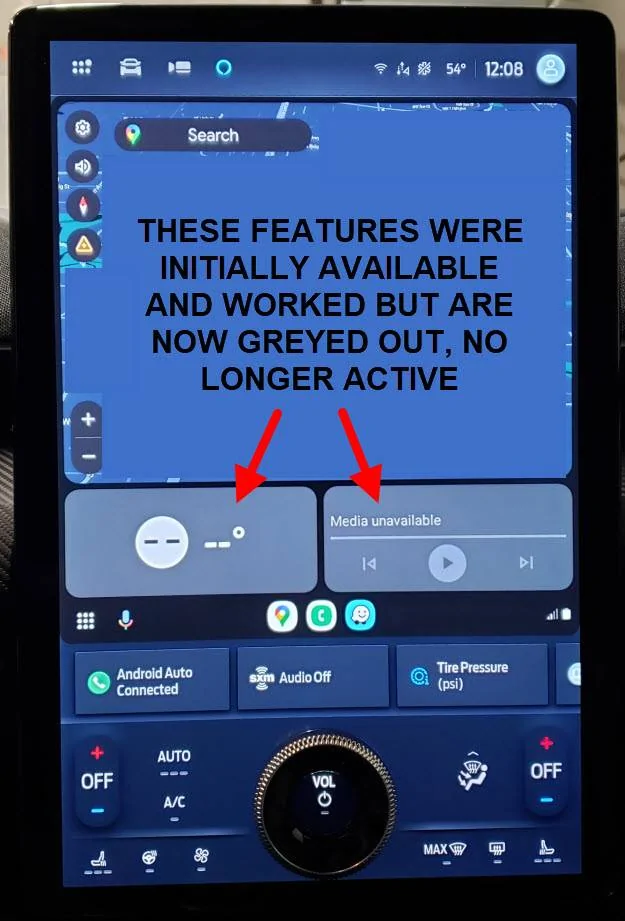
After searching without success, I need help to resolve an issue I have, namely my wifi keeps disconnecting from Android Auto, and even when connected it acts weird, apps don’t work right and some features have disappeared or are unavailable. I can’t determine if it’s my phone or my car.

Car: 2024 MME Job 1, AWD, ER
Phone: Samsung Note9, 4G-LTE
Android Auto App Version: 13.4.645054-release

When I first got the car home and started getting it set up it seemed to work OK but the wifi would occasionally drop out and I had to reconnect to my phone. Then gradually it became more often, like every couple of minutes. At first I was using Waze and it worked just fine, I received alerts and traffic conditions. Then Waze began wigging out, the map would lose whole map segments until the map was completely empty, i.e. just a white screen with only my car icon showing. I couldn’t change any map settings, the alerts stopped, it became useless.

I’ve been very busy lately but today I tried to figure out what’s wrong. I tried resetting app features on the car’s control panel. I tried to set up Google Maps and the map part works but I can’t set any destinations, when I try I get a ‘Poor Connection’ message and then ‘Can’t Connect To Google’. Waze is still just as insane as ever. The onboard Ford Nav map works just fine though, I can set a destination and it guides me to it while showing traffic conditions.

Onboard vehicle features work just fine (climate, radio, SiriusXM, Nav Map) it’s Android Auto that messes up, won’t stay connected via wifi. At this point I’m stumped, how do I get my Android Auto back to normal working status without dropping out every minute or so?

Ford Mustang Mach-E Help! Android Auto keeps dropping wifi connection display screen
Sponsored


MetalCord

Well-Known Member
Joined
Dec 27, 2024
Threads
2
Messages
144
Reaction score
177
Location
USA
Vehicles
2024 Mach-E GT AWD
Occupation
IT Manager
I typically lose my wireless connection to AA twice during my short commute and it happens at exactly the same two spots. This also happens in my power boost F-150 with my phone and my wife's phone. In my case, I know It's our phones. They're the Pixel 6 series (mine is a 6a hers is a pro) and they have a Samsung Exynos 5123 modem that is legendary for its inability to efficiently move between cellular bands or even wifi access points without dropping connections.

Your issue seems to be more severe. Do you have Android auto drop outs if you physically connect your phone? If it's having communication problems while plugged in, that might suggest a problem with your phone...ish.
 
Last edited:

GrayWolf

Well-Known Member
First Name
Brent
Joined
Oct 4, 2021
Threads
0
Messages
237
Reaction score
179
Location
Atlanta, GA area
Vehicles
2021 Mach-E GT (Star White Metallic)
Country flag
This is not "Android Auto doesn't stay connected on Wifi" though. If that was the case, your example image would not show the navigation app, either. Android Auto would not work at all. You'd get a banner saying that your connection to Android Auto was lost. This is more like a sub-function within Android Auto is broken for you.

It's interesting that you are on the latest build of Android Auto but are affected in such a strange way. I'd normally suggest a general web search to see if others have noticed the Android Auto media player being unavailable or broken (just to target the search to that panel in your above screenshot).

@MetalCord has a good point about testing a wired Android Auto connection too - would be great to hear if that was attempted. :)

EDIT: I found this Reddit link and the most recent update on this thread seems to indicate that another Note 9 user is seeing some unusual behaviors, too -- here's the what was said (copy/paste):

I have a Galaxy Note 9 Android 10 One UI 2.5 (no root) and a modest multimedia center (roadstar 915b premium). There are times when wireless Android Auto works quickly with my cell phone. At other times, for it to work, I need to turn off Bluetooth, unpair and it still takes time for the devices to understand each other. Interestingly, my daughter's Samsung A22 and my son's A32, both with Android 13, quickly connect to Android Auto wirelessly. I have already cleaned data from the Android Auto app, but still, I face such problems. Does anyone have a similar problem with the Samsung Galaxy Note 9 or a solution to my problematic issue? Hugs
 
Last edited:

CTZ

Well-Known Member
First Name
Greg
Joined
Jan 19, 2024
Threads
3
Messages
158
Reaction score
210
Location
Canada
Vehicles
2022 Mach-E
Looks like you have no data connection. The bars in the lower right corner will usually show 5G or LTE for me.
 

rhfritz

Well-Known Member
First Name
Rob
Joined
Nov 20, 2022
Threads
8
Messages
178
Reaction score
123
Location
MD
Vehicles
2021 MachE
Country flag
I have a G S24. Sometimes it works better wirelessly than wired. No issues in my prius.


Schwartzcynthia

Well-Known Member
First Name
Cynthia
Joined
Aug 1, 2022
Threads
2
Messages
160
Reaction score
103
Location
Austin, TX
Vehicles
2022 Mach E Premium RWD
Country flag
I have a G S24. Sometimes it works better wirelessly than wired. No issues in my prius.
I have an S22 Ultra and have never had issues with Android Auto. Well every now and then it disconnects but not on a regular basis and very few times in 2.5 years. I hesitate to get a new phone because of that...
 
OP
OP
kamorela

kamorela

Well-Known Member
First Name
Kelly
Joined
Nov 24, 2024
Threads
28
Messages
336
Reaction score
452
Location
Beaverton, Oregon
Vehicles
2024 Ford Mustang Mach-e Premium AWD ER
Occupation
Sr. Aerospace Quality Engineer, Retired
This is not "Android Auto doesn't stay connected on Wifi" though. If that was the case, your example image would not show the navigation app, either. Android Auto would not work at all. You'd get a banner saying that your connection to Android Auto was lost. This is more like a sub-function within Android Auto is broken for you.

It's interesting that you are on the latest build of Android Auto but are affected in such a strange way. I'd normally suggest a general web search to see if others have noticed the Android Auto media player being unavailable or broken (just to target the search to that panel in your above screenshot).

@MetalCord has a good point about testing a wired Android Auto connection too - would be great to hear if that was attempted. :)

EDIT: I found this Reddit link and the most recent update on this thread seems to indicate that another Note 9 user is seeing some unusual behaviors, too -- here's the what was said (copy/paste):
Thanks, I checked out that Reddit post. It said their issue got better by turning off 'Wi-Fi scan throttling' in Settings/Developer options. I did that and saw no difference, same wi-fi disconnect messages. However, I took the advice to plug in directly using USB cable and going on a short trip. Was seeing all the same issues plugged in but then I had an 'ah-ha!' moment and turned off wi-fi altogether on my phone (in essence using cell tower only) and *voila* everything works - Waze map has returned to normal, Google maps works perfectly, other apps, such as weather, are no longer greyed out, etc. Now if I could just figure out why the whole wi-fi connection thing went south after seeming to work fine when I first got the car. <sigh> ?
 

levins771

Member
First Name
Dean
Joined
Jan 24, 2025
Threads
0
Messages
9
Reaction score
4
Location
New York
Vehicles
ford F150 2019
A few things you could try:
Eliminate the car-connecting WiFi from your mobile network then perform a fresh connection.
Check that your Android Auto application and Google Play Services together with your phone system run on the latest version.
When using wireless the issue might resolve after swapping to a different USB cable as wired connection could perform a reset.
 

benk016

Well-Known Member
First Name
Ben
Joined
Nov 12, 2020
Threads
39
Messages
3,267
Reaction score
5,098
Location
Tulsa, Oklahoma
Vehicles
2021 Mustang Mach-E GT
Country flag
This is going to be something on your phone that changed and nothing to do with the car. Try opening those apps that aren't working, directly on your phone. There's a chance the permissions got reset and you need to allow them again.

If that doesn't work you might need to uninstall Android auto and reinstall it from the play store
 

MetalCord

Well-Known Member
Joined
Dec 27, 2024
Threads
2
Messages
144
Reaction score
177
Location
USA
Vehicles
2024 Mach-E GT AWD
Occupation
IT Manager
If turning off wifi altogether provided positive results and connecting via cable did not, is it possible your phone is using the cars wifi hotspot in lieu of your cellular connection? Is wifi hotspot turned on in your cars settings?
 

rhfritz

Well-Known Member
First Name
Rob
Joined
Nov 20, 2022
Threads
8
Messages
178
Reaction score
123
Location
MD
Vehicles
2021 MachE
Country flag
What I believe is now true is that Android Auto may initially connect via BT, but then negotiates a wifi hotspot connection with the car for higher bandwidth. I have been troubleshooting my own AA connection and saw wifi on, turned it off, and then lost AA.
 

GrayWolf

Well-Known Member
First Name
Brent
Joined
Oct 4, 2021
Threads
0
Messages
237
Reaction score
179
Location
Atlanta, GA area
Vehicles
2021 Mach-E GT (Star White Metallic)
Country flag
This issue is what prompted me to get rid of my S23 Ultra in favor of a Google Pixel 8 Pro.

I'd forgotten that even if you connect on the wired USB port, AA would detect that the phone can run AA Wireless and then cause the same bad behaviors on the head unit in the car. Disabling Wifi would force cable-only Android Auto, so great point/find/reminder, @kamorela !
 

Xweb

Well-Known Member
Joined
Dec 20, 2021
Threads
10
Messages
150
Reaction score
123
Location
Los Angeles
Vehicles
2026 Optiq Premium Lux AWD - PAST: 2022 Mustang Mach E Premium eAWD
Country flag
I typically lose my wireless connection to AA twice during my short commute and it happens at exactly the same two spots. This also happens in my power boost F-150 with my phone and my wife's phone.
My Pixel 9 Pro also drops the wireless connection when I drive in the same area 70% of the time. It reconnects within 25 seconds. Odd.
 
OP
OP
kamorela

kamorela

Well-Known Member
First Name
Kelly
Joined
Nov 24, 2024
Threads
28
Messages
336
Reaction score
452
Location
Beaverton, Oregon
Vehicles
2024 Ford Mustang Mach-e Premium AWD ER
Occupation
Sr. Aerospace Quality Engineer, Retired
If turning off wifi altogether provided positive results and connecting via cable did not, is it possible your phone is using the cars wifi hotspot in lieu of your cellular connection? Is wifi hotspot turned on in your cars settings?
Yes, I do have hotspots turned on. But I don't understand how that could interfere if I have wi-fi turned off altogether?
 

MetalCord

Well-Known Member
Joined
Dec 27, 2024
Threads
2
Messages
144
Reaction score
177
Location
USA
Vehicles
2024 Mach-E GT AWD
Occupation
IT Manager
Yes, I do have hotspots turned on. But I don't understand how that could interfere if I have wi-fi turned off altogether?
I was referring to your built-in vehicle hotspot, not any personal devices you carry into the car with you. It was silly of me to not reconize that you'd actually need to purchase a data plan to use the vehicle hotspot. Sorry for the confusion.
Sponsored


Top