OP
OP
Mach-Lee

Mach-Lee

Well-Known Member
First Name
Lee
Joined
Jul 16, 2021
Threads
262
Messages
11,350
Reaction score
24,977
Location
Wisconsin
Vehicles
2022 Mach-E Premium AWD
Occupation
Sci/Eng
Country flag
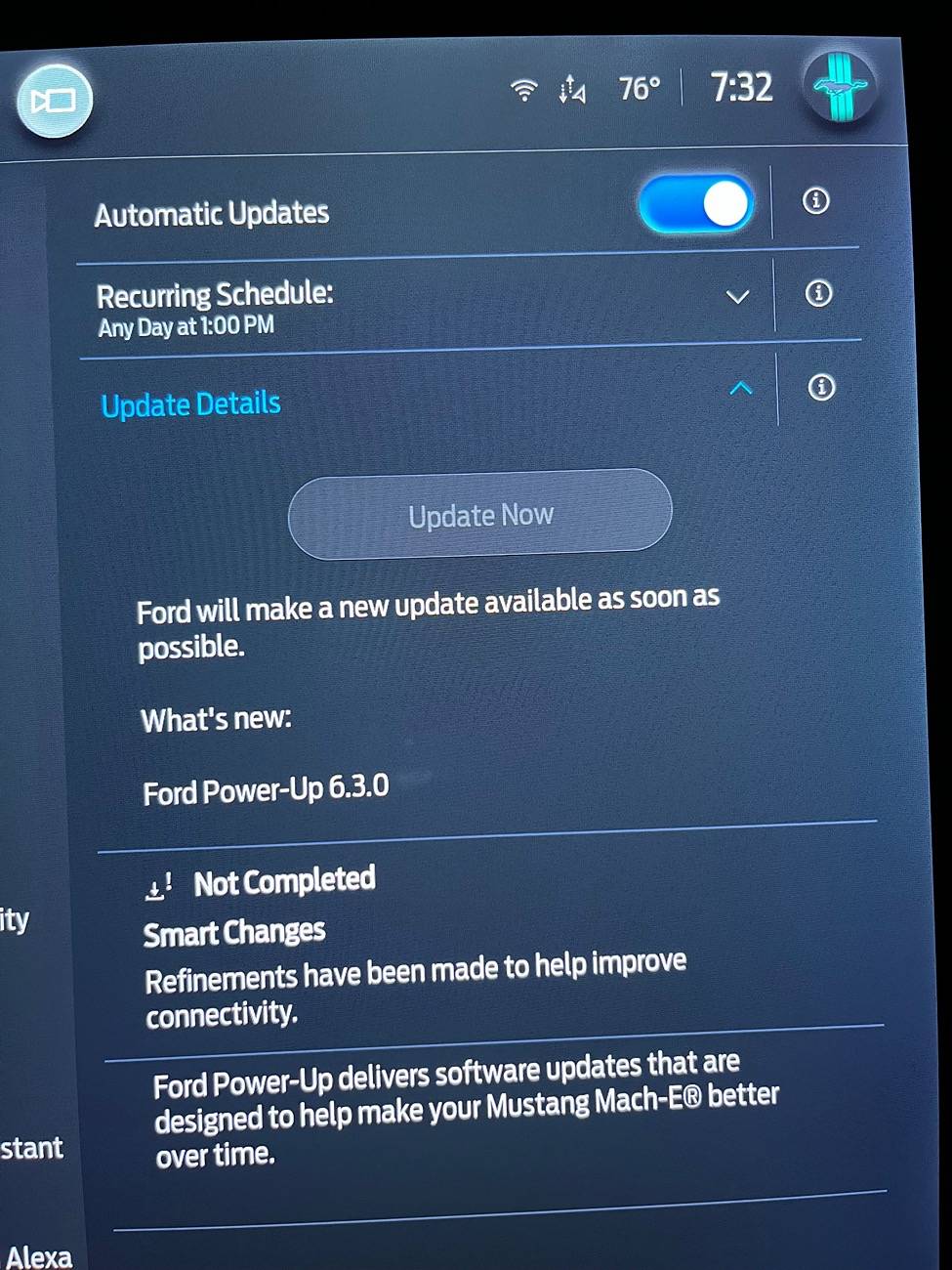
I’m stuck on this update.

IMG_1819.jpeg
Please see the note at the top of the original post, this topic does not apply to "Not Completed" updates. There's nothing you can do but wait.
Sponsored


chiendat

Well-Known Member
First Name
Dat
Joined
Apr 8, 2024
Threads
1
Messages
45
Reaction score
51
Location
Fredericton, NB
Vehicles
2023 Mach-e GTPE
Country flag
The same OS version is not complete for me as well (6.3.0). The tech spent 5 hours updating all of my software module and he said that new APIM didn’t show up after all other module was updated. So I guess it’s waiting game.
 

Sandpiper

Member
Joined
Jul 17, 2024
Threads
0
Messages
9
Reaction score
9
Location
Toronto Canada
Vehicles
Mach e 2024 AWD Extended Range
Country flag
The same OS version is not complete for me as well (6.3.0). The tech spent 5 hours updating all of my software module and he said that new APIM didn’t show up after all other module was updated. So I guess it’s waiting game.
Were you able to get the dealer to look at it under warranty? I'm also stuck at 6.3.0 and I'm hearing mixed messages on dealers performing software updates.


linussjoberg

Member
Joined
Oct 11, 2024
Threads
1
Messages
16
Reaction score
11
Location
sweden
Vehicles
Mach-E -22
Hello @Mach-Lee !

May I ask you a favor to check my VIN WF0TK1E74NMA23235 for any obvious issues? How does battery condition look etc? I did replace my 12v battery this morning but already got the dreaded ”12v drain message again” :(

Not sure if something is wrong with the car. Completely out of ideas now. Also quite a few updates behind due to the last battery not holding charge at all.

Thanks a lot in advance!
 

MachEnthusiast

Well-Known Member
Joined
Oct 22, 2021
Threads
14
Messages
306
Reaction score
145
Location
Seattle, WA
Vehicles
2021 Mustang Mach E GT
Occupation
Software PM
Country flag
I just want to say this thread is extremely helpful. While I haven't had these issues recently, @Mach-Lee has helped me numerous times through 2023 and 2024 with failed OTA updates. In almost all cases it was this 12V battery nonsense. Ford doesn't give you any feedback on this, and their steps to help you make an OTA succeed will NOT help with the 12V SoC issues.

You really need to try the methods outlined in the OP. The one that has worked most consistently for me is leaving the car ON in my driveway for 2+ hours. Then I go on a drive and turn off my car and come back to a successful OTA.

Maybe Ford is improving this with all of their vague updates that say stuff like:
This update improves the way your vehicle receives and transmits software resulting in a more dependable update experience.

... because I haven't seen a failed update in months. But maybe it just means they haven't sent me a big Sync update in a while. I don't know.

Side note: The brutal updates were the ones that required over 90% SoC. That's hard to achieve unless you're actually trying to.
 

Mach1E

Well-Known Member
Joined
Sep 5, 2021
Threads
93
Messages
10,509
Reaction score
13,295
Location
Florida
Vehicles
69 Mach 1, 11 GT, 21 GTPE- sold, 24 Taycan 4S, 20 F type R
Country flag
Thanks for this thread.

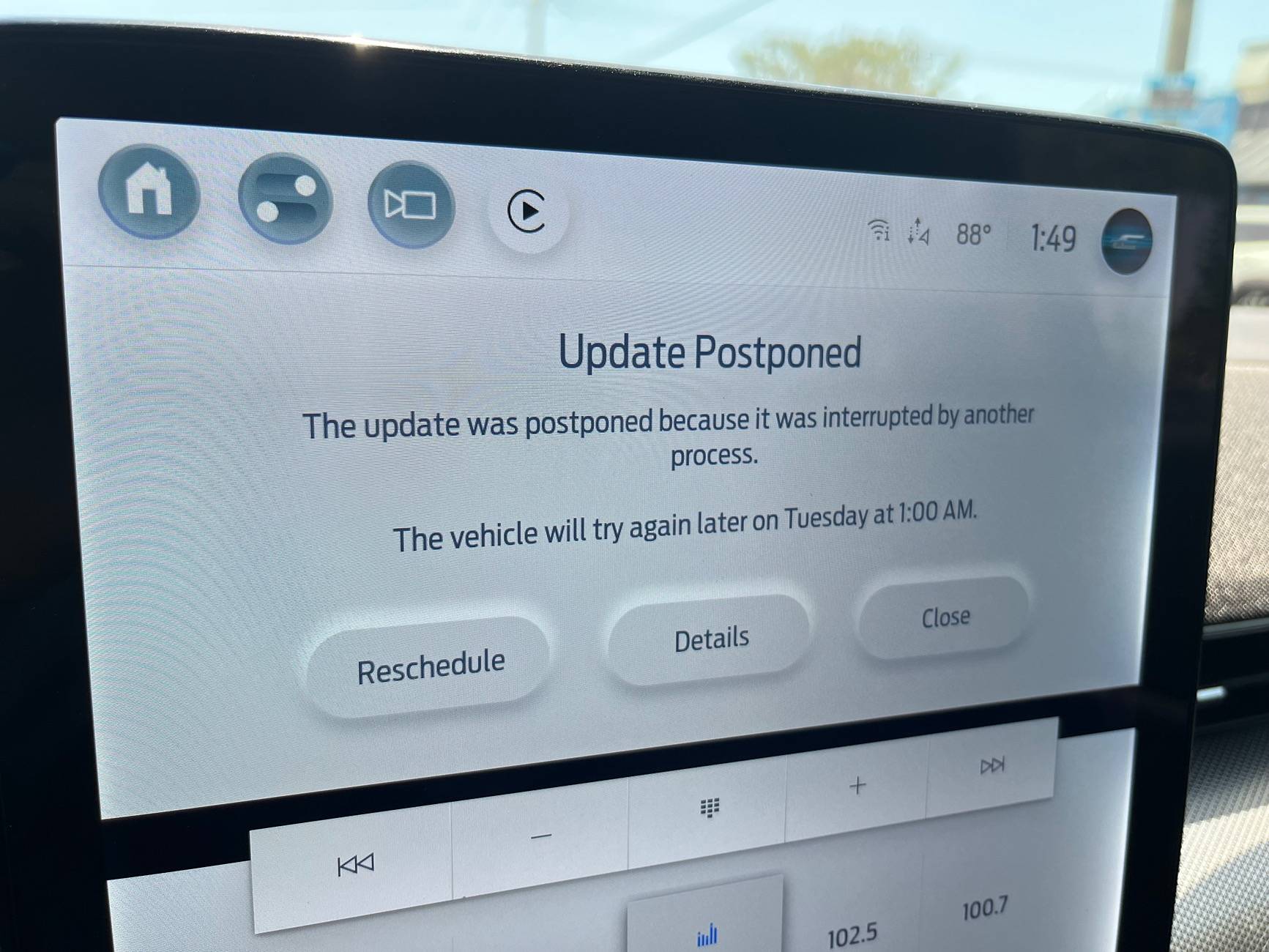
I kept getting this “update postponed” error when trying update now.

Ford Mustang Mach-E How To Get Failed OTAs To Install IMG_2321

I used the 12v charger method. Even took two times charging to get the charge high enough.
 

D4rkt

Active Member
First Name
Paul
Joined
Feb 18, 2021
Threads
2
Messages
38
Reaction score
40
Location
Melbourne, FL
Vehicles
2013 Ford Escape, 2021 MME Premium ER
Country flag
NOTE: This topic applies to "Failed" OTA installs only. This topic does NOT apply to "Not Completed" updates, these steps will not help whatsoever. There is nothing you can do about a "Not Completed" update, other than wait for the next OTA to come (sometimes it takes many months before Ford releases another OTA). If your update screen says "Not Completed" just ignore it and move on with life.

Ford's OTA process can be frustrating at times, with some users experiencing multiple failures in a row without success. Following this guide should increase your chances of an OTA installing successfully.

There are many conditions that must be met before an OTA can install. Some are obvious, such as the car needing to be off and in park. But other conditions, such as the 12V battery status, may not be obvious to you.

There are many reasons why an OTA update fails, but a low 12V battery is the most common cause of failed OTA installs, by far. About 80% of the OTA install failures I've seen are caused by a low 12V battery. It can be extremely difficult to get the 12V battery to a high enough state of charge to install updates, especially if the car is driven or charged infrequently. Due to the charging system design and lead acid charging kinetics, it can take an extremely long time (hours) to get the 12V fully charged up. Most OTAs require the 12V battery to be above 75% SoC (state-of-charge), and sometimes up to 90%. The 12V SoC is not visible to the user, and can only be accessed with an OBD scan tool. In lieu of direct monitoring, you can follow these methods to ensure the 12V battery is fully charged before applying OTAs.

Disconnect any idle draw devices such as dashcams, OBD dongles, or radar detectors first. If these items are powered while the car is off, they may impact your ability to get OTAs installed.

Unplug everything from the USB ports when attempting an APIM/SYNC update.

Please follow these methods (including times) exactly for best success. These have worked for people I've helped in the past.

"30 Minute Drive" Method

This is the least successful method, but is the easiest and may be enough in some cases (if you don't drive much). If this method doesn't work, move on to one of the longer methods below.
  1. Drive your car for at least 30 minutes
  2. Leave car ON and park (do not shut off yet)
  3. Set the parking brake
  4. Turn OFF the headlights fully (rotate knob counterclockwise)
  5. Manually start the update on the screen with the "Update Now" button
  6. Turn OFF the vehicle, exit, and close all doors
  7. Wait for the update to complete (up to 30 mins)

"Long Charge" Method
  1. Drive the car until the high voltage battery is down to 50% or less.
  2. Level 2 charge the car up to 100% in one session
  3. As soon as possible after the car finishes charging...
  4. Unplug the car
  5. Turn ON the car and set the parking brake
  6. Turn OFF the headlights fully (rotate knob counterclockwise)
  7. Manually start the update on the screen with the "Update Now" button
  8. Turn OFF the vehicle, exit, and close all doors
  9. Wait for the update to complete (up to 30 mins)
Level 1 (120V) users, charging the battery +10% will be enough time (e.g. 70% to 80%), then start at step 3.

"Slow Charge" Method

Very similar to the above, but if you have a smart EVSE you can set it to a low amperage (8A) to prolong charging time.
  1. Drive the car until the high voltage battery is down to 50% or less.
  2. Set smart EVSE to lowest amperage (e.g. 8 amps)
  3. Let the car charge for at least 6 hours or overnight
  4. Unplug the car
  5. Turn ON the car and set the parking brake
  6. Turn OFF the headlights fully (rotate knob counterclockwise)
  7. Manually start the update on the screen with the "Update Now" button
  8. Turn OFF the vehicle, exit, and close all doors
  9. Wait for the update to complete (up to 30 mins)

"Stay On" Method
  1. Unplug the car
  2. Turn ON the car (fully ON, do not use accessory mode)
  3. Disable "Vehicle Power Down Timer" in vehicle settings
  4. Set the parking brake
  5. Turn OFF the headlights fully (rotate knob counterclockwise)
  6. Exit, taking all key fobs with you, and lock the doors if necessary
  7. Leave the car ON in Park for 6+ hours
  8. Manually start the update on the screen with the "Update Now" button
  9. Turn OFF the vehicle, exit, and close all doors
  10. Wait for the update to complete (up to 30 mins)

"Blower Charge" Method

12V system voltage is increased when blower speed is set to 5 or higher with a key present inside the vehicle. Only perform this method if the vehicle can be parked in a safe location (e.g. a closed garage) to avoid theft. Battery will charge to a high SoC faster with this method due to a higher voltage set point (14.3V vs 13.4V).
  1. Unplug the car
  2. Turn ON the car
  3. Disable "Vehicle Power Down Timer" in vehicle settings
  4. Set the parking brake
  5. Turn OFF the headlights fully (rotate knob counterclockwise)
  6. Set blower speed to 5 (you may turn off A/C if you like)
  7. Place key fob inside vehicle
  8. Leave the car ON in Park for 2 hours
  9. Manually start the update on the screen with the "Update Now" button
  10. Turn OFF the vehicle, exit, and close all doors
  11. Wait for the update to complete (up to 30 mins)

12V Battery Charger Method

Battery charger must be the automatic type, 4 amp or larger, and have a float or maintenance mode that continues to provide power after the battery is fully charged.
  1. Open the frunk
  2. Remove the top and drivers side frunk covers only (Video)
  3. Connect a 4 amp or larger battery charger to the + and - jump posts (Video)
    1. Do not connect the charger to the negative battery post!
  4. Leave the battery charger connected overnight (12+ hours)
  5. Unplug the J1772 if plugged in
  6. Turn ON the car and set the parking brake
  7. Remove the battery charger and close the frunk (panels can stay removed)
  8. Turn OFF the headlights fully (rotate knob counterclockwise)
  9. Manually start the update on the screen with the "Update Now" button
  10. Turn OFF the vehicle, exit, and close all doors
  11. Wait for the update to complete (up to 30 mins)
NOTE: Using a battery charger that automatically cycles on and off can cause issues with the BMS data quality due to fluctuating voltage. This can cause an OTA to fail, even if the 12V battery is fully charged. In this case the vehicle must be parked undisturbed for at least 8 hours (no charger connected) before attempting the OTA again. I recommend parking it on the street so it is away from your phone and fobs.

BMS Reset Method

This method should be considered "last resort" since it resets 12V BMS (battery management system) learned parameters. The 12V battery must be close to full charge before resetting the BMS (via one of the above methods). The best method is to disconnect the 12V battery, fully charge it, reconnect it, and reset the BMS. WARNING: Do not reset the BMS on a suspected failing battery, as this can potentially cause an OTA to BRICK the car if the 12V battery dies during the update. Resetting the BMS tells the computer you have a brand new battery at 100% heath, if the battery is way off from this it can cause major issues. If you have doubts about a failing battery before resetting the BMS, contact me for assistance.
  1. Press the START button without pressing the brake (ACCESSORY mode)
  2. Flash the high beams with the stalk 5x
  3. Press the brake pedal 3x
  4. Battery icon on instrument cluster should flash 3x
  5. Turn OFF the car and open the driver's door
  6. Close and park the vehicle undisturbed for 6+ hours to allow the BMS to verify the battery SoC (this step is important or the OTA will fail for bad data quality)
  7. After the rest period, continue with one of the other methods listed above to charge the battery again before attempting the OTA.
BMS Poor Data Quality

lf I tell you your OTAs are failing because of poor BMS data quality, please follow these steps. (Note: this is rare.) Conditions: The car must be parked with a 12V load of less than 200 mA for greater than 6 continuous hours without interruption. This is necessary for the BMS to accurately learn the 12V SoC and clear the data quality flag.
  1. Disconnect any and all accessories from the vehicle including hardwired dashcams, dashcam batteries, radar detectors, OBD port scan devices, 12V battery chargers etc. (Verify no fuses are tapped, nothing plugged in to OBD port, 12V ports, USB ports, or connected to the 12V battery).
  2. Fully close all windows and doors
  3. Remove all key fobs from the vehicle and place them at least 25' away (including vertically)
    1. Park the car on the street or in a parking lot to meet distance requirements if you have a small home
  4. Disable Bluetooth on your phone(s) so PAAK connections are not possible
  5. Disable any apps or widgets that ping the car for data
  6. Fully unplug the car (no charging of any kind, including 12V)
  7. Park the vehicle undisturbed for 6+ hours (8 hours recommended)
    1. Do not open, lock, or unlock any doors during this sleep period, ping the vehicle, refresh FordPass status, or cause any lights or screens to activate
  8. After the undisturbed sleep period, you may turn on the car for 30 minutes and proceed with the update.
If the above procedure doesn't work, charge up the 12V battery and reset the BMS, then repeat. If it still fails, you may have an unresolved 12V drain issue that requires additional diagnosis.

Background

Due to the module design of the Mach-E, there is a very high 12V power draw while performing OTA updates, and the DC/DC converter cannot run to maintain the system voltage while updates are being applied. This means the 12V battery must be nearly full before starting an OTA. If it's not full enough, it may drain completely dead during the update and result in your car being bricked (you'll need a tow to the dealer for unbricking). So that's why it's so picky. Before the OTA starts, the system will look at how much energy is in your 12V battery, and decide if it has enough to cover the install and uninstall process. If not, then the OTA fails and will try again later. The best time to apply updates is right after you've driven the car (start them manually).

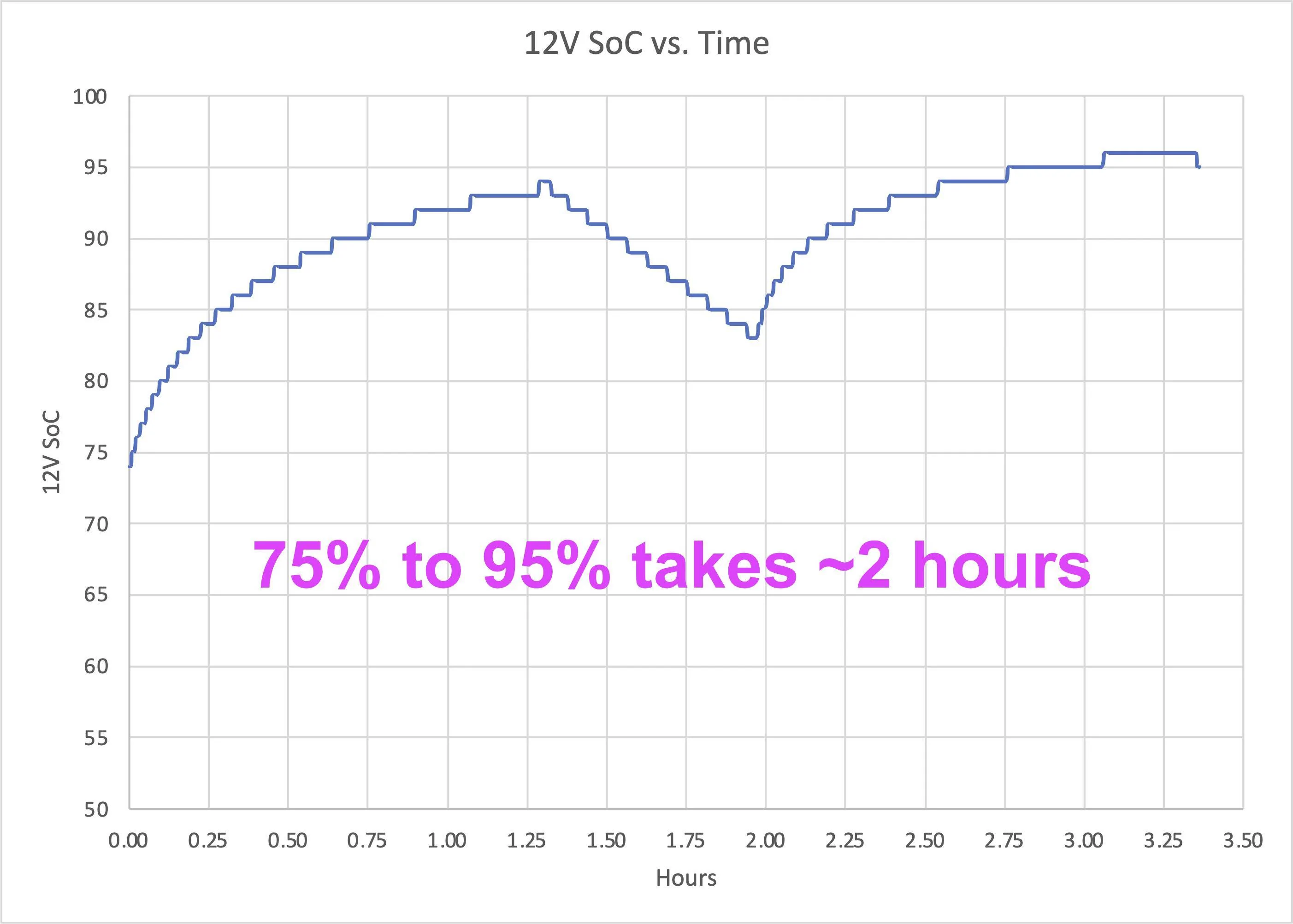
The other factor here is the charging rate of the 12V battery is not linear (see below figure). This has to do with lead acid battery kinetics and voltage setpoints in the charging system, but as a result the AGM battery will charge extremely quickly up to about 80%, but then very slowly past 90%. It can take up to 6 hours to charge the battery from 80% to 95%, hence the long times. Some vehicles also have outdated BCM software, which contributes to difficulties maintaining adequate 12V levels. Depending on a multitude of conditions, the BMS may not want to charge the battery much past 90% SoC, but some updates require 95% SoC.

12v-soc-time-png.png

Non-linear charging behavior of the Mach-E 12V battery. High SoC levels can take hours to reach.
 

RWG

Well-Known Member
First Name
Randal
Joined
Jan 16, 2022
Threads
0
Messages
169
Reaction score
231
Location
Chaska Minnesota
Vehicles
2021 Mach E
Occupation
Retired
Country flag
I spent over 2 hours today on the phone with the Ford Pass folks and the OTA folks in order to get my phone set up as a key. This was a total nightmare, these two departments don't communicate and if you ask and OTA rep a Ford Pass question they don't know anything. However if you have an OTA problem then, in some cases Ford Pass features may not work i.e. phone as a key. Also, when I was talking to the OTA rep. she said my car was not up to date. However, she offered no solution on how to resolve the problem, other than checking back in after the June updates, except they will NOT tell you when the date it is to occur!

In short, in my opinion, after several years in the market place with the Mach e. Ford is still a "software mess". The Ford Pass & OTA tech reps are under-qualified and give out false and/or misleading information. It is sad, the folks that are supposed to provide help are undertrained and they are not getting up to date tech data.
 

MachEnthusiast

Well-Known Member
Joined
Oct 22, 2021
Threads
14
Messages
306
Reaction score
145
Location
Seattle, WA
Vehicles
2021 Mustang Mach E GT
Occupation
Software PM
Country flag
Just got 10.2.0 to install using the Blower Charge method (which I've used before thanks to Mach Lee's help). Went from 12V SOC 79% (where it was failing) to 88%, which allowed me to successfully install on the first try.
 

RyZt

Well-Known Member
Joined
Nov 17, 2019
Threads
24
Messages
746
Reaction score
880
Location
San Jose
Vehicles
Mach E4X
Country flag
I couldn't get PT-25.44.24 (Recall 25S65) to install on my 2021 Mach E. I've tried "slow charge" method twice, 8 hours and 14 hours. Both times, CarScanner shows that the 12V Battery SOC is at 83%. Is the battery failing?
 

rugedraw

Well-Known Member
First Name
Javier
Joined
Nov 13, 2023
Threads
0
Messages
2,640
Reaction score
2,399
Location
Miami, FL
Vehicles
2021 Ford F150 Platinum FX4 EB/2023 Bronco Sport Badlands/1991 Mustang 5.0 coupe
Occupation
Auto Sales
Country flag
I couldn't get PT-25.44.24 (Recall 25S65) to install on my 2021 Mach E. I've tried "slow charge" method twice, 8 hours and 14 hours. Both times, CarScanner shows that the 12V Battery SOC is at 83%. Is the battery failing?
It could be the BMS data quality. The only way to know would be to run the VIN through PTS to see what the OTA dashboard says is the reason it is failing to install.
 
OP
OP
Mach-Lee

Mach-Lee

Well-Known Member
First Name
Lee
Joined
Jul 16, 2021
Threads
262
Messages
11,350
Reaction score
24,977
Location
Wisconsin
Vehicles
2022 Mach-E Premium AWD
Occupation
Sci/Eng
Country flag
I couldn't get PT-25.44.24 (Recall 25S65) to install on my 2021 Mach E. I've tried "slow charge" method twice, 8 hours and 14 hours. Both times, CarScanner shows that the 12V Battery SOC is at 83%. Is the battery failing?
It should be >90% after that stretch, could be because the battery too cold (park where it's above freezing). But if you have the original 12V battery in a 2021 then I would definitely change it.

That update sometimes needs up to 90% (sometimes higher) to install FYI.
Sponsored


Top