
portlandg

Well-Known Member
First Name
grahame
Joined
Mar 17, 2020
Threads
7
Messages
2,930
Reaction score
3,668
Location
Dorset UK
Vehicles
Black RWD ER and loving it
Occupation
Cabinet maker
Country flag
What a wonderful, informative explanation. I do, however, disagree that a low 12V battery is the main cause of failed OTA's. I have carscanner pro installed on my phone and have a Veepeak OBD2 reader linked to it. I set this up from early in my ownership so I could monitor my 12V battery after the early reports of faulty units. During my 27 months of ownership all my OTA's have been received with no issues. I rarely do long journeys, my daily commute is 8 miles each way, so my 12V battery is usually no more than 70/75% SOC. My HVB usually runs at about the same level. My car is only plugged in when I need to charge it, generally because of my low mileage, which is usually once a week. I am aware that when the car has been to the dealer for a software/hardware recall they always ask that the HVB be charged to +80%. Maybe I am just lucky. Who knows. I have not seen anything from Ford that stipulates that the 12V battery must be above 80% SOC to receive OTA updates. It is certainly NOT in my version of the owners manual that I downloaded from their website.
Sponsored

 

foxxxnick

New Member
First Name
Lee
Joined
Jul 27, 2023
Threads
0
Messages
4
Reaction score
1
Location
USA
Vehicles
2013 Nissan LEAF S
Occupation
Architect
Country flag
Disconnect any idle draw devices such as dashcams, OBD dongles, or radar detectors first. If these items are powered while the car is off, they may impact your ability to get OTAs installed.
 

JJR

Well-Known Member
First Name
James
Joined
May 3, 2022
Threads
29
Messages
218
Reaction score
66
Location
Colorado
Vehicles
2022 Mach-e Premium
Occupation
Artist
Country flag
Ford's OTA process can be frustrating at times, with some users experiencing multiple failures in a row without success. Following this guide should increase your chances of success.

There are many conditions that must be met before an OTA can install. Some are obvious, such as the car needing to be off and in park. But other conditions, such as the 12V battery status, may not be obvious to you.

There are many reasons why an OTA update fails, but a low 12V battery is the most common cause of failed OTA installs, by far. About 80% of the OTA install failures I've seen are caused by a low 12V battery. It can be extremely difficult to get the 12V battery to a high enough state of charge to install updates, especially if the car is driven or charged infrequently. Due to the charging system design and lead acid charging kinetics, it can take an extremely long time (hours) to get the 12V fully charged up. Most OTAs require the 12V battery to be above 80-95% SoC (state-of-charge). The 12V SoC is not visible to the user, and can only be accessed with an OBD scan tool. In lieu of direct monitoring, you can follow these methods to ensure the 12V battery is fully charged before applying OTAs.

Disconnect any idle draw devices such as dashcams, OBD dongles, or radar detectors first. If these items are powered while the car is off, they may impact your ability to get OTAs installed.

Please follow these methods (including times) exactly for best success. These have worked for people I've helped in the past.

"Long Charge" Method
  1. Drive the car until the high voltage battery is down to 50% or less.
  2. Level 2 charge the car up to 100% in one session
  3. As soon as possible after the car finishes charging...
  4. Unplug the car
  5. Turn ON the car and set the parking brake
  6. Turn OFF the headlights fully (rotate knob counterclockwise)
  7. Manually start the update on the screen with the "Update Now" button
  8. Turn OFF the vehicle, exit, and close all doors
  9. Wait for the update to complete (up to 30 mins)
Level 1 (120V) users, charging the battery +10% will be enough time (e.g. 70% to 80%), then start at step 3.

"Stay On" Method
  1. Unplug the car
  2. Turn ON the car
  3. Disable "Vehicle Power Down Timer" in vehicle settings
  4. Set the parking brake
  5. Turn OFF the headlights fully (rotate knob counterclockwise)
  6. Exit, taking all key fobs with you, and lock the doors if necessary
  7. Leave the car ON in Park for 6+ hours
  8. Manually start the update on the screen with the "Update Now" button
  9. Turn OFF the vehicle, exit, and close all doors
  10. Wait for the update to complete (up to 30 mins)

12V Battery Charger Method

Battery charger must be the automatic type, 4 amp or larger, and have a float or maintenance mode that continues to provide power after the battery is fully charged.
  1. Open the frunk
  2. Remove the top and drivers side frunk covers only (Video)
  3. Connect a 4 amp or larger battery charger to the + and - jump posts (Video)
    1. Do not connect the charger to the negative battery post!
  4. Leave the battery charger connected overnight (12+ hours)
  5. Unplug the car
  6. Turn ON the car and set the parking brake
  7. Remove the battery charger and close the frunk (panels can stay removed)
  8. Turn OFF the headlights fully (rotate knob counterclockwise)
  9. Manually start the update on the screen with the "Update Now" button
  10. Turn OFF the vehicle, exit, and close all doors
  11. Wait for the update to complete (up to 30 mins)

BMS Reset Method

This method should be considered "last resort" since it resets 12V BMS (battery management system) parameters. The 12V battery must be close to full charge before resetting the BMS (via one of the above methods). The best method is to disconnect the 12V battery, fully charge it, reconnect it, and reset the BMS.
  1. Press the START button without pressing the brake (ACCESSORY mode)
  2. Flash the high beams with the stalk 5x
  3. Press the brake pedal 3x
  4. Battery icon on instrument cluster should flash 3x
  5. Turn OFF the car and open the driver's door
  6. When convenient, drive the car for ~30 minutes to recharge the 12V battery
  7. Set parking brake
  8. Turn OFF the headlights fully (rotate knob counterclockwise)
  9. Manually start the update on the screen with the "Update Now" button
  10. Turn OFF the vehicle, exit, and close all doors
  11. Wait for the update to complete (up to 30 mins)

Background

Due to the module design of the Mach-E, there is a very high 12V power draw while performing OTA updates, and the DC/DC converter cannot run to maintain the system voltage while updates are being applied. This means the 12V battery must be nearly full before starting an OTA. If it's not full enough, it may drain completely dead during the update and result in your car being bricked (you'll need a tow to the dealer for unbricking). So that's why it's so picky. Before the OTA starts, the system will look at how much energy is in your 12V battery, and decide if it has enough to cover the install and uninstall process. If not, then the OTA fails and will try again later. The best time to apply updates is right after you've driven the car, which is what it tries to do.

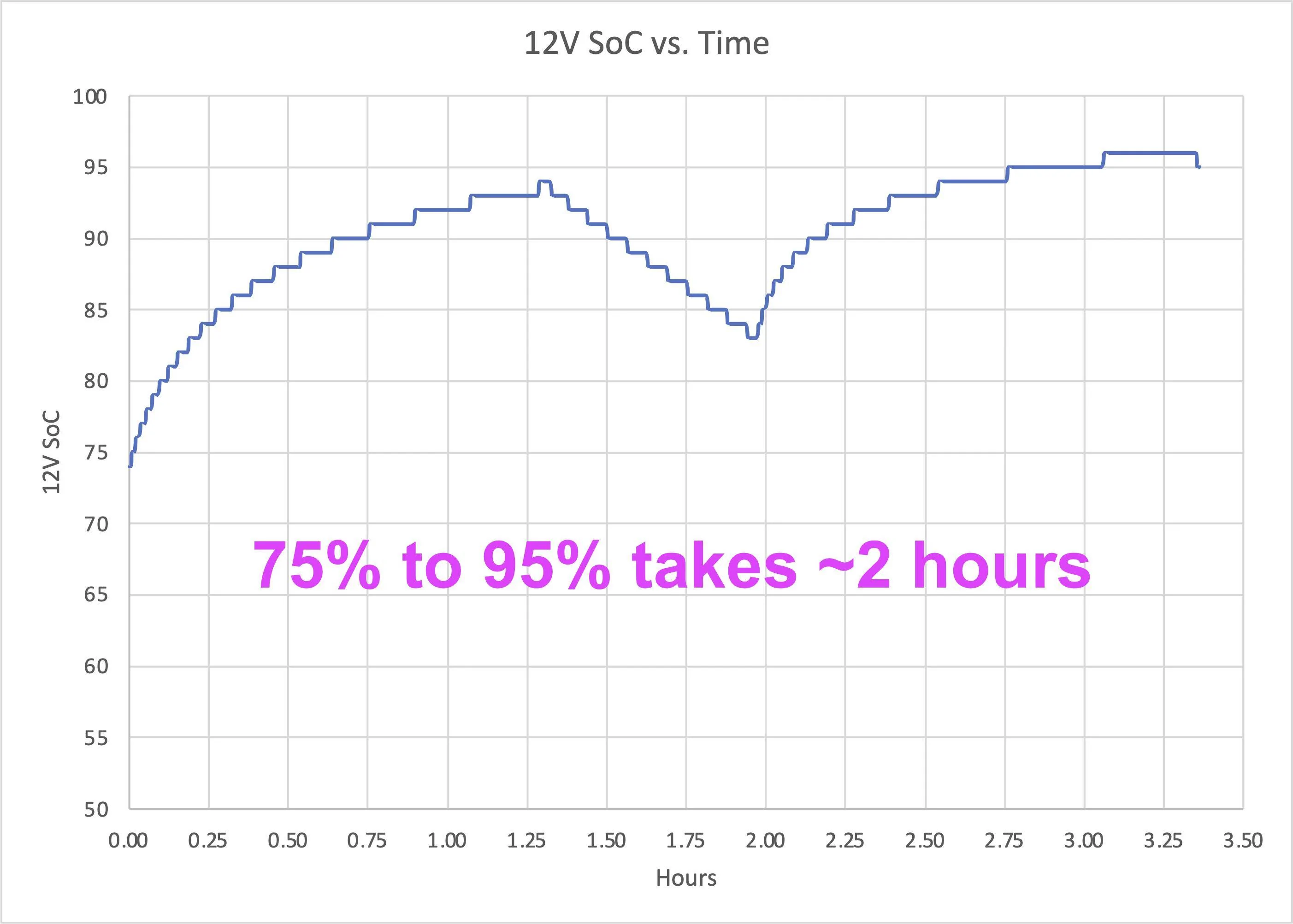
The other factor here is the charging rate of the 12V battery is not linear (see below figure). This has to do with lead acid battery kinetics and voltage setpoints in the charging system, but as a result the AGM battery will charge extremely quickly up to about 80%, but then very slowly past 90%. It can take up to 6 hours to charge the battery from 80% to 95%, hence the long times. Some vehicles also have outdated BCM software, which contributes to difficulties maintaining adequate 12V levels. Depending on a multitude of conditions, the BMS may not want to charge the battery much past 90% SoC, but some updates require 95% SoC.

12v-soc-time-png.png

Non-linear charging behavior of the Mach-E 12V battery. High SoC levels can take hours to reach.
I solved this issue by putting the MME on the charger when an OTA is scheduled.
So far, so good.
 

RKinWA

Well-Known Member
Joined
Mar 13, 2023
Threads
54
Messages
719
Reaction score
1,035
Location
Seattle, WA
Vehicles
2022 Mach-E GTPE Space White, 2023 Lincoln Corsair Pristine White Metallic
Occupation
Software Engineer
Country flag
Ford's OTA process can be frustrating at times, with some users experiencing multiple failures in a row without success. Following this guide should increase your chances of success.

There are many conditions that must be met before an OTA can install. Some are obvious, such as the car needing to be off and in park. But other conditions, such as the 12V battery status, may not be obvious to you.

There are many reasons why an OTA update fails, but a low 12V battery is the most common cause of failed OTA installs, by far. About 80% of the OTA install failures I've seen are caused by a low 12V battery. It can be extremely difficult to get the 12V battery to a high enough state of charge to install updates, especially if the car is driven or charged infrequently. Due to the charging system design and lead acid charging kinetics, it can take an extremely long time (hours) to get the 12V fully charged up. Most OTAs require the 12V battery to be above 80-95% SoC (state-of-charge). The 12V SoC is not visible to the user, and can only be accessed with an OBD scan tool. In lieu of direct monitoring, you can follow these methods to ensure the 12V battery is fully charged before applying OTAs.

Disconnect any idle draw devices such as dashcams, OBD dongles, or radar detectors first. If these items are powered while the car is off, they may impact your ability to get OTAs installed.

Please follow these methods (including times) exactly for best success. These have worked for people I've helped in the past.

"Long Charge" Method
  1. Drive the car until the high voltage battery is down to 50% or less.
  2. Level 2 charge the car up to 100% in one session
  3. As soon as possible after the car finishes charging...
  4. Unplug the car
  5. Turn ON the car and set the parking brake
  6. Turn OFF the headlights fully (rotate knob counterclockwise)
  7. Manually start the update on the screen with the "Update Now" button
  8. Turn OFF the vehicle, exit, and close all doors
  9. Wait for the update to complete (up to 30 mins)
Level 1 (120V) users, charging the battery +10% will be enough time (e.g. 70% to 80%), then start at step 3.

"Stay On" Method
  1. Unplug the car
  2. Turn ON the car
  3. Disable "Vehicle Power Down Timer" in vehicle settings
  4. Set the parking brake
  5. Turn OFF the headlights fully (rotate knob counterclockwise)
  6. Exit, taking all key fobs with you, and lock the doors if necessary
  7. Leave the car ON in Park for 6+ hours
  8. Manually start the update on the screen with the "Update Now" button
  9. Turn OFF the vehicle, exit, and close all doors
  10. Wait for the update to complete (up to 30 mins)

12V Battery Charger Method

Battery charger must be the automatic type, 4 amp or larger, and have a float or maintenance mode that continues to provide power after the battery is fully charged.
  1. Open the frunk
  2. Remove the top and drivers side frunk covers only (Video)
  3. Connect a 4 amp or larger battery charger to the + and - jump posts (Video)
    1. Do not connect the charger to the negative battery post!
  4. Leave the battery charger connected overnight (12+ hours)
  5. Unplug the car
  6. Turn ON the car and set the parking brake
  7. Remove the battery charger and close the frunk (panels can stay removed)
  8. Turn OFF the headlights fully (rotate knob counterclockwise)
  9. Manually start the update on the screen with the "Update Now" button
  10. Turn OFF the vehicle, exit, and close all doors
  11. Wait for the update to complete (up to 30 mins)

BMS Reset Method

This method should be considered "last resort" since it resets 12V BMS (battery management system) parameters. The 12V battery must be close to full charge before resetting the BMS (via one of the above methods). The best method is to disconnect the 12V battery, fully charge it, reconnect it, and reset the BMS.
  1. Press the START button without pressing the brake (ACCESSORY mode)
  2. Flash the high beams with the stalk 5x
  3. Press the brake pedal 3x
  4. Battery icon on instrument cluster should flash 3x
  5. Turn OFF the car and open the driver's door
  6. When convenient, drive the car for ~30 minutes to recharge the 12V battery
  7. Set parking brake
  8. Turn OFF the headlights fully (rotate knob counterclockwise)
  9. Manually start the update on the screen with the "Update Now" button
  10. Turn OFF the vehicle, exit, and close all doors
  11. Wait for the update to complete (up to 30 mins)

Background

Due to the module design of the Mach-E, there is a very high 12V power draw while performing OTA updates, and the DC/DC converter cannot run to maintain the system voltage while updates are being applied. This means the 12V battery must be nearly full before starting an OTA. If it's not full enough, it may drain completely dead during the update and result in your car being bricked (you'll need a tow to the dealer for unbricking). So that's why it's so picky. Before the OTA starts, the system will look at how much energy is in your 12V battery, and decide if it has enough to cover the install and uninstall process. If not, then the OTA fails and will try again later. The best time to apply updates is right after you've driven the car, which is what it tries to do.

The other factor here is the charging rate of the 12V battery is not linear (see below figure). This has to do with lead acid battery kinetics and voltage setpoints in the charging system, but as a result the AGM battery will charge extremely quickly up to about 80%, but then very slowly past 90%. It can take up to 6 hours to charge the battery from 80% to 95%, hence the long times. Some vehicles also have outdated BCM software, which contributes to difficulties maintaining adequate 12V levels. Depending on a multitude of conditions, the BMS may not want to charge the battery much past 90% SoC, but some updates require 95% SoC.

12v-soc-time-png.png

Non-linear charging behavior of the Mach-E 12V battery. High SoC levels can take hours to reach.

Thanks for this. I got my MME June 30th, it had been sitting on the lot for 6 months and had never even had one update. About 3 weeks after I got it I finally got the 3.5.2 update, but haven't gotten any since. I check my 12v SOC whenever I go out after a long charge and it's always between 88-92%, never seems to get higher than that. I have nothing connected. I am wondering if sitting on the lot for that long affected the battery. Should I trickle charge the 12v? Replace it? I was planning on going into the dealership to get the power-ups updated manually, but it appears they don't do power-ups, only TSB/CSB updates.
 

dtbaker61

Well-Known Member
First Name
Dan
Joined
May 11, 2020
Threads
126
Messages
4,822
Reaction score
4,525
Location
santa fe,nm
Website
www.envirokarma.org
Vehicles
MME (delivered 2/26/21), DIY eMiata BEV
Occupation
Solar Sales/install
Country flag
Ford's OTA process can be frustrating at times, with some users experiencing multiple failures in a row without success. Following this guide should increase your chances of success.

Background

Due to the module design of the Mach-E, there is a very high 12V power draw while performing OTA updates, and the DC/DC converter cannot run to maintain the system voltage while updates are being applied. This means the 12V battery must be nearly full before starting an OTA. If it's not full enough, it may drain completely dead during the update and result in your car being bricked (you'll need a tow to the dealer for unbricking). So that's why it's so picky. Before the OTA starts, the system will look at how much energy is in your 12V battery, and decide if it has enough to cover the install and uninstall process. If not, then the OTA fails and will try again later. The best time to apply updates is right after you've driven the car, which is what it tries to do.

this is great information, and may improve the install success rate.....

BUT, my problem is that I do not seem to receive the updates, and when I do they are incremental rather than one big 'catch-up'. Once I get them, they have installed fine.

7/1/23 - turned on auto-update for PowerUp
7/18/23 - updated to 3.5.2
7/27/23 - 3.5.3 , included Alexa
8/2/23 - 3.5.3.3, prep for video streaming on console w Connected service plan or wi-fi
8/4/23 - 3.5.4, added dual phone, climate control UI enhancmeents, digital manual, etc


OP
OP
Mach-Lee

Mach-Lee

Well-Known Member
First Name
Lee
Joined
Jul 16, 2021
Threads
262
Messages
11,350
Reaction score
24,976
Location
Wisconsin
Vehicles
2022 Mach-E Premium AWD
Occupation
Sci/Eng
Country flag
Thanks for this. I got my MME June 30th, it had been sitting on the lot for 6 months and had never even had one update. About 3 weeks after I got it I finally got the 3.5.2 update, but haven't gotten any since. I check my 12v SOC whenever I go out after a long charge and it's always between 88-92%, never seems to get higher than that. I have nothing connected. I am wondering if sitting on the lot for that long affected the battery. Should I trickle charge the 12v? Replace it? I was planning on going into the dealership to get the power-ups updated manually, but it appears they don't do power-ups, only TSB/CSB updates.
Note, this topic is about FAILED OTAs (you get a message it failed), not LACK of OTAs showing up.

12V battery SoC in the 80-95% range is normal for typical use. If you car was sitting for a long time, I do recommend a preventive battery reconditioning, which I've previously written up here: https://www.macheforum.com/site/threads/how-to-recondition-service-your-12v-battery.11069/

Lack of OTAs is mostly a server issue, and you can't do anything about it. You're at the mercy of the server not offering them to your vehicle. If you know you're really behind on update (such as if you don't have the new UI yet with the home button in the corner), then you can call the BEV team and see if they can offer to help you get manual updates at your dealer.
 
Last edited:

LNFitz

Well-Known Member
Joined
Jun 18, 2021
Threads
6
Messages
168
Reaction score
132
Location
Denver
Vehicles
Ford Mustang Mach-e
Occupation
Saddle Fitter…and yes, have worked with Mustangs
Country flag
12v battery was my downfall with updates but it took two times at dealership to address the problem. Don't ask me but the "wrong" test was performed the first time even tho I specifically stated that my suspicion for failed OTAs was the 12v battery. Second trip resulted in replaced battery under warranty.
Thanks for comprehensive procedures. I'm sure they're time tested but I might add a hail Mary or two.
 

RKinWA

Well-Known Member
Joined
Mar 13, 2023
Threads
54
Messages
719
Reaction score
1,035
Location
Seattle, WA
Vehicles
2022 Mach-E GTPE Space White, 2023 Lincoln Corsair Pristine White Metallic
Occupation
Software Engineer
Country flag
Note, this topic is about FAILED OTAs (you get a message it failed), not LACK of OTAs showing up.

12V battery SoC in the 80-95% range is normal for typical use. If you car was sitting for a long time, I do recommend a preventive battery reconditioning, which I've previously written up here: https://www.macheforum.com/site/threads/how-to-recondition-service-your-12v-battery.11069/

Lack of OTAs is mostly a server issue, and you can't do anything about it. You're at the mercy of the server not offering them to your vehicle. If you know you're really behind on update (such as if you don't have the new UI yet with the home button in the corner), then you can call the BEV team and see if they can offer to help you get manual updates at your dealer.
Thanks, sorry for straying off-topic
 

ChasingCoral

Well-Known Member
First Name
Mark
Joined
Feb 3, 2020
Threads
502
Messages
14,306
Reaction score
28,655
Location
Maryland
Vehicles
2021 GB E4X FE, 2022 F-150 Lightning Lariat ER
Occupation
Retired oceanographer
Country flag
"Long Charge" Method
  1. Drive the car until the high voltage battery is down to 50% or less.
  2. Level 2 charge the car up to 100% in one session
  3. As soon as possible after the car finishes charging...
  4. Unplug the car
  5. Turn ON the car and set the parking brake
  6. Turn OFF the headlights fully (rotate knob counterclockwise)
  7. Manually start the update on the screen with the "Update Now" button
  8. Turn OFF the vehicle, exit, and close all doors
  9. Wait for the update to complete (up to 30 mins)
Level 1 (120V) users, charging the battery +10% will be enough time (e.g. 70% to 80%), then start at step 3.
I'm wondering if the unplug and initiate update is really necessary. I've had updates apply quite happily while charging on L2.
 
OP
OP
Mach-Lee

Mach-Lee

Well-Known Member
First Name
Lee
Joined
Jul 16, 2021
Threads
262
Messages
11,350
Reaction score
24,976
Location
Wisconsin
Vehicles
2022 Mach-E Premium AWD
Occupation
Sci/Eng
Country flag
I'm wondering if the unplug and initiate update is really necessary. I've had updates apply quite happily while charging on L2.
Extra insurance. Sometimes being plugged in causes a state where the update won't install. I've seen updates install just fine while charging, and some that wouldn't until unplugged. The procedures are written to eliminate as many edge cases as possible.
 

sgriffin130

Well-Known Member
First Name
Steve
Joined
Oct 10, 2021
Threads
20
Messages
324
Reaction score
154
Location
Thompson Station, TN
Vehicles
'22 Red Mach E- C/T Pkg, '23 Escape PHEV/Prem Pkg
Occupation
Dentist(retired)
Country flag
Just went to my dealer to pick up a hitch for my 2023 Escape PHEV and asked them about the lack of updates on my 2022 Mach E. They looked up data and found that after my last update in Jan there was one attempt in Feb that failed(unbeknownst to me). He said they have had some issues with a module failing and scheduled an appointment to check it and force the updates. So if you haven't done so, you might check with your dealer if your updates are lagging behind.
 

thekat03

Well-Known Member
First Name
Kat
Joined
May 2, 2023
Threads
5
Messages
808
Reaction score
1,508
Location
China, Maine
Vehicles
2023 Mustang Mach-E CR-1, 2022 Volvo C40
Occupation
Physician
Country flag
Just went to my dealer to pick up a hitch for my 2023 Escape PHEV and asked them about the lack of updates on my 2022 Mach E. They looked up data and found that after my last update in Jan there was one attempt in Feb that failed(unbeknownst to me). He said they have had some issues with a module failing and scheduled an appointment to check it and force the updates. So if you haven't done so, you might check with your dealer if your updates are lagging behind.
What is a typical interval between updates? Right now, my CR1 is new enough that it's catching up on software updates that weren't done in factory, but once it catches up, I assume things may slow down some. Just wondering what would be a reasonable number of months to sit on my hands before worrying my car is too behind in updates and checking in with the dealership.
 

mkhuffman

Well-Known Member
First Name
Mike
Joined
Nov 19, 2020
Threads
29
Messages
6,875
Reaction score
9,507
Location
Virginia
Vehicles
2025 Rivian R1T Tri-Max, Jeep GC-L, VW Jetta
Country flag
What is a typical interval between updates? Right now, my CR1 is new enough that it's catching up on software updates that weren't done in factory, but once it catches up, I assume things may slow down some. Just wondering what would be a reasonable number of months to sit on my hands before worrying my car is too behind in updates and checking in with the dealership.
There is no consistent interval. When Ford is ready to push out an update, out it comes.

The best way to see if you are missing an update is to monitor this forum, IMO. Someone always posts an alert when a new update is received. Then you can wait, on the edge of your seat, sweating and worried, until yours arrives. ?
 

sgriffin130

Well-Known Member
First Name
Steve
Joined
Oct 10, 2021
Threads
20
Messages
324
Reaction score
154
Location
Thompson Station, TN
Vehicles
'22 Red Mach E- C/T Pkg, '23 Escape PHEV/Prem Pkg
Occupation
Dentist(retired)
Country flag
What is a typical interval between updates? Right now, my CR1 is new enough that it's catching up on software updates that weren't done in factory, but once it catches up, I assume things may slow down some. Just wondering what would be a reasonable number of months to sit on my hands before worrying my car is too behind in updates and checking in with the dealership.
My 2022 got all the updates until Jan 2023. I checked once before with the dealer a couple of months later and he talked about how random it was . But after seeing cars of various build dates and years getting multiple updates while mine got none I asked again and he discovered the problem. So I would say it depends on where you are at with your updates relative to the number out there and how long it has been since the last one. Your dealer can easily check to see if there have been attempts to install OTA's on your car.
Sponsored


Top