bigcarm40

Member
Joined
Jan 31, 2022
Threads
0
Messages
24
Reaction score
29
Location
Illinois
Vehicles
2018 Explorer Platinum, 2022 Mach-E Premium AWD ER
Country flag
I would like to see if anyone else has experienced this issue (as the OTA team told me they have tried to help someone with the same issue before):

I received Priority Update 23-PU0314-DCM-LAT on 7/19/23, and everything went fine. The vehicle says the update completed, and I have not received any further updates since that time.

Fast forward to 8/16/23, and FordPass stops updating. I can't connect to the vehicle remotely at all. The FordPass team tells me that the TCU's connection is paused because an update has been pending since 8/16/23. The last update on FordPass is from the afternoon of 8/15/23, when a short charging session completed. They tell me to call the OTA team.

I call the OTA team and they say that the update I got on 7/19/23 shows still pending on their end, even though I show it on my end that it completed (I got the green check mark and everything that day when it came through). They walked me through a sync module reset and a key cycle, to no avail. Even before I called the FordPass team I tried to pull fuse 11 for the TCU and left it out for 10 minutes, but it didn't help. The "connected vehicle features" tab won't open, or will say that it is unavailable and to see my dealer.


The OTA team tells me that there is nothing else they can do, and to go see my dealer. I have an appointment for Monday morning, but I want to make sure I'm not going to bring my car in and everyone just scratches their heads.

Has anyone seen this issue before with an OTA update showing as pending by Ford, but showing that it came through on the vehicle's end? Is there anything else I can try before bringing it in? I am trying to stay optimistic, but I fought with Ford for a new TCU for my Explorer a few years when FordPass wouldn't connect and the TCU was faulty, and it is giving me bad flashbacks.
Sponsored

 
OP
OP
Mach-Lee

Mach-Lee

Well-Known Member
First Name
Lee
Joined
Jul 16, 2021
Threads
262
Messages
11,351
Reaction score
24,977
Location
Wisconsin
Vehicles
2022 Mach-E Premium AWD
Occupation
Sci/Eng
Country flag
I would like to see if anyone else has experienced this issue (as the OTA team told me they have tried to help someone with the same issue before):

I received Priority Update 23-PU0314-DCM-LAT on 7/19/23, and everything went fine. The vehicle says the update completed, and I have not received any further updates since that time.

Fast forward to 8/16/23, and FordPass stops updating. I can't connect to the vehicle remotely at all. The FordPass team tells me that the TCU's connection is paused because an update has been pending since 8/16/23. The last update on FordPass is from the afternoon of 8/15/23, when a short charging session completed. They tell me to call the OTA team.

I call the OTA team and they say that the update I got on 7/19/23 shows still pending on their end, even though I show it on my end that it completed (I got the green check mark and everything that day when it came through). They walked me through a sync module reset and a key cycle, to no avail. Even before I called the FordPass team I tried to pull fuse 11 for the TCU and left it out for 10 minutes, but it didn't help. The "connected vehicle features" tab won't open, or will say that it is unavailable and to see my dealer.


The OTA team tells me that there is nothing else they can do, and to go see my dealer. I have an appointment for Monday morning, but I want to make sure I'm not going to bring my car in and everyone just scratches their heads.

Has anyone seen this issue before with an OTA update showing as pending by Ford, but showing that it came through on the vehicle's end? Is there anything else I can try before bringing it in? I am trying to stay optimistic, but I fought with Ford for a new TCU for my Explorer a few years when FordPass wouldn't connect and the TCU was faulty, and it is giving me bad flashbacks.
What the app shows for OTA status isn't always accurate due to occasional server glitches. I would try pulling the GWM fuse #21 and making sure connectivity settings are still turned on:

Ford Mustang Mach-E How To Get Failed OTAs To Install 33282d7f-3338-4721-b92a-5a6dabc5f4be-jpe
 

bigcarm40

Member
Joined
Jan 31, 2022
Threads
0
Messages
24
Reaction score
29
Location
Illinois
Vehicles
2018 Explorer Platinum, 2022 Mach-E Premium AWD ER
Country flag
What the app shows for OTA status isn't always accurate due to occasional server glitches. I would try pulling the GWM fuse #21 and making sure connectivity settings are still turned on:

33282d7f-3338-4721-b92a-5a6dabc5f4be-jpeg.jpg
Pull and replace fuse #21, and then check to see if the connectivity settings opens up?
 
OP
OP
Mach-Lee

Mach-Lee

Well-Known Member
First Name
Lee
Joined
Jul 16, 2021
Threads
262
Messages
11,351
Reaction score
24,977
Location
Wisconsin
Vehicles
2022 Mach-E Premium AWD
Occupation
Sci/Eng
Country flag
Added "Blower Charge" Method. Setting blower to 5 or higher with key present raises 12V system voltage and decreases charge time to high SoC levels.


dmitry

Well-Known Member
First Name
dmitry
Joined
Jan 21, 2022
Threads
20
Messages
470
Reaction score
596
Location
California
Vehicles
2022 Mustang Mach-E GT
Country flag
With @Mach-Lee support I spent the whole weekend resolving the failing update problem and finally this morning I was able to update my car. All three updates were successfully installed! ?

Here is a brief description of the steps we did:
1. Replaced the light switch with a new one: LK9Z-11654-AB
2. Charged the battery (Blower method described here https://www.macheforum.com/site/threads/how-to-get-failed-otas-to-install.29749/). In my case, two hours was not enough. It took me 1 session for 2 hours and 2 sessions for 3 hours to fully charge the 12V battery. It has 40% initially.
3. BMS reset.
4. Disconnect the negative cable from 12V battery for 10 minutes and BMS reset again. While doing this I found that the negative cable was not secured properly and we think that was the reason why the 12V battery was low and caused failing updates. I assume when the technician replaced the windshield he forgot to secure the cable, that was exactly a couple of weeks before I started to have update failures. If you experience the same problem double check 12v battery connectors, especially if your car was prior in service. From my experience with other cars, it is a common problem for technicians to forget to tighten connectors.

After each step, I tried to install updates with no success. After 4th step and failed update we came to the conclusion I should visit the dealer.

5. But then @Mach-Lee suggested to park the car for 9+ hours outside where the key fob and phone would be out of range.
6. This morning before attempting to update I drove the car for 30 minutes (not sure if this was necessary) and then tried to update and all was done successfully.

Big thanks to @Mach-Lee for his support! Ford Co. own you a huge amount of money ?
 

CW23

Active Member
Joined
Nov 25, 2023
Threads
2
Messages
43
Reaction score
7
Location
Michigan
Vehicles
2023 Mach E
Country flag
Ford's OTA process can be frustrating at times, with some users experiencing multiple failures in a row without success. Following this guide should increase your chances of success.

There are many conditions that must be met before an OTA can install. Some are obvious, such as the car needing to be off and in park. But other conditions, such as the 12V battery status, may not be obvious to you.

There are many reasons why an OTA update fails, but a low 12V battery is the most common cause of failed OTA installs, by far. About 80% of the OTA install failures I've seen are caused by a low 12V battery. It can be extremely difficult to get the 12V battery to a high enough state of charge to install updates, especially if the car is driven or charged infrequently. Due to the charging system design and lead acid charging kinetics, it can take an extremely long time (hours) to get the 12V fully charged up. Most OTAs require the 12V battery to be above 75% SoC (state-of-charge), and sometimes up to 95%. The 12V SoC is not visible to the user, and can only be accessed with an OBD scan tool. In lieu of direct monitoring, you can follow these methods to ensure the 12V battery is fully charged before applying OTAs.

Disconnect any idle draw devices such as dashcams, OBD dongles, or radar detectors first. If these items are powered while the car is off, they may impact your ability to get OTAs installed.

Unplug everything from the USB ports when attempting an APIM/SYNC update.

Please follow these methods (including times) exactly for best success. These have worked for people I've helped in the past.

"Long Charge" Method
  1. Drive the car until the high voltage battery is down to 50% or less.
  2. Level 2 charge the car up to 100% in one session
  3. As soon as possible after the car finishes charging...
  4. Unplug the car
  5. Turn ON the car and set the parking brake
  6. Turn OFF the headlights fully (rotate knob counterclockwise)
  7. Manually start the update on the screen with the "Update Now" button
  8. Turn OFF the vehicle, exit, and close all doors
  9. Wait for the update to complete (up to 30 mins)
Level 1 (120V) users, charging the battery +10% will be enough time (e.g. 70% to 80%), then start at step 3.


"Stay On" Method
  1. Unplug the car
  2. Turn ON the car
  3. Disable "Vehicle Power Down Timer" in vehicle settings
  4. Set the parking brake
  5. Turn OFF the headlights fully (rotate knob counterclockwise)
  6. Exit, taking all key fobs with you, and lock the doors if necessary
  7. Leave the car ON in Park for 6+ hours
  8. Manually start the update on the screen with the "Update Now" button
  9. Turn OFF the vehicle, exit, and close all doors
  10. Wait for the update to complete (up to 30 mins)

"Blower Charge" Method

12V system voltage is increased when blower speed is set to 5 or higher with a key present inside the vehicle. Only perform this method if the vehicle can be parked in a safe location (e.g. a closed garage) to avoid theft. Battery will charge to a high SoC faster with this method due to a higher voltage set point (14.3V vs 13.4V).
  1. Unplug the car
  2. Turn ON the car
  3. Disable "Vehicle Power Down Timer" in vehicle settings
  4. Set the parking brake
  5. Turn OFF the headlights fully (rotate knob counterclockwise)
  6. Set blower speed to 5 (you may turn off A/C if you like)
  7. Place key fob inside vehicle
  8. Leave the car ON in Park for 2 hours
  9. Manually start the update on the screen with the "Update Now" button
  10. Turn OFF the vehicle, exit, and close all doors
  11. Wait for the update to complete (up to 30 mins)

12V Battery Charger Method

Battery charger must be the automatic type, 4 amp or larger, and have a float or maintenance mode that continues to provide power after the battery is fully charged.
  1. Open the frunk
  2. Remove the top and drivers side frunk covers only (Video)
  3. Connect a 4 amp or larger battery charger to the + and - jump posts (Video)
    1. Do not connect the charger to the negative battery post!
  4. Leave the battery charger connected overnight (12+ hours)
  5. Unplug the J1772 if plugged in
  6. Turn ON the car and set the parking brake
  7. Remove the battery charger and close the frunk (panels can stay removed)
  8. Turn OFF the headlights fully (rotate knob counterclockwise)
  9. Manually start the update on the screen with the "Update Now" button
  10. Turn OFF the vehicle, exit, and close all doors
  11. Wait for the update to complete (up to 30 mins)
NOTE: Using a battery charger that automatically cycles on and off can cause issues with the BMS data quality due to fluctuating voltage. This can cause an OTA to fail, even if the 12V battery is fully charged. In this case the vehicle must be parked undisturbed for at least 8 hours (no charger connected) before attempting the OTA again. I recommend parking it on the street so it is away from your phone and fobs.

BMS Reset Method

This method should be considered "last resort" since it resets 12V BMS (battery management system) learned parameters. The 12V battery must be close to full charge before resetting the BMS (via one of the above methods). The best method is to disconnect the 12V battery, fully charge it, reconnect it, and reset the BMS.
  1. Press the START button without pressing the brake (ACCESSORY mode)
  2. Flash the high beams with the stalk 5x
  3. Press the brake pedal 3x
  4. Battery icon on instrument cluster should flash 3x
  5. Turn OFF the car and open the driver's door
  6. When convenient, drive the car for ~30 minutes to recharge the 12V battery
  7. Set parking brake
  8. Turn OFF the headlights fully (rotate knob counterclockwise)
  9. Manually start the update on the screen with the "Update Now" button
  10. Turn OFF the vehicle, exit, and close all doors
  11. Wait for the update to complete (up to 30 mins)

Background

Due to the module design of the Mach-E, there is a very high 12V power draw while performing OTA updates, and the DC/DC converter cannot run to maintain the system voltage while updates are being applied. This means the 12V battery must be nearly full before starting an OTA. If it's not full enough, it may drain completely dead during the update and result in your car being bricked (you'll need a tow to the dealer for unbricking). So that's why it's so picky. Before the OTA starts, the system will look at how much energy is in your 12V battery, and decide if it has enough to cover the install and uninstall process. If not, then the OTA fails and will try again later. The best time to apply updates is right after you've driven the car (start them manually).

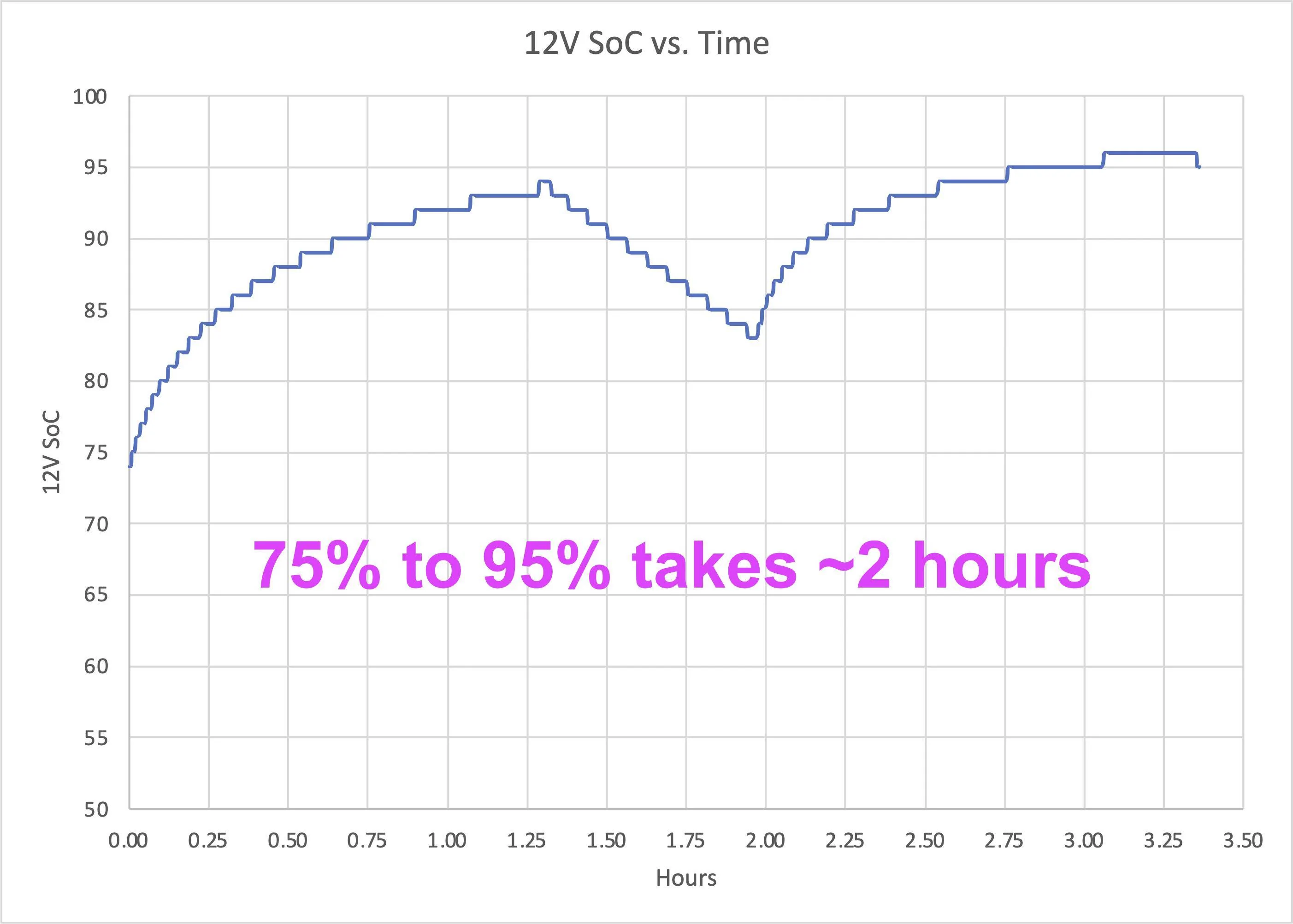
The other factor here is the charging rate of the 12V battery is not linear (see below figure). This has to do with lead acid battery kinetics and voltage setpoints in the charging system, but as a result the AGM battery will charge extremely quickly up to about 80%, but then very slowly past 90%. It can take up to 6 hours to charge the battery from 80% to 95%, hence the long times. Some vehicles also have outdated BCM software, which contributes to difficulties maintaining adequate 12V levels. Depending on a multitude of conditions, the BMS may not want to charge the battery much past 90% SoC, but some updates require 95% SoC.

12v-soc-time-png.webp

Non-linear charging behavior of the Mach-E 12V battery. High SoC levels can take hours to reach.
I am new to the group can someone please tell me what is FDRS
What is OTA? What is BMS?
What is PTS?
who would have the OBD scan tool and what is OBD?
I just purchased a 2023 space white Mach E and I am three weeks into it and it is currently at the dealership right now because I was getting several error messages blindspot detection, and the alarm was going off for no reason and I was hearing a loud banging noise like someone was beating on the car when I use audio don’t know if it was due to CarPlay or just the speakers but I am going through different threads here to learn as much as I can because my resources are limited on knowledgeable people about the vehicle
 
Last edited:

macchiaz-o

Well-Known Member
First Name
Jonathan
Joined
Nov 25, 2019
Threads
171
Messages
8,579
Reaction score
15,987
Location
}not/A/gr8'Place.2.store-mEyePassword{
Vehicles
MY21 J1 Premium RWD SR
Country flag
I am new to the group can someone please tell me what is FDRS
What is OTA? What is BMS?
What is PTS?
who would have the OBD scan tool and what is OBD?
Answers:
https://www.macheforum.com/site/threads/acronyms-tlas-and-initialisms.6365/


I was hearing a loud banging noise like someone was beating on the car when I use audio
I wonder if it was like what some of us have heard? Not sure what caused it, but for me, switching to the FM radio reset the speaker system and ended the insanity during my drive to work:

https://www.macheforum.com/site/threads/high-decibel-“static”noise-arcing.17346/post-697986
 

CW23

Active Member
Joined
Nov 25, 2023
Threads
2
Messages
43
Reaction score
7
Location
Michigan
Vehicles
2023 Mach E
Country flag

jmatero

Well-Known Member
First Name
John
Joined
Jul 21, 2022
Threads
20
Messages
256
Reaction score
248
Location
San Jose, CA
Vehicles
2022 MME GT-P
Country flag
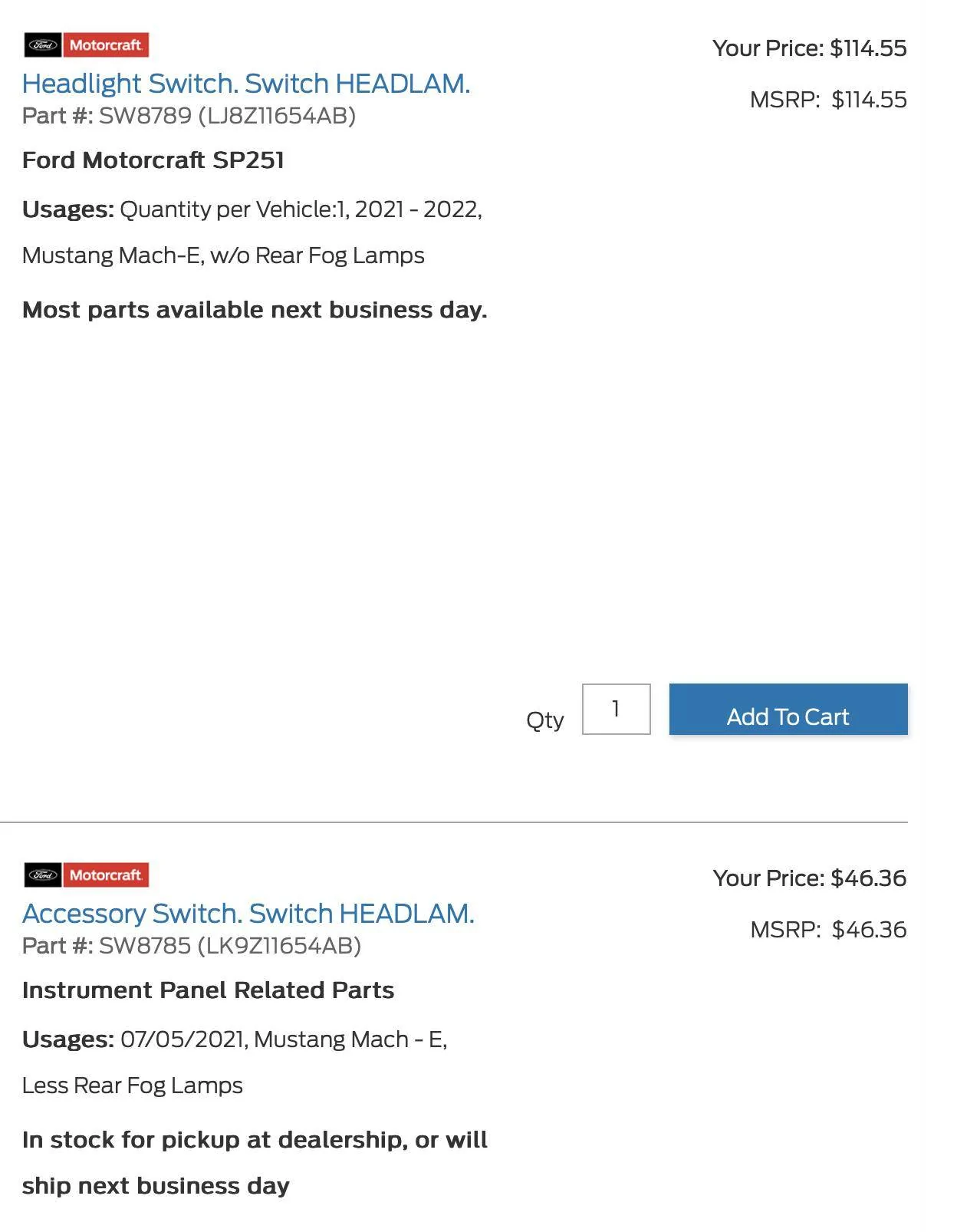
Replaced the light switch with a new one: LK9Z-11654-AB
Is it hard to replace the switch? Any tips/tricks?

Also, what's the difference between these 2 parts? Both are listed for the Mach-e:

Ford Mustang Mach-E How To Get Failed OTAs To Install Screenshot 2023-12-04 at 10.05.45 AM
 
Last edited:

dcbr

Well-Known Member
First Name
don
Joined
Dec 18, 2021
Threads
9
Messages
58
Reaction score
37
Location
S.W. Michigan 49008
Vehicles
Subaru outback, 2021 Mach-E (sold) 2024 Mach- E Premium ER RWD
Occupation
retired
Country flag
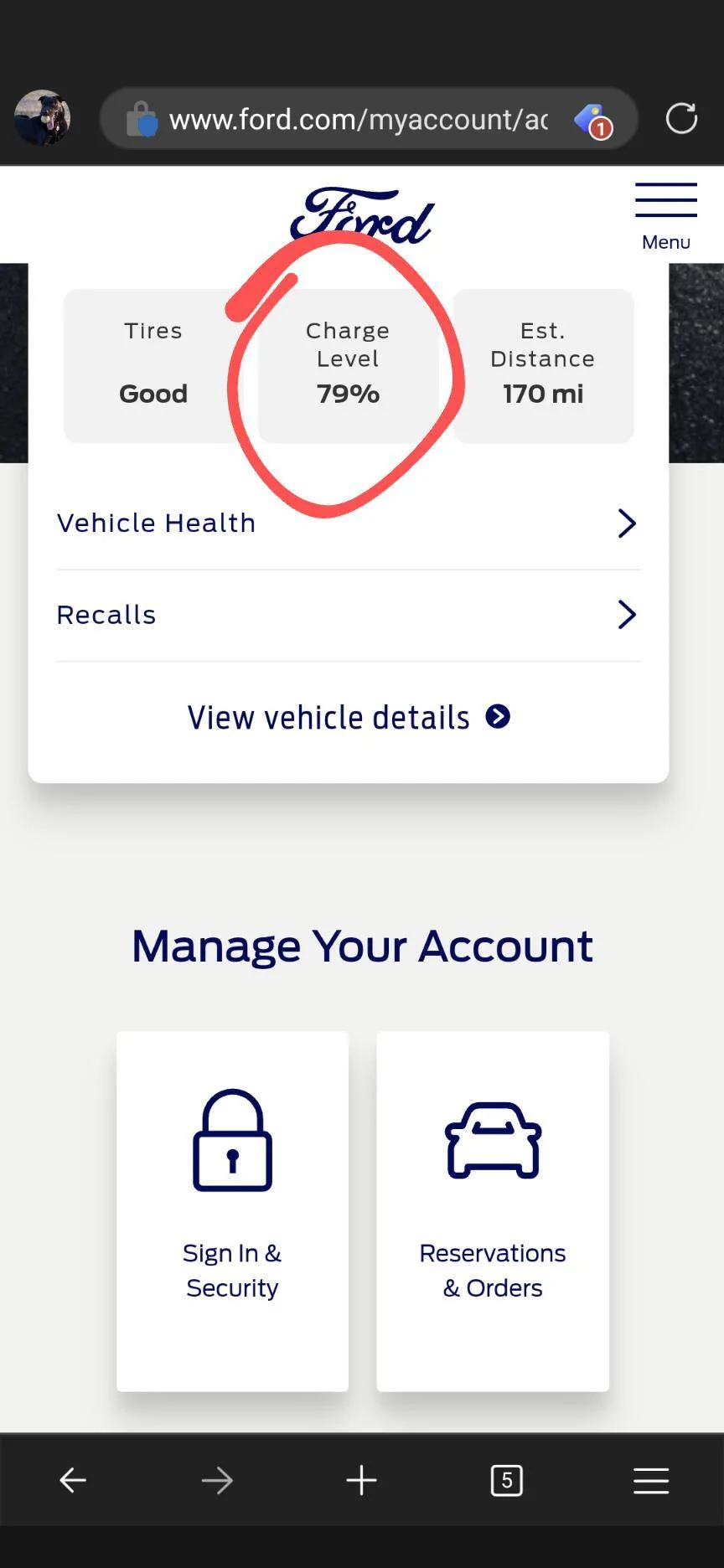
I have seen several posts directing me to the Fordpass.com dashboard to check the 12-volt battery SOC. I have not been able to find this information on my dashboard. Could someone provide me with specific instructions for finding this information on my dashboard?
 

macchiaz-o

Well-Known Member
First Name
Jonathan
Joined
Nov 25, 2019
Threads
171
Messages
8,579
Reaction score
15,987
Location
}not/A/gr8'Place.2.store-mEyePassword{
Vehicles
MY21 J1 Premium RWD SR
Country flag

kevC

Well-Known Member
Joined
Jul 8, 2021
Threads
18
Messages
321
Reaction score
666
Location
Houston
Vehicles
2021 Mustang Mach-E AWD Preimum Carbon Gray
Country flag
6.6.0 has been failing constantly. I'm glad I found this thread. Trying the blower charging method. Ford Account Dashboard is saying the battery is at 59% smh.
Sponsored


Top